Pre-Production
Josh Palmer
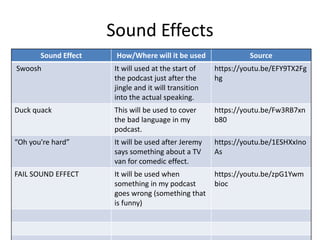
Sound Effects
Sound Effect How/Where will it be used Source
Swoosh It will used at the start of
the podcast just after the
jingle and it will transition
into the actual speaking.
https://youtu.be/EFY9TX2Fg
hg
Duck quack This will be used to cover
the bad language in my
podcast.
https://youtu.be/Fw3RB7xn
b80
“Oh you're hard” It will be used after Jeremy
says something about a TV
van for comedic effect.
https://youtu.be/1ESHXxIno
As
FAIL SOUND EFFECT It will be used when
something in my podcast
goes wrong (something that
is funny)
https://youtu.be/zpG1Ywm
bioc
Music
Track Name/Artist How/Where will it be used Source
Podcast Background Music -
Royalty Free
It will be used for
background music
throughout the whole
podcast.
https://youtu.be/Zb-z82-
eeyU
[No Copyright Music] Lights
- Sappheiros
It will be used for
background music
throughout the whole
podcast.
https://youtu.be/-
lbbHQbZNKg
[No Copyright Music]
Journey - Declan DP
It will be used for
background music
throughout the whole
podcast.
https://youtu.be/zDVKg3riN
GU
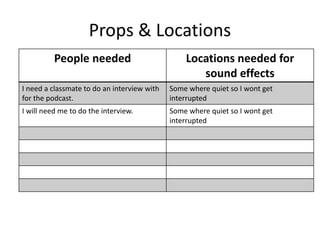
Props & Locations
People needed Locations needed for
sound effects
I need a classmate to do an interview with
for the podcast.
Some where quiet so I wont get
interrupted
I will need me to do the interview. Some where quiet so I wont get
interrupted
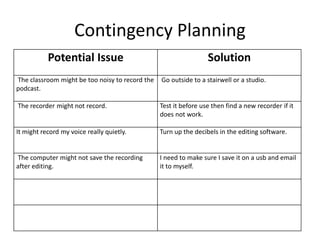
Contingency Planning
Potential Issue Solution
The classroom might be too noisy to record the
podcast.
Go outside to a stairwell or a studio.
The recorder might not record. Test it before use then find a new recorder if it
does not work.
It might record my voice really quietly. Turn up the decibels in the editing software.
The computer might not save the recording
after editing.
I need to make sure I save it on a usb and email
it to myself.
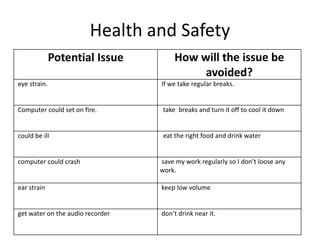
Health and Safety
Potential Issue How will the issue be
avoided?
eye strain. If we take regular breaks.
Computer could set on fire. take breaks and turn it off to cool it down
could be ill eat the right food and drink water
computer could crash save my work regularly so I don’t loose any
work.
ear strain keep low volume
get water on the audio recorder don’t drink near it.
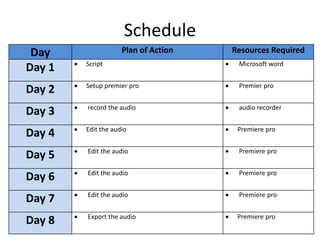
Schedule
Day Plan of Action Resources Required
Day 1  Script  Microsoft word
Day 2  Setup premier pro  Premier pro
Day 3  record the audio  audio recorder
Day 4  Edit the audio  Premiere pro
Day 5  Edit the audio  Premiere pro
Day 6  Edit the audio  Premiere pro
Day 7  Edit the audio  Premiere pro
Day 8  Export the audio  Premiere pro

5. pre production

  • 1.
  • 2.
    Sound Effects Sound EffectHow/Where will it be used Source Swoosh It will used at the start of the podcast just after the jingle and it will transition into the actual speaking. https://youtu.be/EFY9TX2Fg hg Duck quack This will be used to cover the bad language in my podcast. https://youtu.be/Fw3RB7xn b80 “Oh you're hard” It will be used after Jeremy says something about a TV van for comedic effect. https://youtu.be/1ESHXxIno As FAIL SOUND EFFECT It will be used when something in my podcast goes wrong (something that is funny) https://youtu.be/zpG1Ywm bioc
  • 3.
    Music Track Name/Artist How/Wherewill it be used Source Podcast Background Music - Royalty Free It will be used for background music throughout the whole podcast. https://youtu.be/Zb-z82- eeyU [No Copyright Music] Lights - Sappheiros It will be used for background music throughout the whole podcast. https://youtu.be/- lbbHQbZNKg [No Copyright Music] Journey - Declan DP It will be used for background music throughout the whole podcast. https://youtu.be/zDVKg3riN GU
  • 4.
    Props & Locations Peopleneeded Locations needed for sound effects I need a classmate to do an interview with for the podcast. Some where quiet so I wont get interrupted I will need me to do the interview. Some where quiet so I wont get interrupted
  • 5.
    Contingency Planning Potential IssueSolution The classroom might be too noisy to record the podcast. Go outside to a stairwell or a studio. The recorder might not record. Test it before use then find a new recorder if it does not work. It might record my voice really quietly. Turn up the decibels in the editing software. The computer might not save the recording after editing. I need to make sure I save it on a usb and email it to myself.
  • 6.
    Health and Safety PotentialIssue How will the issue be avoided? eye strain. If we take regular breaks. Computer could set on fire. take breaks and turn it off to cool it down could be ill eat the right food and drink water computer could crash save my work regularly so I don’t loose any work. ear strain keep low volume get water on the audio recorder don’t drink near it.
  • 7.
    Schedule Day Plan ofAction Resources Required Day 1  Script  Microsoft word Day 2  Setup premier pro  Premier pro Day 3  record the audio  audio recorder Day 4  Edit the audio  Premiere pro Day 5  Edit the audio  Premiere pro Day 6  Edit the audio  Premiere pro Day 7  Edit the audio  Premiere pro Day 8  Export the audio  Premiere pro