Pre-Production
Samuel Johnson
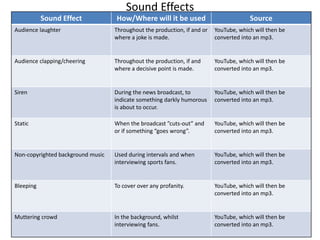
Sound Effects
Sound Effect How/Where will it be used Source
Audience laughter Throughout the production, if and or
where a joke is made.
YouTube, which will then be
converted into an mp3.
Audience clapping/cheering Throughout the production, if and
where a decisive point is made.
YouTube, which will then be
converted into an mp3.
Siren During the news broadcast, to
indicate something darkly humorous
is about to occur.
YouTube, which will then be
converted into an mp3.
Static When the broadcast ”cuts-out” and
or if something “goes wrong”.
YouTube, which will then be
converted into an mp3.
Non-copyrighted background music Used during intervals and when
interviewing sports fans.
YouTube, which will then be
converted into an mp3.
Bleeping To cover over any profanity. YouTube, which will then be
converted into an mp3.
Muttering crowd In the background, whilst
interviewing fans.
YouTube, which will then be
converted into an mp3.
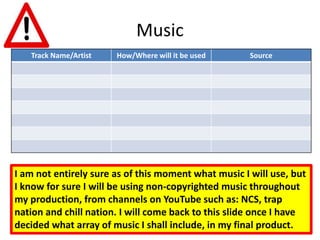
Music
Track Name/Artist How/Where will it be used Source
I am not entirely sure as of this moment what music I will use, but
I know for sure I will be using non-copyrighted music throughout
my production, from channels on YouTube such as: NCS, trap
nation and chill nation. I will come back to this slide once I have
decided what array of music I shall include, in my final product.
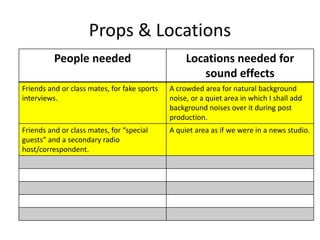
Props & Locations
People needed Locations needed for
sound effects
Friends and or class mates, for fake sports
interviews.
A crowded area for natural background
noise, or a quiet area in which I shall add
background noises over it during post
production.
Friends and or class mates, for “special
guests” and a secondary radio
host/correspondent.
A quiet area as if we were in a news studio.
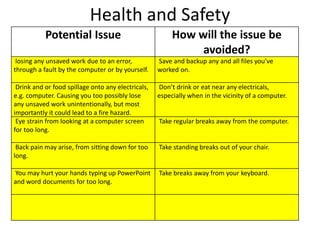
Health and Safety
Potential Issue How will the issue be
avoided?
losing any unsaved work due to an error,
through a fault by the computer or by yourself.
Save and backup any and all files you’ve
worked on.
Drink and or food spillage onto any electricals,
e.g. computer. Causing you too possibly lose
any unsaved work unintentionally, but most
importantly it could lead to a fire hazard.
Don’t drink or eat near any electricals,
especially when in the vicinity of a computer.
Eye strain from looking at a computer screen
for too long.
Take regular breaks away from the computer.
Back pain may arise, from sitting down for too
long.
Take standing breaks out of your chair.
You may hurt your hands typing up PowerPoint
and word documents for too long.
Take breaks away from your keyboard.
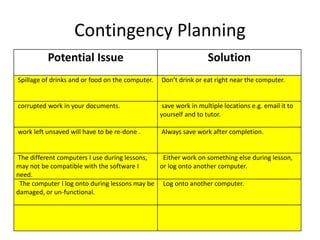
Contingency Planning
Potential Issue Solution
Spillage of drinks and or food on the computer. Don’t drink or eat right near the computer.
corrupted work in your documents. save work in multiple locations e.g. email it to
yourself and to tutor.
work left unsaved will have to be re-done . Always save work after completion.
The different computers I use during lessons,
may not be compatible with the software I
need.
Either work on something else during lesson,
or log onto another computer.
The computer I log onto during lessons may be
damaged, or un-functional.
Log onto another computer.
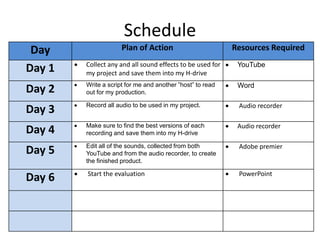
Schedule
Day Plan of Action Resources Required
Day 1  Collect any and all sound effects to be used for
my project and save them into my H-drive
 YouTube
Day 2  Write a script for me and another ”host” to read
out for my production.
 Word
Day 3  Record all audio to be used in my project.  Audio recorder
Day 4  Make sure to find the best versions of each
recording and save them into my H-drive
 Audio recorder
Day 5  Edit all of the sounds, collected from both
YouTube and from the audio recorder, to create
the finished product.
 Adobe premier
Day 6  Start the evaluation  PowerPoint

5. pre production

  • 1.
  • 2.
    Sound Effects Sound EffectHow/Where will it be used Source Audience laughter Throughout the production, if and or where a joke is made. YouTube, which will then be converted into an mp3. Audience clapping/cheering Throughout the production, if and where a decisive point is made. YouTube, which will then be converted into an mp3. Siren During the news broadcast, to indicate something darkly humorous is about to occur. YouTube, which will then be converted into an mp3. Static When the broadcast ”cuts-out” and or if something “goes wrong”. YouTube, which will then be converted into an mp3. Non-copyrighted background music Used during intervals and when interviewing sports fans. YouTube, which will then be converted into an mp3. Bleeping To cover over any profanity. YouTube, which will then be converted into an mp3. Muttering crowd In the background, whilst interviewing fans. YouTube, which will then be converted into an mp3.
  • 3.
    Music Track Name/Artist How/Wherewill it be used Source I am not entirely sure as of this moment what music I will use, but I know for sure I will be using non-copyrighted music throughout my production, from channels on YouTube such as: NCS, trap nation and chill nation. I will come back to this slide once I have decided what array of music I shall include, in my final product.
  • 4.
    Props & Locations Peopleneeded Locations needed for sound effects Friends and or class mates, for fake sports interviews. A crowded area for natural background noise, or a quiet area in which I shall add background noises over it during post production. Friends and or class mates, for “special guests” and a secondary radio host/correspondent. A quiet area as if we were in a news studio.
  • 5.
    Health and Safety PotentialIssue How will the issue be avoided? losing any unsaved work due to an error, through a fault by the computer or by yourself. Save and backup any and all files you’ve worked on. Drink and or food spillage onto any electricals, e.g. computer. Causing you too possibly lose any unsaved work unintentionally, but most importantly it could lead to a fire hazard. Don’t drink or eat near any electricals, especially when in the vicinity of a computer. Eye strain from looking at a computer screen for too long. Take regular breaks away from the computer. Back pain may arise, from sitting down for too long. Take standing breaks out of your chair. You may hurt your hands typing up PowerPoint and word documents for too long. Take breaks away from your keyboard.
  • 6.
    Contingency Planning Potential IssueSolution Spillage of drinks and or food on the computer. Don’t drink or eat right near the computer. corrupted work in your documents. save work in multiple locations e.g. email it to yourself and to tutor. work left unsaved will have to be re-done . Always save work after completion. The different computers I use during lessons, may not be compatible with the software I need. Either work on something else during lesson, or log onto another computer. The computer I log onto during lessons may be damaged, or un-functional. Log onto another computer.
  • 7.
    Schedule Day Plan ofAction Resources Required Day 1  Collect any and all sound effects to be used for my project and save them into my H-drive  YouTube Day 2  Write a script for me and another ”host” to read out for my production.  Word Day 3  Record all audio to be used in my project.  Audio recorder Day 4  Make sure to find the best versions of each recording and save them into my H-drive  Audio recorder Day 5  Edit all of the sounds, collected from both YouTube and from the audio recorder, to create the finished product.  Adobe premier Day 6  Start the evaluation  PowerPoint