Pre-Production
Adele Rolf
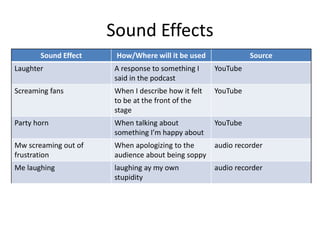
Sound Effects
Sound Effect How/Where will it be used Source
Laughter A response to something I
said in the podcast
YouTube
Screaming fans When I describe how it felt
to be at the front of the
stage
YouTube
Party horn When talking about
something I’m happy about
YouTube
Mw screaming out of
frustration
When apologizing to the
audience about being soppy
audio recorder
Me laughing laughing ay my own
stupidity
audio recorder
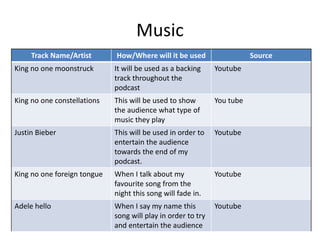
Music
Track Name/Artist How/Where will it be used Source
King no one moonstruck It will be used as a backing
track throughout the
podcast
Youtube
King no one constellations This will be used to show
the audience what type of
music they play
You tube
Justin Bieber This will be used in order to
entertain the audience
towards the end of my
podcast.
Youtube
King no one foreign tongue When I talk about my
favourite song from the
night this song will fade in.
Youtube
Adele hello When I say my name this
song will play in order to try
and entertain the audience
Youtube
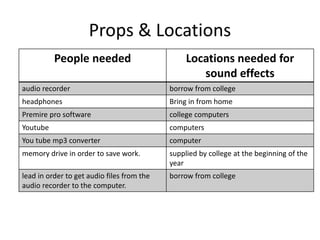
Props & Locations
People needed Locations needed for
sound effects
audio recorder borrow from college
headphones Bring in from home
Premire pro software college computers
Youtube computers
You tube mp3 converter computer
memory drive in order to save work. supplied by college at the beginning of the
year
lead in order to get audio files from the
audio recorder to the computer.
borrow from college
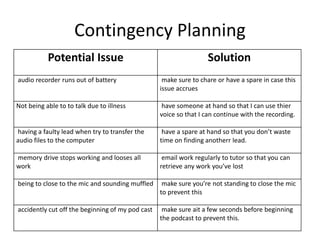
Contingency Planning
Potential Issue Solution
audio recorder runs out of battery make sure to chare or have a spare in case this
issue accrues
Not being able to to talk due to illness have someone at hand so that I can use thier
voice so that I can continue with the recording.
having a faulty lead when try to transfer the
audio files to the computer
have a spare at hand so that you don’t waste
time on finding anotherr lead.
memory drive stops working and looses all
work
email work regularly to tutor so that you can
retrieve any work you’ve lost
being to close to the mic and sounding muffled make sure you’re not standing to close the mic
to prevent this
accidently cut off the beginning of my pod cast make sure ait a few seconds before beginning
the podcast to prevent this.
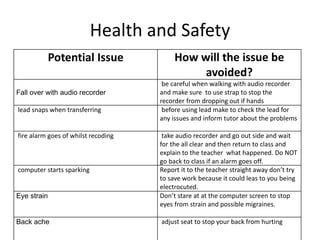
Health and Safety
Potential Issue How will the issue be
avoided?
Fall over with audio recorder
be careful when walking with audio recorder
and make sure to use strap to stop the
recorder from dropping out if hands
lead snaps when transferring before using lead make to check the lead for
any issues and inform tutor about the problems
fire alarm goes of whilst recoding take audio recorder and go out side and wait
for the all clear and then return to class and
explain to the teacher what happened. Do NOT
go back to class if an alarm goes off.
computer starts sparking Report it to the teacher straight away don’t try
to save work because it could leas to you being
electrocuted.
Eye strain Don’t stare at at the computer screen to stop
eyes from strain and possible migraines.
Back ache adjust seat to stop your back from hurting
Schedule
Day Plan of Action Resources Required
Day 1  find music needed for pod cast Computer
Youtube MP3 converter
Youtube to find the music
Day 2  record audio Audio recorder
Headphones
Day 3  place audio in to the time frame. lead to transfer audio
Premire pro software
Computer
Day 4  Put music fond from day 1 in to the right
places
Computer
Premire pro
Day 5  go over work so far to make sure very thing is
where it should be
computer
Premire pro
Day 6  add sound effects to selected files (use script) computer
Word
Premire pro
Day 7  Start adding fade ins and outs on music so
that the podcast flows nicely
Premire pro
Computer
Day 8  check all areas of the podcast to make sure
everything is done to the best of my ability.
Premire pro
Computer

5. pre production

  • 1.
  • 2.
    Sound Effects Sound EffectHow/Where will it be used Source Laughter A response to something I said in the podcast YouTube Screaming fans When I describe how it felt to be at the front of the stage YouTube Party horn When talking about something I’m happy about YouTube Mw screaming out of frustration When apologizing to the audience about being soppy audio recorder Me laughing laughing ay my own stupidity audio recorder
  • 3.
    Music Track Name/Artist How/Wherewill it be used Source King no one moonstruck It will be used as a backing track throughout the podcast Youtube King no one constellations This will be used to show the audience what type of music they play You tube Justin Bieber This will be used in order to entertain the audience towards the end of my podcast. Youtube King no one foreign tongue When I talk about my favourite song from the night this song will fade in. Youtube Adele hello When I say my name this song will play in order to try and entertain the audience Youtube
  • 4.
    Props & Locations Peopleneeded Locations needed for sound effects audio recorder borrow from college headphones Bring in from home Premire pro software college computers Youtube computers You tube mp3 converter computer memory drive in order to save work. supplied by college at the beginning of the year lead in order to get audio files from the audio recorder to the computer. borrow from college
  • 5.
    Contingency Planning Potential IssueSolution audio recorder runs out of battery make sure to chare or have a spare in case this issue accrues Not being able to to talk due to illness have someone at hand so that I can use thier voice so that I can continue with the recording. having a faulty lead when try to transfer the audio files to the computer have a spare at hand so that you don’t waste time on finding anotherr lead. memory drive stops working and looses all work email work regularly to tutor so that you can retrieve any work you’ve lost being to close to the mic and sounding muffled make sure you’re not standing to close the mic to prevent this accidently cut off the beginning of my pod cast make sure ait a few seconds before beginning the podcast to prevent this.
  • 6.
    Health and Safety PotentialIssue How will the issue be avoided? Fall over with audio recorder be careful when walking with audio recorder and make sure to use strap to stop the recorder from dropping out if hands lead snaps when transferring before using lead make to check the lead for any issues and inform tutor about the problems fire alarm goes of whilst recoding take audio recorder and go out side and wait for the all clear and then return to class and explain to the teacher what happened. Do NOT go back to class if an alarm goes off. computer starts sparking Report it to the teacher straight away don’t try to save work because it could leas to you being electrocuted. Eye strain Don’t stare at at the computer screen to stop eyes from strain and possible migraines. Back ache adjust seat to stop your back from hurting
  • 7.
    Schedule Day Plan ofAction Resources Required Day 1  find music needed for pod cast Computer Youtube MP3 converter Youtube to find the music Day 2  record audio Audio recorder Headphones Day 3  place audio in to the time frame. lead to transfer audio Premire pro software Computer Day 4  Put music fond from day 1 in to the right places Computer Premire pro Day 5  go over work so far to make sure very thing is where it should be computer Premire pro Day 6  add sound effects to selected files (use script) computer Word Premire pro Day 7  Start adding fade ins and outs on music so that the podcast flows nicely Premire pro Computer Day 8  check all areas of the podcast to make sure everything is done to the best of my ability. Premire pro Computer