Pre-Production
Jack Reagan-Wallis
Sound Effects
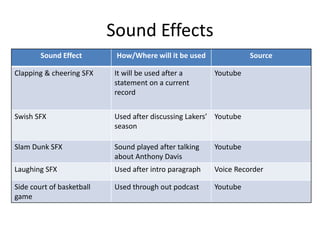
Sound Effect How/Where will it be used Source
Clapping & cheering SFX It will be used after a
statement on a current
record
Youtube
Swish SFX Used after discussing Lakers’
season
Youtube
Slam Dunk SFX Sound played after talking
about Anthony Davis
Youtube
Laughing SFX Used after intro paragraph Voice Recorder
Side court of basketball
game
Used through out podcast Youtube
Music
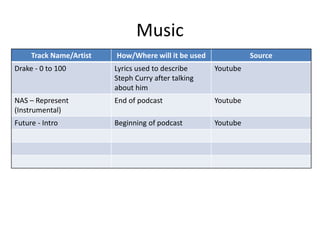
Track Name/Artist How/Where will it be used Source
Drake - 0 to 100 Lyrics used to describe
Steph Curry after talking
about him
Youtube
NAS – Represent
(Instrumental)
End of podcast Youtube
Future - Intro Beginning of podcast Youtube
Props & Locations
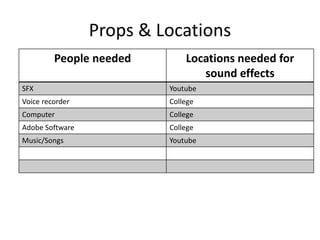
People needed Locations needed for
sound effects
SFX Youtube
Voice recorder College
Computer College
Adobe Software College
Music/Songs Youtube
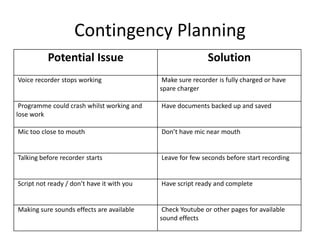
Contingency Planning
Potential Issue Solution
Voice recorder stops working Make sure recorder is fully charged or have
spare charger
Programme could crash whilst working and
lose work
Have documents backed up and saved
Mic too close to mouth Don’t have mic near mouth
Talking before recorder starts Leave for few seconds before start recording
Script not ready / don’t have it with you Have script ready and complete
Making sure sounds effects are available Check Youtube or other pages for available
sound effects
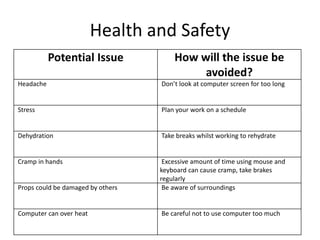
Health and Safety
Potential Issue How will the issue be
avoided?
Headache Don’t look at computer screen for too long
Stress Plan your work on a schedule
Dehydration Take breaks whilst working to rehydrate
Cramp in hands Excessive amount of time using mouse and
keyboard can cause cramp, take brakes
regularly
Props could be damaged by others Be aware of surroundings
Computer can over heat Be careful not to use computer too much
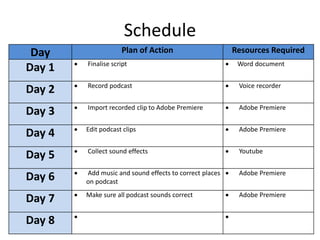
Schedule
Day Plan of Action Resources Required
Day 1  Finalise script  Word document
Day 2  Record podcast  Voice recorder
Day 3  Import recorded clip to Adobe Premiere  Adobe Premiere
Day 4  Edit podcast clips  Adobe Premiere
Day 5  Collect sound effects  Youtube
Day 6  Add music and sound effects to correct places
on podcast
 Adobe Premiere
Day 7  Make sure all podcast sounds correct  Adobe Premiere
Day 8  

5. pre production (jrw) audio

  • 1.
  • 2.
    Sound Effects Sound EffectHow/Where will it be used Source Clapping & cheering SFX It will be used after a statement on a current record Youtube Swish SFX Used after discussing Lakers’ season Youtube Slam Dunk SFX Sound played after talking about Anthony Davis Youtube Laughing SFX Used after intro paragraph Voice Recorder Side court of basketball game Used through out podcast Youtube
  • 3.
    Music Track Name/Artist How/Wherewill it be used Source Drake - 0 to 100 Lyrics used to describe Steph Curry after talking about him Youtube NAS – Represent (Instrumental) End of podcast Youtube Future - Intro Beginning of podcast Youtube
  • 4.
    Props & Locations Peopleneeded Locations needed for sound effects SFX Youtube Voice recorder College Computer College Adobe Software College Music/Songs Youtube
  • 5.
    Contingency Planning Potential IssueSolution Voice recorder stops working Make sure recorder is fully charged or have spare charger Programme could crash whilst working and lose work Have documents backed up and saved Mic too close to mouth Don’t have mic near mouth Talking before recorder starts Leave for few seconds before start recording Script not ready / don’t have it with you Have script ready and complete Making sure sounds effects are available Check Youtube or other pages for available sound effects
  • 6.
    Health and Safety PotentialIssue How will the issue be avoided? Headache Don’t look at computer screen for too long Stress Plan your work on a schedule Dehydration Take breaks whilst working to rehydrate Cramp in hands Excessive amount of time using mouse and keyboard can cause cramp, take brakes regularly Props could be damaged by others Be aware of surroundings Computer can over heat Be careful not to use computer too much
  • 7.
    Schedule Day Plan ofAction Resources Required Day 1  Finalise script  Word document Day 2  Record podcast  Voice recorder Day 3  Import recorded clip to Adobe Premiere  Adobe Premiere Day 4  Edit podcast clips  Adobe Premiere Day 5  Collect sound effects  Youtube Day 6  Add music and sound effects to correct places on podcast  Adobe Premiere Day 7  Make sure all podcast sounds correct  Adobe Premiere Day 8  