Pre-Production
Josh Bailey
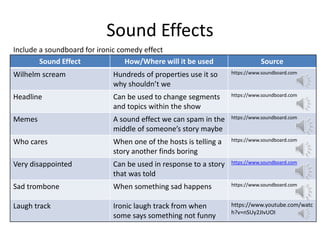
Sound Effects
Sound Effect How/Where will it be used Source
Wilhelm scream Hundreds of properties use it so
why shouldn’t we
https://www.soundboard.com
Headline Can be used to change segments
and topics within the show
https://www.soundboard.com
Memes A sound effect we can spam in the
middle of someone’s story maybe
https://www.soundboard.com
Who cares When one of the hosts is telling a
story another finds boring
https://www.soundboard.com
Very disappointed Can be used in response to a story
that was told
https://www.soundboard.com
Sad trombone When something sad happens https://www.soundboard.com
Laugh track Ironic laugh track from when
some says something not funny
https://www.youtube.com/watc
h?v=nSUy2JIvUOI
Include a soundboard for ironic comedy effect
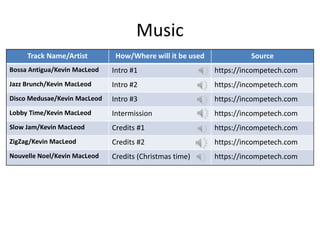
Music
Track Name/Artist How/Where will it be used Source
Bossa Antigua/Kevin MacLeod Intro #1 https://incompetech.com
Jazz Brunch/Kevin MacLeod Intro #2 https://incompetech.com
Disco Medusae/Kevin MacLeod Intro #3 https://incompetech.com
Lobby Time/Kevin MacLeod Intermission https://incompetech.com
Slow Jam/Kevin MacLeod Credits #1 https://incompetech.com
ZigZag/Kevin MacLeod Credits #2 https://incompetech.com
Nouvelle Noel/Kevin MacLeod Credits (Christmas time) https://incompetech.com
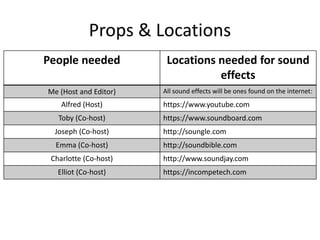
Props & Locations
People needed Locations needed for sound
effects
Me (Host and Editor) All sound effects will be ones found on the internet:
Alfred (Host) https://www.youtube.com
Toby (Co-host) https://www.soundboard.com
Joseph (Co-host) http://soungle.com
Emma (Co-host) http://soundbible.com
Charlotte (Co-host) http://www.soundjay.com
Elliot (Co-host) https://incompetech.com
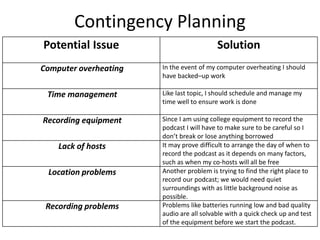
Contingency Planning
Potential Issue Solution
Computer overheating In the event of my computer overheating I should
have backed–up work
Time management Like last topic, I should schedule and manage my
time well to ensure work is done
Recording equipment Since I am using college equipment to record the
podcast I will have to make sure to be careful so I
don’t break or lose anything borrowed
Lack of hosts It may prove difficult to arrange the day of when to
record the podcast as it depends on many factors,
such as when my co-hosts will all be free
Location problems Another problem is trying to find the right place to
record our podcast; we would need quiet
surroundings with as little background noise as
possible.
Recording problems Problems like batteries running low and bad quality
audio are all solvable with a quick check up and test
of the equipment before we start the podcast.
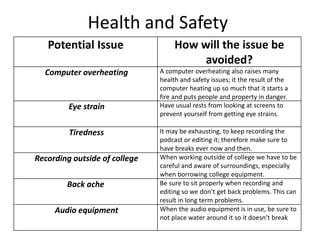
Health and Safety
Potential Issue How will the issue be
avoided?
Computer overheating A computer overheating also raises many
health and safety issues; it the result of the
computer heating up so much that it starts a
fire and puts people and property in danger.
Eye strain Have usual rests from looking at screens to
prevent yourself from getting eye strains.
Tiredness It may be exhausting, to keep recording the
podcast or editing it; therefore make sure to
have breaks ever now and then.
Recording outside of college When working outside of college we have to be
careful and aware of surroundings, especially
when borrowing college equipment.
Back ache Be sure to sit properly when recording and
editing so we don’t get back problems. This can
result in long term problems.
Audio equipment When the audio equipment is in use, be sure to
not place water around it so it doesn’t break
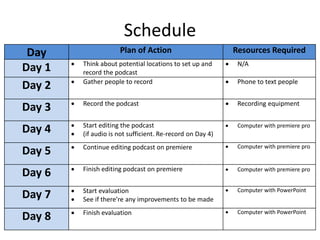
Schedule
Day Plan of Action Resources Required
Day 1  Think about potential locations to set up and
record the podcast
 N/A
Day 2  Gather people to record  Phone to text people
Day 3  Record the podcast  Recording equipment
Day 4  Start editing the podcast
 (if audio is not sufficient. Re-record on Day 4)
 Computer with premiere pro
Day 5  Continue editing podcast on premiere  Computer with premiere pro
Day 6  Finish editing podcast on premiere  Computer with premiere pro
Day 7  Start evaluation
 See if there’re any improvements to be made
 Computer with PowerPoint
Day 8  Finish evaluation  Computer with PowerPoint

5. pre production

  • 1.
  • 2.
    Sound Effects Sound EffectHow/Where will it be used Source Wilhelm scream Hundreds of properties use it so why shouldn’t we https://www.soundboard.com Headline Can be used to change segments and topics within the show https://www.soundboard.com Memes A sound effect we can spam in the middle of someone’s story maybe https://www.soundboard.com Who cares When one of the hosts is telling a story another finds boring https://www.soundboard.com Very disappointed Can be used in response to a story that was told https://www.soundboard.com Sad trombone When something sad happens https://www.soundboard.com Laugh track Ironic laugh track from when some says something not funny https://www.youtube.com/watc h?v=nSUy2JIvUOI Include a soundboard for ironic comedy effect
  • 3.
    Music Track Name/Artist How/Wherewill it be used Source Bossa Antigua/Kevin MacLeod Intro #1 https://incompetech.com Jazz Brunch/Kevin MacLeod Intro #2 https://incompetech.com Disco Medusae/Kevin MacLeod Intro #3 https://incompetech.com Lobby Time/Kevin MacLeod Intermission https://incompetech.com Slow Jam/Kevin MacLeod Credits #1 https://incompetech.com ZigZag/Kevin MacLeod Credits #2 https://incompetech.com Nouvelle Noel/Kevin MacLeod Credits (Christmas time) https://incompetech.com
  • 4.
    Props & Locations Peopleneeded Locations needed for sound effects Me (Host and Editor) All sound effects will be ones found on the internet: Alfred (Host) https://www.youtube.com Toby (Co-host) https://www.soundboard.com Joseph (Co-host) http://soungle.com Emma (Co-host) http://soundbible.com Charlotte (Co-host) http://www.soundjay.com Elliot (Co-host) https://incompetech.com
  • 5.
    Contingency Planning Potential IssueSolution Computer overheating In the event of my computer overheating I should have backed–up work Time management Like last topic, I should schedule and manage my time well to ensure work is done Recording equipment Since I am using college equipment to record the podcast I will have to make sure to be careful so I don’t break or lose anything borrowed Lack of hosts It may prove difficult to arrange the day of when to record the podcast as it depends on many factors, such as when my co-hosts will all be free Location problems Another problem is trying to find the right place to record our podcast; we would need quiet surroundings with as little background noise as possible. Recording problems Problems like batteries running low and bad quality audio are all solvable with a quick check up and test of the equipment before we start the podcast.
  • 6.
    Health and Safety PotentialIssue How will the issue be avoided? Computer overheating A computer overheating also raises many health and safety issues; it the result of the computer heating up so much that it starts a fire and puts people and property in danger. Eye strain Have usual rests from looking at screens to prevent yourself from getting eye strains. Tiredness It may be exhausting, to keep recording the podcast or editing it; therefore make sure to have breaks ever now and then. Recording outside of college When working outside of college we have to be careful and aware of surroundings, especially when borrowing college equipment. Back ache Be sure to sit properly when recording and editing so we don’t get back problems. This can result in long term problems. Audio equipment When the audio equipment is in use, be sure to not place water around it so it doesn’t break
  • 7.
    Schedule Day Plan ofAction Resources Required Day 1  Think about potential locations to set up and record the podcast  N/A Day 2  Gather people to record  Phone to text people Day 3  Record the podcast  Recording equipment Day 4  Start editing the podcast  (if audio is not sufficient. Re-record on Day 4)  Computer with premiere pro Day 5  Continue editing podcast on premiere  Computer with premiere pro Day 6  Finish editing podcast on premiere  Computer with premiere pro Day 7  Start evaluation  See if there’re any improvements to be made  Computer with PowerPoint Day 8  Finish evaluation  Computer with PowerPoint