Pre-Production
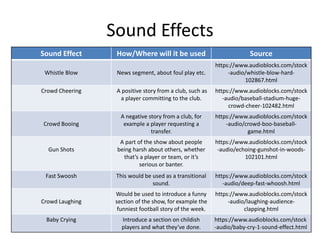
Sound Effects
Sound Effect How/Where will it be used Source
Whistle Blow News segment, about foul play etc.
https://www.audioblocks.com/stock
-audio/whistle-blow-hard-
102867.html
Crowd Cheering A positive story from a club, such as
a player committing to the club.
https://www.audioblocks.com/stock
-audio/baseball-stadium-huge-
crowd-cheer-102482.html
Crowd Booing
A negative story from a club, for
example a player requesting a
transfer.
https://www.audioblocks.com/stock
-audio/crowd-boo-baseball-
game.html
Gun Shots
A part of the show about people
being harsh about others, whether
that’s a player or team, or it’s
serious or banter.
https://www.audioblocks.com/stock
-audio/echoing-gunshot-in-woods-
102101.html
Fast Swoosh This would be used as a transitional
sound.
https://www.audioblocks.com/stock
-audio/deep-fast-whoosh.html
Crowd Laughing
Would be used to introduce a funny
section of the show, for example the
funniest football story of the week.
https://www.audioblocks.com/stock
-audio/laughing-audience-
clapping.html
Baby Crying Introduce a section on childish
players and what they’ve done.
https://www.audioblocks.com/stock
-audio/baby-cry-1-sound-effect.html
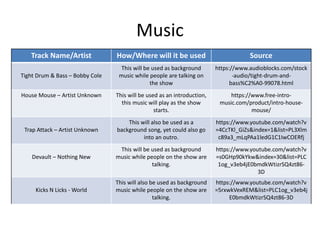
Music
Track Name/Artist How/Where will it be used Source
Tight Drum & Bass – Bobby Cole
This will be used as background
music while people are talking on
the show
https://www.audioblocks.com/stock
-audio/tight-drum-and-
bass%C2%A0-99078.html
House Mouse – Artist Unknown This will be used as an introduction,
this music will play as the show
starts.
https://www.free-intro-
music.com/product/intro-house-
mouse/
Trap Attack – Artist Unknown
This will also be used as a
background song, yet could also go
into an outro.
https://www.youtube.com/watch?v
=4CcTKl_GiZs&index=1&list=PL3Xlm
c89a3_mLqPAa1ledG1C1IwCOERfj
Devault – Nothing New
This will be used as background
music while people on the show are
talking.
https://www.youtube.com/watch?v
=s0GHp90kYkw&index=30&list=PLC
1og_v3eb4jE0bmdkWtizrSQ4zt86-
3D
Kicks N Licks - World
This will also be used as background
music while people on the show are
talking.
https://www.youtube.com/watch?v
=5rxwkVexREM&list=PLC1og_v3eb4j
E0bmdkWtizrSQ4zt86-3D
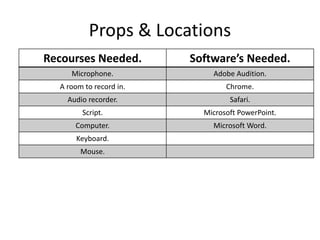
Props & Locations
Recourses Needed. Software’s Needed.
Microphone. Adobe Audition.
A room to record in. Chrome.
Audio recorder. Safari.
Script. Microsoft PowerPoint.
Computer. Microsoft Word.
Keyboard.
Mouse.
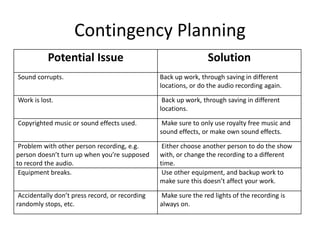
Contingency Planning
Potential Issue Solution
Sound corrupts. Back up work, through saving in different
locations, or do the audio recording again.
Work is lost. Back up work, through saving in different
locations.
Copyrighted music or sound effects used. Make sure to only use royalty free music and
sound effects, or make own sound effects.
Problem with other person recording, e.g.
person doesn’t turn up when you’re supposed
to record the audio.
Either choose another person to do the show
with, or change the recording to a different
time.
Equipment breaks. Use other equipment, and backup work to
make sure this doesn’t affect your work.
Accidentally don’t press record, or recording
randomly stops, etc.
Make sure the red lights of the recording is
always on.
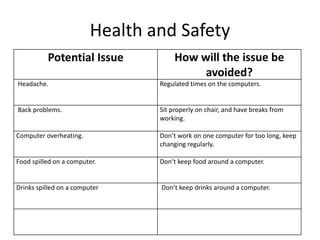
Health and Safety
Potential Issue How will the issue be
avoided?
Headache. Regulated times on the computers.
Back problems. Sit properly on chair, and have breaks from
working.
Computer overheating. Don’t work on one computer for too long, keep
changing regularly.
Food spilled on a computer. Don’t keep food around a computer.
Drinks spilled on a computer Don’t keep drinks around a computer.
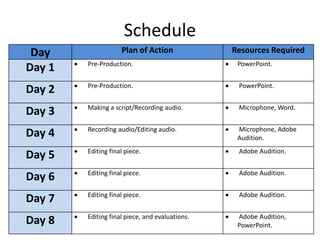
Schedule
Day Plan of Action Resources Required
Day 1  Pre-Production.  PowerPoint.
Day 2  Pre-Production.  PowerPoint.
Day 3  Making a script/Recording audio.  Microphone, Word.
Day 4  Recording audio/Editing audio.  Microphone, Adobe
Audition.
Day 5  Editing final piece.  Adobe Audition.
Day 6  Editing final piece.  Adobe Audition.
Day 7  Editing final piece.  Adobe Audition.
Day 8  Editing final piece, and evaluations.  Adobe Audition,
PowerPoint.

5. Pre-Production(5)

  • 1.
  • 2.
    Sound Effects Sound EffectHow/Where will it be used Source Whistle Blow News segment, about foul play etc. https://www.audioblocks.com/stock -audio/whistle-blow-hard- 102867.html Crowd Cheering A positive story from a club, such as a player committing to the club. https://www.audioblocks.com/stock -audio/baseball-stadium-huge- crowd-cheer-102482.html Crowd Booing A negative story from a club, for example a player requesting a transfer. https://www.audioblocks.com/stock -audio/crowd-boo-baseball- game.html Gun Shots A part of the show about people being harsh about others, whether that’s a player or team, or it’s serious or banter. https://www.audioblocks.com/stock -audio/echoing-gunshot-in-woods- 102101.html Fast Swoosh This would be used as a transitional sound. https://www.audioblocks.com/stock -audio/deep-fast-whoosh.html Crowd Laughing Would be used to introduce a funny section of the show, for example the funniest football story of the week. https://www.audioblocks.com/stock -audio/laughing-audience- clapping.html Baby Crying Introduce a section on childish players and what they’ve done. https://www.audioblocks.com/stock -audio/baby-cry-1-sound-effect.html
  • 3.
    Music Track Name/Artist How/Wherewill it be used Source Tight Drum & Bass – Bobby Cole This will be used as background music while people are talking on the show https://www.audioblocks.com/stock -audio/tight-drum-and- bass%C2%A0-99078.html House Mouse – Artist Unknown This will be used as an introduction, this music will play as the show starts. https://www.free-intro- music.com/product/intro-house- mouse/ Trap Attack – Artist Unknown This will also be used as a background song, yet could also go into an outro. https://www.youtube.com/watch?v =4CcTKl_GiZs&index=1&list=PL3Xlm c89a3_mLqPAa1ledG1C1IwCOERfj Devault – Nothing New This will be used as background music while people on the show are talking. https://www.youtube.com/watch?v =s0GHp90kYkw&index=30&list=PLC 1og_v3eb4jE0bmdkWtizrSQ4zt86- 3D Kicks N Licks - World This will also be used as background music while people on the show are talking. https://www.youtube.com/watch?v =5rxwkVexREM&list=PLC1og_v3eb4j E0bmdkWtizrSQ4zt86-3D
  • 4.
    Props & Locations RecoursesNeeded. Software’s Needed. Microphone. Adobe Audition. A room to record in. Chrome. Audio recorder. Safari. Script. Microsoft PowerPoint. Computer. Microsoft Word. Keyboard. Mouse.
  • 5.
    Contingency Planning Potential IssueSolution Sound corrupts. Back up work, through saving in different locations, or do the audio recording again. Work is lost. Back up work, through saving in different locations. Copyrighted music or sound effects used. Make sure to only use royalty free music and sound effects, or make own sound effects. Problem with other person recording, e.g. person doesn’t turn up when you’re supposed to record the audio. Either choose another person to do the show with, or change the recording to a different time. Equipment breaks. Use other equipment, and backup work to make sure this doesn’t affect your work. Accidentally don’t press record, or recording randomly stops, etc. Make sure the red lights of the recording is always on.
  • 6.
    Health and Safety PotentialIssue How will the issue be avoided? Headache. Regulated times on the computers. Back problems. Sit properly on chair, and have breaks from working. Computer overheating. Don’t work on one computer for too long, keep changing regularly. Food spilled on a computer. Don’t keep food around a computer. Drinks spilled on a computer Don’t keep drinks around a computer.
  • 7.
    Schedule Day Plan ofAction Resources Required Day 1  Pre-Production.  PowerPoint. Day 2  Pre-Production.  PowerPoint. Day 3  Making a script/Recording audio.  Microphone, Word. Day 4  Recording audio/Editing audio.  Microphone, Adobe Audition. Day 5  Editing final piece.  Adobe Audition. Day 6  Editing final piece.  Adobe Audition. Day 7  Editing final piece.  Adobe Audition. Day 8  Editing final piece, and evaluations.  Adobe Audition, PowerPoint.