Dr.Y.NARASIMHA MURTHY Ph.D
                                                                    yayavaram@yahoo.com


                   ARM LPC 21XX INTEFACING EXAMPLES


1.INTERFACING LEDs TO ARM 7 CONTROLLER- (LPC2148 )
Light Emitting Diodes (LEDs) are popularly used display components used to indicate the ON
and OFF state of a system. These are also used to realize various counters like binary counters
experimentally. These LEDs can be easily interfaced with the Port pins of any Microcontroller
by using current limiting resistors of the order of 220 Ohms.

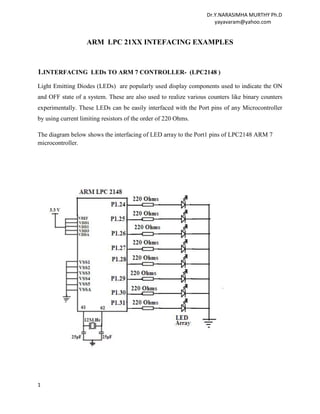
The diagram below shows the interfacing of LED array to the Port1 pins of LPC2148 ARM 7
microcontroller.


1
Dr.Y.NARASIMHA MURTHY Ph.D
                                                                      yayavaram@yahoo.com


PROGRAM -1

This program blinks the LEDs continuously with a small delay. The LEDs are connected to the
Port1 pins P1.24 to P1.31 and the these pins are configured as General Purpose output pins.

#include<lpc2148.H>                  //LPC2148 Header
 void delay()
{
for(int i=0x00;i<=0xff;i++)
for(int j=0x00;j<=0xFf;j++) ;      // Delay program
}
void main()
{
PINSEL2 = 0X00000000;              // Set P1.24 TO P1.31 as GPIO
IO1DIR = 0XFF000000;               //Port pins P1.24 to P 1.31 Configured as Output port.

while(1)                          //Infinite loop
{
IO1SET=0XFF000000;                   // Pins P1.24 to P1.31 goes to high state
delay();
IO1CLR=0XFF000000;                   // Pins P1.24 to P1.31 goes to low state
delay() ;
}
}

PROGRAM – 2

This program glows LEDs alternately by sending 55H and AAH through the port1 Pins.

# include <LPC214X.H>             //LPC2148 HEADER
void delay(void)                  // Delay Program
{
unsigned int i;
i=0xffffff;
 while(i--);
}
int main(void)
{
PINSEL2=0x0000;                        // Port 1 is I/O

IODIR1 = 0XFF <<24 ;            // Port Pins P1.24 to P1.31 as Output Pins


2
Dr.Y.NARASIMHA MURTHY Ph.D
                                                                           yayavaram@yahoo.com


while(1)                              // Infinite loop

{


IOSET1=0X55<<25               ;           // P1.25,P1.27,P1.29 & P1.31 LEDs will Glow

delay()                       ;          // Call delay function

IOCLR1= 0X55 <<25                 ;       // P1.25,P1.27,P1.29 &P1.31 LEDs will be off

IOSET1=0XAA<<24                   ;     //P1.24,P1.26,P1.28 &P1.30 LEDs are Glow

delay ()                      ; // Call delay function

IOCLR1=0XAA<<24               ; // P1.24,P1.26,P1.28 &P1.30 LEDs are off

}

}

2.INTERFACING A RELAY TO ARM 7 CONTROLLER- (LPC2148 )

Relays are devices which allow low power circuits to switch a relatively high Current/ Voltage
ON/OFF. A relay circuit is typically a smaller switch or device which drives (opens/closes) an
electric switch that is capable of carrying much larger current amounts.

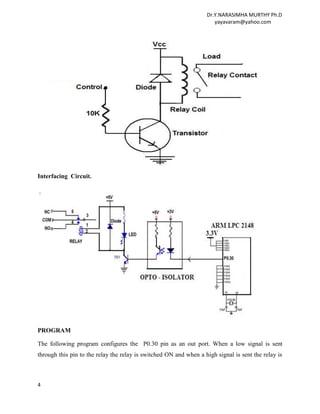
Figure     below shows the interfacing of the Relay to ARM controller. When the input is
energized, the relay turns on and the '+' output is connected to +12v. When the relay is off, the '+'
output is connected to Ground. The '-' output is permanently wired to Ground.

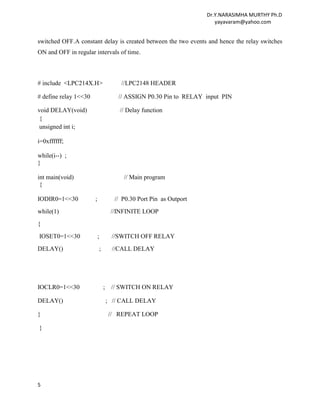
The relay is interfaced to P0.30 Pin through an Opto-isolator. This opto-isolator protects the port
pin from damage due to any high currents .The opto-isolator consists of a pair of an LED and a
Photo transistor as shown in the diagram. The power transistor is used at the input. So, when the
input is high , the output of the transistor is LOW and the relay is in OFF state .Similarly when
we apply a low to the transistor ,the out put is high and the relay is ON.


3
Dr.Y.NARASIMHA MURTHY Ph.D
                                                                      yayavaram@yahoo.com


Interfacing Circuit.


PROGRAM

The following program configures the P0.30 pin as an out port. When a low signal is sent
through this pin to the relay the relay is switched ON and when a high signal is sent the relay is


4
Dr.Y.NARASIMHA MURTHY Ph.D
                                                                       yayavaram@yahoo.com


switched OFF.A constant delay is created between the two events and hence the relay switches
ON and OFF in regular intervals of time.


# include <LPC214X.H>                  //LPC2148 HEADER

# define relay 1<<30                  // ASSIGN P0.30 Pin to RELAY input PIN

void DELAY(void)                       // Delay function
 {
 unsigned int i;

i=0xffffff;

while(i--) ;
}

int main(void)                          // Main program
 {

IODIR0=1<<30           ;             // P0.30 Port Pin as Outport
while(1)                            //INFINITE LOOP
{
IOSET0=1<<30               ;        //SWITCH OFF RELAY
DELAY()                    ;        //CALL DELAY


IOCLR0=1<<30                   ;    // SWITCH ON RELAY

DELAY()                            ; // CALL DELAY

}                                  // REPEAT LOOP

}


5
Dr.Y.NARASIMHA MURTHY Ph.D
                                                                      yayavaram@yahoo.com


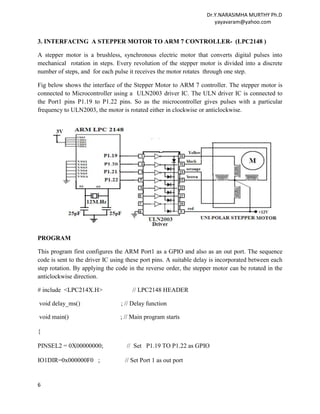
3. INTERFACING A STEPPER MOTOR TO ARM 7 CONTROLLER- (LPC2148 )

A stepper motor is a brushless, synchronous electric motor that converts digital pulses into
mechanical rotation in steps. Every revolution of the stepper motor is divided into a discrete
number of steps, and for each pulse it receives the motor rotates through one step.

Fig below shows the interface of the Stepper Motor to ARM 7 controller. The stepper motor is
connected to Microcontroller using a ULN2003 driver IC. The ULN driver IC is connected to
the Port1 pins P1.19 to P1.22 pins. So as the microcontroller gives pulses with a particular
frequency to ULN2003, the motor is rotated either in clockwise or anticlockwise.


PROGRAM

This program first configures the ARM Port1 as a GPIO and also as an out port. The sequence
code is sent to the driver IC using these port pins. A suitable delay is incorporated between each
step rotation. By applying the code in the reverse order, the stepper motor can be rotated in the
anticlockwise direction.

# include <LPC214X.H>                // LPC2148 HEADER

void delay_ms()                  ; // Delay function

void main()                      ; // Main program starts

{

PINSEL2 = 0X00000000;              // Set P1.19 TO P1.22 as GPIO

IO1DIR=0x000000F0 ;               // Set Port 1 as out port


6
Dr.Y.NARASIMHA MURTHY Ph.D
                                                                       yayavaram@yahoo.com


while(1)                          // Infinite Loop

{

IO1PIN = 0X00000090;                // Send the code1 for phase 1

delay_ms() ;                       // Call Delay

IO0PIN = 0X00000050 ;              // Send the code 2 for phase 2

delay_ms()                ;     // Call Delay

IO1PIN = 0X00000060 ;            // Send the code 3 for phase 3

delay_ms()                ;    // Call Delay


IO1PIN = 0X000000A0 ;           // Send the code 3 for phase 3

delay_ms()            ;         // Call Delay
}
}
void delay_ms()               // Delay function program
{
int i,j     ;

for(i=0;i<0x0a;i++)

for (j=0;j<750;j++) ;

}

4. INTERFACING OF DAC-ARM LPC2148

A digital-to-analog converter is a device for converting a digital signal into to an analog signal
(current or voltage ). Digital-to-Analog Converters are the interface between the abstract digital
world and the analog real world. Simple switches, a network of resistors, current sources or
capacitors may be used to implement this conversion. A DAC inputs a binary number and
outputs an analog voltage or current signal.


The Microchip Technology Inc. MCP4921 is 2.7 – 5.5V, low-power, 12-Bit Digital-to-Analog
Converter (DAC) with SPI interface. The MCP4921 DACt provides high accuracy and low


7
Dr.Y.NARASIMHA MURTHY Ph.D
                                                                       yayavaram@yahoo.com


noise performance for industrial applications where calibration or compensation of signals is
required.
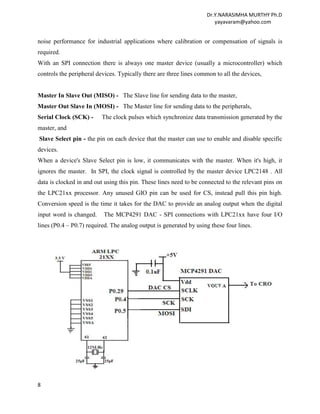
With an SPI connection there is always one master device (usually a microcontroller) which
controls the peripheral devices. Typically there are three lines common to all the devices,


Master In Slave Out (MISO) - The Slave line for sending data to the master,
Master Out Slave In (MOSI) - The Master line for sending data to the peripherals,
Serial Clock (SCK) -      The clock pulses which synchronize data transmission generated by the
master, and
Slave Select pin - the pin on each device that the master can use to enable and disable specific
devices.
When a device's Slave Select pin is low, it communicates with the master. When it's high, it
ignores the master. In SPI, the clock signal is controlled by the master device LPC2148 . All
data is clocked in and out using this pin. These lines need to be connected to the relevant pins on
the LPC21xx processor. Any unused GIO pin can be used for CS, instead pull this pin high.
Conversion speed is the time it takes for the DAC to provide an analog output when the digital
input word is changed.    The MCP4291 DAC - SPI connections with LPC21xx have four I/O
lines (P0.4 – P0.7) required. The analog output is generated by using these four lines.


8
Dr.Y.NARASIMHA MURTHY Ph.D
                                                                     yayavaram@yahoo.com


PROGRAM

#include <LPC2148.H>               // 2148 Header
#include "SPIsw.h"

unsigned long DACval, DACreg;
 int main (void)                  // Main program
{
  PINSEL0 = 0 ;                // Port 0 as GPIO
  PINSEL1 = 0x0000 ;           // Port 0 as Outport
  PINSEL2 & = 0x0000000C;
  SPI_ init (&IOPIN0,29/*CS*/, 5/*MISO*/, 6/*MOSI*/, 4/*SCK*/, 0/*CPOL*/, 0/*CPHA*/) ;
                                                                   // Set output voltage

    DAC val = 2047                ;     // Range [0..4095]
    DAC reg = DACval | 0x7000      ;
    SPI_enable ()                   ;  // Enable SPI port
    SPI_char ((DACreg >> 8) & 0x00FF);
    SPI_char (DACreg & 0x00FF)     ;
    SPI_disable ()                   ;  // Disable SPI port

    while (1)              ;           // Infinite Loop
}


5. INTERFACING ADC –LPC2148

LPC2148 controller has two on n-chip ADCs. In the present program the ADC0 with channel 3
is used and configured to convert the analog input signal into its equivalent digital output.The
configuring of on chip ADC is shown below.


9
Dr.Y.NARASIMHA MURTHY Ph.D
                                                                          yayavaram@yahoo.com


PROGRAM

#include "lpc214x.h"    // This example assumes that PCLK is 12Mhz!

int main(void)
{                        // Initialise ADC 0, Channel 3
adcInit0_3() ;          // Constantly read the results of ADC0.3
 int results = 0;
  while (1)
  {
    results = adcRead0_3();
  }
}                           // Initialise ADC Converter 0, Channel 3
void adcInit0_3(void)
{                            // Force pin 0.30 to function as AD0.3

PCB_PINSEL1 = (PCB_PINSEL1 & ~PCB_PINSEL1_P030_MASK) |

PCB_PINSEL1_P030_AD03;           // Enable power for ADC0

SCB_PCONP |= SCB_PCONP_PCAD0;                    // Initialise ADC converter

AD0_CR = AD_CR_CLKS10                            // 10-bit precision

10
Dr.Y.NARASIMHA MURTHY Ph.D
                                                                    yayavaram@yahoo.com


        | AD_CR_PDN                            // Exit power-down mode
        | ((3 - 1) << AD_CR_CLKDIVSHIFT)       // 4.0MHz Clock (12.0MHz / 3)
        | AD_CR_SEL3;                          // Use channel 3
    }

    int adcRead0_3(void)                   // Read the current value of ADC0.3


    AD0_CR &= ~(AD_CR_START_MASK | AD_CR_SELMASK);                   // Deselect all channels
                                                                    and stop all conversions

{

AD0_CR |= (AD_CR_START_NONE | AD_CR_SEL3);                                // Select channel 3

AD0_CR |= AD_CR_START_NOW; // Manually start conversions (rather than waiting on
                                                          an external input)


while (!(AD0_DR3 & AD_DR_DONE)) ;                   // Wait for the conversion to complete

    return ((AD0_DR3 & AD_DR_RESULTMASK) >> AD_DR_RESULTSHIFT);
                                                   // Return the processed results

}


6 . INTERFACING A SEVEN SEGMENT DISPLAY–LPC21XX


A seven segment display can be used to interface with LPC21XX microcontroller using the
GPIO lines. By using one seven segment display module along with LPC21XX ,a Hex counter
which counts 0 to F can be designed. By interfacing two Seven segment displays, a Hex counter
which counts 00 to FF can be designed. The LSB segment is interfaced to Port1 GPIO
lines(P1.16 to P1.22) and MSB module is interfaced to Port0 GPIO lines(Port0.16 to Port0.22) as
shown in the circuit diagram.


11
Dr.Y.NARASIMHA MURTHY Ph.D
                                                                    yayavaram@yahoo.com


PROGRAM

#include<lpc21xx.h>

unsigned char seg[16] ={0x40,0x79,0x24,0x30,0x19,0x12,0x02,0x78,0x00,0x10,0x08,

0x03,0x46,0x21,0x06,0x0e};

unsigned char seg_val,seg_val1;

unsigned char count,count1;

unsigned long int var,var1;

void main(void)

{    unsigned long int k;

     PINSEL0=0X00000000;          // Select Port 0 pins as GPIO lines


12
Dr.Y.NARASIMHA MURTHY Ph.D
                                                                        yayavaram@yahoo.com


     PINSEL1=0X00000000;             // Select Port 1 pins as GPIO lines

     IODIR0 = 0X00FF0000;          // Configure the required pins of Port 0 as output pins

     IODIR1 = 0X00FF0000;          // Configure the required pins of Port 1 as output pins

 for (count=0;count<=15;count++)              // COUNT FOR MSB

         {      IOCLR1 = var;

                seg_val = seg[count];

                var = seg_val;

                var = var<<16;

                IOSET1 = var;

             for(count1=0;count1<=15;count1++)                 // COUNT FOR LSB

                    {       IOCLR0=var1;

                            seg_val1=seg[count1];

                            var1=seg_val1;

                            var1=var1<<16;

                            IOSET0=var1;

                            for(k=0;k<50000;k++);

                            }                     // End for loop

                                 }                     // End for loop

                                        }                 // End main.


13
Dr.Y.NARASIMHA MURTHY Ph.D
                                                                     yayavaram@yahoo.com


7 . INTERFACING OF 2X16 LCD MODULE - LPC21XX
The ARM7 LPC21xx processor is interfaced to the 2x16 LCD mpdule in 4-bit mode .The
interfcae diagram is shown below.The four data pins are connected with 4 data bits (P0.19 –
P0.22 pins to bits D4-D7), address bit (RS-P0.16), read/write bit (R/W-P0.17) and control
signal (E-P0.18) to make LCD display complete.The pins D0,D1,D2,D3 are left free with out
any connections.

16X 2 LCD is a 16 pin module . In which pins 1 &16 are grounded, 2 &15 are given to V CC
and 3rd pin is given to potentiometer in order adjust the contrast of LCD. Pins 4, 5 & 6
corresponds to RS, R/W & EN respectively. Pins 7 to 14 are data lines from D0 to D7
respectively. Here the LCD is used in 4 bit mode i.e. upper 4 bits are used to transfer the data
with MSB first and LSB next. Port 0 pins i.e. from P0.16 to P0.22 are used for both data and
control signals. The interfacing diagram of 16X2 LCD is shown below.


PROGRAM

#include <LPC21xx.H>
long unsigned int data,temp1,temp2;
unsigned char *ptr,data_array[] = "SSBN DEGREE & PG COLLEGE, ATP";
void main()
{
       int i=0;

14
Dr.Y.NARASIMHA MURTHY Ph.D
                                                                       yayavaram@yahoo.com


       PINSEL0 = 0x00000000;          // Select Port 0 pins as GPIO lines
       IODIR0 = 0x00ff0000;          // Configure the required pins of Port 0 as output pins
       lcd_init();                   // LCD initialization
       delay(2500);                  // Delay
       ret_home();                   // Cursor to return home
       delay(2500);                  // Delay
       clr_disp();                   // Clear display
       delay(2500);                  // Delay
       ptr = &data_array[0];
       for(i=1;i<sizeof(data_array);i++)
       {
           if(i == 17)
                { temp1 = 0xc0;      // Goto 2nd line in the LCD
                   lcd_com();        // Byte to nibble conversion of LCD command
                   delay(800);
                }                    // End if
               data = *ptr;
               lcd_data();            // Byte to nibble conversion of LCD data
               ptr++;
       }                              // End for loop
}                                     // End main
void lcd_init(void)                   // Initialization of LCD
{
                temp2=0x30;            // Assign command to temp2
                temp2=temp2<<16;       // Shift the data by 16 bits left
                cmd_wrt();             // Command write subroutine
                delay(800);           // Delay
                temp2=0x30;            // Assign command to temp2
                temp2=temp2<<16;       // Shift the data by 16 bits left
                cmd_wrt();             // Command write subroutine
                delay(800);            // Delay
                temp2=0x30;            // Assign command to temp2
                temp2=temp2<<16;       // Shift the data by 16 bits left
                cmd_wrt();             // Command write subroutine
                delay(800);            // Delay
                temp2=0x30;            // Assign command to temp2
                temp2=temp2<<16;       // Shift the data by 16 bits left
                cmd_wrt();             // Command write subroutine
                delay(800);            // Delay
                temp2=0x20;            // Assign command to temp2
                temp2=temp2<<16;       // Shift the data by 16 bits left
                cmd_wrt();             // Command write subroutine
                delay(800);            // Delay
                temp1 = 0x28;          // Command for LCD to function in 4 bit mode
                lcd_com();
                delay(800);

15
Dr.Y.NARASIMHA MURTHY Ph.D
                                                                   yayavaram@yahoo.com


              temp1 = 0x0c;         // Command for display on, cursor off
              lcd_com();
              delay(800);
              temp1 = 0x06;         // Command for cursor increment
              lcd_com();
              delay(500);
              temp1 = 0x80;         // Command to force the cursor to beginning of 1st line
              lcd_com();
              delay(800);
 }
void delay(unsigned int j)        // Delay subroutine
{              unsigned int k;
               for(k=0;k<j;k++);
}
void clr_disp(void)                // To clear LCD display
{              temp1 = 0x01;
               lcd_com();
               delay(320);
}
void ret_home(void)                // To return home
{              temp1 = 0x02;
               lcd_com();
               delay(320);
}
void lcd_com(void)               // Byte to nibble conversion of LCD command
{              temp2= temp1 & 0x00f0;
               temp2=temp2<<16;
               cmd_wrt();
               temp2 = temp1 & 0x000f;
               temp2 = temp2 << 20;
               cmd_wrt();
}


                        -------------------xxxxxxx-------------
Acknowledgment: I thank all the people without whose contribution ,this class notes would
have not been possible ,especially Pantech Solutions website .


16

Arm7 Interfacing examples

  • 1.
    Dr.Y.NARASIMHA MURTHY Ph.D yayavaram@yahoo.com ARM LPC 21XX INTEFACING EXAMPLES 1.INTERFACING LEDs TO ARM 7 CONTROLLER- (LPC2148 ) Light Emitting Diodes (LEDs) are popularly used display components used to indicate the ON and OFF state of a system. These are also used to realize various counters like binary counters experimentally. These LEDs can be easily interfaced with the Port pins of any Microcontroller by using current limiting resistors of the order of 220 Ohms. The diagram below shows the interfacing of LED array to the Port1 pins of LPC2148 ARM 7 microcontroller. 1
  • 2.
    Dr.Y.NARASIMHA MURTHY Ph.D yayavaram@yahoo.com PROGRAM -1 This program blinks the LEDs continuously with a small delay. The LEDs are connected to the Port1 pins P1.24 to P1.31 and the these pins are configured as General Purpose output pins. #include<lpc2148.H> //LPC2148 Header void delay() { for(int i=0x00;i<=0xff;i++) for(int j=0x00;j<=0xFf;j++) ; // Delay program } void main() { PINSEL2 = 0X00000000; // Set P1.24 TO P1.31 as GPIO IO1DIR = 0XFF000000; //Port pins P1.24 to P 1.31 Configured as Output port. while(1) //Infinite loop { IO1SET=0XFF000000; // Pins P1.24 to P1.31 goes to high state delay(); IO1CLR=0XFF000000; // Pins P1.24 to P1.31 goes to low state delay() ; } } PROGRAM – 2 This program glows LEDs alternately by sending 55H and AAH through the port1 Pins. # include <LPC214X.H> //LPC2148 HEADER void delay(void) // Delay Program { unsigned int i; i=0xffffff; while(i--); } int main(void) { PINSEL2=0x0000; // Port 1 is I/O IODIR1 = 0XFF <<24 ; // Port Pins P1.24 to P1.31 as Output Pins 2
  • 3.
    Dr.Y.NARASIMHA MURTHY Ph.D yayavaram@yahoo.com while(1) // Infinite loop { IOSET1=0X55<<25 ; // P1.25,P1.27,P1.29 & P1.31 LEDs will Glow delay() ; // Call delay function IOCLR1= 0X55 <<25 ; // P1.25,P1.27,P1.29 &P1.31 LEDs will be off IOSET1=0XAA<<24 ; //P1.24,P1.26,P1.28 &P1.30 LEDs are Glow delay () ; // Call delay function IOCLR1=0XAA<<24 ; // P1.24,P1.26,P1.28 &P1.30 LEDs are off } } 2.INTERFACING A RELAY TO ARM 7 CONTROLLER- (LPC2148 ) Relays are devices which allow low power circuits to switch a relatively high Current/ Voltage ON/OFF. A relay circuit is typically a smaller switch or device which drives (opens/closes) an electric switch that is capable of carrying much larger current amounts. Figure below shows the interfacing of the Relay to ARM controller. When the input is energized, the relay turns on and the '+' output is connected to +12v. When the relay is off, the '+' output is connected to Ground. The '-' output is permanently wired to Ground. The relay is interfaced to P0.30 Pin through an Opto-isolator. This opto-isolator protects the port pin from damage due to any high currents .The opto-isolator consists of a pair of an LED and a Photo transistor as shown in the diagram. The power transistor is used at the input. So, when the input is high , the output of the transistor is LOW and the relay is in OFF state .Similarly when we apply a low to the transistor ,the out put is high and the relay is ON. 3
  • 4.
    Dr.Y.NARASIMHA MURTHY Ph.D yayavaram@yahoo.com Interfacing Circuit. PROGRAM The following program configures the P0.30 pin as an out port. When a low signal is sent through this pin to the relay the relay is switched ON and when a high signal is sent the relay is 4
  • 5.
    Dr.Y.NARASIMHA MURTHY Ph.D yayavaram@yahoo.com switched OFF.A constant delay is created between the two events and hence the relay switches ON and OFF in regular intervals of time. # include <LPC214X.H> //LPC2148 HEADER # define relay 1<<30 // ASSIGN P0.30 Pin to RELAY input PIN void DELAY(void) // Delay function { unsigned int i; i=0xffffff; while(i--) ; } int main(void) // Main program { IODIR0=1<<30 ; // P0.30 Port Pin as Outport while(1) //INFINITE LOOP { IOSET0=1<<30 ; //SWITCH OFF RELAY DELAY() ; //CALL DELAY IOCLR0=1<<30 ; // SWITCH ON RELAY DELAY() ; // CALL DELAY } // REPEAT LOOP } 5
  • 6.
    Dr.Y.NARASIMHA MURTHY Ph.D yayavaram@yahoo.com 3. INTERFACING A STEPPER MOTOR TO ARM 7 CONTROLLER- (LPC2148 ) A stepper motor is a brushless, synchronous electric motor that converts digital pulses into mechanical rotation in steps. Every revolution of the stepper motor is divided into a discrete number of steps, and for each pulse it receives the motor rotates through one step. Fig below shows the interface of the Stepper Motor to ARM 7 controller. The stepper motor is connected to Microcontroller using a ULN2003 driver IC. The ULN driver IC is connected to the Port1 pins P1.19 to P1.22 pins. So as the microcontroller gives pulses with a particular frequency to ULN2003, the motor is rotated either in clockwise or anticlockwise. PROGRAM This program first configures the ARM Port1 as a GPIO and also as an out port. The sequence code is sent to the driver IC using these port pins. A suitable delay is incorporated between each step rotation. By applying the code in the reverse order, the stepper motor can be rotated in the anticlockwise direction. # include <LPC214X.H> // LPC2148 HEADER void delay_ms() ; // Delay function void main() ; // Main program starts { PINSEL2 = 0X00000000; // Set P1.19 TO P1.22 as GPIO IO1DIR=0x000000F0 ; // Set Port 1 as out port 6
  • 7.
    Dr.Y.NARASIMHA MURTHY Ph.D yayavaram@yahoo.com while(1) // Infinite Loop { IO1PIN = 0X00000090; // Send the code1 for phase 1 delay_ms() ; // Call Delay IO0PIN = 0X00000050 ; // Send the code 2 for phase 2 delay_ms() ; // Call Delay IO1PIN = 0X00000060 ; // Send the code 3 for phase 3 delay_ms() ; // Call Delay IO1PIN = 0X000000A0 ; // Send the code 3 for phase 3 delay_ms() ; // Call Delay } } void delay_ms() // Delay function program { int i,j ; for(i=0;i<0x0a;i++) for (j=0;j<750;j++) ; } 4. INTERFACING OF DAC-ARM LPC2148 A digital-to-analog converter is a device for converting a digital signal into to an analog signal (current or voltage ). Digital-to-Analog Converters are the interface between the abstract digital world and the analog real world. Simple switches, a network of resistors, current sources or capacitors may be used to implement this conversion. A DAC inputs a binary number and outputs an analog voltage or current signal. The Microchip Technology Inc. MCP4921 is 2.7 – 5.5V, low-power, 12-Bit Digital-to-Analog Converter (DAC) with SPI interface. The MCP4921 DACt provides high accuracy and low 7
  • 8.
    Dr.Y.NARASIMHA MURTHY Ph.D yayavaram@yahoo.com noise performance for industrial applications where calibration or compensation of signals is required. With an SPI connection there is always one master device (usually a microcontroller) which controls the peripheral devices. Typically there are three lines common to all the devices, Master In Slave Out (MISO) - The Slave line for sending data to the master, Master Out Slave In (MOSI) - The Master line for sending data to the peripherals, Serial Clock (SCK) - The clock pulses which synchronize data transmission generated by the master, and Slave Select pin - the pin on each device that the master can use to enable and disable specific devices. When a device's Slave Select pin is low, it communicates with the master. When it's high, it ignores the master. In SPI, the clock signal is controlled by the master device LPC2148 . All data is clocked in and out using this pin. These lines need to be connected to the relevant pins on the LPC21xx processor. Any unused GIO pin can be used for CS, instead pull this pin high. Conversion speed is the time it takes for the DAC to provide an analog output when the digital input word is changed. The MCP4291 DAC - SPI connections with LPC21xx have four I/O lines (P0.4 – P0.7) required. The analog output is generated by using these four lines. 8
  • 9.
    Dr.Y.NARASIMHA MURTHY Ph.D yayavaram@yahoo.com PROGRAM #include <LPC2148.H> // 2148 Header #include "SPIsw.h" unsigned long DACval, DACreg; int main (void) // Main program { PINSEL0 = 0 ; // Port 0 as GPIO PINSEL1 = 0x0000 ; // Port 0 as Outport PINSEL2 & = 0x0000000C; SPI_ init (&IOPIN0,29/*CS*/, 5/*MISO*/, 6/*MOSI*/, 4/*SCK*/, 0/*CPOL*/, 0/*CPHA*/) ; // Set output voltage DAC val = 2047 ; // Range [0..4095] DAC reg = DACval | 0x7000 ; SPI_enable () ; // Enable SPI port SPI_char ((DACreg >> 8) & 0x00FF); SPI_char (DACreg & 0x00FF) ; SPI_disable () ; // Disable SPI port while (1) ; // Infinite Loop } 5. INTERFACING ADC –LPC2148 LPC2148 controller has two on n-chip ADCs. In the present program the ADC0 with channel 3 is used and configured to convert the analog input signal into its equivalent digital output.The configuring of on chip ADC is shown below. 9
  • 10.
    Dr.Y.NARASIMHA MURTHY Ph.D yayavaram@yahoo.com PROGRAM #include "lpc214x.h" // This example assumes that PCLK is 12Mhz! int main(void) { // Initialise ADC 0, Channel 3 adcInit0_3() ; // Constantly read the results of ADC0.3 int results = 0; while (1) { results = adcRead0_3(); } } // Initialise ADC Converter 0, Channel 3 void adcInit0_3(void) { // Force pin 0.30 to function as AD0.3 PCB_PINSEL1 = (PCB_PINSEL1 & ~PCB_PINSEL1_P030_MASK) | PCB_PINSEL1_P030_AD03; // Enable power for ADC0 SCB_PCONP |= SCB_PCONP_PCAD0; // Initialise ADC converter AD0_CR = AD_CR_CLKS10 // 10-bit precision 10
  • 11.
    Dr.Y.NARASIMHA MURTHY Ph.D yayavaram@yahoo.com | AD_CR_PDN // Exit power-down mode | ((3 - 1) << AD_CR_CLKDIVSHIFT) // 4.0MHz Clock (12.0MHz / 3) | AD_CR_SEL3; // Use channel 3 } int adcRead0_3(void) // Read the current value of ADC0.3 AD0_CR &= ~(AD_CR_START_MASK | AD_CR_SELMASK); // Deselect all channels and stop all conversions { AD0_CR |= (AD_CR_START_NONE | AD_CR_SEL3); // Select channel 3 AD0_CR |= AD_CR_START_NOW; // Manually start conversions (rather than waiting on an external input) while (!(AD0_DR3 & AD_DR_DONE)) ; // Wait for the conversion to complete return ((AD0_DR3 & AD_DR_RESULTMASK) >> AD_DR_RESULTSHIFT); // Return the processed results } 6 . INTERFACING A SEVEN SEGMENT DISPLAY–LPC21XX A seven segment display can be used to interface with LPC21XX microcontroller using the GPIO lines. By using one seven segment display module along with LPC21XX ,a Hex counter which counts 0 to F can be designed. By interfacing two Seven segment displays, a Hex counter which counts 00 to FF can be designed. The LSB segment is interfaced to Port1 GPIO lines(P1.16 to P1.22) and MSB module is interfaced to Port0 GPIO lines(Port0.16 to Port0.22) as shown in the circuit diagram. 11
  • 12.
    Dr.Y.NARASIMHA MURTHY Ph.D yayavaram@yahoo.com PROGRAM #include<lpc21xx.h> unsigned char seg[16] ={0x40,0x79,0x24,0x30,0x19,0x12,0x02,0x78,0x00,0x10,0x08, 0x03,0x46,0x21,0x06,0x0e}; unsigned char seg_val,seg_val1; unsigned char count,count1; unsigned long int var,var1; void main(void) { unsigned long int k; PINSEL0=0X00000000; // Select Port 0 pins as GPIO lines 12
  • 13.
    Dr.Y.NARASIMHA MURTHY Ph.D yayavaram@yahoo.com PINSEL1=0X00000000; // Select Port 1 pins as GPIO lines IODIR0 = 0X00FF0000; // Configure the required pins of Port 0 as output pins IODIR1 = 0X00FF0000; // Configure the required pins of Port 1 as output pins for (count=0;count<=15;count++) // COUNT FOR MSB { IOCLR1 = var; seg_val = seg[count]; var = seg_val; var = var<<16; IOSET1 = var; for(count1=0;count1<=15;count1++) // COUNT FOR LSB { IOCLR0=var1; seg_val1=seg[count1]; var1=seg_val1; var1=var1<<16; IOSET0=var1; for(k=0;k<50000;k++); } // End for loop } // End for loop } // End main. 13
  • 14.
    Dr.Y.NARASIMHA MURTHY Ph.D yayavaram@yahoo.com 7 . INTERFACING OF 2X16 LCD MODULE - LPC21XX The ARM7 LPC21xx processor is interfaced to the 2x16 LCD mpdule in 4-bit mode .The interfcae diagram is shown below.The four data pins are connected with 4 data bits (P0.19 – P0.22 pins to bits D4-D7), address bit (RS-P0.16), read/write bit (R/W-P0.17) and control signal (E-P0.18) to make LCD display complete.The pins D0,D1,D2,D3 are left free with out any connections. 16X 2 LCD is a 16 pin module . In which pins 1 &16 are grounded, 2 &15 are given to V CC and 3rd pin is given to potentiometer in order adjust the contrast of LCD. Pins 4, 5 & 6 corresponds to RS, R/W & EN respectively. Pins 7 to 14 are data lines from D0 to D7 respectively. Here the LCD is used in 4 bit mode i.e. upper 4 bits are used to transfer the data with MSB first and LSB next. Port 0 pins i.e. from P0.16 to P0.22 are used for both data and control signals. The interfacing diagram of 16X2 LCD is shown below. PROGRAM #include <LPC21xx.H> long unsigned int data,temp1,temp2; unsigned char *ptr,data_array[] = "SSBN DEGREE & PG COLLEGE, ATP"; void main() { int i=0; 14
  • 15.
    Dr.Y.NARASIMHA MURTHY Ph.D yayavaram@yahoo.com PINSEL0 = 0x00000000; // Select Port 0 pins as GPIO lines IODIR0 = 0x00ff0000; // Configure the required pins of Port 0 as output pins lcd_init(); // LCD initialization delay(2500); // Delay ret_home(); // Cursor to return home delay(2500); // Delay clr_disp(); // Clear display delay(2500); // Delay ptr = &data_array[0]; for(i=1;i<sizeof(data_array);i++) { if(i == 17) { temp1 = 0xc0; // Goto 2nd line in the LCD lcd_com(); // Byte to nibble conversion of LCD command delay(800); } // End if data = *ptr; lcd_data(); // Byte to nibble conversion of LCD data ptr++; } // End for loop } // End main void lcd_init(void) // Initialization of LCD { temp2=0x30; // Assign command to temp2 temp2=temp2<<16; // Shift the data by 16 bits left cmd_wrt(); // Command write subroutine delay(800); // Delay temp2=0x30; // Assign command to temp2 temp2=temp2<<16; // Shift the data by 16 bits left cmd_wrt(); // Command write subroutine delay(800); // Delay temp2=0x30; // Assign command to temp2 temp2=temp2<<16; // Shift the data by 16 bits left cmd_wrt(); // Command write subroutine delay(800); // Delay temp2=0x30; // Assign command to temp2 temp2=temp2<<16; // Shift the data by 16 bits left cmd_wrt(); // Command write subroutine delay(800); // Delay temp2=0x20; // Assign command to temp2 temp2=temp2<<16; // Shift the data by 16 bits left cmd_wrt(); // Command write subroutine delay(800); // Delay temp1 = 0x28; // Command for LCD to function in 4 bit mode lcd_com(); delay(800); 15
  • 16.
    Dr.Y.NARASIMHA MURTHY Ph.D yayavaram@yahoo.com temp1 = 0x0c; // Command for display on, cursor off lcd_com(); delay(800); temp1 = 0x06; // Command for cursor increment lcd_com(); delay(500); temp1 = 0x80; // Command to force the cursor to beginning of 1st line lcd_com(); delay(800); } void delay(unsigned int j) // Delay subroutine { unsigned int k; for(k=0;k<j;k++); } void clr_disp(void) // To clear LCD display { temp1 = 0x01; lcd_com(); delay(320); } void ret_home(void) // To return home { temp1 = 0x02; lcd_com(); delay(320); } void lcd_com(void) // Byte to nibble conversion of LCD command { temp2= temp1 & 0x00f0; temp2=temp2<<16; cmd_wrt(); temp2 = temp1 & 0x000f; temp2 = temp2 << 20; cmd_wrt(); } -------------------xxxxxxx------------- Acknowledgment: I thank all the people without whose contribution ,this class notes would have not been possible ,especially Pantech Solutions website . 16