
VERILOG TESTBENCH
• Once the design of a chip is completed its
correctness must be verified or checked.
• It means the designer must convince himself that
the chip designed by him/her is functioning
according to the specs.
• So, to verify or check the correctness of a chip, a
code using any HDL is developed, called the “Test
Bench”
• A test bench is defined as a HDL code to check
the correctness of a chip, that provides the stimulus
(input vectors) to the design.
INTRODUCTION
• Define inputs to the MUT or DUT as reg and
output as wire.(MUT: Module Under Test).
• As we have to initialize the DUT inputs inside the
procedural block(s),typically ‘initial’ where only
‘reg’ type variables can be assigned.
• This initial procedural block executes only once.
• But always block can also be used to generate
some test inputs ,like a clock signal.
• Now, some test vectors are generated by the test
bench which acts as stimulus and applied to the
DUT.
How to write a Testbench
contd
• The test bench also captures the behaviour of the
device under test (DUT) by applying the set of
input vectors generated and compare this result with
predefined expected output.
• In the process of verification, the simulator
directives like $display , $monitor , $finish , $stop,
$dumpfile, $dumpvars etc. are used.
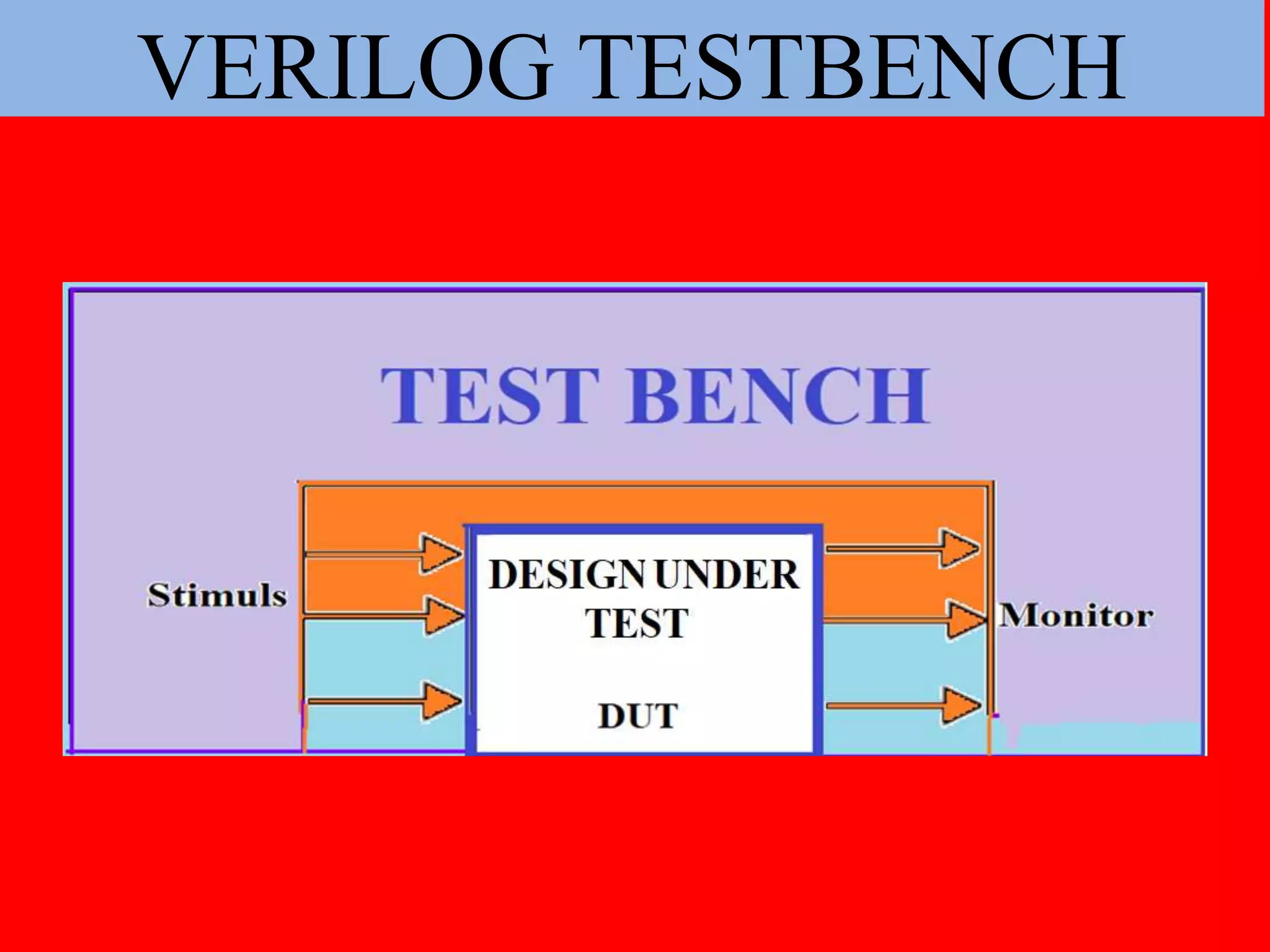
• The general architecture of a test bench is shown in
the next slide.
23 June 2020 yayavaram@yahoo.com 4
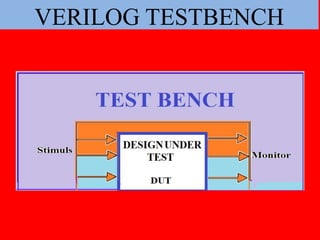
TEST BENCH STRUCTURE
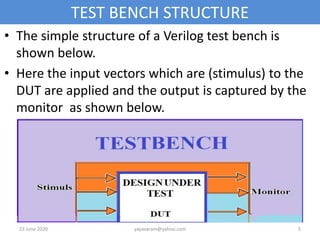
• The simple structure of a Verilog test bench is
shown below.
• Here the input vectors which are (stimulus) to the
DUT are applied and the output is captured by the
monitor as shown below.
23 June 2020 yayavaram@yahoo.com 5
Procedure
• First develop the design using the HDL Verilog.
• Develop the Testbench code using the same HDL
Verilog code.
• Instantiate a copy of the Design into TB.
• Apply (connect) different input vectors (Stimulus) to
the Design Under Test (DUT).
• Capture the output of the DUT to the monitor and
compare the output with the predefined expected
results.
23 June 2020 yayavaram@yahoo.com 6
contd
• If the captured output result is matched with the
predefined ,expected results ,then the design is bug
free.
• Else the designer is asked to redesign according to
the specs.
23 June 2020 yayavaram@yahoo.com 7
Test Bench Ex: NAND
• Let us consider a simple example of nand gate
design and its test bench verification.
Design code
• module mynand(Y,A,B);
input A,B;
output Y;
assign Y =~(A&B);
endmodule
23 June 2020 yayavaram@yahoo.com 8
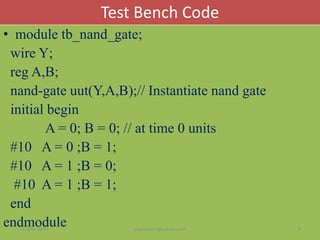
Test Bench Code
• module tb_nand_gate;
wire Y;
reg A,B;
nand-gate uut(Y,A,B);// Instantiate nand gate
initial begin
A = 0; B = 0; // at time 0 units
#10 A = 0 ;B = 1;
#10 A = 1 ;B = 0;
#10 A = 1 ;B = 1;
end
endmodule23 June 2020 yayavaram@yahoo.com 9
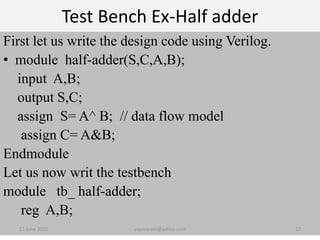
Test Bench Ex-Half adder
First let us write the design code using Verilog.
• module half-adder(S,C,A,B);
input A,B;
output S,C;
assign S= A^ B; // data flow model
assign C= A&B;
Endmodule
Let us now writ the testbench
module tb_ half-adder;
reg A,B;
23 June 2020 yayavaram@yahoo.com 10
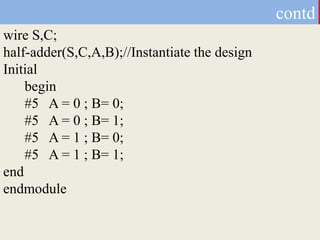
wire S,C;
half-adder(S,C,A,B);//Instantiate the design
Initial
begin
#5 A = 0 ; B= 0;
#5 A = 0 ; B= 1;
#5 A = 1 ; B= 0;
#5 A = 1 ; B= 1;
end
endmodule
contd
Ex: Full adder
First let us write the design code using Verilog.
• module full-adder(S,C0,A,B,C);
input A,B,C;
output S,C0;
assign S= A^ B^C; // data flow model
assign C0= (A&B)| (B&C)|(C&A);
endmodule
Let us now write the test bench
module tb_ full-adder;
reg A,B,C;
23 June 2020 yayavaram@yahoo.com 12
contd
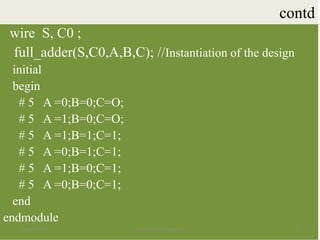
wire S, C0 ;
full_adder(S,C0,A,B,C); //Instantiation of the design
initial
begin
# 5 A =0;B=0;C=O;
# 5 A =1;B=0;C=O;
# 5 A =1;B=1;C=1;
# 5 A =0;B=1;C=1;
# 5 A =1;B=0;C=1;
# 5 A =0;B=0;C=1;
end
endmodule
23 June 2020 yayavaram@yahoo.com 13
Ex:Up Counter
module up_count (output reg[7:0] out,
input wire enable , input wire clk , input wire rst);
always @(posedge clk) //behavioural model
if (rst)
begin
out <= 8'b0;
end
else if (enable)
begin
out <= out+1;
end
endmodule
Up-Counter-TB
• module test_upcount;
wire [7:0]out;
reg enable, clk, rst;
upcount uut(out,enable,clk,rst); // Module Instantiation
initial begin
clk = 0;
rst = 1;
enable = 0; #20;
end
23 June 2020 yayavaram@yahoo.com 15
contd
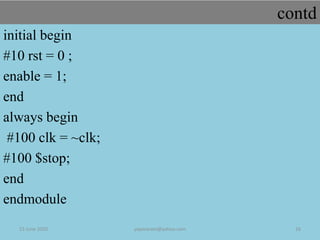
initial begin
#10 rst = 0 ;
enable = 1;
end
always begin
#100 clk = ~clk;
#100 $stop;
end
endmodule
23 June 2020 yayavaram@yahoo.com 16
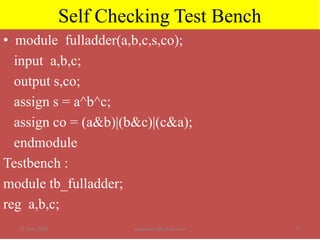
Self Checking Test Bench
• module fulladder(a,b,c,s,co);
input a,b,c;
output s,co;
assign s = a^b^c;
assign co = (a&b)|(b&c)|(c&a);
endmodule
Testbench :
module tb_fulladder;
reg a,b,c;
23 June 2020 yayavaram@yahoo.com 17
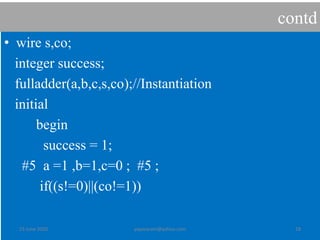
contd
• wire s,co;
integer success;
fulladder(a,b,c,s,co);//Instantiation
initial
begin
success = 1;
#5 a =1 ,b=1,c=0 ; #5 ;
if((s!=0)||(co!=1))
23 June 2020 yayavaram@yahoo.com 18
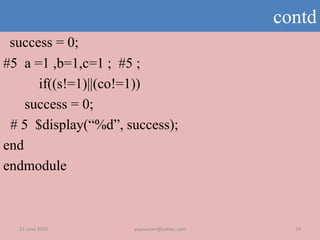
contd
success = 0;
#5 a =1 ,b=1,c=1 ; #5 ;
if((s!=1)||(co!=1))
success = 0;
# 5 $display(“%d”, success);
end
endmodule
23 June 2020 yayavaram@yahoo.com 19
23 June 2020 20yayavaram@yahoo.com
THANQ FOR WATCHINIG
GOOD LUCK !!

Verilog Test Bench

  • 1.
  • 2.
    • Once thedesign of a chip is completed its correctness must be verified or checked. • It means the designer must convince himself that the chip designed by him/her is functioning according to the specs. • So, to verify or check the correctness of a chip, a code using any HDL is developed, called the “Test Bench” • A test bench is defined as a HDL code to check the correctness of a chip, that provides the stimulus (input vectors) to the design. INTRODUCTION
  • 3.
    • Define inputsto the MUT or DUT as reg and output as wire.(MUT: Module Under Test). • As we have to initialize the DUT inputs inside the procedural block(s),typically ‘initial’ where only ‘reg’ type variables can be assigned. • This initial procedural block executes only once. • But always block can also be used to generate some test inputs ,like a clock signal. • Now, some test vectors are generated by the test bench which acts as stimulus and applied to the DUT. How to write a Testbench
  • 4.
    contd • The testbench also captures the behaviour of the device under test (DUT) by applying the set of input vectors generated and compare this result with predefined expected output. • In the process of verification, the simulator directives like $display , $monitor , $finish , $stop, $dumpfile, $dumpvars etc. are used. • The general architecture of a test bench is shown in the next slide. 23 June 2020 yayavaram@yahoo.com 4
  • 5.
    TEST BENCH STRUCTURE •The simple structure of a Verilog test bench is shown below. • Here the input vectors which are (stimulus) to the DUT are applied and the output is captured by the monitor as shown below. 23 June 2020 yayavaram@yahoo.com 5
  • 6.
    Procedure • First developthe design using the HDL Verilog. • Develop the Testbench code using the same HDL Verilog code. • Instantiate a copy of the Design into TB. • Apply (connect) different input vectors (Stimulus) to the Design Under Test (DUT). • Capture the output of the DUT to the monitor and compare the output with the predefined expected results. 23 June 2020 yayavaram@yahoo.com 6
  • 7.
    contd • If thecaptured output result is matched with the predefined ,expected results ,then the design is bug free. • Else the designer is asked to redesign according to the specs. 23 June 2020 yayavaram@yahoo.com 7
  • 8.
    Test Bench Ex:NAND • Let us consider a simple example of nand gate design and its test bench verification. Design code • module mynand(Y,A,B); input A,B; output Y; assign Y =~(A&B); endmodule 23 June 2020 yayavaram@yahoo.com 8
  • 9.
    Test Bench Code •module tb_nand_gate; wire Y; reg A,B; nand-gate uut(Y,A,B);// Instantiate nand gate initial begin A = 0; B = 0; // at time 0 units #10 A = 0 ;B = 1; #10 A = 1 ;B = 0; #10 A = 1 ;B = 1; end endmodule23 June 2020 yayavaram@yahoo.com 9
  • 10.
    Test Bench Ex-Halfadder First let us write the design code using Verilog. • module half-adder(S,C,A,B); input A,B; output S,C; assign S= A^ B; // data flow model assign C= A&B; Endmodule Let us now writ the testbench module tb_ half-adder; reg A,B; 23 June 2020 yayavaram@yahoo.com 10
  • 11.
    wire S,C; half-adder(S,C,A,B);//Instantiate thedesign Initial begin #5 A = 0 ; B= 0; #5 A = 0 ; B= 1; #5 A = 1 ; B= 0; #5 A = 1 ; B= 1; end endmodule contd
  • 12.
    Ex: Full adder Firstlet us write the design code using Verilog. • module full-adder(S,C0,A,B,C); input A,B,C; output S,C0; assign S= A^ B^C; // data flow model assign C0= (A&B)| (B&C)|(C&A); endmodule Let us now write the test bench module tb_ full-adder; reg A,B,C; 23 June 2020 yayavaram@yahoo.com 12
  • 13.
    contd wire S, C0; full_adder(S,C0,A,B,C); //Instantiation of the design initial begin # 5 A =0;B=0;C=O; # 5 A =1;B=0;C=O; # 5 A =1;B=1;C=1; # 5 A =0;B=1;C=1; # 5 A =1;B=0;C=1; # 5 A =0;B=0;C=1; end endmodule 23 June 2020 yayavaram@yahoo.com 13
  • 14.
    Ex:Up Counter module up_count(output reg[7:0] out, input wire enable , input wire clk , input wire rst); always @(posedge clk) //behavioural model if (rst) begin out <= 8'b0; end else if (enable) begin out <= out+1; end endmodule
  • 15.
    Up-Counter-TB • module test_upcount; wire[7:0]out; reg enable, clk, rst; upcount uut(out,enable,clk,rst); // Module Instantiation initial begin clk = 0; rst = 1; enable = 0; #20; end 23 June 2020 yayavaram@yahoo.com 15
  • 16.
    contd initial begin #10 rst= 0 ; enable = 1; end always begin #100 clk = ~clk; #100 $stop; end endmodule 23 June 2020 yayavaram@yahoo.com 16
  • 17.
    Self Checking TestBench • module fulladder(a,b,c,s,co); input a,b,c; output s,co; assign s = a^b^c; assign co = (a&b)|(b&c)|(c&a); endmodule Testbench : module tb_fulladder; reg a,b,c; 23 June 2020 yayavaram@yahoo.com 17
  • 18.
    contd • wire s,co; integersuccess; fulladder(a,b,c,s,co);//Instantiation initial begin success = 1; #5 a =1 ,b=1,c=0 ; #5 ; if((s!=0)||(co!=1)) 23 June 2020 yayavaram@yahoo.com 18
  • 19.
    contd success = 0; #5a =1 ,b=1,c=1 ; #5 ; if((s!=1)||(co!=1)) success = 0; # 5 $display(“%d”, success); end endmodule 23 June 2020 yayavaram@yahoo.com 19
  • 20.
    23 June 202020yayavaram@yahoo.com THANQ FOR WATCHINIG GOOD LUCK !!

Editor's Notes

  • #21 If the value of S is 1 ,then Y= B other wise Y= A