Available functions for Nano 5 Cards
I2C (I2C_FUNC.c):
// I2C Functions – Master
void i2c_start (void)
void i2c_stop (void)
bit i2c_write (unsigned char output_data)
unsigned char i2c_read (bit send_ack)
LCD (LCD_Func.c):
void sendCharLCD (unsigned char DIR_DISP, unsigned char CONT_DISP)
void SendStringLCD (unsigned short int LINE, char src[])
Example:
char string1[] = "-----Reference------";
SendStringLCD (2, string1); // line(1-4), string
void Clear_Screen (void)
Figure 1.- LCD interface using I2C communication
Pins definition (Init.h):
Example:
// Timers Tester & Cayenne Interface
sbit TEST_P23 = P2^3; // Control of Relay 1
sbit TEST_P22 = P2^2; // Control of Relay 2
sbit TEST_P21 = P2^1; // Reset
Initial conditions (BasicRut.c):
void System_Setup (void)
Example:
// %%%%%%%%%%%%%%%%%%%%%%%%%%%%%%%%%% UART Setup
// Initialize the serial port (115200, 8, N, 1) [see page 32 of data sheet]
PLLCON = 0x50;
SCON = 0x50; // 0101,0000 (Mode 1 and RxD enable)
T3CON = 0x83;
T3FD = 0x09;
TI = 1; // Set UART to send first char
Delays (BasicRut.c):
// delay of 0.1 mseg at 16MHz, fixed by oscilloscope
void delay01(unsigned int num_01delay)
// delay of 0.02 mseg at 16MHz, fixed by oscilloscope
void delay002(unsigned int num_01delay)
Relays (BasicRut.c):
// SET_Relay (RELAY, STATUS_R) // RELAY {LS1 == 0, LS2 == 1}, STATUS_R { 0 == OFF, 1 == ON}
void Set_Relay (bit RELAY, bit STATUS_R)
LED:
TEST_LED = 1; // LED == P2.5 // TEST_LED = {1 == OFF, 0 == ON}
Switch (BasicRut.c):
bit Get_Key(void) // KEY_FLAGE = 0 (Pressed), KEY_FLAGE = 1 (No Pressed)
void Wait_KitKey (void) // Wait for key pressed
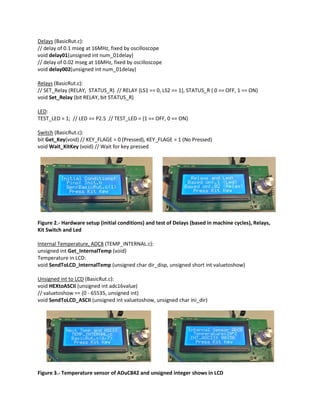
Figure 2.- Hardware setup (initial conditions) and test of Delays (based in machine cycles), Relays,
Kit Switch and Led
Internal Temperature, ADC8 (TEMP_INTERNAL.c):
unsigned int Get_InternalTemp (void)
Temperature in LCD:
void SendToLCD_InternalTemp (unsigned char dir_disp, unsigned short int valuetoshow)
Unsigned int to LCD (BasicRut.c):
void HEXtoASCII (unsigned int adc16value)
// valuetoshow == (0 - 65535, unsigned int)
void SendToLCD_ASCII (unsigned int valuetoshow, unsigned char ini_dir)
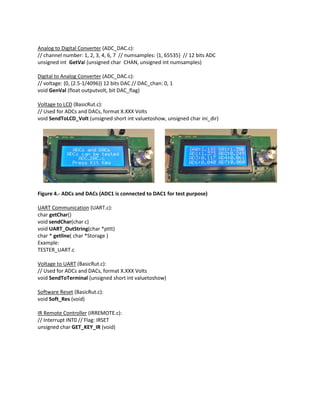
Figure 3.- Temperature sensor of ADuC842 and unsigned integer shows in LCD
Analog to Digital Converter (ADC_DAC.c):
// channel number: 1, 2, 3, 4, 6, 7 // numsamples: {1, 65535} // 12 bits ADC
unsigned int GetVal (unsigned char CHAN, unsigned int numsamples)
Digital to Analog Converter (ADC_DAC.c):
// voltage: {0, (2.5-1/4096)} 12 bits DAC // DAC_chan: 0, 1
void GenVal (float outputvolt, bit DAC_flag)
Voltage to LCD (BasicRut.c):
// Used for ADCs and DACs, format X.XXX Volts
void SendToLCD_Volt (unsigned short int valuetoshow, unsigned char ini_dir)
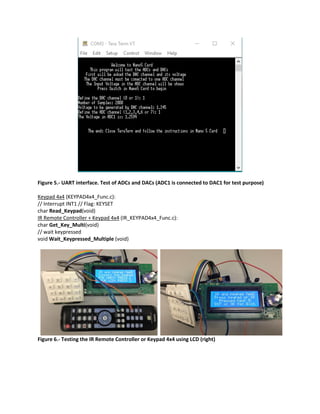
Figure 4.- ADCs and DACs (ADC1 is connected to DAC1 for test purpose)
UART Communication (UART.c):
char getChar()
void sendChar(char c)
void UART_OutString(char *pttt)
char * getline( char *Storage )
Example:
TESTER_UART.c
Voltage to UART (BasicRut.c):
// Used for ADCs and DACs, format X.XXX Volts
void SendToTerminal (unsigned short int valuetoshow)
Software Reset (BasicRut.c):
void Soft_Res (void)
IR Remote Controller (IRREMOTE.c):
// Interrupt INT0 // Flag: IRSET
unsigned char GET_KEY_IR (void)
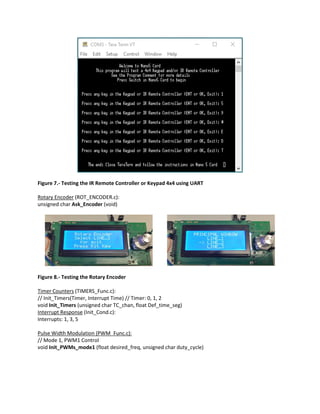
Figure 5.- UART interface. Test of ADCs and DACs (ADC1 is connected to DAC1 for test purpose)
Keypad 4x4 (KEYPAD4x4_Func.c):
// Interrupt INT1 // Flag: KEYSET
char Read_Keypad(void)
IR Remote Controller + Keypad 4x4 (IR_KEYPAD4x4_Func.c):
char Get_Key_Multi(void)
// wait keypressed
void Wait_Keypressed_Multiple (void)
Figure 6.- Testing the IR Remote Controller or Keypad 4x4 using LCD (right)
Figure 7.- Testing the IR Remote Controller or Keypad 4x4 using UART
Rotary Encoder (ROT_ENCODER.c):
unsigned char Ask_Encoder (void)
Figure 8.- Testing the Rotary Encoder
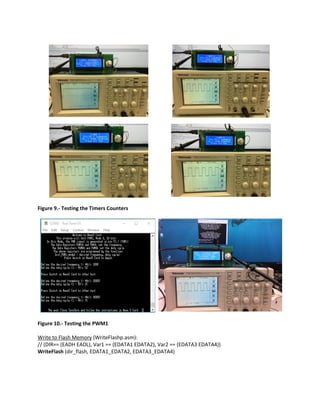
Timer Counters (TIMERS_Func.c):
// Init_Timers(Timer, Interrupt Time) // Timer: 0, 1, 2
void Init_Timers (unsigned char TC_chan, float Def_time_seg)
Interrupt Response (Init_Cond.c):
Interrupts: 1, 3, 5
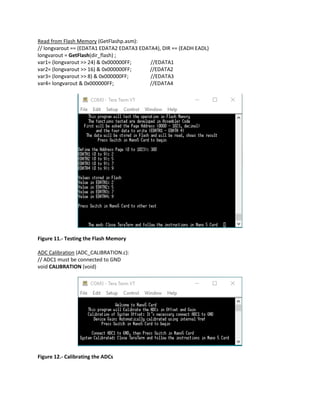
Pulse Width Modulation (PWM_Func.c):
// Mode 1, PWM1 Control
void Init_PWMs_mode1 (float desired_freq, unsigned char duty_cycle)
Figure 9.- Testing the Timers Counters
Figure 10.- Testing the PWM1
Write to Flash Memory (WriteFlashp.asm):
// (DIR== (EADH EADL), Var1 == (EDATA1 EDATA2), Var2 == (EDATA3 EDATA4))
WriteFlash (dir_flash, EDATA1_EDATA2, EDATA3_EDATA4)
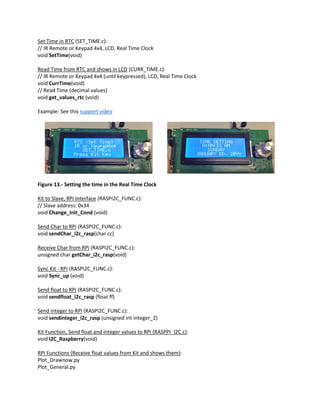
Read from Flash Memory (GetFlashp.asm):
// longvarout == (EDATA1 EDATA2 EDATA3 EDATA4), DIR == (EADH EADL)
longvarout = GetFlash(dir_flash) ;
var1= (longvarout >> 24) & 0x000000FF; //EDATA1
var2= (longvarout >> 16) & 0x000000FF; //EDATA2
var3= (longvarout >> 8) & 0x000000FF; //EDATA3
var4= longvarout & 0x000000FF; //EDATA4
Figure 11.- Testing the Flash Memory
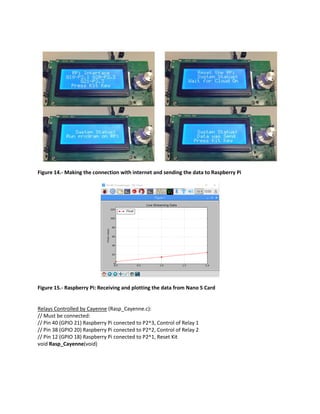
ADC Calibration (ADC_CALIBRATION.c):
// ADC1 must be connected to GND
void CALIBRATION (void)
Figure 12.- Calibrating the ADCs
Set Time in RTC (SET_TIME.c):
// IR Remote or Keypad 4x4, LCD, Real Time Clock
void SetTime(void)
Read Time from RTC and shows in LCD (CURR_TIME.c):
// IR Remote or Keypad 4x4 (until keypressed), LCD, Real Time Clock
void CurrTime(void)
// Read Time (decimal values)
void get_values_rtc (void)
Example: See this support video
Figure 13.- Setting the time in the Real Time Clock
Kit to Slave, RPi Interface (RASPI2C_FUNC.c):
// Slave address: 0x34
void Change_Init_Cond (void)
Send Char to RPi (RASPI2C_FUNC.c):
void sendChar_i2c_rasp(char cc)
Receive Char from RPi (RASPI2C_FUNC.c):
unsigned char getChar_i2c_rasp(void)
Sync Kit - RPi (RASPI2C_FUNC.c):
void Sync_up (void)
Send float to RPi (RASPI2C_FUNC.c):
void sendfloat_i2c_rasp (float ff)
Send integer to RPi (RASPI2C_FUNC.c):
void sendinteger_i2c_rasp (unsigned int integer_2)
Kit Function, Send float and integer values to RPi (RASPPI_I2C.c):
void I2C_Raspberry(void)
RPI Functions (Receive float values from Kit and shows them):
Plot_Drawnow.py
Plot_General.py
Figure 14.- Making the connection with internet and sending the data to Raspberry Pi
Figure 15.- Raspberry Pi: Receiving and plotting the data from Nano 5 Card
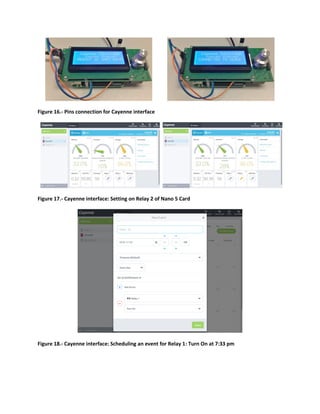
Relays Controlled by Cayenne (Rasp_Cayenne.c):
// Must be connected:
// Pin 40 (GPIO 21) Raspberry Pi conected to P2^3, Control of Relay 1
// Pin 38 (GPIO 20) Raspberry Pi conected to P2^2, Control of Relay 2
// Pin 12 (GPIO 18) Raspberry Pi conected to P2^1, Reset Kit
void Rasp_Cayenne(void)
Figure 16.- Pins connection for Cayenne interface
Figure 17.- Cayenne interface: Setting on Relay 2 of Nano 5 Card
Figure 18.- Cayenne interface: Scheduling an event for Relay 1: Turn On at 7:33 pm

Functions for Nano 5 Card

  • 1.
    Available functions forNano 5 Cards I2C (I2C_FUNC.c): // I2C Functions – Master void i2c_start (void) void i2c_stop (void) bit i2c_write (unsigned char output_data) unsigned char i2c_read (bit send_ack) LCD (LCD_Func.c): void sendCharLCD (unsigned char DIR_DISP, unsigned char CONT_DISP) void SendStringLCD (unsigned short int LINE, char src[]) Example: char string1[] = "-----Reference------"; SendStringLCD (2, string1); // line(1-4), string void Clear_Screen (void) Figure 1.- LCD interface using I2C communication Pins definition (Init.h): Example: // Timers Tester & Cayenne Interface sbit TEST_P23 = P2^3; // Control of Relay 1 sbit TEST_P22 = P2^2; // Control of Relay 2 sbit TEST_P21 = P2^1; // Reset Initial conditions (BasicRut.c): void System_Setup (void) Example: // %%%%%%%%%%%%%%%%%%%%%%%%%%%%%%%%%% UART Setup // Initialize the serial port (115200, 8, N, 1) [see page 32 of data sheet] PLLCON = 0x50; SCON = 0x50; // 0101,0000 (Mode 1 and RxD enable) T3CON = 0x83; T3FD = 0x09; TI = 1; // Set UART to send first char
  • 2.
    Delays (BasicRut.c): // delayof 0.1 mseg at 16MHz, fixed by oscilloscope void delay01(unsigned int num_01delay) // delay of 0.02 mseg at 16MHz, fixed by oscilloscope void delay002(unsigned int num_01delay) Relays (BasicRut.c): // SET_Relay (RELAY, STATUS_R) // RELAY {LS1 == 0, LS2 == 1}, STATUS_R { 0 == OFF, 1 == ON} void Set_Relay (bit RELAY, bit STATUS_R) LED: TEST_LED = 1; // LED == P2.5 // TEST_LED = {1 == OFF, 0 == ON} Switch (BasicRut.c): bit Get_Key(void) // KEY_FLAGE = 0 (Pressed), KEY_FLAGE = 1 (No Pressed) void Wait_KitKey (void) // Wait for key pressed Figure 2.- Hardware setup (initial conditions) and test of Delays (based in machine cycles), Relays, Kit Switch and Led Internal Temperature, ADC8 (TEMP_INTERNAL.c): unsigned int Get_InternalTemp (void) Temperature in LCD: void SendToLCD_InternalTemp (unsigned char dir_disp, unsigned short int valuetoshow) Unsigned int to LCD (BasicRut.c): void HEXtoASCII (unsigned int adc16value) // valuetoshow == (0 - 65535, unsigned int) void SendToLCD_ASCII (unsigned int valuetoshow, unsigned char ini_dir) Figure 3.- Temperature sensor of ADuC842 and unsigned integer shows in LCD
  • 3.
    Analog to DigitalConverter (ADC_DAC.c): // channel number: 1, 2, 3, 4, 6, 7 // numsamples: {1, 65535} // 12 bits ADC unsigned int GetVal (unsigned char CHAN, unsigned int numsamples) Digital to Analog Converter (ADC_DAC.c): // voltage: {0, (2.5-1/4096)} 12 bits DAC // DAC_chan: 0, 1 void GenVal (float outputvolt, bit DAC_flag) Voltage to LCD (BasicRut.c): // Used for ADCs and DACs, format X.XXX Volts void SendToLCD_Volt (unsigned short int valuetoshow, unsigned char ini_dir) Figure 4.- ADCs and DACs (ADC1 is connected to DAC1 for test purpose) UART Communication (UART.c): char getChar() void sendChar(char c) void UART_OutString(char *pttt) char * getline( char *Storage ) Example: TESTER_UART.c Voltage to UART (BasicRut.c): // Used for ADCs and DACs, format X.XXX Volts void SendToTerminal (unsigned short int valuetoshow) Software Reset (BasicRut.c): void Soft_Res (void) IR Remote Controller (IRREMOTE.c): // Interrupt INT0 // Flag: IRSET unsigned char GET_KEY_IR (void)
  • 4.
    Figure 5.- UARTinterface. Test of ADCs and DACs (ADC1 is connected to DAC1 for test purpose) Keypad 4x4 (KEYPAD4x4_Func.c): // Interrupt INT1 // Flag: KEYSET char Read_Keypad(void) IR Remote Controller + Keypad 4x4 (IR_KEYPAD4x4_Func.c): char Get_Key_Multi(void) // wait keypressed void Wait_Keypressed_Multiple (void) Figure 6.- Testing the IR Remote Controller or Keypad 4x4 using LCD (right)
  • 5.
    Figure 7.- Testingthe IR Remote Controller or Keypad 4x4 using UART Rotary Encoder (ROT_ENCODER.c): unsigned char Ask_Encoder (void) Figure 8.- Testing the Rotary Encoder Timer Counters (TIMERS_Func.c): // Init_Timers(Timer, Interrupt Time) // Timer: 0, 1, 2 void Init_Timers (unsigned char TC_chan, float Def_time_seg) Interrupt Response (Init_Cond.c): Interrupts: 1, 3, 5 Pulse Width Modulation (PWM_Func.c): // Mode 1, PWM1 Control void Init_PWMs_mode1 (float desired_freq, unsigned char duty_cycle)
  • 6.
    Figure 9.- Testingthe Timers Counters Figure 10.- Testing the PWM1 Write to Flash Memory (WriteFlashp.asm): // (DIR== (EADH EADL), Var1 == (EDATA1 EDATA2), Var2 == (EDATA3 EDATA4)) WriteFlash (dir_flash, EDATA1_EDATA2, EDATA3_EDATA4)
  • 7.
    Read from FlashMemory (GetFlashp.asm): // longvarout == (EDATA1 EDATA2 EDATA3 EDATA4), DIR == (EADH EADL) longvarout = GetFlash(dir_flash) ; var1= (longvarout >> 24) & 0x000000FF; //EDATA1 var2= (longvarout >> 16) & 0x000000FF; //EDATA2 var3= (longvarout >> 8) & 0x000000FF; //EDATA3 var4= longvarout & 0x000000FF; //EDATA4 Figure 11.- Testing the Flash Memory ADC Calibration (ADC_CALIBRATION.c): // ADC1 must be connected to GND void CALIBRATION (void) Figure 12.- Calibrating the ADCs
  • 8.
    Set Time inRTC (SET_TIME.c): // IR Remote or Keypad 4x4, LCD, Real Time Clock void SetTime(void) Read Time from RTC and shows in LCD (CURR_TIME.c): // IR Remote or Keypad 4x4 (until keypressed), LCD, Real Time Clock void CurrTime(void) // Read Time (decimal values) void get_values_rtc (void) Example: See this support video Figure 13.- Setting the time in the Real Time Clock Kit to Slave, RPi Interface (RASPI2C_FUNC.c): // Slave address: 0x34 void Change_Init_Cond (void) Send Char to RPi (RASPI2C_FUNC.c): void sendChar_i2c_rasp(char cc) Receive Char from RPi (RASPI2C_FUNC.c): unsigned char getChar_i2c_rasp(void) Sync Kit - RPi (RASPI2C_FUNC.c): void Sync_up (void) Send float to RPi (RASPI2C_FUNC.c): void sendfloat_i2c_rasp (float ff) Send integer to RPi (RASPI2C_FUNC.c): void sendinteger_i2c_rasp (unsigned int integer_2) Kit Function, Send float and integer values to RPi (RASPPI_I2C.c): void I2C_Raspberry(void) RPI Functions (Receive float values from Kit and shows them): Plot_Drawnow.py Plot_General.py
  • 9.
    Figure 14.- Makingthe connection with internet and sending the data to Raspberry Pi Figure 15.- Raspberry Pi: Receiving and plotting the data from Nano 5 Card Relays Controlled by Cayenne (Rasp_Cayenne.c): // Must be connected: // Pin 40 (GPIO 21) Raspberry Pi conected to P2^3, Control of Relay 1 // Pin 38 (GPIO 20) Raspberry Pi conected to P2^2, Control of Relay 2 // Pin 12 (GPIO 18) Raspberry Pi conected to P2^1, Reset Kit void Rasp_Cayenne(void)
  • 10.
    Figure 16.- Pinsconnection for Cayenne interface Figure 17.- Cayenne interface: Setting on Relay 2 of Nano 5 Card Figure 18.- Cayenne interface: Scheduling an event for Relay 1: Turn On at 7:33 pm