Downloaded 40 times
![Create a concatenated field in a query
Concatenated fields combine information from two or more fields into one. Ex: Combine first and last
names into one field, called “FullName”. In Design View, click in a blank column and type the following:
FullName:[FirstName]&" "&[LastName]
(Type a space between the two sets of quotation marks, and use square brackets around the field
names.)
Create a calculated field in a query
In Design View, click in a blank column and type a mathematical expression, typing field names in
square brackets. Any of the normal mathematical operators (+ - * / ^) can be used. If desired, give the
expression a name as in the sample below. The following expression calculates a total cost by
multiplying quantity times price:
Item Total:[Quantity]*[Price]
Use the Expression Builder to create calculated
or concatenated fields
You can simplify the process of creating concatenated
fields and other expressions with the Expression Builder. Create a blank column in your query grid and
then click the Builder button in the Query Setup group on the Query Design Ribbon. The Expression
Builder opens.
Type the expression in the large
box at the top. One advantage is
that you have way more room to
type and see your expression
than you have at the top of a
query grid column!
A second advantage is that you
can add fields to the expression by
double clicking them in the
Expression Categories column
rather than by typing them. This
removes the possibility of typos.](https://image.slidesharecdn.com/access5pdf-140525121022-phpapp02/85/MS-Access-2010-tutorial-5-3-320.jpg)
![Between And Between 1 and 4 Finds records where the field is between the endpoints.
Is Null Is Null Finds records where the field is empty.
Is Not Null Is Not Null Finds records where the field is not empty.
Like Like U*
Like "[U-X]*"
Like "*Korea*"
Like "*ina"
Like "Chi??"
Like "*4.99"
Finds records where the criteria match parts of the field.
The * wildcard stands for any number of characters, and
the ? wildcard stands for a single character.
The sample criteria will return records where the field
1) starts with U; 2) starts with U, V, W or X, 3) contains
the letters ‘Korea’; 4) ends in the letters ‘ina’ as in
ballerina; 5) has five letters and begins with the letters
‘Chi’ as in Chile or China; 6) is a number and ends in the
digits ‘4.99’ as in 24.99.
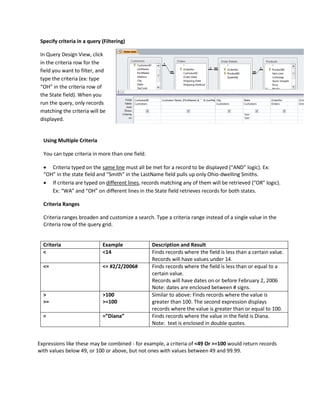
Create a parameter query
Parameters make queries flexible by letting users choose their own criteria each time they run the
query. In the criteria box, type a phrase in square brackets; Access will use this phrase to prompt the
user for a value. Ex: In a State field, type [Enter a state]. If the user types CA, only California
records will be retrieved.
Specify a range in a parameter query
In the criteria box, type the following:
Between [ ] And [ ]
Inside the brackets, type text telling the user what kind of information to enter.
Inner Joins vs. Outer Joins
Excel normally uses inner joins in its queries. These queries return only those rows from both tables in
the join that match on the joining field (e.g., customers in the Customers table with corresponding
orders in the Orders table.)
If you need to display all customers, with or without orders, as well as any available order information,
you need to use an outer join.
In the query tray, double click the join line between two related tables. The Join Properties dialog
box will appear:](https://image.slidesharecdn.com/access5pdf-140525121022-phpapp02/85/MS-Access-2010-tutorial-5-6-320.jpg)
![Select button 2 or 3 depending on which field’s records you want to display completely.
Action Queries
Action queries modify groups of records in one fell swoop. Types of action queries include:
Update Queries (modify all records in a table that meet specific criteria – ex: change the tax rate
for all Ohio customers from 5.75% to 6%)
Delete Queries (remove records from a table – ex: delete all customers whose last order date
is more than 2 years ago)
Append Queries (add records to an existing table – ex: at the end of the year, add the year's
orders to the end of an archive table)
Make-table Queries (create a new table – ex: extract a subset of records into a new table, for
a subordinate who needs Ohio customers only)
Note: Undo will NOT undo the results of action queries!
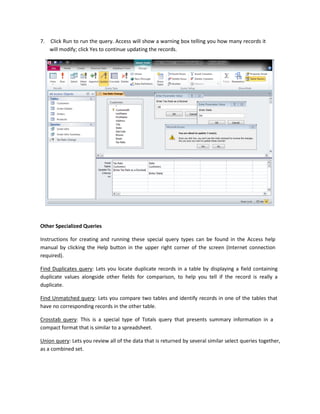
Create an update query
1. Create a new table in Design View. Add the table you will be updating.
2. Add the following fields to the query:
a. The field you will be updating and
b. The fields you need as criteria.
For example, if you are changing the sales tax for all businesses in Cuyahoga County, you
would need to add a Sales Tax field and a County field to your query.
3. Change the query type to an update query by clicking the Update button in the Query Type group
on the Query Tools Design toolbar:
4. In the Criteria row of the query, type criteria to select the records that will be changed.
5. In the Update To row of the query, add an expression to update the desired fields.
(example: [Price]*1.1 will raise all the values in the Price field by 10%.)
(Note: You can use parameters in the Criteria and/or Update To rows.)
6. Click the View button ( ) to preview records that will be affected; click it again ( )
to return to design view.](https://image.slidesharecdn.com/access5pdf-140525121022-phpapp02/85/MS-Access-2010-tutorial-5-7-320.jpg)

This document provides instructions for creating various types of queries in Microsoft Access 2010, including select, update, parameter, and totals queries. It explains how to add and sort fields, apply filters and criteria, perform calculations, and summarize data. Key steps covered include adding tables to a query, specifying criteria ranges, creating calculated and concatenated fields, running action queries, and using parameters and joins. The practice assignment demonstrates how to build queries that pull donor data, calculate contribution totals and averages, and allow filtering by date range.


