MODULE 3
QUERIES
ALEXANDER BABICH
ALEXANDER.TAURUS@GMAIL.COM
MODULE OVERVIEW
• Concepts related to queries.Visual query building tools
• Query Designer. Data selection conditions
• Create calculated fields. Using the Expression Builder
• Query with group operations
• Create a table with a query. Update data. Put a new data
• Data deletion. Crosstab queries
LESSON 1: SIMPLE QUERIES
• Concepts related to queries.Visual query building
tools
• Query Designer. Data selection conditions
• Create calculated fields. Using the Expression
Builder
QUERIES
• A tools to get answers to
questions
• selection of certain records
from the database
• update tables
• inclusion of new records
• The concept of the same
order as the filters
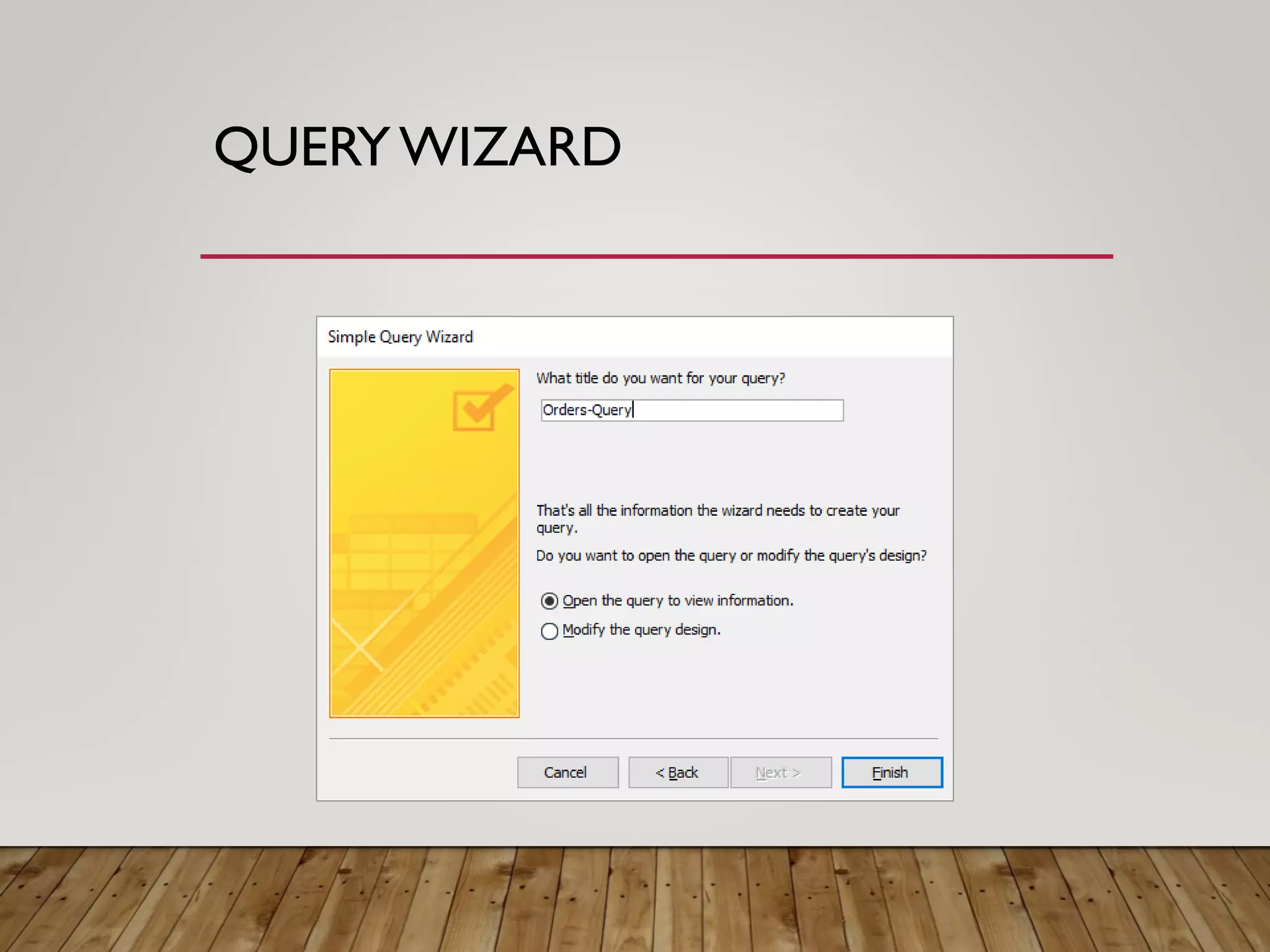
QUERYWIZARD
Simple Query Wizard
QUERYWIZARD
QUERYWIZARD
QUERYWIZARD
QUERYWIZARD
QUERY DESIGNER
QUERY DESIGNER
SELECTION CRITERIA
boolean expression
• >30
• =‘Smith‘,‘Smith’
• =10, 10
• Like [prompt]
• Or, And
• Between, Is, In
CALCULATED FIELDS
Fields that are the result of calculations over the values of
other fields
SHIFT+F2
EXPRESSION BUILDER
Ability to search and
insert expression
components
• Identifiers
• Field names
• Spreadsheets
• Form
• Requests
• Function Names and
Arguments
• Can be used in tables,
forms, reports, queries
EXERCISE
1. Supplement your database
with relevant queries
2. Use selection criteria and
calculated fields
LESSON 2: MORE COMPLEX
QUERIES
• Query with group operations
• Create a table with a query. Update data.
Put a new data
• Data deletion. Crosstab queries
TYPES OF QUERIES
• Select query
• extract information from one or several tables, forming
a temporary table on their basis
• Change query
• creating new tables or making changes to existing ones
• Crosstab query
• summarize data from one or more related tables and
form a new table
• Query with parameter
• Actually are not separate requests.
• SQL query
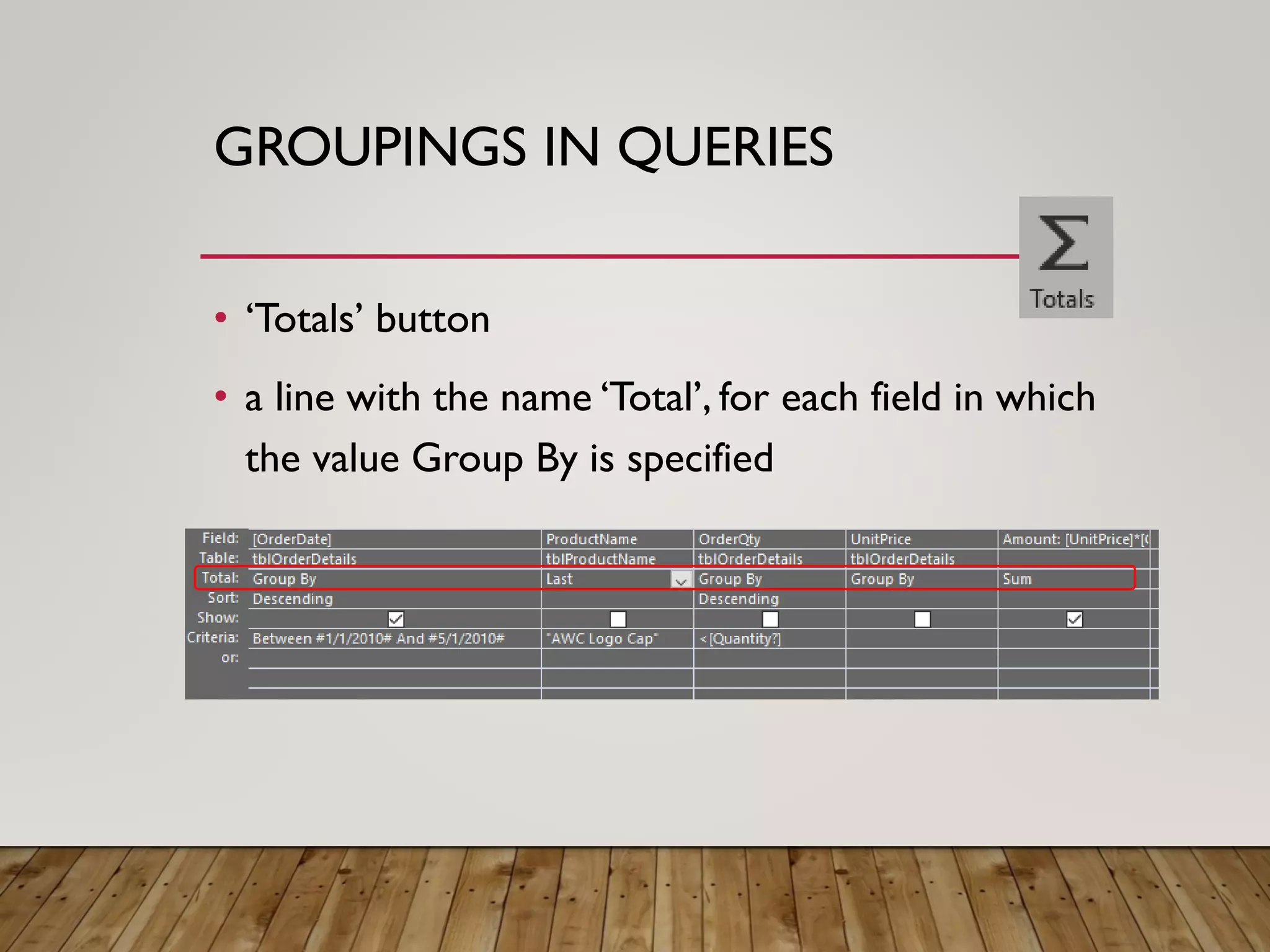
GROUPINGS IN QUERIES
• ‘Totals’ button
• a line with the name ‘Total’, for each field in which
the value Group By is specified
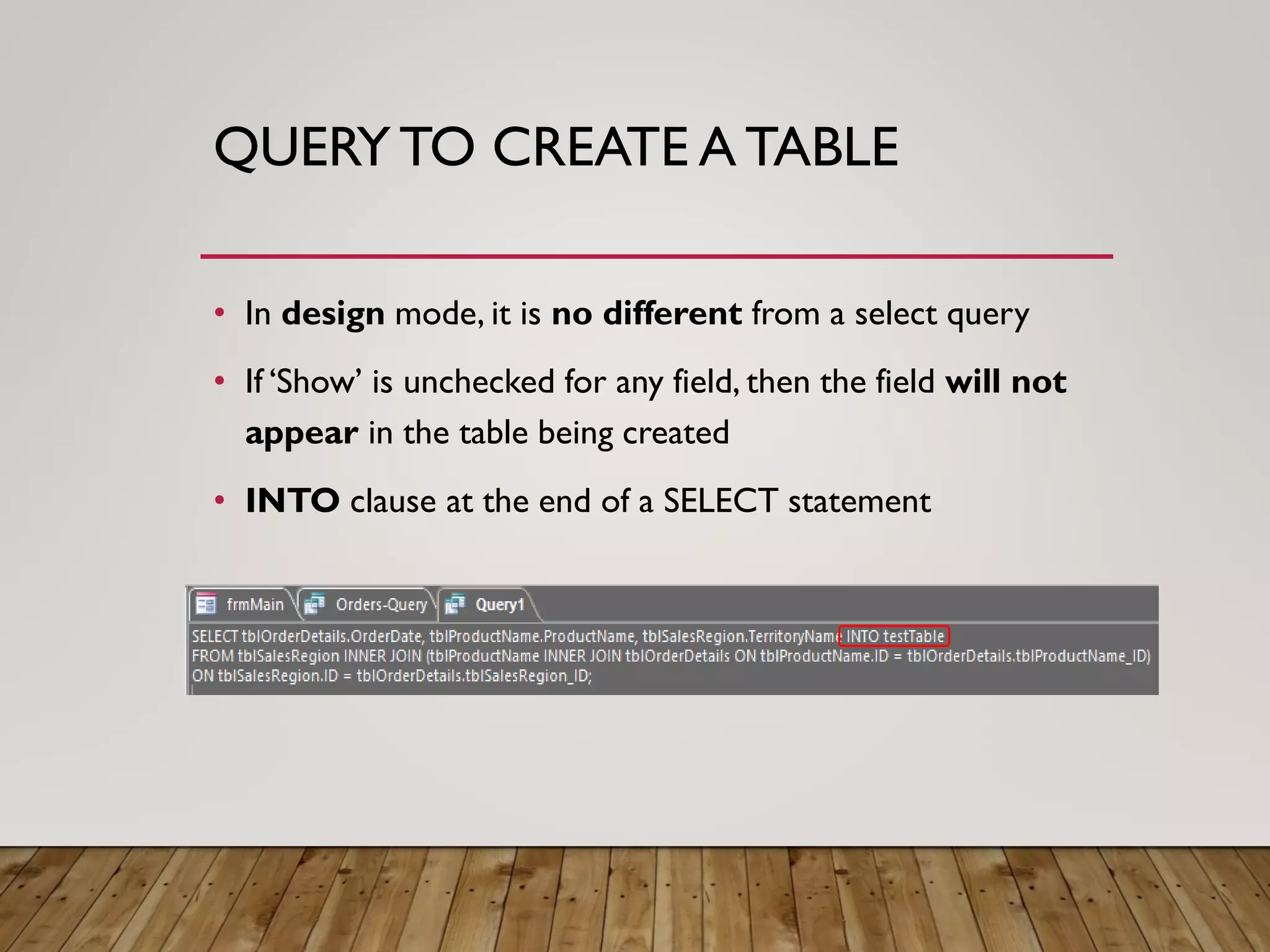
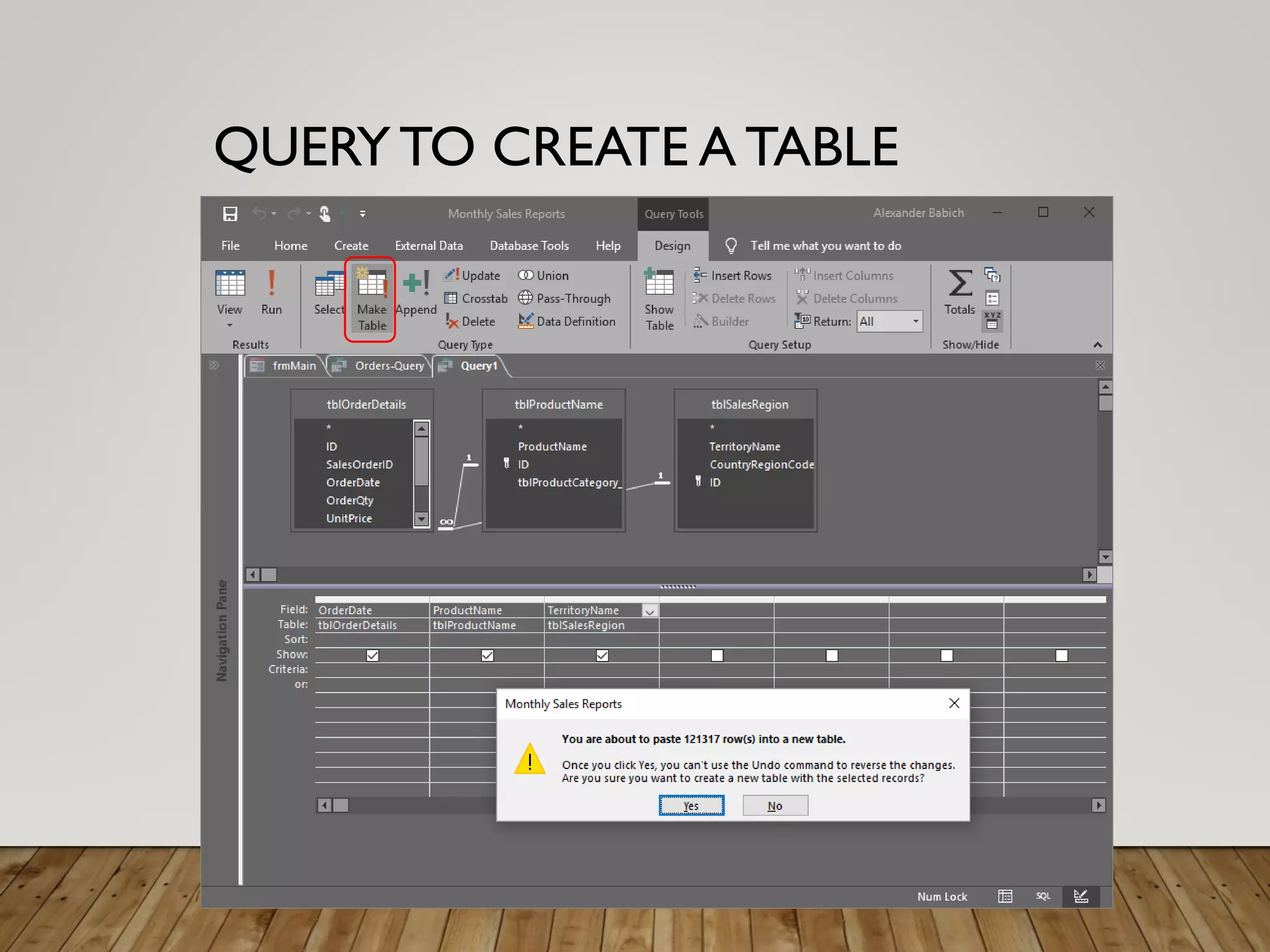
QUERYTO CREATE A TABLE
• In design mode, it is no different from a select query
• If ‘Show’ is unchecked for any field, then the field will not
appear in the table being created
• INTO clause at the end of a SELECT statement
QUERYTO CREATE A TABLE
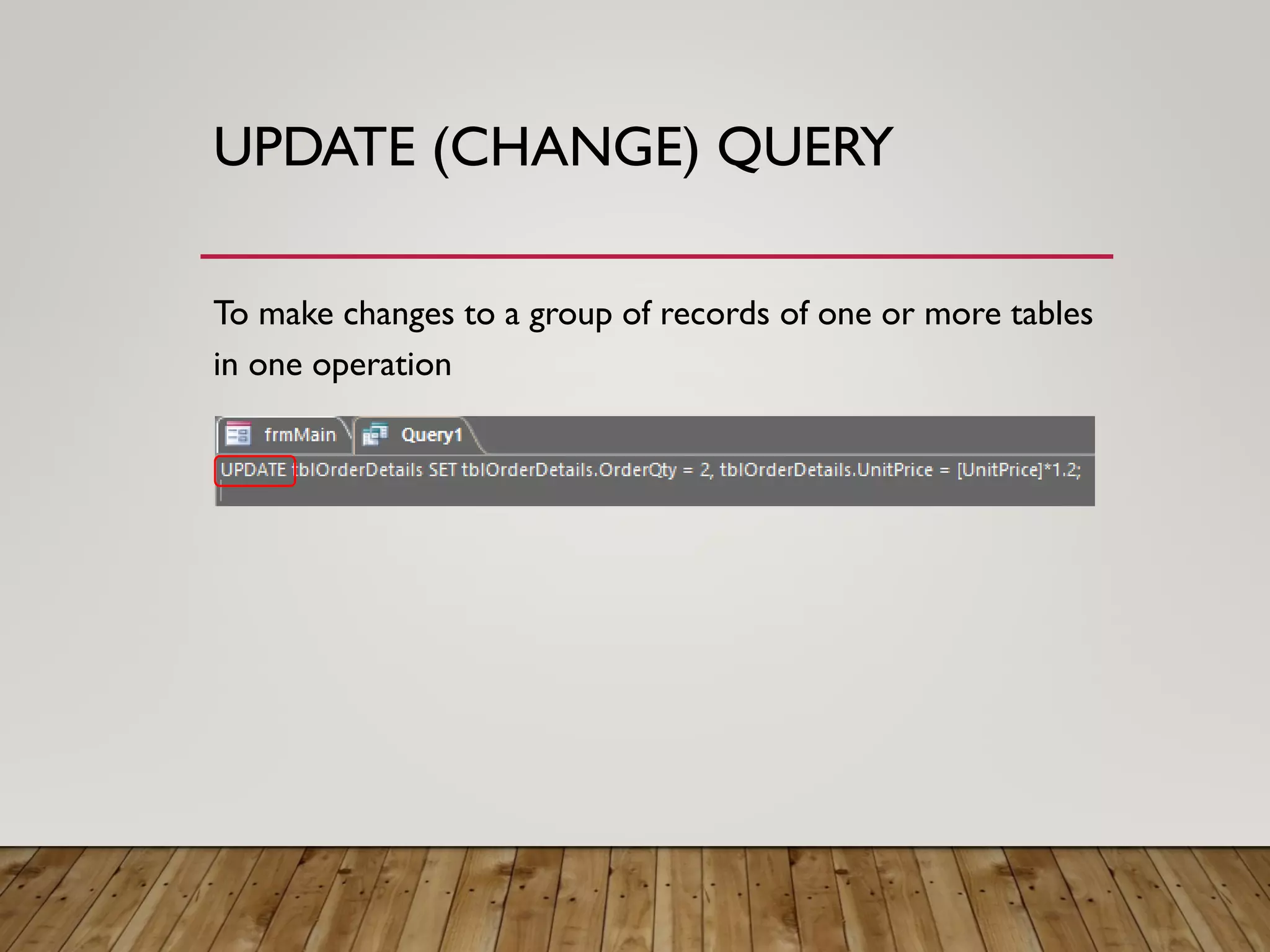
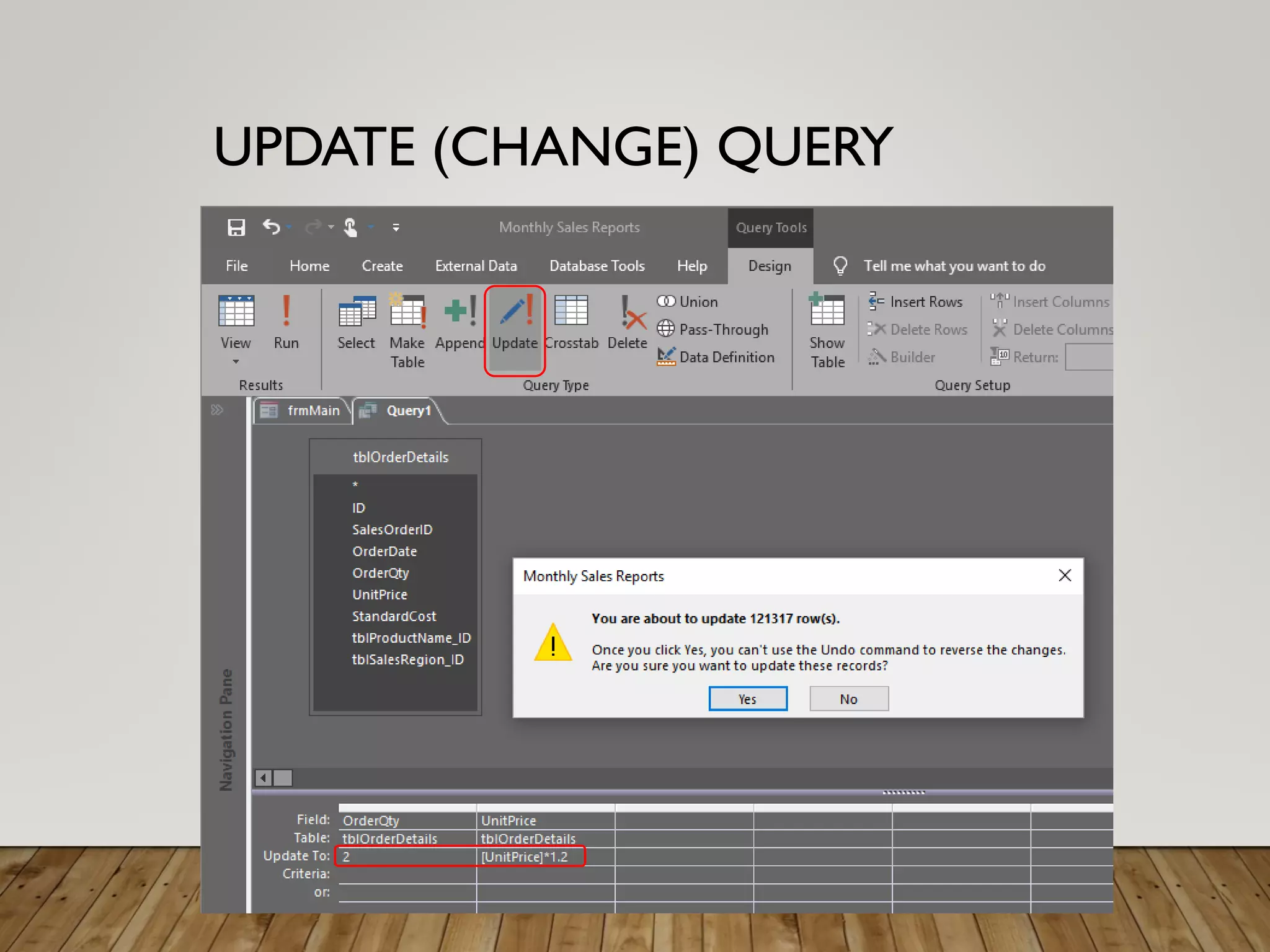
UPDATE (CHANGE) QUERY
To make changes to a group of records of one or more tables
in one operation
UPDATE (CHANGE) QUERY
ADD (CHANGE) QUERY
• Copying records from one table to another
• Adding records from different tables
• Adding records containing calculated fields
• Copy temporary dataset to target table
• Adding records to a table in an external
(temporary) database
ADD (CHANGE) QUERY
DELETE (CHANGE) QUERY
• Query to delete all records from the table
(clearing the table)
• Query for deletion with a limit on the number of
records to be deleted
• Delete query using external table join
DELETE (CHANGE) QUERY
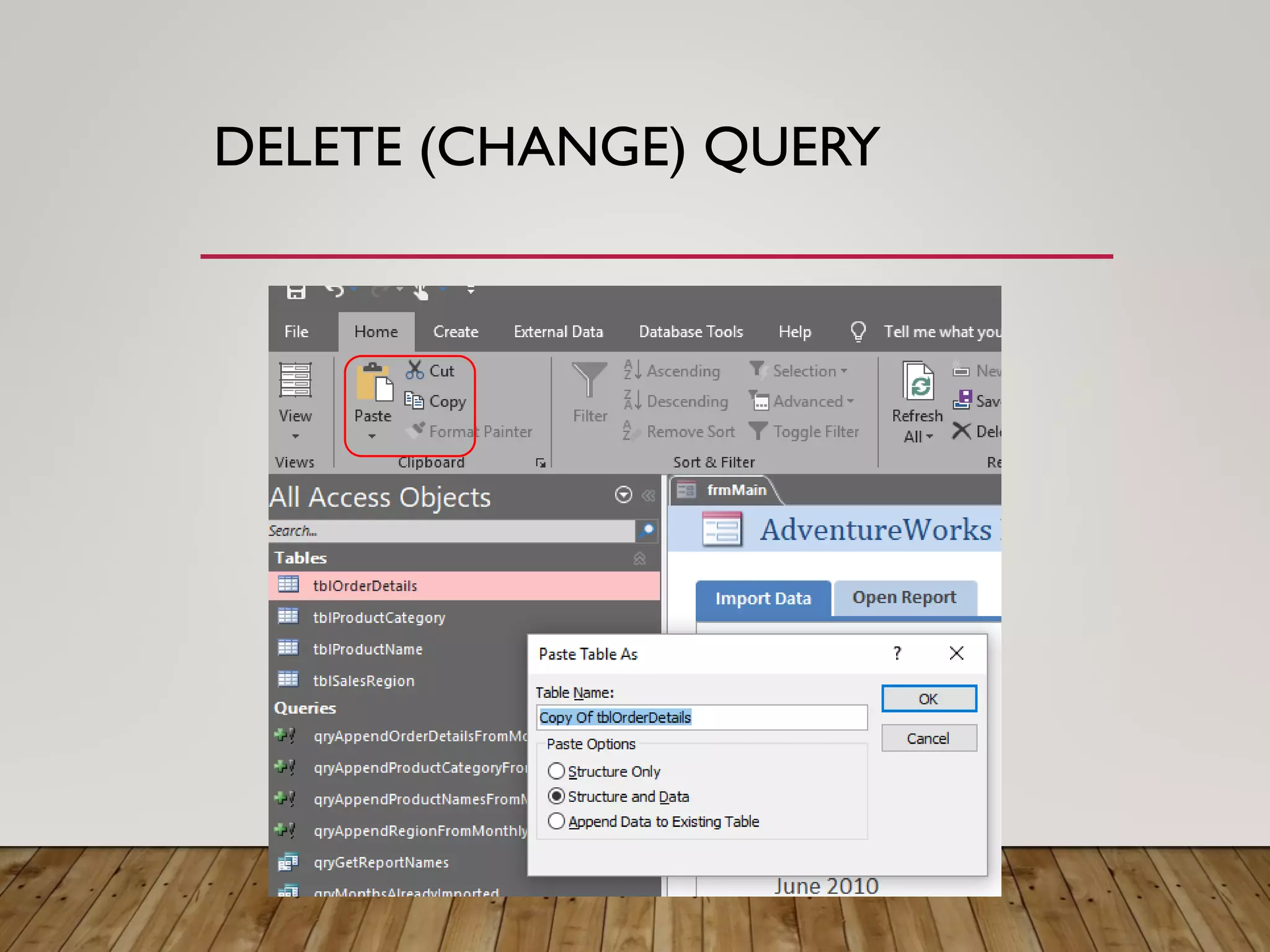
• First you need to create a copy of the table.
• select ‘Copy’ from the context menu
(or from ribbon, or just CTRL+C)
• Paste (CTRL+V)
• Structure Only – empty table
• Structure and Data – same dataset
• Append Data to ExistingTable
DELETE (CHANGE) QUERY
Query to delete all records from the table (clearing the table)
DELETE * FROM [...];
QUERYWITH A LIMIT ONTHE NUMBER
OF RECORDSTO BE DELETED
DELETE QUERY USING EXTERNAL
TABLE JOIN
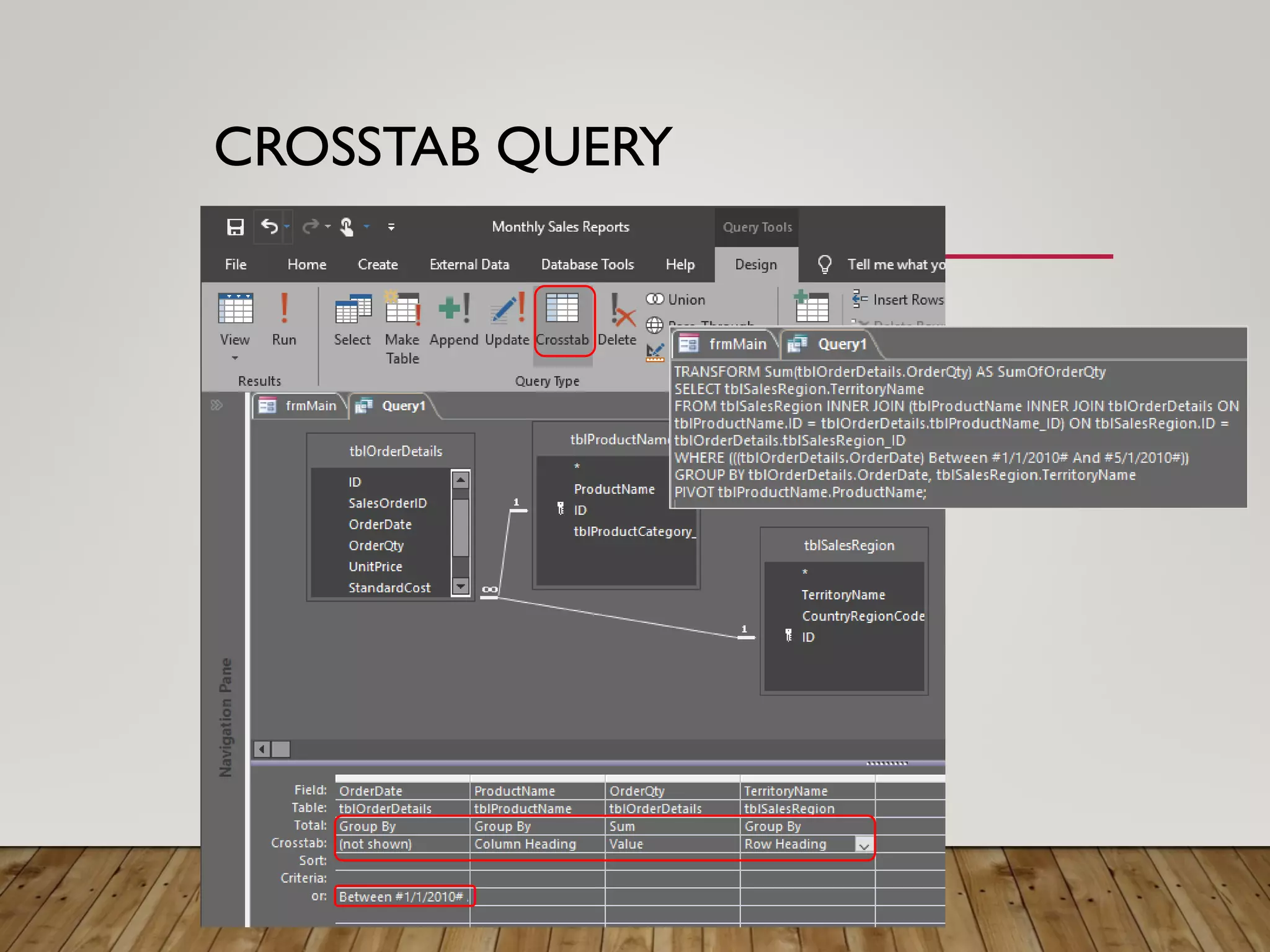
CROSSTAB QUERY
• For in-depth analysis of the information stored in the
tables
• Very similar to the pivot table
CROSSTAB QUERY
TEST QUESTION
When you first create a query, you select which of the following?
(Pick one answer)
1. A record source
2. A system table
3. A record set
TEST QUESTION
The record source can be a combination of tables and
queries
When you first create a query, you select which of the following?
Answer:
1. A record source
TEST QUESTION
Use criteria in a query when you need to do which of the following?
(Pick one answer)
1. Ensure your data is properly formatted
2. Add formulas to a table
3. Sort, filter, or otherwise limit what the query returns
TEST QUESTION
Criteria can be quite powerful, too. For example, you can use
criteria to find records for people who live in a given city and
have birthdays that fall between dates that you specify
Use criteria in a query when you need to do which of the following?
Answer:
3. Sort, filter, or otherwise limit what the query returns
TEST QUESTION
Before you can use multiple tables as a record source,
those tables must: (Pick one answer)
1. Be open in Datasheet view
2. Participate in a relationship
3. Not serve as the record source for another query
TEST QUESTION
If the tables don’t participate in a relationship, the query
returns all the data in each table, and the results are almost
always meaningless
Before you can use multiple tables as a record source, those tables
must:
Answer:
2. Participate in a relationship
TEST QUESTION
An expression is: (Pick one answer)
1. A formula stored in one or more database tables
2. A formula that just calculates dates
3. An object that can perform calculations and other tasks
such as data validation
TEST QUESTION
This course has shown you a couple of ways to use expressions.
The Quick Reference Card that’s linked to at the end points you
to a lot more information about them
An expression is:
Answer:
3. An object that can perform calculations and other
tasks such as data validation
TEST QUESTION
This module has taught you everything you need to know about
queries (Pick one answer)
1. True
2. False
TEST QUESTION
This module has taught you everything you need to know about
queries
Answer:
2. False
EXERCISE
Supplement your database with
suitable queries of different
types
BOTTOM LINE
• The concepts of queries.Visual query building tools
• Query Builder.Writing data selection conditions
• Creating Calculated Fields. Using Expression Builder
• Select query with group operations
• Create table with query. Update query. Add query
• Delete query. Crosstab query
QUESTIONS?
SELF-TEST
• What types of queries you can use in Access?
• What are calculated fields and how are they
created?
• How do different types of requests differ from
each other?
• What is the use of crosstab queries?

Access 03

  • 1.
  • 2.
    MODULE OVERVIEW • Conceptsrelated to queries.Visual query building tools • Query Designer. Data selection conditions • Create calculated fields. Using the Expression Builder • Query with group operations • Create a table with a query. Update data. Put a new data • Data deletion. Crosstab queries
  • 3.
    LESSON 1: SIMPLEQUERIES • Concepts related to queries.Visual query building tools • Query Designer. Data selection conditions • Create calculated fields. Using the Expression Builder
  • 4.
    QUERIES • A toolsto get answers to questions • selection of certain records from the database • update tables • inclusion of new records • The concept of the same order as the filters
  • 5.
  • 6.
  • 7.
  • 8.
  • 9.
  • 10.
  • 11.
  • 12.
    SELECTION CRITERIA boolean expression •>30 • =‘Smith‘,‘Smith’ • =10, 10 • Like [prompt] • Or, And • Between, Is, In
  • 13.
    CALCULATED FIELDS Fields thatare the result of calculations over the values of other fields SHIFT+F2
  • 14.
    EXPRESSION BUILDER Ability tosearch and insert expression components • Identifiers • Field names • Spreadsheets • Form • Requests • Function Names and Arguments • Can be used in tables, forms, reports, queries
  • 15.
    EXERCISE 1. Supplement yourdatabase with relevant queries 2. Use selection criteria and calculated fields
  • 16.
    LESSON 2: MORECOMPLEX QUERIES • Query with group operations • Create a table with a query. Update data. Put a new data • Data deletion. Crosstab queries
  • 17.
    TYPES OF QUERIES •Select query • extract information from one or several tables, forming a temporary table on their basis • Change query • creating new tables or making changes to existing ones • Crosstab query • summarize data from one or more related tables and form a new table • Query with parameter • Actually are not separate requests. • SQL query
  • 18.
    GROUPINGS IN QUERIES •‘Totals’ button • a line with the name ‘Total’, for each field in which the value Group By is specified
  • 19.
    QUERYTO CREATE ATABLE • In design mode, it is no different from a select query • If ‘Show’ is unchecked for any field, then the field will not appear in the table being created • INTO clause at the end of a SELECT statement
  • 20.
  • 21.
    UPDATE (CHANGE) QUERY Tomake changes to a group of records of one or more tables in one operation
  • 22.
  • 23.
    ADD (CHANGE) QUERY •Copying records from one table to another • Adding records from different tables • Adding records containing calculated fields • Copy temporary dataset to target table • Adding records to a table in an external (temporary) database
  • 24.
  • 25.
    DELETE (CHANGE) QUERY •Query to delete all records from the table (clearing the table) • Query for deletion with a limit on the number of records to be deleted • Delete query using external table join
  • 26.
    DELETE (CHANGE) QUERY •First you need to create a copy of the table. • select ‘Copy’ from the context menu (or from ribbon, or just CTRL+C) • Paste (CTRL+V) • Structure Only – empty table • Structure and Data – same dataset • Append Data to ExistingTable
  • 27.
  • 28.
    DELETE (CHANGE) QUERY Queryto delete all records from the table (clearing the table) DELETE * FROM [...];
  • 29.
    QUERYWITH A LIMITONTHE NUMBER OF RECORDSTO BE DELETED
  • 30.
    DELETE QUERY USINGEXTERNAL TABLE JOIN
  • 31.
    CROSSTAB QUERY • Forin-depth analysis of the information stored in the tables • Very similar to the pivot table
  • 32.
  • 33.
    TEST QUESTION When youfirst create a query, you select which of the following? (Pick one answer) 1. A record source 2. A system table 3. A record set
  • 34.
    TEST QUESTION The recordsource can be a combination of tables and queries When you first create a query, you select which of the following? Answer: 1. A record source
  • 35.
    TEST QUESTION Use criteriain a query when you need to do which of the following? (Pick one answer) 1. Ensure your data is properly formatted 2. Add formulas to a table 3. Sort, filter, or otherwise limit what the query returns
  • 36.
    TEST QUESTION Criteria canbe quite powerful, too. For example, you can use criteria to find records for people who live in a given city and have birthdays that fall between dates that you specify Use criteria in a query when you need to do which of the following? Answer: 3. Sort, filter, or otherwise limit what the query returns
  • 37.
    TEST QUESTION Before youcan use multiple tables as a record source, those tables must: (Pick one answer) 1. Be open in Datasheet view 2. Participate in a relationship 3. Not serve as the record source for another query
  • 38.
    TEST QUESTION If thetables don’t participate in a relationship, the query returns all the data in each table, and the results are almost always meaningless Before you can use multiple tables as a record source, those tables must: Answer: 2. Participate in a relationship
  • 39.
    TEST QUESTION An expressionis: (Pick one answer) 1. A formula stored in one or more database tables 2. A formula that just calculates dates 3. An object that can perform calculations and other tasks such as data validation
  • 40.
    TEST QUESTION This coursehas shown you a couple of ways to use expressions. The Quick Reference Card that’s linked to at the end points you to a lot more information about them An expression is: Answer: 3. An object that can perform calculations and other tasks such as data validation
  • 41.
    TEST QUESTION This modulehas taught you everything you need to know about queries (Pick one answer) 1. True 2. False
  • 42.
    TEST QUESTION This modulehas taught you everything you need to know about queries Answer: 2. False
  • 43.
    EXERCISE Supplement your databasewith suitable queries of different types
  • 44.
    BOTTOM LINE • Theconcepts of queries.Visual query building tools • Query Builder.Writing data selection conditions • Creating Calculated Fields. Using Expression Builder • Select query with group operations • Create table with query. Update query. Add query • Delete query. Crosstab query
  • 45.
  • 46.
    SELF-TEST • What typesof queries you can use in Access? • What are calculated fields and how are they created? • How do different types of requests differ from each other? • What is the use of crosstab queries?