3 rd  Generation Virtual Computing (The new IT frontier) By Matthew Bulat M.Eng.Tech MCSE MCDBA http://www.matthewb.id.au/
What is virtualisation? A host computer running isolated guest operating systems \ applications A Virtual Machine (VM) is the representation of a physical machine by software VM can work independently of the host architecture
Why Virtualization? Use hardware efficiently Save electricity at the server/UPS/cooling system Setup new computer projects quickly Run development systems up offline on desktop PC Save money on yearly hardware budgets Save space in computer room Less network hardware needed
Who is involved? Linux and Xen project Microsoft and Virtual PC software VMWARE and multiple software systems Apple has virtualization built into OSX Leopard Sun systems
Where is industry heading? Future server buying trends are forecasting virtualization will reduce need Green IT is becoming a hot issue The ability to perform constantly more with same hardware suits virtualization
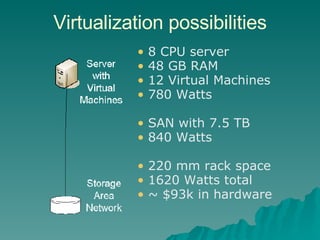
Virtualization possibilities 8 CPU server 48 GB RAM 12 Virtual Machines 780 Watts SAN with 7.5 TB 840 Watts 220 mm rack space 1620 Watts total ~ $93k in hardware
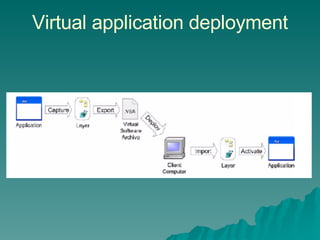
Virtual Applications Install an application in a protected space with its own installation files and registry Allows multiple version of the same application to run side by side Test applications and remove them cleanly No more bloated registry and DLL hell Remotely deploy new applications very fast Applications available can be related to Group membership
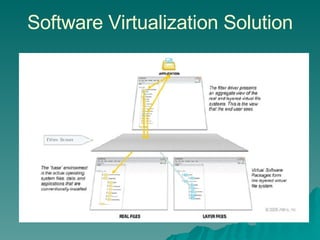
Software Virtualization Solution
Virtual application deployment
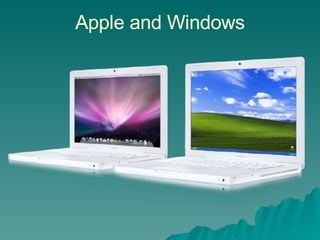
Apple and Windows
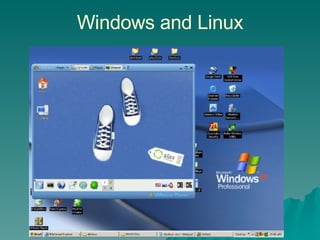
Windows and Linux
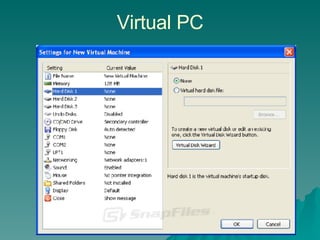
Virtual PC
Virtual Server 2005 R2 Works currently on top of Windows 2003 Server (free download) Make virtual machines of legacy NT4 and Windows 2000 Servers on modern hardware 64 virtual machines limit Each virtual machine is limited to 1 CPU Microsoft running over 1200 VMs on this
Windows 2008 Server virtualization Up to 4 CPU can be used by a VM Support Linux VM Can use ISO images Built for server consolidation in mind Slow down server sprawl Get good utilization of servers Standard licences allows 4 virtual servers Datacentre licence allows unlimited VM Up to 32GB memory per VM supported
Thin Clients Very quick to start Can be run locally or remotely Thin clients are secure, only use minimal power and do not need upgrading Centralise all storage requirements  Only screen, mouse and keyboard changes on the network
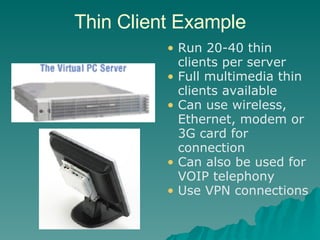
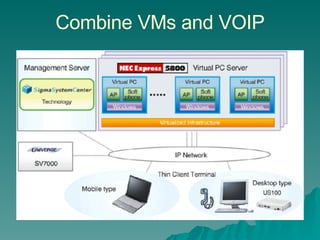
Thin Client Example Run 20-40 thin clients per server  Full multimedia thin clients available  Can use wireless, Ethernet, modem or 3G card for connection Can also be used for VOIP telephony Use VPN connections
Combine VMs and VOIP
Linux Xen Citrix acquired Xen Source  Products Citrix Xen Server / Xen Desktop Desktop VMs hosted at server 64 bit hypervisor management for fast input output Up to 8 CPUs per VM Up to 32 GB RAM per VM VM can be moved between servers without downtime Supports Windows 2000/2003, Linux, XP
VMWARE Workstation Supports 19 version of Windows and 26 versions of Linux All VMs have VNC access Up to 8GB per VM Create whole desktop VMs Create VMs for USB devices Make VMs for use later on VM player or ESX server Great for development testing on VM
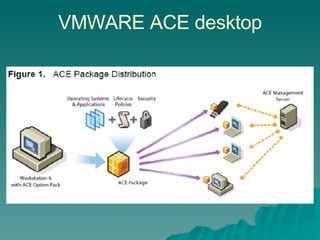
VMWARE ACE desktop
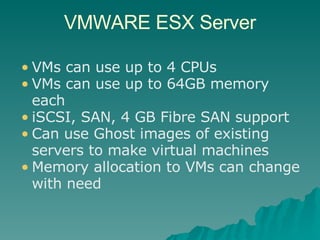
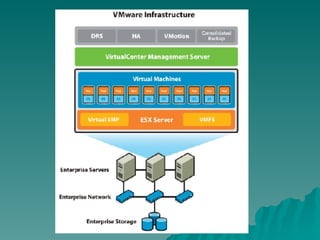
VMWARE ESX Server VMs can use up to 4 CPUs VMs can use up to 64GB memory each iSCSI, SAN, 4 GB Fibre SAN support Can use Ghost images of existing servers to make virtual machines Memory allocation to VMs can change with need
 
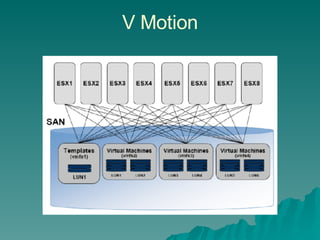
V Motion

3rd Generation Virtual Computing

  • 1.
    3 rd Generation Virtual Computing (The new IT frontier) By Matthew Bulat M.Eng.Tech MCSE MCDBA http://www.matthewb.id.au/
  • 2.
    What is virtualisation?A host computer running isolated guest operating systems \ applications A Virtual Machine (VM) is the representation of a physical machine by software VM can work independently of the host architecture
  • 3.
    Why Virtualization? Usehardware efficiently Save electricity at the server/UPS/cooling system Setup new computer projects quickly Run development systems up offline on desktop PC Save money on yearly hardware budgets Save space in computer room Less network hardware needed
  • 4.
    Who is involved?Linux and Xen project Microsoft and Virtual PC software VMWARE and multiple software systems Apple has virtualization built into OSX Leopard Sun systems
  • 5.
    Where is industryheading? Future server buying trends are forecasting virtualization will reduce need Green IT is becoming a hot issue The ability to perform constantly more with same hardware suits virtualization
  • 6.
    Virtualization possibilities 8CPU server 48 GB RAM 12 Virtual Machines 780 Watts SAN with 7.5 TB 840 Watts 220 mm rack space 1620 Watts total ~ $93k in hardware
  • 7.
    Virtual Applications Installan application in a protected space with its own installation files and registry Allows multiple version of the same application to run side by side Test applications and remove them cleanly No more bloated registry and DLL hell Remotely deploy new applications very fast Applications available can be related to Group membership
  • 8.
  • 9.
  • 10.
  • 11.
  • 12.
  • 13.
    Virtual Server 2005R2 Works currently on top of Windows 2003 Server (free download) Make virtual machines of legacy NT4 and Windows 2000 Servers on modern hardware 64 virtual machines limit Each virtual machine is limited to 1 CPU Microsoft running over 1200 VMs on this
  • 14.
    Windows 2008 Servervirtualization Up to 4 CPU can be used by a VM Support Linux VM Can use ISO images Built for server consolidation in mind Slow down server sprawl Get good utilization of servers Standard licences allows 4 virtual servers Datacentre licence allows unlimited VM Up to 32GB memory per VM supported
  • 15.
    Thin Clients Veryquick to start Can be run locally or remotely Thin clients are secure, only use minimal power and do not need upgrading Centralise all storage requirements Only screen, mouse and keyboard changes on the network
  • 16.
    Thin Client ExampleRun 20-40 thin clients per server Full multimedia thin clients available Can use wireless, Ethernet, modem or 3G card for connection Can also be used for VOIP telephony Use VPN connections
  • 17.
  • 18.
    Linux Xen Citrixacquired Xen Source Products Citrix Xen Server / Xen Desktop Desktop VMs hosted at server 64 bit hypervisor management for fast input output Up to 8 CPUs per VM Up to 32 GB RAM per VM VM can be moved between servers without downtime Supports Windows 2000/2003, Linux, XP
  • 19.
    VMWARE Workstation Supports19 version of Windows and 26 versions of Linux All VMs have VNC access Up to 8GB per VM Create whole desktop VMs Create VMs for USB devices Make VMs for use later on VM player or ESX server Great for development testing on VM
  • 20.
  • 21.
    VMWARE ESX ServerVMs can use up to 4 CPUs VMs can use up to 64GB memory each iSCSI, SAN, 4 GB Fibre SAN support Can use Ghost images of existing servers to make virtual machines Memory allocation to VMs can change with need
  • 22.
  • 23.

Editor's Notes

  • #2 http://www.matthewb.id.au/