What is Virtualization?
 Virtualization is a technique how to
separate a service from the underlying
physical delivery of that service
 It was first developed in the 60’s by IBM
 Until 1998 it was considered impossible for
microprocessors (x86) based computers
 The inventors of x86 virtualization created
VMware in 1998 in Palo Alto
 Behind a company, there is an idea!
What is Virtualization?
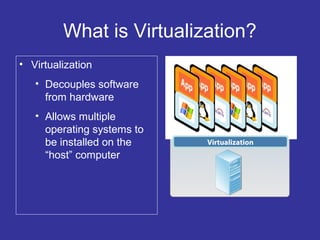
• Virtualization
• Decouples software
from hardware
• Allows multiple
operating systems to
be installed on the
“host” computer
Virtualization
2 Approaches for x86 Virtualization
 Hosted: virtualization layer runs as an
application on top of an operating system
 Hypervisor (bare-metal): installs the
virtualization layer directly on a x86 based
system
 Hypervisor is more efficient, more robust
and has greater scalability and better
performance than hosted architecture
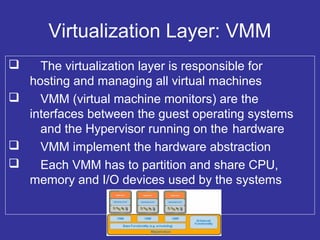
Virtualization Layer: VMM
 The virtualization layer is responsible for
hosting and managing all virtual machines
 VMM (virtual machine monitors) are the
interfaces between the guest operating systems
and the Hypervisor running on the hardware
 VMM implement the hardware abstraction
 Each VMM has to partition and share CPU,
memory and I/O devices used by the systems
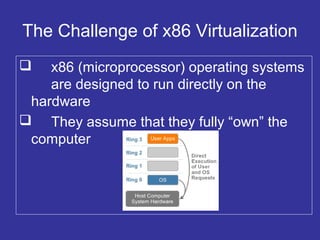
The Challenge of x86 Virtualization
 x86 (microprocessor) operating systems
are designed to run directly on the
hardware
 They assume that they fully “own” the
computer
Three Alternative Techniques
 Full virtualization using binary translation
 Operating system assisted virtualization
(para-virtualization)
 Hardware assisted virtualization
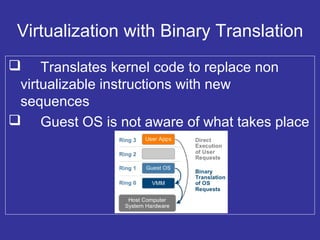
Virtualization with Binary Translation
 Translates kernel code to replace non
virtualizable instructions with new
sequences
 Guest OS is not aware of what takes place
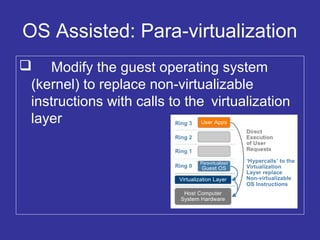
OS Assisted: Para-virtualization
 Modify the guest operating system
(kernel) to replace non-virtualizable
instructions with calls to the virtualization
layer
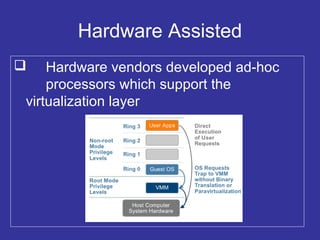
Hardware Assisted
 Hardware vendors developed ad-hoc
processors which support the
virtualization layer
11
April 13, 2016
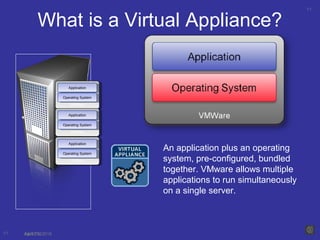
What is a Virtual Appliance?
11 04/13/16
VMWareVMWare
ApplicationApplication
Operating SystemOperating System
VMWareVMWare
ApplicationApplication
Operating SystemOperating System
VMWareVMWare
ApplicationApplication
Operating SystemOperating System
An application plus an operating
system, pre-configured, bundled
together. VMware allows multiple
applications to run simultaneously
on a single server.
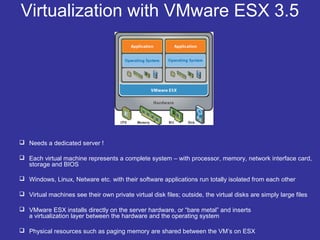
Virtualization with VMware ESX 3.5
 Needs a dedicated server !
 Each virtual machine represents a complete system – with processor, memory, network interface card,
storage and BIOS
 Windows, Linux, Netware etc. with their software applications run totally isolated from each other
 Virtual machines see their own private virtual disk files; outside, the virtual disks are simply large files
 VMware ESX installs directly on the server hardware, or “bare metal” and inserts
a virtualization layer between the hardware and the operating system
 Physical resources such as paging memory are shared between the VM’s on ESX
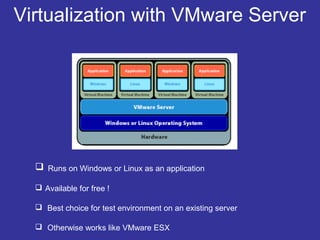
Virtualization with VMware Server
 Runs on Windows or Linux as an application
 Available for free !
 Best choice for test environment on an existing server
 Otherwise works like VMware ESX

What is Virtualization

  • 1.
  • 2.
    What is Virtualization? Virtualization is a technique how to separate a service from the underlying physical delivery of that service  It was first developed in the 60’s by IBM  Until 1998 it was considered impossible for microprocessors (x86) based computers  The inventors of x86 virtualization created VMware in 1998 in Palo Alto  Behind a company, there is an idea!
  • 3.
    What is Virtualization? •Virtualization • Decouples software from hardware • Allows multiple operating systems to be installed on the “host” computer Virtualization
  • 4.
    2 Approaches forx86 Virtualization  Hosted: virtualization layer runs as an application on top of an operating system  Hypervisor (bare-metal): installs the virtualization layer directly on a x86 based system  Hypervisor is more efficient, more robust and has greater scalability and better performance than hosted architecture
  • 5.
    Virtualization Layer: VMM The virtualization layer is responsible for hosting and managing all virtual machines  VMM (virtual machine monitors) are the interfaces between the guest operating systems and the Hypervisor running on the hardware  VMM implement the hardware abstraction  Each VMM has to partition and share CPU, memory and I/O devices used by the systems
  • 6.
    The Challenge ofx86 Virtualization  x86 (microprocessor) operating systems are designed to run directly on the hardware  They assume that they fully “own” the computer
  • 7.
    Three Alternative Techniques Full virtualization using binary translation  Operating system assisted virtualization (para-virtualization)  Hardware assisted virtualization
  • 8.
    Virtualization with BinaryTranslation  Translates kernel code to replace non virtualizable instructions with new sequences  Guest OS is not aware of what takes place
  • 9.
    OS Assisted: Para-virtualization Modify the guest operating system (kernel) to replace non-virtualizable instructions with calls to the virtualization layer
  • 10.
    Hardware Assisted  Hardwarevendors developed ad-hoc processors which support the virtualization layer
  • 11.
    11 April 13, 2016 Whatis a Virtual Appliance? 11 04/13/16 VMWareVMWare ApplicationApplication Operating SystemOperating System VMWareVMWare ApplicationApplication Operating SystemOperating System VMWareVMWare ApplicationApplication Operating SystemOperating System An application plus an operating system, pre-configured, bundled together. VMware allows multiple applications to run simultaneously on a single server.
  • 12.
    Virtualization with VMwareESX 3.5  Needs a dedicated server !  Each virtual machine represents a complete system – with processor, memory, network interface card, storage and BIOS  Windows, Linux, Netware etc. with their software applications run totally isolated from each other  Virtual machines see their own private virtual disk files; outside, the virtual disks are simply large files  VMware ESX installs directly on the server hardware, or “bare metal” and inserts a virtualization layer between the hardware and the operating system  Physical resources such as paging memory are shared between the VM’s on ESX
  • 13.
    Virtualization with VMwareServer  Runs on Windows or Linux as an application  Available for free !  Best choice for test environment on an existing server  Otherwise works like VMware ESX

Editor's Notes

  • #4 Virtualization allows one computer to do the work of many.  It allows multiple OS environments to use/share the physical resources of one server.  Virtualization utilizes the hypervisor to decouple the software (OS and applications) from the hardware.  The hypervisor allows multiple operating systems to be installed on the “host” computer at the same time. Multiple virtual machines or “guests” run on the host and the hypervisor manages these virtual guests.  This configuration allows for tremendous benefits...