VMware Enterprise Desktop Solutions: What’s NEW with VMware View 3  Tony Lamont Enterprise Deployment Consultant Dec 3rd, 2008
Agenda What is VMware View 3 Market Momentum What’s new with VMware View 3
The Desktop Dilemma
Virtualisation is the Solution Run different operating systems side by side Run legacy Win32 apps next to web 2.0 applications Move OS, apps, desktop to different devices Separate user data and settings into a universally accessible VM  Virtualisation enables isolation, encapsulation, and mobility Application Virtualization Machine Virtualization User / Data
VMware View:  The Virtual User Environment COMPONENTS OF VMWARE VIEW
Agenda What is VMware View 3 Market Momentum What’s new with VMware View 3
VMware View Total Potential Market ($Billion)‏ Source: IDC March 2007
Agenda What is VMware View 3 Market Momentum What’s new with VMware View 3 Features Pricing and Packaging
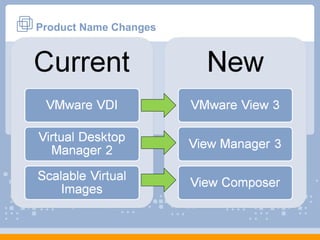
Product Name Changes
VMware VDI Solution Overview Extended Win32 client Browser on Linux, Mac Direct from thin clients RDP/ HTTPS RDP Windows XP Windows Vista Automated provisioning and desktop management DMZ deployment option Integrated solution including: VMware VI3 Enterprise Virtual Desktop Manager 2.1 Optional integration with RSA SecurID
What’s new with VMware View 3 VMware View 3 View  Composer Slash Storage Costs Thin App Application Flexibility Unified Access Leverage Old & New Infrastructure Virtual  Printing Complete & Hassle Free Printing Offline Desktop (experimental)‏ Anywhere Mobility Multimedia Re-Direct Enhanced User Experience
View Composer:  Image Management Traditional VDI VMware View  + Clones
View Composer:  Image Management Lowering Overall Storage Costs Up to 90% reduction Manage 1000s of desktops Streamline Desktop Management Quick Provisioning Simplified updating, patching and upgrading while retaining user settings Guarantee updates applied to every desktop Updated
ThinApp:  Application Management through Virtualization Features Decouples applications & data from OS Agent-less architecture  Wide platform and application support Plugs into existing Application Management tools Benefits Reduces Storage Costs  Minimizes desktop images to be managed Streamlines application patch updates Allows multiple versions of applications to be used Application Application VOS VOS Application Application App Files App Files App Files App Files Operating System sandbox sandbox Operating System
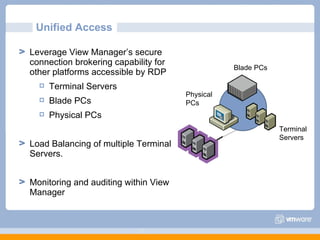
Unified Access  Leverage View Manager’s secure connection brokering capability for other platforms accessible by RDP Terminal Servers Blade PCs Physical PCs Load Balancing of multiple Terminal Servers.  Monitoring and auditing within View Manager Blade PCs Terminal  Servers Physical  PCs
Virtual Printing Driver Free Printing:  No Installation and Maintenance of printer drivers on Virtual Desktops All necessary printers automatically available Minimize network utilization up to 98% with advanced print stream compression High quality printing even over WAN connections Use of client printer driver rather than complicated server installations View Client RDP View Client RDP
View Manager:  Better User Experience Multimedia Redirection: Multimedia stream decoded at client Better user experience Min impact on servers, bandwidth consumed Win XP, Win XPe clients supported Support of critical codecs  MPEG-1, MPEG-2, MPEG-4-part2 WMV 7/8/9 WMA, AC3, MP3 Granular policies for USB Redirection Flash support soon with VMware View 3.1  Remote User experience
VDM Clients  View Manager 3 VMware Infrastructure  Offline Desktop (Experimental)‏ End-users can check their Virtual Desktops in and out  Administrators can extend security policies to the local PC Full user experience VirtualCenter
Summary Overview for VMware View 3 View Manager Clients Unified  Access View Composer Offline  Desktop
VMware View Pricing, Packaging, SKU’s and Licensing Discussion
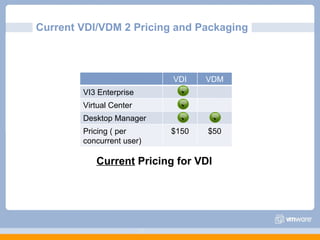
Current VDI/VDM 2 Pricing and Packaging Current  Pricing for VDI VDI VDM VI3 Enterprise Virtual Center Desktop Manager Pricing ( per concurrent user)‏ $150 $50    
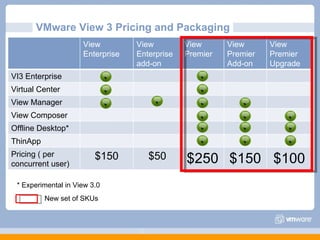
VMware View 3 Pricing and Packaging New set of SKUs * Experimental in View 3.0 View Enterprise View Enterprise add-on View Premier View  Premier Add-on View Premier Upgrade VI3 Enterprise Virtual Center View Manager View Composer Offline Desktop* ThinApp Pricing ( per concurrent user)‏ $150 $50 $250 $150 $100                 
The Competition
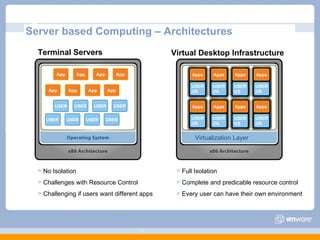
Server based Computing – Architectures Terminal Servers App USER USER USER USER USER USER USER App App App App App App Virtualization Layer Virtual Desktop Infrastructure App USER` No Isolation Challenges with Resource Control Challenging if users want different apps Full Isolation  Complete and predicable resource control Every user can have their own environment Apps USER OS Apps USER OS Apps USER OS Apps USER OS Apps USER OS Apps USER OS Apps USER OS Apps USER OS
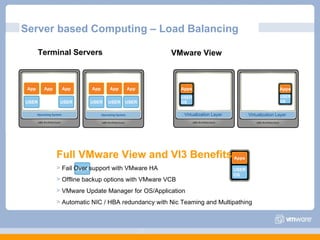
Server based Computing – Load Balancing Terminal Servers VMware View USER USER USER App App App USER USER App USER App App Full VMware View and VI3 Benefits:   Fail Over support with VMware HA Offline backup options with VMware VCB VMware Update Manager for OS/Application Automatic NIC / HBA redundancy with Nic Teaming and Multipathing  Virtualization Layer Virtualization Layer Apps USER OS Apps USER OS Apps USER OS
Competitive Pricing/Packaging Comparison * Experimental support only XenDesktop VMware View Advanced Enterprise Platinum Enterprise Premier Virtualization Platform Connection broker Secure remote access Storage Optimization Multi-backend support Application Virtualization Offline Desktop* High Availability Dynamic Provisioning Desktop Monitoring Partner Partner Pricing $195 $295 $395 $150 $250                                 x x x x x x x x x x x x x x x 
Why Choose VMware View over Citrix XenDesktop Other Thin Client Solutions
Why Choose VMware View over Citrix XenDesktop Standardising on the best platform is a strategic decision More than 10 years of innovation, 120,000 customers >85% deployed in production XenDesktop is complex to deploy and its future is uncertain Microsoft Hyper-V likely to replace XenServer Early adopters face significant technical risks and uncertainties No one protocol will fit all use case scenarios VMware is committed to supporting multiple protocols such as  Sun ALP, HP RGS, Teradici, and RDP VMware View includes Client virtualisation for best end user experience, off-line usage RDP performs as well as ICA in LAN environments RDP and ICA gap narrowing:  MSFT is aggressively investing to further enhance RDP (e.g. Calista technology acquisition)‏
Windows Operating System Licensing
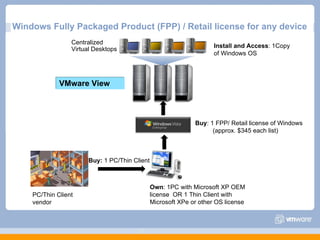
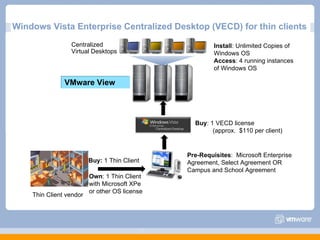
Licenses for Windows Desktop There are two ways to purchase Microsoft Windows Desktop licenses for VMware View Full Packaged Product (FPP)‏ Vista Enterprise Centralized Desktop (VECD)‏
Licensing Microsoft Windows for VMware View Full Packaged Product FPP licenses can be deployed as virtual desktops Cannot re-use existing OEM licenses for virtual desktops Each client device requires license for physical device This information is subject to change, contact your Microsoft sales representative for the latest licensing policies or visit the web: http://www.microsoft.com/windows/products/windowsvista/enterprise/benefits/licensing.mspx
Windows Fully Packaged Product (FPP) / Retail license for any device PC/Thin Client  vendor Own : 1PC with Microsoft XP OEM license  OR 1 Thin Client with Microsoft XPe or other OS license Buy:  1 PC/Thin Client Buy : 1 FPP/ Retail license of Windows (approx. $345 each list)‏ Install and Access : 1Copy of Windows OS Centralized Virtual Desktops VMware View
Licensing Microsoft Windows for VMware View Vista Enterprise Centralized Desktops (VECD)‏ Allows access to hosted virtual desktops Single end device can access up to four remote desktops Subscription based licensing Need to have MSFT volume license agreement Thin clients and regular PCs priced differently VECD covers “business” versions of Windows Windows Vista Business and Windows Vista Ultimate Downgrade rights apply to Windows XP Professional and Windows 2000 Professional This information is subject to change, contact your Microsoft sales representative for the latest licensing policies or visit the web: http://www.microsoft.com/windows/products/windowsvista/enterprise/benefits/licensing.mspx
Windows Vista Enterprise Centralized Desktop for regular PCs PC vendor Own : 1 PC with Windows OS OEM license Buy:  1 PC Buy : 1 VECD for SA license (approx.  $23 per client)‏ Install : Unlimited Copies of Windows OS Access : 4 running instances of Windows OS Centralized Virtual Desktops VMware View Pre-Requisites :  Microsoft Enterprise Agreement, Select Agreement OR Campus and School Agreement Microsoft Software Assurance for PC
Windows Vista Enterprise Centralized Desktop (VECD) for thin clients Thin Client vendor Own : 1 Thin Client with Microsoft XPe or other OS license Buy:  1 Thin Client Buy : 1 VECD license (approx.  $110 per client)‏ Install : Unlimited Copies of Windows OS Access : 4 running instances of Windows OS Centralized Virtual Desktops VMware View Pre-Requisites :  Microsoft Enterprise Agreement, Select Agreement OR Campus and School Agreement
Questions?

Whats New With VMware view 3

  • 1.
    VMware Enterprise DesktopSolutions: What’s NEW with VMware View 3 Tony Lamont Enterprise Deployment Consultant Dec 3rd, 2008
  • 2.
    Agenda What isVMware View 3 Market Momentum What’s new with VMware View 3
  • 3.
  • 4.
    Virtualisation is theSolution Run different operating systems side by side Run legacy Win32 apps next to web 2.0 applications Move OS, apps, desktop to different devices Separate user data and settings into a universally accessible VM Virtualisation enables isolation, encapsulation, and mobility Application Virtualization Machine Virtualization User / Data
  • 5.
    VMware View: The Virtual User Environment COMPONENTS OF VMWARE VIEW
  • 6.
    Agenda What isVMware View 3 Market Momentum What’s new with VMware View 3
  • 7.
    VMware View TotalPotential Market ($Billion)‏ Source: IDC March 2007
  • 8.
    Agenda What isVMware View 3 Market Momentum What’s new with VMware View 3 Features Pricing and Packaging
  • 9.
  • 10.
    VMware VDI SolutionOverview Extended Win32 client Browser on Linux, Mac Direct from thin clients RDP/ HTTPS RDP Windows XP Windows Vista Automated provisioning and desktop management DMZ deployment option Integrated solution including: VMware VI3 Enterprise Virtual Desktop Manager 2.1 Optional integration with RSA SecurID
  • 11.
    What’s new withVMware View 3 VMware View 3 View Composer Slash Storage Costs Thin App Application Flexibility Unified Access Leverage Old & New Infrastructure Virtual Printing Complete & Hassle Free Printing Offline Desktop (experimental)‏ Anywhere Mobility Multimedia Re-Direct Enhanced User Experience
  • 12.
    View Composer: Image Management Traditional VDI VMware View + Clones
  • 13.
    View Composer: Image Management Lowering Overall Storage Costs Up to 90% reduction Manage 1000s of desktops Streamline Desktop Management Quick Provisioning Simplified updating, patching and upgrading while retaining user settings Guarantee updates applied to every desktop Updated
  • 14.
    ThinApp: ApplicationManagement through Virtualization Features Decouples applications & data from OS Agent-less architecture Wide platform and application support Plugs into existing Application Management tools Benefits Reduces Storage Costs Minimizes desktop images to be managed Streamlines application patch updates Allows multiple versions of applications to be used Application Application VOS VOS Application Application App Files App Files App Files App Files Operating System sandbox sandbox Operating System
  • 15.
    Unified Access Leverage View Manager’s secure connection brokering capability for other platforms accessible by RDP Terminal Servers Blade PCs Physical PCs Load Balancing of multiple Terminal Servers. Monitoring and auditing within View Manager Blade PCs Terminal Servers Physical PCs
  • 16.
    Virtual Printing DriverFree Printing: No Installation and Maintenance of printer drivers on Virtual Desktops All necessary printers automatically available Minimize network utilization up to 98% with advanced print stream compression High quality printing even over WAN connections Use of client printer driver rather than complicated server installations View Client RDP View Client RDP
  • 17.
    View Manager: Better User Experience Multimedia Redirection: Multimedia stream decoded at client Better user experience Min impact on servers, bandwidth consumed Win XP, Win XPe clients supported Support of critical codecs MPEG-1, MPEG-2, MPEG-4-part2 WMV 7/8/9 WMA, AC3, MP3 Granular policies for USB Redirection Flash support soon with VMware View 3.1 Remote User experience
  • 18.
    VDM Clients View Manager 3 VMware Infrastructure Offline Desktop (Experimental)‏ End-users can check their Virtual Desktops in and out Administrators can extend security policies to the local PC Full user experience VirtualCenter
  • 19.
    Summary Overview forVMware View 3 View Manager Clients Unified Access View Composer Offline Desktop
  • 20.
    VMware View Pricing,Packaging, SKU’s and Licensing Discussion
  • 21.
    Current VDI/VDM 2Pricing and Packaging Current Pricing for VDI VDI VDM VI3 Enterprise Virtual Center Desktop Manager Pricing ( per concurrent user)‏ $150 $50    
  • 22.
    VMware View 3Pricing and Packaging New set of SKUs * Experimental in View 3.0 View Enterprise View Enterprise add-on View Premier View Premier Add-on View Premier Upgrade VI3 Enterprise Virtual Center View Manager View Composer Offline Desktop* ThinApp Pricing ( per concurrent user)‏ $150 $50 $250 $150 $100                 
  • 23.
  • 24.
    Server based Computing– Architectures Terminal Servers App USER USER USER USER USER USER USER App App App App App App Virtualization Layer Virtual Desktop Infrastructure App USER` No Isolation Challenges with Resource Control Challenging if users want different apps Full Isolation Complete and predicable resource control Every user can have their own environment Apps USER OS Apps USER OS Apps USER OS Apps USER OS Apps USER OS Apps USER OS Apps USER OS Apps USER OS
  • 25.
    Server based Computing– Load Balancing Terminal Servers VMware View USER USER USER App App App USER USER App USER App App Full VMware View and VI3 Benefits: Fail Over support with VMware HA Offline backup options with VMware VCB VMware Update Manager for OS/Application Automatic NIC / HBA redundancy with Nic Teaming and Multipathing Virtualization Layer Virtualization Layer Apps USER OS Apps USER OS Apps USER OS
  • 26.
    Competitive Pricing/Packaging Comparison* Experimental support only XenDesktop VMware View Advanced Enterprise Platinum Enterprise Premier Virtualization Platform Connection broker Secure remote access Storage Optimization Multi-backend support Application Virtualization Offline Desktop* High Availability Dynamic Provisioning Desktop Monitoring Partner Partner Pricing $195 $295 $395 $150 $250                                 x x x x x x x x x x x x x x x 
  • 27.
    Why Choose VMwareView over Citrix XenDesktop Other Thin Client Solutions
  • 28.
    Why Choose VMwareView over Citrix XenDesktop Standardising on the best platform is a strategic decision More than 10 years of innovation, 120,000 customers >85% deployed in production XenDesktop is complex to deploy and its future is uncertain Microsoft Hyper-V likely to replace XenServer Early adopters face significant technical risks and uncertainties No one protocol will fit all use case scenarios VMware is committed to supporting multiple protocols such as Sun ALP, HP RGS, Teradici, and RDP VMware View includes Client virtualisation for best end user experience, off-line usage RDP performs as well as ICA in LAN environments RDP and ICA gap narrowing: MSFT is aggressively investing to further enhance RDP (e.g. Calista technology acquisition)‏
  • 29.
  • 30.
    Licenses for WindowsDesktop There are two ways to purchase Microsoft Windows Desktop licenses for VMware View Full Packaged Product (FPP)‏ Vista Enterprise Centralized Desktop (VECD)‏
  • 31.
    Licensing Microsoft Windowsfor VMware View Full Packaged Product FPP licenses can be deployed as virtual desktops Cannot re-use existing OEM licenses for virtual desktops Each client device requires license for physical device This information is subject to change, contact your Microsoft sales representative for the latest licensing policies or visit the web: http://www.microsoft.com/windows/products/windowsvista/enterprise/benefits/licensing.mspx
  • 32.
    Windows Fully PackagedProduct (FPP) / Retail license for any device PC/Thin Client vendor Own : 1PC with Microsoft XP OEM license OR 1 Thin Client with Microsoft XPe or other OS license Buy: 1 PC/Thin Client Buy : 1 FPP/ Retail license of Windows (approx. $345 each list)‏ Install and Access : 1Copy of Windows OS Centralized Virtual Desktops VMware View
  • 33.
    Licensing Microsoft Windowsfor VMware View Vista Enterprise Centralized Desktops (VECD)‏ Allows access to hosted virtual desktops Single end device can access up to four remote desktops Subscription based licensing Need to have MSFT volume license agreement Thin clients and regular PCs priced differently VECD covers “business” versions of Windows Windows Vista Business and Windows Vista Ultimate Downgrade rights apply to Windows XP Professional and Windows 2000 Professional This information is subject to change, contact your Microsoft sales representative for the latest licensing policies or visit the web: http://www.microsoft.com/windows/products/windowsvista/enterprise/benefits/licensing.mspx
  • 34.
    Windows Vista EnterpriseCentralized Desktop for regular PCs PC vendor Own : 1 PC with Windows OS OEM license Buy: 1 PC Buy : 1 VECD for SA license (approx. $23 per client)‏ Install : Unlimited Copies of Windows OS Access : 4 running instances of Windows OS Centralized Virtual Desktops VMware View Pre-Requisites : Microsoft Enterprise Agreement, Select Agreement OR Campus and School Agreement Microsoft Software Assurance for PC
  • 35.
    Windows Vista EnterpriseCentralized Desktop (VECD) for thin clients Thin Client vendor Own : 1 Thin Client with Microsoft XPe or other OS license Buy: 1 Thin Client Buy : 1 VECD license (approx. $110 per client)‏ Install : Unlimited Copies of Windows OS Access : 4 running instances of Windows OS Centralized Virtual Desktops VMware View Pre-Requisites : Microsoft Enterprise Agreement, Select Agreement OR Campus and School Agreement
  • 36.