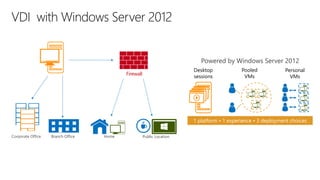
Powered by Windows Server 2012
Desktop
sessions

Firewall

Pooled
VMs

Personal
VMs

1 platform • 1 experience • 3 deployment choices
Corporate Office

Branch Office

Home

Public Location
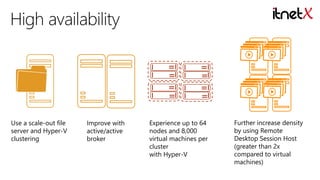
Use a scale-out file
server and Hyper-V
clustering

Improve with
active/active
broker

Experience up to 64
nodes and 8,000
virtual machines per
cluster
with Hyper-V

Further increase density
by using Remote
Desktop Session Host
(greater than 2x
compared to virtual
machines)
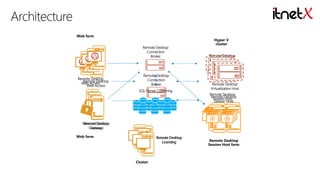
Web farm
Remote Desktop
Connection
Broker

Remote Desktop
Remote Desktop
Web Access
Web Access

Remote Desktop
Connection
Broker
SQL Server Clustering

Database

Hyper-V
cluster
Remote Desktop
Virtualization Host

Remote Desktop
Virtualization Host
Remote Desktop
Remote Desktop
Session Host
Session Host

Remote Desktop
Remote Desktop
Gateway
Gateway
Web farm

Remote Desktop
Licensing

Cluster

Remote Desktop
Session Host farm
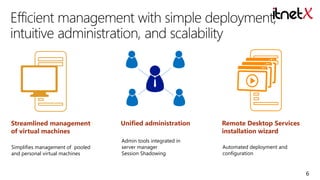
Streamlined management
of virtual machines
Simplifies management of pooled
and personal virtual machines

Unified administration
Admin tools integrated in
server manager
Session Shadowing

Remote Desktop Services
installation wizard
Automated deployment and
configuration

6
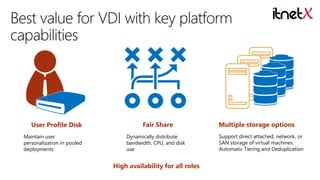
User Profile Disk
Maintain user
personalization in pooled
deployments

Fair Share
Dynamically distribute
bandwidth, CPU, and disk
use

High availability for all roles

Multiple storage options
Support direct attached, network, or
SAN storage of virtual machines.
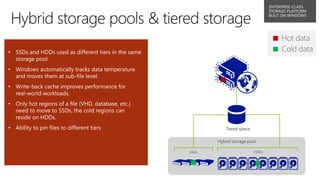
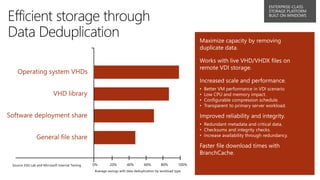
Automatic Tiering and Deduplication
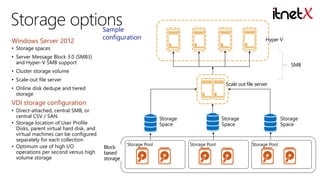
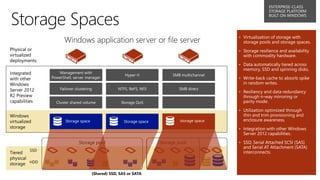
Windows Server 2012

Sample
configuration

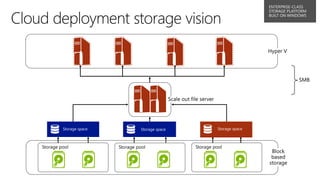
Hyper V

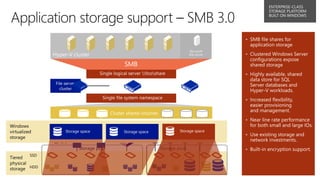
• Storage spaces

• Server Message Block 3.0 (SMB3)
and Hyper-V SMB support

SMB

• Cluster storage volume
• Scale-out file server

Scale out file server

• Online disk dedupe and tiered
storage

VDI storage configuration
• Direct-attached, central SMB, or
central CSV / SAN
• Storage location of User Profile
Disks, parent virtual hard disk, and
virtual machines can be configured
separately for each collection
• Optimum use of high I/O
operations per second versus high
volume storage

Storage
Space

Block
based
storage

Storage Pool

Storage
Space

Storage Pool

Storage
Space

Storage Pool
•
•

•

•

•

•
•
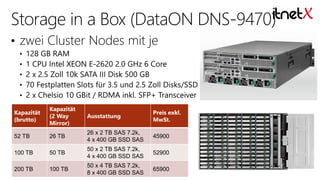
Kapazität
(brutto)

Kapazität
(2 Way
Mirror)

Ausstattung

Preis exkl.
MwSt.

52 TB

26 TB

26 x 2 TB SAS 7.2k,
4 x 400 GB SSD SAS

45900

100 TB

50 TB

50 x 2 TB SAS 7.2k,
4 x 400 GB SSD SAS

52900

200 TB

100 TB

50 x 4 TB SAS 7.2k,
8 x 400 GB SSD SAS

65900
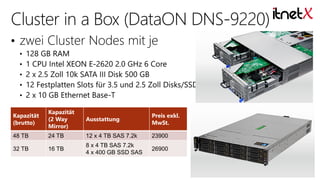
Kapazität
(brutto)

Kapazität
(2 Way
Mirror)

Ausstattung

Preis exkl.
MwSt.

48 TB

24 TB

12 x 4 TB SAS 7.2k

23900

32 TB

16 TB

8 x 4 TB SAS 7.2k
4 x 400 GB SSD SAS

26900
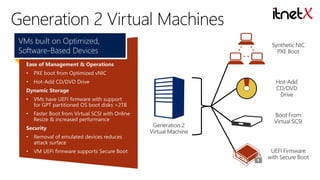
VMs built on Optimized,
Software-Based Devices
Ease of Management & Operations
•

PXE boot from Optimized vNIC

•

Hot-Add CD/DVD Drive

Dynamic Storage

•

VMs have UEFI firmware with support
for GPT partitioned OS boot disks >2TB

•

Faster Boot from Virtual SCSI with Online
Resize & increased performance

Security
•

Removal of emulated devices reduces
attack surface

•

VM UEFI firmware supports Secure Boot
DIRECTACCES

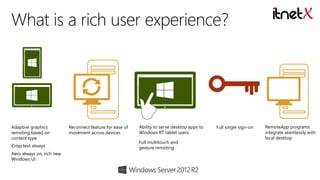
Adaptive graphics
remoting based on
content type
Crisp text always
Aero always on, rich new
Windows UI

Reconnect feature for ease of
movement across devices

Ability to serve desktop apps to
Windows RT tablet users
Full multitouch and
gesture remoting

Full single sign-on

RemoteApp programs
integrate seamlessly with
local desktop
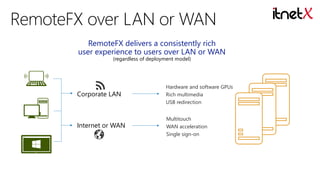
RemoteFX delivers a consistently rich
user experience to users over LAN or WAN
(regardless of deployment model)

Corporate LAN

Hardware and software GPUs
Rich multimedia
USB redirection

Internet or WAN

Multitouch
WAN acceleration
Single sign-on
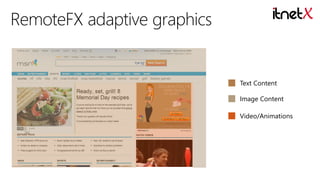
Text Content
Image Content
Video/Animations
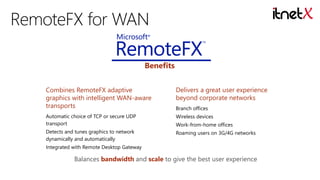
Benefits
Combines RemoteFX adaptive
graphics with intelligent WAN-aware
transports

Delivers a great user experience
beyond corporate networks

Automatic choice of TCP or secure UDP
transport

Wireless devices

Detects and tunes graphics to network
dynamically and automatically

Roaming users on 3G/4G networks

Branch offices
Work-from-home offices

Integrated with Remote Desktop Gateway

Balances bandwidth and scale to give the best user experience
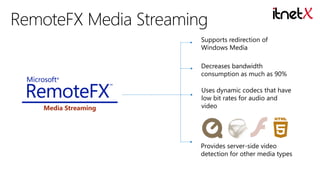
Supports redirection of
Windows Media
Decreases bandwidth
consumption as much as 90%

Media Streaming

Uses dynamic codecs that have
low bit rates for audio and
video

Provides server-side video
detection for other media types
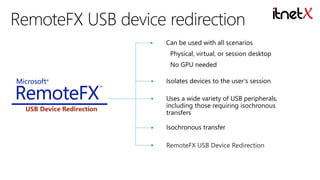
Can be used with all scenarios
Physical, virtual, or session desktop
No GPU needed

Isolates devices to the user’s session

USB Device Redirection

Uses a wide variety of USB peripherals,
including those requiring isochronous
transfers
Isochronous transfer
RemoteFX USB Device Redirection
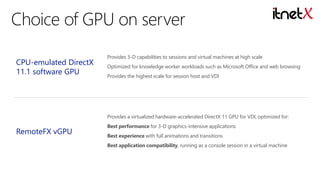
CPU-emulated DirectX
11.1 software GPU

Provides 3-D capabilities to sessions and virtual machines at high scale
Optimized for knowledge worker workloads such as Microsoft Office and web browsing
Provides the highest scale for session host and VDI

Provides a virtualized hardware-accelerated DirectX 11 GPU for VDI, optimized for:

RemoteFX vGPU

Best performance for 3-D graphics-intensive applications
Best experience with full animations and transitions
Best application compatibility, running as a console session in a virtual machine
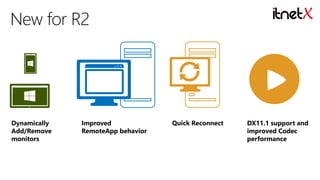
Dynamically
Add/Remove
monitors

Improved
RemoteApp behavior

Quick Reconnect

DX11.1 support and
improved Codec
performance
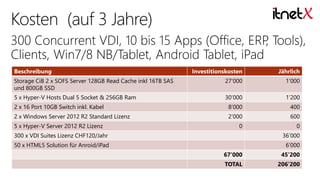
Beschreibung

Investitionskosten

Jährlich

Storage CiB 2 x SOFS Server 128GB Read Cache inkl 16TB SAS
und 800GB SSD

27’000

1’000

5 x Hyper-V Hosts Dual 5 Socket & 256GB Ram

30’000

1’200

2 x 16 Port 10GB Switch inkl. Kabel

8’000

400

2 x Windows Server 2012 R2 Standard Lizenz

2’000

600

0

0

5 x Hyper-V Server 2012 R2 Lizenz
300 x VDI Suites Lizenz CHF120/Jahr

36’000

50 x HTML5 Solution für Anroid/iPad

6’000
67’000

45’200

TOTAL

206’200
Fragen ?

itnetx gmbh • fabrikstrasse 20a • 3012 bern
phone +41 (0)31 802’05’05 • info@itnetx.ch • http://www.itnetx.ch

Virtual Deep-Dive: Microsoft VDI

  • 3.
    Powered by WindowsServer 2012 Desktop sessions Firewall Pooled VMs Personal VMs 1 platform • 1 experience • 3 deployment choices Corporate Office Branch Office Home Public Location
  • 4.
    Use a scale-outfile server and Hyper-V clustering Improve with active/active broker Experience up to 64 nodes and 8,000 virtual machines per cluster with Hyper-V Further increase density by using Remote Desktop Session Host (greater than 2x compared to virtual machines)
  • 5.
    Web farm Remote Desktop Connection Broker RemoteDesktop Remote Desktop Web Access Web Access Remote Desktop Connection Broker SQL Server Clustering Database Hyper-V cluster Remote Desktop Virtualization Host Remote Desktop Virtualization Host Remote Desktop Remote Desktop Session Host Session Host Remote Desktop Remote Desktop Gateway Gateway Web farm Remote Desktop Licensing Cluster Remote Desktop Session Host farm
  • 6.
    Streamlined management of virtualmachines Simplifies management of pooled and personal virtual machines Unified administration Admin tools integrated in server manager Session Shadowing Remote Desktop Services installation wizard Automated deployment and configuration 6
  • 7.
    User Profile Disk Maintainuser personalization in pooled deployments Fair Share Dynamically distribute bandwidth, CPU, and disk use High availability for all roles Multiple storage options Support direct attached, network, or SAN storage of virtual machines. Automatic Tiering and Deduplication
  • 8.
    Windows Server 2012 Sample configuration HyperV • Storage spaces • Server Message Block 3.0 (SMB3) and Hyper-V SMB support SMB • Cluster storage volume • Scale-out file server Scale out file server • Online disk dedupe and tiered storage VDI storage configuration • Direct-attached, central SMB, or central CSV / SAN • Storage location of User Profile Disks, parent virtual hard disk, and virtual machines can be configured separately for each collection • Optimum use of high I/O operations per second versus high volume storage Storage Space Block based storage Storage Pool Storage Space Storage Pool Storage Space Storage Pool
  • 15.
  • 17.
    Kapazität (brutto) Kapazität (2 Way Mirror) Ausstattung Preis exkl. MwSt. 52TB 26 TB 26 x 2 TB SAS 7.2k, 4 x 400 GB SSD SAS 45900 100 TB 50 TB 50 x 2 TB SAS 7.2k, 4 x 400 GB SSD SAS 52900 200 TB 100 TB 50 x 4 TB SAS 7.2k, 8 x 400 GB SSD SAS 65900
  • 18.
    Kapazität (brutto) Kapazität (2 Way Mirror) Ausstattung Preis exkl. MwSt. 48TB 24 TB 12 x 4 TB SAS 7.2k 23900 32 TB 16 TB 8 x 4 TB SAS 7.2k 4 x 400 GB SSD SAS 26900
  • 20.
    VMs built onOptimized, Software-Based Devices Ease of Management & Operations • PXE boot from Optimized vNIC • Hot-Add CD/DVD Drive Dynamic Storage • VMs have UEFI firmware with support for GPT partitioned OS boot disks >2TB • Faster Boot from Virtual SCSI with Online Resize & increased performance Security • Removal of emulated devices reduces attack surface • VM UEFI firmware supports Secure Boot
  • 24.
    DIRECTACCES Adaptive graphics remoting basedon content type Crisp text always Aero always on, rich new Windows UI Reconnect feature for ease of movement across devices Ability to serve desktop apps to Windows RT tablet users Full multitouch and gesture remoting Full single sign-on RemoteApp programs integrate seamlessly with local desktop
  • 25.
    RemoteFX delivers aconsistently rich user experience to users over LAN or WAN (regardless of deployment model) Corporate LAN Hardware and software GPUs Rich multimedia USB redirection Internet or WAN Multitouch WAN acceleration Single sign-on
  • 26.
  • 28.
    Benefits Combines RemoteFX adaptive graphicswith intelligent WAN-aware transports Delivers a great user experience beyond corporate networks Automatic choice of TCP or secure UDP transport Wireless devices Detects and tunes graphics to network dynamically and automatically Roaming users on 3G/4G networks Branch offices Work-from-home offices Integrated with Remote Desktop Gateway Balances bandwidth and scale to give the best user experience
  • 29.
    Supports redirection of WindowsMedia Decreases bandwidth consumption as much as 90% Media Streaming Uses dynamic codecs that have low bit rates for audio and video Provides server-side video detection for other media types
  • 30.
    Can be usedwith all scenarios Physical, virtual, or session desktop No GPU needed Isolates devices to the user’s session USB Device Redirection Uses a wide variety of USB peripherals, including those requiring isochronous transfers Isochronous transfer RemoteFX USB Device Redirection
  • 31.
    CPU-emulated DirectX 11.1 softwareGPU Provides 3-D capabilities to sessions and virtual machines at high scale Optimized for knowledge worker workloads such as Microsoft Office and web browsing Provides the highest scale for session host and VDI Provides a virtualized hardware-accelerated DirectX 11 GPU for VDI, optimized for: RemoteFX vGPU Best performance for 3-D graphics-intensive applications Best experience with full animations and transitions Best application compatibility, running as a console session in a virtual machine
  • 32.
  • 34.
    Beschreibung Investitionskosten Jährlich Storage CiB 2x SOFS Server 128GB Read Cache inkl 16TB SAS und 800GB SSD 27’000 1’000 5 x Hyper-V Hosts Dual 5 Socket & 256GB Ram 30’000 1’200 2 x 16 Port 10GB Switch inkl. Kabel 8’000 400 2 x Windows Server 2012 R2 Standard Lizenz 2’000 600 0 0 5 x Hyper-V Server 2012 R2 Lizenz 300 x VDI Suites Lizenz CHF120/Jahr 36’000 50 x HTML5 Solution für Anroid/iPad 6’000 67’000 45’200 TOTAL 206’200
  • 35.
    Fragen ? itnetx gmbh• fabrikstrasse 20a • 3012 bern phone +41 (0)31 802’05’05 • info@itnetx.ch • http://www.itnetx.ch