By : SANOJ<mu10co13>
What is Virtual?
What is Virtualization?
What is Hardware Virtualization?
 Hardware virtualization allows to run several
operating systems on a unique machine. This is
done due to a specific software called “Virtual
Machine Manager” (VMM).
 In hardware virtualization there are two things:
 Host machine
 Guest machine
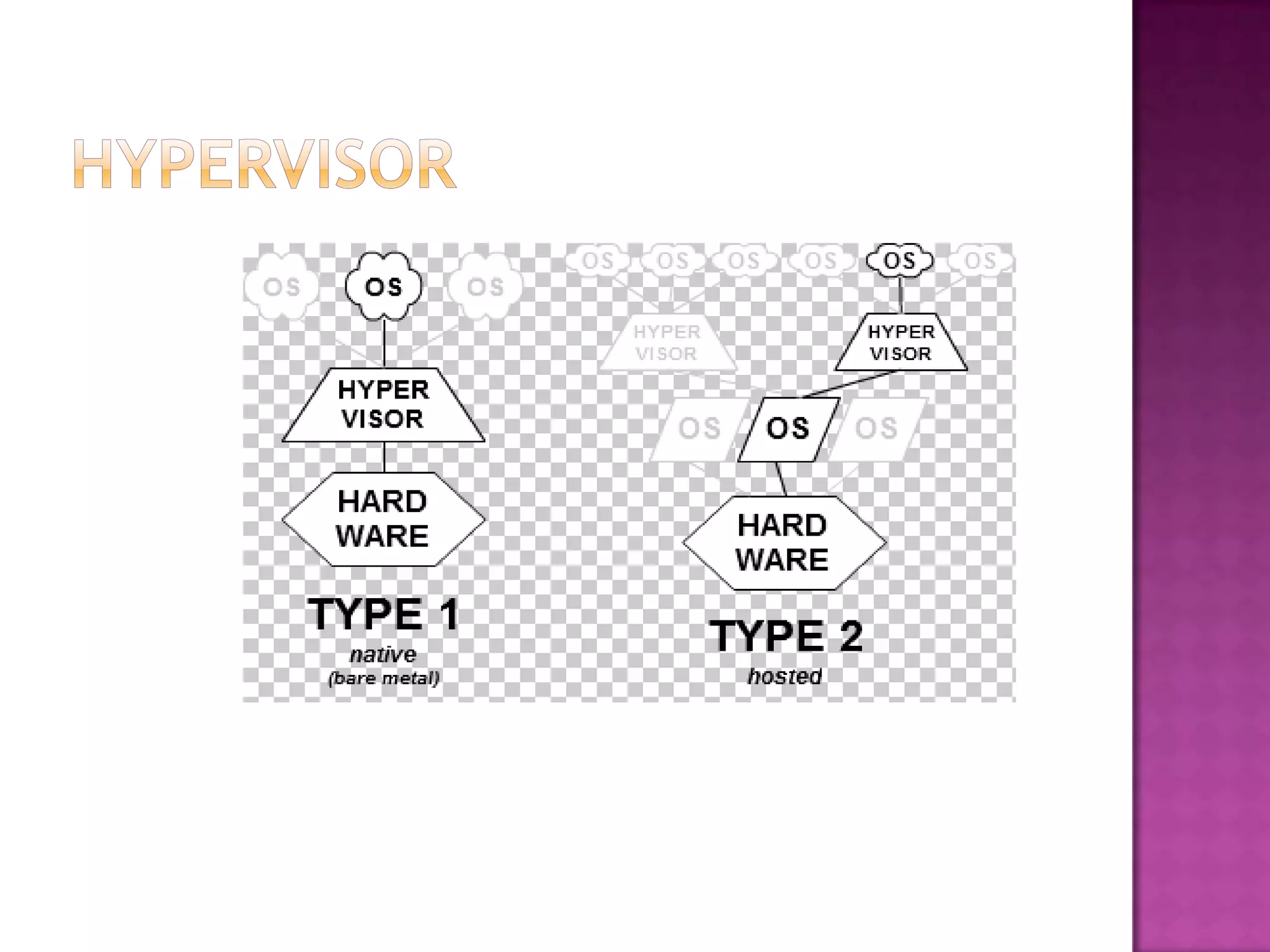
-The software that creates a virtual machine on the
host hardware is called a hypervisor or Virtual
Machine Manager.
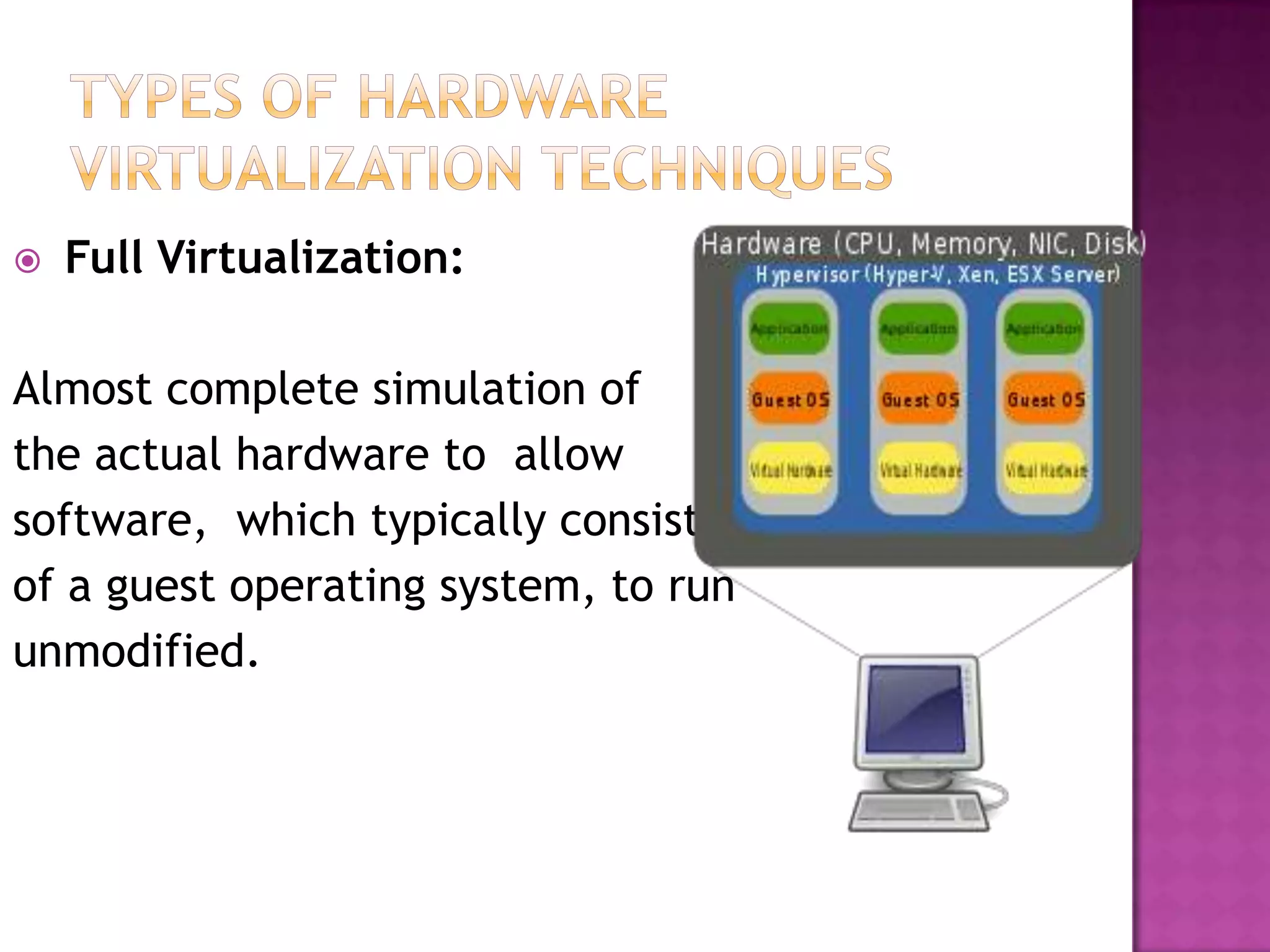
 Full Virtualization:
Almost complete simulation of
the actual hardware to allow
software, which typically consists
of a guest operating system, to run
unmodified.
 Some but not all of the target environment is
simulated. Some guest programs, therefore,
may need modifications to run in this virtual
environment.
 A hardware virtualization DR environment
will involve hardware and software
protection solutions based on business
continuity needs
Tape backup for software data long-
term archival needs This common method
can be used to store data offsite but can be a
difficult and lengthy process to recover your
data. Tape backup data is only as good as the
latest copy stored. Tape backup methods will
require a backup device and ongoing storage
material.
Whole-file and application
replication The data is replicated on a
different disk partition or separate disk device
and can be a scheduled activity for most servers
and is implemented more for database-type
applications.
 Virtualization lets you reduce the complexity
of your IT infrastructure by maximizing the
utilization of your physical computing
resources. But you still need to purchase and
maintain servers and software.
 Pros
 Real time sharing
 Testing and learning
 Portable
 Cons
 Resource hungry.
 Not compatible
Hardware virtualization basic

Hardware virtualization basic

  • 1.
  • 2.
    What is Virtual? Whatis Virtualization? What is Hardware Virtualization?
  • 3.
     Hardware virtualizationallows to run several operating systems on a unique machine. This is done due to a specific software called “Virtual Machine Manager” (VMM).  In hardware virtualization there are two things:  Host machine  Guest machine -The software that creates a virtual machine on the host hardware is called a hypervisor or Virtual Machine Manager.
  • 5.
     Full Virtualization: Almostcomplete simulation of the actual hardware to allow software, which typically consists of a guest operating system, to run unmodified.
  • 6.
     Some butnot all of the target environment is simulated. Some guest programs, therefore, may need modifications to run in this virtual environment.
  • 7.
     A hardwarevirtualization DR environment will involve hardware and software protection solutions based on business continuity needs
  • 8.
    Tape backup forsoftware data long- term archival needs This common method can be used to store data offsite but can be a difficult and lengthy process to recover your data. Tape backup data is only as good as the latest copy stored. Tape backup methods will require a backup device and ongoing storage material. Whole-file and application replication The data is replicated on a different disk partition or separate disk device and can be a scheduled activity for most servers and is implemented more for database-type applications.
  • 9.
     Virtualization letsyou reduce the complexity of your IT infrastructure by maximizing the utilization of your physical computing resources. But you still need to purchase and maintain servers and software.  Pros  Real time sharing  Testing and learning  Portable  Cons  Resource hungry.  Not compatible