{
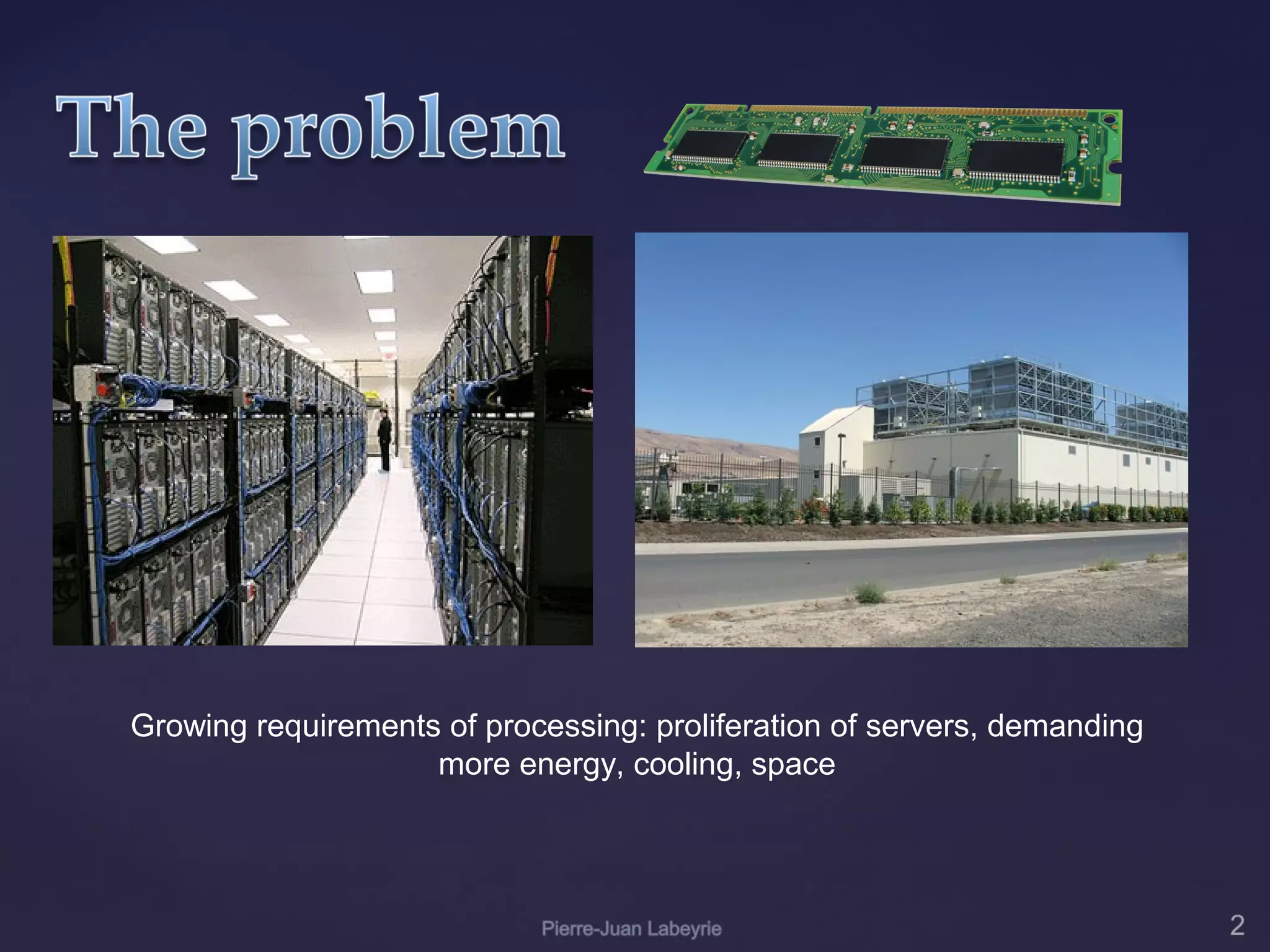
Growing requirements of processing: proliferation of servers, demanding
                    more energy, cooling, space
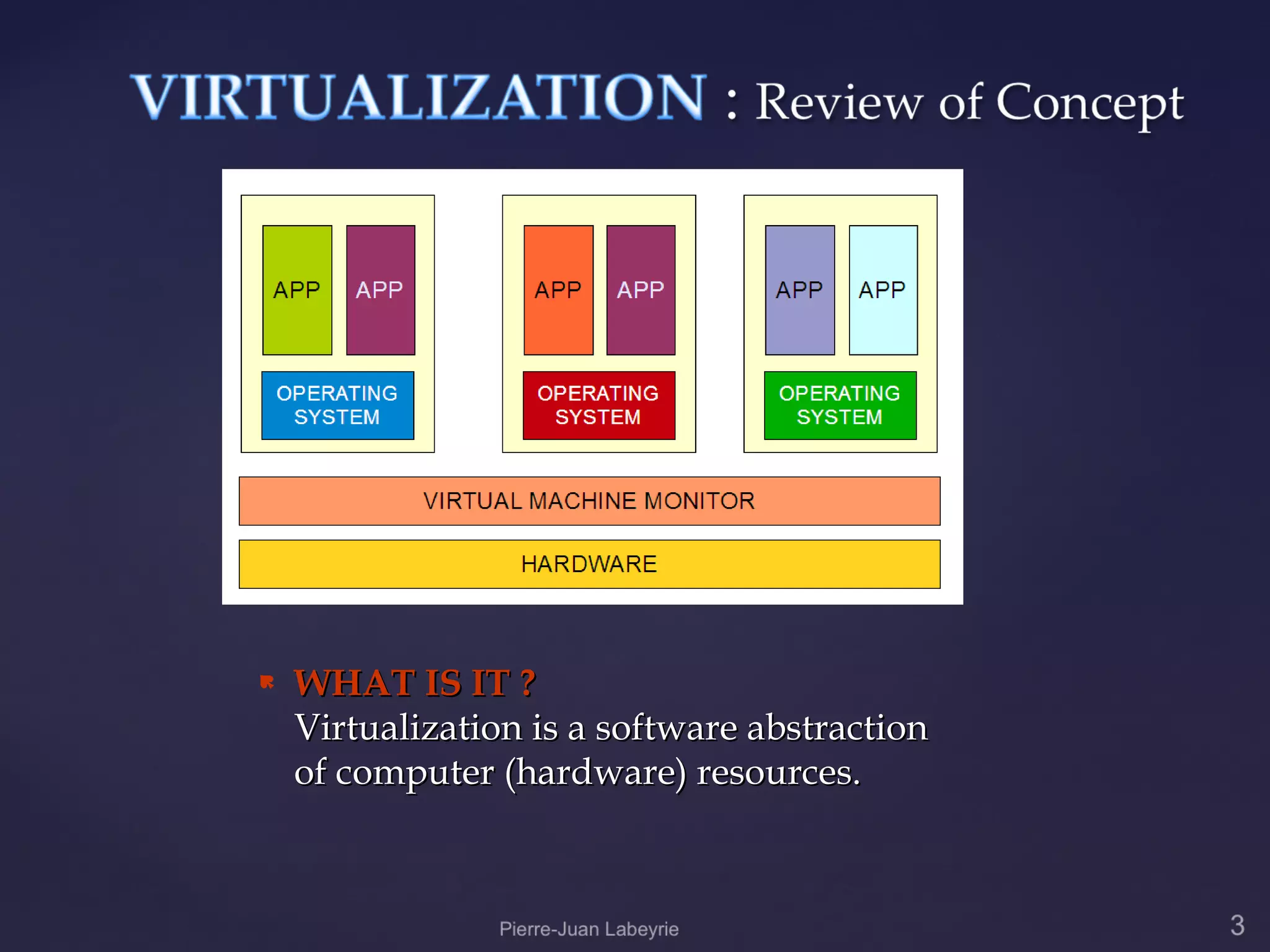
   WHAT IS IT ?
    Virtualization is a software abstraction
    of computer (hardware) resources.
   Virtualization products partition
    physical servers in multiple virtual
    machines. Each virtual machine
    represents a complete system, with
    processors, memory, networking, storage
    and BIOS.

   Multiple virtual machines can share
    physical resources and run side by side
    on the same server.

   Operating systems and applications can
    run unmodified in virtual machines.
HOW CAN IT BE USED
    WITHIN AN ORGANIZATION
    FOR ITS BUSINESS
    PROCESSES ?

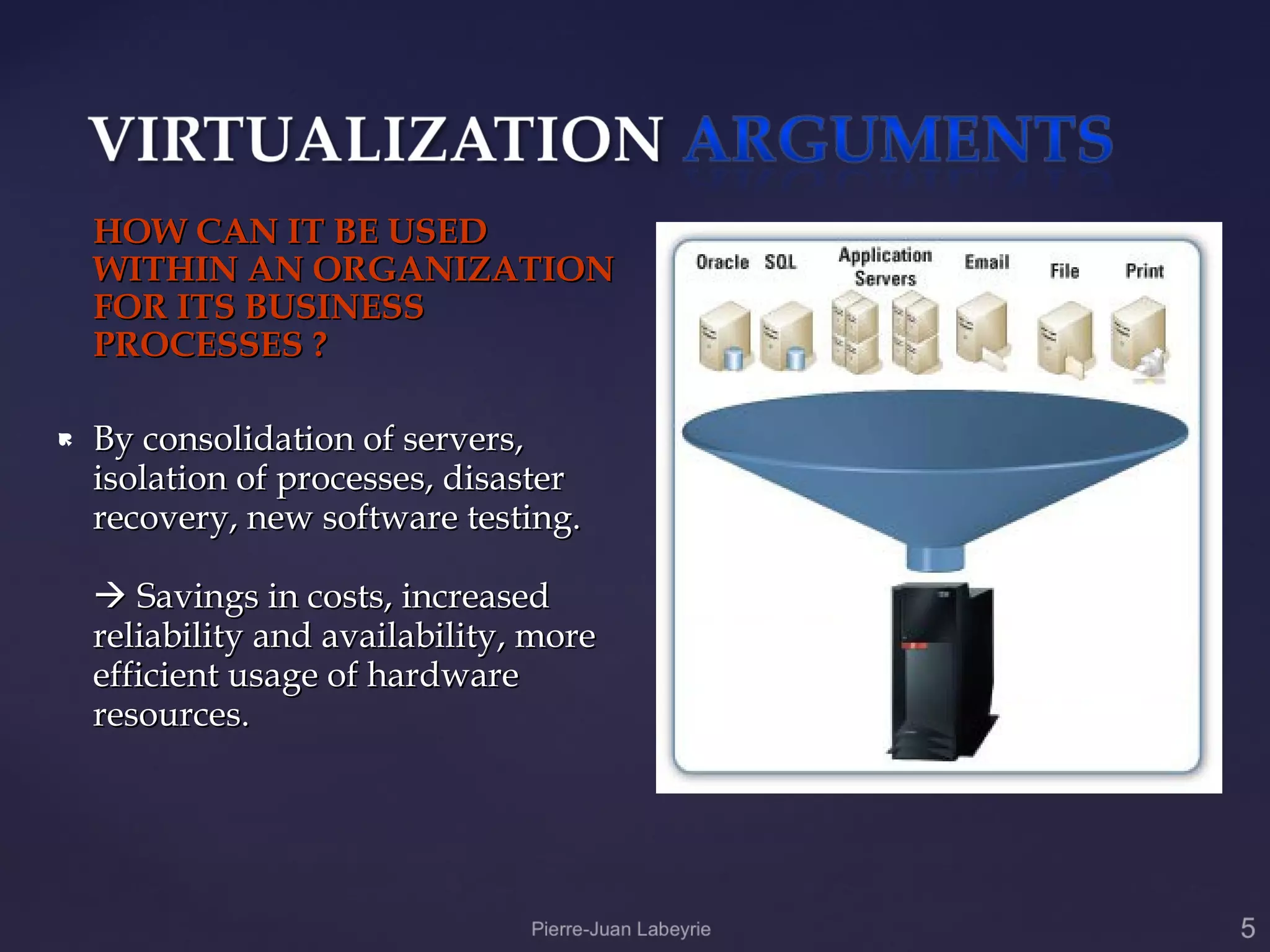
   By consolidation of servers,
    isolation of processes, disaster
    recovery, new software testing.

     Savings in costs, increased
    reliability and availability, more
    efficient usage of hardware
    resources.
WHAT WOULD BE THE ADVANTAGES AND DISADVANTAGES OF
                   VIRTUALIZATION ?

                                    Advantages:
 #1 Decreases power, cooling, floor space and infrastructure.
 #2 Simplifies disaster recovery and business continuity requirements.
 #3 Increases server utilization from the typical averages of 5-15% to 60-80%.
 #4 Faster deployment of information technology resources reduces time to market.
 #5 Lower operational costs associated with reduced resource management and
 administration.
 #6 Improves application performance by dynamically adapting storage and server resources
 to meet peek usage cycles.
 #7 Aligns application data with the storage infrastructure to match application quality of
 service requirements and lower cost per gigabyte.
 #8 Improves protection and recovery of critical business data.
 #9 Easier to secure and comply with regulatory requirements such as SOX, HIPPA and
 eDiscovery.
 #10 Nearly 60 percent of Fortune 500 companies are implementing virtualization in their
 data centers, and another 30 percent are developing plans to do so. This means a growing
 available pool of qualified professionals.
Disadvantages

  #1 Licensing costs.
  #2 Vulnerable to server failure.
  #3 Compromise of virtualized hosts will affect guest machines.
  #4 Additional guest servers will require their own administration measures.
  #5 Initial cost can be high – renewal of associated infrastructure must be added
  (newest processors, storage).


                                  Personal Note : the Cons part wont
                                  have to be presented in such a way,
                                  it is only used as a way to anticipate
                                  potential aversions coming from
                                  some local IT specialists
Once an organization realizes the advantages
of going into virtualization, several
considerations are to be taken:

   Strategy (replace, expand)
   What systems to virtualize.
   Operating systems involved.
   Hardware platforms.
   Administrative Issues.
   Hardware reuse, replacement.
   Licensing issues.
   Legacy software considerations.
   Additional infrastructure expenses must
    be considered (e.g. Energy efficient
    cabinets, new network cabling....)
   Prototype testing
   Migration
   Commissioning
VMWARE (ESX, Server)

CITRIX (Xen)

SUN xVM (VirtualBox)

MICROSOFT (Hyper-V Server
2008)
PARALLELS
VIRTUALIRON
CASE STUDY:

              Evaluation and
              Comparison of market
              leader VMWARE ESX
              product and
              MICROSOFT recent
              entry HYPER-V
              product.
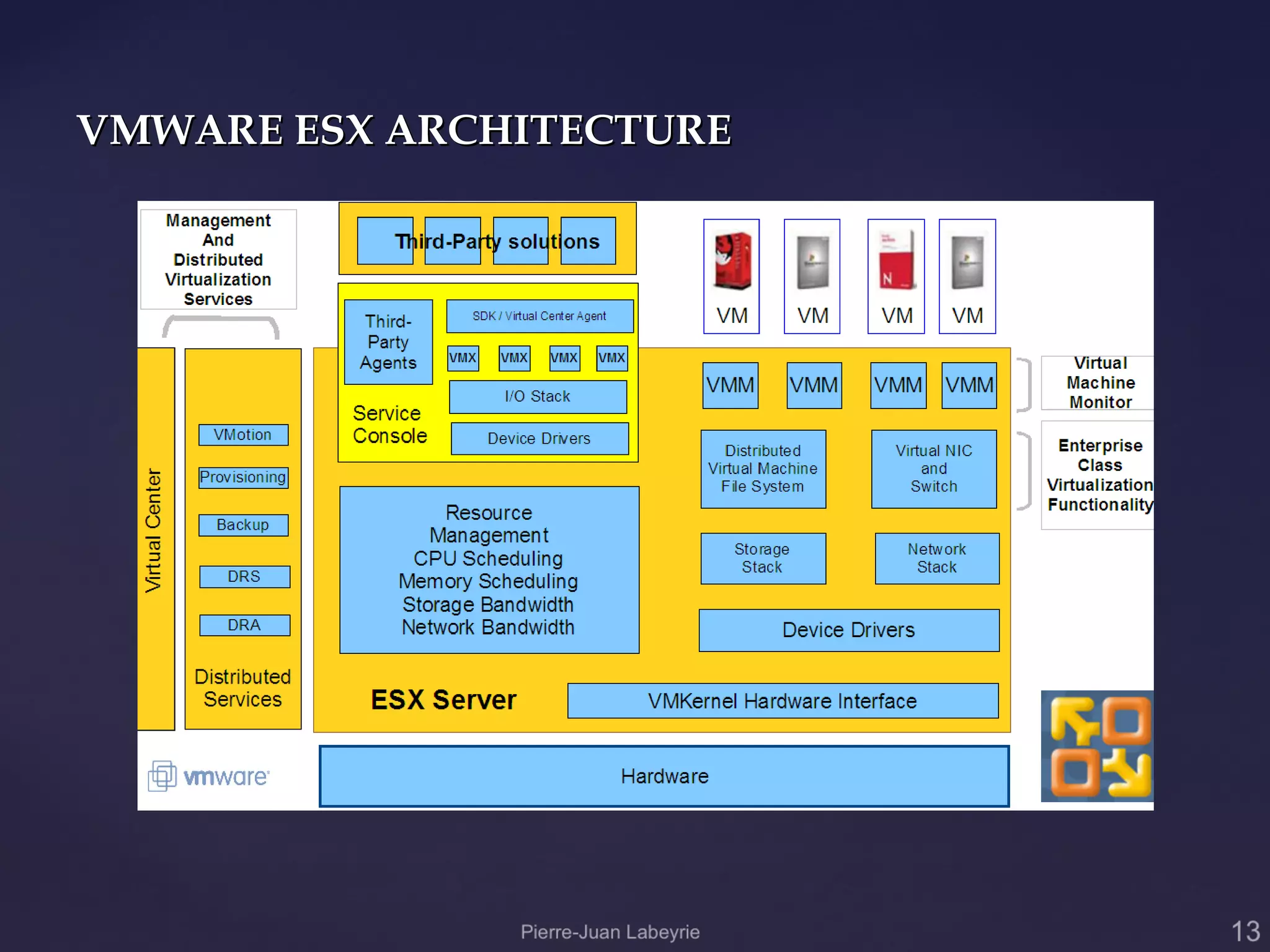
VMWARE ESX ARCHITECTURE
Hardware requirements:

 Minimum: 1 GB RAM; Recommended: 2+ GB
  RAM
 Maximum (64-bit systems): 256 GB RAM

 Hard disk space: Minimum: 10 GB;

  Recommended: 40 GB or greater. Requires
  local disk for system, recommended SCSI,
  SATA limited compatibility. Storage can be
  attached externally (physical, virtual).
 Hardware must be VMWARE certified.
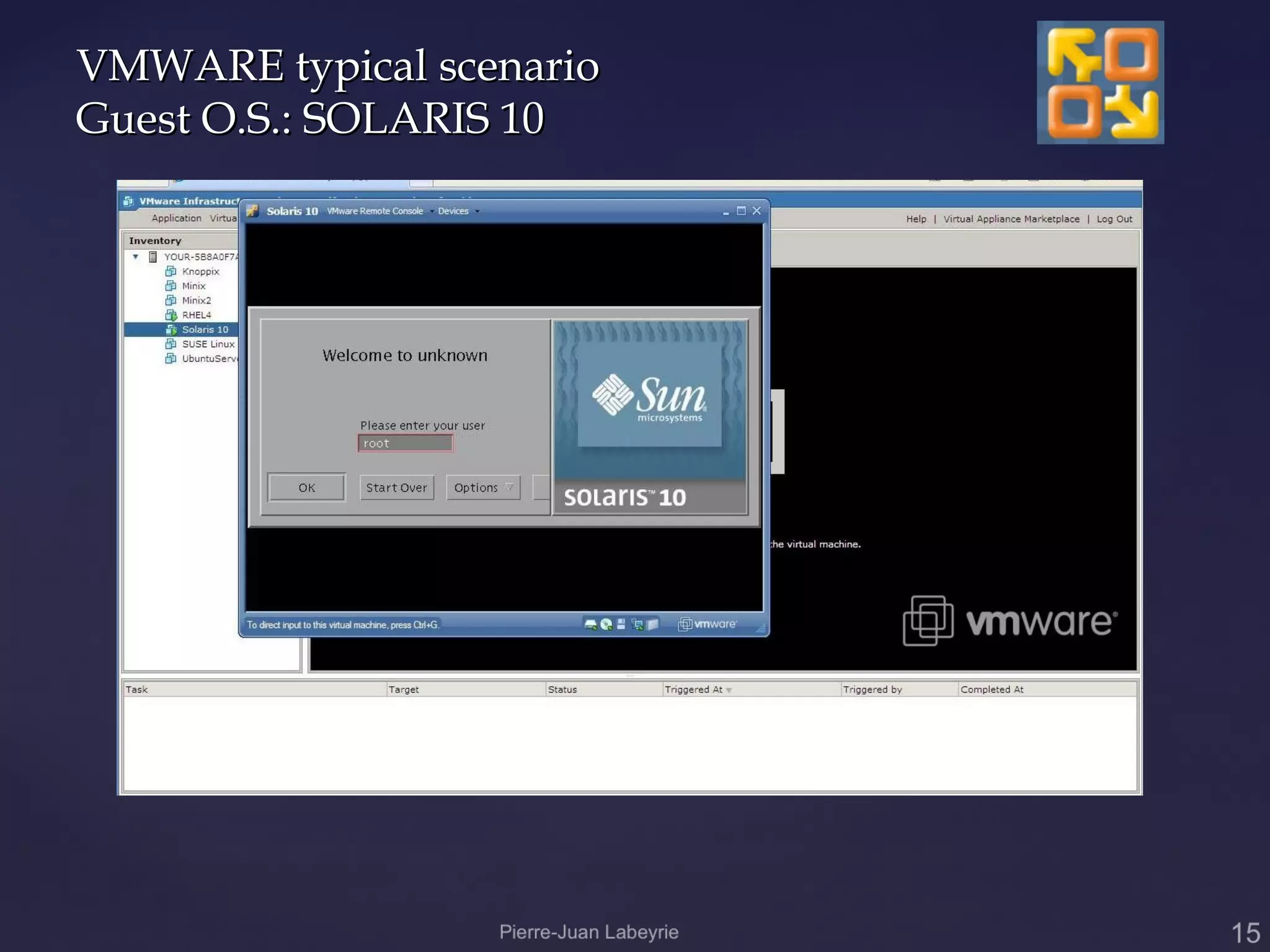
VMWARE typical scenario
Guest O.S.: SOLARIS 10
VMWARE ESX Server
CASE STUDY: 7-eleven
 Solution Overview
 Customer Size: 31,500 employees
 Organization Profile
  7-Eleven, Inc. is the world’s largest operator, franchisor and licensor of
   convenience stores (34,800 stores in 17 countries, 5,600 stores in North
   America). 7-Eleven also is one of the nation's largest independent gasoline
   retailers.
 Hardware
  HP ProLiant DL380 G5 servers

  Quad-Core Intel Xeon processors

 Partner(s)
   HP
 Software and Services

    VMWare ESX, VirtualCenter, VMotion

 Vertical Industries
  Convenience retailing, gasoline retail.
VMWARE ESX Server
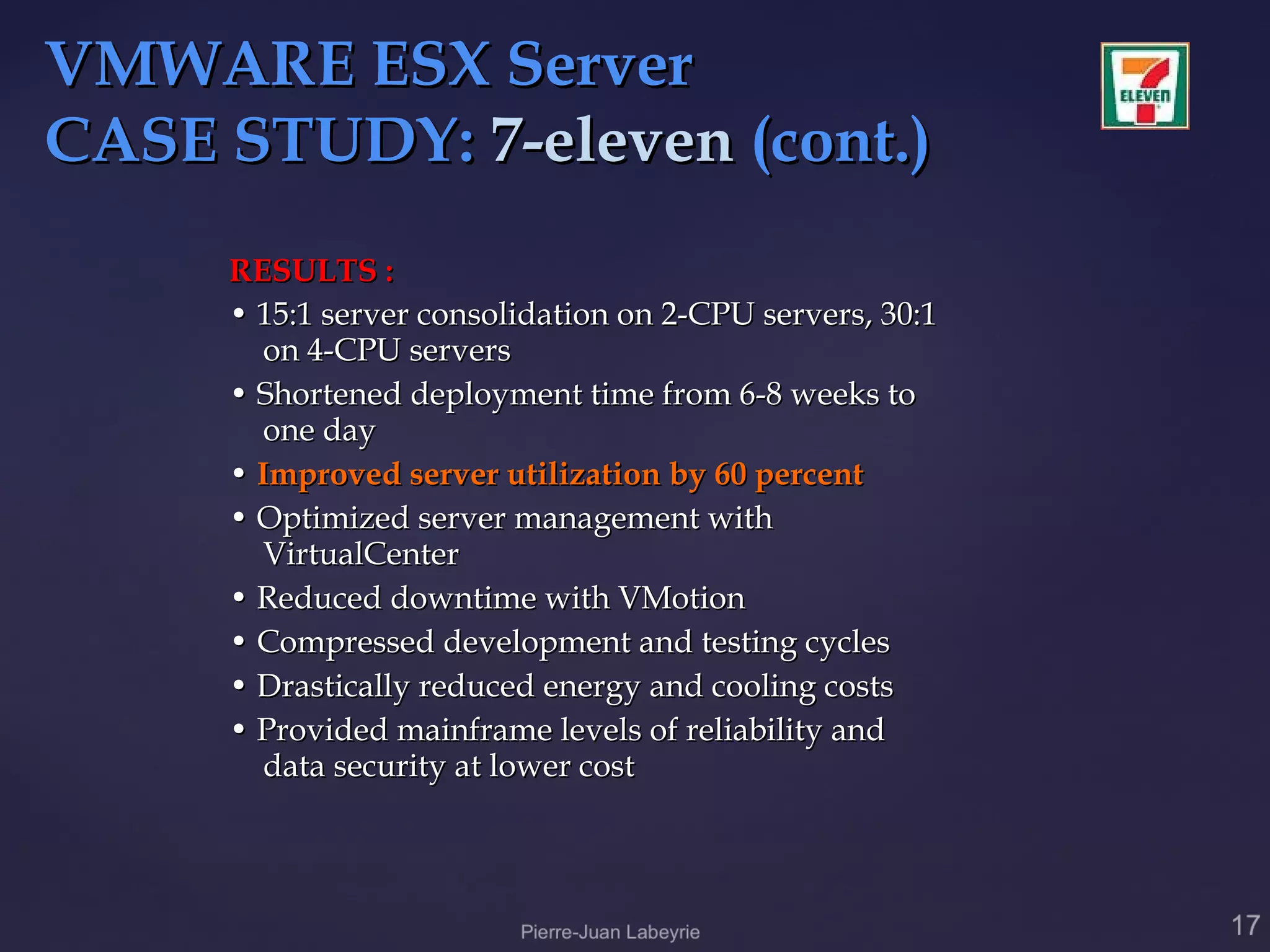
CASE STUDY: 7-eleven (cont.)
     RESULTS :
     • 15:1 server consolidation on 2-CPU servers, 30:1
       on 4-CPU servers
     • Shortened deployment time from 6-8 weeks to
       one day
     • Improved server utilization by 60 percent
     • Optimized server management with
       VirtualCenter
     • Reduced downtime with VMotion
     • Compressed development and testing cycles
     • Drastically reduced energy and cooling costs
     • Provided mainframe levels of reliability and
       data security at lower cost
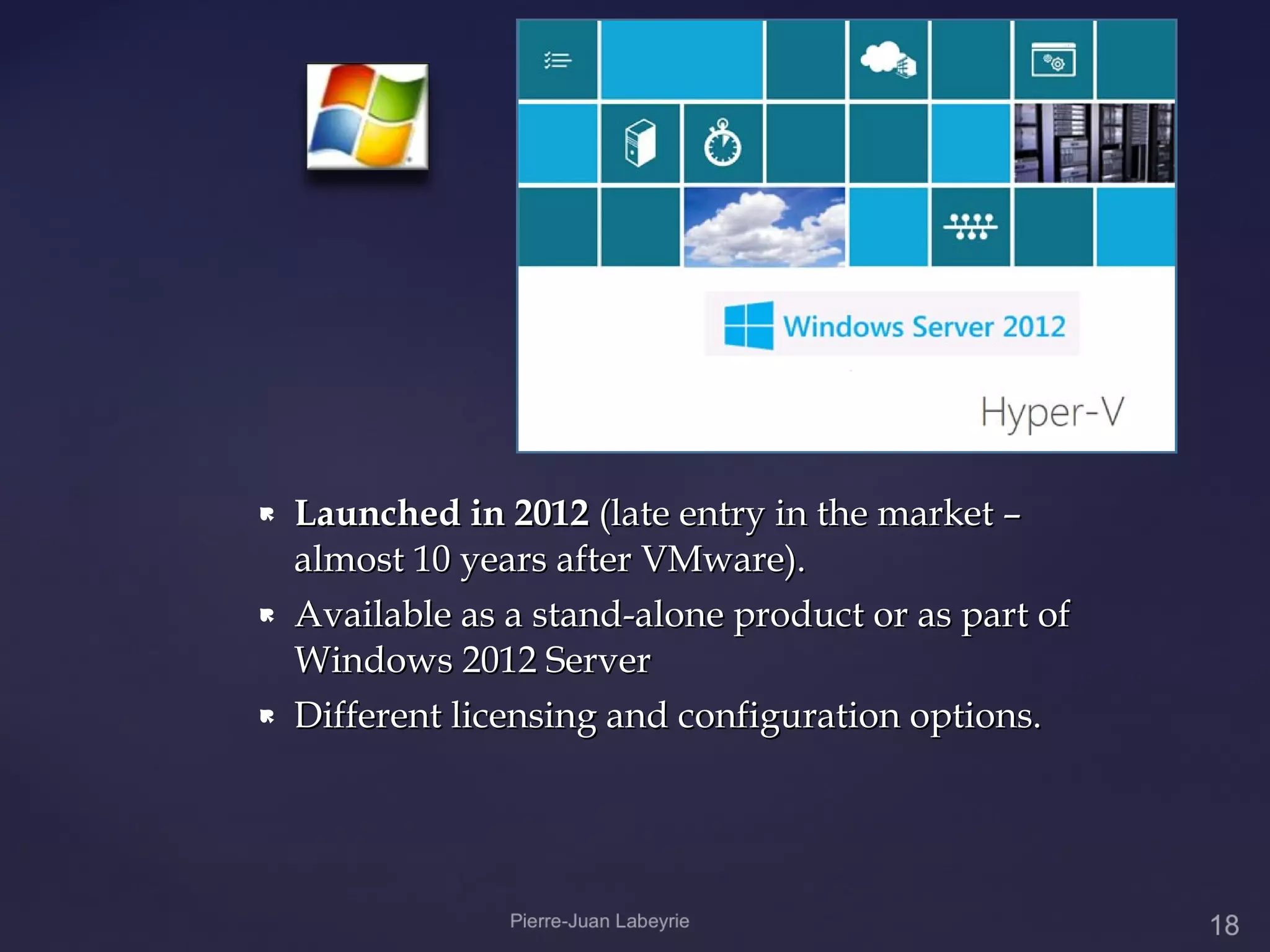
   Launched in 2012 (late entry in the market –
    almost 10 years after VMware).
   Available as a stand-alone product or as part of
    Windows 2012 Server
   Different licensing and configuration options.
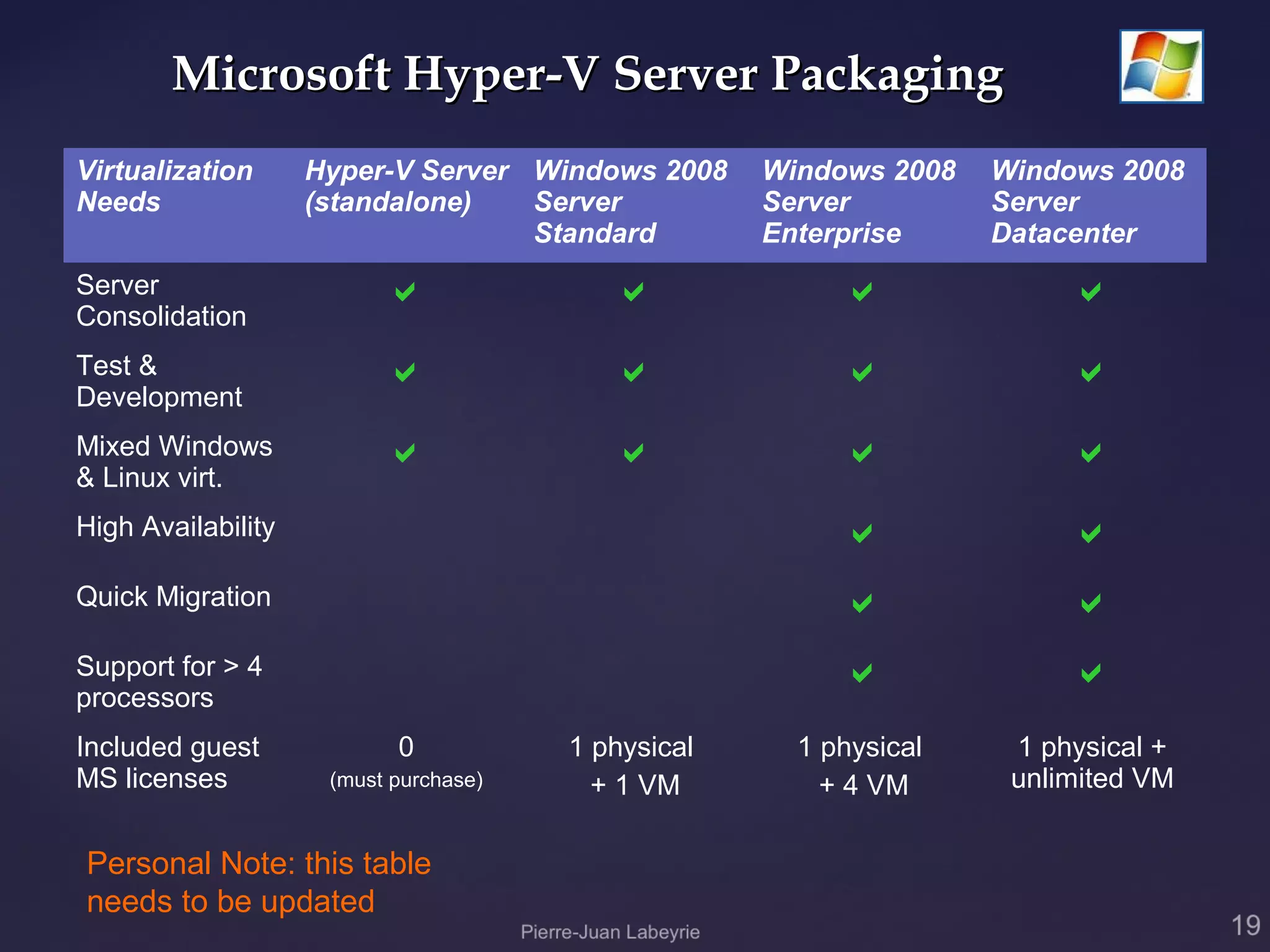
Microsoft Hyper-V Server Packaging
Virtualization      Hyper-V Server Windows 2008     Windows 2008   Windows 2008
Needs               (standalone)   Server           Server         Server
                                   Standard         Enterprise     Datacenter
Server                                                               
Consolidation
Test &                                                               
Development
Mixed Windows                                                        
& Linux virt.
High Availability                                                      
Quick Migration                                                        
Support for > 4                                                        
processors
Included guest             0           1 physical     1 physical    1 physical +
MS licenses          (must purchase)     + 1 VM         + 4 VM      unlimited VM


Personal Note: this table
needs to be updated
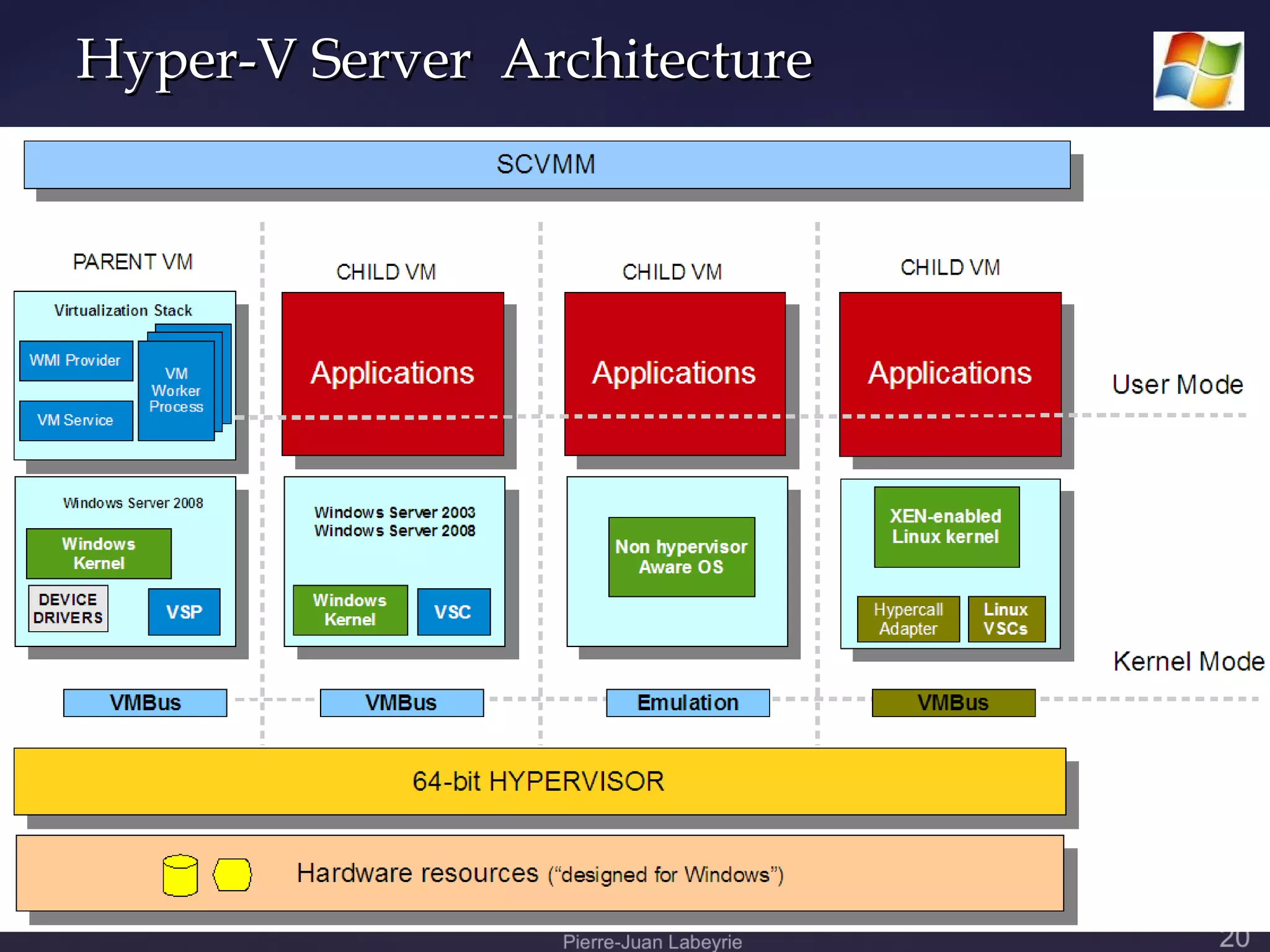
Hyper-V Server Architecture
Microsoft Hyper-V Server
 Hardware requirements:
  64-bit x86 processor with hardware-assisted
   virtualization (Intel VT or AMD-V).
  Data execution prevention (DEP) enabled in

   BIOS. Specifically, you must enable Intel XD bit
   (execute disable bit) or AMD NX bit (no execute
   bit).
  Hardware virtualization enabled in BIOS.
Microsoft Hyper-V Server
     Hardware requirements (continued):
      Minimum: 1 GB RAM; Recommended: 2+ GB

       RAM
      Maximum (64-bit systems): 32 GB

      Hard disk space: Minimum: 10 GB;

       Recommended: 40 GB or greater. Requires local
       disk for system, storage can be attached
       externally.
Product implementation
Stand-alone: Microsoft Hyper-V Server:

   Contains Windows Hypervisor and other components
    including base kernel and driver technologies. (Only
    command line or remote management)

As part of Windows 2008 Server:

   Available as a role in Server core or full installation of the
    Windows 2008 server (Standard, Enterprise, Data
    Center). GUI console, remote management, command
    line interfaces.
                            Personal Note: this needs
                            to be updated
Microsoft Hyper-V Technical Data

GUEST O.S. SPECIFICATIONS
   32 bit (x86) operating systems (e.g. MS-Windows 9x, XP,
    Vista*; MS-Windows 200x except for Windows 2008 self);
    Linux, Solaris, Unix.
   64 bit (x86) operating systems (Windows, SuSE Linux)**
   32 and 64 bit O.S. can execute concurrently.
   Up to 4 virtual processors per virtual machine
   Up to 31 GB memory for all (up to 128) running virtual
    machines (1GB reserved for Hyper-V Server Parent
    Partition).
                                          * : Windows Vista currently requires patch.
                           **Note: Red Hat and other Linux must have XEN extensions
                                   SOLARIS, UNIX not yet supported.
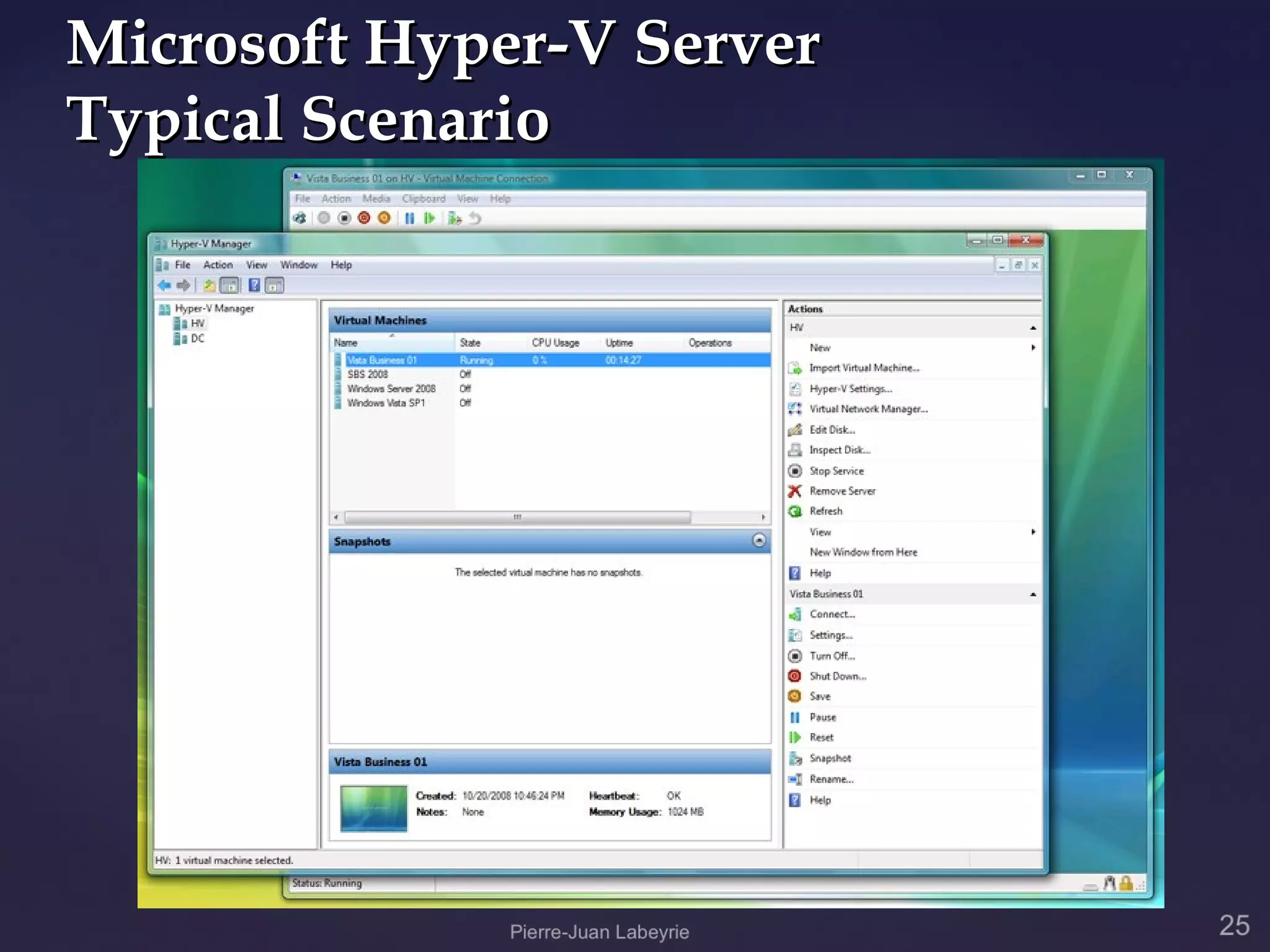
Microsoft Hyper-V Server
Typical Scenario
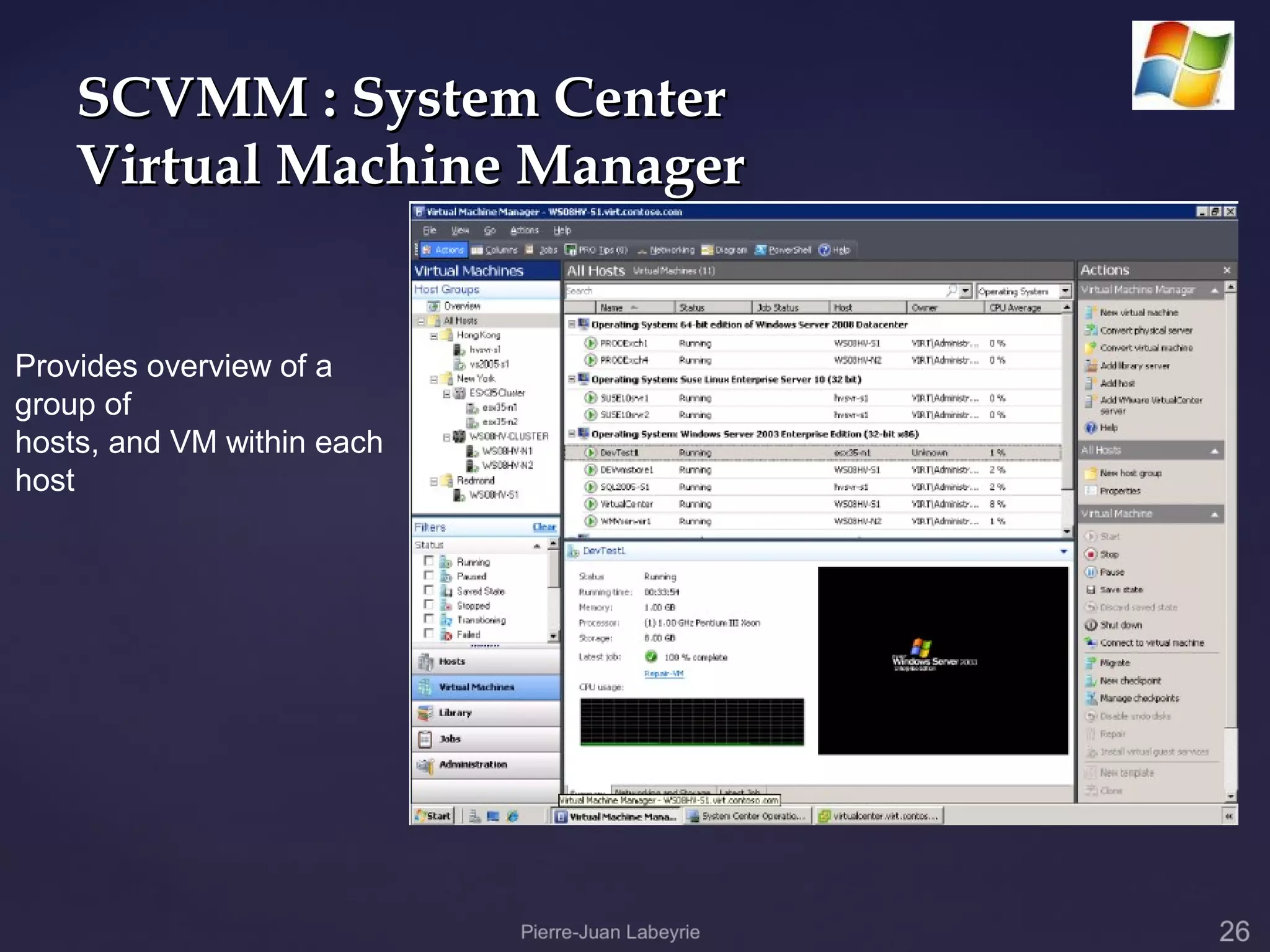
SCVMM : System Center
    Virtual Machine Manager


Provides overview of a
group of
hosts, and VM within each
host
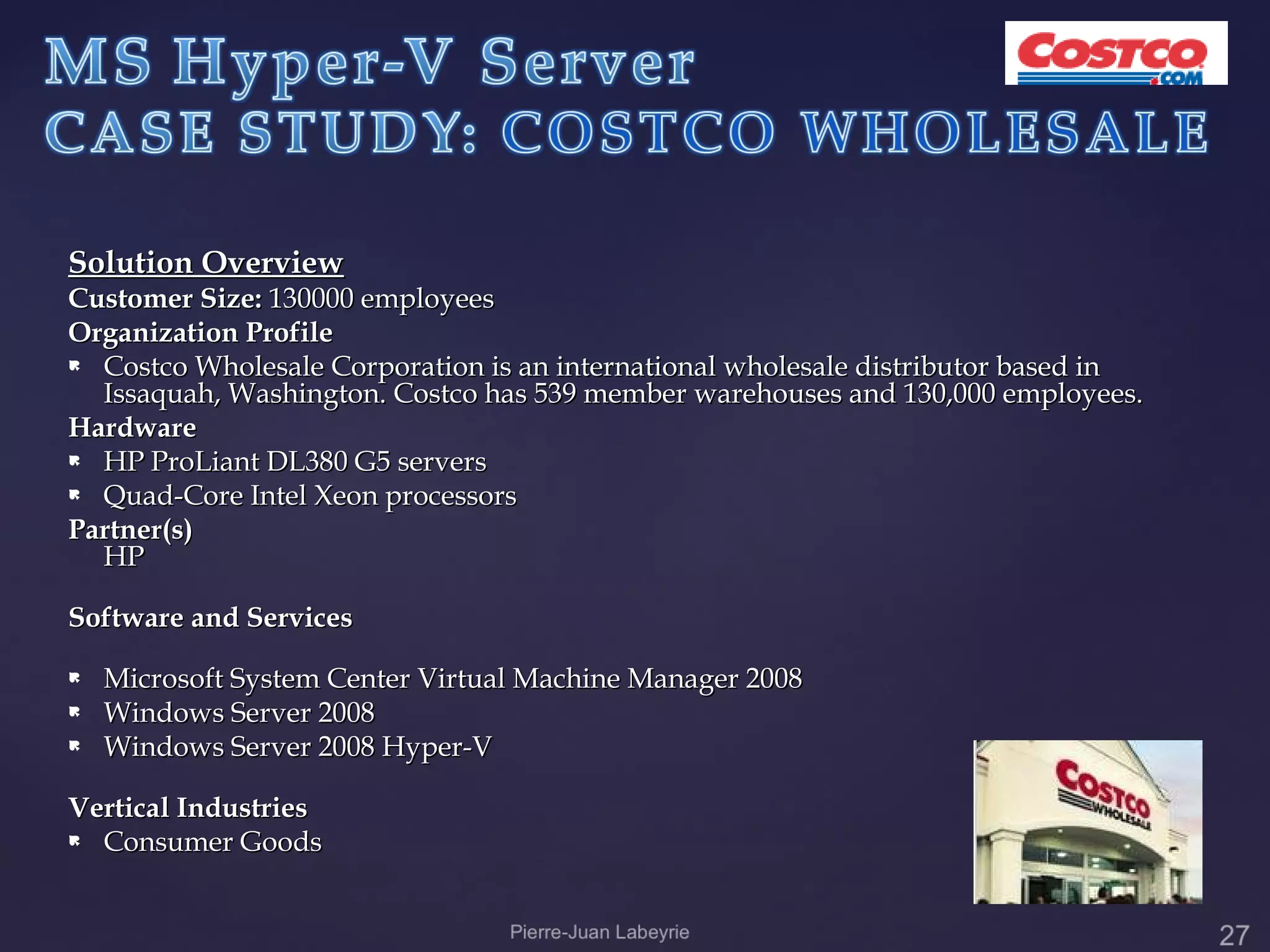
Solution Overview
Customer Size: 130000 employees
Organization Profile
 Costco Wholesale Corporation is an international wholesale distributor based in
  Issaquah, Washington. Costco has 539 member warehouses and 130,000 employees.
Hardware
 HP ProLiant DL380 G5 servers

 Quad-Core Intel Xeon processors

Partner(s)
  HP

Software and Services
   Microsoft System Center Virtual Machine Manager 2008
   Windows Server 2008
   Windows Server 2008 Hyper-V

Vertical Industries
 Consumer Goods
   Mostly a Microsoft shop (1200 servers, 95% of them
    on Windows products)

   Started virtualization efforts in 2006 (using MS
    Virtual Server 2005, a previous, limited
    virtualization product).

   As soon as hearing about Hyper-V, enrolled in MS
    Virtualization Rapid Deployment Program.

   Using MAP tool (Microsoft Assessment and
    Planning) server loads were evaluated, discovering
    underutilized servers, good candidates for
    consolidation.
   Initial phase: 50+ servers consolidated on 5 HP servers with Quad-
    Core Intel Xeon processors.
   The server cluster has a core infrastructure that mimics the
    production Costco environment
   Quality Assurance staff verifying reliability and stability before
    rolling out new systems to internal customers and member
    warehouses.
   By virtualizing existing servers instead of purchasing new physical
    machines, Costco limited the proliferation of servers in its data
    center.
   IT staff at Costco expects to achieve 40-45% virtualization by August
    2009.
   Expected savings in energy costs, currently $75,000/mo (yet to
    quantify).
   ROI not yet published (estimated?)
   Hyper-V lacks some advanced features of
    VMware's ESX server and virtualization
    platform, but its relatively low cost,
    integrated physical and virtual management,
    and ease of implementation might be good
    enough for many organizations today.

   Microsoft-based shops will eventually
    migrate to Windows 2008 and have access to
    Hyper-V (Netscape history repeating ?)
   One important disadvantage of Hyper-V is its
    requirement for 64-bit hardware. This excludes
    many 32-bit based infrastructures that may
    benefit greatly from virtualization, leaving
    them to the competition.
   VMWARE claims to be less expensive
              than MS-Hyper-V, mainly due to
              Microsoft’s pricing model regarding
              licenses of guest OSs, despite a higher
              license cost per installation.
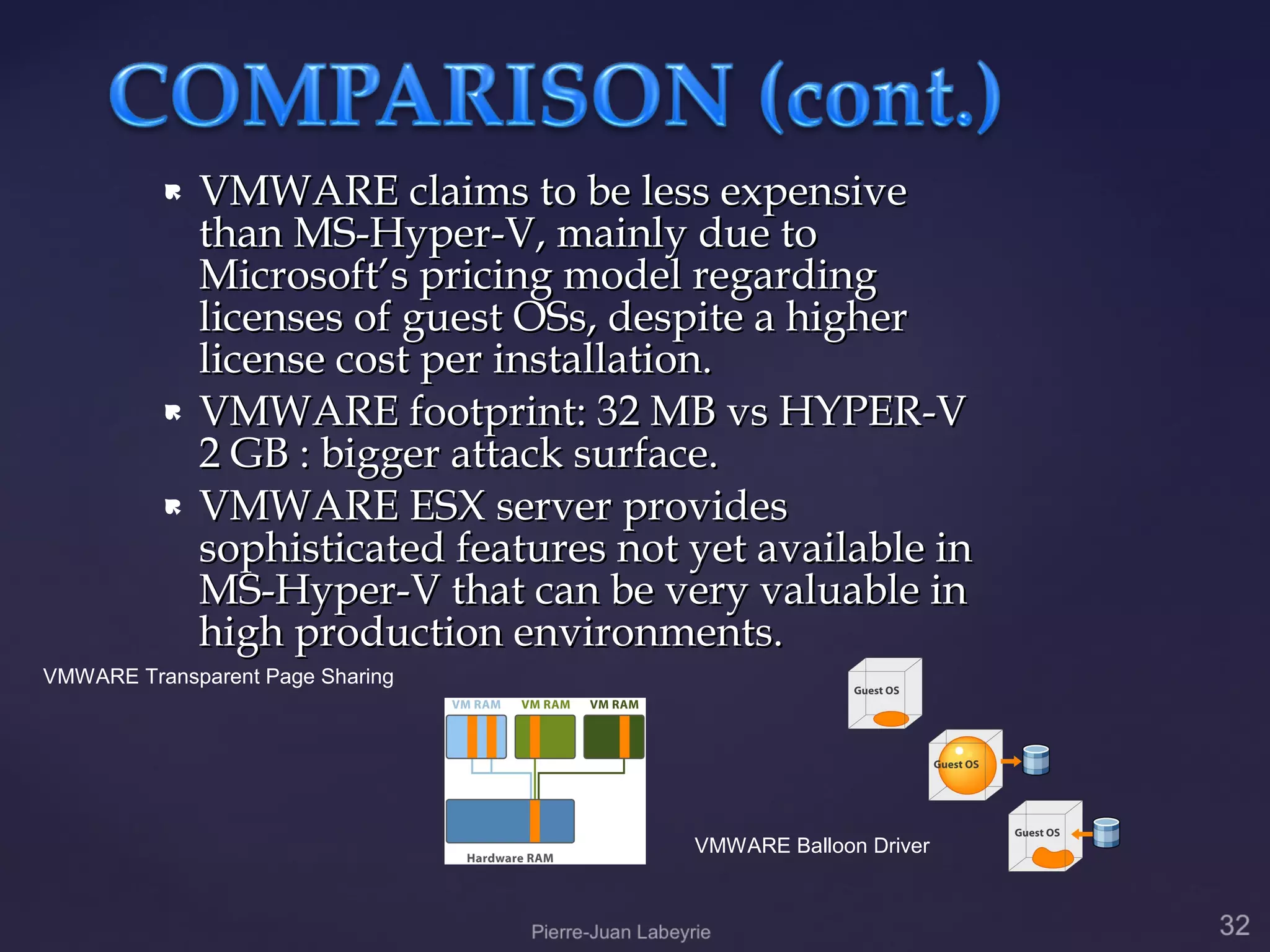
             VMWARE footprint: 32 MB vs HYPER-V
              2 GB : bigger attack surface.
             VMWARE ESX server provides
              sophisticated features not yet available in
              MS-Hyper-V that can be very valuable in
              high production environments.
VMWARE Transparent Page Sharing


                                         VMWARE Balloon Driver
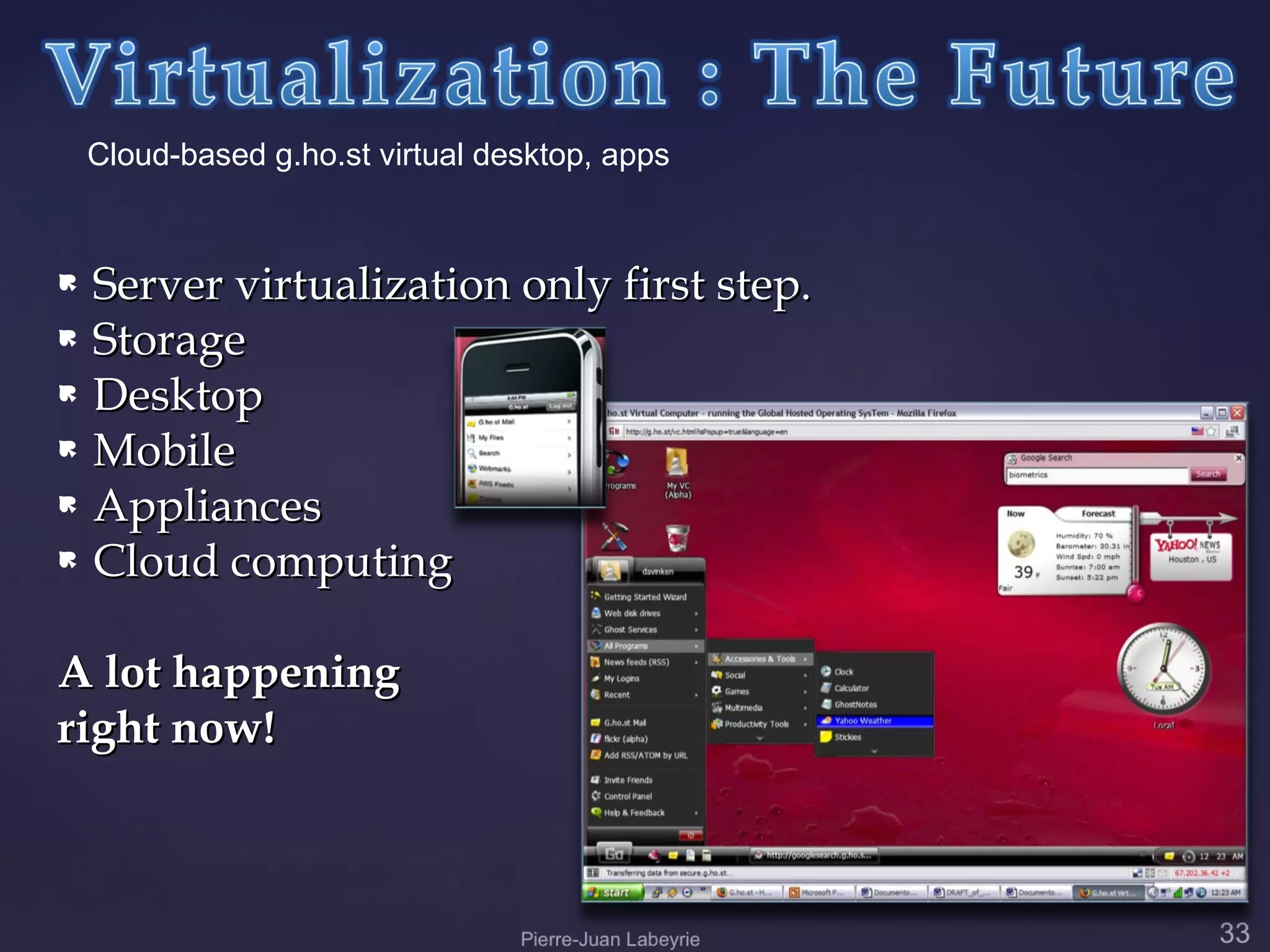
Cloud-based g.ho.st virtual desktop, apps


 Server virtualization only first step.
 Storage

 Desktop

 Mobile

 Appliances

 Cloud computing


A lot happening
right now!
   As newer operating systems and hardware
    supporting virtualization appear, it will become
    mainstream in every aspect of IT.
   Already prime consideration in the Data Center.
   Already an option in Storage.
   Strong consideration at the desktop level.
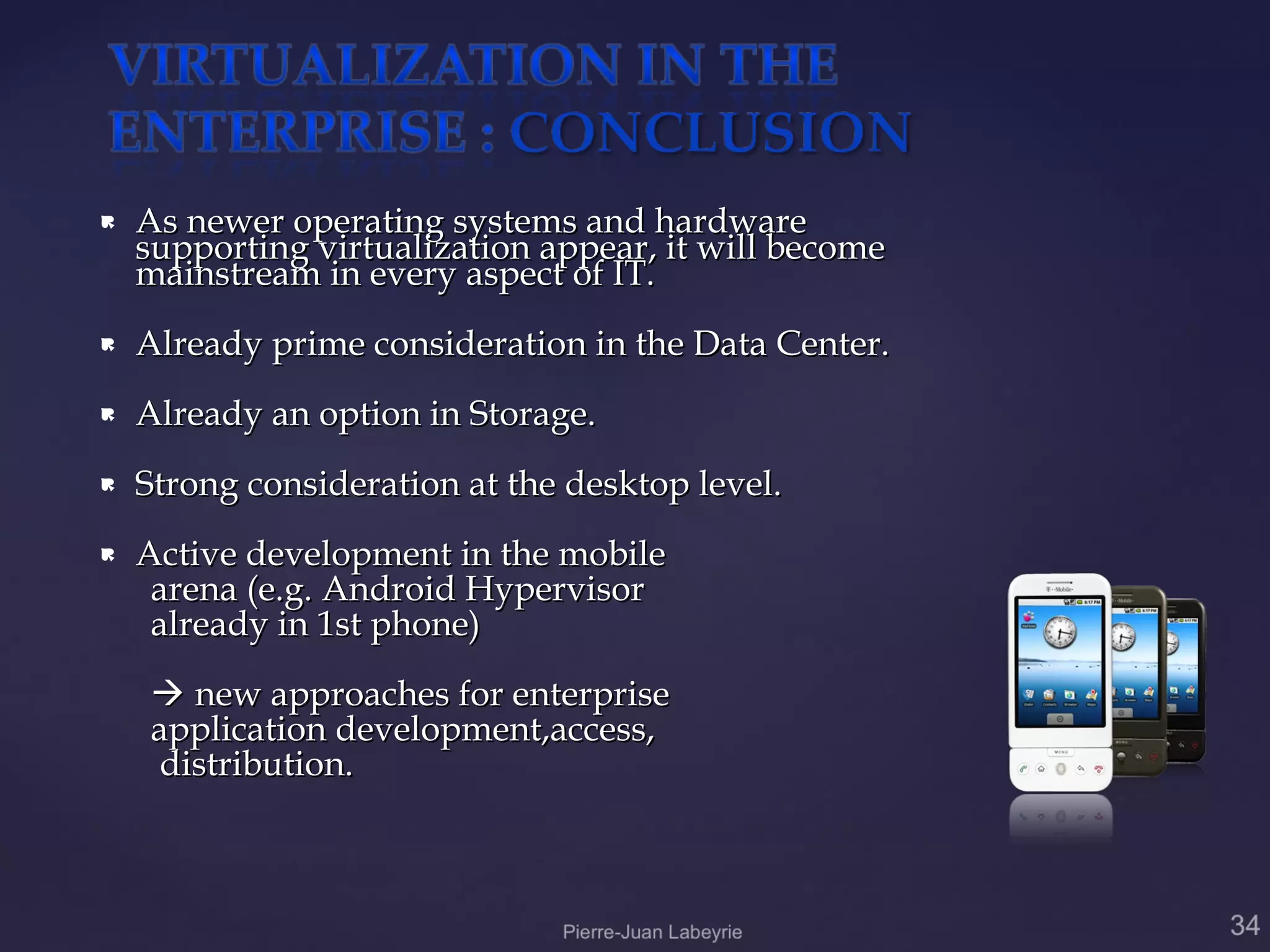
   Active development in the mobile
     arena (e.g. Android Hypervisor
     already in 1st phone)
     new approaches for enterprise
    application development,access,
     distribution.
{   Pierre-Juan Labeyrie

Private cloud server virtualization

  • 1.
  • 2.
    Growing requirements ofprocessing: proliferation of servers, demanding more energy, cooling, space
  • 3.
    WHAT IS IT ? Virtualization is a software abstraction of computer (hardware) resources.
  • 4.
    Virtualization products partition physical servers in multiple virtual machines. Each virtual machine represents a complete system, with processors, memory, networking, storage and BIOS.  Multiple virtual machines can share physical resources and run side by side on the same server.  Operating systems and applications can run unmodified in virtual machines.
  • 5.
    HOW CAN ITBE USED WITHIN AN ORGANIZATION FOR ITS BUSINESS PROCESSES ?  By consolidation of servers, isolation of processes, disaster recovery, new software testing.  Savings in costs, increased reliability and availability, more efficient usage of hardware resources.
  • 6.
    WHAT WOULD BETHE ADVANTAGES AND DISADVANTAGES OF VIRTUALIZATION ? Advantages: #1 Decreases power, cooling, floor space and infrastructure. #2 Simplifies disaster recovery and business continuity requirements. #3 Increases server utilization from the typical averages of 5-15% to 60-80%. #4 Faster deployment of information technology resources reduces time to market. #5 Lower operational costs associated with reduced resource management and administration. #6 Improves application performance by dynamically adapting storage and server resources to meet peek usage cycles. #7 Aligns application data with the storage infrastructure to match application quality of service requirements and lower cost per gigabyte. #8 Improves protection and recovery of critical business data. #9 Easier to secure and comply with regulatory requirements such as SOX, HIPPA and eDiscovery. #10 Nearly 60 percent of Fortune 500 companies are implementing virtualization in their data centers, and another 30 percent are developing plans to do so. This means a growing available pool of qualified professionals.
  • 7.
    Disadvantages #1Licensing costs. #2 Vulnerable to server failure. #3 Compromise of virtualized hosts will affect guest machines. #4 Additional guest servers will require their own administration measures. #5 Initial cost can be high – renewal of associated infrastructure must be added (newest processors, storage). Personal Note : the Cons part wont have to be presented in such a way, it is only used as a way to anticipate potential aversions coming from some local IT specialists
  • 8.
    Once an organizationrealizes the advantages of going into virtualization, several considerations are to be taken:  Strategy (replace, expand)  What systems to virtualize.  Operating systems involved.  Hardware platforms.  Administrative Issues.
  • 9.
    Hardware reuse, replacement.  Licensing issues.  Legacy software considerations.  Additional infrastructure expenses must be considered (e.g. Energy efficient cabinets, new network cabling....)  Prototype testing  Migration  Commissioning
  • 10.
    VMWARE (ESX, Server) CITRIX(Xen) SUN xVM (VirtualBox) MICROSOFT (Hyper-V Server 2008) PARALLELS VIRTUALIRON
  • 11.
    CASE STUDY: Evaluation and Comparison of market leader VMWARE ESX product and MICROSOFT recent entry HYPER-V product.
  • 13.
  • 14.
    Hardware requirements:  Minimum:1 GB RAM; Recommended: 2+ GB RAM  Maximum (64-bit systems): 256 GB RAM  Hard disk space: Minimum: 10 GB; Recommended: 40 GB or greater. Requires local disk for system, recommended SCSI, SATA limited compatibility. Storage can be attached externally (physical, virtual).  Hardware must be VMWARE certified.
  • 15.
  • 16.
    VMWARE ESX Server CASESTUDY: 7-eleven Solution Overview Customer Size: 31,500 employees Organization Profile  7-Eleven, Inc. is the world’s largest operator, franchisor and licensor of convenience stores (34,800 stores in 17 countries, 5,600 stores in North America). 7-Eleven also is one of the nation's largest independent gasoline retailers. Hardware  HP ProLiant DL380 G5 servers  Quad-Core Intel Xeon processors Partner(s) HP Software and Services  VMWare ESX, VirtualCenter, VMotion Vertical Industries  Convenience retailing, gasoline retail.
  • 17.
    VMWARE ESX Server CASESTUDY: 7-eleven (cont.) RESULTS : • 15:1 server consolidation on 2-CPU servers, 30:1 on 4-CPU servers • Shortened deployment time from 6-8 weeks to one day • Improved server utilization by 60 percent • Optimized server management with VirtualCenter • Reduced downtime with VMotion • Compressed development and testing cycles • Drastically reduced energy and cooling costs • Provided mainframe levels of reliability and data security at lower cost
  • 18.
    Launched in 2012 (late entry in the market – almost 10 years after VMware).  Available as a stand-alone product or as part of Windows 2012 Server  Different licensing and configuration options.
  • 19.
    Microsoft Hyper-V ServerPackaging Virtualization Hyper-V Server Windows 2008 Windows 2008 Windows 2008 Needs (standalone) Server Server Server Standard Enterprise Datacenter Server     Consolidation Test &     Development Mixed Windows     & Linux virt. High Availability   Quick Migration   Support for > 4   processors Included guest 0 1 physical 1 physical 1 physical + MS licenses (must purchase) + 1 VM + 4 VM unlimited VM Personal Note: this table needs to be updated
  • 20.
  • 21.
    Microsoft Hyper-V Server Hardware requirements:  64-bit x86 processor with hardware-assisted virtualization (Intel VT or AMD-V).  Data execution prevention (DEP) enabled in BIOS. Specifically, you must enable Intel XD bit (execute disable bit) or AMD NX bit (no execute bit).  Hardware virtualization enabled in BIOS.
  • 22.
    Microsoft Hyper-V Server Hardware requirements (continued):  Minimum: 1 GB RAM; Recommended: 2+ GB RAM  Maximum (64-bit systems): 32 GB  Hard disk space: Minimum: 10 GB; Recommended: 40 GB or greater. Requires local disk for system, storage can be attached externally.
  • 23.
    Product implementation Stand-alone: MicrosoftHyper-V Server:  Contains Windows Hypervisor and other components including base kernel and driver technologies. (Only command line or remote management) As part of Windows 2008 Server:  Available as a role in Server core or full installation of the Windows 2008 server (Standard, Enterprise, Data Center). GUI console, remote management, command line interfaces. Personal Note: this needs to be updated
  • 24.
    Microsoft Hyper-V TechnicalData GUEST O.S. SPECIFICATIONS  32 bit (x86) operating systems (e.g. MS-Windows 9x, XP, Vista*; MS-Windows 200x except for Windows 2008 self); Linux, Solaris, Unix.  64 bit (x86) operating systems (Windows, SuSE Linux)**  32 and 64 bit O.S. can execute concurrently.  Up to 4 virtual processors per virtual machine  Up to 31 GB memory for all (up to 128) running virtual machines (1GB reserved for Hyper-V Server Parent Partition). * : Windows Vista currently requires patch. **Note: Red Hat and other Linux must have XEN extensions SOLARIS, UNIX not yet supported.
  • 25.
  • 26.
    SCVMM : SystemCenter Virtual Machine Manager Provides overview of a group of hosts, and VM within each host
  • 27.
    Solution Overview Customer Size:130000 employees Organization Profile  Costco Wholesale Corporation is an international wholesale distributor based in Issaquah, Washington. Costco has 539 member warehouses and 130,000 employees. Hardware  HP ProLiant DL380 G5 servers  Quad-Core Intel Xeon processors Partner(s) HP Software and Services  Microsoft System Center Virtual Machine Manager 2008  Windows Server 2008  Windows Server 2008 Hyper-V Vertical Industries  Consumer Goods
  • 28.
    Mostly a Microsoft shop (1200 servers, 95% of them on Windows products)  Started virtualization efforts in 2006 (using MS Virtual Server 2005, a previous, limited virtualization product).  As soon as hearing about Hyper-V, enrolled in MS Virtualization Rapid Deployment Program.  Using MAP tool (Microsoft Assessment and Planning) server loads were evaluated, discovering underutilized servers, good candidates for consolidation.
  • 29.
    Initial phase: 50+ servers consolidated on 5 HP servers with Quad- Core Intel Xeon processors.  The server cluster has a core infrastructure that mimics the production Costco environment  Quality Assurance staff verifying reliability and stability before rolling out new systems to internal customers and member warehouses.  By virtualizing existing servers instead of purchasing new physical machines, Costco limited the proliferation of servers in its data center.  IT staff at Costco expects to achieve 40-45% virtualization by August 2009.  Expected savings in energy costs, currently $75,000/mo (yet to quantify).  ROI not yet published (estimated?)
  • 30.
    Hyper-V lacks some advanced features of VMware's ESX server and virtualization platform, but its relatively low cost, integrated physical and virtual management, and ease of implementation might be good enough for many organizations today.  Microsoft-based shops will eventually migrate to Windows 2008 and have access to Hyper-V (Netscape history repeating ?)
  • 31.
    One important disadvantage of Hyper-V is its requirement for 64-bit hardware. This excludes many 32-bit based infrastructures that may benefit greatly from virtualization, leaving them to the competition.
  • 32.
    VMWARE claims to be less expensive than MS-Hyper-V, mainly due to Microsoft’s pricing model regarding licenses of guest OSs, despite a higher license cost per installation.  VMWARE footprint: 32 MB vs HYPER-V 2 GB : bigger attack surface.  VMWARE ESX server provides sophisticated features not yet available in MS-Hyper-V that can be very valuable in high production environments. VMWARE Transparent Page Sharing VMWARE Balloon Driver
  • 33.
    Cloud-based g.ho.st virtualdesktop, apps  Server virtualization only first step.  Storage  Desktop  Mobile  Appliances  Cloud computing A lot happening right now!
  • 34.
    As newer operating systems and hardware supporting virtualization appear, it will become mainstream in every aspect of IT.  Already prime consideration in the Data Center.  Already an option in Storage.  Strong consideration at the desktop level.  Active development in the mobile arena (e.g. Android Hypervisor already in 1st phone)  new approaches for enterprise application development,access, distribution.
  • 35.
    { Pierre-Juan Labeyrie

Editor's Notes

  • #3 Pierre-Juan Labeyrie