Virtualization
Virtualization
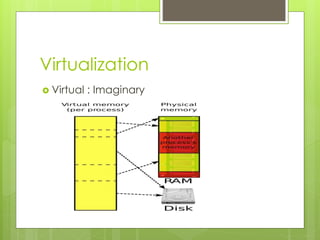
 Virtual : Imaginary
Definition
 It is the technology which is making a
transformation in IT by saving cost, energy,
time.
 Virtualization provides an emulation of
hardware (computer resources) to
different virtual machines. A virtual
machine is an illusion of existing machine,
which uses the resources of underlying
machine & works as actual machine.
 Virtualization is to run different operation
systems and different applications on
same machine at the same time, giving
an illusion that each is running on different
machines.
 One physical machine to support multiple
virtual machines that run in parallel.
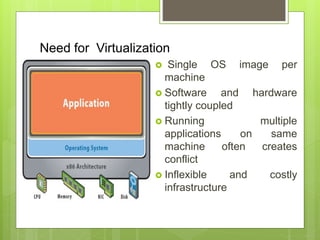
Need for Virtualization
 Single OS image per
machine
 Software and hardware
tightly coupled
 Running multiple
applications on same
machine often creates
conflict
 Inflexible and costly
infrastructure
Need…
 Cloud computing promises to give you as
much as you desire. It is a fully scalable
and elastic model. But to fulfill the real
time demands a lot of infrastructure is
required, which would require a lot of cost
and energy consumption too. The solution
to it is Virtualization. As with virtualization
the same resource can be made
available to many user concurrently.
Therefore virtualization is the basic need
of cloud computing
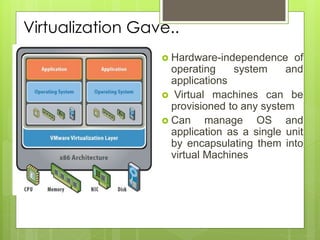
Virtualization Gave..
 Hardware-independence of
operating system and
applications
 Virtual machines can be
provisioned to any system
 Can manage OS and
application as a single unit
by encapsulating them into
virtual Machines
Benefits of Virtualization
 Reduce the number of physical machines
 Isolate environments but share hardware
 Make better use of existing capacity
 Virtualize Network and SAN interfaces to
reduce infrastructure needs
 Ultimately save on maintenance
 More Flexible
 Energy Saving
…
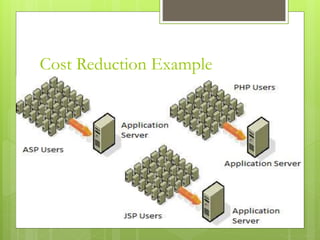
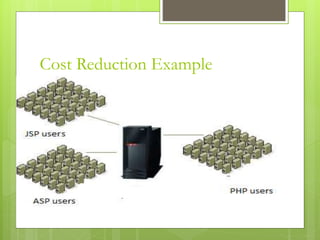
Cost Reduction Example
Types
 Execution Level
 Operating System
 Programming
 Application
 Storage
Execution
 This type of virtualization provides an
execution environment for executing the
applications /operating system/ byte code.
It can be achieved by:
 Hardware Level Virtualization: - This type of
virtualization provides an illusion of having
many resources (hardware) over one
machine (hardware). Same hardware is
emulated (reproduced) to many users. Same
hardware can be used as different hardware.
Hardware Virtualization
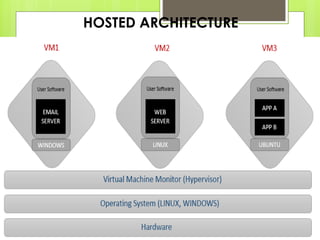
 For it a Virtual Machine Manager (VMM) is
required, which is called hypervisor. A
hypervisor is one, which receives the
request from created Virtual Machine for
a resource and allocates the resource
from underlying hardware.
Hypervisor
 A computing layer which allows multiple
operating systems to run on a host computer at
the same time.
 Originally developed in the 1970s as part of the
IBM S/360
 Also known as VMM (Virtual Machine Monitor)
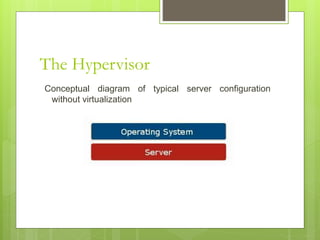
The Hypervisor
Conceptual diagram of typical server configuration
without virtualization
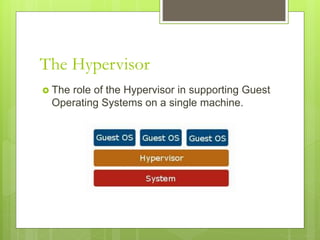
The Hypervisor
 The role of the Hypervisor in supporting Guest
Operating Systems on a single machine.
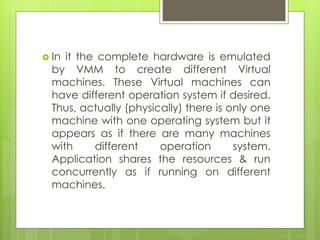
 In it the complete hardware is emulated
by VMM to create different Virtual
machines. These Virtual machines can
have different operation system if desired.
Thus, actually (physically) there is only one
machine with one operating system but it
appears as if there are many machines
with different operation system.
Application shares the resources & run
concurrently as if running on different
machines.
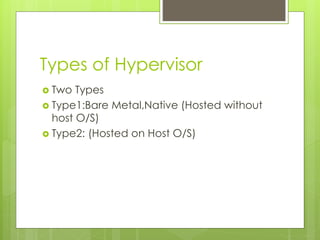
Types of Hypervisor
 Two Types
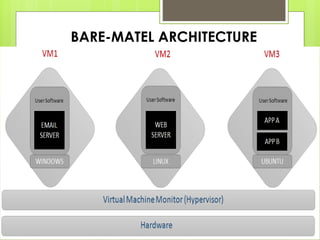
 Type1:Bare Metal,Native (Hosted without
host O/S)
 Type2: (Hosted on Host O/S)
BARE-MATEL ARCHITECTURE
HOSTED ARCHITECTURE
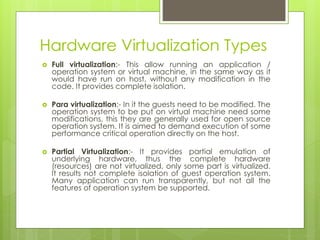
Hardware Virtualization Types
 Full virtualization:- This allow running an application /
operation system or virtual machine, in the same way as it
would have run on host, without any modification in the
code. It provides complete isolation.
 Para virtualization:- In it the guests need to be modified. The
operation system to be put on virtual machine need some
modifications, this they are generally used for open source
operation system. It is aimed to demand execution of some
performance critical operation directly on the host.
 Partial Virtualization:- It provides partial emulation of
underlying hardware, thus the complete hardware
(resources) are not virtualized, only some part is virtualized.
It results not complete isolation of guest operation system.
Many application can run transparently, but not all the
features of operation system be supported.
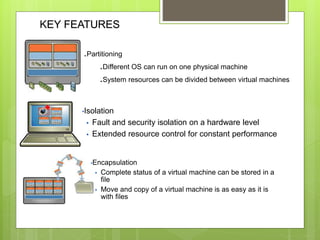
KEY FEATURES
.Partitioning
.Different OS can run on one physical machine
.System resources can be divided between virtual machines
•Isolation
 Fault and security isolation on a hardware level
 Extended resource control for constant performance
•Encapsulation
 Complete status of a virtual machine can be stored in a
file
 Move and copy of a virtual machine is as easy as it is
with files
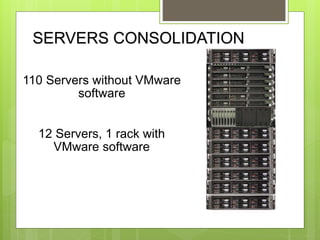
SERVERS CONSOLIDATION
110 Servers without VMware
software
12 Servers, 1 rack with
VMware software
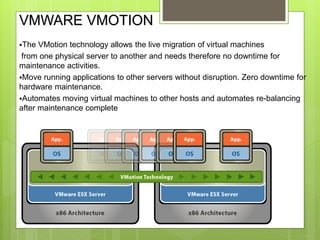
VMWARE VMOTION
The VMotion technology allows the live migration of virtual machines
from one physical server to another and needs therefore no downtime for
maintenance activities.
Move running applications to other servers without disruption. Zero downtime for
hardware maintenance.
Automates moving virtual machines to other hosts and automates re-balancing
after maintenance complete
Operation System virtualization
 In it the same operation system, provides
different execution environment for different
concurrent applications. There is no
hypervisor, all the application runs on same
machines having one operation system.
Different applications share the resources and
run concurrently as if running on different
machines. A separate user space instance is
created. This is provided by time-sharing
operation system like UNIX. Different user
space is provided to all users
Programming Level
Virtualization
 In it the code of program is complied for a
Virtual machine not for machine code eg.
Java.
Application Level Virtualization
 Application Level Virtualization allows application
to be run on run time environment, which natively
do not support all the features required by such
application. It allows running application on one
operating system, which actually does not support
that application. It allows executing a program,
compiled for different network. This is done at
operating system level by emulation, using a thin
log on program or operating system components
eg. Cross over provides facility to run windows
application on Mac operating system.
Storage
 In this type of virtualization basic focus is
on storage of the data. User can have
access to unlimited amount of storage
without even worrying about their actual
location. Data is accessed by logical
address or path. Google drive, Drop-box
are examples of this category
Network
 It can be grouped in two categories. Internal
and External. In External Network Virtualization
a virtual LAN (VLAN) is created, it gives
capability of real network. It is a combination
of Hardware appliances and some soft-wares
for network virtualization. The groups of hosts
make a VLAN that communicate with each
other as if they are in real LAN. In Internal
Network Virtualization, network facility is
provided by Operating System.

Virtualization: Force driving cloud computing

  • 1.
  • 2.
  • 3.
    Definition  It isthe technology which is making a transformation in IT by saving cost, energy, time.  Virtualization provides an emulation of hardware (computer resources) to different virtual machines. A virtual machine is an illusion of existing machine, which uses the resources of underlying machine & works as actual machine.
  • 4.
     Virtualization isto run different operation systems and different applications on same machine at the same time, giving an illusion that each is running on different machines.  One physical machine to support multiple virtual machines that run in parallel.
  • 5.
    Need for Virtualization Single OS image per machine  Software and hardware tightly coupled  Running multiple applications on same machine often creates conflict  Inflexible and costly infrastructure
  • 6.
    Need…  Cloud computingpromises to give you as much as you desire. It is a fully scalable and elastic model. But to fulfill the real time demands a lot of infrastructure is required, which would require a lot of cost and energy consumption too. The solution to it is Virtualization. As with virtualization the same resource can be made available to many user concurrently. Therefore virtualization is the basic need of cloud computing
  • 7.
    Virtualization Gave..  Hardware-independenceof operating system and applications  Virtual machines can be provisioned to any system  Can manage OS and application as a single unit by encapsulating them into virtual Machines
  • 8.
    Benefits of Virtualization Reduce the number of physical machines  Isolate environments but share hardware  Make better use of existing capacity  Virtualize Network and SAN interfaces to reduce infrastructure needs  Ultimately save on maintenance  More Flexible  Energy Saving …
  • 9.
  • 10.
  • 11.
    Types  Execution Level Operating System  Programming  Application  Storage
  • 12.
    Execution  This typeof virtualization provides an execution environment for executing the applications /operating system/ byte code. It can be achieved by:  Hardware Level Virtualization: - This type of virtualization provides an illusion of having many resources (hardware) over one machine (hardware). Same hardware is emulated (reproduced) to many users. Same hardware can be used as different hardware.
  • 13.
    Hardware Virtualization  Forit a Virtual Machine Manager (VMM) is required, which is called hypervisor. A hypervisor is one, which receives the request from created Virtual Machine for a resource and allocates the resource from underlying hardware.
  • 14.
    Hypervisor  A computinglayer which allows multiple operating systems to run on a host computer at the same time.  Originally developed in the 1970s as part of the IBM S/360  Also known as VMM (Virtual Machine Monitor)
  • 15.
    The Hypervisor Conceptual diagramof typical server configuration without virtualization
  • 16.
    The Hypervisor  Therole of the Hypervisor in supporting Guest Operating Systems on a single machine.
  • 17.
     In itthe complete hardware is emulated by VMM to create different Virtual machines. These Virtual machines can have different operation system if desired. Thus, actually (physically) there is only one machine with one operating system but it appears as if there are many machines with different operation system. Application shares the resources & run concurrently as if running on different machines.
  • 18.
    Types of Hypervisor Two Types  Type1:Bare Metal,Native (Hosted without host O/S)  Type2: (Hosted on Host O/S)
  • 19.
  • 20.
  • 21.
    Hardware Virtualization Types Full virtualization:- This allow running an application / operation system or virtual machine, in the same way as it would have run on host, without any modification in the code. It provides complete isolation.  Para virtualization:- In it the guests need to be modified. The operation system to be put on virtual machine need some modifications, this they are generally used for open source operation system. It is aimed to demand execution of some performance critical operation directly on the host.  Partial Virtualization:- It provides partial emulation of underlying hardware, thus the complete hardware (resources) are not virtualized, only some part is virtualized. It results not complete isolation of guest operation system. Many application can run transparently, but not all the features of operation system be supported.
  • 22.
    KEY FEATURES .Partitioning .Different OScan run on one physical machine .System resources can be divided between virtual machines •Isolation  Fault and security isolation on a hardware level  Extended resource control for constant performance •Encapsulation  Complete status of a virtual machine can be stored in a file  Move and copy of a virtual machine is as easy as it is with files
  • 23.
    SERVERS CONSOLIDATION 110 Serverswithout VMware software 12 Servers, 1 rack with VMware software
  • 24.
    VMWARE VMOTION The VMotiontechnology allows the live migration of virtual machines from one physical server to another and needs therefore no downtime for maintenance activities. Move running applications to other servers without disruption. Zero downtime for hardware maintenance. Automates moving virtual machines to other hosts and automates re-balancing after maintenance complete
  • 25.
    Operation System virtualization In it the same operation system, provides different execution environment for different concurrent applications. There is no hypervisor, all the application runs on same machines having one operation system. Different applications share the resources and run concurrently as if running on different machines. A separate user space instance is created. This is provided by time-sharing operation system like UNIX. Different user space is provided to all users
  • 26.
    Programming Level Virtualization  Init the code of program is complied for a Virtual machine not for machine code eg. Java.
  • 27.
    Application Level Virtualization Application Level Virtualization allows application to be run on run time environment, which natively do not support all the features required by such application. It allows running application on one operating system, which actually does not support that application. It allows executing a program, compiled for different network. This is done at operating system level by emulation, using a thin log on program or operating system components eg. Cross over provides facility to run windows application on Mac operating system.
  • 28.
    Storage  In thistype of virtualization basic focus is on storage of the data. User can have access to unlimited amount of storage without even worrying about their actual location. Data is accessed by logical address or path. Google drive, Drop-box are examples of this category
  • 29.
    Network  It canbe grouped in two categories. Internal and External. In External Network Virtualization a virtual LAN (VLAN) is created, it gives capability of real network. It is a combination of Hardware appliances and some soft-wares for network virtualization. The groups of hosts make a VLAN that communicate with each other as if they are in real LAN. In Internal Network Virtualization, network facility is provided by Operating System.