Virtualization:
        Hyper-V, VMM, App-V and MED-V
                        or
          Server and desktop solutions

Torben Vig Nelausen
Product Manager – Windows Server Family
Torben.Nelausen@microsoft.com
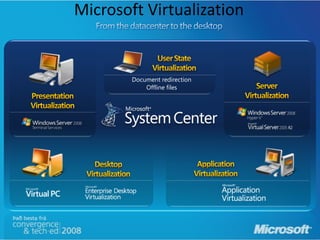
Microsoft Virtualization


        Document redirection
            Offline files
Server Virtualization
Hyper-V Architecture                                  Provided by:
                                                                                            OS
                                                                                     ISV / IHV / OEM
    Parent
   Partition
                                            Child Partitions                        Microsoft Hyper-V
                                                                                   Microsoft / XenSource


   VM Worker
    Processes
Applications               Applications        Applications    Applications
  WMI Provider                                                                               User
    VM Service                                                                               Mode
   Windows                 Windows Server         Non-         Xen-Enabled
  Server 2008                2003, 2008         Hypervisor     Linux Kernel
                                                Aware OS            Linux
Windows                   Windows
 Kernel         VSP        Kernel     VSC                            VSC

                                                                                            Kernel
       IHV
      Drivers                                                     VMBus

    VMBus                     VMBus              Emulation     Hypercall Adapter            Mode

                                    Windows hypervisor                                     Ring -1

                      “Designed for Windows” Server Hardware
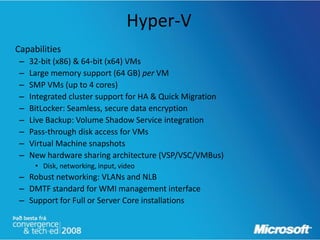
Hyper-V
Capabilities
 –   32-bit (x86) & 64-bit (x64) VMs
 –   Large memory support (64 GB) per VM
 –   SMP VMs (up to 4 cores)
 –   Integrated cluster support for HA & Quick Migration
 –   BitLocker: Seamless, secure data encryption
 –   Live Backup: Volume Shadow Service integration
 –   Pass-through disk access for VMs
 –   Virtual Machine snapshots
 –   New hardware sharing architecture (VSP/VSC/VMBus)
      • Disk, networking, input, video
 – Robust networking: VLANs and NLB
 – DMTF standard for WMI management interface
 – Support for Full or Server Core installations
Windows Server Core
• Server Core: new minimal
  installation option
   – Provides essential server
     functionality
   – Command Line Interface only,
     no GUI Shell
• Benefits
   – Less code results in fewer
     patches and reduced servicing
     burden
   – Low surface area server for
     targeted roles
   – More secure and reliable with
     less management
Security
Isolation
– No sharing of virtualized devices
– Separate VMBus instance per vm to the parent
– No sharing of memory
    • Each has its own address space
– VMs cannot communicate with each other, except through
  traditional networking
– Guests can’t perform DMA attacks because they’re never
  mapped to physical devices
– Guests cannot write to the hypervisor
– Parent partition cannot write to the hypervisor
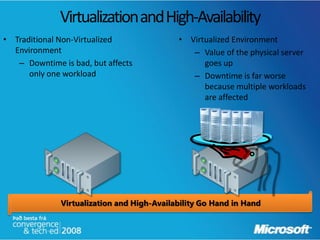
Virtualization and High-Availability
• Traditional Non-Virtualized               • Virtualized Environment
  Environment                                  – Value of the physical server
   – Downtime is bad, but affects                 goes up
      only one workload                        – Downtime is far worse
                                                  because multiple workloads
                                                  are affected


              Virtualization and High-Availability Go Hand in Hand
Windows Server Virtualization
                        High Availability


• Providing solutions for both planned and unplanned downtime
• Planned downtime
   – Quickly move virtualized workloads to service underlying hardware
   – More common than unplanned
• Unplanned downtime
   – Automatic failover to other nodes (hardware or power failure)
   – Not as common and more difficult
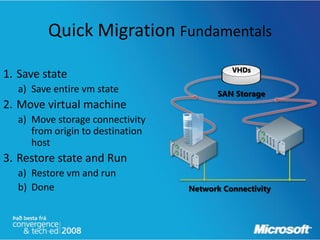
Quick Migration Fundamentals
                                            VHDs
1. Save state
  a) Save entire vm state                SAN Storage
2. Move virtual machine
  a) Move storage connectivity
     from origin to destination
     host
3. Restore state and Run
  a) Restore vm and run
  b) Done                         Network Connectivity
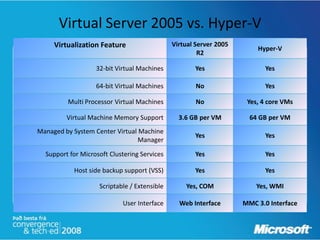
Virtual Server 2005 vs. Hyper-V
     Virtualization Feature                   Virtual Server 2005
                                                                        Hyper-V
                                                       R2

                   32-bit Virtual Machines           Yes                   Yes

                   64-bit Virtual Machines            No                   Yes

         Multi Processor Virtual Machines             No             Yes, 4 core VMs

         Virtual Machine Memory Support         3.6 GB per VM         64 GB per VM
Managed by System Center Virtual Machine
                                                     Yes                   Yes
                                 Manager

  Support for Microsoft Clustering Services          Yes                   Yes

           Host side backup support (VSS)            Yes                   Yes

                    Scriptable / Extensible       Yes, COM              Yes, WMI

                            User Interface      Web Interface       MMC 3.0 Interface
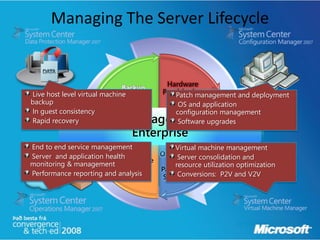
Managing The Server Lifecycle


                              Backup
Live host level virtual machine        Patch management and deployment
backup                                  OS and application
In guest consistency                   configuration management
Rapid recovery                          Software upgrades


End to end service management          Virtual machine management
Server and application health           Server consolidation and
monitoring & management                resource utilization optimization
Performance reporting and analysis      Conversions: P2V and V2V
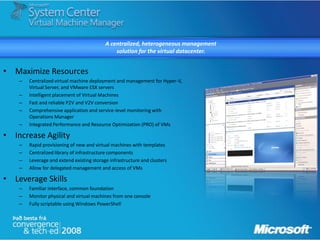
A centralized, heterogeneous management
                                               solution for the virtual datacenter.


• Maximize Resources
    –   Centralized virtual machine deployment and management for Hyper-V,
        Virtual Server, and VMware ESX servers
    –   Intelligent placement of Virtual Machines
    –   Fast and reliable P2V and V2V conversion
    –   Comprehensive application and service-level monitoring with
        Operations Manager
    –   Integrated Performance and Resource Optimization (PRO) of VMs

• Increase Agility
    –   Rapid provisioning of new and virtual machines with templates
    –   Centralized library of infrastructure components
    –   Leverage and extend existing storage infrastructure and clusters
    –   Allow for delegated management and access of VMs

• Leverage Skills
    –   Familiar interface, common foundation
    –   Monitor physical and virtual machines from one console
    –   Fully scriptable using Windows PowerShell
System Center Virtual Machine Manager 2008


                                                         Virtual
Hyper-V
                                                        Machines
Cluster

VMware
                                                        Context
 server
                                                        Sensitive
                                                         Actions


Filters                                                  Live
                                                       Thumbnail


                                                           VM
Management                                             Information
 Selection
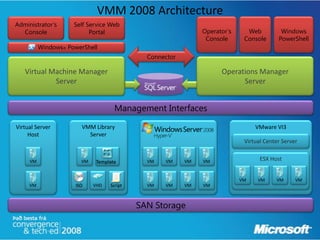
VMM 2008 Architecture
Administrator’s      Self Service Web
  Console                  Portal                              Operator’s     Web          Windows
                                                                Console      Console      PowerShell
          Windows® PowerShell
                                              Connector

   Virtual Machine Manager                                           Operations Manager
            Server                                                         Server


                                     Management Interfaces

Virtual Server          VMM Library                                              VMware VI3
     Host                 Server
                                                                             Virtual Center Server


     VM                 VM    Template        VM   VM     VM   VM                  ESX Host


                                                                            VM    VM     VM      VM
     VM               ISO    VHD   Script     VM   VM     VM   VM


                                            SAN Storage
Virtualization


“Virtualization without good management
     is more dangerous than not using
       virtualization in the first place.”
              – TOM BITTMAN, GARTNER
Application and Desktop Virtualization
Mobile PCs yield positive ROI   Corporate knowledge assets at risk
Mobile users work on average    Over 600K laptops lost in US
3.2 hours per week more than    in 2005; 80% of companies’
desktop users                   data on user PCs

Gartner, Forrester              Safeware Insurance
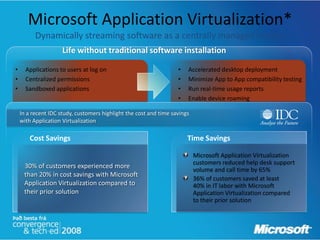
Microsoft Application Virtualization*
          Dynamically streaming software as a centrally managed service
                     Life without traditional software installation

•     Applications to users at log on                              •   Accelerated desktop deployment
•     Centralized permissions                                      •   Minimize App to App compatibility testing
•     Sandboxed applications                                       •   Run real-time usage reports
                                                                   •   Enable device roaming

    In a recent IDC study, customers highlight the cost and time savings
    with Application Virtualization

        Cost Savings                                                   Time Savings

                                                                           Microsoft Application Virtualization
                                                                           customers reduced help desk support
     30% of customers experienced more
                                                                           volume and call time by 65%
     than 20% in cost savings with Microsoft
                                                                           36% of customers saved at least
     Application Virtualization compared to                                40% in IT labor with Microsoft
     their prior solution                                                  Application Virtualization compared
                                                                           to their prior solution
Microsoft Application Virtualization 4.5
                Key Investment Areas

        Dynamic Suite Composition
        Admin controlled combination of virtual application environments


        Flexible deployment modes
        Interoperability with SMS, SCCM and third party ESD
        Standalone mode
        Increased Supportability


        Globalization and Localization
        Supports localized applications and operating systems


        Secure Windows Initiative
        Trustworthy Computing
        Secure by Default
The Microsoft Application Virtualization Platform
                                                                                                   SMS/SCCM
                                                                                                   Management
                                                                                                     Console
                                                               SMS/SCCM
                                                                Database


                                                                                                                                              Microsoft
                                         SMS/SCCM                                                   Active                                   Application
                                      Distribution Point                                           Directory                                Virtualization
                                                                                                                                            Management
                                                                                                          Management                           Console
                                                                                                          Web Service

                           SMS/SCCM
                           application                        System Center                                                                   Microsoft
                            delivery                           Application                                                                   Application
                                                              Virtualization                                                                Virtualization
                                                            Management Server                                                                 Database                 Windows
                                                                                                                                                                      application

      VECD
                                                             Streaming
             Terminal                                            +                             System Center
              server                                          manifest                           Application
                                                                                                Virtualization                                                              Microsoft
Microsoft Application                                                                         Streaming Server                                                             Application
                         Desktop
Virtualization Clients                                                                                                                                                    Virtualization
                                                                                                                                                                           Sequencer
                                                                                                                                   Virtualized
                                         VECD                                                                                      application
                                                Terminal                                      Streaming
                                                 server
                                                                                                                                                       MSI-wrapped
                                   Microsoft Application                                                                                                virtualized
                                                            Desktop
                                   Virtualization Clients                                                                   Standalone
                                                                                                                                                        application
                                                                                                                             Microsoft
                                                                                                                            Application
                                                                            VECD
                                                                                                                        Virtualization Client
                                                                                   Terminal
                                                                                    server
                                                                                                                                                Application
                                                                      Microsoft Application
                                                                                                  Desktop                                       delivery via
                                                                      Virtualization Clients                                                    MSI on CD
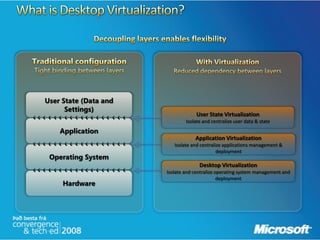
Desktop Virtualization Overview
   Server-Based Virtualization                  Client-Hosted Virtualization

• Runs virtual images on a server, and           Creates a local copy of the virtual
  provides remote access from any                image, available to work offline,
  endpoint (with zero-touch                      and with no servers
  deployment)


        Server             Client                                Client


 VDI (Windows VECD – Windows Vista Enterprise   Microsoft® Enterprise Desktop Virtualization
     Centralized Desktop), Terminal Services                     based on
                                                         Microsoft Virtual PC 2007
MEDV leverages Microsfot Virtual PC, to enable enterprise deployment of local
desktop virtualization
User experience with Virtual PC
…with MEDV
MEDV Architecture
Replaceable PC                                                                  Hot-Desking
Flexibility, easy to migrate users                                              Flexibly, compliance, free seating
                  Application
                  Virtualization
                                    Enterprise
                                    Desktop                                     Application
Bitlocker Drive                                                                 Virtualization
Encryption                          Virtualization                                                           Terminal
                        Folder                                                                               Services
                                                                                Folder
                        Redirection                                                                          (LOB Application)
                                                                                Redirection


Extending PC Life                                                               Hosted Image
Security, low cost, carbon-neutral                                              Security, right apps and data
                                                                                  Windows Vista Enterprise
                                                                                  Centralized Desktop
                                   Terminal
                                   Services
                                   (Desktop)


                                       Working from Home
                                       Security, emergency access
                                                     Windows Vista Enterprise
                                                     Centralized Desktop


                                       Windows Server 2008
                                       Terminal Services Gateway


                                                                                                                                 34
Questions

   ?
Thank you

Virtualization: Hyper-V, VMM, App-V and MED-V.

  • 1.
    Virtualization: Hyper-V, VMM, App-V and MED-V or Server and desktop solutions Torben Vig Nelausen Product Manager – Windows Server Family Torben.Nelausen@microsoft.com
  • 2.
    Microsoft Virtualization Document redirection Offline files
  • 3.
  • 4.
    Hyper-V Architecture Provided by: OS ISV / IHV / OEM Parent Partition Child Partitions Microsoft Hyper-V Microsoft / XenSource VM Worker Processes Applications Applications Applications Applications WMI Provider User VM Service Mode Windows Windows Server Non- Xen-Enabled Server 2008 2003, 2008 Hypervisor Linux Kernel Aware OS Linux Windows Windows Kernel VSP Kernel VSC VSC Kernel IHV Drivers VMBus VMBus VMBus Emulation Hypercall Adapter Mode Windows hypervisor Ring -1 “Designed for Windows” Server Hardware
  • 5.
    Hyper-V Capabilities – 32-bit (x86) & 64-bit (x64) VMs – Large memory support (64 GB) per VM – SMP VMs (up to 4 cores) – Integrated cluster support for HA & Quick Migration – BitLocker: Seamless, secure data encryption – Live Backup: Volume Shadow Service integration – Pass-through disk access for VMs – Virtual Machine snapshots – New hardware sharing architecture (VSP/VSC/VMBus) • Disk, networking, input, video – Robust networking: VLANs and NLB – DMTF standard for WMI management interface – Support for Full or Server Core installations
  • 6.
    Windows Server Core •Server Core: new minimal installation option – Provides essential server functionality – Command Line Interface only, no GUI Shell • Benefits – Less code results in fewer patches and reduced servicing burden – Low surface area server for targeted roles – More secure and reliable with less management
  • 7.
    Security Isolation – No sharingof virtualized devices – Separate VMBus instance per vm to the parent – No sharing of memory • Each has its own address space – VMs cannot communicate with each other, except through traditional networking – Guests can’t perform DMA attacks because they’re never mapped to physical devices – Guests cannot write to the hypervisor – Parent partition cannot write to the hypervisor
  • 8.
    Virtualization and High-Availability •Traditional Non-Virtualized • Virtualized Environment Environment – Value of the physical server – Downtime is bad, but affects goes up only one workload – Downtime is far worse because multiple workloads are affected Virtualization and High-Availability Go Hand in Hand
  • 9.
    Windows Server Virtualization High Availability • Providing solutions for both planned and unplanned downtime • Planned downtime – Quickly move virtualized workloads to service underlying hardware – More common than unplanned • Unplanned downtime – Automatic failover to other nodes (hardware or power failure) – Not as common and more difficult
  • 10.
    Quick Migration Fundamentals VHDs 1. Save state a) Save entire vm state SAN Storage 2. Move virtual machine a) Move storage connectivity from origin to destination host 3. Restore state and Run a) Restore vm and run b) Done Network Connectivity
  • 11.
    Virtual Server 2005vs. Hyper-V Virtualization Feature Virtual Server 2005 Hyper-V R2 32-bit Virtual Machines Yes Yes 64-bit Virtual Machines No Yes Multi Processor Virtual Machines No Yes, 4 core VMs Virtual Machine Memory Support 3.6 GB per VM 64 GB per VM Managed by System Center Virtual Machine Yes Yes Manager Support for Microsoft Clustering Services Yes Yes Host side backup support (VSS) Yes Yes Scriptable / Extensible Yes, COM Yes, WMI User Interface Web Interface MMC 3.0 Interface
  • 12.
    Managing The ServerLifecycle Backup Live host level virtual machine Patch management and deployment backup OS and application In guest consistency configuration management Rapid recovery Software upgrades End to end service management Virtual machine management Server and application health Server consolidation and monitoring & management resource utilization optimization Performance reporting and analysis Conversions: P2V and V2V
  • 13.
    A centralized, heterogeneousmanagement solution for the virtual datacenter. • Maximize Resources – Centralized virtual machine deployment and management for Hyper-V, Virtual Server, and VMware ESX servers – Intelligent placement of Virtual Machines – Fast and reliable P2V and V2V conversion – Comprehensive application and service-level monitoring with Operations Manager – Integrated Performance and Resource Optimization (PRO) of VMs • Increase Agility – Rapid provisioning of new and virtual machines with templates – Centralized library of infrastructure components – Leverage and extend existing storage infrastructure and clusters – Allow for delegated management and access of VMs • Leverage Skills – Familiar interface, common foundation – Monitor physical and virtual machines from one console – Fully scriptable using Windows PowerShell
  • 14.
    System Center VirtualMachine Manager 2008 Virtual Hyper-V Machines Cluster VMware Context server Sensitive Actions Filters Live Thumbnail VM Management Information Selection
  • 15.
    VMM 2008 Architecture Administrator’s Self Service Web Console Portal Operator’s Web Windows Console Console PowerShell Windows® PowerShell Connector Virtual Machine Manager Operations Manager Server Server Management Interfaces Virtual Server VMM Library VMware VI3 Host Server Virtual Center Server VM VM Template VM VM VM VM ESX Host VM VM VM VM VM ISO VHD Script VM VM VM VM SAN Storage
  • 16.
    Virtualization “Virtualization without goodmanagement is more dangerous than not using virtualization in the first place.” – TOM BITTMAN, GARTNER
  • 17.
  • 18.
    Mobile PCs yieldpositive ROI Corporate knowledge assets at risk Mobile users work on average Over 600K laptops lost in US 3.2 hours per week more than in 2005; 80% of companies’ desktop users data on user PCs Gartner, Forrester Safeware Insurance
  • 24.
    Microsoft Application Virtualization* Dynamically streaming software as a centrally managed service Life without traditional software installation • Applications to users at log on • Accelerated desktop deployment • Centralized permissions • Minimize App to App compatibility testing • Sandboxed applications • Run real-time usage reports • Enable device roaming In a recent IDC study, customers highlight the cost and time savings with Application Virtualization Cost Savings Time Savings Microsoft Application Virtualization customers reduced help desk support 30% of customers experienced more volume and call time by 65% than 20% in cost savings with Microsoft 36% of customers saved at least Application Virtualization compared to 40% in IT labor with Microsoft their prior solution Application Virtualization compared to their prior solution
  • 25.
    Microsoft Application Virtualization4.5 Key Investment Areas Dynamic Suite Composition Admin controlled combination of virtual application environments Flexible deployment modes Interoperability with SMS, SCCM and third party ESD Standalone mode Increased Supportability Globalization and Localization Supports localized applications and operating systems Secure Windows Initiative Trustworthy Computing Secure by Default
  • 26.
    The Microsoft ApplicationVirtualization Platform SMS/SCCM Management Console SMS/SCCM Database Microsoft SMS/SCCM Active Application Distribution Point Directory Virtualization Management Management Console Web Service SMS/SCCM application System Center Microsoft delivery Application Application Virtualization Virtualization Management Server Database Windows application VECD Streaming Terminal + System Center server manifest Application Virtualization Microsoft Microsoft Application Streaming Server Application Desktop Virtualization Clients Virtualization Sequencer Virtualized VECD application Terminal Streaming server MSI-wrapped Microsoft Application virtualized Desktop Virtualization Clients Standalone application Microsoft Application VECD Virtualization Client Terminal server Application Microsoft Application Desktop delivery via Virtualization Clients MSI on CD
  • 28.
    Desktop Virtualization Overview Server-Based Virtualization Client-Hosted Virtualization • Runs virtual images on a server, and Creates a local copy of the virtual provides remote access from any image, available to work offline, endpoint (with zero-touch and with no servers deployment) Server Client Client VDI (Windows VECD – Windows Vista Enterprise Microsoft® Enterprise Desktop Virtualization Centralized Desktop), Terminal Services based on Microsoft Virtual PC 2007
  • 30.
    MEDV leverages MicrosfotVirtual PC, to enable enterprise deployment of local desktop virtualization
  • 31.
  • 32.
  • 33.
  • 34.
    Replaceable PC Hot-Desking Flexibility, easy to migrate users Flexibly, compliance, free seating Application Virtualization Enterprise Desktop Application Bitlocker Drive Virtualization Encryption Virtualization Terminal Folder Services Folder Redirection (LOB Application) Redirection Extending PC Life Hosted Image Security, low cost, carbon-neutral Security, right apps and data Windows Vista Enterprise Centralized Desktop Terminal Services (Desktop) Working from Home Security, emergency access Windows Vista Enterprise Centralized Desktop Windows Server 2008 Terminal Services Gateway 34
  • 35.
  • 36.