
Operating System
Topic :- Virtual Machine
Presented By :
Mehul Boghra (115348)
Prashant Mojidra (115346)
Naresh Sarvaiya (115340)
Topics
• What is Virtual Machine ?
• Types Of Virtual Machine
• Architecture Of Virtual Machine
• Pros And Cons Of VM
• Introducing Popular Virtual Machine
What's Virtual Machine ?
Virtual machine (VM):
 A software implementation of a machine (computer) that
executes programs like a physical machine.
 A virtual machine provides an interface identical to the
underlying bare hardware.
 The operating system creates the illusion of multiple processes,
each executing on its own processor with its own (virtual) memory.
Types of Virtual Machine :
 System virtual machines - Hardware virtual machine
 Provides a complete system platform environment which supports the
execution of a complete operating system (OS).
 Process virtual machine - Application virtual machine
 Provides a platform-independent programming environment that abstracts
away details of the underlying hardware or operating system from software or
application runtime.
 Example:
 Hardware virtual machine: VMWare, Xen, Virtual BOX .
 Application virtual machine: Java Virtual Machine, .NET Framework
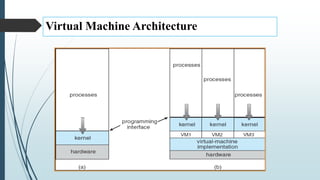
Virtual Machine Architecture
Advantages of VM
 Familiar Interfaces
 Isolation
 Each OS Run Separately With Its Own Virtual Resources.
 High Availability
 If One Vm Server is Failed Then Easily Access Data From Another
one.
 Scalability
 Add Or Remove Resources Easily
Advantages of VM
 Backup with Fast Recovery
 Using VMDK Data Recovery Tool
 Reduction Of Cost
 It Save cost By Running Multi Os On Single Machine.
 Sharing Of Hardware.
Disadvantages of VM
 Difficulty in direct access to hardware.
 Great RAM consumption since each virtual machine will occupy a
separate area of the Same.
 Great use of disk space, since it takes all the files for each operating
system installed on each virtual machine.
 A virtual machine is less efficient than an actual machine when it accesses
the host hard drive indirectly.
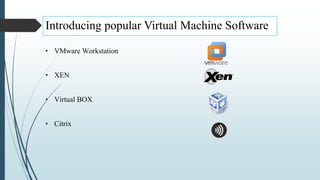
Introducing popular Virtual Machine Software
• VMware Workstation
• XEN
• Virtual BOX
• Citrix
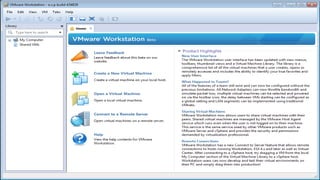
 VMware Workstation is the most dependable, high-performing, feature-
rich virtualization platform for your Windows or Linux PC. It allows one
physical PC to run multiple operating systems at the same time. No
restarting or hard-drive partitioning is required.
 Software developers rely on Workstation to develop and test client-server,
Web and cloud applications in a replica of their production environments.
Key Benefits Of VMWare
 Access anytime, anywhere
 Run applications in Windows, Linux and other systems at the same time
without restarting.
 Remotely access virtual machines running on Vmware.
 Run as a server to host applications for your team, department or anyone
in your organization.
 Create virtual machines that are encrypted, block USB devices and have
read-only settings.
 Xen is a virtual machine monitor for IA-32 (x86, x86-64), IA-64 and
PowerPC 970 architectures. It allows several guest operating systems to be
executed on the same computer hardware concurrently.
 Xen was initially created by the University of Cambridge, Computer
Laboratory and is now developed and maintained by the Xen community
as free software, as well as Citrix XenServer Commercial version variant.
 A central part of Amazon.com's cloud computing platform, EC2 allows
users to rent virtual computers on which to run their own computer
applications.
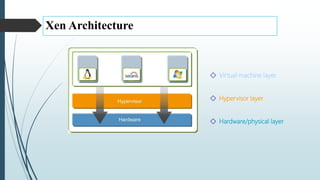
Xen Architecture
◇ Virtual machine layer
◇ Hypervisor layer
◇ Hardware/physical layer
Xen Architecture
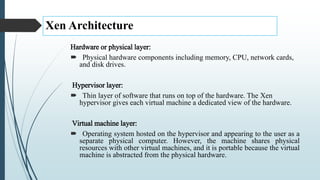
Hardware or physical layer:
 Physical hardware components including memory, CPU, network cards,
and disk drives.
Hypervisor layer:
 Thin layer of software that runs on top of the hardware. The Xen
hypervisor gives each virtual machine a dedicated view of the hardware.
Virtual machine layer:
 Operating system hosted on the hypervisor and appearing to the user as a
separate physical computer. However, the machine shares physical
resources with other virtual machines, and it is portable because the virtual
machine is abstracted from the physical hardware.
Virtual Box
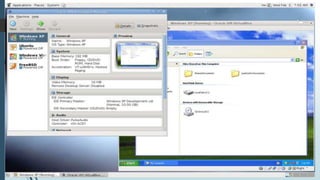
 Oracle VM VirtualBox (formerly Sun VirtualBox, Sun xVM VirtualBox
and Innotek VirtualBox) is a free and open-source hypervisor for x86
computers currently being developed by Oracle Corporation.
 VirtualBox may be installed on a number of host operating systems,
including: Linux, OS X, Windows, Solaris, and OpenSolaris. There are
also ports to FreeBSD and Genode.
 For some guest operating systems, a "Guest Additions" package of device
drivers and system applications is available which typically improves
performance, especially of graphics.
Demo
1. How To Create New Virtual Machine Using VM Ware Software.
2. How To Open An Existing Virtual Machine.
Reference
• https://en.wikipedia.org
• https://www.vmware.com
• https://www.virtualbox.org
Virtual Machine

Virtual Machine

  • 1.
    Operating System Topic :-Virtual Machine Presented By : Mehul Boghra (115348) Prashant Mojidra (115346) Naresh Sarvaiya (115340)
  • 2.
    Topics • What isVirtual Machine ? • Types Of Virtual Machine • Architecture Of Virtual Machine • Pros And Cons Of VM • Introducing Popular Virtual Machine
  • 3.
    What's Virtual Machine? Virtual machine (VM):  A software implementation of a machine (computer) that executes programs like a physical machine.  A virtual machine provides an interface identical to the underlying bare hardware.  The operating system creates the illusion of multiple processes, each executing on its own processor with its own (virtual) memory.
  • 4.
    Types of VirtualMachine :  System virtual machines - Hardware virtual machine  Provides a complete system platform environment which supports the execution of a complete operating system (OS).  Process virtual machine - Application virtual machine  Provides a platform-independent programming environment that abstracts away details of the underlying hardware or operating system from software or application runtime.  Example:  Hardware virtual machine: VMWare, Xen, Virtual BOX .  Application virtual machine: Java Virtual Machine, .NET Framework
  • 5.
  • 6.
    Advantages of VM Familiar Interfaces  Isolation  Each OS Run Separately With Its Own Virtual Resources.  High Availability  If One Vm Server is Failed Then Easily Access Data From Another one.  Scalability  Add Or Remove Resources Easily
  • 7.
    Advantages of VM Backup with Fast Recovery  Using VMDK Data Recovery Tool  Reduction Of Cost  It Save cost By Running Multi Os On Single Machine.  Sharing Of Hardware.
  • 8.
    Disadvantages of VM Difficulty in direct access to hardware.  Great RAM consumption since each virtual machine will occupy a separate area of the Same.  Great use of disk space, since it takes all the files for each operating system installed on each virtual machine.  A virtual machine is less efficient than an actual machine when it accesses the host hard drive indirectly.
  • 9.
    Introducing popular VirtualMachine Software • VMware Workstation • XEN • Virtual BOX • Citrix
  • 10.
     VMware Workstationis the most dependable, high-performing, feature- rich virtualization platform for your Windows or Linux PC. It allows one physical PC to run multiple operating systems at the same time. No restarting or hard-drive partitioning is required.  Software developers rely on Workstation to develop and test client-server, Web and cloud applications in a replica of their production environments.
  • 12.
    Key Benefits OfVMWare  Access anytime, anywhere  Run applications in Windows, Linux and other systems at the same time without restarting.  Remotely access virtual machines running on Vmware.  Run as a server to host applications for your team, department or anyone in your organization.  Create virtual machines that are encrypted, block USB devices and have read-only settings.
  • 13.
     Xen isa virtual machine monitor for IA-32 (x86, x86-64), IA-64 and PowerPC 970 architectures. It allows several guest operating systems to be executed on the same computer hardware concurrently.  Xen was initially created by the University of Cambridge, Computer Laboratory and is now developed and maintained by the Xen community as free software, as well as Citrix XenServer Commercial version variant.  A central part of Amazon.com's cloud computing platform, EC2 allows users to rent virtual computers on which to run their own computer applications.
  • 14.
    Xen Architecture ◇ Virtualmachine layer ◇ Hypervisor layer ◇ Hardware/physical layer
  • 15.
    Xen Architecture Hardware orphysical layer:  Physical hardware components including memory, CPU, network cards, and disk drives. Hypervisor layer:  Thin layer of software that runs on top of the hardware. The Xen hypervisor gives each virtual machine a dedicated view of the hardware. Virtual machine layer:  Operating system hosted on the hypervisor and appearing to the user as a separate physical computer. However, the machine shares physical resources with other virtual machines, and it is portable because the virtual machine is abstracted from the physical hardware.
  • 16.
    Virtual Box  OracleVM VirtualBox (formerly Sun VirtualBox, Sun xVM VirtualBox and Innotek VirtualBox) is a free and open-source hypervisor for x86 computers currently being developed by Oracle Corporation.  VirtualBox may be installed on a number of host operating systems, including: Linux, OS X, Windows, Solaris, and OpenSolaris. There are also ports to FreeBSD and Genode.  For some guest operating systems, a "Guest Additions" package of device drivers and system applications is available which typically improves performance, especially of graphics.
  • 18.
    Demo 1. How ToCreate New Virtual Machine Using VM Ware Software. 2. How To Open An Existing Virtual Machine.
  • 19.