Virtual Desktops:
Why is this so HOT?
Quick Facts


About Us           Approach            Partnerships
• 20th Year        • Vendor Agnostic   • Microsoft Gold
                                           • Central Region Client
• Grand Rapids &   • Non-reseller            Experience Award Winner
  Royal Oak        • Professional      •    VMware Enterprise
• 25 Staff           Services Only     •    Cisco Premier
                                       •    Novell Platinum
                                       •    Citrix Silver
Expertise
Project Management     Infrastructure


Collaboration          Access & Identity Management
Your Presenter


• Jason L Cooper
 MCITP:EA, MCITP:VA, VCP, MCNE
 JasonC@cdh.com
Agenda

•   Overview of VDI
•   Benefits of Hosted Desktops
•   VDI Drawbacks
•   Key Players
•   Microsoft
•   Citrix
•   VMware
•   Feature Comparison
•   Licensing Comparison
•   What is Right for You?
Overview

• SBC - Server Based Computing
   – What’s old is new again!
   – Thin Client Computing
• Virtualization
   – Decoupling OS from hardware
   – Sharing hardware resources
• VDI - Virtual Desktop Infrastructure
   – Hosted virtual desktops
   – Hybrid of SBC and virtualization
Expectations


               2008 IDC Report
Desktop Management

• TCO for the traditional corporate desktop
  – $3500 and $5000 per user, per year
  – End user operational costs nearly 45%
• Hosted virtual desktops 2% to 12% more
  cost effective than traditional PCs


                                   *Gartner
Physical vs. Virtual
Cost                                   Physical       Virtual
                                       Desktop        Desktop
Client hardware                        $900           $450
Server hardware                        -              $250
Virtual desktop solution               -              $120
PC deployment costs                    $185           $25
Operations: Support, software          $600           $392
deployment, backup, security, virus
protection
End-user operations: Training, self-   $2215          $1854
support
Annual downtime cost                   $90            $30
TOTAL                                  $3990          $2821
 *Gartner TCO Comparison of PCs with Server-Based Computing
Components

• Virtualization platform
   – Highly available, resource load balancing
• Connection Broker
• Endpoint
   – Desktop, laptop,
     thin client
• Hosted desktop
• Application
  deployment
  process/solution
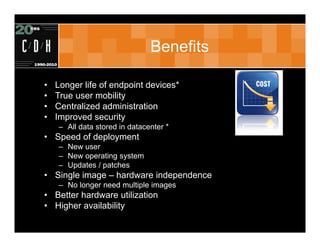
Benefits

•   Longer life of endpoint devices*
•   True user mobility
•   Centralized administration
•   Improved security
    – All data stored in datacenter *
• Speed of deployment
    – New user
    – New operating system
    – Updates / patches
• Single image – hardware independence
    – No longer need multiple images
• Better hardware utilization
• Higher availability
Drawbacks

• Large initial investment
   – Servers for virtualization infrastructure
   – FC or iSCSI SAN for shared storage
   – Network infrastructure
• More expensive than other SBC solutions
   – Cost benefit analysis
• IT training
   – Steep learning curve: virtualization, application
     management, user state
• Reliance on network connectivity*
• End-user experience
Key Players

• VMware
  – View
  – Virtual Infrastructure / vSphere
• Citrix Systems
  – XenDesktop
  – XenApp (Presentation Server)
  – XenServer
• Microsoft
  – Remote Desktop Services (Terminal Services)
  – Hyper-V
  – Windows Server and workstation operating
    systems
Microsoft

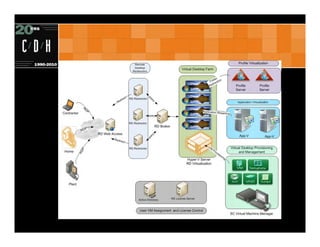
• Remote Desktop Services
  –   Remote Desktop Connection Broker
  –   Web Access and RemoteApp
  –   Remote Desktop Virtualization Host
  –   Remote Desktop Gateway
• Windows Server 2008 R2
• Microsoft Hyper-V
• System Center Virtual Machine Manager
Virtualization

• Microsoft Hyper-V R2
  – Live Migration (Failover Cluster Role)
  – Shared Cluster Volumes
  – Integration with System Center Operations
    Manager 2007
• Virtual Machine Manager
  – Management of Microsoft virtualization
  – Single Administrative view
  – Templates, cloning, library, PRO Tips
Remote Desktop Services

• Connection Broker
  – Desktop pools
• Secure remote access
  – Remote Desktop Gateway
• Web Access
• RemoteApp
Connection Manager

• Remote Desktop Connection Manager
  – Load balancing of connections
  – Hosted Desktop
     • Assigned
        – User assigned to dedicated desktop
     • Pool
        – User connects to any available desktop

• Remote Desktop Gateway
  – Secure remote access to desktops
Application Deployment

• System Center Configuration Manager
  – Lite or Zero touch OS deployment
  – Application deployment
• Remote Desktop Services
  – RemoteApp
• App-V
  – Application virtualization
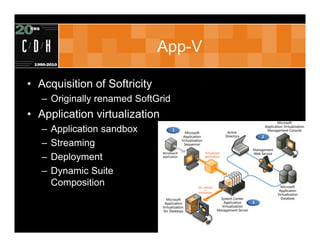
App-V

• Acquisition of Softricity
   – Originally renamed SoftGrid
• Application virtualization
   –   Application sandbox
   –   Streaming
   –   Deployment
   –   Dynamic Suite
       Composition
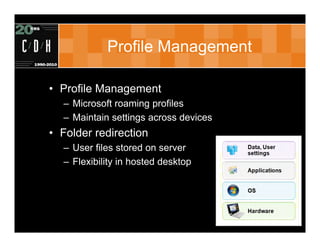
Profile Management

• Profile Management
  – Microsoft roaming profiles
  – Maintain settings across devices
• Folder redirection
  – User files stored on server
  – Flexibility in hosted desktop
Citrix

• XenDesktop
• XenServer
• XenApp
  – Formerly Presentation Server
• Provisioning Server
  – Ardence
• Profile Management
Virtualization

• XenServer
  – Live migration with XenMotion
  – XenCenter for management
  – High availability with resource pools
• Platform support
  – Open architecture
  – Any endpoint device
  – Any virtualization platform
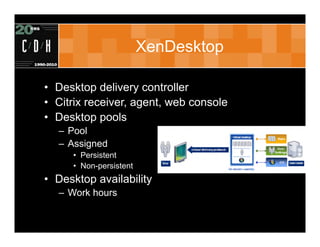
XenDesktop

• Desktop delivery controller
• Citrix receiver, agent, web console
• Desktop pools
  – Pool
  – Assigned
     • Persistent
     • Non-persistent
• Desktop availability
  – Work hours
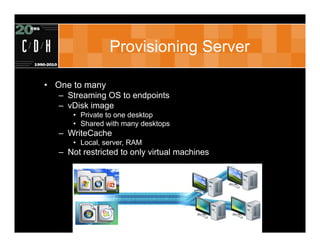
Provisioning Server

• One to many
   – Streaming OS to endpoints
   – vDisk image
      • Private to one desktop
      • Shared with many desktops
   – WriteCache
      • Local, server, RAM
   – Not restricted to only virtual machines
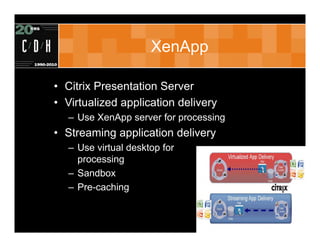
XenApp

• Citrix Presentation Server
• Virtualized application delivery
   – Use XenApp server for processing
• Streaming application delivery
   – Use virtual desktop for
     processing
   – Sandbox
   – Pre-caching
Profile Manager

• Windows service that monitors logon and
  logoff
• Maintain settings across devices
• Granular control of profile
  – Reduce profile bloat
• Settings deployed via GPO
• Logoff
  – Only changes synchronized
• Logon
  – Local profile synchronized
VMware

• View
• vSphere - ESX/ESXi
  – High Availability
  – Distributed Resource Scheduler
  – vMotion
• ThinApp
  – Application virtualization
vSphere

•   ESX/ESXi hypervisor
•   Live migration with vMotion
•   High Availability
•   Resource load balancing (DRS)
•   High consolidation ratio
    – Resource pools
    – Memory page sharing
    – Balloon driver
• Update Manager
View Manager

• View Manager
  – Connection Server
     • Full, Replica, Security
  – Authentication
     • Active Directory
     • RSA Secure Authentication
• Automated and manual pools
  – Persistent and non-persistent
• RDP / PCoIP
• Physical PCs / blades
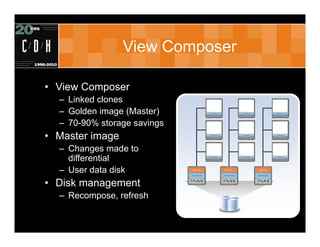
View Composer

• View Composer
  – Linked clones
  – Golden image (Master)
  – 70-90% storage savings
• Master image
  – Changes made to
    differential
  – User data disk
• Disk management
  – Recompose, refresh
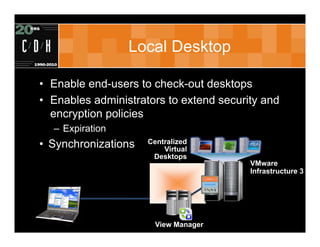
Local Desktop

• Enable end-users to check-out desktops
• Enables administrators to extend security and
  encryption policies
  – Expiration
• Synchronizations   Centralized
                         Virtual
                      Desktops
                                         VMware
                                         Infrastructure 3


                       View Manager
ThinApp

•   Acquisition of Thinstall
•   Sandbox environment
•   Streaming or local
•   No server or client
    – GPOs and logon scripts
• Application policies
• Application Link
    – Dependencies with other applications
• Application Sync
    – Updating applications
Profile Management

• User personality disks
  – Application and user disk mapped to linked
    clone
  – Folder redirection to disk
• Roaming profiles
• Folder redirection
NxTop: The Best of Both Worlds?

• http://www.virtualcomputer.com/nxtop
• Central Management, Distributed Execution
• Client Side Type 1 Hypervisor
• VMs built in Hyper-V, managed centrally
• Single, self contained server for NxTop,
  Application, and User State Management
• The Next Generation? Here today?
• As low as $100 per client – perpetual license
Feature Comparison

     Feature         Microsoft             Citrix            VMware            NxTop
Infrastructure        Microsoft       Citrix / Microsoft /    VMware           Microsoft
                                           VMware
Assigned Desktop          X                    X                 X                X
Desktop Pools             X                    X                 X                No

Secure Remote        RDS Gateway      Access Gateway          Security   Whole Disk Encryption
Access                                                         Server            SSL
Application            App-V               XenApp             ThinApp        NxTop Center
Deployment           RemoteApp
                       SCCM


Profile Management     Roaming        Profile Manager        Microsoft      User data disk
                        profiles     Folder redirection      User data
                        Folder                                 disk
                      redirection
Shared storage            No        Provisioning Services      View      Delta synchronization
                                                             Composer         (client side)
Offline desktops         No                   No                Yes              Yes

Image Updating          SCCM                vDisk            Recompose        Versioning

Web console               X                    X                 X                X
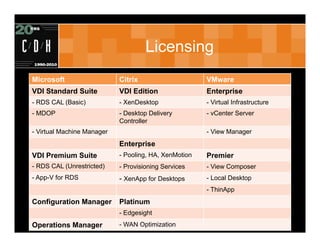
Licensing
Microsoft                   Citrix                     VMware
VDI Standard Suite          VDI Edition                Enterprise
- RDS CAL (Basic)           - XenDesktop               - Virtual Infrastructure
- MDOP                      - Desktop Delivery         - vCenter Server
                            Controller
- Virtual Machine Manager                              - View Manager
                            Enterprise
VDI Premium Suite           - Pooling, HA, XenMotion   Premier
- RDS CAL (Unrestricted)    - Provisioning Services    - View Composer
- App-V for RDS             - XenApp for Desktops      - Local Desktop
                                                       - ThinApp
Configuration Manager       Platinum
                            - Edgesight
Operations Manager          - WAN Optimization
Conclusion – Which is Right for Me?

• A Few Questions to Ask Yourself:
  – Do virtual desktops still make sense for you?
  – Do you already have one of these vendors in
    your environment and have experience with it?
  – Is there a particular feature that is very
    important to you available in only one of the
    vendor’s solutions?
  – Are you already partially or fully licensed for
    one of these solutions?
  – Do you have in-house expertise or a qualified
    partner to help you with the solution?
Thank You

Royal Oak                                Grand Rapids
306 S. Washington Ave.                   15 Ionia SW
Suite 212                                Suite 270
Royal Oak, MI 48067                      Grand Rapids, MI 49503
p: (248) 546-1800                        p: (616) 776-1600


                www.cdh.com
                  (c) C/D/H 2007. All rights reserved

Virtual Desktops: Why is this So Hot

  • 1.
  • 2.
    Quick Facts About Us Approach Partnerships • 20th Year • Vendor Agnostic • Microsoft Gold • Central Region Client • Grand Rapids & • Non-reseller Experience Award Winner Royal Oak • Professional • VMware Enterprise • 25 Staff Services Only • Cisco Premier • Novell Platinum • Citrix Silver
  • 3.
    Expertise Project Management Infrastructure Collaboration Access & Identity Management
  • 4.
    Your Presenter • JasonL Cooper MCITP:EA, MCITP:VA, VCP, MCNE JasonC@cdh.com
  • 5.
    Agenda • Overview of VDI • Benefits of Hosted Desktops • VDI Drawbacks • Key Players • Microsoft • Citrix • VMware • Feature Comparison • Licensing Comparison • What is Right for You?
  • 6.
    Overview • SBC -Server Based Computing – What’s old is new again! – Thin Client Computing • Virtualization – Decoupling OS from hardware – Sharing hardware resources • VDI - Virtual Desktop Infrastructure – Hosted virtual desktops – Hybrid of SBC and virtualization
  • 7.
    Expectations 2008 IDC Report
  • 8.
    Desktop Management • TCOfor the traditional corporate desktop – $3500 and $5000 per user, per year – End user operational costs nearly 45% • Hosted virtual desktops 2% to 12% more cost effective than traditional PCs *Gartner
  • 9.
    Physical vs. Virtual Cost Physical Virtual Desktop Desktop Client hardware $900 $450 Server hardware - $250 Virtual desktop solution - $120 PC deployment costs $185 $25 Operations: Support, software $600 $392 deployment, backup, security, virus protection End-user operations: Training, self- $2215 $1854 support Annual downtime cost $90 $30 TOTAL $3990 $2821 *Gartner TCO Comparison of PCs with Server-Based Computing
  • 10.
    Components • Virtualization platform – Highly available, resource load balancing • Connection Broker • Endpoint – Desktop, laptop, thin client • Hosted desktop • Application deployment process/solution
  • 11.
    Benefits • Longer life of endpoint devices* • True user mobility • Centralized administration • Improved security – All data stored in datacenter * • Speed of deployment – New user – New operating system – Updates / patches • Single image – hardware independence – No longer need multiple images • Better hardware utilization • Higher availability
  • 12.
    Drawbacks • Large initialinvestment – Servers for virtualization infrastructure – FC or iSCSI SAN for shared storage – Network infrastructure • More expensive than other SBC solutions – Cost benefit analysis • IT training – Steep learning curve: virtualization, application management, user state • Reliance on network connectivity* • End-user experience
  • 13.
    Key Players • VMware – View – Virtual Infrastructure / vSphere • Citrix Systems – XenDesktop – XenApp (Presentation Server) – XenServer • Microsoft – Remote Desktop Services (Terminal Services) – Hyper-V – Windows Server and workstation operating systems
  • 14.
    Microsoft • Remote DesktopServices – Remote Desktop Connection Broker – Web Access and RemoteApp – Remote Desktop Virtualization Host – Remote Desktop Gateway • Windows Server 2008 R2 • Microsoft Hyper-V • System Center Virtual Machine Manager
  • 15.
    Virtualization • Microsoft Hyper-VR2 – Live Migration (Failover Cluster Role) – Shared Cluster Volumes – Integration with System Center Operations Manager 2007 • Virtual Machine Manager – Management of Microsoft virtualization – Single Administrative view – Templates, cloning, library, PRO Tips
  • 16.
    Remote Desktop Services •Connection Broker – Desktop pools • Secure remote access – Remote Desktop Gateway • Web Access • RemoteApp
  • 17.
    Connection Manager • RemoteDesktop Connection Manager – Load balancing of connections – Hosted Desktop • Assigned – User assigned to dedicated desktop • Pool – User connects to any available desktop • Remote Desktop Gateway – Secure remote access to desktops
  • 18.
    Application Deployment • SystemCenter Configuration Manager – Lite or Zero touch OS deployment – Application deployment • Remote Desktop Services – RemoteApp • App-V – Application virtualization
  • 19.
    App-V • Acquisition ofSoftricity – Originally renamed SoftGrid • Application virtualization – Application sandbox – Streaming – Deployment – Dynamic Suite Composition
  • 20.
    Profile Management • ProfileManagement – Microsoft roaming profiles – Maintain settings across devices • Folder redirection – User files stored on server – Flexibility in hosted desktop
  • 22.
    Citrix • XenDesktop • XenServer •XenApp – Formerly Presentation Server • Provisioning Server – Ardence • Profile Management
  • 23.
    Virtualization • XenServer – Live migration with XenMotion – XenCenter for management – High availability with resource pools • Platform support – Open architecture – Any endpoint device – Any virtualization platform
  • 24.
    XenDesktop • Desktop deliverycontroller • Citrix receiver, agent, web console • Desktop pools – Pool – Assigned • Persistent • Non-persistent • Desktop availability – Work hours
  • 25.
    Provisioning Server • Oneto many – Streaming OS to endpoints – vDisk image • Private to one desktop • Shared with many desktops – WriteCache • Local, server, RAM – Not restricted to only virtual machines
  • 26.
    XenApp • Citrix PresentationServer • Virtualized application delivery – Use XenApp server for processing • Streaming application delivery – Use virtual desktop for processing – Sandbox – Pre-caching
  • 27.
    Profile Manager • Windowsservice that monitors logon and logoff • Maintain settings across devices • Granular control of profile – Reduce profile bloat • Settings deployed via GPO • Logoff – Only changes synchronized • Logon – Local profile synchronized
  • 28.
    VMware • View • vSphere- ESX/ESXi – High Availability – Distributed Resource Scheduler – vMotion • ThinApp – Application virtualization
  • 29.
    vSphere • ESX/ESXi hypervisor • Live migration with vMotion • High Availability • Resource load balancing (DRS) • High consolidation ratio – Resource pools – Memory page sharing – Balloon driver • Update Manager
  • 30.
    View Manager • ViewManager – Connection Server • Full, Replica, Security – Authentication • Active Directory • RSA Secure Authentication • Automated and manual pools – Persistent and non-persistent • RDP / PCoIP • Physical PCs / blades
  • 31.
    View Composer • ViewComposer – Linked clones – Golden image (Master) – 70-90% storage savings • Master image – Changes made to differential – User data disk • Disk management – Recompose, refresh
  • 32.
    Local Desktop • Enableend-users to check-out desktops • Enables administrators to extend security and encryption policies – Expiration • Synchronizations Centralized Virtual Desktops VMware Infrastructure 3 View Manager
  • 33.
    ThinApp • Acquisition of Thinstall • Sandbox environment • Streaming or local • No server or client – GPOs and logon scripts • Application policies • Application Link – Dependencies with other applications • Application Sync – Updating applications
  • 34.
    Profile Management • Userpersonality disks – Application and user disk mapped to linked clone – Folder redirection to disk • Roaming profiles • Folder redirection
  • 35.
    NxTop: The Bestof Both Worlds? • http://www.virtualcomputer.com/nxtop • Central Management, Distributed Execution • Client Side Type 1 Hypervisor • VMs built in Hyper-V, managed centrally • Single, self contained server for NxTop, Application, and User State Management • The Next Generation? Here today? • As low as $100 per client – perpetual license
  • 36.
    Feature Comparison Feature Microsoft Citrix VMware NxTop Infrastructure Microsoft Citrix / Microsoft / VMware Microsoft VMware Assigned Desktop X X X X Desktop Pools X X X No Secure Remote RDS Gateway Access Gateway Security Whole Disk Encryption Access Server SSL Application App-V XenApp ThinApp NxTop Center Deployment RemoteApp SCCM Profile Management Roaming Profile Manager Microsoft User data disk profiles Folder redirection User data Folder disk redirection Shared storage No Provisioning Services View Delta synchronization Composer (client side) Offline desktops No No Yes Yes Image Updating SCCM vDisk Recompose Versioning Web console X X X X
  • 37.
    Licensing Microsoft Citrix VMware VDI Standard Suite VDI Edition Enterprise - RDS CAL (Basic) - XenDesktop - Virtual Infrastructure - MDOP - Desktop Delivery - vCenter Server Controller - Virtual Machine Manager - View Manager Enterprise VDI Premium Suite - Pooling, HA, XenMotion Premier - RDS CAL (Unrestricted) - Provisioning Services - View Composer - App-V for RDS - XenApp for Desktops - Local Desktop - ThinApp Configuration Manager Platinum - Edgesight Operations Manager - WAN Optimization
  • 38.
    Conclusion – Whichis Right for Me? • A Few Questions to Ask Yourself: – Do virtual desktops still make sense for you? – Do you already have one of these vendors in your environment and have experience with it? – Is there a particular feature that is very important to you available in only one of the vendor’s solutions? – Are you already partially or fully licensed for one of these solutions? – Do you have in-house expertise or a qualified partner to help you with the solution?
  • 39.
    Thank You Royal Oak Grand Rapids 306 S. Washington Ave. 15 Ionia SW Suite 212 Suite 270 Royal Oak, MI 48067 Grand Rapids, MI 49503 p: (248) 546-1800 p: (616) 776-1600 www.cdh.com (c) C/D/H 2007. All rights reserved