A+ HardwareSection 1.1 Storage DevicesMade By : Gagandeep Singh
What you learn todayCompTIA A+  220-701 , Section 1.1 Categories of Storage Devices and Backup    - FDD     - HDD        * Solid State Vs Magnetic    - Optical Drives         * CD/DVD/RW/ BLUERAY    - Removable Storage        * Tape Drive         * Solid State (e.g. Thumb drive, flash, SD cards, USB)        * External CD-RW and Hard Disk Drive        * Hot-Swappable device and Non Hot-Swappable device.
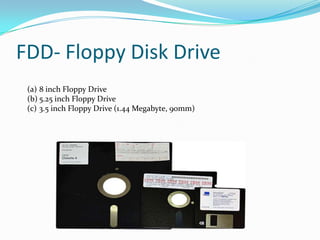
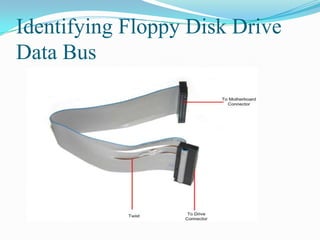
FDD- Floppy Disk Drive
FDD- Floppy Disk Drive8 inch Floppy Drive5.25 inch Floppy Drive3.5 inch Floppy Drive (1.44 Megabyte, 90mm)
FDDFloppy disk drive (FDD) is removable storage utilizing a thin, flexible magnetic storage medium, encased in a plastic shell to read and write data.
While over time drive capacities have changed, today’s standard floppy disk drive size is 1.44 MB.
Floppy disk drives are quickly going out of standard use, due to the higher capacity, and much cheaper, writeable compact disks.CD DVDCD and DVD-R (or RW, for rewriteable) is removable storage that takes advantage of  the higher capacity of optical disks to store information.
CD-R (and DVD-R) drives utilize a red-light laser to “burn” data onto blank optical discs.
CD and DVD-R media come in several different types:
CD-R – Write-Once discs, with a standard size of 700MBs.
CD-RW – Rewriteable discs, with a standard size of 700MBs.
DVD-R – Also write-once discs, DVDs have a standard capacity of 4.7 GB. This format includes the DVD-RW, the rewriteable form;DVD Blu-RayDVD+R – Simply another write-once format, not currently approved by the DVD Forum. It also has a rewriteable form, DVD+RW, and a double layer disc with a capacity of almost 8.55 GBs, referred to as DVD+RW DL.
Blu-Ray – Sony-proprietary optical disc storage medium. Can store high-definition video and audio at a capacity of 50 GB per disc (dual layer) and 25GB ( single layer).
 Drive speeds are as varied as media types and are issued as multiples of the original read speed of the device. CD-ROMs start at 150Kbps, and DVD-ROMs start at 1352.54Kbps. Thus, a 52x CD-ROM reads at 7800Kbps, and a 16x DVD-ROM reads at 21,640KbpsHDD- Hard Disk Drive
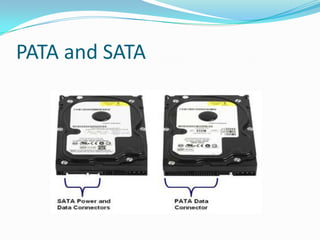
PATA and SATA
Storage devices and Backup MediaA storage device is, broadly defined, any component your computer uses to permanently store information.
This is done in a variety of ways by a variety of different components, but generally speaking, storage devices are split into two categories: fixed and removable.Storage devices (HDD Intro)Hard disk drive (HDD) is a fixed, non-volatile storage device that stores information on the magnetic surface of hard disk platters.
Hard disks are measured in terms of capacity (typically in GB) and in speed (revolutions per minute, or RPMs).
Today, a typical workstation’s hard drive might have between 40 and 200 GB of storage space rotating at 7,200 to 10,000 RPMs.Storage devices (HDD Intro)Hard disks are usually connected to the computer by one of several different connections:
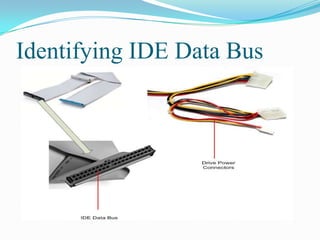
ATA – Standard on most desktop computers; IDE (Integrated Device Electronics) and EIDE( Enhanced Integrated Device Electronics) ; cable is a flat, wide ribbon.
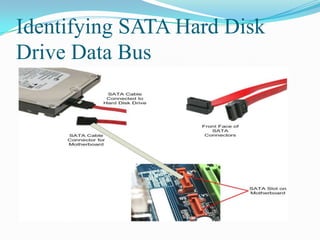
Serial ATA – Provides for faster communication speeds between hard drive and motherboard; it is not backward compatible with the ATA form factor.
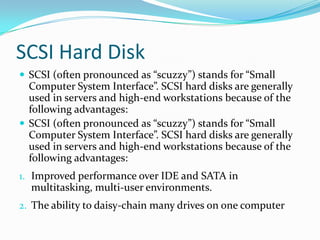
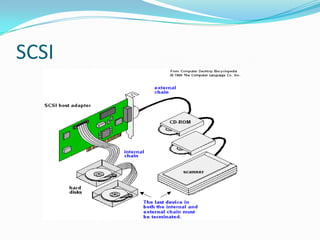
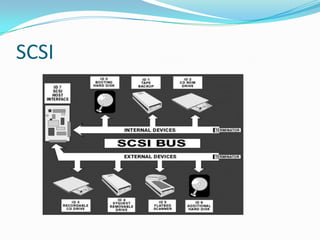
SCSI – Interface allowing the connection of several devices in a chain.Solid State Drives (SSD)
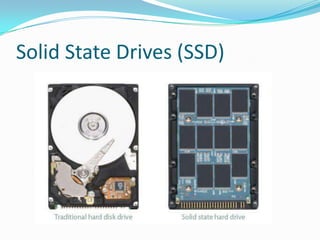
Solid State Drives (SSD) Solid State Drives does not have moving parts.It have concept of memory chips. So that is why is very fast.Reading and writing is fast and expensive per GB basis.100$ and 100$ spending to buy Solid State Drives. You can buy traditional HDD is same amount and you get 10 times space available on the system. Traditional HDD works slow as SSD.Solid State Drives - Such as thumb, flash and SD drives. Volatile storage (like RAM) utilized for extremely quick access speeds. These are usually used in small, hand-held devices.
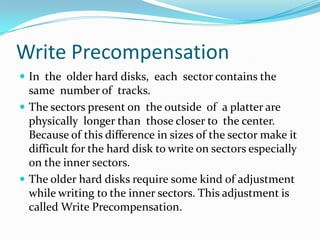
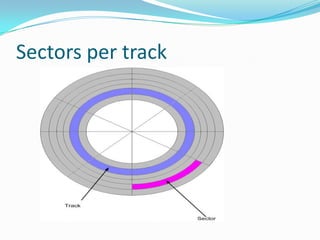
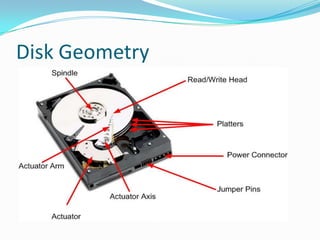
Disk Geometry
Key Components of a Hard Disk Platters and Media
Read/Write Heads
Head Sliders, Arms and Actuator
Spindle Motor
Connectors and Jumpers
Logic Board
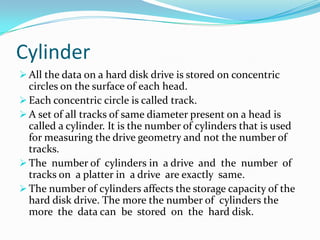
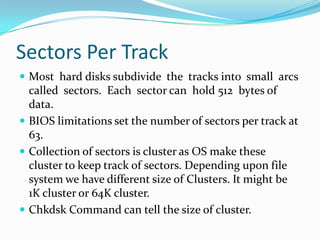
Integrated CachePlattersA hard disk drive consists of on one or more flat circular discs called platters on which data is stored.
The platters are composed of two main substances:
A substrate material that forms the majority of the platter and gives the platter a  structure and rigidity.
A  magnetic media coating  which  actually  holds the  magnetic impulses  that represent the data.  Read/Write Head The  read/write  heads of  the  hard disk  are the  interface between  the  magnetic physical media on which the data is stored and the electronic components that make up the rest of the  hard disk  (and  the  PC).
The  read/write  heads are responsible  for converting  bits to magnetic pulses and storing them on the platter when data is written on the hard disk.
The read/write head then again converts back the magnetic pulses stored on the hard disk into bits when data is read from the hard disk. Actuator AssemblyThe read/write heads of a hard disk are responsible for reading data and writing data on the hard disk.
To perform its task effectively, the read/write head must be held in a fixed position relative to the surface it is reading and should also be allowed to move from track to  track  to  allow  access  to  the  entire  disk  surface area. The  surface on  which  the read/write  heads are mounted  is called  the  actuator assembly.
The  actuator assembly looks similar to a comb with its teeth inserted between the platters.Actuator Assembly Cont..An  actuator assembly  is further composed  of  three  parts: head slider,  head arm and actuator.. The component of the actuator assembly on which heads are actually mounted is called the head slider.
The head arms are all combined together into a single structure that is  moved around the surface of the disk by the actuator.
 The actuator is the device used to position the head arms to different tracks on the surface of the platter. Spindle MotorThe  spindle  motor,  also  called  the  spindle  shaft,  is responsible  for moving  the  platters around  that  make  the  hard disk  operational.
 The  spindle  motor provides stable,  reliable and consistent turning power to the hard disk to function it properly. Hard Disk Connectors and JumpersJumpers are small  devices that  are used  to  directly  control  the  operation  of  hardware  devices,  without  using  any  software. A  jumper has two  main components: Jumper: Jumper itself is a small piece of plastic and metal that is used to connect or remove the hardware device from the computer.
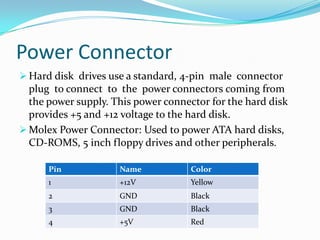
Jumper Pins: A  set  of  pins,  across two  of  which  a jumper is placed  to  make  a specific connection.Power ConnectorHard disk  drives use a standard, 4-pin  male  connector plug  to connect  to  the  power connectors coming from the power supply. This power connector for the hard disk provides +5 and +12 voltage to the hard disk.
Molex Power Connector: Used to power ATA hard disks, CD-ROMS, 5 inch floppy drives and other peripherals.Data Interface ConnectorModern hard disk drives use one of two interfaces: Integrated Drive Electronics (IDE) {also known  as AT Attachment  (ATA)}  and  its variants,  or Small  Computer System Interface (SCSI). However, it can be easily identified which interface is being used by simply looking at  the  back  of  the  hard disk.  This is how  you  can  identify  the  hard disk  interface being used:
IDE/ATA or its variant hard disks have a 40-pin connector at its back.
SCSI hard disks have a 50-pin, 68-pin, or 80-pin D-shaped connector at its back.  IDE/ATA Configuration Jumpers IDE/ATA  hard disks have  only  a few  jumpers and  they  don't  vary  greatly  from drive  to drive. Here are the jumpers you will normally find:Drive Select
Slave Present
 Cable Select
Size Restriction JumperLED ConnectorThe  hard disks use an  LED to  indicate  its activity.  This LED also  enables  a user to determine  whether a system is active  or not.
This hard disk  LED is mounted  on  the computer case itself.  In earlier computers a for the hard disk LED wire run to a two-pin connector on the hard disk itself.

1.1 storage device

  • 1.
    A+ HardwareSection 1.1Storage DevicesMade By : Gagandeep Singh
  • 2.
    What you learntodayCompTIA A+ 220-701 , Section 1.1 Categories of Storage Devices and Backup - FDD - HDD * Solid State Vs Magnetic - Optical Drives * CD/DVD/RW/ BLUERAY - Removable Storage * Tape Drive * Solid State (e.g. Thumb drive, flash, SD cards, USB) * External CD-RW and Hard Disk Drive * Hot-Swappable device and Non Hot-Swappable device.
  • 3.
  • 4.
    FDD- Floppy DiskDrive8 inch Floppy Drive5.25 inch Floppy Drive3.5 inch Floppy Drive (1.44 Megabyte, 90mm)
  • 5.
    FDDFloppy disk drive(FDD) is removable storage utilizing a thin, flexible magnetic storage medium, encased in a plastic shell to read and write data.
  • 6.
    While over timedrive capacities have changed, today’s standard floppy disk drive size is 1.44 MB.
  • 7.
    Floppy disk drivesare quickly going out of standard use, due to the higher capacity, and much cheaper, writeable compact disks.CD DVDCD and DVD-R (or RW, for rewriteable) is removable storage that takes advantage of the higher capacity of optical disks to store information.
  • 8.
    CD-R (and DVD-R)drives utilize a red-light laser to “burn” data onto blank optical discs.
  • 9.
    CD and DVD-Rmedia come in several different types:
  • 10.
    CD-R – Write-Oncediscs, with a standard size of 700MBs.
  • 11.
    CD-RW – Rewriteablediscs, with a standard size of 700MBs.
  • 12.
    DVD-R – Alsowrite-once discs, DVDs have a standard capacity of 4.7 GB. This format includes the DVD-RW, the rewriteable form;DVD Blu-RayDVD+R – Simply another write-once format, not currently approved by the DVD Forum. It also has a rewriteable form, DVD+RW, and a double layer disc with a capacity of almost 8.55 GBs, referred to as DVD+RW DL.
  • 13.
    Blu-Ray – Sony-proprietaryoptical disc storage medium. Can store high-definition video and audio at a capacity of 50 GB per disc (dual layer) and 25GB ( single layer).
  • 14.
     Drive speeds areas varied as media types and are issued as multiples of the original read speed of the device. CD-ROMs start at 150Kbps, and DVD-ROMs start at 1352.54Kbps. Thus, a 52x CD-ROM reads at 7800Kbps, and a 16x DVD-ROM reads at 21,640KbpsHDD- Hard Disk Drive
  • 15.
  • 16.
    Storage devices andBackup MediaA storage device is, broadly defined, any component your computer uses to permanently store information.
  • 17.
    This is donein a variety of ways by a variety of different components, but generally speaking, storage devices are split into two categories: fixed and removable.Storage devices (HDD Intro)Hard disk drive (HDD) is a fixed, non-volatile storage device that stores information on the magnetic surface of hard disk platters.
  • 18.
    Hard disks aremeasured in terms of capacity (typically in GB) and in speed (revolutions per minute, or RPMs).
  • 19.
    Today, a typicalworkstation’s hard drive might have between 40 and 200 GB of storage space rotating at 7,200 to 10,000 RPMs.Storage devices (HDD Intro)Hard disks are usually connected to the computer by one of several different connections:
  • 20.
    ATA – Standardon most desktop computers; IDE (Integrated Device Electronics) and EIDE( Enhanced Integrated Device Electronics) ; cable is a flat, wide ribbon.
  • 21.
    Serial ATA –Provides for faster communication speeds between hard drive and motherboard; it is not backward compatible with the ATA form factor.
  • 22.
    SCSI – Interfaceallowing the connection of several devices in a chain.Solid State Drives (SSD)
  • 23.
    Solid State Drives(SSD) Solid State Drives does not have moving parts.It have concept of memory chips. So that is why is very fast.Reading and writing is fast and expensive per GB basis.100$ and 100$ spending to buy Solid State Drives. You can buy traditional HDD is same amount and you get 10 times space available on the system. Traditional HDD works slow as SSD.Solid State Drives - Such as thumb, flash and SD drives. Volatile storage (like RAM) utilized for extremely quick access speeds. These are usually used in small, hand-held devices.
  • 24.
  • 25.
    Key Components ofa Hard Disk Platters and Media
  • 26.
  • 27.
    Head Sliders, Armsand Actuator
  • 28.
  • 29.
  • 30.
  • 31.
    Integrated CachePlattersA harddisk drive consists of on one or more flat circular discs called platters on which data is stored.
  • 32.
    The platters arecomposed of two main substances:
  • 33.
    A substrate materialthat forms the majority of the platter and gives the platter a structure and rigidity.
  • 34.
    A magneticmedia coating which actually holds the magnetic impulses that represent the data. Read/Write Head The read/write heads of the hard disk are the interface between the magnetic physical media on which the data is stored and the electronic components that make up the rest of the hard disk (and the PC).
  • 35.
    The read/write heads are responsible for converting bits to magnetic pulses and storing them on the platter when data is written on the hard disk.
  • 36.
    The read/write headthen again converts back the magnetic pulses stored on the hard disk into bits when data is read from the hard disk. Actuator AssemblyThe read/write heads of a hard disk are responsible for reading data and writing data on the hard disk.
  • 37.
    To perform itstask effectively, the read/write head must be held in a fixed position relative to the surface it is reading and should also be allowed to move from track to track to allow access to the entire disk surface area. The surface on which the read/write heads are mounted is called the actuator assembly.
  • 38.
    The actuatorassembly looks similar to a comb with its teeth inserted between the platters.Actuator Assembly Cont..An actuator assembly is further composed of three parts: head slider, head arm and actuator.. The component of the actuator assembly on which heads are actually mounted is called the head slider.
  • 39.
    The head armsare all combined together into a single structure that is moved around the surface of the disk by the actuator.
  • 40.
    The actuatoris the device used to position the head arms to different tracks on the surface of the platter. Spindle MotorThe spindle motor, also called the spindle shaft, is responsible for moving the platters around that make the hard disk operational.
  • 41.
    The spindle motor provides stable, reliable and consistent turning power to the hard disk to function it properly. Hard Disk Connectors and JumpersJumpers are small devices that are used to directly control the operation of hardware devices, without using any software. A jumper has two main components: Jumper: Jumper itself is a small piece of plastic and metal that is used to connect or remove the hardware device from the computer.
  • 42.
    Jumper Pins: A set of pins, across two of which a jumper is placed to make a specific connection.Power ConnectorHard disk drives use a standard, 4-pin male connector plug to connect to the power connectors coming from the power supply. This power connector for the hard disk provides +5 and +12 voltage to the hard disk.
  • 43.
    Molex Power Connector:Used to power ATA hard disks, CD-ROMS, 5 inch floppy drives and other peripherals.Data Interface ConnectorModern hard disk drives use one of two interfaces: Integrated Drive Electronics (IDE) {also known as AT Attachment (ATA)} and its variants, or Small Computer System Interface (SCSI). However, it can be easily identified which interface is being used by simply looking at the back of the hard disk. This is how you can identify the hard disk interface being used:
  • 44.
    IDE/ATA or itsvariant hard disks have a 40-pin connector at its back.
  • 45.
    SCSI hard diskshave a 50-pin, 68-pin, or 80-pin D-shaped connector at its back. IDE/ATA Configuration Jumpers IDE/ATA hard disks have only a few jumpers and they don't vary greatly from drive to drive. Here are the jumpers you will normally find:Drive Select
  • 46.
  • 47.
  • 48.
    Size Restriction JumperLEDConnectorThe hard disks use an LED to indicate its activity. This LED also enables a user to determine whether a system is active or not.
  • 49.
    This hard disk LED is mounted on the computer case itself. In earlier computers a for the hard disk LED wire run to a two-pin connector on the hard disk itself.