A+ HardwareSection 1.8 Input Devices    Made By : Gagandeep Singh
What you learn todayCompTIA A+  220-701 , Section 1.10Install and configure peripheral and input devices.    - Keyboard     - Mouse    - Barcode Reader    - Multimedia    - Biometric Devices    - Touch Screen    - KVM Switch
Keyboard Installation Newer Keyboard might have both Mini-Din (PS/2) and USB    - Use one or the other.Additional feature may require additional driver or software.
Mouse Newer mouse might have both Mini-Din (PS/2) and USB    - Old mouse use the serial port.New Optical mouse few moving parts    - May need the right surface.
Bar Code Reader Mini-Din (PS/2) and USBLaser Scanner can be seen    - You can see it, right?A Separate reader may be required for testing.
Digital CameraStill Pictures    - Now with video.Pixel Density    - Megapixels Storage     - Compact Flash    - Secure Digital     - Other formats
Web CameraWebcamsUSB connectionsLive Video    - Not often Used for stored video/pictures on the computer. Integrated into new Laptops
Digital Video CamerasLatest generation video capture.Storage      - Hard drives    - Flash Memory ( Compact Flash (CF), Secure Digital (SD), Internal Memory.Connectivity    - IEEE 1394/ Firewire/ i.Link    - HDMI    - USB
Transferring Pictures and VideoConnection     - USB     - Firewire     - memory cardsLong-term Storage     - Pictures     - Video
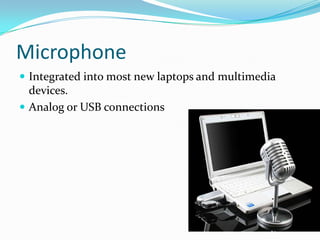
MicrophoneIntegrated into most new laptops and multimedia devices.Analog or USB connections
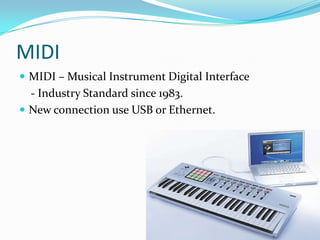
MIDI MIDI – Musical Instrument Digital Interface    - Industry Standard since 1983.New connection use USB or Ethernet.
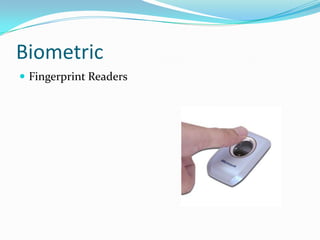
BiometricFingerprint Readers
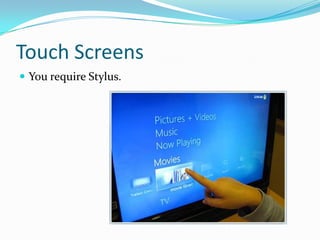
Touch ScreensYou require Stylus.
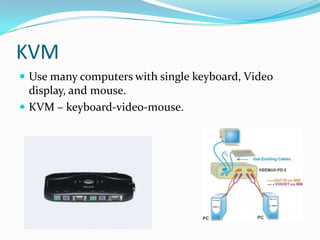
KVMUse many computers with single keyboard, Video display, and mouse.KVM – keyboard-video-mouse.
Question/AnswerQ1. Which of the following interfaces are typically supported on the input side of a KVM switch?A. PS/2, VGA, USBB. DB25, DB9, PS/2C. PS/2, DB9, USBD. PS/2, DB25, VGAAnswer: A
Question/AnswerQ2. Which of the following input/output protocols is commonly associated with the DB-9 port?A. RS-422B. RS-232C. IEEE 1284D. IEEE 1394Answer: B
Question/AnswerQ3. Which of the following input devices requires calibration before use?A. KVMB. KeyboardC. Touch screenD. Touch padAnswer: C
Question/AnswerQ4. Which of the following describes the S-video mini-DIN connector on laptops?A. Allows a LCD projectors output to display on a laptops screenB. Allows analog video output to a variety of devicesC. Allows digital video to a variety of devicesD. Allows digital video and audio to a variety of devicesAnswer: B

1.8 input devices

  • 1.
    A+ HardwareSection 1.8Input Devices Made By : Gagandeep Singh
  • 2.
    What you learntodayCompTIA A+ 220-701 , Section 1.10Install and configure peripheral and input devices. - Keyboard - Mouse - Barcode Reader - Multimedia - Biometric Devices - Touch Screen - KVM Switch
  • 3.
    Keyboard Installation NewerKeyboard might have both Mini-Din (PS/2) and USB - Use one or the other.Additional feature may require additional driver or software.
  • 4.
    Mouse Newer mousemight have both Mini-Din (PS/2) and USB - Old mouse use the serial port.New Optical mouse few moving parts - May need the right surface.
  • 5.
    Bar Code ReaderMini-Din (PS/2) and USBLaser Scanner can be seen - You can see it, right?A Separate reader may be required for testing.
  • 6.
    Digital CameraStill Pictures - Now with video.Pixel Density - Megapixels Storage - Compact Flash - Secure Digital - Other formats
  • 7.
    Web CameraWebcamsUSB connectionsLiveVideo - Not often Used for stored video/pictures on the computer. Integrated into new Laptops
  • 8.
    Digital Video CamerasLatestgeneration video capture.Storage - Hard drives - Flash Memory ( Compact Flash (CF), Secure Digital (SD), Internal Memory.Connectivity - IEEE 1394/ Firewire/ i.Link - HDMI - USB
  • 9.
    Transferring Pictures andVideoConnection - USB - Firewire - memory cardsLong-term Storage - Pictures - Video
  • 10.
    MicrophoneIntegrated into mostnew laptops and multimedia devices.Analog or USB connections
  • 11.
    MIDI MIDI –Musical Instrument Digital Interface - Industry Standard since 1983.New connection use USB or Ethernet.
  • 12.
  • 13.
  • 14.
    KVMUse many computerswith single keyboard, Video display, and mouse.KVM – keyboard-video-mouse.
  • 15.
    Question/AnswerQ1. Which ofthe following interfaces are typically supported on the input side of a KVM switch?A. PS/2, VGA, USBB. DB25, DB9, PS/2C. PS/2, DB9, USBD. PS/2, DB25, VGAAnswer: A
  • 16.
    Question/AnswerQ2. Which ofthe following input/output protocols is commonly associated with the DB-9 port?A. RS-422B. RS-232C. IEEE 1284D. IEEE 1394Answer: B
  • 17.
    Question/AnswerQ3. Which ofthe following input devices requires calibration before use?A. KVMB. KeyboardC. Touch screenD. Touch padAnswer: C
  • 18.
    Question/AnswerQ4. Which ofthe following describes the S-video mini-DIN connector on laptops?A. Allows a LCD projectors output to display on a laptops screenB. Allows analog video output to a variety of devicesC. Allows digital video to a variety of devicesD. Allows digital video and audio to a variety of devicesAnswer: B