Introduction
Name : Awais Alam

Roll # 4808

1
Topic
• Hard Disk Drive ( Internal )

2
What Is Hard Disk ?
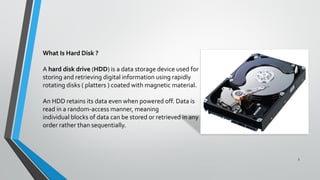
A hard disk drive (HDD) is a data storage device used for
storing and retrieving digital information using rapidly
rotating disks ( platters ) coated with magnetic material.
An HDD retains its data even when powered off. Data is
read in a random-access manner, meaning
individual blocks of data can be stored or retrieved in any
order rather than sequentially.

3
History
•

•

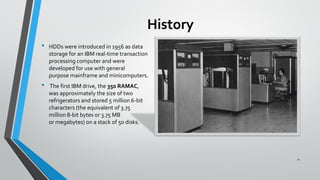
HDDs were introduced in 1956 as data
storage for an IBM real-time transaction
processing computer and were
developed for use with general
purpose mainframe and minicomputers.
The first IBM drive, the 350 RAMAC,
was approximately the size of two
refrigerators and stored 5 million 6-bit
characters (the equivalent of 3.75
million 8-bit bytes or 3.75 MB
or megabytes) on a stack of 50 disks.

4
History
•
•

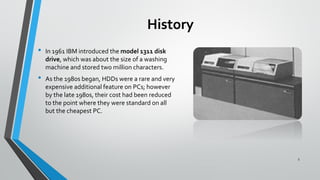
In 1961 IBM introduced the model 1311 disk
drive, which was about the size of a washing
machine and stored two million characters.
As the 1980s began, HDDs were a rare and very
expensive additional feature on PCs; however
by the late 1980s, their cost had been reduced
to the point where they were standard on all
but the cheapest PC.

5
Technology
Magnetic recording

•
•

An HDD records data by magnetizing a thin film of ferromagnetic material on a
disk. Sequential changes in the direction of magnetization represent binary
data bits.
The data is read from the disk by detecting the transitions in magnetization.
User data is encoded using an encoding scheme, such as run-length
limited encoding, which determines how the data is represented by the
magnetic transitions.

6
Components
•

•

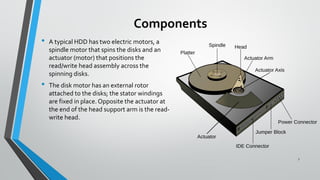
A typical HDD has two electric motors, a
spindle motor that spins the disks and an
actuator (motor) that positions the
read/write head assembly across the
spinning disks.
The disk motor has an external rotor
attached to the disks; the stator windings
are fixed in place. Opposite the actuator at
the end of the head support arm is the readwrite head.

7
Platters
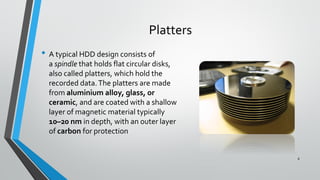
• A typical HDD design consists of
a spindle that holds flat circular disks,
also called platters, which hold the
recorded data. The platters are made
from aluminium alloy, glass, or
ceramic, and are coated with a shallow
layer of magnetic material typically
10–20 nm in depth, with an outer layer
of carbon for protection

8
Read/Write Head

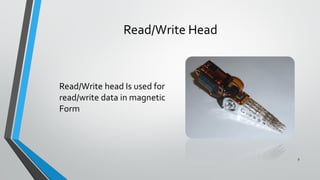
Read/Write head Is used for
read/write data in magnetic
Form

9
Platter’s Structure
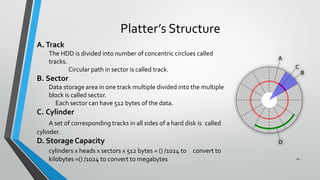
A. Track
The HDD is divided into number of concentric circlues called
tracks.
Circular path in sector is called track.

B. Sector
Data storage area in one track multiple divided into the multiple
block is called sector.
Each sector can have 512 bytes of the data.

C. Cylinder
A set of corresponding tracks in all sides of a hard disk is called
cylinder.

D. Storage Capacity
cylinders x heads x sectors x 512 bytes = () /1024 to convert to
kilobytes =() /1024 to convert to megabytes

10
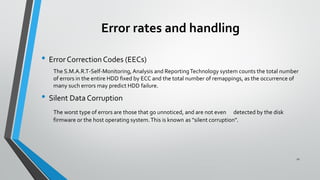
Error rates and handling
• Error Correction Codes (EECs)
The S.M.A.R.T-Self-Monitoring, Analysis and Reporting Technology system counts the total number
of errors in the entire HDD fixed by ECC and the total number of remappings, as the occurrence of
many such errors may predict HDD failure.

• Silent Data Corruption
The worst type of errors are those that go unnoticed, and are not even detected by the disk
firmware or the host operating system. This is known as "silent corruption”.

11
Interfaces
• EIDE
• SATA
• SCSI

• They are three types of interfacing in hard disk

12
EIDE (Enhanced Integrated Device Electronics)
PATA (Parallel Advanced Technology Attachment)
•
•
•
•

It has a 40 pin connector.
Data transfer rate is 133mbps.
when installed this type of hard drives ensure that the jumpers are correctly configured.
If you have two devices connected to one IDE controller.

( one must be set to master and the other must be set to slave).

13
SATA (Serial Advanced Technology Attachment)
•
•
•
•
•

It has a 7pin connector.
It is the latest high-speed type of hard drive connectors.
Data transfer rate is 300mbps. As there are faster than old IDE interface.

the latest hard drives are using this type of interface.
As there are faster than old IDE interface.

14
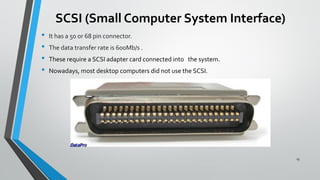
SCSI (Small Computer System Interface)
•
•
•
•

It has a 50 or 68 pin connector.

The data transfer rate is 600Mb/s .
These require a SCSI adapter card connected into the system.
Nowadays, most desktop computers did not use the SCSI.

15
Disk Partitioning

16
Disk Formatting
•
•

The process of initializing these logical blocks on the physical disk platters is called low
level formatting which is usually performed at the factory and is not normally changed in
the field.
High level formatting then writes the file system structures into selected logical blocks to
make the remaining logical blocks available to the host OS and its applications.

17
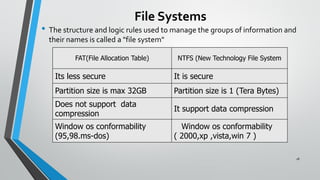
File Systems

• The structure and logic rules used to manage the groups of information and
their names is called a "file system"
FAT(File Allocation Table)

NTFS (New Technology File System

Its less secure

It is secure

Partition size is max 32GB

Partition size is 1 (Tera Bytes)

Does not support data
compression

It support data compression

Window os conformability
(95,98.ms-dos)

Window os conformability
( 2000,xp ,vista,win 7 )
18
Unit Prefix for Capacity
Term

Equal to

Bit

0 or 1

Kb(Kilobit)

1,000 bits

Byte

8 bits (approximately one character in a Word
document)

KB(Kilobyte)

1,000 bytes

MB(Megabyte)

1,000 Kilobytes or 1,000,000 Bytes

GB(Gigabyte)

1,000 Megabytes or 1,000,000, 000 Bytes

TB(Terabyte)

1, 000 Gigabytes or 1,000, 000, 000, 000 Bytes

PB(Petabyte)

1, 000 Terabytes or about 1,000,000,000,000,000
Bytes

EB(Exabyte)

1, 000 Petabytes or about
1,000,000,000,000,000,000 Bytes

ZB(Zetabyte)

1, 000 Exabytes or about
1,000,000,000,000,000,000,000 Bytes

YB(Yottabyte)

1, 000 Zetabytes or about
1,000,000,000,000,000,000,000,000 Bytes

19
Form Factors
Past and present HDD form factors
Form factor

Status

Length [mm] Width [mm] Height [mm]

Largest
capacity

Capacity
Per platter
[GB]

Platters
(max)

3.5"

Current

146

101.6

19 or 25.4

6 TB (2013)

5 or 7

1000

2.5"

Current

100

69.85

5, 7, 9.5,
12.5, or 15

2 TB (2012)

4

694

1.8"

Current

71

54

5 or 8

320 GB
(2009)

2

220

8"

Obsolete

362

241.3

117.5

5.25" FH

Obsolete

203

146

82.6

47 GB (1998) 14

3.36

5.25" HH

Obsolete

203

146

41.4

19.3 GB
(1998)

4.83

1.3"

Obsolete

43

40 GB (2007) 1

40

1"
(CFII/ZIF/IDE- Obsolete
Flex)

42

20 GB (2006) 1

20

8 GB (2004)

8

0.85"

Obsolete

32

24

5

4

1

20
Form Factors

21
Performance characteristics
• Latency
Latency is the delay for the rotation of the disk to bring the
required disk sector under the read-write mechanism. It
depends on rotational speed of a disk, measured in revolutions
per minute (rpm).

Rotational speed
[rpm]

Average latency
[ms]

15,000

2

10,000

3

Average rotational latency is shown in the table below, based on
the statistical relation that the average latency in milliseconds
for such a drive is one-half the rotational period.

7,200

4.16

5,400

5.55

• Data transfer rate

4,800

6.25

22
Popular Vendors

23
Future Development

• Desktop 3.5" drives estimated to hit 12 TB around 2016.

24
Thank You

25

Hard disk drive

  • 1.
    Introduction Name : AwaisAlam Roll # 4808 1
  • 2.
    Topic • Hard DiskDrive ( Internal ) 2
  • 3.
    What Is HardDisk ? A hard disk drive (HDD) is a data storage device used for storing and retrieving digital information using rapidly rotating disks ( platters ) coated with magnetic material. An HDD retains its data even when powered off. Data is read in a random-access manner, meaning individual blocks of data can be stored or retrieved in any order rather than sequentially. 3
  • 4.
    History • • HDDs were introducedin 1956 as data storage for an IBM real-time transaction processing computer and were developed for use with general purpose mainframe and minicomputers. The first IBM drive, the 350 RAMAC, was approximately the size of two refrigerators and stored 5 million 6-bit characters (the equivalent of 3.75 million 8-bit bytes or 3.75 MB or megabytes) on a stack of 50 disks. 4
  • 5.
    History • • In 1961 IBMintroduced the model 1311 disk drive, which was about the size of a washing machine and stored two million characters. As the 1980s began, HDDs were a rare and very expensive additional feature on PCs; however by the late 1980s, their cost had been reduced to the point where they were standard on all but the cheapest PC. 5
  • 6.
    Technology Magnetic recording • • An HDDrecords data by magnetizing a thin film of ferromagnetic material on a disk. Sequential changes in the direction of magnetization represent binary data bits. The data is read from the disk by detecting the transitions in magnetization. User data is encoded using an encoding scheme, such as run-length limited encoding, which determines how the data is represented by the magnetic transitions. 6
  • 7.
    Components • • A typical HDDhas two electric motors, a spindle motor that spins the disks and an actuator (motor) that positions the read/write head assembly across the spinning disks. The disk motor has an external rotor attached to the disks; the stator windings are fixed in place. Opposite the actuator at the end of the head support arm is the readwrite head. 7
  • 8.
    Platters • A typicalHDD design consists of a spindle that holds flat circular disks, also called platters, which hold the recorded data. The platters are made from aluminium alloy, glass, or ceramic, and are coated with a shallow layer of magnetic material typically 10–20 nm in depth, with an outer layer of carbon for protection 8
  • 9.
    Read/Write Head Read/Write headIs used for read/write data in magnetic Form 9
  • 10.
    Platter’s Structure A. Track TheHDD is divided into number of concentric circlues called tracks. Circular path in sector is called track. B. Sector Data storage area in one track multiple divided into the multiple block is called sector. Each sector can have 512 bytes of the data. C. Cylinder A set of corresponding tracks in all sides of a hard disk is called cylinder. D. Storage Capacity cylinders x heads x sectors x 512 bytes = () /1024 to convert to kilobytes =() /1024 to convert to megabytes 10
  • 11.
    Error rates andhandling • Error Correction Codes (EECs) The S.M.A.R.T-Self-Monitoring, Analysis and Reporting Technology system counts the total number of errors in the entire HDD fixed by ECC and the total number of remappings, as the occurrence of many such errors may predict HDD failure. • Silent Data Corruption The worst type of errors are those that go unnoticed, and are not even detected by the disk firmware or the host operating system. This is known as "silent corruption”. 11
  • 12.
    Interfaces • EIDE • SATA •SCSI • They are three types of interfacing in hard disk 12
  • 13.
    EIDE (Enhanced IntegratedDevice Electronics) PATA (Parallel Advanced Technology Attachment) • • • • It has a 40 pin connector. Data transfer rate is 133mbps. when installed this type of hard drives ensure that the jumpers are correctly configured. If you have two devices connected to one IDE controller. ( one must be set to master and the other must be set to slave). 13
  • 14.
    SATA (Serial AdvancedTechnology Attachment) • • • • • It has a 7pin connector. It is the latest high-speed type of hard drive connectors. Data transfer rate is 300mbps. As there are faster than old IDE interface. the latest hard drives are using this type of interface. As there are faster than old IDE interface. 14
  • 15.
    SCSI (Small ComputerSystem Interface) • • • • It has a 50 or 68 pin connector. The data transfer rate is 600Mb/s . These require a SCSI adapter card connected into the system. Nowadays, most desktop computers did not use the SCSI. 15
  • 16.
  • 17.
    Disk Formatting • • The processof initializing these logical blocks on the physical disk platters is called low level formatting which is usually performed at the factory and is not normally changed in the field. High level formatting then writes the file system structures into selected logical blocks to make the remaining logical blocks available to the host OS and its applications. 17
  • 18.
    File Systems • Thestructure and logic rules used to manage the groups of information and their names is called a "file system" FAT(File Allocation Table) NTFS (New Technology File System Its less secure It is secure Partition size is max 32GB Partition size is 1 (Tera Bytes) Does not support data compression It support data compression Window os conformability (95,98.ms-dos) Window os conformability ( 2000,xp ,vista,win 7 ) 18
  • 19.
    Unit Prefix forCapacity Term Equal to Bit 0 or 1 Kb(Kilobit) 1,000 bits Byte 8 bits (approximately one character in a Word document) KB(Kilobyte) 1,000 bytes MB(Megabyte) 1,000 Kilobytes or 1,000,000 Bytes GB(Gigabyte) 1,000 Megabytes or 1,000,000, 000 Bytes TB(Terabyte) 1, 000 Gigabytes or 1,000, 000, 000, 000 Bytes PB(Petabyte) 1, 000 Terabytes or about 1,000,000,000,000,000 Bytes EB(Exabyte) 1, 000 Petabytes or about 1,000,000,000,000,000,000 Bytes ZB(Zetabyte) 1, 000 Exabytes or about 1,000,000,000,000,000,000,000 Bytes YB(Yottabyte) 1, 000 Zetabytes or about 1,000,000,000,000,000,000,000,000 Bytes 19
  • 20.
    Form Factors Past andpresent HDD form factors Form factor Status Length [mm] Width [mm] Height [mm] Largest capacity Capacity Per platter [GB] Platters (max) 3.5" Current 146 101.6 19 or 25.4 6 TB (2013) 5 or 7 1000 2.5" Current 100 69.85 5, 7, 9.5, 12.5, or 15 2 TB (2012) 4 694 1.8" Current 71 54 5 or 8 320 GB (2009) 2 220 8" Obsolete 362 241.3 117.5 5.25" FH Obsolete 203 146 82.6 47 GB (1998) 14 3.36 5.25" HH Obsolete 203 146 41.4 19.3 GB (1998) 4.83 1.3" Obsolete 43 40 GB (2007) 1 40 1" (CFII/ZIF/IDE- Obsolete Flex) 42 20 GB (2006) 1 20 8 GB (2004) 8 0.85" Obsolete 32 24 5 4 1 20
  • 21.
  • 22.
    Performance characteristics • Latency Latencyis the delay for the rotation of the disk to bring the required disk sector under the read-write mechanism. It depends on rotational speed of a disk, measured in revolutions per minute (rpm). Rotational speed [rpm] Average latency [ms] 15,000 2 10,000 3 Average rotational latency is shown in the table below, based on the statistical relation that the average latency in milliseconds for such a drive is one-half the rotational period. 7,200 4.16 5,400 5.55 • Data transfer rate 4,800 6.25 22
  • 23.
  • 24.
    Future Development • Desktop3.5" drives estimated to hit 12 TB around 2016. 24
  • 25.