
HARD DISK DRIVE
HARD DISK DRIVE It is a  data storage device in a computer. It is a secondary storage device.  Its stored in  0 (or) 1. The  operating system , software  and most  other files are stored in the HDD. Its invented in 1954 by ibm. Nowaday,HDD with3.5 inch or 5.25 inch platters in different capacities, such as 10GB,20GB,40GB,80GB etc.
 
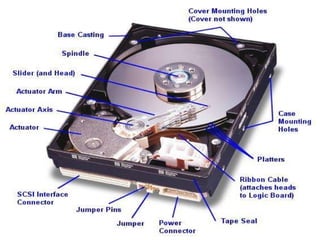
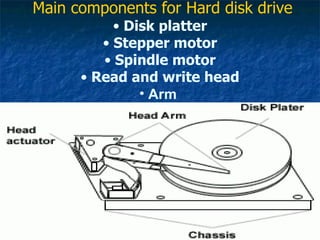
Main components for Hard disk drive Disk platter Stepper motor Spindle motor Read and write head Arm
DISK PLATTER  1.  The platter is made up of a magnetic material, in the flat disk  part of the drive.  The data stored in the platter.  Each set of magnetic particles is   collection a unit called a bit. 4. New hard-drive technology uses thin-film metals and glass platters to increase efficiency and drive storage capacity. STEPPER MOTOR 1. Use stepper motors for controlling read/write head position.  2. Stepper motors usually use +12V power, but some new low-power drives use +5V power source. SPINDLE MOTOR 1. It control the platter. 2. Ithis motor rotates at a speed of 3600 to 10,000 r.p.m. 3. All the platter moves in the same direction.
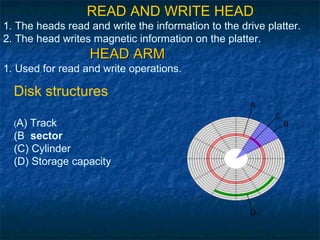
READ AND WRITE HEAD 1. The heads read and write the information to the drive platter. 2. The head writes magnetic information on the platter.   HEAD ARM 1. Used for read and write operations. Disk structures ( A) Track (B  sector (C) Cylinder (D) Storage capacity
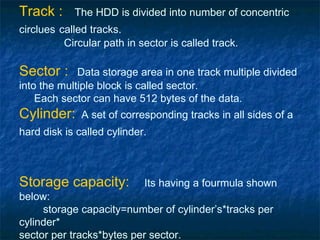
Track :  The HDD is divided into number of concentric circlues   called tracks. Circular path in sector is called track. Sector :   Data storage area in one track multiple divided into the multiple block is called sector. Each sector can have 512 bytes of the data. Cylinder:   A set of corresponding tracks in all sides of a hard disk is called cylinder.   Storage capacity:   Its having a fourmula shown below: storage capacity=number of cylinder’s*tracks per cylinder* sector per tracks*bytes per sector.
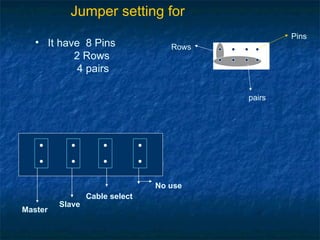
Jumper setting for  It have  8 Pins  2 Rows 4 pairs Pins Rows pairs Master Slave   Cable select No use
Partition for HDD 1.Primary Partition:   Windows operating systems must be located in a primary partition. Only primary partitions can be used to boot the   operatingsystem. 2.Extended Partition: A hard disk may contain only one extended partition. the extended partition can be subdivided into multiple logical partitions  (Other than  OS is a Extended Partition). 3.Logical Partition:   Linux operating systems can be installed into (and run from) logical partitions.   4.Active Partition :  Only one partition on a computer can be set as an  active partition  or  bootable partition .  For example, if you are using Microsoft Windows the partition that contains Windows is the active partition.
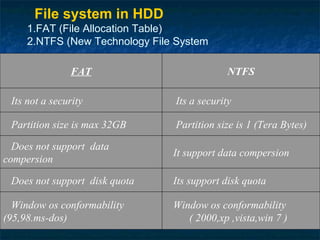
File system in HDD 1.FAT (File Allocation Table) 2.NTFS (New Technology File System FAT NTFS Its not a security Its a security Partition size is max 32GB Partition size is 1 (Tera Bytes) Does not support  data compersion It support data compersion Does not support  disk quota  Its support disk quota Window os conformability (95,98.ms-dos)  Window os conformability  ( 2000,xp ,vista,win 7 )
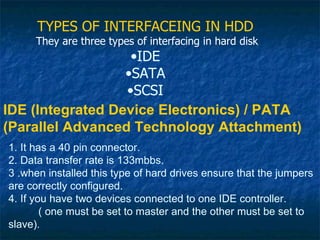
TYPES OF INTERFACEING IN HDD They are three types of interfacing in hard disk IDE SATA SCSI IDE (Integrated Device Electronics) / PATA (Parallel Advanced Technology Attachment) 1. It has a 40 pin connector. 2. Data transfer rate is 133mbbs. 3 .when installed this type of hard drives ensure that the jumpers are correctly configured. 4. If you have two devices connected to one IDE controller. ( one must be set to master and the other must be set to slave).
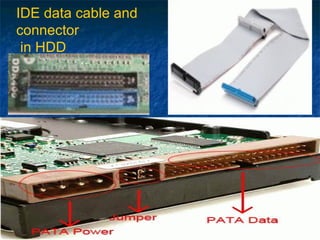
IDE data cable and  connector in HDD
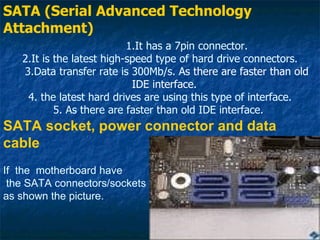
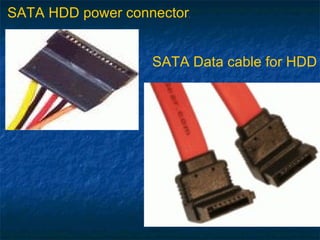
SATA (Serial Advanced Technology Attachment)   1.It has a 7pin connector. 2.It is the latest high-speed type of hard drive connectors. 3.Data transfer rate is 300Mb/s.  As there are faster than old IDE interface.  4. the latest hard drives are using this type of interface. 5. As there are faster than old IDE interface.  SATA socket, power connector and data cable   If  the  motherboard have the SATA connectors/sockets  as shown the picture .
SATA HDD power connector .  . SATA Data cable for HDD
SCSI (Small Computer System Interface) 1.It has a 50 or 68 pin connector.   2.The data transfer rate is 600Mb/s . 3.These require a SCSI adapter card connected into  the system.  4.Nowadays, most desktop computers did not use the  SCSI.
Main Problem Created in HDD No Operating System  (No operating system in Hard Disk) Disk boot Failure  (Cable Problem) OR (HDD Not Detect)
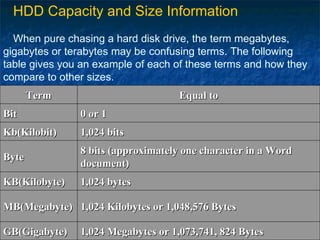
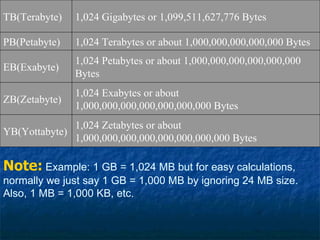
HDD Capacity and Size Information   When pure chasing a hard disk drive, the term megabytes, gigabytes or terabytes may be confusing terms. The following table gives you an example of each of these terms and how they compare to other sizes.  Term Equal to Bit 0 or 1 Kb(Kilobit) 1,024 bits Byte 8 bits (approximately one character in a Word document) KB(Kilobyte) 1,024 bytes MB(Megabyte) 1,024 Kilobytes or 1,048,576 Bytes GB(Gigabyte) 1,024 Megabytes or 1,073,741, 824 Bytes
Note:  Example: 1 GB = 1,024 MB but for easy calculations, normally we just say 1 GB = 1,000 MB by ignoring 24 MB size. Also, 1 MB = 1,000 KB, etc.  TB(Terabyte) 1,024 Gigabytes or 1,099,511,627,776 Bytes PB(Petabyte) 1,024 Terabytes or about 1,000,000,000,000,000 Bytes  EB(Exabyte) 1,024 Petabytes or about 1,000,000,000,000,000,000 Bytes ZB(Zetabyte) 1,024 Exabytes or about 1,000,000,000,000,000,000,000 Bytes YB(Yottabyte) 1,024 Zetabytes or about 1,000,000,000,000,000,000,000,000 Bytes