Memory Versus Storage What is storage? The media on which data, instructions, and information are kept, as well as the devices that record and retrieve these items
Memory Versus Storage What is memory? A temporary holding place for data and instructions Consists of one or more chips on the motherboard Sometimes called primary storage Nonvolatile memory  Does not lose its contents when power is removed from the computer Volatile memory Loses its contents when the computer’s power is turned off Most memory is volatile
Floppy Disks What is a floppy disk? A portable, inexpensive storage medium Consists of a thin, circular, flexible plastic disk with a magnetic coating Enclosed in a square-shaped plastic shell Today’s standard disk is 3.5” wide
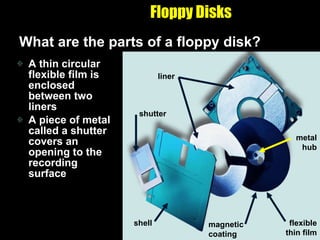
Floppy Disks What are the parts of a floppy disk? A thin circular flexible film is enclosed between two liners A piece of metal called a shutter covers an opening to the recording surface shell shutter liner magnetic coating flexible thin film metal hub
Floppy Disks A device that can read from and write on a floppy disk Most personal computers have a floppy disk drive, in which you insert and remove a floppy disk What is a floppy disk drive (FDD)?
Floppy Disks How does a floppy disk store data? A type of magnetic media Uses magnetic patterns to store items such as data, instructions, and information on a disk’s surface Able to access (read) data from and place (write) data on a magnetic disk any number of times The read/write head in the  floppy disk drive is the  mechanism that actually  reads items from or writes  items on the floppy disk
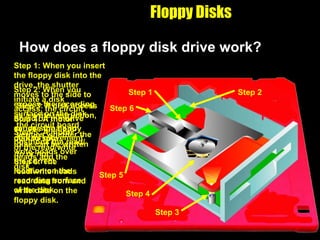
Floppy Disks How does a floppy disk drive work? Step 6: The read/write heads read data from and write data on the floppy disk. Step 6 Step 5: A motor positions the read/write heads over the correct location on the recording surface of the disk. Step 5 Step 4: A motor causes the floppy disk to spin. Step 4 Step 3: If disk access is a write instruction, the circuit board verifies whether the disk can be written to or not. Step 3 Step 2: When you initiate a disk access, the circuit board on the drive sends signals to control movement of the read/write heads and the disk. Step 2 Step 1: When you insert the floppy disk into the drive, the shutter moves to the side to expose the recording surface on the disk. Step 1
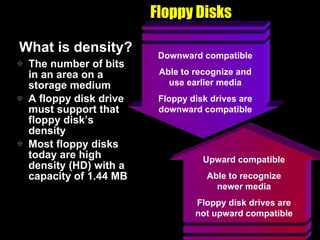
Floppy Disks What is density? The number of bits in an area on a storage medium A floppy disk drive must support that floppy disk’s density Most floppy disks today are high density (HD) with a capacity of 1.44 MB Upward compatible Able to recognize newer media Floppy disk drives are not upward compatible Downward compatible Able to recognize and use earlier media Floppy disk drives are downward compatible
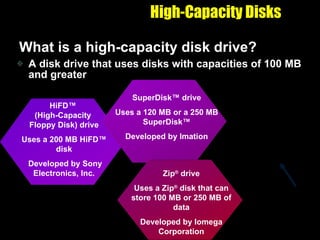
High-Capacity Disks What is a high-capacity disk drive? A disk drive that uses disks with capacities of 100 MB and greater HiFD ™  (High-Capacity  Floppy Disk) drive Uses a 200 MB  HiFD ™ disk Developed by Sony Electronics, Inc. SuperDisk ™ drive Uses a 120 MB or a 250 MB SuperDisk™ Developed by Imation Zip ®  drive Uses a Zip ®  disk that can store 100 MB or 250 MB of data Developed by Iomega Corporation built in Zip ®  drive
High-Capacity Disks What is a backup? A duplicate  of a file, program, or disk that you can use if the original is lost damaged, or destroyed High-capacity disks are often used to  back up  important  data and  information
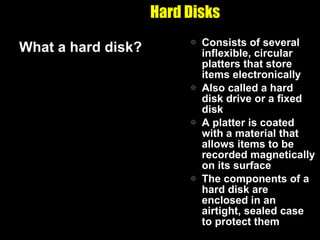
Hard Disks What a hard disk? Consists of several inflexible, circular platters that store items electronically Also called a hard disk drive or a fixed disk A platter is coated with a material that allows items to be recorded magnetically on its surface The components of a hard disk are enclosed in an airtight, sealed case to protect them
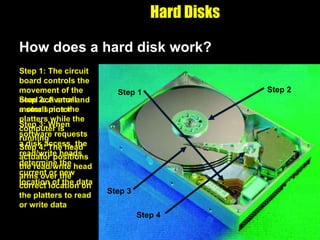
Hard Disks How does a hard disk work? Step 4: The head actuator positions the read/write head arms over the correct location on the platters to read or write data Step 4 Step 2: A small motor spins the platters while the computer is running Step 2 Step 3: When software requests a disk access, the read/write heads determine the current or new location of the data Step 3 Step 1: The circuit board controls the movement of the head activator and a small motor Step 1
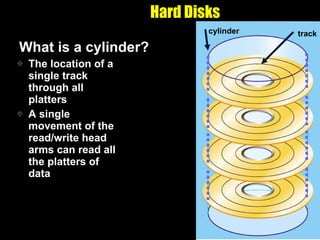
Hard Disks What is a cylinder? The location of a single track through all platters A single movement of the read/write head arms can read all the platters of data track cylinder
Hard Disks What is a head crash? Occurs when a read/write head touches the surface of a platter The platters of the hard disk rotate at a high rate of speed while the computer is running The spinning creates a cushion of air that floats the read/write head above the platter
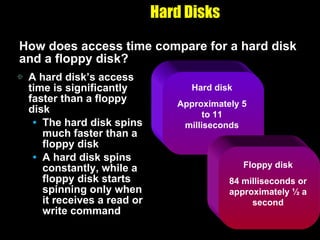
Hard Disks How does access time compare for a hard disk and a floppy disk? A hard disk’s access time is significantly faster than a floppy disk The hard disk spins much faster than a floppy disk A hard disk spins constantly, while a floppy disk starts spinning only when it receives a read or write command  Hard disk Approximately 5 to 11 milliseconds Floppy disk 84 milliseconds or approximately ½ a second
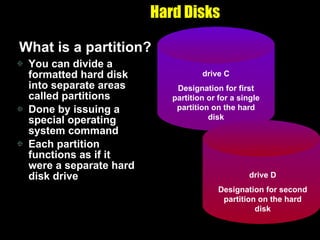
Hard Disks What is a partition? You can divide a formatted hard disk into separate areas called partitions Done by issuing a special operating system command Each partition functions as if it were a separate hard disk drive drive C Designation for first partition or for a single partition on the hard disk drive D Designation for second partition on the hard disk
Hard Disks What is a removable hard disk? A disk drive in which a plastic or metal case surrounds the hard disk so you can remove it from the drive A popular, reasonably priced, removable hard disk is the Jaz ®  disk by Iomega
Hard Disks What is an Internet hard drive? A service on the Web that provides storage to computer users Sometimes called online storage Many offer storage free of charge Revenues come from advertisers
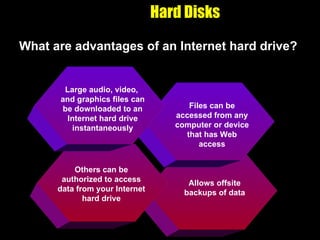
Hard Disks What are advantages of an Internet hard drive? Allows offsite backups of data Others can be authorized to access data from your Internet hard drive Files can be accessed from any computer or device that has Web access Large audio, video,  and graphics files can be downloaded to an Internet hard drive instantaneously
Compact Discs What is a compact disc (CD)? A flat, round, portable, metal storage medium that usually is 4.75 inches in diameter and less than one-twentieth of an inch thick Most personal computers today include some  type of compact disc drive Also called an  optical disc Available in a  variety of formats
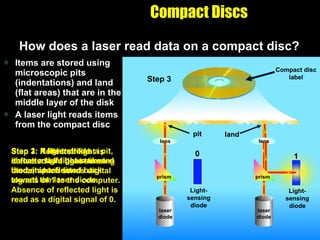
Items are stored using microscopic pits (indentations) and land (flat areas) that are in the middle layer of the disk A laser light reads items from the compact disc Compact Discs How does a laser read data on a compact disc? Step 3: Reflected light is deflected to a light-sensing diode, which sends digital signals of 1 to the computer. Absence of reflected light is read as a digital signal of 0. Step 1: A laser diode shines a light beam toward the compact disc. Step 2: If light strikes a pit, it scatters. If light strikes land, it is reflected back toward the laser diode. Compact disc label Compact disc label lens lens prism prism laser diode laser diode Step 1 Compact disc label lens lens prism prism laser diode laser diode Step 2 Compact disc label lens lens prism prism laser diode laser diode pit land Step 3 Compact disc label lens lens prism prism laser diode laser diode Light-sensing diode Light-sensing diode 0 1 pit land
CD-ROMs What is a CD-ROM? A silver-colored compact disc that uses the same laser technology as audio CDs for recording music Can contain text, graphics, audio, and video The manufacturer writes, or records, the contents of standard CD-ROMs You cannot erase or modify the contents A CD-ROM drive or CD-ROM player is used to read items on a CD-ROM
CD-ROMs What is the storage capacity of a CD-ROM? A typical CD-ROM holds about 650 MB of data, instructions, and information Manufactures use CD-ROMs to store and distribute today’s  multimedia  and other  complex  software
CD-ROMs What is a PhotoCD? A compact disc that contains digital photographic images saved in the PhotoCD format Based on a file format developed by Eastman Kodak Used by commercial and  professional users A multisession disc, which means you can write additional data, instructions, and information to the disc at a later time
CD-ROMs A single-session disc offered by Kodak Stores digital versions of photographs for consumers Single-session means all items are written to the disc at one time Film developers create the images on the disc from photographic negatives at the time a roll of film is developed What is a Picture CD?
CD-R and CD-RW What is a CD-R (compact disc-recordable)? A multisession compact disc onto which you can record your own items such as text, graphics, and audio You write on the CD-R using a CD recorder or a CD-R drive and special software The CD-R drive can read and write both audio CDs and standard CD-ROMs You cannot erase the disc’s contents Most CD-ROM drives can read a CD-R
CD-R and CD-RW What is a CD-RW (compact disc-rewritable)? An erasable disc you can write on multiple times You must have CD-RW software  and a CD-RW drive Discs can be read only by multiread CD-ROM drives Drives that can read audio CDs, data CDs, CD-Rs, and CD-RWs Most recent CD-ROM drives are multiread
DVD-ROMs What is a DVD-ROM (digital video disc-ROM)? An extremely high capacity compact disc capable of storing from 4.7 GB to 17 GB You must have a DVD-ROM drive or DVD player to read a DVD-ROM Looks just like a CD-ROM but data, instructions, and information is stored in a slightly different manner to achieve a higher storage capacity
DVD-ROMs How does a DVD-ROM store data? Three storage techniques used to store DVD-ROM data Pits are packed closer together to make the disc more dense Two layers of pits are used, where the lower layer is semitransparent so the laser can read through it to the upper layer Some are double-sided, which means you can remove the DVD-ROM and turn it over to read the other side
Tapes What is tape? A magnetically coated ribbon of plastic capable of storing large amounts of data and information at a low cost A tape drive reads from and writes data and information on a tape Older computers used reel-to-reel tape drives A tape cartridge is a small, rectangular, plastic housing for tape used in  today’s tape  drives
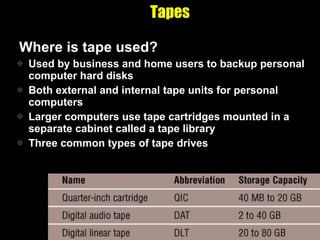
Tapes Where is tape used? Used by business and home users to backup personal computer hard disks Both external and internal tape units for personal computers Larger computers use tape cartridges mounted in a separate cabinet called a tape library Three common types of tape drives
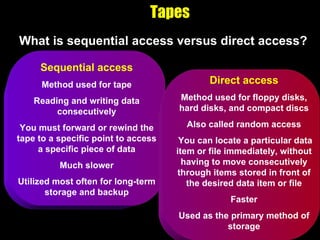
Tapes What is sequential access versus direct access? Sequential access Method used for tape Reading and writing data consecutively You must forward or rewind the tape to a specific point to access a specific piece of data Much slower Utilized most often for long-term storage and backup Direct access Method used for floppy disks, hard disks, and compact discs Also called random access You can locate a particular data item or file immediately, without having to move consecutively through items stored in front of the desired data item or file Faster Used as the primary method of storage
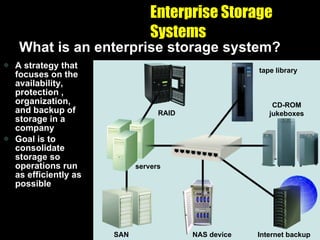
Enterprise Storage Systems What is an enterprise storage system? A strategy that focuses on the availability, protection , organization, and backup of storage in a company Goal is to consolidate storage so operations run as efficiently as possible NAS device Internet backup NAS device NAS device CD-ROM jukeboxes Internet backup tape library NAS device CD-ROM jukeboxes Internet backup RAID SAN servers tape library NAS device CD-ROM jukeboxes Internet backup
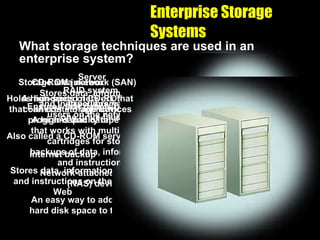
Enterprise Storage Systems What storage techniques are used in an enterprise system? Network-attached storage (NAS) device An easy way to add additional hard disk space to the network Internet backup Stores data, information, and instructions on the Web CD-ROM jukebox Holds hundreds of CD-ROMs that can contain application programs and data Also called a CD-ROM server RAID system Ensures that data is not lost if one drive fails Server Stores data, information, and instructions need by users on the network Tape library A high-capacity tape system that works with multiple tape cartridges for storing backups of data, information, and instructions Storage area network (SAN) A high-speed network that connects storage devices
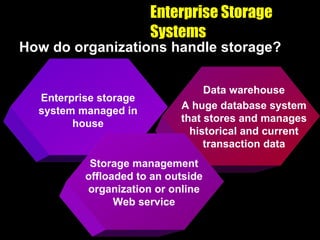
Enterprise Storage Systems How do organizations handle storage? Enterprise storage system managed in house Data warehouse A huge database system that stores and manages historical and current transaction data Storage management offloaded to an outside organization or online Web service
PC Cards What is a PC Card? A thin, credit card-sized device Fits into a PC Card slot on a notebook other personal computer Different types and sizes add storage, additional memory, communications, and sound capabilities to a computer
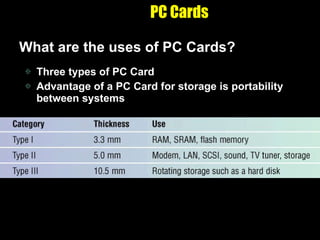
PC Cards What are the uses of PC Cards? Three types of PC Card Advantage of a PC Card for storage is portability between systems
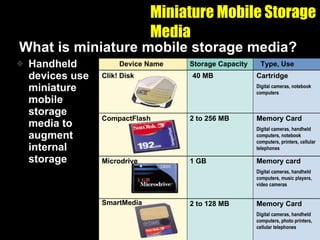
Miniature Mobile Storage Media What is miniature mobile storage media? Handheld devices use miniature mobile storage media to augment internal storage Clik! Disk CompactFlash Microdrive SmartMedia 40 MB 2 to 256 MB 1 GB 2 to 128 MB Cartridge Digital cameras, notebook computers Memory Card Digital cameras, handheld computers, notebook computers, printers, cellular telephones Memory card Digital cameras, handheld computers, music players, video cameras Memory Card Digital cameras, handheld computers, photo printers, cellular telephones Storage Capacity Device Name Type, Use
Miniature Mobile Storage Media How is miniature storage media used? Handheld devices, such as players and wallets, read or display the contents of miniature storage media such as memory cards
Miniature Mobile Storage Media What is a smart card? Stores data on a thin microprocessor embedded in the card Similar in size to a credit card Read smart card with a specialized card reader Information on the smart card can be read and updated
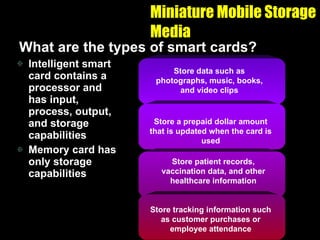
Miniature Mobile Storage Media What are the types of smart cards? Intelligent smart card contains a processor and has input, process, output, and storage capabilities Memory card has only storage capabilities Store data such as photographs, music, books, and video clips Store a prepaid dollar amount that is updated when the card is used Store patient records, vaccination data, and other healthcare information Store tracking information such as customer purchases or employee attendance
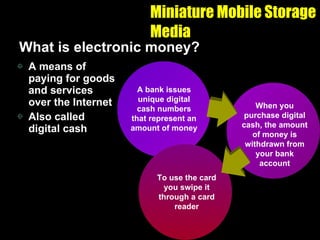
Miniature Mobile Storage Media What is electronic money? A means of paying for goods and services over the Internet Also called digital cash A bank issues unique digital cash numbers that represent an amount of money When you purchase digital cash, the amount of money is withdrawn from your bank account To use the card you swipe it through a card reader
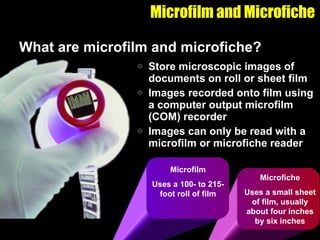
Microfilm and Microfiche What are microfilm and microfiche? Store microscopic images of documents on roll or sheet film Images recorded onto film using a computer output microfilm (COM) recorder Images can only be read with a microfilm or microfiche reader Microfiche Uses a small sheet of film, usually about four inches by six inches Microfilm Uses a 100- to 215-foot roll of film
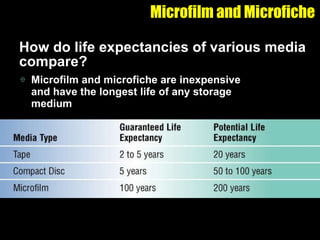
Microfilm and Microfiche How do life expectancies of various media compare? Microfilm and microfiche are inexpensive and have the longest life of any storage medium

14c. Computer Systems Extra Storage

  • 1.
    Memory Versus StorageWhat is storage? The media on which data, instructions, and information are kept, as well as the devices that record and retrieve these items
  • 2.
    Memory Versus StorageWhat is memory? A temporary holding place for data and instructions Consists of one or more chips on the motherboard Sometimes called primary storage Nonvolatile memory Does not lose its contents when power is removed from the computer Volatile memory Loses its contents when the computer’s power is turned off Most memory is volatile
  • 3.
    Floppy Disks Whatis a floppy disk? A portable, inexpensive storage medium Consists of a thin, circular, flexible plastic disk with a magnetic coating Enclosed in a square-shaped plastic shell Today’s standard disk is 3.5” wide
  • 4.
    Floppy Disks Whatare the parts of a floppy disk? A thin circular flexible film is enclosed between two liners A piece of metal called a shutter covers an opening to the recording surface shell shutter liner magnetic coating flexible thin film metal hub
  • 5.
    Floppy Disks Adevice that can read from and write on a floppy disk Most personal computers have a floppy disk drive, in which you insert and remove a floppy disk What is a floppy disk drive (FDD)?
  • 6.
    Floppy Disks Howdoes a floppy disk store data? A type of magnetic media Uses magnetic patterns to store items such as data, instructions, and information on a disk’s surface Able to access (read) data from and place (write) data on a magnetic disk any number of times The read/write head in the floppy disk drive is the mechanism that actually reads items from or writes items on the floppy disk
  • 7.
    Floppy Disks Howdoes a floppy disk drive work? Step 6: The read/write heads read data from and write data on the floppy disk. Step 6 Step 5: A motor positions the read/write heads over the correct location on the recording surface of the disk. Step 5 Step 4: A motor causes the floppy disk to spin. Step 4 Step 3: If disk access is a write instruction, the circuit board verifies whether the disk can be written to or not. Step 3 Step 2: When you initiate a disk access, the circuit board on the drive sends signals to control movement of the read/write heads and the disk. Step 2 Step 1: When you insert the floppy disk into the drive, the shutter moves to the side to expose the recording surface on the disk. Step 1
  • 8.
    Floppy Disks Whatis density? The number of bits in an area on a storage medium A floppy disk drive must support that floppy disk’s density Most floppy disks today are high density (HD) with a capacity of 1.44 MB Upward compatible Able to recognize newer media Floppy disk drives are not upward compatible Downward compatible Able to recognize and use earlier media Floppy disk drives are downward compatible
  • 9.
    High-Capacity Disks Whatis a high-capacity disk drive? A disk drive that uses disks with capacities of 100 MB and greater HiFD ™ (High-Capacity Floppy Disk) drive Uses a 200 MB HiFD ™ disk Developed by Sony Electronics, Inc. SuperDisk ™ drive Uses a 120 MB or a 250 MB SuperDisk™ Developed by Imation Zip ® drive Uses a Zip ® disk that can store 100 MB or 250 MB of data Developed by Iomega Corporation built in Zip ® drive
  • 10.
    High-Capacity Disks Whatis a backup? A duplicate of a file, program, or disk that you can use if the original is lost damaged, or destroyed High-capacity disks are often used to back up important data and information
  • 11.
    Hard Disks Whata hard disk? Consists of several inflexible, circular platters that store items electronically Also called a hard disk drive or a fixed disk A platter is coated with a material that allows items to be recorded magnetically on its surface The components of a hard disk are enclosed in an airtight, sealed case to protect them
  • 12.
    Hard Disks Howdoes a hard disk work? Step 4: The head actuator positions the read/write head arms over the correct location on the platters to read or write data Step 4 Step 2: A small motor spins the platters while the computer is running Step 2 Step 3: When software requests a disk access, the read/write heads determine the current or new location of the data Step 3 Step 1: The circuit board controls the movement of the head activator and a small motor Step 1
  • 13.
    Hard Disks Whatis a cylinder? The location of a single track through all platters A single movement of the read/write head arms can read all the platters of data track cylinder
  • 14.
    Hard Disks Whatis a head crash? Occurs when a read/write head touches the surface of a platter The platters of the hard disk rotate at a high rate of speed while the computer is running The spinning creates a cushion of air that floats the read/write head above the platter
  • 15.
    Hard Disks Howdoes access time compare for a hard disk and a floppy disk? A hard disk’s access time is significantly faster than a floppy disk The hard disk spins much faster than a floppy disk A hard disk spins constantly, while a floppy disk starts spinning only when it receives a read or write command Hard disk Approximately 5 to 11 milliseconds Floppy disk 84 milliseconds or approximately ½ a second
  • 16.
    Hard Disks Whatis a partition? You can divide a formatted hard disk into separate areas called partitions Done by issuing a special operating system command Each partition functions as if it were a separate hard disk drive drive C Designation for first partition or for a single partition on the hard disk drive D Designation for second partition on the hard disk
  • 17.
    Hard Disks Whatis a removable hard disk? A disk drive in which a plastic or metal case surrounds the hard disk so you can remove it from the drive A popular, reasonably priced, removable hard disk is the Jaz ® disk by Iomega
  • 18.
    Hard Disks Whatis an Internet hard drive? A service on the Web that provides storage to computer users Sometimes called online storage Many offer storage free of charge Revenues come from advertisers
  • 19.
    Hard Disks Whatare advantages of an Internet hard drive? Allows offsite backups of data Others can be authorized to access data from your Internet hard drive Files can be accessed from any computer or device that has Web access Large audio, video, and graphics files can be downloaded to an Internet hard drive instantaneously
  • 20.
    Compact Discs Whatis a compact disc (CD)? A flat, round, portable, metal storage medium that usually is 4.75 inches in diameter and less than one-twentieth of an inch thick Most personal computers today include some type of compact disc drive Also called an optical disc Available in a variety of formats
  • 21.
    Items are storedusing microscopic pits (indentations) and land (flat areas) that are in the middle layer of the disk A laser light reads items from the compact disc Compact Discs How does a laser read data on a compact disc? Step 3: Reflected light is deflected to a light-sensing diode, which sends digital signals of 1 to the computer. Absence of reflected light is read as a digital signal of 0. Step 1: A laser diode shines a light beam toward the compact disc. Step 2: If light strikes a pit, it scatters. If light strikes land, it is reflected back toward the laser diode. Compact disc label Compact disc label lens lens prism prism laser diode laser diode Step 1 Compact disc label lens lens prism prism laser diode laser diode Step 2 Compact disc label lens lens prism prism laser diode laser diode pit land Step 3 Compact disc label lens lens prism prism laser diode laser diode Light-sensing diode Light-sensing diode 0 1 pit land
  • 22.
    CD-ROMs What isa CD-ROM? A silver-colored compact disc that uses the same laser technology as audio CDs for recording music Can contain text, graphics, audio, and video The manufacturer writes, or records, the contents of standard CD-ROMs You cannot erase or modify the contents A CD-ROM drive or CD-ROM player is used to read items on a CD-ROM
  • 23.
    CD-ROMs What isthe storage capacity of a CD-ROM? A typical CD-ROM holds about 650 MB of data, instructions, and information Manufactures use CD-ROMs to store and distribute today’s multimedia and other complex software
  • 24.
    CD-ROMs What isa PhotoCD? A compact disc that contains digital photographic images saved in the PhotoCD format Based on a file format developed by Eastman Kodak Used by commercial and professional users A multisession disc, which means you can write additional data, instructions, and information to the disc at a later time
  • 25.
    CD-ROMs A single-sessiondisc offered by Kodak Stores digital versions of photographs for consumers Single-session means all items are written to the disc at one time Film developers create the images on the disc from photographic negatives at the time a roll of film is developed What is a Picture CD?
  • 26.
    CD-R and CD-RWWhat is a CD-R (compact disc-recordable)? A multisession compact disc onto which you can record your own items such as text, graphics, and audio You write on the CD-R using a CD recorder or a CD-R drive and special software The CD-R drive can read and write both audio CDs and standard CD-ROMs You cannot erase the disc’s contents Most CD-ROM drives can read a CD-R
  • 27.
    CD-R and CD-RWWhat is a CD-RW (compact disc-rewritable)? An erasable disc you can write on multiple times You must have CD-RW software and a CD-RW drive Discs can be read only by multiread CD-ROM drives Drives that can read audio CDs, data CDs, CD-Rs, and CD-RWs Most recent CD-ROM drives are multiread
  • 28.
    DVD-ROMs What isa DVD-ROM (digital video disc-ROM)? An extremely high capacity compact disc capable of storing from 4.7 GB to 17 GB You must have a DVD-ROM drive or DVD player to read a DVD-ROM Looks just like a CD-ROM but data, instructions, and information is stored in a slightly different manner to achieve a higher storage capacity
  • 29.
    DVD-ROMs How doesa DVD-ROM store data? Three storage techniques used to store DVD-ROM data Pits are packed closer together to make the disc more dense Two layers of pits are used, where the lower layer is semitransparent so the laser can read through it to the upper layer Some are double-sided, which means you can remove the DVD-ROM and turn it over to read the other side
  • 30.
    Tapes What istape? A magnetically coated ribbon of plastic capable of storing large amounts of data and information at a low cost A tape drive reads from and writes data and information on a tape Older computers used reel-to-reel tape drives A tape cartridge is a small, rectangular, plastic housing for tape used in today’s tape drives
  • 31.
    Tapes Where istape used? Used by business and home users to backup personal computer hard disks Both external and internal tape units for personal computers Larger computers use tape cartridges mounted in a separate cabinet called a tape library Three common types of tape drives
  • 32.
    Tapes What issequential access versus direct access? Sequential access Method used for tape Reading and writing data consecutively You must forward or rewind the tape to a specific point to access a specific piece of data Much slower Utilized most often for long-term storage and backup Direct access Method used for floppy disks, hard disks, and compact discs Also called random access You can locate a particular data item or file immediately, without having to move consecutively through items stored in front of the desired data item or file Faster Used as the primary method of storage
  • 33.
    Enterprise Storage SystemsWhat is an enterprise storage system? A strategy that focuses on the availability, protection , organization, and backup of storage in a company Goal is to consolidate storage so operations run as efficiently as possible NAS device Internet backup NAS device NAS device CD-ROM jukeboxes Internet backup tape library NAS device CD-ROM jukeboxes Internet backup RAID SAN servers tape library NAS device CD-ROM jukeboxes Internet backup
  • 34.
    Enterprise Storage SystemsWhat storage techniques are used in an enterprise system? Network-attached storage (NAS) device An easy way to add additional hard disk space to the network Internet backup Stores data, information, and instructions on the Web CD-ROM jukebox Holds hundreds of CD-ROMs that can contain application programs and data Also called a CD-ROM server RAID system Ensures that data is not lost if one drive fails Server Stores data, information, and instructions need by users on the network Tape library A high-capacity tape system that works with multiple tape cartridges for storing backups of data, information, and instructions Storage area network (SAN) A high-speed network that connects storage devices
  • 35.
    Enterprise Storage SystemsHow do organizations handle storage? Enterprise storage system managed in house Data warehouse A huge database system that stores and manages historical and current transaction data Storage management offloaded to an outside organization or online Web service
  • 36.
    PC Cards Whatis a PC Card? A thin, credit card-sized device Fits into a PC Card slot on a notebook other personal computer Different types and sizes add storage, additional memory, communications, and sound capabilities to a computer
  • 37.
    PC Cards Whatare the uses of PC Cards? Three types of PC Card Advantage of a PC Card for storage is portability between systems
  • 38.
    Miniature Mobile StorageMedia What is miniature mobile storage media? Handheld devices use miniature mobile storage media to augment internal storage Clik! Disk CompactFlash Microdrive SmartMedia 40 MB 2 to 256 MB 1 GB 2 to 128 MB Cartridge Digital cameras, notebook computers Memory Card Digital cameras, handheld computers, notebook computers, printers, cellular telephones Memory card Digital cameras, handheld computers, music players, video cameras Memory Card Digital cameras, handheld computers, photo printers, cellular telephones Storage Capacity Device Name Type, Use
  • 39.
    Miniature Mobile StorageMedia How is miniature storage media used? Handheld devices, such as players and wallets, read or display the contents of miniature storage media such as memory cards
  • 40.
    Miniature Mobile StorageMedia What is a smart card? Stores data on a thin microprocessor embedded in the card Similar in size to a credit card Read smart card with a specialized card reader Information on the smart card can be read and updated
  • 41.
    Miniature Mobile StorageMedia What are the types of smart cards? Intelligent smart card contains a processor and has input, process, output, and storage capabilities Memory card has only storage capabilities Store data such as photographs, music, books, and video clips Store a prepaid dollar amount that is updated when the card is used Store patient records, vaccination data, and other healthcare information Store tracking information such as customer purchases or employee attendance
  • 42.
    Miniature Mobile StorageMedia What is electronic money? A means of paying for goods and services over the Internet Also called digital cash A bank issues unique digital cash numbers that represent an amount of money When you purchase digital cash, the amount of money is withdrawn from your bank account To use the card you swipe it through a card reader
  • 43.
    Microfilm and MicroficheWhat are microfilm and microfiche? Store microscopic images of documents on roll or sheet film Images recorded onto film using a computer output microfilm (COM) recorder Images can only be read with a microfilm or microfiche reader Microfiche Uses a small sheet of film, usually about four inches by six inches Microfilm Uses a 100- to 215-foot roll of film
  • 44.
    Microfilm and MicroficheHow do life expectancies of various media compare? Microfilm and microfiche are inexpensive and have the longest life of any storage medium