Hard disk  Drive
Head positioning Of a voice coil Based System Voice coil based systems use a special information previously written on disk surface ( at the time of manufacturing). This special index information on the disk surface is called “Servo”. Voice coil actuators use this servo information as an index to accurately move the R/W head to any particular location It is a closed loop system This type does not require frequent low level formatting as required in the stepper motor based HDD
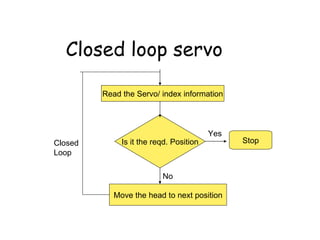
Closed loop servo Read the Servo/ index information Is it the reqd. Position Move the head to next position Stop Yes No Closed Loop
Types of servo There are 3 types of servo for controlling the voice coil based head positioning system (relative position of information wrt the head position) Wedge servo Embedded servo Dedicated servo
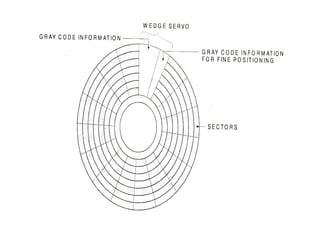
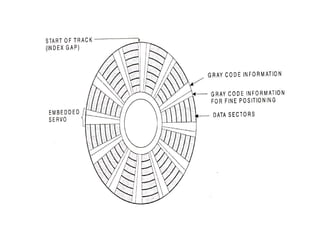
Wedge servo It appears in a wedge like shape on the disk surface.  The servo information is written in pre- index gap i.e gap between end and beginning of the track Most controllers need not be specially configured for these drives but some may need to be  configured to work with these drives
 
Problem with Wedge servo Servo information appears only once per rotation If the head is looking for some information, then the drive needs several rotations for the head to properly find the required information
Embedded servo Servo information is kept at the beginning of each sector This design allows the head positioning system to receive the current position many times in a single rotation. This makes it precise and faster
 
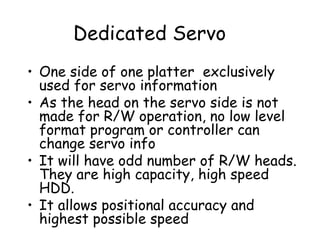
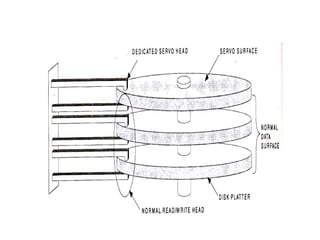
Dedicated Servo One side of one platter  exclusively used for servo information As the head on the servo side is not made for R/W operation, no low level format program or controller can change servo info It will have odd number of R/W heads. They are high capacity, high speed HDD. It allows positional accuracy and highest possible speed
 
HDD features Characteristics of HDD are : Size Capacity Interleave Head skew Cylinder skew
Form Factor Drives are available in different widths and heights Form factor is the basic unit of measurement of size of the drive Form factor is decided by the platter width 5.25 inch platter has 5.25 inch form factor 3.5 inch platter has 3.5 inch form factor
Storage capacity The storage may be given as formatted capacity in million bytes or in megabytes. It may be given as unformatted capacity in million bytes or in megabytes
Disk Geometry HDD stores data as magnetic information on its surface. If the data is stored continuously one next to another, then at the time of retrieval, the disk has to be scanned for getting the required data. To arrange data properly on the disk surface , it is divided into Heads/side, tracks, sectors, cylinders etc.. When info is written on some side, sector, track etc are saved in an index like place called directory and FAT When data is required, comp. looks at the entry in directory and FAT and locates the side, track and sector
Sides and Heads HD can contain more than one platter Each side can be used for read and write operation Each side has a separate R/W head All the heads are connected to a single head rack which makes R/W heads move over the disk drives. Head numbers begin from head 0, head1 and so on
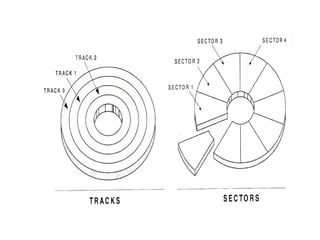
Track Each side of HDD platter’s surface is divided into concentric circles called tracks They are magnetic information written during formatting of HDD Outermost track is called track 0. The innermost will have the highest number
 
Sector A track is a big area to store data( 5000 bytes) Hence tracks  are divided into sectors  The formatting program divides disk surface into sectors by writing magnetic pattern on disk surface Different HDD capacities have different number of tracks 512 byte data can be stored in each sector. Sector no. starts from 1
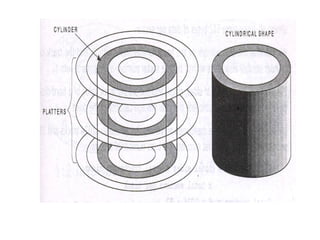
Cylinder Same tracks of different  platters form an imaginary cylinder like structure Data is stored cylinder by cylinder All tracks on a cylinder are written and then the R/W head moves to the next Cylinder . This reduces movement of R/W head and increases the speed of read and write operation
 
Calculation of storage capacity Total number of sectors =  Total sides  x  total tracks per side  x  Total sectors per track Total Storage capacity = Total number of sectors  x 512
Interleave If the sectors are numbered sequentially from 1 - max number, the disc read operation will be very slow Consider disc read of a complete track (sectors1 ,2,3  etc) The drive starts reading when R/W head reaches Sector1 After reading, drive sends this data to the controller. CRC test is done. During this the disk is rotating
Interleave By the time this process is completed, the R/W disk passes the 2 nd  sector. Now when the 2 nd  sector instruction is given, the head is in the 3 rd  / 4 th  sector. Now the disc has to complete one full rotation to come to 2 nd  sector again This will make the read process slow
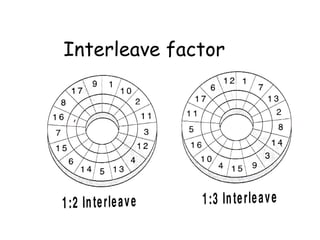
Interleave Factor The solution to this to put the 2 nd  sector in 3 rd  or 4 th  position, so that the head will position itself at the correct location when it receives the instruction to read the 2 nd  sector Numbering the sectors out of order with leaving a gap of one or more sectors in sector numbering is called  Interleaving. No w a days , we have 1:1 interleave with IDE and SCSI interfacing which support them
Interleave factor
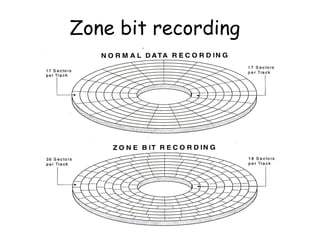
Zone bit recording A new recording scheme is used by current high capacity IDE and SCSI HDDs to store more sectors in outer track compared to the number in the inner track This method is called zone bit recording In this method, the platter is divided into number of zones, each zone will have a fixed number of sectors / track The controller used with the drive has one additional job of converting the odd number of sectors/ track in different tracks into standard no. of sectors/track
Zone bit recording
Write Pre-compensation It is useful for drives using standard track, sector format Drives using zone bit recording do not require any write pre- compensation The magnetic particles used to write on the disk surface have north and south poles Like poles repel and unlike poles attract In outer surface of hard disk platter, magnetic particles are far apart to be affected by the attraction and repulsion of magnetic particles
Write Pre-compensation I n the inner tracks of the disk drive, the density of the magnetic are very high and adjacent particles start to attract and repel. This will force to change the information written on the disk To compensate for this shift of data particles due to  attraction and repulsion, the drive can write the data apart or closer than the required position
Write Pre-compensation The particles will slowly shift to the required position because of attraction and repulsion This process of writing the data closer or farther to compensate for attraction or repulsion of magnetic particles is called Write pre-compensation The cylinder from which this pre-compensation is started  is called pre-compensation cylinder. This value will be used by all the cylinders that are towards the centre of the drive
Master Boot Record MBR contains a small program to load and start the active / bootable partition This area also contains information about all four primary partitions on HDD, their starting sector, ending sector,  size etc.in the form of partition table record The MBR is located at Cylinder 0, head 0 sector1 and partition boot sector are located at the beginning of each partition volume Max number of all type of partition together allowed by DOS is 24(c-z)
Cluster When OS writes some information on the hard disk, it does not allocate the space sector wise, instead uses a new unit of storage called “Cluster” Clusters are the minimum space allocated by DOS when storing any information on the disk Even to store only one byte long information on the disk requires minimum one cluster area on the disk surface
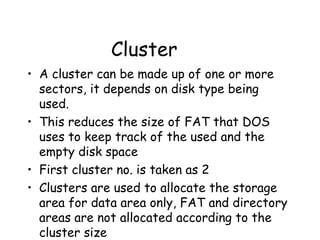
Cluster A cluster can be made up of one or more sectors, it depends on disk type being used.  This reduces the size of FAT that DOS uses to keep track of the used and the empty disk space First cluster no. is taken as 2 Clusters are used to allocate the storage area for data area only, FAT and directory areas are not allocated according to the cluster size
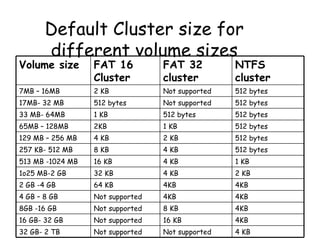
Default Cluster size for different volume sizes Volume size FAT 16 Cluster FAT 32 cluster NTFS cluster 7MB – 16MB 2 KB Not supported 512 bytes 17MB- 32 MB 512 bytes Not supported 512 bytes 33 MB- 64MB 1 KB 512 bytes 512 bytes 65MB – 128MB 2KB 1 KB 512 bytes 129 MB – 256 MB 4 KB  2 KB 512 bytes 257 KB- 512 MB 8 KB 4 KB 512 bytes 513 MB -1024 MB 16 KB 4 KB 1 KB 1o25 MB-2 GB 32 KB 4 KB 2 KB 2 GB -4 GB 64 KB 4KB 4KB 4 GB – 8 GB Not supported 4KB 4KB 8GB -16 GB Not supported 8 KB 4KB 16 GB- 32 GB Not supported 16 KB 4KB 32 GB- 2 TB Not supported Not supported 4 KB
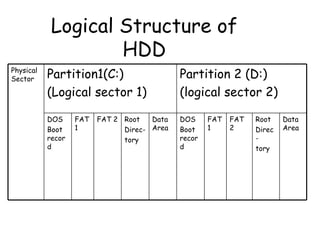
Logical Structure of HDD Physical Sector Partition1(C:) (Logical sector 1) Partition 2 (D:) (logical sector 2) DOS Boot record  FAT 1 FAT 2 Root  Direc- tory Data Area DOS Boot record  FAT 1 FAT 2 Root  Direc- tory Data Area
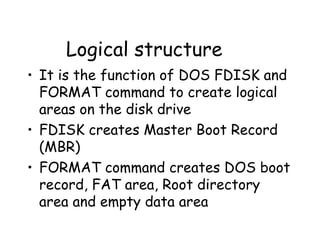
Logical structure It is the function of DOS FDISK and FORMAT command to create logical areas on the disk drive FDISK creates Master Boot Record (MBR) FORMAT command creates DOS boot record, FAT area, Root directory area and empty data area
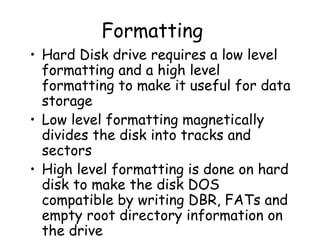
Formatting Hard Disk drive requires a low level formatting and a high level formatting to make it useful for data storage Low level formatting magnetically divides the disk into tracks and sectors High level formatting is done on hard disk to make the disk DOS compatible by writing DBR, FATs and empty root directory information on the drive
Low level formatting It is called physical formatting. To find out if a drive is low level formatted or not , DOS FDISK program is used. If FDISK program recognizes HDD, the drive has already been low level formatted Most HDD currently available are Low level formatted from factory itself.
Functions of low level formatting Dividing the disk surface into tracks and sectors Establishing interleave factor Marking identification information on each track and sector Marking defective sectors
High level formatting After low level formatting and partitioning, final step for preparing the hard disk drive for use is high level format the drive High level format program need to only create File Allocation Table, directory system etc..so that the DOS can use the HDD for storing and storing files The command A:\> FORMAT C:/S
Partitioning It was a new concept introduced by IBM when they launched 10 MB HDD At that time 10 MB was considered to be a large storage area and decided to use it for 2 different operating system Partitioning means dividing the drive into logical parts or volumes DOS/ Windows FDISK.EXE is used to partition a HDD. Big size partition is wastage of space
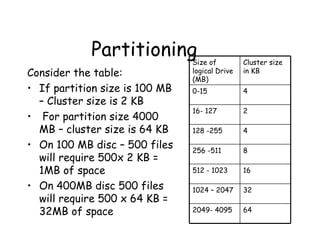
Partitioning Consider the table: If partition size is 100 MB – Cluster size is 2 KB For partition size 4000 MB – cluster size is 64 KB On 100 MB disc – 500 files will require 500x 2 KB = 1MB of space On 400MB disc 500 files will require 500 x 64 KB = 32MB of space Size of logical Drive (MB) Cluster size in KB 0-15 4 16- 127 2 128 -255 4 256 -511 8 512 - 1023 16 1024 – 2047 32 2049- 4095 64
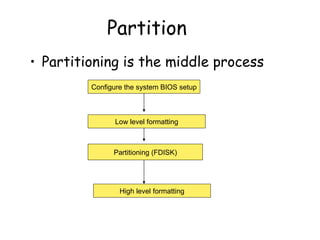
Partition Partitioning is the middle process Configure the system BIOS setup Low level formatting Partitioning (FDISK) High level formatting
Partitioning It is done to have more than one operating system on the same drive To have more than one logical drive Partition program FDISK writes a MBR in the first physical sector i.e Cylinder 0, head 0 and Sector 1 FDISK can be used for : Creating a primary DOS partition Creating an extended DOS partition Creating logical drives in extended partition Deleting partitions Display partition data

Chap2 hdd2

  • 1.
  • 2.
    Head positioning Ofa voice coil Based System Voice coil based systems use a special information previously written on disk surface ( at the time of manufacturing). This special index information on the disk surface is called “Servo”. Voice coil actuators use this servo information as an index to accurately move the R/W head to any particular location It is a closed loop system This type does not require frequent low level formatting as required in the stepper motor based HDD
  • 3.
    Closed loop servoRead the Servo/ index information Is it the reqd. Position Move the head to next position Stop Yes No Closed Loop
  • 4.
    Types of servoThere are 3 types of servo for controlling the voice coil based head positioning system (relative position of information wrt the head position) Wedge servo Embedded servo Dedicated servo
  • 5.
    Wedge servo Itappears in a wedge like shape on the disk surface. The servo information is written in pre- index gap i.e gap between end and beginning of the track Most controllers need not be specially configured for these drives but some may need to be configured to work with these drives
  • 6.
  • 7.
    Problem with Wedgeservo Servo information appears only once per rotation If the head is looking for some information, then the drive needs several rotations for the head to properly find the required information
  • 8.
    Embedded servo Servoinformation is kept at the beginning of each sector This design allows the head positioning system to receive the current position many times in a single rotation. This makes it precise and faster
  • 9.
  • 10.
    Dedicated Servo Oneside of one platter exclusively used for servo information As the head on the servo side is not made for R/W operation, no low level format program or controller can change servo info It will have odd number of R/W heads. They are high capacity, high speed HDD. It allows positional accuracy and highest possible speed
  • 11.
  • 12.
    HDD features Characteristicsof HDD are : Size Capacity Interleave Head skew Cylinder skew
  • 13.
    Form Factor Drivesare available in different widths and heights Form factor is the basic unit of measurement of size of the drive Form factor is decided by the platter width 5.25 inch platter has 5.25 inch form factor 3.5 inch platter has 3.5 inch form factor
  • 14.
    Storage capacity Thestorage may be given as formatted capacity in million bytes or in megabytes. It may be given as unformatted capacity in million bytes or in megabytes
  • 15.
    Disk Geometry HDDstores data as magnetic information on its surface. If the data is stored continuously one next to another, then at the time of retrieval, the disk has to be scanned for getting the required data. To arrange data properly on the disk surface , it is divided into Heads/side, tracks, sectors, cylinders etc.. When info is written on some side, sector, track etc are saved in an index like place called directory and FAT When data is required, comp. looks at the entry in directory and FAT and locates the side, track and sector
  • 16.
    Sides and HeadsHD can contain more than one platter Each side can be used for read and write operation Each side has a separate R/W head All the heads are connected to a single head rack which makes R/W heads move over the disk drives. Head numbers begin from head 0, head1 and so on
  • 17.
    Track Each sideof HDD platter’s surface is divided into concentric circles called tracks They are magnetic information written during formatting of HDD Outermost track is called track 0. The innermost will have the highest number
  • 18.
  • 19.
    Sector A trackis a big area to store data( 5000 bytes) Hence tracks are divided into sectors The formatting program divides disk surface into sectors by writing magnetic pattern on disk surface Different HDD capacities have different number of tracks 512 byte data can be stored in each sector. Sector no. starts from 1
  • 20.
    Cylinder Same tracksof different platters form an imaginary cylinder like structure Data is stored cylinder by cylinder All tracks on a cylinder are written and then the R/W head moves to the next Cylinder . This reduces movement of R/W head and increases the speed of read and write operation
  • 21.
  • 22.
    Calculation of storagecapacity Total number of sectors = Total sides x total tracks per side x Total sectors per track Total Storage capacity = Total number of sectors x 512
  • 23.
    Interleave If thesectors are numbered sequentially from 1 - max number, the disc read operation will be very slow Consider disc read of a complete track (sectors1 ,2,3 etc) The drive starts reading when R/W head reaches Sector1 After reading, drive sends this data to the controller. CRC test is done. During this the disk is rotating
  • 24.
    Interleave By thetime this process is completed, the R/W disk passes the 2 nd sector. Now when the 2 nd sector instruction is given, the head is in the 3 rd / 4 th sector. Now the disc has to complete one full rotation to come to 2 nd sector again This will make the read process slow
  • 25.
    Interleave Factor Thesolution to this to put the 2 nd sector in 3 rd or 4 th position, so that the head will position itself at the correct location when it receives the instruction to read the 2 nd sector Numbering the sectors out of order with leaving a gap of one or more sectors in sector numbering is called Interleaving. No w a days , we have 1:1 interleave with IDE and SCSI interfacing which support them
  • 26.
  • 27.
    Zone bit recordingA new recording scheme is used by current high capacity IDE and SCSI HDDs to store more sectors in outer track compared to the number in the inner track This method is called zone bit recording In this method, the platter is divided into number of zones, each zone will have a fixed number of sectors / track The controller used with the drive has one additional job of converting the odd number of sectors/ track in different tracks into standard no. of sectors/track
  • 28.
  • 29.
    Write Pre-compensation Itis useful for drives using standard track, sector format Drives using zone bit recording do not require any write pre- compensation The magnetic particles used to write on the disk surface have north and south poles Like poles repel and unlike poles attract In outer surface of hard disk platter, magnetic particles are far apart to be affected by the attraction and repulsion of magnetic particles
  • 30.
    Write Pre-compensation In the inner tracks of the disk drive, the density of the magnetic are very high and adjacent particles start to attract and repel. This will force to change the information written on the disk To compensate for this shift of data particles due to attraction and repulsion, the drive can write the data apart or closer than the required position
  • 31.
    Write Pre-compensation Theparticles will slowly shift to the required position because of attraction and repulsion This process of writing the data closer or farther to compensate for attraction or repulsion of magnetic particles is called Write pre-compensation The cylinder from which this pre-compensation is started is called pre-compensation cylinder. This value will be used by all the cylinders that are towards the centre of the drive
  • 32.
    Master Boot RecordMBR contains a small program to load and start the active / bootable partition This area also contains information about all four primary partitions on HDD, their starting sector, ending sector, size etc.in the form of partition table record The MBR is located at Cylinder 0, head 0 sector1 and partition boot sector are located at the beginning of each partition volume Max number of all type of partition together allowed by DOS is 24(c-z)
  • 33.
    Cluster When OSwrites some information on the hard disk, it does not allocate the space sector wise, instead uses a new unit of storage called “Cluster” Clusters are the minimum space allocated by DOS when storing any information on the disk Even to store only one byte long information on the disk requires minimum one cluster area on the disk surface
  • 34.
    Cluster A clustercan be made up of one or more sectors, it depends on disk type being used. This reduces the size of FAT that DOS uses to keep track of the used and the empty disk space First cluster no. is taken as 2 Clusters are used to allocate the storage area for data area only, FAT and directory areas are not allocated according to the cluster size
  • 35.
    Default Cluster sizefor different volume sizes Volume size FAT 16 Cluster FAT 32 cluster NTFS cluster 7MB – 16MB 2 KB Not supported 512 bytes 17MB- 32 MB 512 bytes Not supported 512 bytes 33 MB- 64MB 1 KB 512 bytes 512 bytes 65MB – 128MB 2KB 1 KB 512 bytes 129 MB – 256 MB 4 KB 2 KB 512 bytes 257 KB- 512 MB 8 KB 4 KB 512 bytes 513 MB -1024 MB 16 KB 4 KB 1 KB 1o25 MB-2 GB 32 KB 4 KB 2 KB 2 GB -4 GB 64 KB 4KB 4KB 4 GB – 8 GB Not supported 4KB 4KB 8GB -16 GB Not supported 8 KB 4KB 16 GB- 32 GB Not supported 16 KB 4KB 32 GB- 2 TB Not supported Not supported 4 KB
  • 36.
    Logical Structure ofHDD Physical Sector Partition1(C:) (Logical sector 1) Partition 2 (D:) (logical sector 2) DOS Boot record FAT 1 FAT 2 Root Direc- tory Data Area DOS Boot record FAT 1 FAT 2 Root Direc- tory Data Area
  • 37.
    Logical structure Itis the function of DOS FDISK and FORMAT command to create logical areas on the disk drive FDISK creates Master Boot Record (MBR) FORMAT command creates DOS boot record, FAT area, Root directory area and empty data area
  • 38.
    Formatting Hard Diskdrive requires a low level formatting and a high level formatting to make it useful for data storage Low level formatting magnetically divides the disk into tracks and sectors High level formatting is done on hard disk to make the disk DOS compatible by writing DBR, FATs and empty root directory information on the drive
  • 39.
    Low level formattingIt is called physical formatting. To find out if a drive is low level formatted or not , DOS FDISK program is used. If FDISK program recognizes HDD, the drive has already been low level formatted Most HDD currently available are Low level formatted from factory itself.
  • 40.
    Functions of lowlevel formatting Dividing the disk surface into tracks and sectors Establishing interleave factor Marking identification information on each track and sector Marking defective sectors
  • 41.
    High level formattingAfter low level formatting and partitioning, final step for preparing the hard disk drive for use is high level format the drive High level format program need to only create File Allocation Table, directory system etc..so that the DOS can use the HDD for storing and storing files The command A:\> FORMAT C:/S
  • 42.
    Partitioning It wasa new concept introduced by IBM when they launched 10 MB HDD At that time 10 MB was considered to be a large storage area and decided to use it for 2 different operating system Partitioning means dividing the drive into logical parts or volumes DOS/ Windows FDISK.EXE is used to partition a HDD. Big size partition is wastage of space
  • 43.
    Partitioning Consider thetable: If partition size is 100 MB – Cluster size is 2 KB For partition size 4000 MB – cluster size is 64 KB On 100 MB disc – 500 files will require 500x 2 KB = 1MB of space On 400MB disc 500 files will require 500 x 64 KB = 32MB of space Size of logical Drive (MB) Cluster size in KB 0-15 4 16- 127 2 128 -255 4 256 -511 8 512 - 1023 16 1024 – 2047 32 2049- 4095 64
  • 44.
    Partition Partitioning isthe middle process Configure the system BIOS setup Low level formatting Partitioning (FDISK) High level formatting
  • 45.
    Partitioning It isdone to have more than one operating system on the same drive To have more than one logical drive Partition program FDISK writes a MBR in the first physical sector i.e Cylinder 0, head 0 and Sector 1 FDISK can be used for : Creating a primary DOS partition Creating an extended DOS partition Creating logical drives in extended partition Deleting partitions Display partition data