A+ HardwareSection 1.2 Motherboard Form FactorMade By : Gagandeep Singh
What you learn todayCompTIA A+  220-701 , Section 1.2Explain motherboard components, types and features    - Form factorsATX/BTXMicro BTXNLX
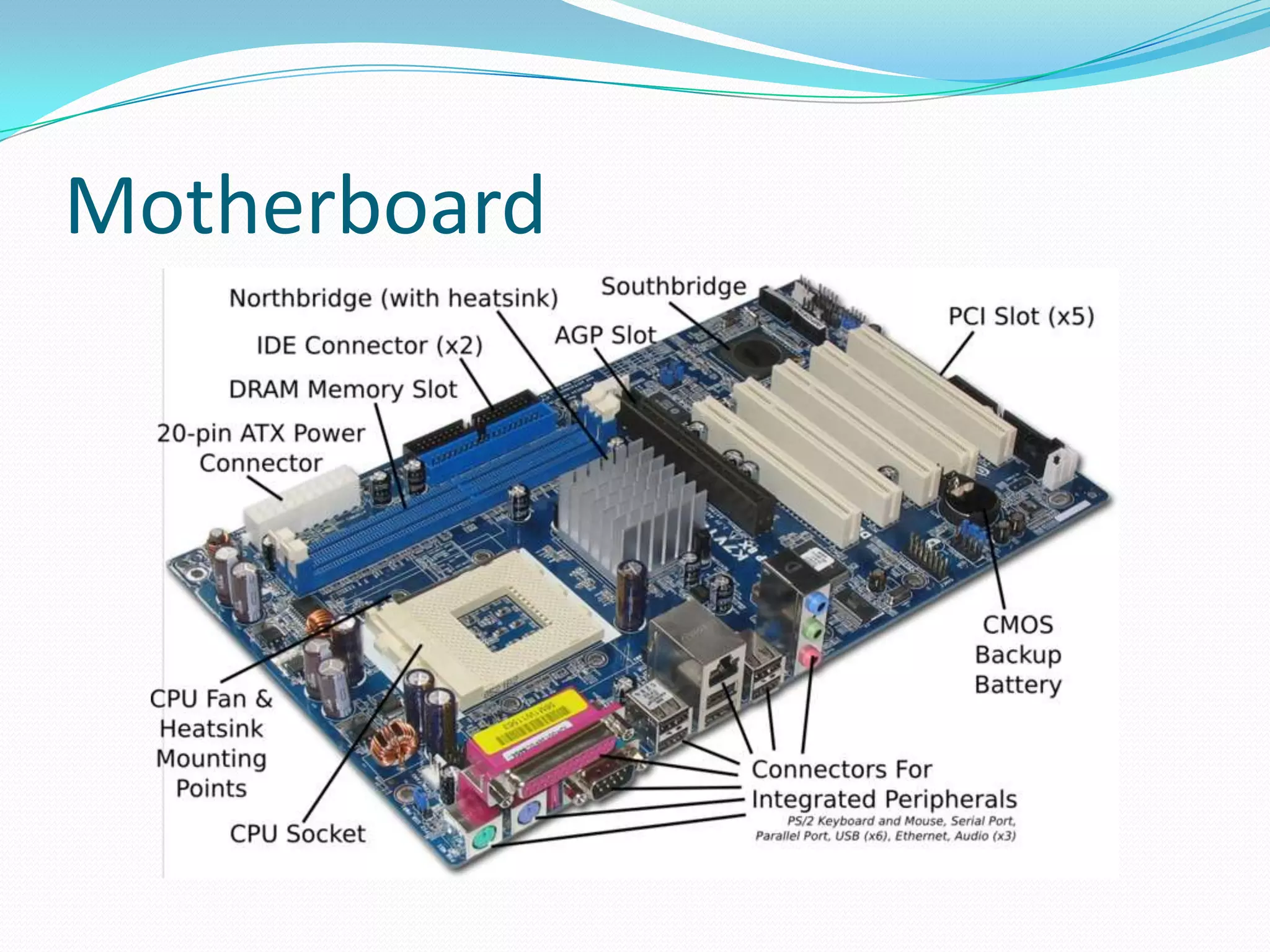
MotherboardIf processor is the brain of the computer, the motherboard is the heart of the computer.
 The Motherboard is the main circuit inside the computer.
All the components and peripherals are attached to it.
Most of the compute features like scalabilty,upgradeablity, depends on Motherboard.Motherboard
Motherboard Key Assessable Parameters of the motherboardForm Factors
Chipset
CPU Support
Video Support
Memory Support
Audio Support
Memory Slots
Ports and SlotsMotherboard Form FactorsPhysical Size    - Case SizingBasic Layout    - Room for small changesPower     - Standard ConnectorAirflow    - Increasingly importantWikipedia : There are 26 different motherboard types categories.
Form FactorThere are two commonly known form factors AT and ATX.
 In AT “Baby AT” and in ATX “Mini ATX”, “Micro ATX” and “Flexi ATX” are different variants available.
They differ  mainly in size, type of power connector and switch. There are three parameters to be taken care.
First is the size of the motherboard should be compatible with Cabinet.
Second, the motherboard should have suitable power socket to match the power supply.
Third, the size of the Power supply should fit into the cabinet and have suitable power switch.Types of FORM FACTORSAT (Advanced Technology).ATX(Advanced Technology Extension).LPX.NLX.BTX(Balanced Technology Extension).
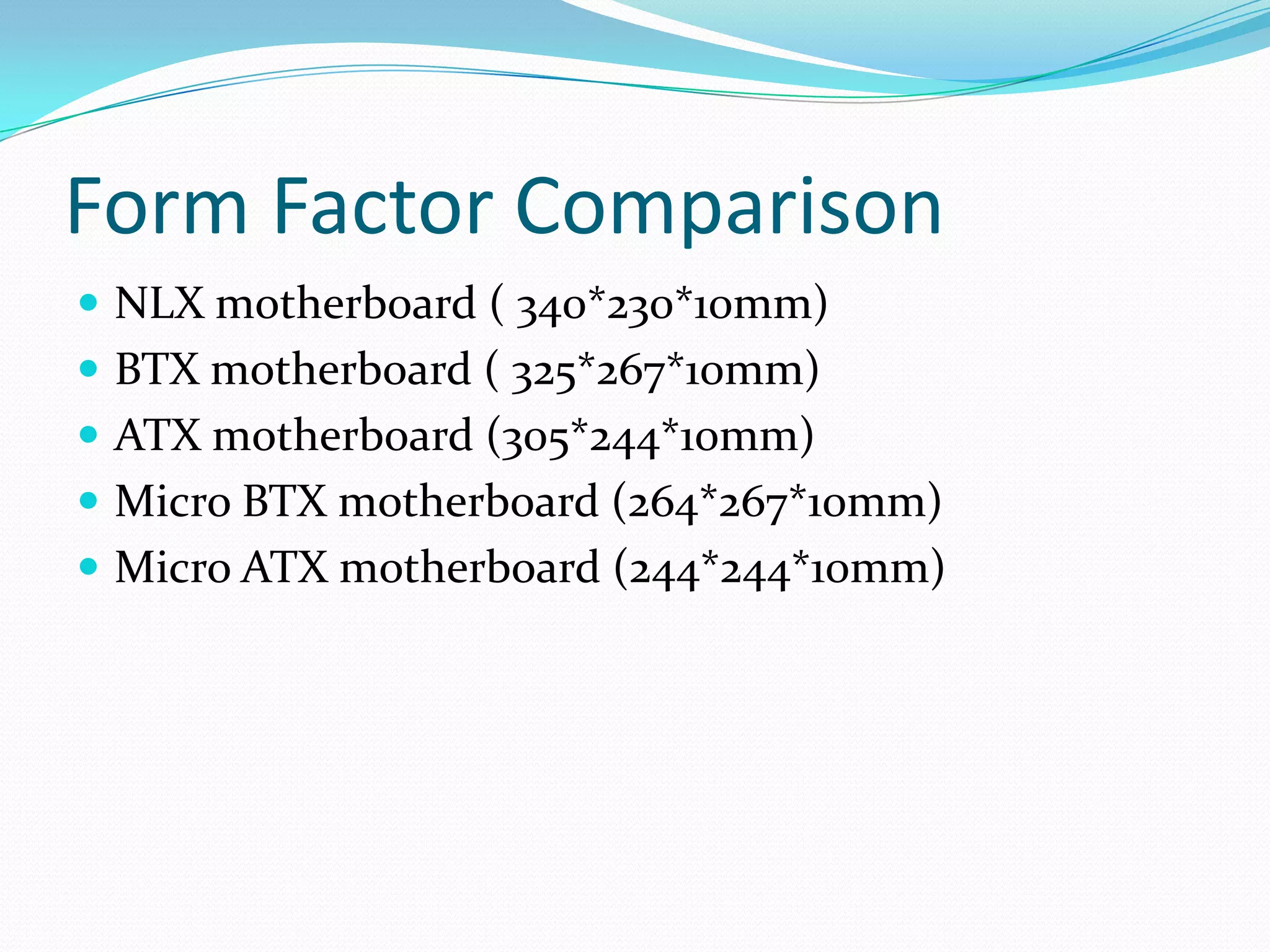
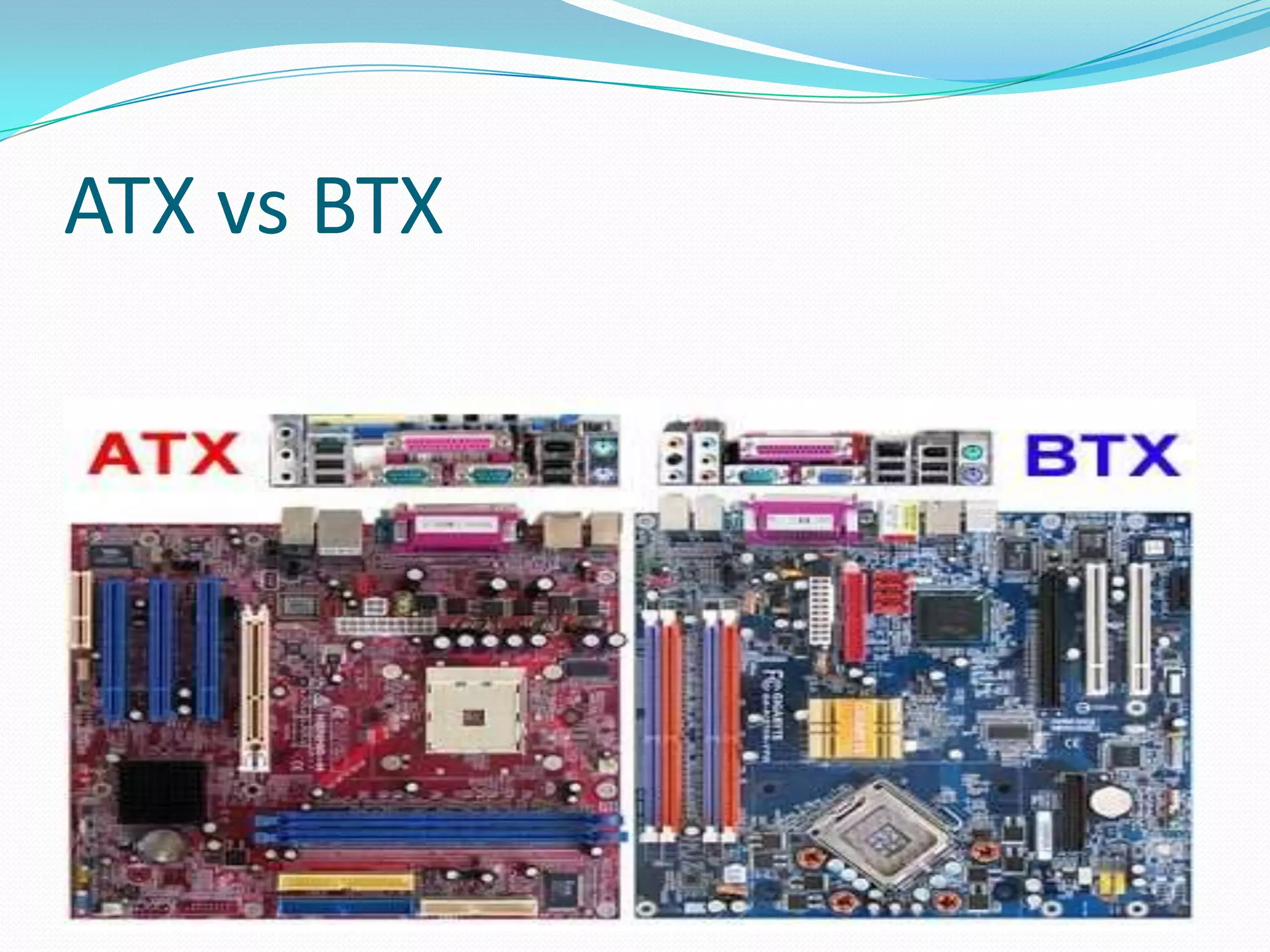
Form Factor ComparisonNLX motherboard ( 340*230*10mm)BTX motherboard ( 325*267*10mm)ATX motherboard (305*244*10mm)Micro BTX motherboard (264*267*10mm)Micro ATX motherboard (244*244*10mm)
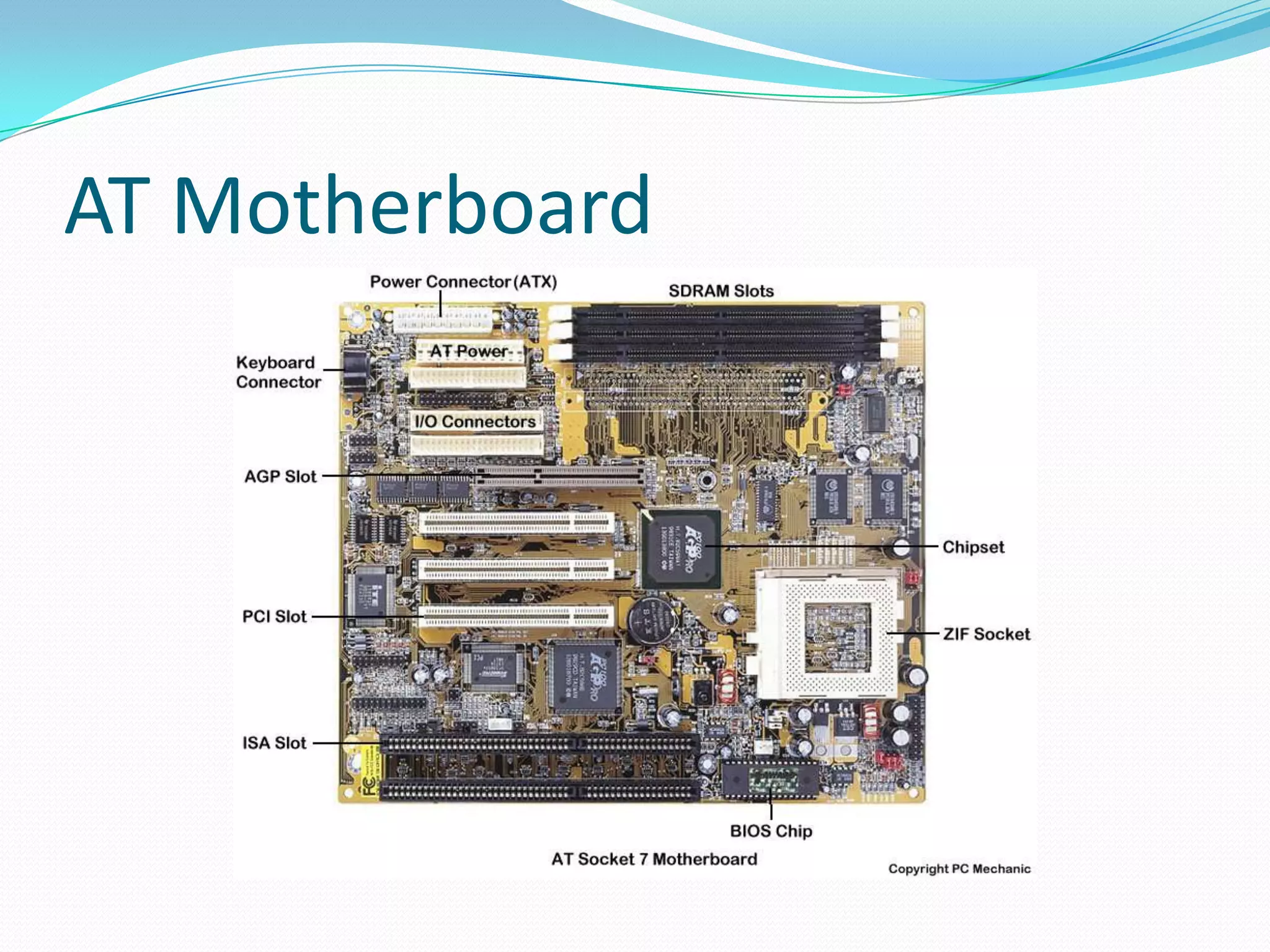
AT (EXTRA)Earlier IBM PC/XT used large Motherboards.AT replaced PC/XT by reducing its size.Its size is 12 inches (305 mm) wide and 13.8 inches (350 mm) deep.It belongs  to family class 386 or earlier.The AT had only a keyboard connector .Expansion slots for add-on card backplates.
AT Motherboard
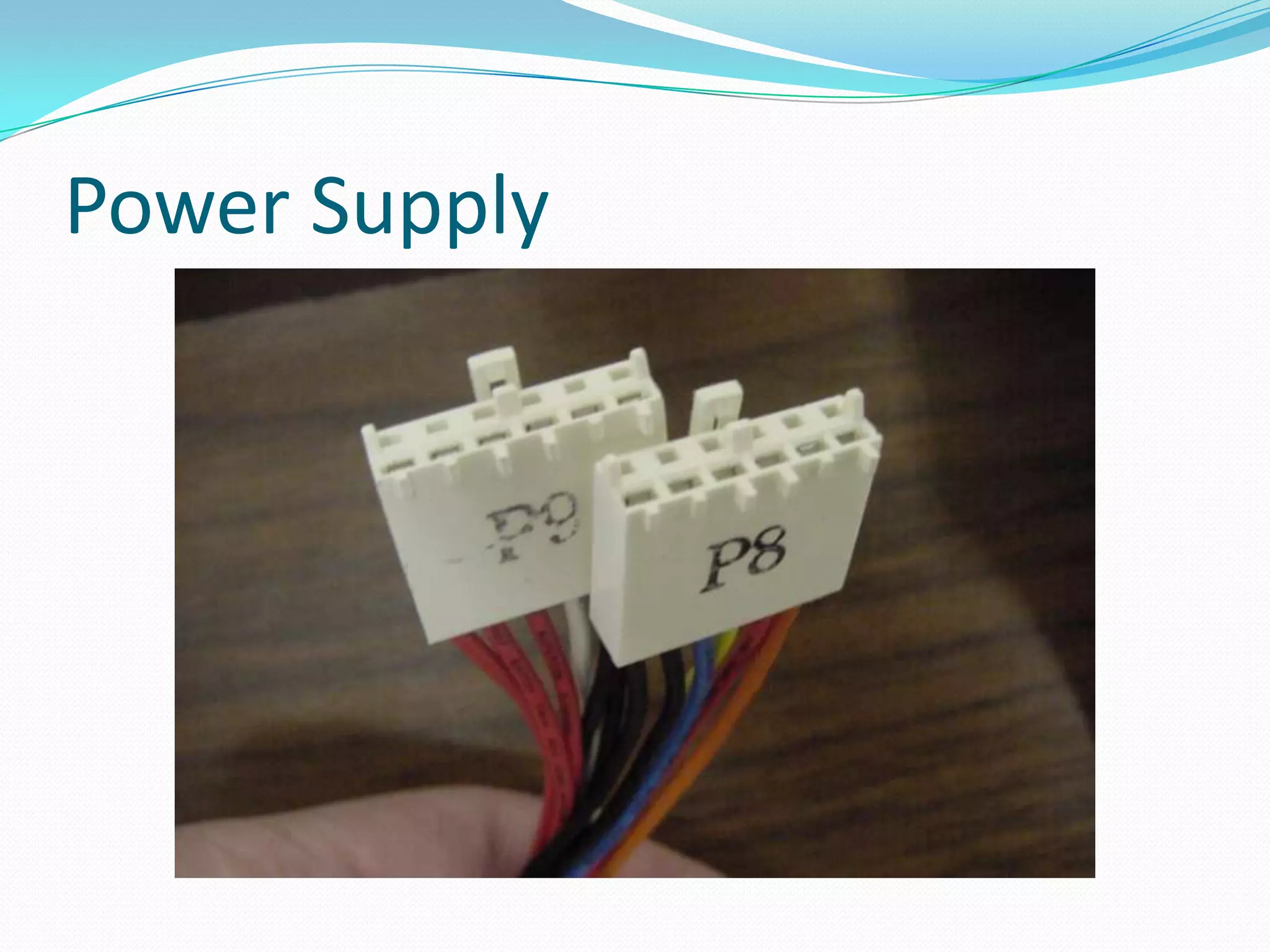
Power Supply
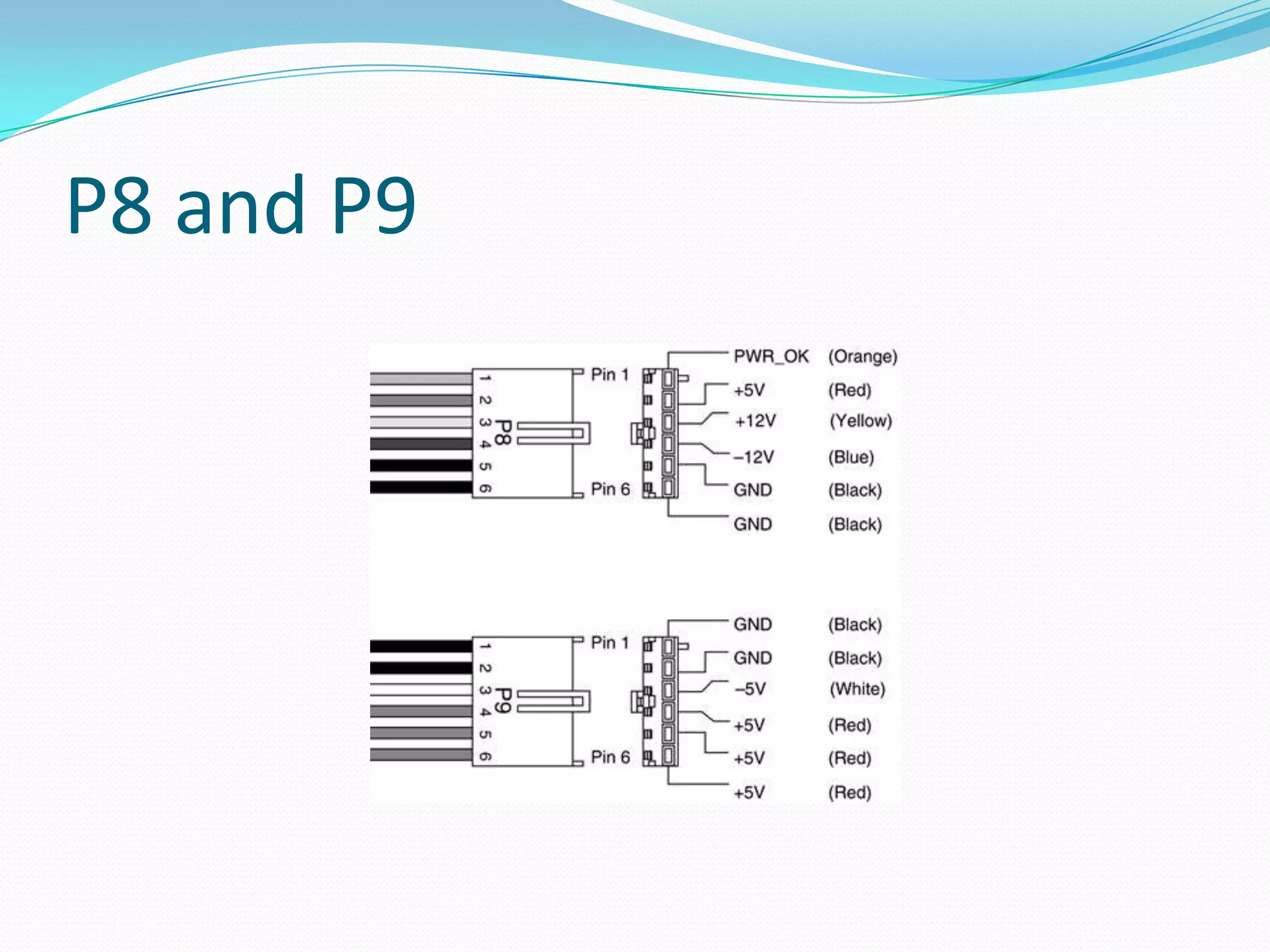
P8 and P9
ATX form factorAdvanced Technology ExtensionStandardized by Intel in 1995.    - See many update over the yearsPower     - 20 pin connector    - 24 pin connector, additional 4/8 pin connector.Port Type    - Optional I/O back plate.    - Add and remove as needed.90 degree
ATX Specifications Integrated I/O Port Connectors.Integrated PS/2 Mouse Connector.Reduced Expansion Card Interference. Better Power Supply Connector."Soft Power" Support.3.3V Power Support: Better Air Flow.Improved Design for Upgradability.
ATX  ConnectorsPS/2 port  Connector.25-pin Parallel port. 9-pin serial port.On-board peripheral ports are           Ethernet           FireWire           e-sata, audio (both analog and S/PDIF),           Video (analog D-sub, DVI, or HDMI),            USB ports.
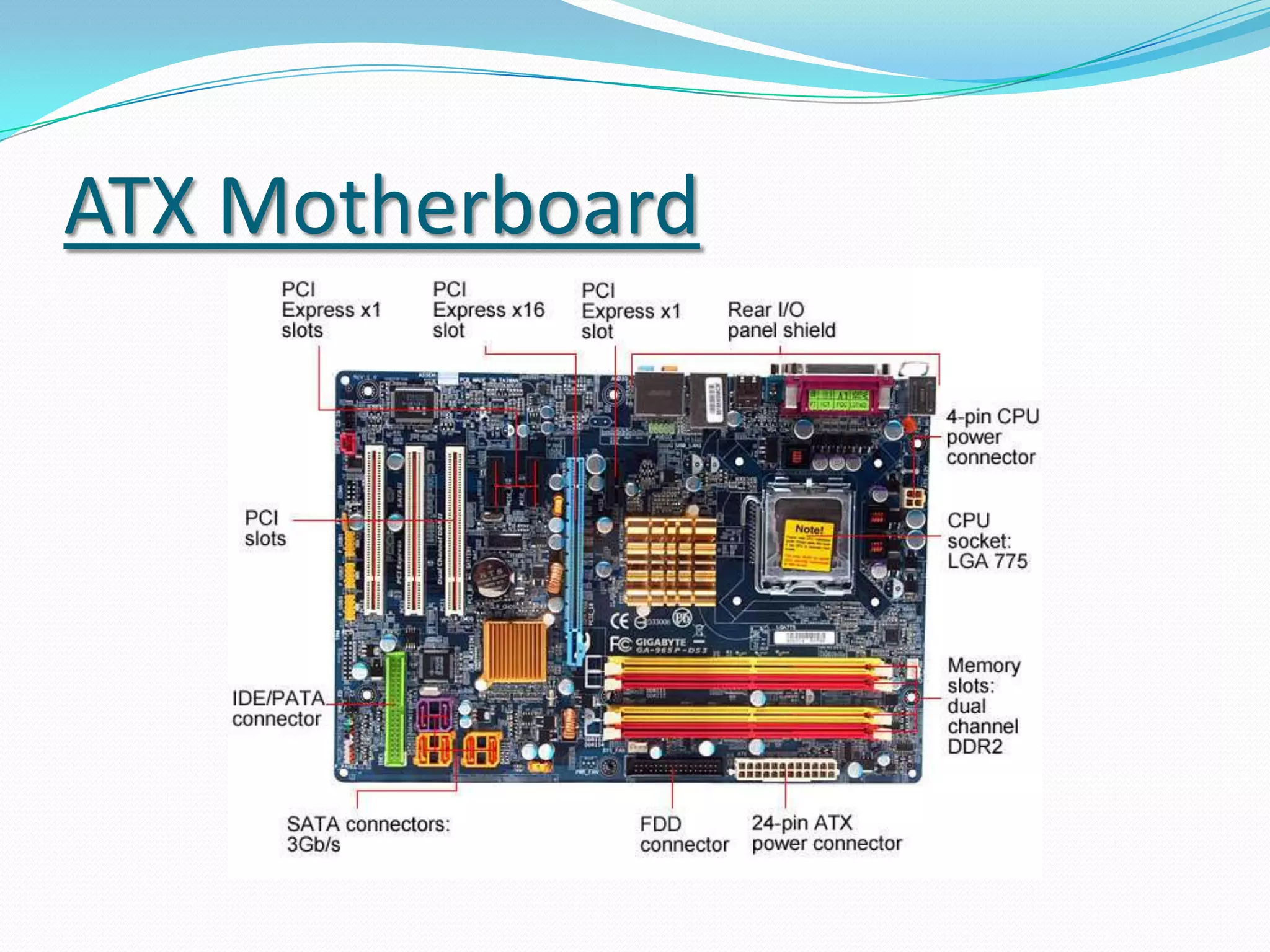
ATX Motherboard
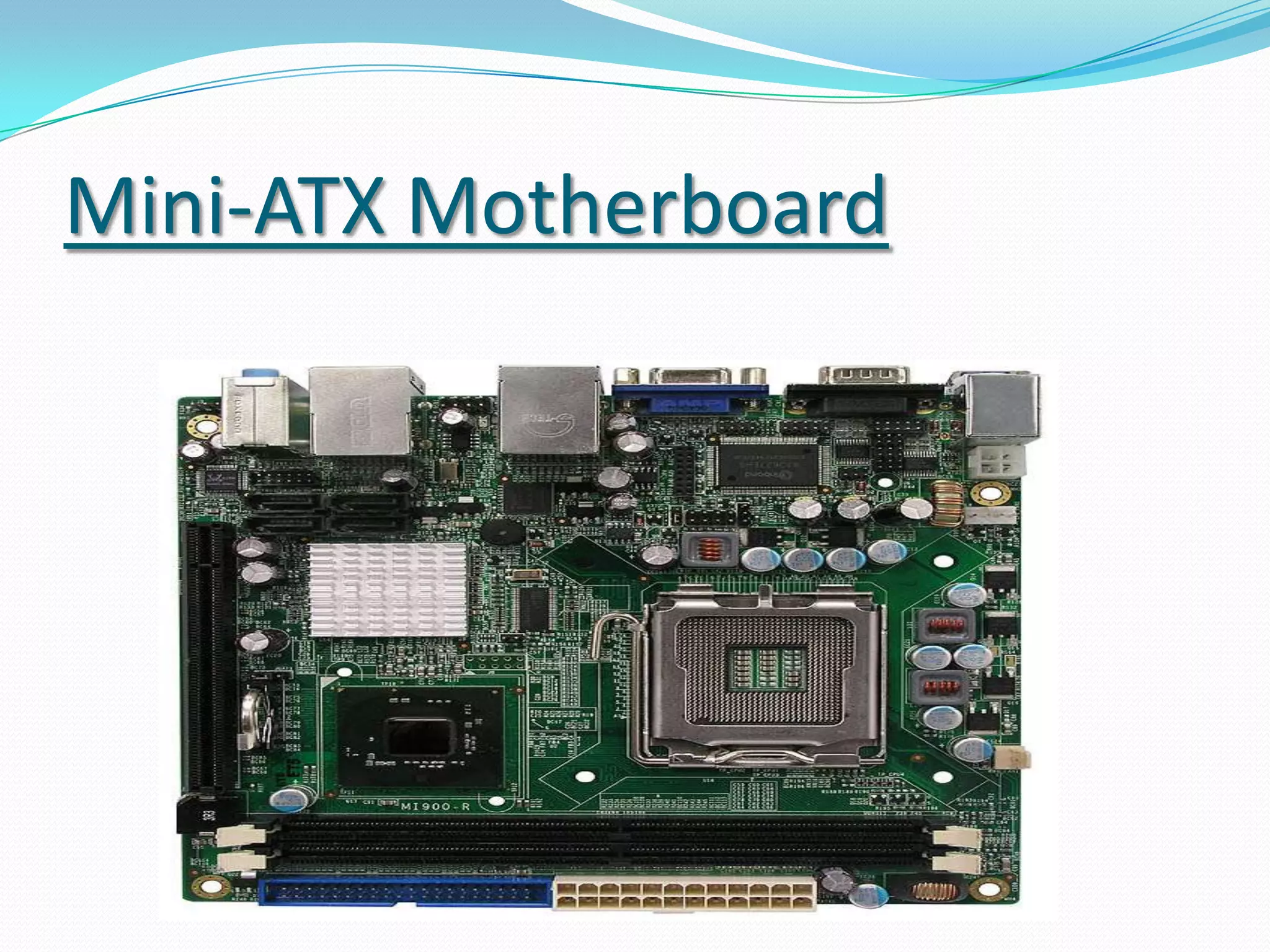
Mini-ATX"Mini ATX“ slightly smaller than ATX specification.It use same ATX form factor power supplies and cases.Main difference is in their size.Its size is 11.2"x8.2“.Dimensions, and the placement of mounting holes.It is mainly intended for mini-PCs.
Mini-ATX Motherboard
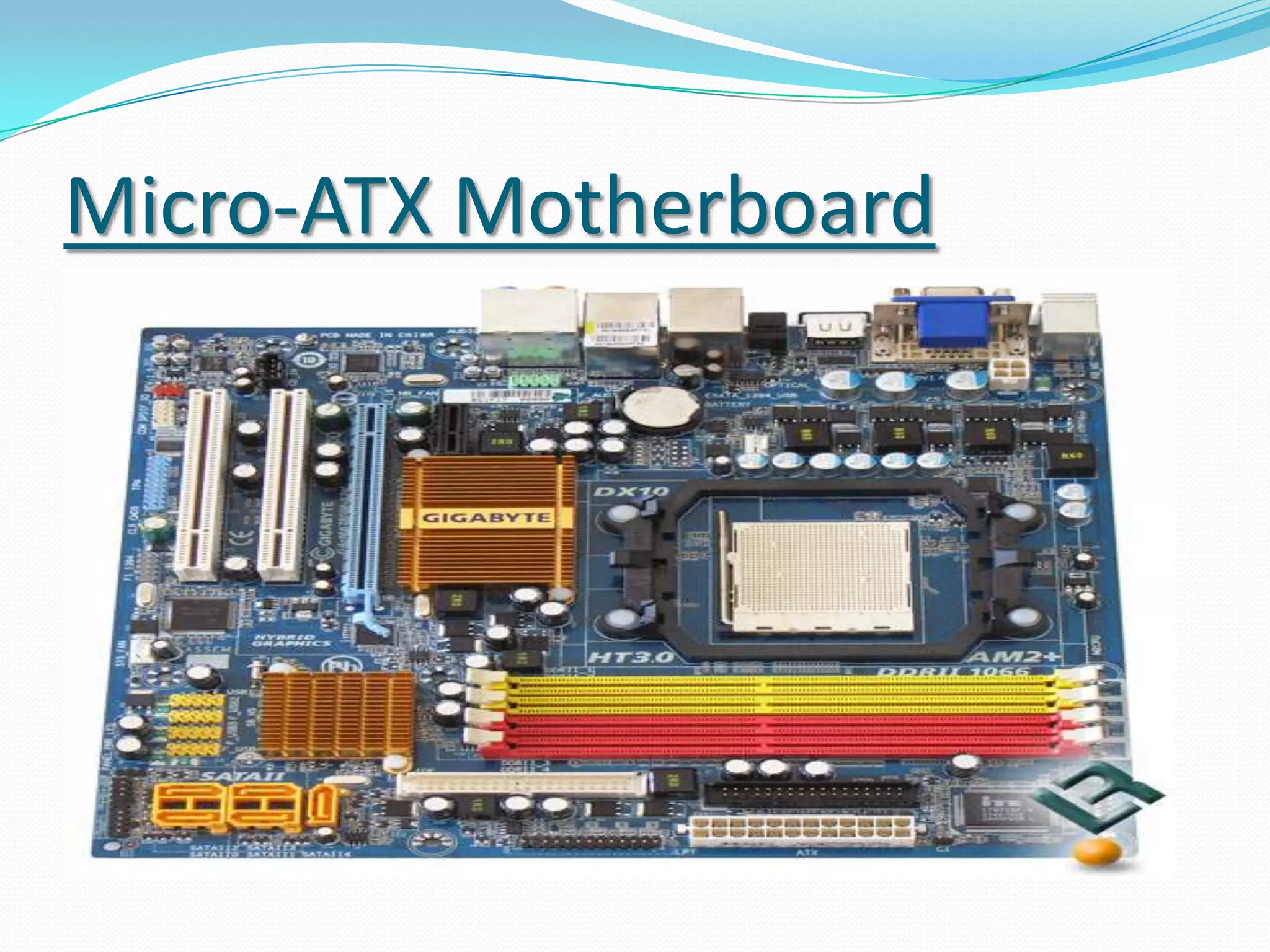
Micro-ATXIt is same as ATX  but differ in size.Its size is  9.6"x9.6". Limited expansion slotsBackward Compatibility – Mounting holes.One AGP slot.2 PCI slots.
Micro-ATX Motherboard
Flex-ATXIt is same as ATX  but differ in size.Flex-ATX motherboard have maximum dimensions of just 9"x7.5“.lower-cost PC .One AGP slot.2 PCI slots.
Flex-ATX
Power Supply for ATX
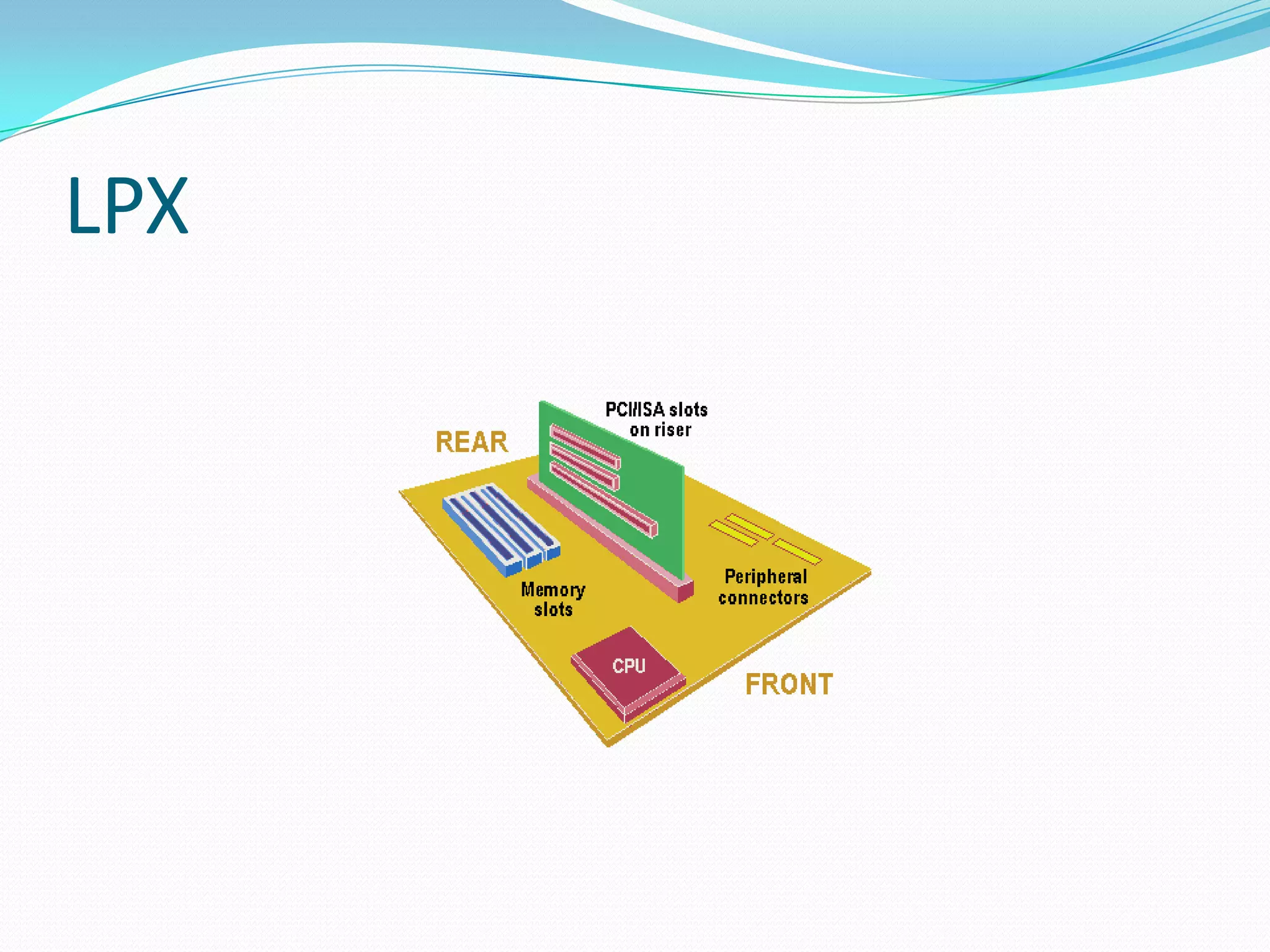
LPXLPX stands for Low Profile extension.Most distinguishing feature:    The riser card that is used to hold                                                                                                                                                                                                                                                                                               expansion slots.It has been updated and modernized to allow support for the latest technologiesIts size is 9’’ wide and  11-13“ long.
LPX
Advantages of LPXInbuilt video display adapter cards .Their cost is low.They have onboard components like ATX.Adaption of raiser card.
Disadvantages of LPXNon-standardization. Poor expandability. Poor upgradability. Poor cooling . Two or three expansion slots.Restricted air-flow

1.2 motherboard form factor

  • 1.
    A+ HardwareSection 1.2Motherboard Form FactorMade By : Gagandeep Singh
  • 2.
    What you learntodayCompTIA A+ 220-701 , Section 1.2Explain motherboard components, types and features - Form factorsATX/BTXMicro BTXNLX
  • 3.
    MotherboardIf processor isthe brain of the computer, the motherboard is the heart of the computer.
  • 4.
    The Motherboardis the main circuit inside the computer.
  • 5.
    All the componentsand peripherals are attached to it.
  • 6.
    Most of thecompute features like scalabilty,upgradeablity, depends on Motherboard.Motherboard
  • 7.
    Motherboard Key AssessableParameters of the motherboardForm Factors
  • 8.
  • 9.
  • 10.
  • 11.
  • 12.
  • 13.
  • 14.
    Ports and SlotsMotherboardForm FactorsPhysical Size - Case SizingBasic Layout - Room for small changesPower - Standard ConnectorAirflow - Increasingly importantWikipedia : There are 26 different motherboard types categories.
  • 15.
    Form FactorThere aretwo commonly known form factors AT and ATX.
  • 16.
    In AT“Baby AT” and in ATX “Mini ATX”, “Micro ATX” and “Flexi ATX” are different variants available.
  • 17.
    They differ mainly in size, type of power connector and switch. There are three parameters to be taken care.
  • 18.
    First is thesize of the motherboard should be compatible with Cabinet.
  • 19.
    Second, the motherboardshould have suitable power socket to match the power supply.
  • 20.
    Third, the sizeof the Power supply should fit into the cabinet and have suitable power switch.Types of FORM FACTORSAT (Advanced Technology).ATX(Advanced Technology Extension).LPX.NLX.BTX(Balanced Technology Extension).
  • 21.
    Form Factor ComparisonNLXmotherboard ( 340*230*10mm)BTX motherboard ( 325*267*10mm)ATX motherboard (305*244*10mm)Micro BTX motherboard (264*267*10mm)Micro ATX motherboard (244*244*10mm)
  • 22.
    AT (EXTRA)Earlier IBMPC/XT used large Motherboards.AT replaced PC/XT by reducing its size.Its size is 12 inches (305 mm) wide and 13.8 inches (350 mm) deep.It belongs to family class 386 or earlier.The AT had only a keyboard connector .Expansion slots for add-on card backplates.
  • 23.
  • 24.
  • 25.
  • 26.
    ATX form factorAdvancedTechnology ExtensionStandardized by Intel in 1995. - See many update over the yearsPower - 20 pin connector - 24 pin connector, additional 4/8 pin connector.Port Type - Optional I/O back plate. - Add and remove as needed.90 degree
  • 27.
    ATX Specifications IntegratedI/O Port Connectors.Integrated PS/2 Mouse Connector.Reduced Expansion Card Interference. Better Power Supply Connector."Soft Power" Support.3.3V Power Support: Better Air Flow.Improved Design for Upgradability.
  • 28.
    ATX ConnectorsPS/2port Connector.25-pin Parallel port. 9-pin serial port.On-board peripheral ports are Ethernet FireWire e-sata, audio (both analog and S/PDIF), Video (analog D-sub, DVI, or HDMI), USB ports.
  • 29.
  • 30.
    Mini-ATX"Mini ATX“ slightlysmaller than ATX specification.It use same ATX form factor power supplies and cases.Main difference is in their size.Its size is 11.2"x8.2“.Dimensions, and the placement of mounting holes.It is mainly intended for mini-PCs.
  • 31.
  • 32.
    Micro-ATXIt is sameas ATX but differ in size.Its size is 9.6"x9.6". Limited expansion slotsBackward Compatibility – Mounting holes.One AGP slot.2 PCI slots.
  • 33.
  • 34.
    Flex-ATXIt is sameas ATX but differ in size.Flex-ATX motherboard have maximum dimensions of just 9"x7.5“.lower-cost PC .One AGP slot.2 PCI slots.
  • 35.
  • 36.
  • 37.
    LPXLPX stands forLow Profile extension.Most distinguishing feature: The riser card that is used to hold expansion slots.It has been updated and modernized to allow support for the latest technologiesIts size is 9’’ wide and 11-13“ long.
  • 38.
  • 39.
    Advantages of LPXInbuiltvideo display adapter cards .Their cost is low.They have onboard components like ATX.Adaption of raiser card.
  • 40.
    Disadvantages of LPXNon-standardization.Poor expandability. Poor upgradability. Poor cooling . Two or three expansion slots.Restricted air-flow
  • 41.
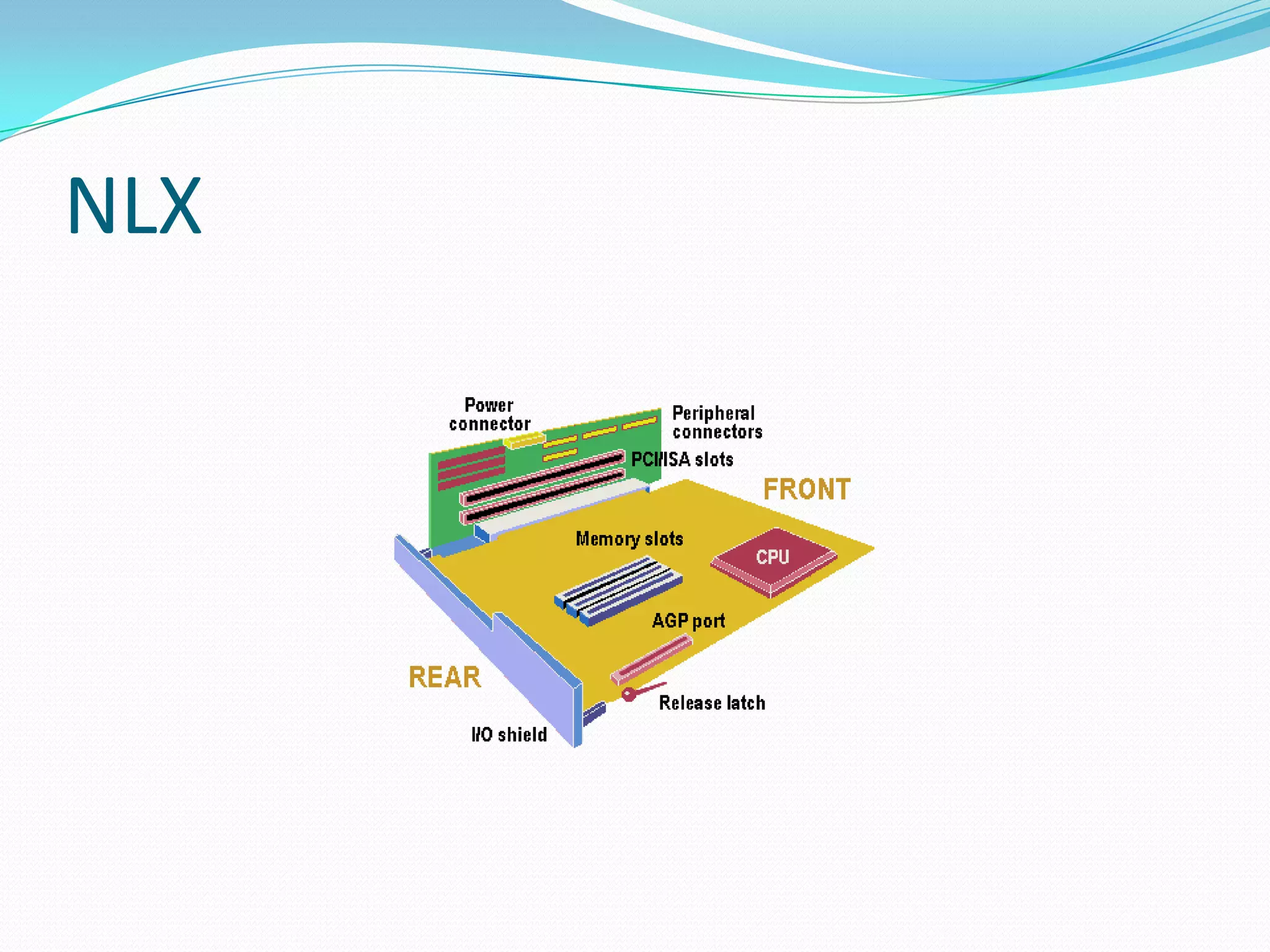
    NLXNLX stands forNew Low Profile Extended.NLX still uses the same general design as LPX.It is designed to support larger memory modules and modern DIMM memory packaging. Support for the newest processor technologies, including the new Pentium II . Support for AGP video cards. Better thermal characteristics.Easy to maintain – Motherboard replacement without screws.
  • 42.
    NLXMore optimal locationof CPU on the board to allow easier access and better cooling. More flexibility in how the motherboard can be set up and configured. Enhanced design features, such as the ability to mount the motherboard so it can slide in or out of the system case easily. Cables, such as the floppy drive interface cable, now attach to the riser card instead of the motherboard itself, reducing cable length and clutter. Support for desktop and tower cases.
  • 43.
  • 44.
  • 45.
    BTXIt stands forBalanced Technology Extended .design strategies arePower dissipation, Structural integrity, Motherboard design.Many straight lines.Good Airflow.
  • 46.
  • 47.
    Advantages of BTXEmergingtechnologies such as Serial ATA, USB 2.0, and PCI Express.In-line airflow layout allows many of the main board components (i.e.: processor, chipset, and graphics controller).Allows fewer and/or less expensive heat sinks.
  • 48.
    Chipset The chipsethandles the data transfer between devices connected to motherboard.The architecture of chipsets evolving time to time based on increasing user requirement to connect different devices with increasing data transfer rate.It consists of two integrated circuits (IC) known as Northbridge and Southbridge. The chipset is designed as two parts to categorizes the data transfer between various devices.
  • 49.
    Chipset Chipset willmaximize the performance as one part of the chipset takes care of the data transfer in processing area where as the other part the chipset take care of the transfer between peripheralsThe names of the bridges are different and they are paired to come under a collective name of chipset.For example, the names of the bridges in Intel 945 chipset are 82945 the Northbridge and 82801 the Southbridge.
  • 50.
    NorthbridgeThe Northbridge isalso called as memory controller chip (MCC) or memory controller hub (MCH) in Intel systems whereas AMD,VIV, SIS and other systems called as Northbridge.Some of the Northbridge integrated with Video controllers are known as graphics and memory controller hub (GMCH). It handles the data transfer between main memory, processor, AGP port/PCI Express and Southbridge.
  • 51.
    Northbridge This bridgedeals with faster data processing components it is known as Fast bridge also.It interacts with Southbridge known as slow bridge to handle the data from the slower devices like hard disk, CD-ROM drive etc.
  • 52.
    Southbridge The Southbridgeis called as I/O controller hub. Unlike Northbridge, the Southbridge do not interact with CPU and RAM directly, rather interacts with NorthbridgeIt handles the data transfer between slower devices like ports, PCI bus, ISA bus,IDE,bios, interrupt controller usb and other ports.