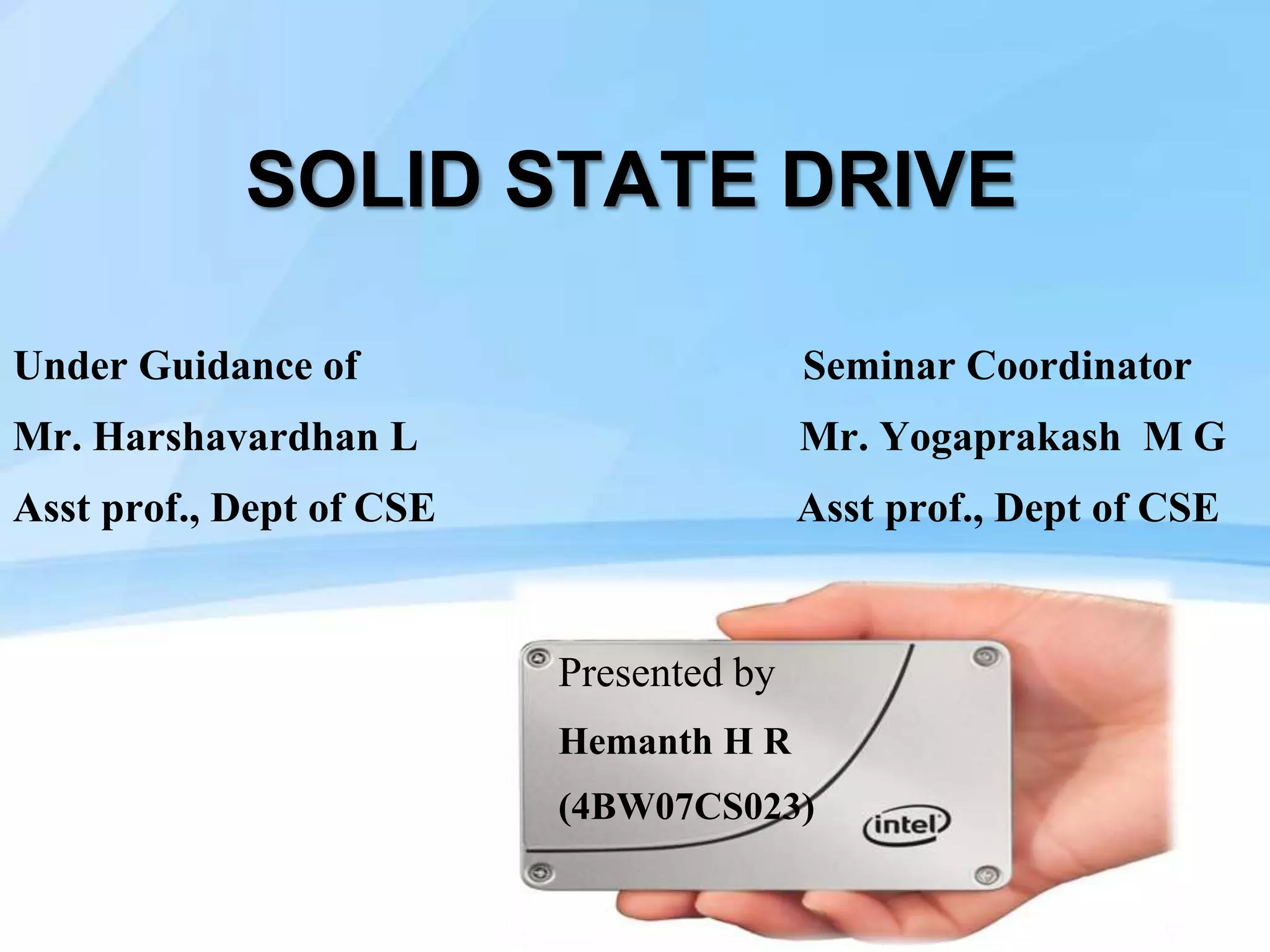
SOLID STATE DRIVE
Under Guidance of Seminar Coordinator
Mr. Harshavardhan L Mr. Yogaprakash M G
Asst prof., Dept of CSE Asst prof., Dept of CSE
Presented by
Hemanth H R
(4BW07CS023)
Page  2
 INTRODUCTION
 DEVELOPMENT & HISTORY
 THE PROBLEMS WITH TODAY’S HARD DISKS
 ARCHITECTURE OF SSD
 MEMORY
 CONTROLLER
 HOST INTERFACE
 COMPARISON OF SSD & HDD
 ADVANTAGES & DISSADVANTAGES
 APPLICATIONS OF SSD
 REFERENCE
CONTENTS
Page  3
INTRODUCTION
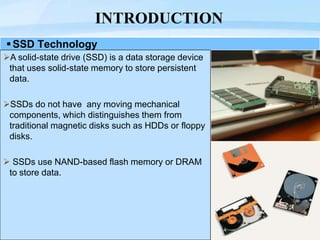
SSD Technology
A solid-state drive (SSD) is a data storage device
that uses solid-state memory to store persistent
data.
SSDs do not have any moving mechanical
components, which distinguishes them from
traditional magnetic disks such as HDDs or floppy
disks.
 SSDs use NAND-based flash memory or DRAM
to store data.
Page  4
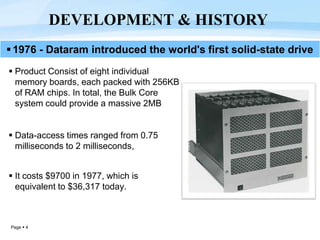
 Product Consist of eight individual
memory boards, each packed with 256KB
of RAM chips. In total, the Bulk Core
system could provide a massive 2MB
 Data-access times ranged from 0.75
milliseconds to 2 milliseconds,
 It costs $9700 in 1977, which is
equivalent to $36,317 today.
DEVELOPMENT & HISTORY
1976 - Dataram introduced the world's first solid-state drive
Page  5
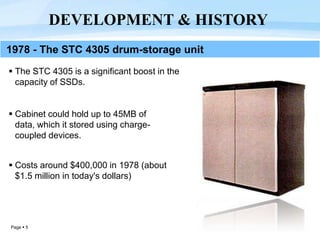
 The STC 4305 is a significant boost in the
capacity of SSDs.
 Cabinet could hold up to 45MB of
data, which it stored using charge-
coupled devices.
 Costs around $400,000 in 1978 (about
$1.5 million in today's dollars)
DEVELOPMENT & HISTORY
1978 - The STC 4305 drum-storage unit
Page  6
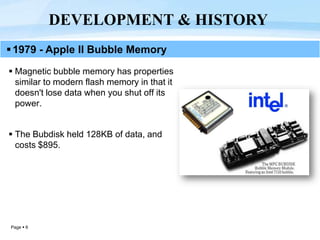
 Magnetic bubble memory has properties
similar to modern flash memory in that it
doesn't lose data when you shut off its
power.
 The Bubdisk held 128KB of data, and
costs $895.
DEVELOPMENT & HISTORY
1979 - Apple II Bubble Memory
Page  7
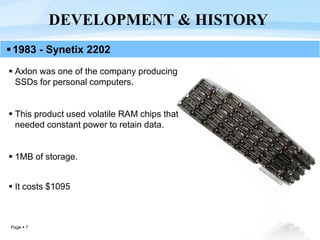
 Axlon was one of the company producing
SSDs for personal computers.
 This product used volatile RAM chips that
needed constant power to retain data.
 1MB of storage.
 It costs $1095
DEVELOPMENT & HISTORY
1983 - Synetix 2202
Page  8
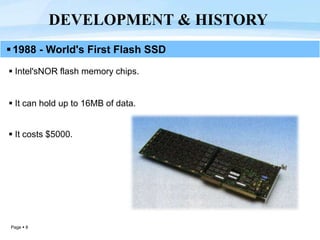
 Intel'sNOR flash memory chips.
 It can hold up to 16MB of data.
 It costs $5000.
DEVELOPMENT & HISTORY
1988 - World's First Flash SSD
Page  9
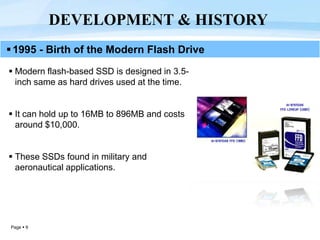
 Modern flash-based SSD is designed in 3.5-
inch same as hard drives used at the time.
 It can hold up to 16MB to 896MB and costs
around $10,000.
 These SSDs found in military and
aeronautical applications.
DEVELOPMENT & HISTORY
1995 - Birth of the Modern Flash Drive
Page  10
The problems with today’s Hard Disks?
Hard Disk Drives
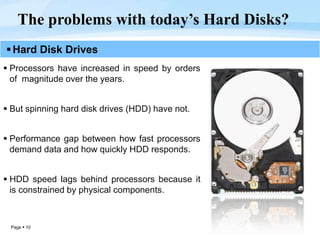
 Processors have increased in speed by orders
of magnitude over the years.
 But spinning hard disk drives (HDD) have not.
 Performance gap between how fast processors
demand data and how quickly HDD responds.
 HDD speed lags behind processors because it
is constrained by physical components.
Page  11
The problems with today’s Hard Disks?
Hybrid Hard Disk Drives
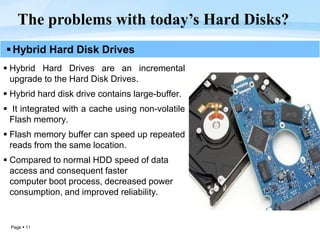
 Hybrid Hard Drives are an incremental
upgrade to the Hard Disk Drives.
 Hybrid hard disk drive contains large-buffer.
 It integrated with a cache using non-volatile
Flash memory.
 Flash memory buffer can speed up repeated
reads from the same location.
 Compared to normal HDD speed of data
access and consequent faster
computer boot process, decreased power
consumption, and improved reliability.
Page  12
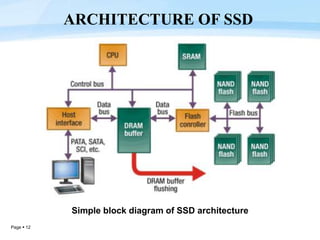
ARCHITECTURE OF SSD
Simple block diagram of SSD architecture
Page  13
MEMORY
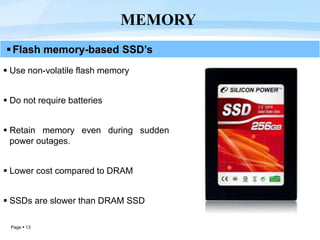
Flash memory-based SSD’s
 Use non-volatile flash memory
 Do not require batteries
 Retain memory even during sudden
power outages.
 Lower cost compared to DRAM
 SSDs are slower than DRAM SSD
Page  14
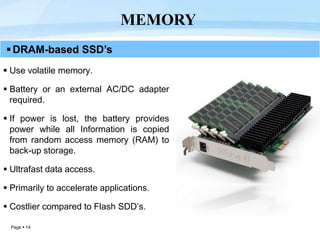
DRAM-based SSD’s
 Use volatile memory.
 Battery or an external AC/DC adapter
required.
 If power is lost, the battery provides
power while all Information is copied
from random access memory (RAM) to
back-up storage.
 Ultrafast data access.
 Primarily to accelerate applications.
 Costlier compared to Flash SDD’s.
MEMORY
Page  15
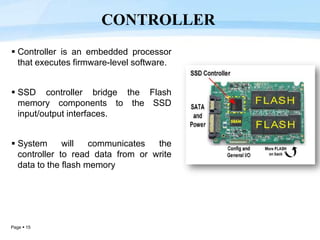
 Controller is an embedded processor
that executes firmware-level software.
 SSD controller bridge the Flash
memory components to the SSD
input/output interfaces.
 System will communicates the
controller to read data from or write
data to the flash memory
CONTROLLER
Page  16
 Serial ATA (SATA)
 SAS - Serial attached SCSI (generally found on servers)
 PCI Express
 USB
 Parallel ATA (IDE) interface (mostly replaced by SATA)
HOST INTERFACE
Page  17
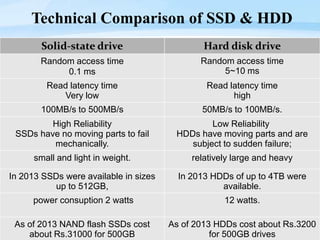
Technical Comparison of SSD & HDD
Solid-state drive Hard disk drive
Random access time
0.1 ms
Random access time
5~10 ms
Read latency time
Very low
Read latency time
high
100MB/s to 500MB/s 50MB/s to 100MB/s.
High Reliability
SSDs have no moving parts to fail
mechanically.
Low Reliability
HDDs have moving parts and are
subject to sudden failure;
small and light in weight. relatively large and heavy
In 2013 SSDs were available in sizes
up to 512GB,
In 2013 HDDs of up to 4TB were
available.
power consuption 2 watts 12 watts.
As of 2013 NAND flash SSDs cost
about Rs.31000 for 500GB
As of 2013 HDDs cost about Rs.3200
for 500GB drives
Page  18
 High performance – significantly faster than a standard HDD
 Faster seek time – up to 60x faster than HDD
 Lower power – Lesser power consumption ,cooler operation
 Silent operation – ideal for post production environments
 Lighter weight – perfect for portable devices.
 Ability to endure extreme shock, high altitude, vibration and
extremes of temperature.
 Immune to magnets.
 SSDs are random access by nature and can perform parallel
reads on multiple sections of the drive
ADVANTAGES OF SSD
Page  19
 They are more expensive than traditional hard drives.
 They currently offer less storage space than traditional hard
drives.
 Slower Write Speed on low-end Models(MLC based types).
DISSADVANTAGES OF SSD
Page  20
Servers
Desktop computers
Laptops
Ultrabooks
HD Camcorders
Smart Tv
CCTV Digital Video Recorder (DVR)
Set-Top Boxes
Gaming Consoles
SSD APPLICATIONS
Page  21
 J. Katcher. PostMark: “A New Solid State Drives”. Technical Report
TR3022, Network Appliance, October 1997.
 “Evolution of the Solid-State Drive” By Benj Edwards, PCWorld
 A. Birrell, M. Isard, C. Thacker, and T. Wobber. “A Design for High-
Performance Flash Disks”, December 2007.
 S. Nath and A. Kansal. FlashDB: “Dynamic Self-Tuning Database for
NAND Flash”. In IPSN ’07: Proceedings of the 6th International
Conference on Information Processing in Sensor Networks June, 2009.
 http://en.wikipedia.org/wiki/Solid-state_drive
 http://www.intel.com/pressroom/.html
 http://whatisasolidstatedrive.com/?p=14
REFERENCE
Solid State Drives (Third Generation) 2013

Solid State Drives (Third Generation) 2013

  • 1.
    SOLID STATE DRIVE UnderGuidance of Seminar Coordinator Mr. Harshavardhan L Mr. Yogaprakash M G Asst prof., Dept of CSE Asst prof., Dept of CSE Presented by Hemanth H R (4BW07CS023)
  • 2.
    Page  2 INTRODUCTION  DEVELOPMENT & HISTORY  THE PROBLEMS WITH TODAY’S HARD DISKS  ARCHITECTURE OF SSD  MEMORY  CONTROLLER  HOST INTERFACE  COMPARISON OF SSD & HDD  ADVANTAGES & DISSADVANTAGES  APPLICATIONS OF SSD  REFERENCE CONTENTS
  • 3.
    Page  3 INTRODUCTION SSDTechnology A solid-state drive (SSD) is a data storage device that uses solid-state memory to store persistent data. SSDs do not have any moving mechanical components, which distinguishes them from traditional magnetic disks such as HDDs or floppy disks.  SSDs use NAND-based flash memory or DRAM to store data.
  • 4.
    Page  4 Product Consist of eight individual memory boards, each packed with 256KB of RAM chips. In total, the Bulk Core system could provide a massive 2MB  Data-access times ranged from 0.75 milliseconds to 2 milliseconds,  It costs $9700 in 1977, which is equivalent to $36,317 today. DEVELOPMENT & HISTORY 1976 - Dataram introduced the world's first solid-state drive
  • 5.
    Page  5 The STC 4305 is a significant boost in the capacity of SSDs.  Cabinet could hold up to 45MB of data, which it stored using charge- coupled devices.  Costs around $400,000 in 1978 (about $1.5 million in today's dollars) DEVELOPMENT & HISTORY 1978 - The STC 4305 drum-storage unit
  • 6.
    Page  6 Magnetic bubble memory has properties similar to modern flash memory in that it doesn't lose data when you shut off its power.  The Bubdisk held 128KB of data, and costs $895. DEVELOPMENT & HISTORY 1979 - Apple II Bubble Memory
  • 7.
    Page  7 Axlon was one of the company producing SSDs for personal computers.  This product used volatile RAM chips that needed constant power to retain data.  1MB of storage.  It costs $1095 DEVELOPMENT & HISTORY 1983 - Synetix 2202
  • 8.
    Page  8 Intel'sNOR flash memory chips.  It can hold up to 16MB of data.  It costs $5000. DEVELOPMENT & HISTORY 1988 - World's First Flash SSD
  • 9.
    Page  9 Modern flash-based SSD is designed in 3.5- inch same as hard drives used at the time.  It can hold up to 16MB to 896MB and costs around $10,000.  These SSDs found in military and aeronautical applications. DEVELOPMENT & HISTORY 1995 - Birth of the Modern Flash Drive
  • 10.
    Page  10 Theproblems with today’s Hard Disks? Hard Disk Drives  Processors have increased in speed by orders of magnitude over the years.  But spinning hard disk drives (HDD) have not.  Performance gap between how fast processors demand data and how quickly HDD responds.  HDD speed lags behind processors because it is constrained by physical components.
  • 11.
    Page  11 Theproblems with today’s Hard Disks? Hybrid Hard Disk Drives  Hybrid Hard Drives are an incremental upgrade to the Hard Disk Drives.  Hybrid hard disk drive contains large-buffer.  It integrated with a cache using non-volatile Flash memory.  Flash memory buffer can speed up repeated reads from the same location.  Compared to normal HDD speed of data access and consequent faster computer boot process, decreased power consumption, and improved reliability.
  • 12.
    Page  12 ARCHITECTUREOF SSD Simple block diagram of SSD architecture
  • 13.
    Page  13 MEMORY Flashmemory-based SSD’s  Use non-volatile flash memory  Do not require batteries  Retain memory even during sudden power outages.  Lower cost compared to DRAM  SSDs are slower than DRAM SSD
  • 14.
    Page  14 DRAM-basedSSD’s  Use volatile memory.  Battery or an external AC/DC adapter required.  If power is lost, the battery provides power while all Information is copied from random access memory (RAM) to back-up storage.  Ultrafast data access.  Primarily to accelerate applications.  Costlier compared to Flash SDD’s. MEMORY
  • 15.
    Page  15 Controller is an embedded processor that executes firmware-level software.  SSD controller bridge the Flash memory components to the SSD input/output interfaces.  System will communicates the controller to read data from or write data to the flash memory CONTROLLER
  • 16.
    Page  16 Serial ATA (SATA)  SAS - Serial attached SCSI (generally found on servers)  PCI Express  USB  Parallel ATA (IDE) interface (mostly replaced by SATA) HOST INTERFACE
  • 17.
    Page  17 TechnicalComparison of SSD & HDD Solid-state drive Hard disk drive Random access time 0.1 ms Random access time 5~10 ms Read latency time Very low Read latency time high 100MB/s to 500MB/s 50MB/s to 100MB/s. High Reliability SSDs have no moving parts to fail mechanically. Low Reliability HDDs have moving parts and are subject to sudden failure; small and light in weight. relatively large and heavy In 2013 SSDs were available in sizes up to 512GB, In 2013 HDDs of up to 4TB were available. power consuption 2 watts 12 watts. As of 2013 NAND flash SSDs cost about Rs.31000 for 500GB As of 2013 HDDs cost about Rs.3200 for 500GB drives
  • 18.
    Page  18 High performance – significantly faster than a standard HDD  Faster seek time – up to 60x faster than HDD  Lower power – Lesser power consumption ,cooler operation  Silent operation – ideal for post production environments  Lighter weight – perfect for portable devices.  Ability to endure extreme shock, high altitude, vibration and extremes of temperature.  Immune to magnets.  SSDs are random access by nature and can perform parallel reads on multiple sections of the drive ADVANTAGES OF SSD
  • 19.
    Page  19 They are more expensive than traditional hard drives.  They currently offer less storage space than traditional hard drives.  Slower Write Speed on low-end Models(MLC based types). DISSADVANTAGES OF SSD
  • 20.
    Page  20 Servers Desktopcomputers Laptops Ultrabooks HD Camcorders Smart Tv CCTV Digital Video Recorder (DVR) Set-Top Boxes Gaming Consoles SSD APPLICATIONS
  • 21.
    Page  21 J. Katcher. PostMark: “A New Solid State Drives”. Technical Report TR3022, Network Appliance, October 1997.  “Evolution of the Solid-State Drive” By Benj Edwards, PCWorld  A. Birrell, M. Isard, C. Thacker, and T. Wobber. “A Design for High- Performance Flash Disks”, December 2007.  S. Nath and A. Kansal. FlashDB: “Dynamic Self-Tuning Database for NAND Flash”. In IPSN ’07: Proceedings of the 6th International Conference on Information Processing in Sensor Networks June, 2009.  http://en.wikipedia.org/wiki/Solid-state_drive  http://www.intel.com/pressroom/.html  http://whatisasolidstatedrive.com/?p=14 REFERENCE