Sunawar Khan
STORAGE DEVICES
Sunawar Khan
MSCS
IIUI
Sunawar Khan
Stored-Program Concept
The von Neumann architecture
Sunawar Khan
Memory
■ Memory is a
collection of cells,
each with a unique
physical address
Sunawar Khan
MemoryHierarchy
Slow and
inexpensive
Increasing performance
and
increasing cost
Sunawar Khan
Storage Devices
■ Storage device stores information to be
recalled and used at a later time
■ Storage device consists of:
■Storage medium
■Storage device
■ Three major technology types for
information storage:
■Magnetic
■Optical or laser
■Flash memory
SimNet Concepts Support CD: “Storage Concepts”
Sunawar Khan
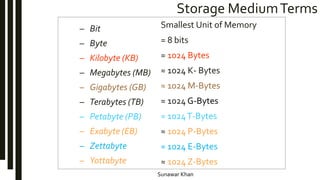
Storage MediumTerms
– Bit
– Byte
– Kilobyte (KB)
– Megabytes (MB)
– Gigabytes (GB)
– Terabytes (TB)
– Petabyte (PB)
– Exabyte (EB)
– Zettabyte
– Yottabyte
Smallest Unit of Memory
= 8 bits
≈ 1024 Bytes
≈ 1024 K- Bytes
≈ 1024 M-Bytes
≈ 1024 G-Bytes
≈ 1024T-Bytes
≈ 1024 P-Bytes
≈ 1024 E-Bytes
≈ 1024 Z-Bytes
Sunawar Khan
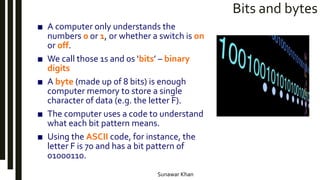
Bits and bytes
■ A computer only understands the
numbers 0 or 1, or whether a switch is on
or off.
■ We call those 1s and 0s ‘bits’ – binary
digits
■ A byte (made up of 8 bits) is enough
computer memory to store a single
character of data (e.g. the letter F).
■ The computer uses a code to understand
what each bit pattern means.
■ Using the ASCII code, for instance, the
letter F is 70 and has a bit pattern of
01000110.
Sunawar Khan
Magnetic and Optical Storage
Storage
Media
Magnetic
Storage
Media Sealed
Inside Drive
Internal Hard
Drive
External
hard Drive
Removeable
Storage
Media
Floppy Disk Zip Disk
Optical
Storage
Media
CD
CD-ROM CD RW CD R
DVD
DVD ROM DVD RW
Blue Ray
Disk
Sunawar Khan
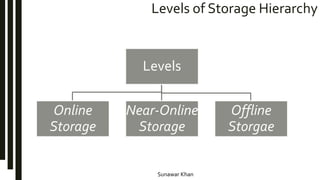
Levels of Storage Hierarchy
Levels
Online
Storage
Near-Online
Storage
Offline
Storgae
Sunawar Khan
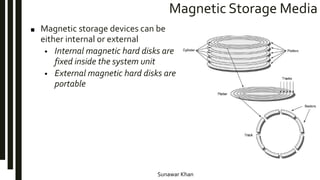
Magnetic Storage Media
■ Magnetic storage devices can be
either internal or external
• Internal magnetic hard disks are
fixed inside the system unit
• External magnetic hard disks are
portable
Sunawar Khan
Magnetic Disks
■ A read/write head travels across a spinning magnetic disk, retrieving or
recording data
The organization of a magnetic disk
Sunawar Khan
Internal Magnetic Hard Disk
■ Internal hard disk is a magnetic storage device
with
• One or more thin platters that store
information sealed inside the disk drive.
• Read/write heads access the information on
surface
• Heads read information while copying it from
disk to RAM
• Heads write information when copying it
from RAM to disk
■ Long term storage system and application
software
■ Operating system and application software are
copied from the hard disk to memory
■ Capacity measured in gigabytes
Sunawar Khan
Hard Disk
■ The hard drive is the main and usually largest data storage
device in computer.
■ It can store anywhere from 160 GB to 2TB.
■ Hard disk speed is the speed at which content can be read
and written on a hard disk.
■ A hard disk unit comes with a set rotation speed varying from
4500 to 7200 rpm.
■ Disk access time is measured in milliseconds.
Sunawar Khan
Disk Storage
Head
Assembly
All heads move
together Platter
Sector
Top and bottom
Surfaces
Head
SpindleTrack
Shaft
Arm
Sunawar Khan
Disk Storage
Cylinder X: Track X
from all 12 surfaces
(2 per platter)
Each circle represents
two tracks: one for top surface
and one for bottom surface
Sunawar Khan
Disk Storage
(a) Normal (Non zoned) recording (b) Zoned recording
Sunawar Khan
External Magnetic Hard Disk
■ External hard disks are magnetic
storage media which are portable
storage units that you can connect to
your computer as necessary
• Great for backup storage devices
• Ability to transport your hard disk
from one computer to another
Sunawar Khan
Comparison
Sunawar Khan
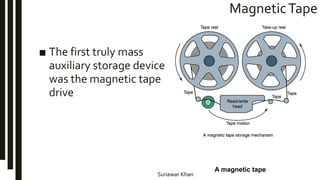
MagneticTape
■ The first truly mass
auxiliary storage device
was the magnetic tape
drive
A magnetic tape
Sunawar Khan
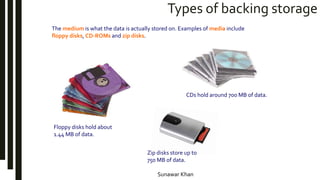
Types of backing storage
The medium is what the data is actually stored on. Examples of media include
floppy disks, CD-ROMs and zip disks.
Floppy disks hold about
1.44 MB of data.
Zip disks store up to
750 MB of data.
CDs hold around 700 MB of data.
Sunawar Khan
Removable Magnetic Storage: Floppy Disk
■ Floppy Mylar disk
– Housed inside a hard plastic
casing
– Thin, flexible plastic disk
■ 3.5 inch floppy disks
– also called floppies,
diskettes, floppy disks
– Holds about 1.44
megabytes of
information
■ High-capacity disks
– Zip® disk
p. 5.144 Fig. 5.15
Sunawar Khan
Floppy Disk
Sunawar Khan
Removable Magnetic Storage: Zip Disk
■ High capacity plastic platter disk
– Called removable hard disks
– Provide a higher storage capacity than Mylar disks
■ Example - Zip® disk with capacity of 100MB, 250MB,
and 750MB
Sunawar Khan
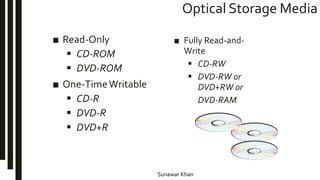
Optical Storage Media
■ Read-Only
 CD-ROM
 DVD-ROM
■ One-TimeWritable
 CD-R
 DVD-R
 DVD+R
■ Fully Read-and-
Write
 CD-RW
 DVD-RW or
DVD+RW or
DVD-RAM
Sunawar Khan
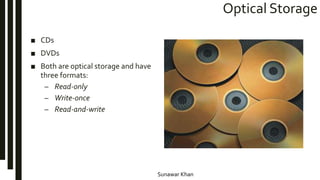
Optical Storage
■ CDs
■ DVDs
■ Both are optical storage and have
three formats:
– Read-only
– Write-once
– Read-and-write
Sunawar Khan
Comparison
Sunawar Khan
Flash Memory Cards
■ Flash memory cards have
high-capacity storage
laminated inside a small
piece of plastic
■ Flash flash memory cards
do not need a drive with
moving parts to operate
Sunawar Khan
Zip Disk Drive
Sunawar Khan
USB Flash Drive
Sunawar Khan
LatestTechnologies
Sunawar Khan
Data is stored using binary code (0 and 1).
Computer memory is measured in kilobytes.
Read Only Memory (ROM) is non-volatile because it cannot be
changed.
Random Access Memory (RAM) is volatile because it only works
when the computer is switched on.
There are three types of storage device: those that use magnetic
media, others that use optical media, and those that use flash
memory.
Different types of media have different storage capacities.
Storage devices can also be divided into those that are fixed and
those that are removable.
Summary

Storage devices

  • 1.
  • 2.
  • 3.
    Sunawar Khan Memory ■ Memoryis a collection of cells, each with a unique physical address
  • 4.
  • 5.
    Sunawar Khan Storage Devices ■Storage device stores information to be recalled and used at a later time ■ Storage device consists of: ■Storage medium ■Storage device ■ Three major technology types for information storage: ■Magnetic ■Optical or laser ■Flash memory SimNet Concepts Support CD: “Storage Concepts”
  • 6.
    Sunawar Khan Storage MediumTerms –Bit – Byte – Kilobyte (KB) – Megabytes (MB) – Gigabytes (GB) – Terabytes (TB) – Petabyte (PB) – Exabyte (EB) – Zettabyte – Yottabyte Smallest Unit of Memory = 8 bits ≈ 1024 Bytes ≈ 1024 K- Bytes ≈ 1024 M-Bytes ≈ 1024 G-Bytes ≈ 1024T-Bytes ≈ 1024 P-Bytes ≈ 1024 E-Bytes ≈ 1024 Z-Bytes
  • 7.
    Sunawar Khan Bits andbytes ■ A computer only understands the numbers 0 or 1, or whether a switch is on or off. ■ We call those 1s and 0s ‘bits’ – binary digits ■ A byte (made up of 8 bits) is enough computer memory to store a single character of data (e.g. the letter F). ■ The computer uses a code to understand what each bit pattern means. ■ Using the ASCII code, for instance, the letter F is 70 and has a bit pattern of 01000110.
  • 8.
    Sunawar Khan Magnetic andOptical Storage Storage Media Magnetic Storage Media Sealed Inside Drive Internal Hard Drive External hard Drive Removeable Storage Media Floppy Disk Zip Disk Optical Storage Media CD CD-ROM CD RW CD R DVD DVD ROM DVD RW Blue Ray Disk
  • 9.
    Sunawar Khan Levels ofStorage Hierarchy Levels Online Storage Near-Online Storage Offline Storgae
  • 10.
    Sunawar Khan Magnetic StorageMedia ■ Magnetic storage devices can be either internal or external • Internal magnetic hard disks are fixed inside the system unit • External magnetic hard disks are portable
  • 11.
    Sunawar Khan Magnetic Disks ■A read/write head travels across a spinning magnetic disk, retrieving or recording data The organization of a magnetic disk
  • 12.
    Sunawar Khan Internal MagneticHard Disk ■ Internal hard disk is a magnetic storage device with • One or more thin platters that store information sealed inside the disk drive. • Read/write heads access the information on surface • Heads read information while copying it from disk to RAM • Heads write information when copying it from RAM to disk ■ Long term storage system and application software ■ Operating system and application software are copied from the hard disk to memory ■ Capacity measured in gigabytes
  • 13.
    Sunawar Khan Hard Disk ■The hard drive is the main and usually largest data storage device in computer. ■ It can store anywhere from 160 GB to 2TB. ■ Hard disk speed is the speed at which content can be read and written on a hard disk. ■ A hard disk unit comes with a set rotation speed varying from 4500 to 7200 rpm. ■ Disk access time is measured in milliseconds.
  • 14.
    Sunawar Khan Disk Storage Head Assembly Allheads move together Platter Sector Top and bottom Surfaces Head SpindleTrack Shaft Arm
  • 15.
    Sunawar Khan Disk Storage CylinderX: Track X from all 12 surfaces (2 per platter) Each circle represents two tracks: one for top surface and one for bottom surface
  • 16.
    Sunawar Khan Disk Storage (a)Normal (Non zoned) recording (b) Zoned recording
  • 17.
    Sunawar Khan External MagneticHard Disk ■ External hard disks are magnetic storage media which are portable storage units that you can connect to your computer as necessary • Great for backup storage devices • Ability to transport your hard disk from one computer to another
  • 18.
  • 19.
    Sunawar Khan MagneticTape ■ Thefirst truly mass auxiliary storage device was the magnetic tape drive A magnetic tape
  • 20.
    Sunawar Khan Types ofbacking storage The medium is what the data is actually stored on. Examples of media include floppy disks, CD-ROMs and zip disks. Floppy disks hold about 1.44 MB of data. Zip disks store up to 750 MB of data. CDs hold around 700 MB of data.
  • 21.
    Sunawar Khan Removable MagneticStorage: Floppy Disk ■ Floppy Mylar disk – Housed inside a hard plastic casing – Thin, flexible plastic disk ■ 3.5 inch floppy disks – also called floppies, diskettes, floppy disks – Holds about 1.44 megabytes of information ■ High-capacity disks – Zip® disk p. 5.144 Fig. 5.15
  • 22.
  • 23.
    Sunawar Khan Removable MagneticStorage: Zip Disk ■ High capacity plastic platter disk – Called removable hard disks – Provide a higher storage capacity than Mylar disks ■ Example - Zip® disk with capacity of 100MB, 250MB, and 750MB
  • 24.
    Sunawar Khan Optical StorageMedia ■ Read-Only  CD-ROM  DVD-ROM ■ One-TimeWritable  CD-R  DVD-R  DVD+R ■ Fully Read-and- Write  CD-RW  DVD-RW or DVD+RW or DVD-RAM
  • 25.
    Sunawar Khan Optical Storage ■CDs ■ DVDs ■ Both are optical storage and have three formats: – Read-only – Write-once – Read-and-write
  • 26.
  • 27.
    Sunawar Khan Flash MemoryCards ■ Flash memory cards have high-capacity storage laminated inside a small piece of plastic ■ Flash flash memory cards do not need a drive with moving parts to operate
  • 28.
  • 29.
  • 30.
  • 31.
    Sunawar Khan Data isstored using binary code (0 and 1). Computer memory is measured in kilobytes. Read Only Memory (ROM) is non-volatile because it cannot be changed. Random Access Memory (RAM) is volatile because it only works when the computer is switched on. There are three types of storage device: those that use magnetic media, others that use optical media, and those that use flash memory. Different types of media have different storage capacities. Storage devices can also be divided into those that are fixed and those that are removable. Summary