Chapter 3 : Memory
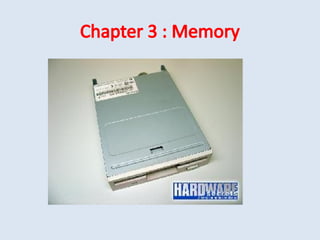
Floppy Disk Drive
• The floppy disk drive (FDD) was the primary
means of adding data to a computer until the
CD-ROM drive became popular.
• Basically, a floppy disk drive reads and writes
data to a small, circular piece of metal-coated
plastic similar to audio cassette tape.
FDD contd..
• The floppy disk drive (FDD) was invented at
IBM by Alan Shugart in 1967.
• Floppy disk drives had five generations: 360
KB (5 ¼”), 1.2 MB (5 ¼”), 720 KB (3 ½”), 1.44
MB (3 ½”) and 2.88 MB (3 ½”).
• The 5.25-inch disks were dubbed "floppy"
because the diskette packaging was a very
flexible plastic envelope.
FDD Contd..
A floppy disk is a lot like a cassette tape:
• Both use a thin plastic base material coated
with iron oxide. This oxide is a ferromagnetic
material, meaning that if you expose it to a
magnetic field it is permanently magnetized
by the field.
• Both can record information instantly.
• Both can be erased and reused many times.
• Both are very inexpensive and easy to use.
FDD Contd..
• It is shaped like a disk.
• The tracks are arranged in concentric rings so
that the software can jump from "file 1" to
"file 19" without having to fast forward
through files 2-18.
• The diskette spins like a record and the heads
move to the correct track, providing what is
known as direct access storage.
FDD Contd..
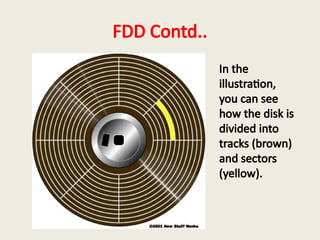
In the
illustration,
you can see
how the disk is
divided into
tracks (brown)
and sectors
(yellow).
FDD Major Parts
• Read/Write Heads: Located on both sides of a
diskette, they move together on the same
assembly.
• The same head is used for reading and writing,
while a second, wider head is used for erasing
a track just prior to it being written.
FDD Major Parts
• Drive Motor: A very small spindle motor
engages the metal hub at the center of the
diskette, spinning it at either 300 or 360
rotations per minute (RPM).
FDD Major Parts
• Stepper Motor: This motor makes a precise
number of stepped revolutions to move the
read/write head assembly to the proper track
position. The read/write head assembly is
fastened to the stepper motor shaft.
FDD Major Parts
• Mechanical Frame: A system of levers that
opens the little protective window on the
diskette to allow the read/write heads to
touch the dual-sided diskette media.
• An external button allows the diskette to be
ejected, at which point the spring-loaded
protective window on the diskette closes.
FDD Major Parts
• Circuit Board: Contains all of the electronics to
handle the data read from or written to the
diskette. It also controls the stepper-motor
control circuits used to move the read/write
heads to each track, as well as the movement
of the read/write heads toward the diskette
surface.
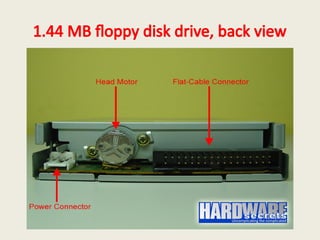
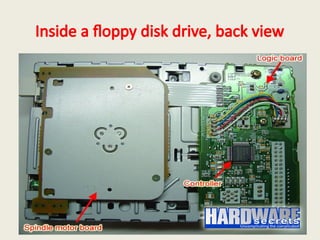
1.44 MB floppy disk drive, back view
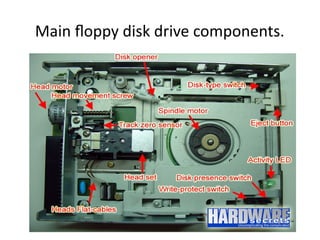
Main floppy disk drive components.
4 Sensors on FDD
• Disk Type: 1.44 MB floppy disks have an extra
hole over 720 KB disks, so the drive can “feel”
if the disk is a 720 KB or a 1.44 MB floppy.
• Disk Presence: This sensor is used for the drive
to know if there is a floppy disk inside it or
not.
4 Sensors on FDD
• Write-protect: To enable or disable writing
data to the disk, depending if you closed or
opened the write-protect hole on the floppy
disk.
• Track zero: When the head set triggers this
sensor it means that it reached track zero,
which is the first track on the disk.
Inside a floppy disk drive, back view
Logic Cards
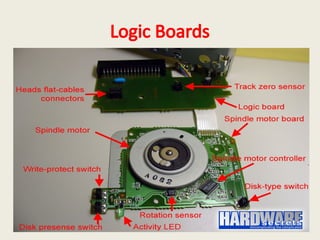
• Figure on next slide shows the two printed
circuit boards that exist inside the floppy disk
drive.
• One is the logic board, which holds the drive’s
controller.
• The other is the spindle motor board, which
holds the spindle motor and its servo
controller.
Logic Boards
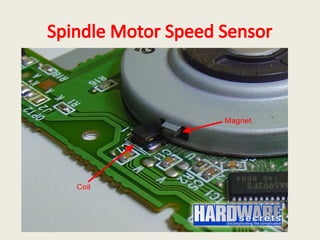
Motor Speed Sensor
• The spindle motor uses a sensor for checking
if it is rotating or not and also to check its
speed.
• So, this motor is a closed loop system, i.e. it
has a sensor that feeds the controller in order
to perform any speed adjustments that may
be necessary to keep it rotating at its correct
speed.
Spindle Motor Speed Sensor
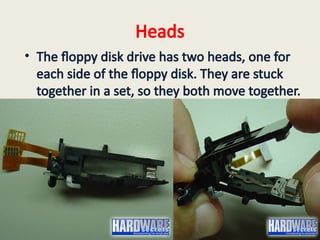
Heads
• The floppy disk drive has two heads, one for
each side of the floppy disk. They are stuck
together in a set, so they both move together.
Inside The Head
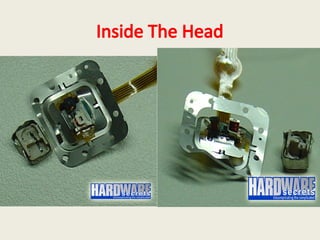
• it has two coils inside. These coils are in
charge of generating the necessary
electromagnetic field for erasing or writing
data on the disk and also in charge of
capturing the magnetic field generated by the
floppy and transforming it into electrical
current when data is being read from the
floppy.
Inside The Head
Hard Disk Drive
Hard Disk Drive
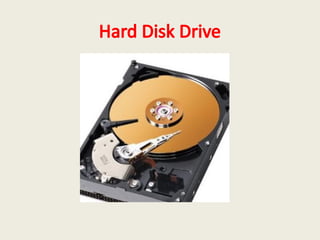
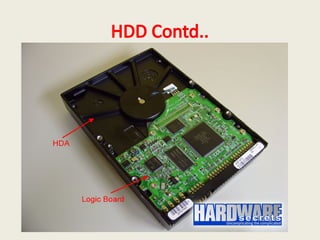
• Hard drives have two kinds of components:
internal and external.
• External components are located on a printed
circuit board called logic board
• while internal components are located in a
sealed chamber called HDA or Hard Drive
Assembly.
HDD Contd..
HDD Contd..
• You cannot open a hard drive or you will make
your drive unusable. Hard drives are
assembled in clean rooms (cleaner than
surgery rooms) and then sealed.
• Any particle of dust inside the HDA can
destroy the surface of the discs, because the
discs spin at a very high speed (at least 7,200
rpm nowadays).
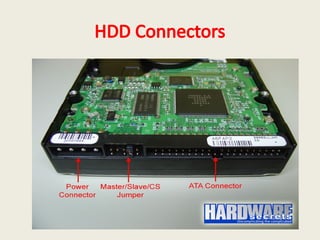
HDD Connectors
• Hard disk drives have basically two connectors,
one for power and other for exchanging data
with the computer. This second connector is
better known as “interface”.
• The two common interfaces are called ATA
(Advanced Technology Attachment) and SATA
(Serial ATA).
• Later interface was created to replace ATA and is
becoming more popular these days.
HDD Connectors
• After the released of SATA, ATA interface
started being also called PATA (Parallel ATA).
• Another famous interface is called SCSI (Small
Computer Systems Interface), but it is targeted
to servers and rarely seen on PCs targeted to
end-users.
HDD Connectors
Master Slave Connections
The master/slave jumper on ATA hard drives can be configured in
three different ways:
• Master: this means that this drive will be the only one
attached to the cable that connects the hard drive to the
computer or will be the first drive in a two-drive configuration.
• Slave: this means that this drive will be the second drive
attached to the cable that connects the hard drive to the
computer.
• CS (Cable Select): this means that you will use a “special”
cable (called CS cable) that the configuration of whether a
drive will be master or slave will be made by the position of
the hard drive on the cable and not by a jumper configuration
on the drive.
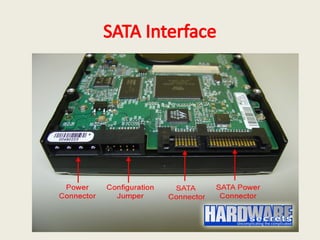
SATA Interface
SATA Contd..
• Serial ATA standard introduced a new power
supply plug, which is very different from the
standard hard drive power plug. Since Serial
ATA is still entering the market, you will find a
lot of Serial ATA hard drives with both power
connectors, like the one on Figure 3. You need
to use just one of them, not the two at the
same time.
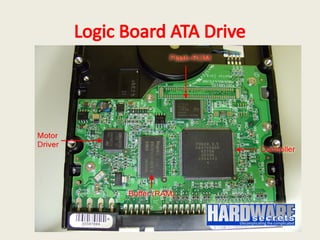
Logic Board ATA Drive
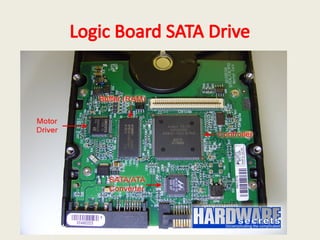
Logic Board SATA Drive
Controller
• The big circuit is the controller. It is in charge
of everything: exchanging data between the
hard drive and the computer, controlling the
motors on the hard drive, commanding the
heads to read or write data, etc
FLASH ROM
• Optionally there is a Flash-ROM circuit where
the hard drive firmware is located. Firmware is
the name given to a program that is stored
inside a ROM (Read Only Memory). The hard
drive firmware is the program its controller
executes. Sometimes this device is embedded
in the controller
MOTOR Driver Chip
• The controller doesn’t drive enough current to
turn on or move the hard drive motors. So all
hard drives use a motor driver chip. This chip
is a current amplifier. It takes the commands
sent from the controller to the motors and
passes them to the motors, but with a higher
current. So, this chip is located between the
controller and the motors.
RAM
• The fourth main chip you can find on a logic
board is the RAM (Random Access Memory)
chip, also known as buffer. This chips has an
ultimate role in the hard drive performance.
The higher its capacity, the fastest the data
transfer between the drive and the computer
will be. You can find out the capacity of your
hard drive buffer on the chip manufacturer’s
website.
SATA/ ATA Converter Chip
• A lot of manufacturers instead of designing
Serial ATA controller chips simply pick ATA
controller chips and add a converter chip to
convert the hard drive Serial ATA interface into
regular ATA.
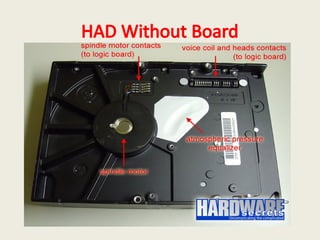
Spindle Motor
• On next slide is the H.DA after the logic board
is removed. There you can clearly see the
spindle motor and its contacts – which
connect this motor to the logic board –, and
also the contacts from the devices inside the
HDA, namely the heads and the voice coil
actuators.
HAD Without Board
Spindle Motor
• On hard drives targeted to desktops, the
spindle motor rotates at 5,400 rpm, 7,200 rpm
or even 10,000 rpm, depending on the drive.
The faster this motor rotates, the faster data
can be read from the platters. Hard drives
targeted to laptops usually rotates at 4,200
rpm.
Inside HDA
Inside HDA
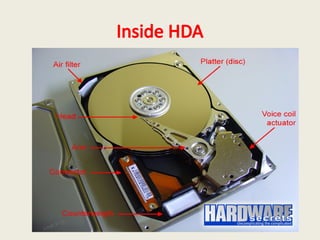
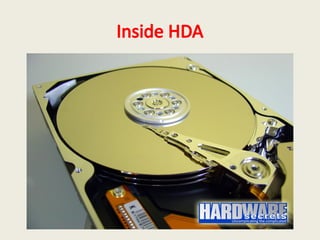
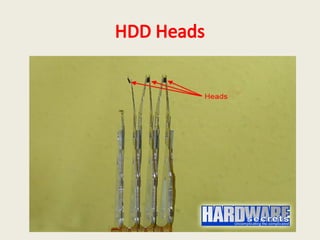
• The hard drive can have several discs. The one
on our picture had three discs. There is one
read/write read for each side of the disc –
which is also called platter. The heads are
stuck together in an arm. So, all the heads
move together.
Inside HDA
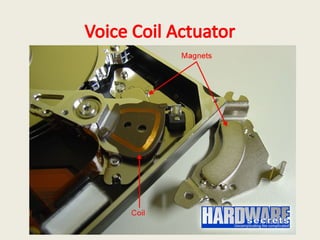
Actuator
• A motor (actually the correct term is
“actuator”) called voice coil moves the arm. It
is called “voice coil” because it uses the same
idea behind loudspeakers: a coil inside a
magnetic field provided by a magnet.
Depending on the current direction on the coil
the arm moves to one side or to the other
side. And depending on the intensity of the
current, the actuator will move more or less.
Voice Coil Actuator
HDD Heads

Slides on Memory and Motherboard components

  • 1.
  • 2.
    Floppy Disk Drive •The floppy disk drive (FDD) was the primary means of adding data to a computer until the CD-ROM drive became popular. • Basically, a floppy disk drive reads and writes data to a small, circular piece of metal-coated plastic similar to audio cassette tape.
  • 3.
    FDD contd.. • Thefloppy disk drive (FDD) was invented at IBM by Alan Shugart in 1967. • Floppy disk drives had five generations: 360 KB (5 ¼”), 1.2 MB (5 ¼”), 720 KB (3 ½”), 1.44 MB (3 ½”) and 2.88 MB (3 ½”). • The 5.25-inch disks were dubbed "floppy" because the diskette packaging was a very flexible plastic envelope.
  • 4.
    FDD Contd.. A floppydisk is a lot like a cassette tape: • Both use a thin plastic base material coated with iron oxide. This oxide is a ferromagnetic material, meaning that if you expose it to a magnetic field it is permanently magnetized by the field. • Both can record information instantly. • Both can be erased and reused many times. • Both are very inexpensive and easy to use.
  • 5.
    FDD Contd.. • Itis shaped like a disk. • The tracks are arranged in concentric rings so that the software can jump from "file 1" to "file 19" without having to fast forward through files 2-18. • The diskette spins like a record and the heads move to the correct track, providing what is known as direct access storage.
  • 6.
    FDD Contd.. In the illustration, youcan see how the disk is divided into tracks (brown) and sectors (yellow).
  • 7.
    FDD Major Parts •Read/Write Heads: Located on both sides of a diskette, they move together on the same assembly. • The same head is used for reading and writing, while a second, wider head is used for erasing a track just prior to it being written.
  • 8.
    FDD Major Parts •Drive Motor: A very small spindle motor engages the metal hub at the center of the diskette, spinning it at either 300 or 360 rotations per minute (RPM).
  • 9.
    FDD Major Parts •Stepper Motor: This motor makes a precise number of stepped revolutions to move the read/write head assembly to the proper track position. The read/write head assembly is fastened to the stepper motor shaft.
  • 10.
    FDD Major Parts •Mechanical Frame: A system of levers that opens the little protective window on the diskette to allow the read/write heads to touch the dual-sided diskette media. • An external button allows the diskette to be ejected, at which point the spring-loaded protective window on the diskette closes.
  • 11.
    FDD Major Parts •Circuit Board: Contains all of the electronics to handle the data read from or written to the diskette. It also controls the stepper-motor control circuits used to move the read/write heads to each track, as well as the movement of the read/write heads toward the diskette surface.
  • 12.
    1.44 MB floppydisk drive, back view
  • 13.
    Main floppy diskdrive components.
  • 14.
    4 Sensors onFDD • Disk Type: 1.44 MB floppy disks have an extra hole over 720 KB disks, so the drive can “feel” if the disk is a 720 KB or a 1.44 MB floppy. • Disk Presence: This sensor is used for the drive to know if there is a floppy disk inside it or not.
  • 15.
    4 Sensors onFDD • Write-protect: To enable or disable writing data to the disk, depending if you closed or opened the write-protect hole on the floppy disk. • Track zero: When the head set triggers this sensor it means that it reached track zero, which is the first track on the disk.
  • 16.
    Inside a floppydisk drive, back view
  • 17.
    Logic Cards • Figureon next slide shows the two printed circuit boards that exist inside the floppy disk drive. • One is the logic board, which holds the drive’s controller. • The other is the spindle motor board, which holds the spindle motor and its servo controller.
  • 18.
  • 19.
    Motor Speed Sensor •The spindle motor uses a sensor for checking if it is rotating or not and also to check its speed. • So, this motor is a closed loop system, i.e. it has a sensor that feeds the controller in order to perform any speed adjustments that may be necessary to keep it rotating at its correct speed.
  • 20.
  • 21.
    Heads • The floppydisk drive has two heads, one for each side of the floppy disk. They are stuck together in a set, so they both move together.
  • 22.
    Inside The Head •it has two coils inside. These coils are in charge of generating the necessary electromagnetic field for erasing or writing data on the disk and also in charge of capturing the magnetic field generated by the floppy and transforming it into electrical current when data is being read from the floppy.
  • 23.
  • 24.
  • 25.
    Hard Disk Drive •Hard drives have two kinds of components: internal and external. • External components are located on a printed circuit board called logic board • while internal components are located in a sealed chamber called HDA or Hard Drive Assembly.
  • 26.
  • 27.
    HDD Contd.. • Youcannot open a hard drive or you will make your drive unusable. Hard drives are assembled in clean rooms (cleaner than surgery rooms) and then sealed. • Any particle of dust inside the HDA can destroy the surface of the discs, because the discs spin at a very high speed (at least 7,200 rpm nowadays).
  • 28.
    HDD Connectors • Harddisk drives have basically two connectors, one for power and other for exchanging data with the computer. This second connector is better known as “interface”. • The two common interfaces are called ATA (Advanced Technology Attachment) and SATA (Serial ATA). • Later interface was created to replace ATA and is becoming more popular these days.
  • 29.
    HDD Connectors • Afterthe released of SATA, ATA interface started being also called PATA (Parallel ATA). • Another famous interface is called SCSI (Small Computer Systems Interface), but it is targeted to servers and rarely seen on PCs targeted to end-users.
  • 30.
  • 31.
    Master Slave Connections Themaster/slave jumper on ATA hard drives can be configured in three different ways: • Master: this means that this drive will be the only one attached to the cable that connects the hard drive to the computer or will be the first drive in a two-drive configuration. • Slave: this means that this drive will be the second drive attached to the cable that connects the hard drive to the computer. • CS (Cable Select): this means that you will use a “special” cable (called CS cable) that the configuration of whether a drive will be master or slave will be made by the position of the hard drive on the cable and not by a jumper configuration on the drive.
  • 32.
  • 33.
    SATA Contd.. • SerialATA standard introduced a new power supply plug, which is very different from the standard hard drive power plug. Since Serial ATA is still entering the market, you will find a lot of Serial ATA hard drives with both power connectors, like the one on Figure 3. You need to use just one of them, not the two at the same time.
  • 34.
  • 35.
  • 36.
    Controller • The bigcircuit is the controller. It is in charge of everything: exchanging data between the hard drive and the computer, controlling the motors on the hard drive, commanding the heads to read or write data, etc
  • 37.
    FLASH ROM • Optionallythere is a Flash-ROM circuit where the hard drive firmware is located. Firmware is the name given to a program that is stored inside a ROM (Read Only Memory). The hard drive firmware is the program its controller executes. Sometimes this device is embedded in the controller
  • 38.
    MOTOR Driver Chip •The controller doesn’t drive enough current to turn on or move the hard drive motors. So all hard drives use a motor driver chip. This chip is a current amplifier. It takes the commands sent from the controller to the motors and passes them to the motors, but with a higher current. So, this chip is located between the controller and the motors.
  • 39.
    RAM • The fourthmain chip you can find on a logic board is the RAM (Random Access Memory) chip, also known as buffer. This chips has an ultimate role in the hard drive performance. The higher its capacity, the fastest the data transfer between the drive and the computer will be. You can find out the capacity of your hard drive buffer on the chip manufacturer’s website.
  • 40.
    SATA/ ATA ConverterChip • A lot of manufacturers instead of designing Serial ATA controller chips simply pick ATA controller chips and add a converter chip to convert the hard drive Serial ATA interface into regular ATA.
  • 41.
    Spindle Motor • Onnext slide is the H.DA after the logic board is removed. There you can clearly see the spindle motor and its contacts – which connect this motor to the logic board –, and also the contacts from the devices inside the HDA, namely the heads and the voice coil actuators.
  • 42.
  • 43.
    Spindle Motor • Onhard drives targeted to desktops, the spindle motor rotates at 5,400 rpm, 7,200 rpm or even 10,000 rpm, depending on the drive. The faster this motor rotates, the faster data can be read from the platters. Hard drives targeted to laptops usually rotates at 4,200 rpm.
  • 44.
  • 45.
    Inside HDA • Thehard drive can have several discs. The one on our picture had three discs. There is one read/write read for each side of the disc – which is also called platter. The heads are stuck together in an arm. So, all the heads move together.
  • 46.
  • 47.
    Actuator • A motor(actually the correct term is “actuator”) called voice coil moves the arm. It is called “voice coil” because it uses the same idea behind loudspeakers: a coil inside a magnetic field provided by a magnet. Depending on the current direction on the coil the arm moves to one side or to the other side. And depending on the intensity of the current, the actuator will move more or less.
  • 48.
  • 49.