
Excel


The Interface
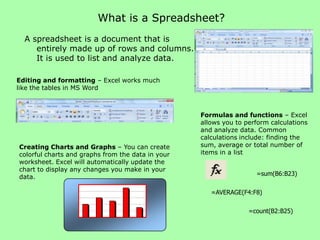
What is a Spreadsheet?
  A spreadsheet is a document that is
     entirely made up of rows and columns.
     It is used to list and analyze data.

Editing and formatting – Excel works much
like the tables in MS Word


                                                   Formulas and functions – Excel
                                                   allows you to perform calculations
                                                   and analyze data. Common
                                                   calculations include: finding the
Creating Charts and Graphs – You can create        sum, average or total number of
colorful charts and graphs from the data in your   items in a list
worksheet. Excel will automatically update the
chart to display any changes you make in your
                                                                    =sum(B6:B23)
data.

                                                      =AVERAGE(F4:F8)

                                                                  =count(B2:B25)
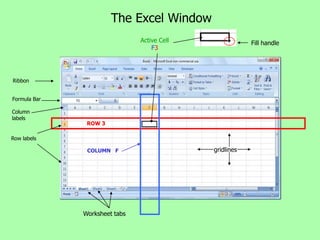
The Excel Window
                               Active Cell               Fill handle
                                   F3


Ribbon


Formula Bar

Column
labels
               ROW 3

Row labels

               COLUMN F                      gridlines


              Worksheet tabs
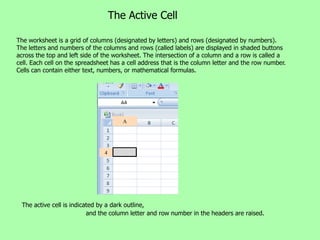
The Active Cell

The worksheet is a grid of columns (designated by letters) and rows (designated by numbers).
The letters and numbers of the columns and rows (called labels) are displayed in shaded buttons
across the top and left side of the worksheet. The intersection of a column and a row is called a
cell. Each cell on the spreadsheet has a cell address that is the column letter and the row number.
Cells can contain either text, numbers, or mathematical formulas.


                                       A


                                4


 The active cell is indicated by a dark outline,
                          and the column letter and row number in the headers are raised.

01 Excel interface

  • 1.
  • 2.
    What is aSpreadsheet? A spreadsheet is a document that is entirely made up of rows and columns. It is used to list and analyze data. Editing and formatting – Excel works much like the tables in MS Word Formulas and functions – Excel allows you to perform calculations and analyze data. Common calculations include: finding the Creating Charts and Graphs – You can create sum, average or total number of colorful charts and graphs from the data in your items in a list worksheet. Excel will automatically update the chart to display any changes you make in your =sum(B6:B23) data. =AVERAGE(F4:F8) =count(B2:B25)
  • 3.
    The Excel Window Active Cell Fill handle F3 Ribbon Formula Bar Column labels ROW 3 Row labels COLUMN F gridlines Worksheet tabs
  • 4.
    The Active Cell Theworksheet is a grid of columns (designated by letters) and rows (designated by numbers). The letters and numbers of the columns and rows (called labels) are displayed in shaded buttons across the top and left side of the worksheet. The intersection of a column and a row is called a cell. Each cell on the spreadsheet has a cell address that is the column letter and the row number. Cells can contain either text, numbers, or mathematical formulas. A 4 The active cell is indicated by a dark outline, and the column letter and row number in the headers are raised.