


Introduction To
    ROUTER
 Farhan Noor Galib (09.01.04.015)
 Zahidul islam george
  (09.01.04.023)
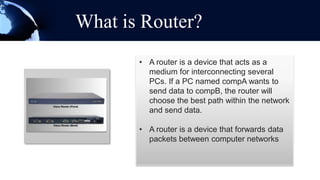
What is Router?
       • A router is a device that acts as a
         medium for interconnecting several
         PCs. If a PC named compA wants to
         send data to compB, the router will
         choose the best path within the network
         and send data.

       • A router is a device that forwards data
         packets between computer networks
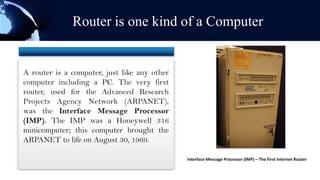
Router is one kind of a Computer


A router is a computer, just like any other
computer including a PC. The very first
router, used for the Advanced Research
Projects Agency Network (ARPANET),
was the Interface Message Processor
(IMP). The IMP was a Honeywell 316
minicomputer; this computer brought the
ARPANET to life on August 30, 1969.

                                              Interface Message Processor (IMP) – The First Internet Router
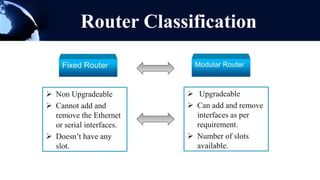
Router Classification


 Non Upgradeable          Upgradeable
 Cannot add and           Can add and remove
  remove the Ethernet       interfaces as per
  or serial interfaces.     requirement.
 Doesn’t have any         Number of slots
  slot.                     available.
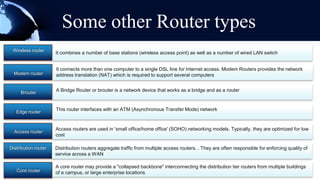
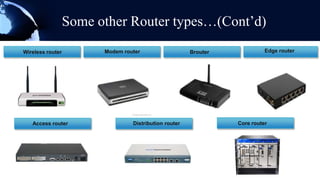
Some other Router types
 Wireless router
                      It combines a number of base stations (wireless access point) as well as a number of wired LAN switch


                      It connects more than one computer to a single DSL line for Internet access. Modem Routers provides the network
  Modem router        address translation (NAT) which is required to support several computers


     Brouter          A Bridge Router or brouter is a network device that works as a bridge and as a router


                      This router interfaces with an ATM (Asynchronous Transfer Mode) network
   Edge router


                      Access routers are used in 'small office/home office' (SOHO) networking models. Typically, they are optimized for low
  Access router
                      cost

Distribution router   Distribution routers aggregate traffic from multiple access routers. . They are often responsible for enforcing quality of
                      service across a WAN

                      A core router may provide a "collapsed backbone" interconnecting the distribution tier routers from multiple buildings
   Core router        of a campus, or large enterprise locations
Some other Router types…(Cont’d)
Wireless router         Modem router                   Brouter             Edge router


   Access router                 Distribution router             Core router
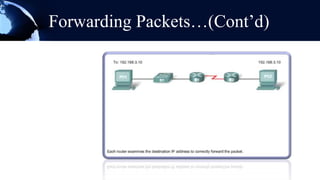
Forwarding Packets…(Cont’d)
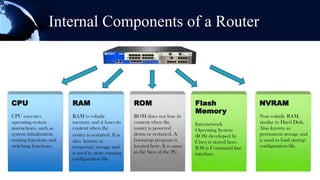
Internal Components of a Router


CPU                      RAM                          ROM                        Flash                    NVRAM
                                                                                                         NVRAM
                                                                                 Memory
CPU executes             RAM is volatile              ROM does not lose its                              This is volatile RAM,
                                                                                                           Non an example
operating system         memory and it loses its      content when the           Internetwork              similar to Hard Disk.
                                                                                                         text. Go ahead and
instructions, such as    content when the             router is powered          Operating System        replaceknown as
                                                                                                           Also it with your
system initialization,   router is restarted. It is   down or restarted. A       (IOS) developed by        permanent storage and
                                                                                                         own text
routing functions and    also known as                bootstrap program is       Cisco is stored here.     is used to load startup
switching functions.     temporary storage and        located here. It is same   IOS is Command line       configuration file.
                         is used to store running     as the bios of the PC.     interface.
                         configuration file.
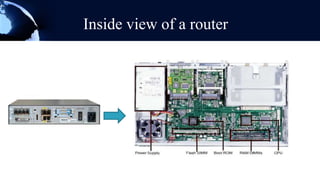
Inside view of a router
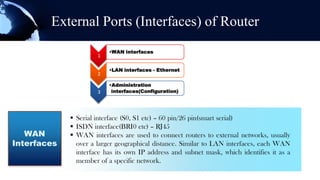
External Ports (Interfaces) of Router
                          •WAN interfaces
                      1

                          •LAN interfaces - Ethernet
                      2

                          •Administration
                      3    interfaces(Configuration)


              Serial interface (S0, S1 etc) – 60 pin/26 pin(smart serial)
              ISDN interface(BRI0 etc) – RJ45
   WAN        WAN interfaces are used to connect routers to external networks, usually
Interfaces     over a larger geographical distance. Similar to LAN interfaces, each WAN
               interface has its own IP address and subnet mask, which identifies it as a
               member of a specific network.
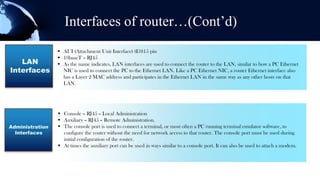
Interfaces of router…(Cont’d)
                  AUI (Attachment Unit Interface) (E0)15 pin
                  10baseT – RJ45
   LAN            As the name indicates, LAN interfaces are used to connect the router to the LAN, similar to how a PC Ethernet
Interfaces         NIC is used to connect the PC to the Ethernet LAN. Like a PC Ethernet NIC, a router Ethernet interface also
                   has a Layer 2 MAC address and participates in the Ethernet LAN in the same way as any other hosts on that
                   LAN.


                  Console – RJ45 – Local Administration
                  Auxiliary – RJ45 – Remote Administration.
Administration    The console port is used to connect a terminal, or most often a PC running terminal emulator software, to
  Interfaces       configure the router without the need for network access to that router. The console port must be used during
                   initial configuration of the router.
                  At times the auxiliary port can be used in ways similar to a console port. It can also be used to attach a modem.
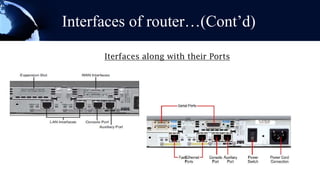
Interfaces of router…(Cont’d)

      Iterfaces along with their Ports
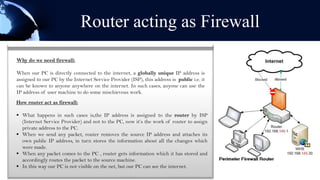
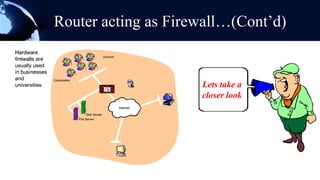
Router acting as Firewall
Why do we need firewall:

When our PC is directly connected to the internet, a globally unique IP address is
assigned to our PC by the Internet Service Provider (ISP), this address is public i.e. it
can be known to anyone anywhere on the internet. In such cases, anyone can use the
IP address of user machine to do some mischievous work.
How router act as firewall:

 What happens in such cases is,the IP address is assigned to the router by ISP
  (Internet Service Provider) and not to the PC, now it’s the work of router to assign
  private address to the PC.
 When we send any packet, router removes the source IP address and attaches its
  own public IP address, in turn stores the information about all the changes which
  were made.
 When any packet comes to the PC , router gets information which it has stored and
  accordingly routes the packet to the source machine.
 In this way our PC is not visible on the net, but our PC can see the internet.
Router acting as Firewall…(Cont’d)


                     Lets take a
                     closer look
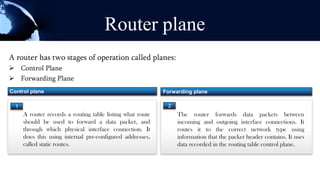
Router plane
A router has two stages of operation called planes:
 Control Plane
 Forwarding Plane
Control plane                                               Forwarding plane

  1                                                          2
      A router records a routing table listing what route        The router forwards data packets between
      should be used to forward a data packet, and               incoming and outgoing interface connections. It
      through which physical interface connection. It            routes it to the correct network type using
      does this using internal pre-configured addresses,         information that the packet header contains. It uses
      called static routes.                                      data recorded in the routing table control plane.
Cisco IOS


A router cannot function without an operating system. Without an operating system, the hardware does not have any capabilities.
The Cisco Internetwork Operating System (Cisco IOS) is the system software in Cisco devices. Different company uses different
IOS for their devices i.e Juniper uses JUNOS for their devices.

The Cisco IOS provides devices with the following network services:
 Basic routing and switching functions
 Reliable and secure access to networked resources
 Network scalability

The services provided by the Cisco IOS are generally accessed using a command line interface (CLI). The IOS file itself is several
megabytes in size and is stored in flash. Flash memory provides non-volatile storage. This means that the contents of the memory
are not lost when the device loses power.
Accessing command line interface(CLI)

There are several ways to access the CLI environment. The most
usual methods are:
 Console
 Telnet or SSH
 AUX port


Console:
The CLI can be accessed through a console session, also known as
the CTY line. A console uses a low speed serial connection to
directly connect a computer or terminal to the console port
on the router or switch. The console port is accessible even if
Accessing CLI….(Cont’d)
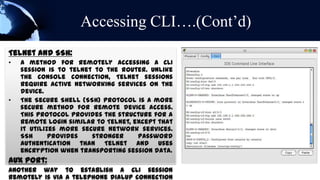
Telnet and SSH:
•   A method for remotely accessing a CLI
    session is to telnet to the router. Unlike
    the console connection, Telnet sessions
    require active networking services on the
    device.
•   The Secure Shell (SSH) protocol is a more
    secure method for remote device access.
    This protocol provides the structure for a
    remote login similar to Telnet, except that
    it utilizes more secure network services.
    SSH      provides   stronger     password
    authentication than Telnet and uses
    encryption when transporting session data.
AUX port:
Another way to establish a CLI session
remotely is via a telephone dialup connection
Router configuration files

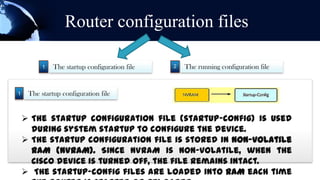
          1   The startup configuration file   2   The running configuration file


1    The startup configuration file


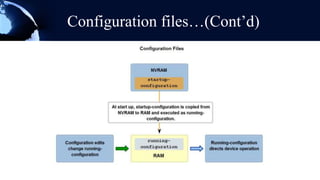
     The startup configuration file (startup-config) is used
      during system startup to configure the device.
     The startup configuration file is stored in non-volatile
      RAM (NVRAM). Since NVRAM is non-volatile, when the
      Cisco device is turned off, the file remains intact.
     The startup-config files are loaded into RAM each time
Configuration files…(Cont’d)
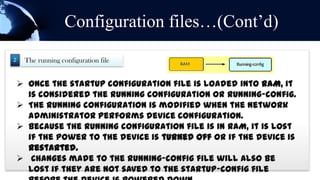
2    The running configuration file


     Once the startup configuration file is loaded into RAM, it
      is considered the running configuration or running-config.
     The running configuration is modified when the network
      administrator performs device configuration.
     Because the running configuration file is in RAM, it is lost
      if the power to the device is turned off or if the device is
      restarted.
     Changes made to the running-config file will also be
      lost if they are not saved to the startup-config file
Configuration files…(Cont’d)
Router boot-up process
Step        1              2                3              4
                                        locating
                                        and
                                        loading the
       Performing                       configurati
                      Loading the   Locating and      Locating and
                                        on file
       the Power-     bootstrap     loading Cisco     loading the
       On Self Test   program       IOS               configuration
       (POST).                                        file
Router boot-up process…(Cont’d)
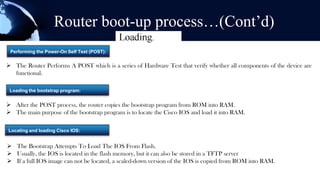
 Performing the Power-On Self Test (POST):


 The Router Performs A POST which is a series of Hardware Test that verify whether all components of the device are
  functional.

 Loading the bootstrap program:


 After the POST process, the router copies the bootstrap program from ROM into RAM.
 The main purpose of the bootstrap program is to locate the Cisco IOS and load it into RAM.

Locating and loading Cisco IOS:


 The Bootstrap Attempts To Load The IOS From Flash.
 Usually, the IOS is located in the flash memory, but it can also be stored in a TFTP server
 If a full IOS image can not be located, a scaled-down version of the IOS is copied from ROM into RAM.
Router boot-up process…(Cont’d)

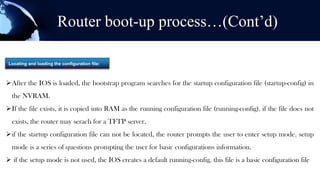
 Locating and loading the configuration file:


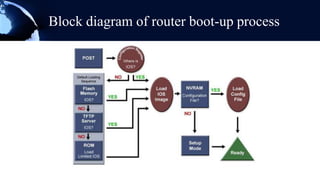
After the IOS is loaded, the bootstrap program searches for the startup configuration file (startup-config) in
  the NVRAM.
If the file exists, it is copied into RAM as the running configuration file (running-config). if the file does not
  exists, the router may serach for a TFTP server.
if the startup configuration file can not be located, the router prompts the user to enter setup mode. setup
  mode is a series of questions prompting the user for basic configurations information.
 if the setup mode is not used, the IOS creates a default running-config. this file is a basic configuration file
Block diagram of router boot-up process
Worldwide market leaders of router
Router advantages and issues
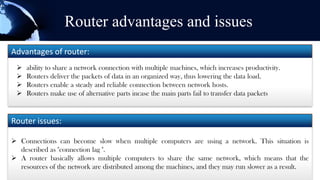
Advantages of router:
    ability to share a network connection with multiple machines, which increases productivity.
    Routers deliver the packets of data in an organized way, thus lowering the data load.
    Routers enable a steady and reliable connection between network hosts.
    Routers make use of alternative parts incase the main parts fail to transfer data packets


Router issues:

 Connections can become slow when multiple computers are using a network. This situation is
  described as "connection lag ".
 A router basically allows multiple computers to share the same network, which means that the
  resources of the network are distributed among the machines, and they may run slower as a result.
Any
Question
  ???

Introduction to router

  • 1.
  • 2.
     Farhan NoorGalib (09.01.04.015)  Zahidul islam george (09.01.04.023)
  • 3.
    What is Router? • A router is a device that acts as a medium for interconnecting several PCs. If a PC named compA wants to send data to compB, the router will choose the best path within the network and send data. • A router is a device that forwards data packets between computer networks
  • 4.
    Router is onekind of a Computer A router is a computer, just like any other computer including a PC. The very first router, used for the Advanced Research Projects Agency Network (ARPANET), was the Interface Message Processor (IMP). The IMP was a Honeywell 316 minicomputer; this computer brought the ARPANET to life on August 30, 1969. Interface Message Processor (IMP) – The First Internet Router
  • 5.
    Router Classification  NonUpgradeable  Upgradeable  Cannot add and  Can add and remove remove the Ethernet interfaces as per or serial interfaces. requirement.  Doesn’t have any  Number of slots slot. available.
  • 6.
    Some other Routertypes Wireless router It combines a number of base stations (wireless access point) as well as a number of wired LAN switch It connects more than one computer to a single DSL line for Internet access. Modem Routers provides the network Modem router address translation (NAT) which is required to support several computers Brouter A Bridge Router or brouter is a network device that works as a bridge and as a router This router interfaces with an ATM (Asynchronous Transfer Mode) network Edge router Access routers are used in 'small office/home office' (SOHO) networking models. Typically, they are optimized for low Access router cost Distribution router Distribution routers aggregate traffic from multiple access routers. . They are often responsible for enforcing quality of service across a WAN A core router may provide a "collapsed backbone" interconnecting the distribution tier routers from multiple buildings Core router of a campus, or large enterprise locations
  • 7.
    Some other Routertypes…(Cont’d) Wireless router Modem router Brouter Edge router Access router Distribution router Core router
  • 9.
  • 10.
    Internal Components ofa Router CPU RAM ROM Flash NVRAM NVRAM Memory CPU executes RAM is volatile ROM does not lose its This is volatile RAM, Non an example operating system memory and it loses its content when the Internetwork similar to Hard Disk. text. Go ahead and instructions, such as content when the router is powered Operating System replaceknown as Also it with your system initialization, router is restarted. It is down or restarted. A (IOS) developed by permanent storage and own text routing functions and also known as bootstrap program is Cisco is stored here. is used to load startup switching functions. temporary storage and located here. It is same IOS is Command line configuration file. is used to store running as the bios of the PC. interface. configuration file.
  • 11.
  • 12.
    External Ports (Interfaces)of Router •WAN interfaces 1 •LAN interfaces - Ethernet 2 •Administration 3 interfaces(Configuration)  Serial interface (S0, S1 etc) – 60 pin/26 pin(smart serial)  ISDN interface(BRI0 etc) – RJ45 WAN  WAN interfaces are used to connect routers to external networks, usually Interfaces over a larger geographical distance. Similar to LAN interfaces, each WAN interface has its own IP address and subnet mask, which identifies it as a member of a specific network.
  • 13.
    Interfaces of router…(Cont’d)  AUI (Attachment Unit Interface) (E0)15 pin  10baseT – RJ45 LAN  As the name indicates, LAN interfaces are used to connect the router to the LAN, similar to how a PC Ethernet Interfaces NIC is used to connect the PC to the Ethernet LAN. Like a PC Ethernet NIC, a router Ethernet interface also has a Layer 2 MAC address and participates in the Ethernet LAN in the same way as any other hosts on that LAN.  Console – RJ45 – Local Administration  Auxiliary – RJ45 – Remote Administration. Administration  The console port is used to connect a terminal, or most often a PC running terminal emulator software, to Interfaces configure the router without the need for network access to that router. The console port must be used during initial configuration of the router.  At times the auxiliary port can be used in ways similar to a console port. It can also be used to attach a modem.
  • 14.
    Interfaces of router…(Cont’d) Iterfaces along with their Ports
  • 15.
    Router acting asFirewall Why do we need firewall: When our PC is directly connected to the internet, a globally unique IP address is assigned to our PC by the Internet Service Provider (ISP), this address is public i.e. it can be known to anyone anywhere on the internet. In such cases, anyone can use the IP address of user machine to do some mischievous work. How router act as firewall:  What happens in such cases is,the IP address is assigned to the router by ISP (Internet Service Provider) and not to the PC, now it’s the work of router to assign private address to the PC.  When we send any packet, router removes the source IP address and attaches its own public IP address, in turn stores the information about all the changes which were made.  When any packet comes to the PC , router gets information which it has stored and accordingly routes the packet to the source machine.  In this way our PC is not visible on the net, but our PC can see the internet.
  • 16.
    Router acting asFirewall…(Cont’d) Lets take a closer look
  • 17.
    Router plane A routerhas two stages of operation called planes:  Control Plane  Forwarding Plane Control plane Forwarding plane 1 2 A router records a routing table listing what route The router forwards data packets between should be used to forward a data packet, and incoming and outgoing interface connections. It through which physical interface connection. It routes it to the correct network type using does this using internal pre-configured addresses, information that the packet header contains. It uses called static routes. data recorded in the routing table control plane.
  • 18.
    Cisco IOS A routercannot function without an operating system. Without an operating system, the hardware does not have any capabilities. The Cisco Internetwork Operating System (Cisco IOS) is the system software in Cisco devices. Different company uses different IOS for their devices i.e Juniper uses JUNOS for their devices. The Cisco IOS provides devices with the following network services:  Basic routing and switching functions  Reliable and secure access to networked resources  Network scalability The services provided by the Cisco IOS are generally accessed using a command line interface (CLI). The IOS file itself is several megabytes in size and is stored in flash. Flash memory provides non-volatile storage. This means that the contents of the memory are not lost when the device loses power.
  • 19.
    Accessing command lineinterface(CLI) There are several ways to access the CLI environment. The most usual methods are:  Console  Telnet or SSH  AUX port Console: The CLI can be accessed through a console session, also known as the CTY line. A console uses a low speed serial connection to directly connect a computer or terminal to the console port on the router or switch. The console port is accessible even if
  • 20.
    Accessing CLI….(Cont’d) Telnet andSSH: • A method for remotely accessing a CLI session is to telnet to the router. Unlike the console connection, Telnet sessions require active networking services on the device. • The Secure Shell (SSH) protocol is a more secure method for remote device access. This protocol provides the structure for a remote login similar to Telnet, except that it utilizes more secure network services. SSH provides stronger password authentication than Telnet and uses encryption when transporting session data. AUX port: Another way to establish a CLI session remotely is via a telephone dialup connection
  • 21.
    Router configuration files 1 The startup configuration file 2 The running configuration file 1 The startup configuration file  The startup configuration file (startup-config) is used during system startup to configure the device.  The startup configuration file is stored in non-volatile RAM (NVRAM). Since NVRAM is non-volatile, when the Cisco device is turned off, the file remains intact.  The startup-config files are loaded into RAM each time
  • 22.
    Configuration files…(Cont’d) 2 The running configuration file  Once the startup configuration file is loaded into RAM, it is considered the running configuration or running-config.  The running configuration is modified when the network administrator performs device configuration.  Because the running configuration file is in RAM, it is lost if the power to the device is turned off or if the device is restarted.  Changes made to the running-config file will also be lost if they are not saved to the startup-config file
  • 23.
  • 24.
    Router boot-up process Step 1 2 3 4 locating and loading the Performing configurati Loading the Locating and Locating and on file the Power- bootstrap loading Cisco loading the On Self Test program IOS configuration (POST). file
  • 25.
    Router boot-up process…(Cont’d) Performing the Power-On Self Test (POST):  The Router Performs A POST which is a series of Hardware Test that verify whether all components of the device are functional. Loading the bootstrap program:  After the POST process, the router copies the bootstrap program from ROM into RAM.  The main purpose of the bootstrap program is to locate the Cisco IOS and load it into RAM. Locating and loading Cisco IOS:  The Bootstrap Attempts To Load The IOS From Flash.  Usually, the IOS is located in the flash memory, but it can also be stored in a TFTP server  If a full IOS image can not be located, a scaled-down version of the IOS is copied from ROM into RAM.
  • 26.
    Router boot-up process…(Cont’d) Locating and loading the configuration file: After the IOS is loaded, the bootstrap program searches for the startup configuration file (startup-config) in the NVRAM. If the file exists, it is copied into RAM as the running configuration file (running-config). if the file does not exists, the router may serach for a TFTP server. if the startup configuration file can not be located, the router prompts the user to enter setup mode. setup mode is a series of questions prompting the user for basic configurations information.  if the setup mode is not used, the IOS creates a default running-config. this file is a basic configuration file
  • 27.
    Block diagram ofrouter boot-up process
  • 28.
  • 29.
    Router advantages andissues Advantages of router:  ability to share a network connection with multiple machines, which increases productivity.  Routers deliver the packets of data in an organized way, thus lowering the data load.  Routers enable a steady and reliable connection between network hosts.  Routers make use of alternative parts incase the main parts fail to transfer data packets Router issues:  Connections can become slow when multiple computers are using a network. This situation is described as "connection lag ".  A router basically allows multiple computers to share the same network, which means that the resources of the network are distributed among the machines, and they may run slower as a result.
  • 30.