YOGESH PARMAR
BCA ( MSC –IT RUNNING )
   1864: James Clerk Maxwell proved the existence
    of electromagnetic waves

   1887 Heinrich Hertz sent and received wireless
    waves, using a spark transmitter

   1920: Marconi discovers short wave radio, with
    wavelengths between 10 and 100 meters.

   The first wireless LAN was created in at the
    University of Hawaii in 1971.
What is Wi-Fi?

 Wi-Fi   is stands for wireless fidelity.
   Requirement of Wi-Fi is mostly in Network Adapters, USB
    Adapters, internal and external antennas, all kinds of
    Access points.
   A Wireless Adapter translates data into a radio signal and
    transmits it using an antenna.
   A router receives the signal and decodes it. The router
    sends the information to the Internet using a physical
    wired Ethernet connection.
 Theterm Wi-Fi, first used commercially in
 August 1999, was coined by a brand-
 consulting firm called interbrand
 Corporation that the Alliance had hired to
 determine a name that was "a little catchier
 than 'IEEE 802.11b Direct Sequence"
SPEED OF WI-FI
  wi-fi network use radio technology to
   transmit and receive the data at a high
   speed.
  (1) 802.11
  (2) 802.11a
  (3) 802.11b
  (4) 802.11g
  (5) 802.11n
A  and B is 10mbps and G is 54mbps
 And Upcoming N is 300mbps to get
  speed on your internet connection.
HOW TO WIFI NETWORK WORK?

    The wi-fi of basic concept is same as walkie-talkies.
    wi-fi hotspot is created by installing and access point to and
     internet connection
    when wi-fi enabled devices encounters a hotspots the
     devices can than connect to that net-work wirelelissly
    a single access point can support up to 30-users and can
     function within a range of 100-150 feet indoors and up to
     300 feet outdoor.
    many access point can be connected to each other via
     Ethernet cable to create a single large network.
Wi-Fi OBJECT


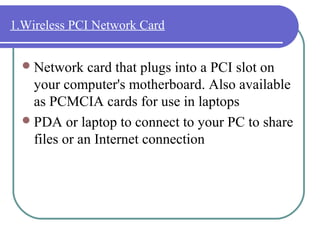
                                     2.A roof-mounted Wi-Fi
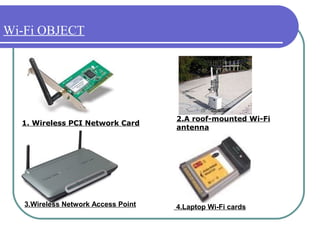
  1. Wireless PCI Network Card
                                     antenna


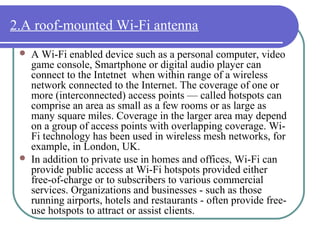
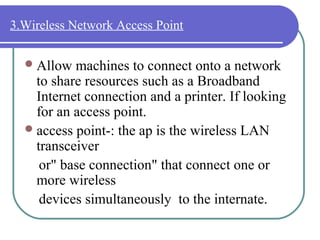
   3.Wireless Network Access Point   4.Laptop Wi-Fi cards
1.Wireless PCI Network Card


   Network    card that plugs into a PCI slot on
    your computer's motherboard. Also available
    as PCMCIA cards for use in laptops
   PDA or laptop to connect to your PC to share
    files or an Internet connection
2.A roof-mounted Wi-Fi antenna
    A Wi-Fi enabled device such as a personal computer, video
     game console, Smartphone or digital audio player can
     connect to the Intetnet when within range of a wireless
     network connected to the Internet. The coverage of one or
     more (interconnected) access points — called hotspots can
     comprise an area as small as a few rooms or as large as
     many square miles. Coverage in the larger area may depend
     on a group of access points with overlapping coverage. Wi-
     Fi technology has been used in wireless mesh networks, for
     example, in London, UK.
    In addition to private use in homes and offices, Wi-Fi can
     provide public access at Wi-Fi hotspots provided either
     free-of-charge or to subscribers to various commercial
     services. Organizations and businesses - such as those
     running airports, hotels and restaurants - often provide free-
     use hotspots to attract or assist clients.
3.Wireless Network Access Point

   Allow  machines to connect onto a network
    to share resources such as a Broadband
    Internet connection and a printer. If looking
    for an access point.
   access point-: the ap is the wireless LAN
    transceiver
     or" base connection" that connect one or
    more wireless
     devices simultaneously to the internate.
4.Laptop Wi-Fi cards


   These  are PCMCIA cards that slide into a
    special slot on many laptops, adding wi-fi
    connectivity to laptops.
   wi-fi card-:they accept the wireless signal
    and relay information they can be internal
    and external.
WHERE IS USE OF Wi-Fi?


     Offices

     Homes

     Industries

     Hospitals

     Hotels/ restaurants

     Banks

     IT companies
ADVANTAGES & DISADVANTAGES FOR Wi-Fi


   The some advantages of Wi-Fi is
    mobility,ease of installation,costly,speed,
    secure,flexibility.

   The disadvantages of Wi-Fi is limited
    range and high power consumption.
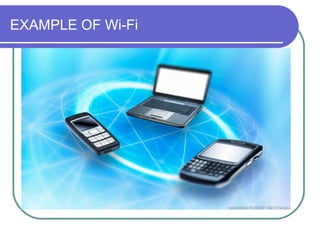
EXAMPLE OF Wi-Fi
ADVANCE VERSION OF Wi-Fi

  Wi-MAX  is the Advance version of Wi-Fi.
  Wi-MAX is the providing the more security and
  range compare to Wi-Fi.
  Wi-MAX stands for the Worldwide
  Interoperability Microwave Access.
BLUETOOTH

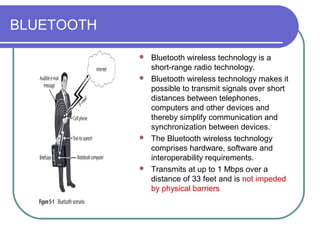
             Bluetooth wireless technology is a
              short-range radio technology.
             Bluetooth wireless technology makes it
              possible to transmit signals over short
              distances between telephones,
              computers and other devices and
              thereby simplify communication and
              synchronization between devices.
             The Bluetooth wireless technology
              comprises hardware, software and
              interoperability requirements.
             Transmits at up to 1 Mbps over a
              distance of 33 feet and is not impeded
              by physical barriers
WI-FI V/S BLUETOOTH

  Bluetooth is the shortes range of
   wireless communication up to 10Fit.
  Where Wi-Fi is the largest range to
   wireless communicate .
  Bluetooth is get data to transfer speed is
   1.0mbps where Wi-Fi get data transfer
   speed up to 802.11a to 802.11n.
  Now a days Wi-Fi is the best use for
   people better than Bluetooth.
THANK YOU

Wi fi network

  • 1.
    YOGESH PARMAR BCA (MSC –IT RUNNING )
  • 2.
    1864: James Clerk Maxwell proved the existence of electromagnetic waves  1887 Heinrich Hertz sent and received wireless waves, using a spark transmitter  1920: Marconi discovers short wave radio, with wavelengths between 10 and 100 meters.  The first wireless LAN was created in at the University of Hawaii in 1971.
  • 3.
    What is Wi-Fi? Wi-Fi is stands for wireless fidelity.  Requirement of Wi-Fi is mostly in Network Adapters, USB Adapters, internal and external antennas, all kinds of Access points.  A Wireless Adapter translates data into a radio signal and transmits it using an antenna.  A router receives the signal and decodes it. The router sends the information to the Internet using a physical wired Ethernet connection.
  • 4.
     Theterm Wi-Fi,first used commercially in August 1999, was coined by a brand- consulting firm called interbrand Corporation that the Alliance had hired to determine a name that was "a little catchier than 'IEEE 802.11b Direct Sequence"
  • 5.
    SPEED OF WI-FI  wi-fi network use radio technology to transmit and receive the data at a high speed.  (1) 802.11  (2) 802.11a  (3) 802.11b  (4) 802.11g  (5) 802.11n
  • 6.
    A andB is 10mbps and G is 54mbps  And Upcoming N is 300mbps to get speed on your internet connection.
  • 7.
    HOW TO WIFINETWORK WORK?  The wi-fi of basic concept is same as walkie-talkies.  wi-fi hotspot is created by installing and access point to and internet connection  when wi-fi enabled devices encounters a hotspots the devices can than connect to that net-work wirelelissly  a single access point can support up to 30-users and can function within a range of 100-150 feet indoors and up to 300 feet outdoor.  many access point can be connected to each other via Ethernet cable to create a single large network.
  • 8.
    Wi-Fi OBJECT 2.A roof-mounted Wi-Fi 1. Wireless PCI Network Card antenna 3.Wireless Network Access Point 4.Laptop Wi-Fi cards
  • 9.
    1.Wireless PCI NetworkCard  Network card that plugs into a PCI slot on your computer's motherboard. Also available as PCMCIA cards for use in laptops  PDA or laptop to connect to your PC to share files or an Internet connection
  • 10.
    2.A roof-mounted Wi-Fiantenna  A Wi-Fi enabled device such as a personal computer, video game console, Smartphone or digital audio player can connect to the Intetnet when within range of a wireless network connected to the Internet. The coverage of one or more (interconnected) access points — called hotspots can comprise an area as small as a few rooms or as large as many square miles. Coverage in the larger area may depend on a group of access points with overlapping coverage. Wi- Fi technology has been used in wireless mesh networks, for example, in London, UK.  In addition to private use in homes and offices, Wi-Fi can provide public access at Wi-Fi hotspots provided either free-of-charge or to subscribers to various commercial services. Organizations and businesses - such as those running airports, hotels and restaurants - often provide free- use hotspots to attract or assist clients.
  • 11.
    3.Wireless Network AccessPoint  Allow machines to connect onto a network to share resources such as a Broadband Internet connection and a printer. If looking for an access point.  access point-: the ap is the wireless LAN transceiver or" base connection" that connect one or more wireless devices simultaneously to the internate.
  • 12.
    4.Laptop Wi-Fi cards  These are PCMCIA cards that slide into a special slot on many laptops, adding wi-fi connectivity to laptops.  wi-fi card-:they accept the wireless signal and relay information they can be internal and external.
  • 13.
    WHERE IS USEOF Wi-Fi?  Offices  Homes  Industries  Hospitals  Hotels/ restaurants  Banks  IT companies
  • 14.
    ADVANTAGES & DISADVANTAGESFOR Wi-Fi  The some advantages of Wi-Fi is mobility,ease of installation,costly,speed, secure,flexibility.  The disadvantages of Wi-Fi is limited range and high power consumption.
  • 15.
  • 16.
    ADVANCE VERSION OFWi-Fi  Wi-MAX is the Advance version of Wi-Fi.  Wi-MAX is the providing the more security and range compare to Wi-Fi.  Wi-MAX stands for the Worldwide Interoperability Microwave Access.
  • 17.
    BLUETOOTH  Bluetooth wireless technology is a short-range radio technology.  Bluetooth wireless technology makes it possible to transmit signals over short distances between telephones, computers and other devices and thereby simplify communication and synchronization between devices.  The Bluetooth wireless technology comprises hardware, software and interoperability requirements.  Transmits at up to 1 Mbps over a distance of 33 feet and is not impeded by physical barriers
  • 18.
    WI-FI V/S BLUETOOTH  Bluetooth is the shortes range of wireless communication up to 10Fit.  Where Wi-Fi is the largest range to wireless communicate .  Bluetooth is get data to transfer speed is 1.0mbps where Wi-Fi get data transfer speed up to 802.11a to 802.11n.  Now a days Wi-Fi is the best use for people better than Bluetooth.
  • 19.