
Technology
Wi-Fi Tech. Agenda 
 Introduction 
 Purpose 
 Wi-Fi Alliance 
 Founder 
 The Wi-Fi Technology 
 Versions 
 Elements of a WI-FI Network 
 How a Wi-Fi Network Works 
 Wi-Fi Network Topologies 
 Wi-Fi Configurations 
 Wi-Fi Applications 
 Wi-Fi Security 
 Advantages & Disadvantages
Introduction 
• Wireless Technology is an alternative to Wired Technology, 
which is commonly used, for connecting devices in wireless 
mode. 
• Wi-Fi (Wireless Fidelity) is a generic term that refers to the 
IEEE 802.11 communications standard for Wireless Local 
Area Networks (WLANs). 
• Wi-Fi Network connect computers to each other, to the 
internet and to the wired network. 
• Wi-Fi works on physical and data link layer.
Need of Wi-Fi Technology 
Home! 
!!
Purpose 
 The purpose of Wi-Fi is to hide complexity by enabling 
wireless access to applications and data, media and streams. 
 The main aims of Wi-Fi are the following: 
make access to information easier 
ensure compatibility and co-existence of devices 
eliminate complex cabling 
eliminate switches, adapters, plugs, pins and connectors
Wi-Fi Alliance 
The term Wi-Fi was created the Wi-Fi Alliance as a play 
on "Hi-Fi," an abbreviation for "high fidelity," which 
referred to high-quality audio reproduction. 
 According to the Wi-Fi Alliance, "Wi-Fi" is not an 
abbreviation. 
The confusion may stem from the fact that the Alliance 
briefly used "The standard for wireless fidelity" as a 
slogan for Wi-Fi.
Founder 
• Phil Belanger who is the founding member of the Wi-Fi 
Alliance states that term Wi-Fi was never supposed to 
mean anything at all. 
• The yin-yang logo indicates the certification of a product 
for interoperability.
The Wi-Fi Technology 
 The technology used in Wi-Fi is easiest to understand 
in terms of radio. 
 It is quite similar to walkie-talkies, the only 
difference being in the strength of signals. 
 An ordinary walkie-talkie can handle only limited 
data in the range of 1000 bits per second, and operate 
at 49 MHz. 
 In the case of Wi-Fi radios, the signal strength is 
much more, so they can handle much higher data 
rates. Wi-Fi radios typically operate at a frequency of 
2.4GHz.
versions 
♣ There are three versions of Wi-Fi radios currently 
available- the ones that work with, 
♣ 802.11b 
♣ 802.11g 
♣ 802.11a 
♣ While the first two- 802.11b and 802.11g- transmit 
2.4 GHz, the radios operating at 802.11a standard can 
transmit at 5GHz.
IEEE 802.11b 
► Appeared in late 1999 
► Operates at 2.4GHz radio spectrum 
► 11 Mbps (theoretical speed) - within 30 m Range 
► 4-6 Mbps (actual speed) 
► 100 -150 feet range 
► Most popular, Least Expensive 
► Interference from mobile phones and Bluetooth devices 
which can reduce the transmission speed.
IEEE 802.11a 
♣ Introduced in 2001 
♣ Operates at 5 GHz (less popular) 
♣ 54 Mbps (theoretical speed) 
♣ 15-20 Mbps (Actual speed) 
♣ 50-75 feet range 
♣ More expensive 
♣ Not compatible with 802.11b
IEEE 802.11g 
 Introduced in 2003 
 Combine the feature of both standards (a,b) 
 100-150 feet range 
 54 Mbps Speed 
 2.4 GHz radio frequencies 
 Compatible with ‘b’
Elements of a WI-FI Network 
 Access Point (AP) - The AP is a wireless LAN 
transceiver or “base station” that can connect one or many 
wireless devices simultaneously to the Internet. 
 Wi-Fi cards - They accept the wireless signal and relay 
information. They can be internal and external.(e.g 
PCMCIA Card for Laptop and PCI Card for Desktop PC) 
 Safeguards - Firewalls and anti-virus software protect 
networks from uninvited users and keep information 
secure.
How a Wi-Fi Network Works 
 Basic concept is same asWalkie talkies. 
 A Wi-Fi hotspot is created by installing an access point to 
an internet connection. 
 An access point acts as a base station. 
 When Wi-Fi enabled device encounters a hotspot the 
device can then connect to that network wirelessly. 
 A single access point can support up to 30 users and can 
function within a range of 100 up to 300 feet. 
 Many access points can be connected to each other via 
Ethernet cables to create a single large network.
Wi-Fi Network Topologies 
 IEEE 802.11 operates in following 3 modes, 
 AP-based topology (Infrastructure Mode) 
 Peer-to-Peer topology (Ad-hoc Mode) 
 Point-to-Multipoint bridge topology
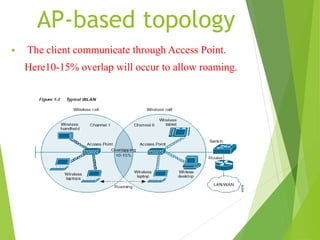
AP-based topology 
 The client communicate through Access Point. 
Here10-15% overlap will occur to allow roaming.
Peer-to-Peer topology 
• AP is not required. 
• Client devices within a cell can communicate directly with 
each other. 
• It is useful for setting up of a wireless network quickly 
and easily.
Point-to-Multipoint bridge 
topology 
• This is used to connect a LAN in one building to a LANs 
in other buildings even if the buildings are miles apart. 
These conditions receive a clear line of sight between 
buildings. 
• The line-of-sight range varies based on the type of wireless 
bridge and antenna used as well as the environmental 
conditions.
Wi-Fi Configurations 
 Wi-Fi is composed of three main sectors: 
 Home (individual residences and apartment buildings) 
 Public (Round about 70,000 “hotspots” through out the 
world) 
 Enterprise (corporations, universities, office parks)
802.11 Vs 802.16
Wi-Fi Applications 
 Home 
 Small Businesses 
 Large Corporations & Campuses 
 Health Care 
 Travellers
Wi-Fi Security 
Service Set Identifier (SSID) 
Wired Equivalent Privacy (WEP) 
Wireless Protected Access (WPA) 
IEEE 802.11i 
 WEP and WPA are encryption protocols that you can choose 
from in your router's firmware. 
 Wi-Fi Protected Access (WPA), a subset of the upcoming 
802.11i security standard, will replace the flawed Wired 
Equivalent Privacy (WEP). 
 Without your SSID, people will not be able to join your Wi- 
Fi hotspot.
Advantages 
 Ease of Installation 
 Flexibility 
 Cost 
 Security 
 Speed
Limitations 
 Degradation in performance 
 High power consumption 
 Limited range
Thank You

wi-fi technology

  • 1.
  • 2.
    Wi-Fi Tech. Agenda  Introduction  Purpose  Wi-Fi Alliance  Founder  The Wi-Fi Technology  Versions  Elements of a WI-FI Network  How a Wi-Fi Network Works  Wi-Fi Network Topologies  Wi-Fi Configurations  Wi-Fi Applications  Wi-Fi Security  Advantages & Disadvantages
  • 3.
    Introduction • WirelessTechnology is an alternative to Wired Technology, which is commonly used, for connecting devices in wireless mode. • Wi-Fi (Wireless Fidelity) is a generic term that refers to the IEEE 802.11 communications standard for Wireless Local Area Networks (WLANs). • Wi-Fi Network connect computers to each other, to the internet and to the wired network. • Wi-Fi works on physical and data link layer.
  • 4.
    Need of Wi-FiTechnology Home! !!
  • 5.
    Purpose  Thepurpose of Wi-Fi is to hide complexity by enabling wireless access to applications and data, media and streams.  The main aims of Wi-Fi are the following: make access to information easier ensure compatibility and co-existence of devices eliminate complex cabling eliminate switches, adapters, plugs, pins and connectors
  • 6.
    Wi-Fi Alliance Theterm Wi-Fi was created the Wi-Fi Alliance as a play on "Hi-Fi," an abbreviation for "high fidelity," which referred to high-quality audio reproduction.  According to the Wi-Fi Alliance, "Wi-Fi" is not an abbreviation. The confusion may stem from the fact that the Alliance briefly used "The standard for wireless fidelity" as a slogan for Wi-Fi.
  • 7.
    Founder • PhilBelanger who is the founding member of the Wi-Fi Alliance states that term Wi-Fi was never supposed to mean anything at all. • The yin-yang logo indicates the certification of a product for interoperability.
  • 8.
    The Wi-Fi Technology  The technology used in Wi-Fi is easiest to understand in terms of radio.  It is quite similar to walkie-talkies, the only difference being in the strength of signals.  An ordinary walkie-talkie can handle only limited data in the range of 1000 bits per second, and operate at 49 MHz.  In the case of Wi-Fi radios, the signal strength is much more, so they can handle much higher data rates. Wi-Fi radios typically operate at a frequency of 2.4GHz.
  • 9.
    versions ♣ Thereare three versions of Wi-Fi radios currently available- the ones that work with, ♣ 802.11b ♣ 802.11g ♣ 802.11a ♣ While the first two- 802.11b and 802.11g- transmit 2.4 GHz, the radios operating at 802.11a standard can transmit at 5GHz.
  • 10.
    IEEE 802.11b ►Appeared in late 1999 ► Operates at 2.4GHz radio spectrum ► 11 Mbps (theoretical speed) - within 30 m Range ► 4-6 Mbps (actual speed) ► 100 -150 feet range ► Most popular, Least Expensive ► Interference from mobile phones and Bluetooth devices which can reduce the transmission speed.
  • 11.
    IEEE 802.11a ♣Introduced in 2001 ♣ Operates at 5 GHz (less popular) ♣ 54 Mbps (theoretical speed) ♣ 15-20 Mbps (Actual speed) ♣ 50-75 feet range ♣ More expensive ♣ Not compatible with 802.11b
  • 12.
    IEEE 802.11g Introduced in 2003  Combine the feature of both standards (a,b)  100-150 feet range  54 Mbps Speed  2.4 GHz radio frequencies  Compatible with ‘b’
  • 13.
    Elements of aWI-FI Network  Access Point (AP) - The AP is a wireless LAN transceiver or “base station” that can connect one or many wireless devices simultaneously to the Internet.  Wi-Fi cards - They accept the wireless signal and relay information. They can be internal and external.(e.g PCMCIA Card for Laptop and PCI Card for Desktop PC)  Safeguards - Firewalls and anti-virus software protect networks from uninvited users and keep information secure.
  • 15.
    How a Wi-FiNetwork Works  Basic concept is same asWalkie talkies.  A Wi-Fi hotspot is created by installing an access point to an internet connection.  An access point acts as a base station.  When Wi-Fi enabled device encounters a hotspot the device can then connect to that network wirelessly.  A single access point can support up to 30 users and can function within a range of 100 up to 300 feet.  Many access points can be connected to each other via Ethernet cables to create a single large network.
  • 16.
    Wi-Fi Network Topologies  IEEE 802.11 operates in following 3 modes,  AP-based topology (Infrastructure Mode)  Peer-to-Peer topology (Ad-hoc Mode)  Point-to-Multipoint bridge topology
  • 17.
    AP-based topology The client communicate through Access Point. Here10-15% overlap will occur to allow roaming.
  • 18.
    Peer-to-Peer topology •AP is not required. • Client devices within a cell can communicate directly with each other. • It is useful for setting up of a wireless network quickly and easily.
  • 19.
    Point-to-Multipoint bridge topology • This is used to connect a LAN in one building to a LANs in other buildings even if the buildings are miles apart. These conditions receive a clear line of sight between buildings. • The line-of-sight range varies based on the type of wireless bridge and antenna used as well as the environmental conditions.
  • 20.
    Wi-Fi Configurations Wi-Fi is composed of three main sectors:  Home (individual residences and apartment buildings)  Public (Round about 70,000 “hotspots” through out the world)  Enterprise (corporations, universities, office parks)
  • 21.
  • 22.
    Wi-Fi Applications Home  Small Businesses  Large Corporations & Campuses  Health Care  Travellers
  • 23.
    Wi-Fi Security ServiceSet Identifier (SSID) Wired Equivalent Privacy (WEP) Wireless Protected Access (WPA) IEEE 802.11i  WEP and WPA are encryption protocols that you can choose from in your router's firmware.  Wi-Fi Protected Access (WPA), a subset of the upcoming 802.11i security standard, will replace the flawed Wired Equivalent Privacy (WEP).  Without your SSID, people will not be able to join your Wi- Fi hotspot.
  • 24.
    Advantages  Easeof Installation  Flexibility  Cost  Security  Speed
  • 25.
    Limitations  Degradationin performance  High power consumption  Limited range
  • 26.