Wireless LAN
Mukesh Chinta
Asst Professor, CSE
What is WLAN???
 A wireless local area network(LAN) is a
flexible data communications system
implemented as an extension to, or as an
alternative for, a wired LAN.
 Using radio frequency (RF) technology, wireless
LANs transmit and receive data over the air,
minimizing the need for wired connections.
 Thus, combining data connectivity with user mobility.
Advantages of WLAN
 Productivity, convenience, and cost
advantages
 Installation speed and simplicity.
 Installation flexibility.
 Reduced cost-of-ownership.
 Mobility.
 Scalability.
Disadvantages of WLAN
 Cost
 Wireless network cards cost 4 times more than wired network
cards.
 The access points are more expensive than hubs and wires.
 Signal Bleed Over
 Access points pick up the signals of adjacent access points or
overpower their signal.
 Environmental Conditions
 Susceptible to weather and solar activity.
 Constrained by buildings, trees, terrain.
 Less Capacity
 Slower bandwidth.
 Limit to how much data a carrier wave can transmit without
lost packets impacting performance.
 Medical Professionals
 Corporate
 Education
 Temporary Situations
 Airlines
 Security Staff
 Emergency Centers
Wireless LAN Applications
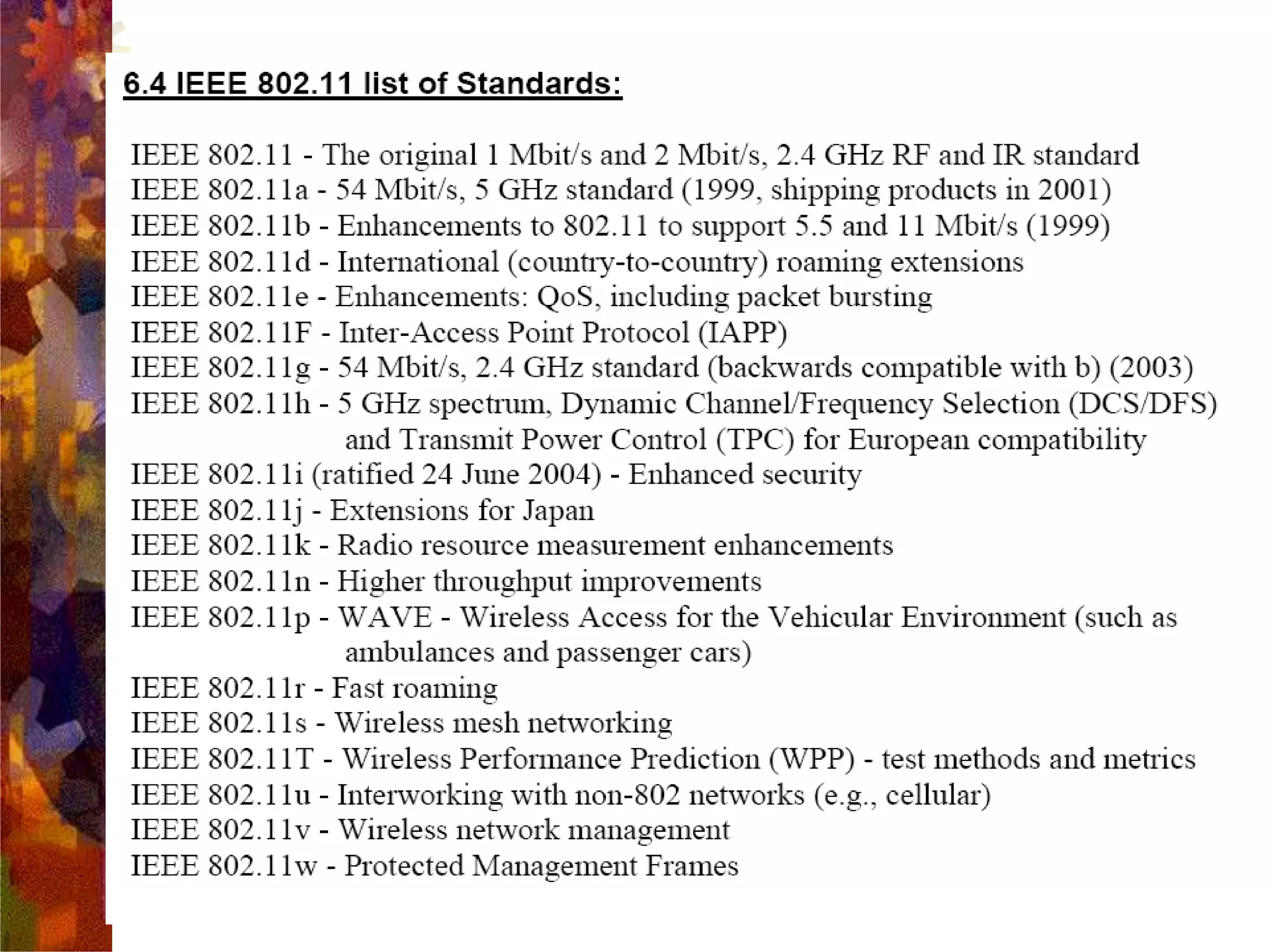
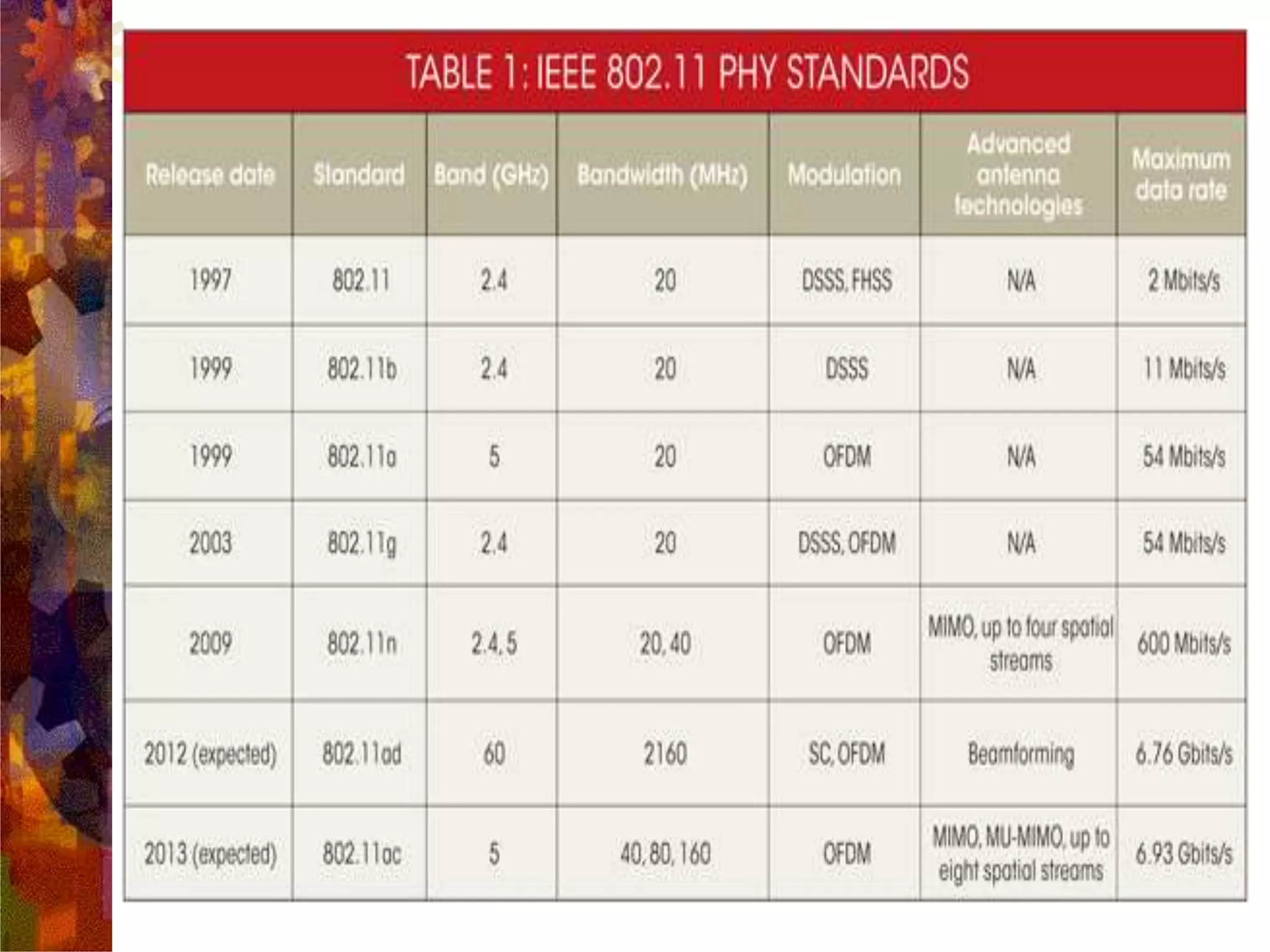
 In response to lacking standards, IEEE developed the
first internationally recognized wireless LAN
standard – IEEE 802.11
 IEEE published 802.11 in 1997, after seven years of
work
 Most prominent specification for WLANs
 Scope of IEEE 802.11 is limited to Physical and Data
Link Layers.
IEEE 802.11 Wireless LAN
Standard
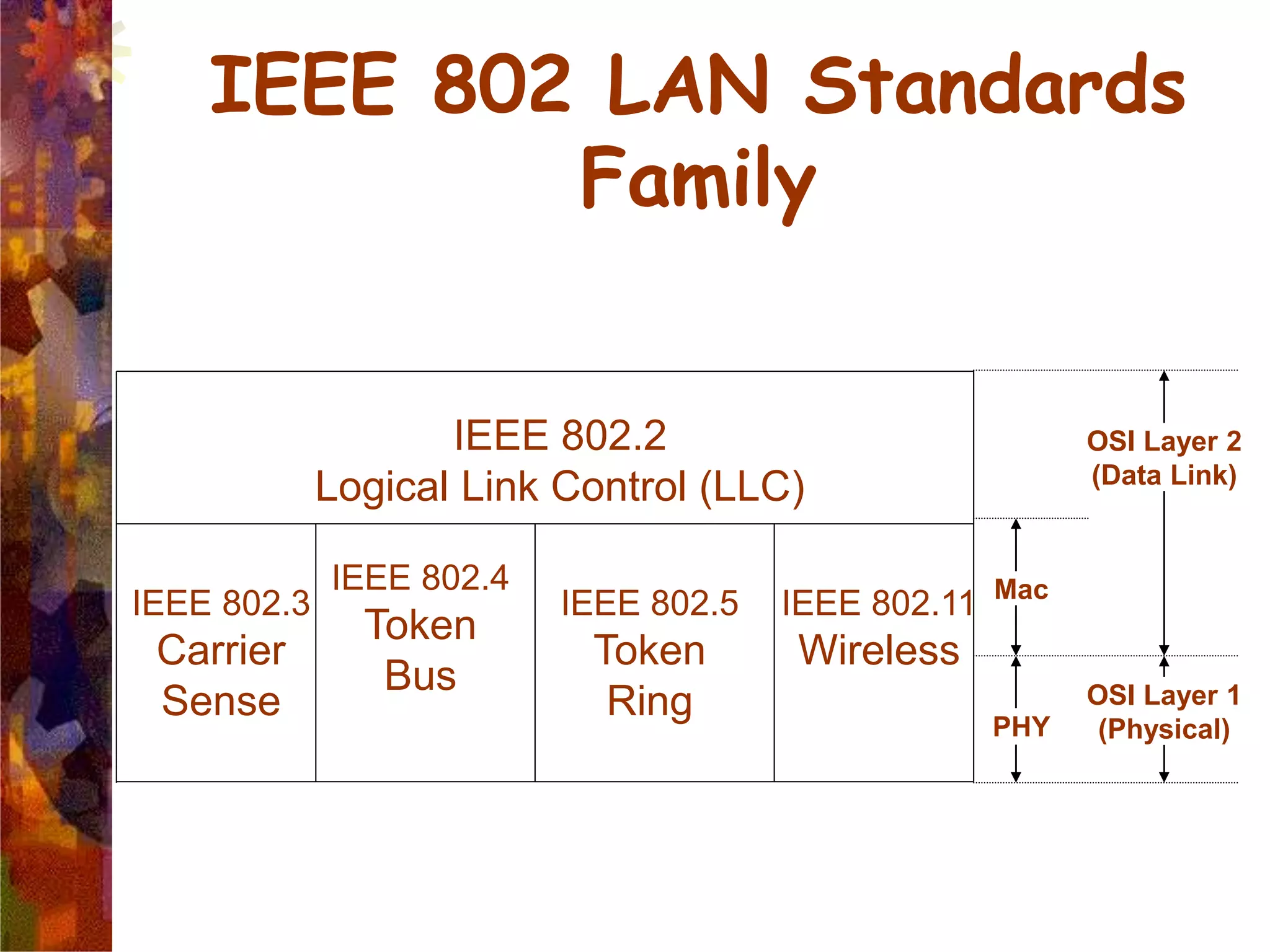
IEEE 802 LAN Standards
Family
IEEE 802.3
Carrier
Sense
IEEE 802.4
Token
Bus
IEEE 802.5
Token
Ring
IEEE 802.11
Wireless
IEEE 802.2
Logical Link Control (LLC)
PHY
OSI Layer 1
(Physical)
Mac
OSI Layer 2
(Data Link)
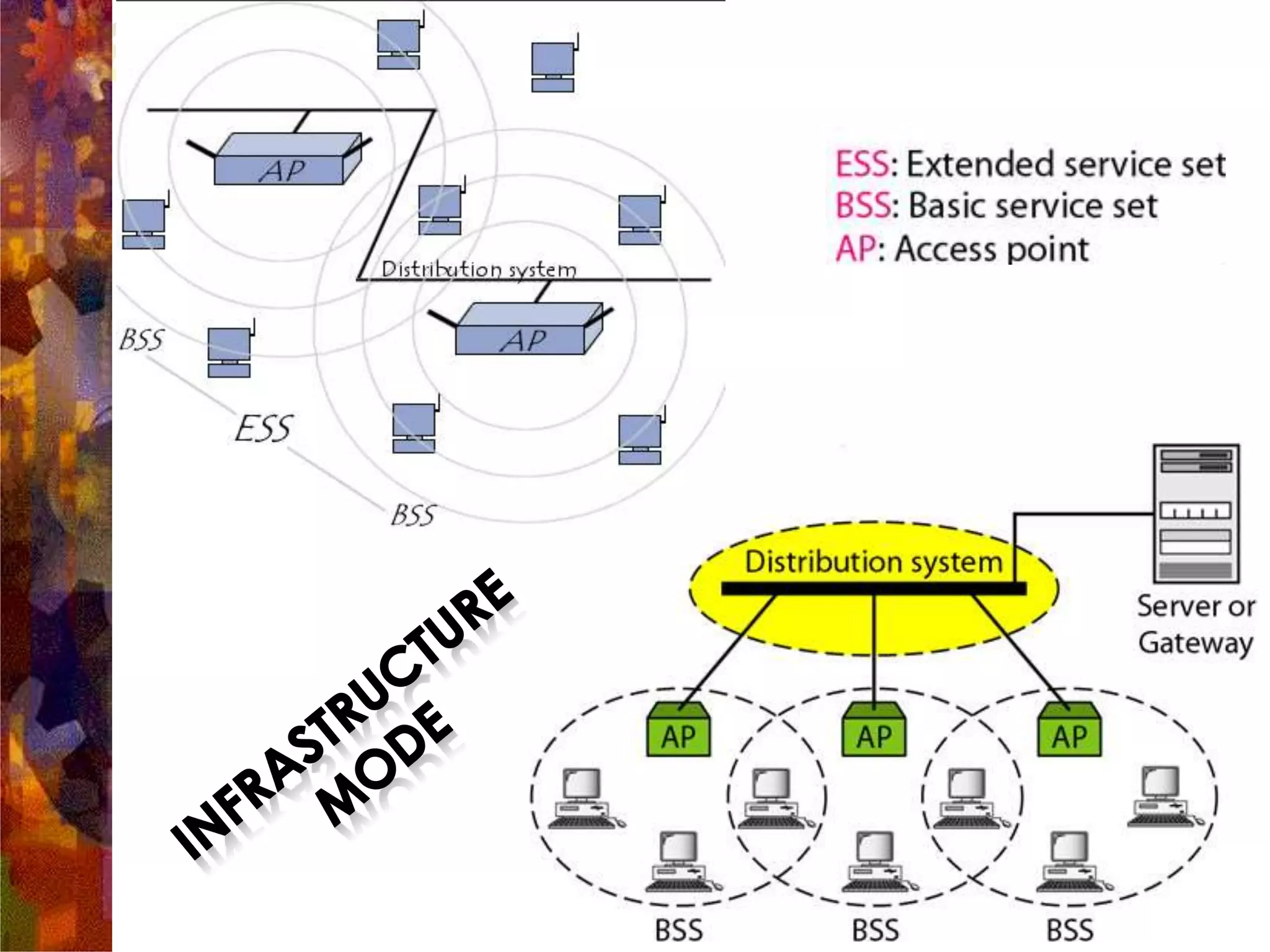
802.11 Infrastructure
 802.11 networks can be used in two modes: Infrastructure
and Ad hoc Mode
 Infrastructure mode requires a central access point that all devices
connect to.
 Ad-hoc mode is also known as “peer-to-peer” mode. Ad-hoc networks
don't require a centralized access point. Instead, devices on the wireless
network connect directly to each other
Access point (AP): A station that provides access to the
DS.
Basic service set (BSS): A set of stations controlled by a
single AP.
Distribution system (DS): A system used to interconnect
a set of BSSs to create an ESS.
DS is implementation-independent. It can be a wired 802.3
Ethernet LAN, 802.4 token bus, 802.5 token ring or another
802.11 medium.
Extended service set (ESS):Two or more BSS
interconnected by DS
Portal: Logical entity where 802.11 network integrates
with a non 802.11 network.
IEEE 802.11 Terminology
WLAN Topology
Ad-Hoc Network
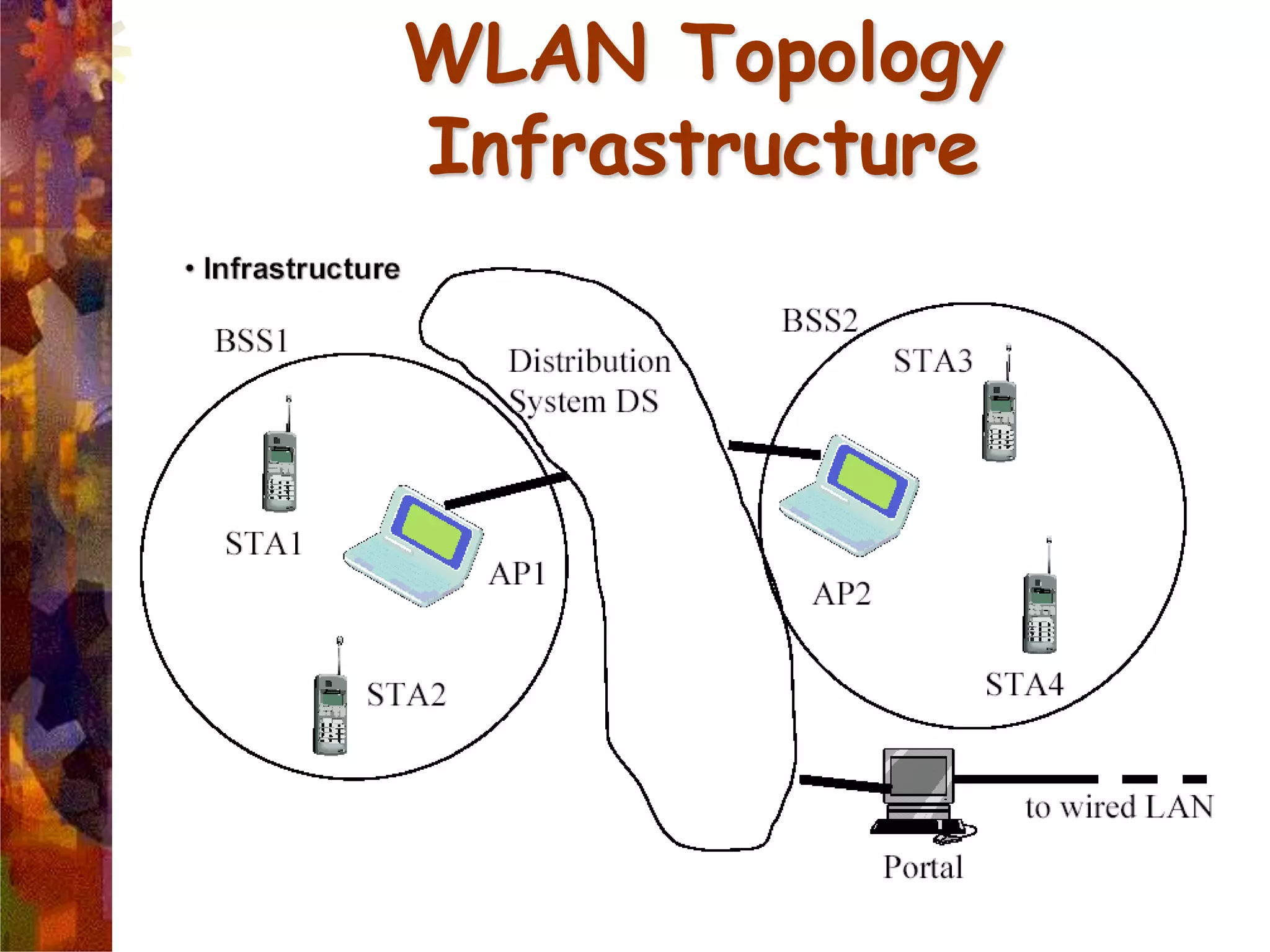
WLAN Topology
Infrastructure
 In each station computer (STA for short)
connects to an access point via a wireless link. The set-up formed by the
access point and the stations located within its coverage area are called the
or for short. They form one cell.
 Each BSS is identified by a a 6-byte (48-bite) identifier. In
infrastructure mode, the BSSID corresponds to the access point's MAC
address.
 Several access points can be linked together (or more precisely several
BSS's) using a connection called a for short)
in order to form an or . The distribution
system can also be a wired network, a cable between two access points or
even a wireless network.
 An ESS is identified with an
a 32-character identifier (in ASCII format) which acts as its
name on the network. The ESSID, often shortened to , shows the
network's name, and in a way acts a first-level security measure, since it is
necessary for a station to know the SSID in order to connect to the
extended network.
802.11 Protocol Stack
802.11 MAC Sublayer Protocol
MAC layer
covers three
functional
areas:
reliable
data
delivery
access
control
security
Medium Access Control
802.11 MAC sublayer protocol
 In 802.11 wireless LANs, “seizing the channel” does
not exist as in 802.3 wired Ethernet.
 Two additional problems:
 Hidden Terminal Problem
 Exposed Station Problem
 To deal with these two problems 802.11 supports two
modes of operation:
 DCF (Distributed Coordination Function)
 PCF (Point Coordination Function).
 All implementations must support DCF, but PCF
is optional.
DCF
 DCF sub-layer uses CSMA/CA
 if station has frame to send it listens to medium
 if medium idle, station may transmit
 else waits until current transmission completes
 No collision detection since on wireless network, so use
collision avoidance (backoff and RTS/CTS)
 DCF includes delays that act as a priority scheme
 DIFS: DCF inter-frame space
 SIFS: short inter-frame space (SIFS < DIFS)
DCF
 1. A station with a frame to transmit senses the medium. If the medium is
idle, it waits to see if the medium remains idle for a time equal to IFS. If so,
the station may transmit immediately.
 2. If the medium is busy (either because the station initially finds the
medium busy or because the medium becomes busy during the IFS idle
time), the station defers transmission and continues to monitor the medium
until the current transmission is over.
 3. Once the current transmission is over, the station delays another IFS. If
the medium remains idle for this period, then the station backs off a random
amount of time and again senses the medium. If the medium is still idle, the
station may transmit. During the backoff time, if the medium becomes busy,
the backoff timer is halted and resumes when the medium becomes idle.
 4.If the transmission is unsuccessful, which is determined by the absence of
an acknowledgement, then it is assumed that a collision has occurred.
Simple CSMA in action
Virtual Carrier Sensing
 To reduce ambiguities about which station is sending, 802.11 defines
channel sensing to consist of both physical sensing and virtual sensing.
 Physical sensing simply checks the medium to see if there is a valid
signal. With virtual sensing, each station keeps a logical record of
when the channel is in use by tracking the NAV (Network Allocation
Vector).
 Each frame carries a NAV field that says how long the sequence of
which this frame is part will take to complete. Stations that overhear
this frame know that the channel will be busy for the period indicated
by the NAV, regardless of whether they can sense a physical signal.
 For example, the NAV of a data frame includes the time needed to
send an acknowledgement.
 All stations that hear the data frame will defer during the
acknowledgement period, whether or not they can hear the
acknowledgement.
Virtual Channel Sensing in CSMA/CA
The use of virtual channel sensing using CSMA/CA.
 C (in range of A) receives the RTS and based on
information in RTS creates a virtual channel busy
NAV(Network Allocation Vector).
 D (in range of B) receives the CTS and creates a shorter
NAV.
RTS-CTS-DATA-ACK
DIFS: Distributed IFS
RTS: Request To Send
SIFS: Short IFS
CTS: Clear To Send
ACK: Acknowledgement
NAV: Network Allocation Vector
DCF: Distributed Coordination Function
Power Saving in WLAN’s
 Battery Life is always an issue with mobile wireless devices. Care has to be
taken so that the clients don’t waste power when they have neither
information to send nor receive.
 The basic mechanism is Beacon Frame. These are the periodic broadcasts
by the AP and advertise the presence of AP to the clients and carry system
parameters such as identity of AP, time, security settings etc
 Clients can set a power-management bit in frames that they send to the
AP to tell it that they are entering power-save mode. In this mode, the
client can doze and the AP will buffer traffic intended for it. To check for
incoming traffic, the client wakes up for every beacon, and checks a traffic
map that is sent as part of the beacon.
 Another power-saving mechanism, called APSD (Automatic Power Save
Delivery), was also added to 802.11 in 2005. With this new mechanism,
the AP buffers frames and sends them to a client just after the client
sends frames to the AP.
Fragmentation in 802.11
 High wireless error rates  long packets have
less probability of being successfully
transmitted.
 Solution: MAC layer fragmentation with stop-
and-wait protocol on the fragments.
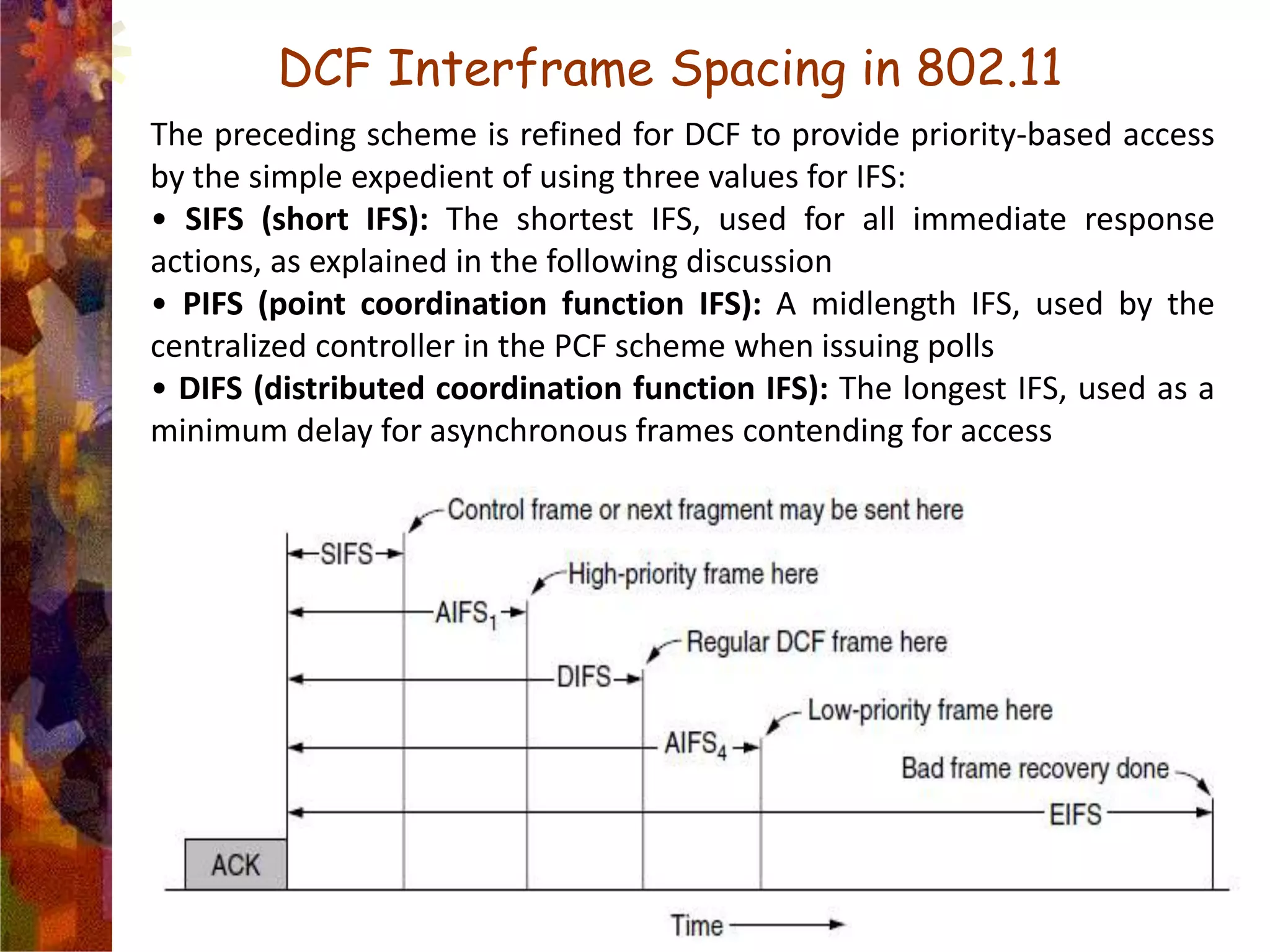
DCF Interframe Spacing in 802.11
The preceding scheme is refined for DCF to provide priority-based access
by the simple expedient of using three values for IFS:
• SIFS (short IFS): The shortest IFS, used for all immediate response
actions, as explained in the following discussion
• PIFS (point coordination function IFS): A midlength IFS, used by the
centralized controller in the PCF scheme when issuing polls
• DIFS (distributed coordination function IFS): The longest IFS, used as a
minimum delay for asynchronous frames contending for access
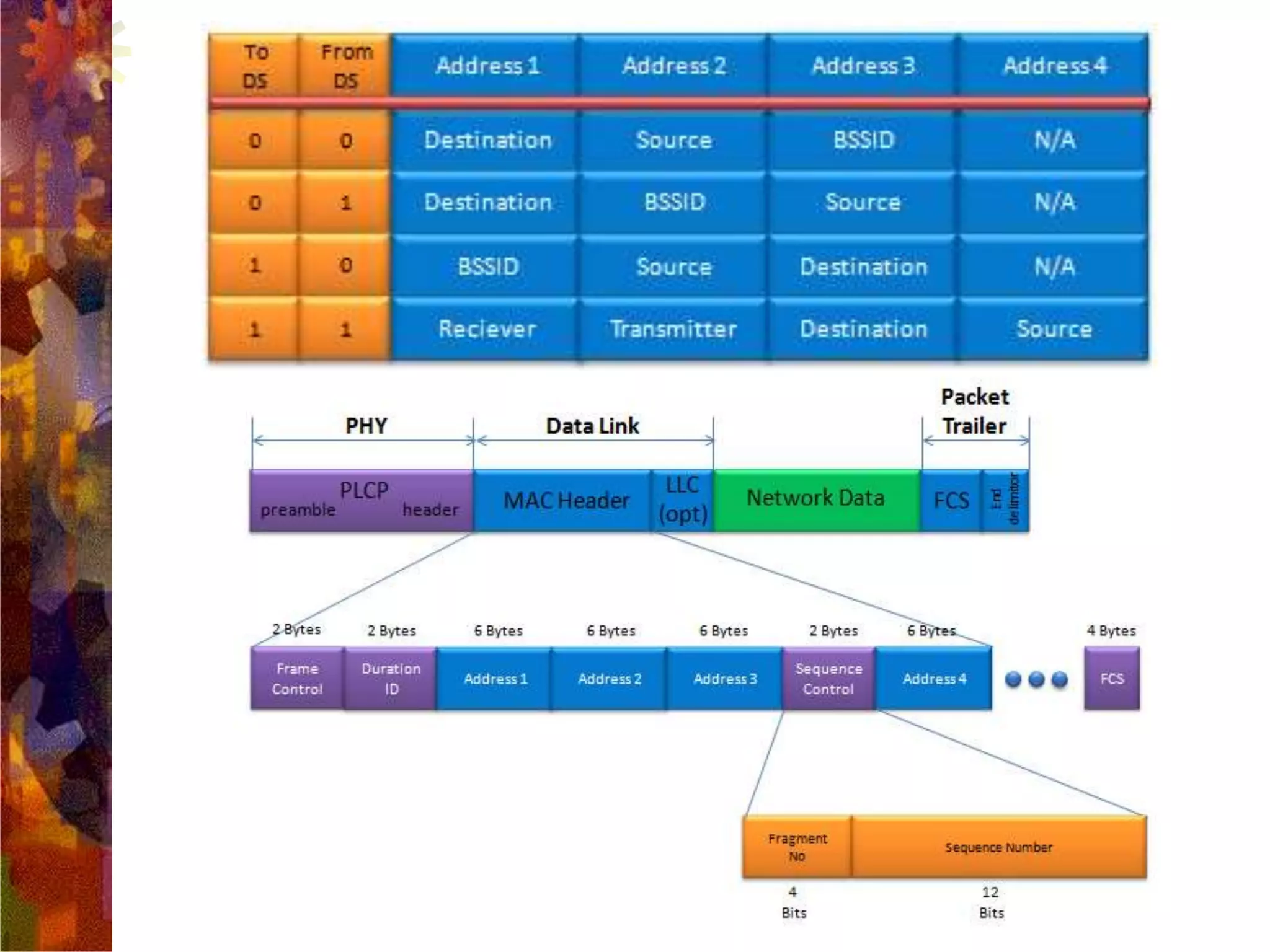
Frame Format of 802.11 Frame
 Protocol Version: zero for 802.11 standard
 Type= frame type: data, management, control
 Subtype = frame sub-type:
 ToDS: When bit is set indicate that destination frame is for
DS
 FromDS:When bit is set indicate frame coming from DS
 Retry: Set in case of retransmission frame
 More fragments: Set when frame is followed by other
fragment
 Power Management: bit set when station go Power Save mode
(PS)
 More Data: When set means that AP have more buffered data
for a station in Power Save mode
 WEP: When set indicate that in the Frame Body field there are
data need to processed by WEP algorithm.
 Order: When set indicate restrictions for transmission
Frame Control
Frame Format
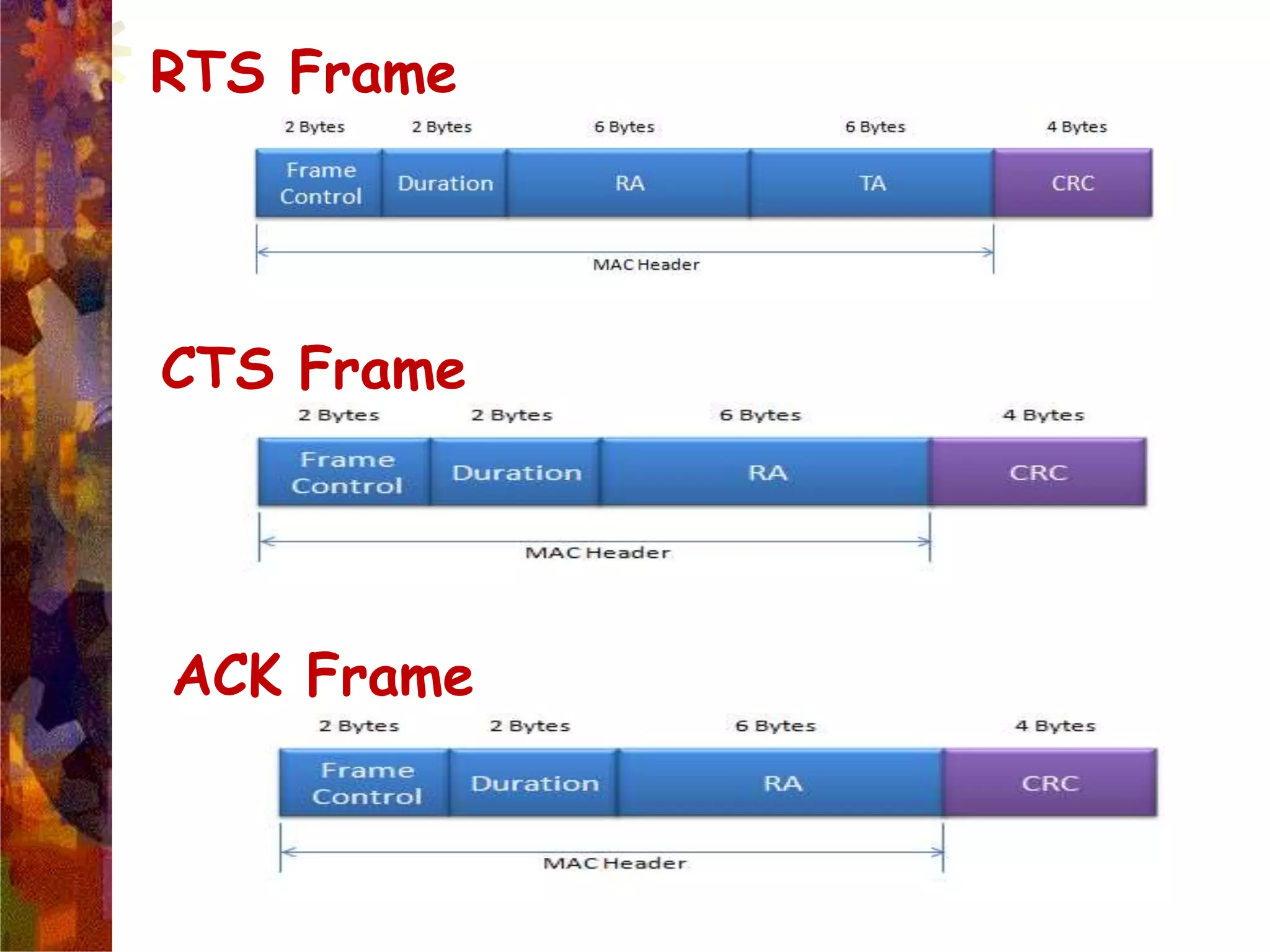
RTS Frame
CTS Frame
ACK Frame
 Duration/Connection ID: If used as a duration field, indicates the time
(in microseconds) the channel will be allocated for successful
transmission of a MAC frame. In some control frames, this field contains
an association, or connection, identifier.
 Addresses: The number and meaning of the 48-bit address fields depend
on context. The transmitter address and receiver address are the MAC
addresses of stations joined to the BSS that are transmitting and receiving
frames over the wireless LAN. The service set ID (SSID) identifies the
wireless LAN over which a frame is transmitted.
 Sequence Control: Contains a 4-bit fragment number subfield, used for
fragmentation and reassembly, and a 12-bit sequence number used to
number frames sent between a given transmitter and receiver.
 • Frame Body: Contains an MSDU or a fragment of an MSDU. The
MSDU is a LLC protocol data unit or MAC control information.
 • Frame Check Sequence: A 32-bit cyclic redundancy check.
Distribution service (DS)
Used to exchange MAC frames from
station in one BSS to station in another
BSS
Integration service
Transfer of data between station on
IEEE 802.11 LAN and station on
integrated IEEE 802.x LAN
IEEE 802.11 Services:
Distribution of Messages
802.11 Services
 Association
 Reassociation/Disassociation
 Authentication – WPA2/WEP
 Distribution
 Integration
 Data Delivery
 Privacy – WPA2/AES
 QOS Traffic Scheduling
 Transmit Power Control
 Dynamic Frequency Selection
Association
Establishes initial association between
station and AP
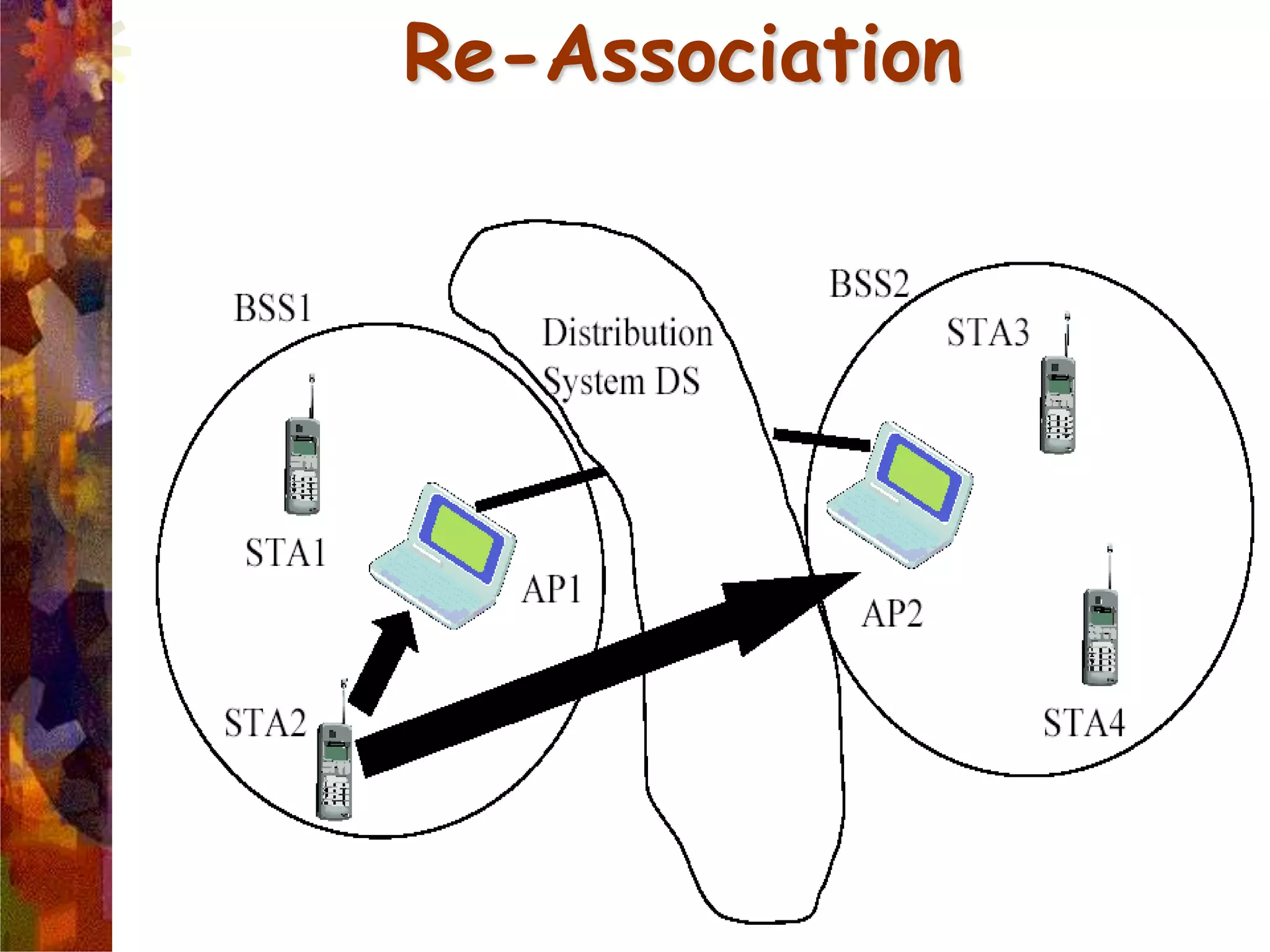
Re-association
Enables transfer of association from one
AP to another, allowing station to move
from one BSS to another
Disassociation
Association termination notice from
station or AP
Association Related Services
Re-Association
Authentication
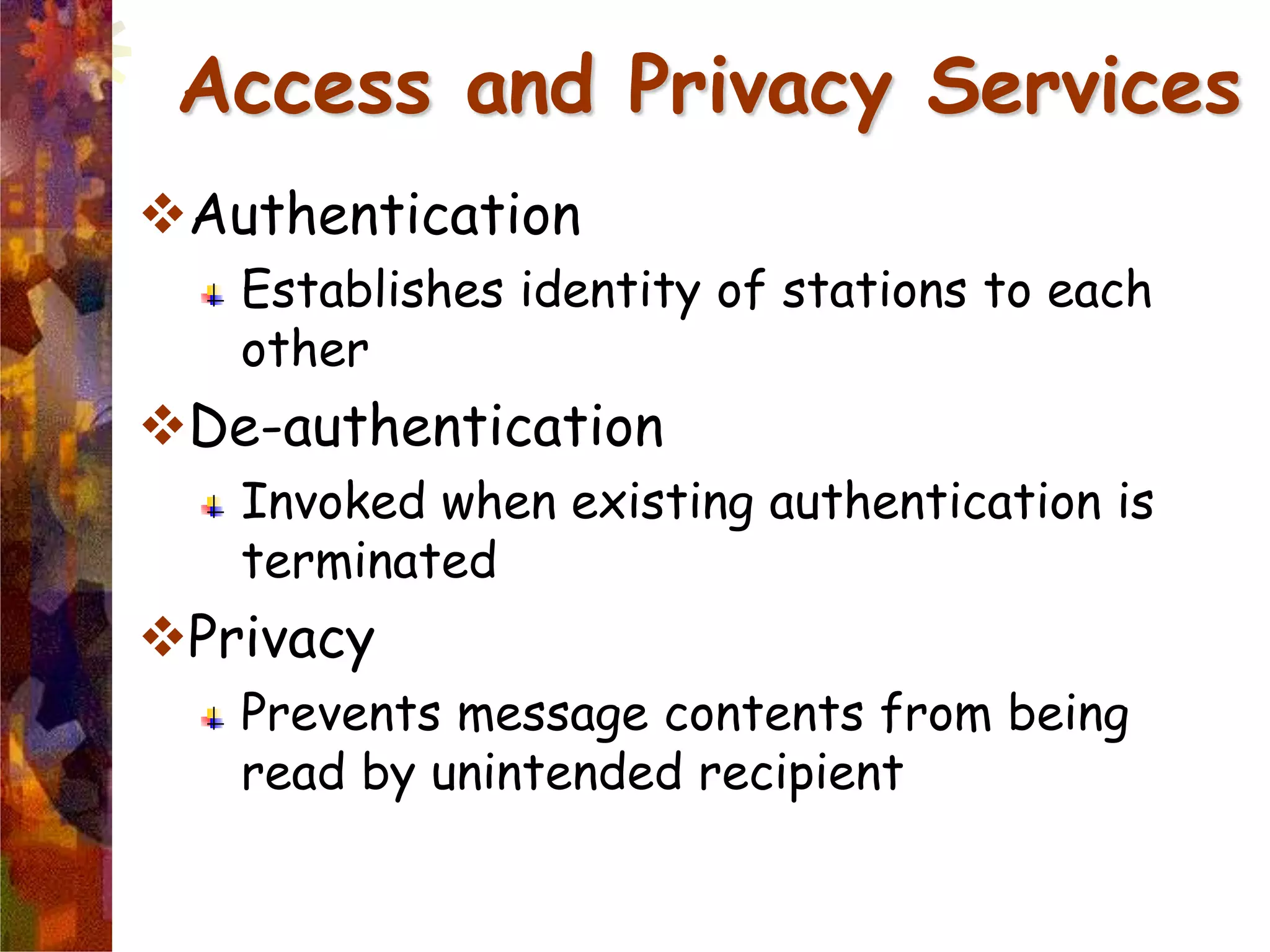
Establishes identity of stations to each
other
De-authentication
Invoked when existing authentication is
terminated
Privacy
Prevents message contents from being
read by unintended recipient
Access and Privacy Services
IEEE 802.11 Medium
Access Control
 MAC layer covers three functional
areas:
Reliable data delivery
Access control
Security
Reliable Data Delivery
Loss of frames due to noise, interference,
and propagation effects
Frame exchange protocol
Source station transmits data
Destination responds with acknowledgment (ACK)
If source doesn’t receive ACK, it retransmits
frame
Four frame exchange for enhanced reliability
Source issues request to send (RTS)
Destination responds with clear to send (CTS)
Source transmits data
Destination responds with ACK
Distributed Coordination Function (DCF)
Distributed access protocol
Contention-Based
Makes use of CSMA/CA rather than CSMA/CD
Suited for ad hoc network and ordinary
asynchronous traffic
Point Coordination Function (PCF)
Alternative access method on top of DCF
Centralized access protocol
Contention-Free
Works like polling
Suited for time bound services like voice or
multimedia
Access Control
Interframe Space (IFS)
Defined length of time for control
SIFS - Short Inter Frame Spacing
Used for immediate response actions e.g ACK, CTS
PIFS - Point Inter Frame Spacing
Used by centralized controller in PCF scheme
DIFS - Distributed Inter Frame Spacing
Used for all ordinary asynchronous traffic
DIFS (MAX) > PIFS > SIFS (MIN)
MAC Layer Frames
Data Frames
Control Frames
RTS,CTS,ACK and PS-POLL
Management Frames
Authentication and De-Authentication
Association, Re-Association, and
Disassociation
Beacon and Probe frames
IEEE 802.11 Security
 Authentication provided by
open system or shared key
authentication
(Authentication is used
instead of wired media
physical connection)
 Privacy provided by WEP
(Privacy is used to provide the
confidential aspects of closed
wired media)
 An Integrity check is
performed using a 32-bit CRC
Authentication
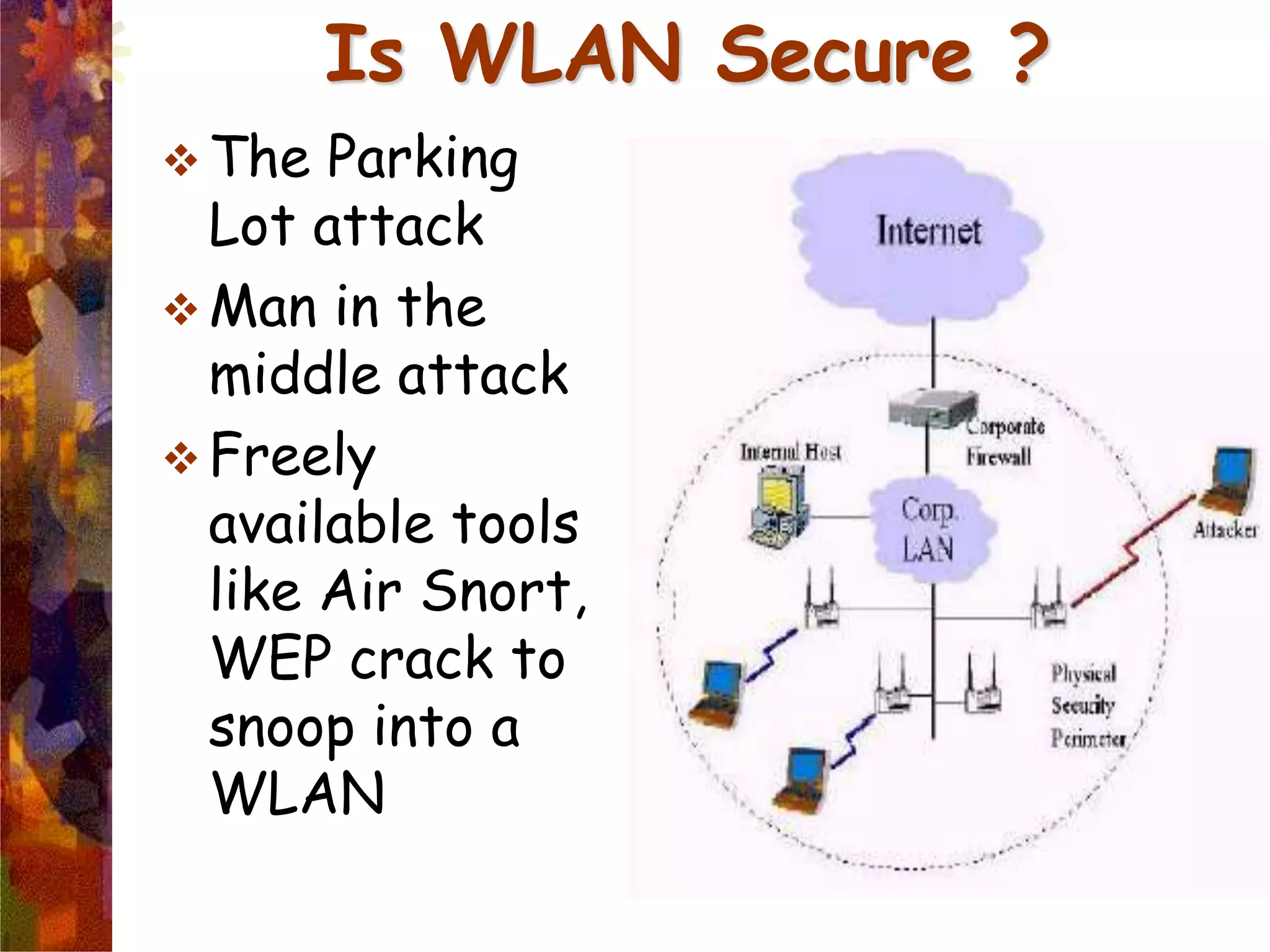
Is WLAN Secure ?
 The Parking
Lot attack
 Man in the
middle attack
 Freely
available tools
like Air Snort,
WEP crack to
snoop into a
WLAN
Future of WLAN
WLANs move to maturity
Higher Speeds
Improved Security
Seamless end-to-end protocols
Better Error control
Long distances
New vendors
Better interoperability
Global networking
Anywhere, anytime,any-form connectivity…

WLAN

  • 1.
  • 2.
    What is WLAN??? A wireless local area network(LAN) is a flexible data communications system implemented as an extension to, or as an alternative for, a wired LAN.  Using radio frequency (RF) technology, wireless LANs transmit and receive data over the air, minimizing the need for wired connections.  Thus, combining data connectivity with user mobility.
  • 3.
    Advantages of WLAN Productivity, convenience, and cost advantages  Installation speed and simplicity.  Installation flexibility.  Reduced cost-of-ownership.  Mobility.  Scalability.
  • 4.
    Disadvantages of WLAN Cost  Wireless network cards cost 4 times more than wired network cards.  The access points are more expensive than hubs and wires.  Signal Bleed Over  Access points pick up the signals of adjacent access points or overpower their signal.  Environmental Conditions  Susceptible to weather and solar activity.  Constrained by buildings, trees, terrain.  Less Capacity  Slower bandwidth.  Limit to how much data a carrier wave can transmit without lost packets impacting performance.
  • 5.
     Medical Professionals Corporate  Education  Temporary Situations  Airlines  Security Staff  Emergency Centers Wireless LAN Applications
  • 7.
     In responseto lacking standards, IEEE developed the first internationally recognized wireless LAN standard – IEEE 802.11  IEEE published 802.11 in 1997, after seven years of work  Most prominent specification for WLANs  Scope of IEEE 802.11 is limited to Physical and Data Link Layers. IEEE 802.11 Wireless LAN Standard
  • 8.
    IEEE 802 LANStandards Family IEEE 802.3 Carrier Sense IEEE 802.4 Token Bus IEEE 802.5 Token Ring IEEE 802.11 Wireless IEEE 802.2 Logical Link Control (LLC) PHY OSI Layer 1 (Physical) Mac OSI Layer 2 (Data Link)
  • 10.
    802.11 Infrastructure  802.11networks can be used in two modes: Infrastructure and Ad hoc Mode  Infrastructure mode requires a central access point that all devices connect to.  Ad-hoc mode is also known as “peer-to-peer” mode. Ad-hoc networks don't require a centralized access point. Instead, devices on the wireless network connect directly to each other
  • 11.
    Access point (AP):A station that provides access to the DS. Basic service set (BSS): A set of stations controlled by a single AP. Distribution system (DS): A system used to interconnect a set of BSSs to create an ESS. DS is implementation-independent. It can be a wired 802.3 Ethernet LAN, 802.4 token bus, 802.5 token ring or another 802.11 medium. Extended service set (ESS):Two or more BSS interconnected by DS Portal: Logical entity where 802.11 network integrates with a non 802.11 network. IEEE 802.11 Terminology
  • 12.
  • 13.
  • 14.
     In eachstation computer (STA for short) connects to an access point via a wireless link. The set-up formed by the access point and the stations located within its coverage area are called the or for short. They form one cell.  Each BSS is identified by a a 6-byte (48-bite) identifier. In infrastructure mode, the BSSID corresponds to the access point's MAC address.  Several access points can be linked together (or more precisely several BSS's) using a connection called a for short) in order to form an or . The distribution system can also be a wired network, a cable between two access points or even a wireless network.  An ESS is identified with an a 32-character identifier (in ASCII format) which acts as its name on the network. The ESSID, often shortened to , shows the network's name, and in a way acts a first-level security measure, since it is necessary for a station to know the SSID in order to connect to the extended network.
  • 16.
  • 17.
    802.11 MAC SublayerProtocol MAC layer covers three functional areas: reliable data delivery access control security
  • 18.
  • 19.
    802.11 MAC sublayerprotocol  In 802.11 wireless LANs, “seizing the channel” does not exist as in 802.3 wired Ethernet.  Two additional problems:  Hidden Terminal Problem  Exposed Station Problem  To deal with these two problems 802.11 supports two modes of operation:  DCF (Distributed Coordination Function)  PCF (Point Coordination Function).  All implementations must support DCF, but PCF is optional.
  • 20.
    DCF  DCF sub-layeruses CSMA/CA  if station has frame to send it listens to medium  if medium idle, station may transmit  else waits until current transmission completes  No collision detection since on wireless network, so use collision avoidance (backoff and RTS/CTS)  DCF includes delays that act as a priority scheme  DIFS: DCF inter-frame space  SIFS: short inter-frame space (SIFS < DIFS)
  • 21.
    DCF  1. Astation with a frame to transmit senses the medium. If the medium is idle, it waits to see if the medium remains idle for a time equal to IFS. If so, the station may transmit immediately.  2. If the medium is busy (either because the station initially finds the medium busy or because the medium becomes busy during the IFS idle time), the station defers transmission and continues to monitor the medium until the current transmission is over.  3. Once the current transmission is over, the station delays another IFS. If the medium remains idle for this period, then the station backs off a random amount of time and again senses the medium. If the medium is still idle, the station may transmit. During the backoff time, if the medium becomes busy, the backoff timer is halted and resumes when the medium becomes idle.  4.If the transmission is unsuccessful, which is determined by the absence of an acknowledgement, then it is assumed that a collision has occurred.
  • 22.
  • 23.
    Virtual Carrier Sensing To reduce ambiguities about which station is sending, 802.11 defines channel sensing to consist of both physical sensing and virtual sensing.  Physical sensing simply checks the medium to see if there is a valid signal. With virtual sensing, each station keeps a logical record of when the channel is in use by tracking the NAV (Network Allocation Vector).  Each frame carries a NAV field that says how long the sequence of which this frame is part will take to complete. Stations that overhear this frame know that the channel will be busy for the period indicated by the NAV, regardless of whether they can sense a physical signal.  For example, the NAV of a data frame includes the time needed to send an acknowledgement.  All stations that hear the data frame will defer during the acknowledgement period, whether or not they can hear the acknowledgement.
  • 24.
    Virtual Channel Sensingin CSMA/CA The use of virtual channel sensing using CSMA/CA.  C (in range of A) receives the RTS and based on information in RTS creates a virtual channel busy NAV(Network Allocation Vector).  D (in range of B) receives the CTS and creates a shorter NAV.
  • 25.
    RTS-CTS-DATA-ACK DIFS: Distributed IFS RTS:Request To Send SIFS: Short IFS CTS: Clear To Send ACK: Acknowledgement NAV: Network Allocation Vector DCF: Distributed Coordination Function
  • 26.
    Power Saving inWLAN’s  Battery Life is always an issue with mobile wireless devices. Care has to be taken so that the clients don’t waste power when they have neither information to send nor receive.  The basic mechanism is Beacon Frame. These are the periodic broadcasts by the AP and advertise the presence of AP to the clients and carry system parameters such as identity of AP, time, security settings etc  Clients can set a power-management bit in frames that they send to the AP to tell it that they are entering power-save mode. In this mode, the client can doze and the AP will buffer traffic intended for it. To check for incoming traffic, the client wakes up for every beacon, and checks a traffic map that is sent as part of the beacon.  Another power-saving mechanism, called APSD (Automatic Power Save Delivery), was also added to 802.11 in 2005. With this new mechanism, the AP buffers frames and sends them to a client just after the client sends frames to the AP.
  • 27.
    Fragmentation in 802.11 High wireless error rates  long packets have less probability of being successfully transmitted.  Solution: MAC layer fragmentation with stop- and-wait protocol on the fragments.
  • 28.
    DCF Interframe Spacingin 802.11 The preceding scheme is refined for DCF to provide priority-based access by the simple expedient of using three values for IFS: • SIFS (short IFS): The shortest IFS, used for all immediate response actions, as explained in the following discussion • PIFS (point coordination function IFS): A midlength IFS, used by the centralized controller in the PCF scheme when issuing polls • DIFS (distributed coordination function IFS): The longest IFS, used as a minimum delay for asynchronous frames contending for access
  • 29.
    Frame Format of802.11 Frame
  • 31.
     Protocol Version:zero for 802.11 standard  Type= frame type: data, management, control  Subtype = frame sub-type:  ToDS: When bit is set indicate that destination frame is for DS  FromDS:When bit is set indicate frame coming from DS  Retry: Set in case of retransmission frame  More fragments: Set when frame is followed by other fragment  Power Management: bit set when station go Power Save mode (PS)  More Data: When set means that AP have more buffered data for a station in Power Save mode  WEP: When set indicate that in the Frame Body field there are data need to processed by WEP algorithm.  Order: When set indicate restrictions for transmission Frame Control
  • 32.
  • 34.
  • 35.
     Duration/Connection ID:If used as a duration field, indicates the time (in microseconds) the channel will be allocated for successful transmission of a MAC frame. In some control frames, this field contains an association, or connection, identifier.  Addresses: The number and meaning of the 48-bit address fields depend on context. The transmitter address and receiver address are the MAC addresses of stations joined to the BSS that are transmitting and receiving frames over the wireless LAN. The service set ID (SSID) identifies the wireless LAN over which a frame is transmitted.  Sequence Control: Contains a 4-bit fragment number subfield, used for fragmentation and reassembly, and a 12-bit sequence number used to number frames sent between a given transmitter and receiver.  • Frame Body: Contains an MSDU or a fragment of an MSDU. The MSDU is a LLC protocol data unit or MAC control information.  • Frame Check Sequence: A 32-bit cyclic redundancy check.
  • 36.
    Distribution service (DS) Usedto exchange MAC frames from station in one BSS to station in another BSS Integration service Transfer of data between station on IEEE 802.11 LAN and station on integrated IEEE 802.x LAN IEEE 802.11 Services: Distribution of Messages
  • 37.
    802.11 Services  Association Reassociation/Disassociation  Authentication – WPA2/WEP  Distribution  Integration  Data Delivery  Privacy – WPA2/AES  QOS Traffic Scheduling  Transmit Power Control  Dynamic Frequency Selection
  • 38.
    Association Establishes initial associationbetween station and AP Re-association Enables transfer of association from one AP to another, allowing station to move from one BSS to another Disassociation Association termination notice from station or AP Association Related Services
  • 39.
  • 40.
    Authentication Establishes identity ofstations to each other De-authentication Invoked when existing authentication is terminated Privacy Prevents message contents from being read by unintended recipient Access and Privacy Services
  • 41.
    IEEE 802.11 Medium AccessControl  MAC layer covers three functional areas: Reliable data delivery Access control Security
  • 42.
    Reliable Data Delivery Lossof frames due to noise, interference, and propagation effects Frame exchange protocol Source station transmits data Destination responds with acknowledgment (ACK) If source doesn’t receive ACK, it retransmits frame Four frame exchange for enhanced reliability Source issues request to send (RTS) Destination responds with clear to send (CTS) Source transmits data Destination responds with ACK
  • 43.
    Distributed Coordination Function(DCF) Distributed access protocol Contention-Based Makes use of CSMA/CA rather than CSMA/CD Suited for ad hoc network and ordinary asynchronous traffic Point Coordination Function (PCF) Alternative access method on top of DCF Centralized access protocol Contention-Free Works like polling Suited for time bound services like voice or multimedia Access Control
  • 44.
    Interframe Space (IFS) Definedlength of time for control SIFS - Short Inter Frame Spacing Used for immediate response actions e.g ACK, CTS PIFS - Point Inter Frame Spacing Used by centralized controller in PCF scheme DIFS - Distributed Inter Frame Spacing Used for all ordinary asynchronous traffic DIFS (MAX) > PIFS > SIFS (MIN)
  • 45.
    MAC Layer Frames DataFrames Control Frames RTS,CTS,ACK and PS-POLL Management Frames Authentication and De-Authentication Association, Re-Association, and Disassociation Beacon and Probe frames
  • 46.
    IEEE 802.11 Security Authentication provided by open system or shared key authentication (Authentication is used instead of wired media physical connection)  Privacy provided by WEP (Privacy is used to provide the confidential aspects of closed wired media)  An Integrity check is performed using a 32-bit CRC
  • 47.
  • 48.
    Is WLAN Secure?  The Parking Lot attack  Man in the middle attack  Freely available tools like Air Snort, WEP crack to snoop into a WLAN
  • 49.
    Future of WLAN WLANsmove to maturity Higher Speeds Improved Security Seamless end-to-end protocols Better Error control Long distances New vendors Better interoperability Global networking Anywhere, anytime,any-form connectivity…