
PRESENTATION
BY:-
SINDHURA. P
SAHITHI. I
 Introduction
 History of WiFi
 What is IEEE 802.11
 Setup required for WiFi
 Working Principle of WiFi
 WiFi Network Topologies
 Advantages
 Disadvantages
 Applications
 Conclusion
Wi-Fi, an acronym for "Wireless Fidelity", is a set of product compatibility standards for
Wireless Local Area Networks (WLAN) based on the IEEE 802.11 specifications.
 Wi-Fi was intended to be used for mobile devices and LANs, but is now often used for
Internet access.
 It enables a person with a wireless-enabled computer or personal digital assistant (PDA) to
connect to the Internet when in proximity of an access point.
 Wireless Fidelity is the wireless way to handle networking. It is also known as 802.11
networking and wireless networking.
 Using this technology we can connect computers anywhere in a home or office without the
need of any wires. The computers connect to the network using radio signals, and they can be
up to 100 feet or so apart.
 Wi-Fi allows to connect to the internet from virtually anywhere at speeds of up to 54Mbps.
 Wi-Fi goes beyond wirelessly connecting computers, it also connects people.
Logo of
WiFi
 IEEE (Institute of Electrical and Electronics Engineers)
established
the 802.11 group in 1990.
 Initial speeds were 1 and 2 Mbps.
 IEEE modified the standard in 1999 to include 802.11a
and b.
 802.11g was added in 2003.
 802.11 equipment first available, then a, followed by g.
 It was appeared in late 1999.
 It operates at 2.4 GHZ radio spectrum.
 4-6 Mbps (actual speed) can go up to 11 Mbps within
the
range of 30m.
 100-150 feet range.
 Most popular, Least Expensive.
 Interference from mobile phones and Bluetooth
devices
which can reduce the transmission speed.
 It was introduced in 2001 .
 Operates at 5 GHz radio spectrum (less popular).
 15-20 Mbps (Actual speed) can go up to 54 Mbps as the range
reduces.
 50-75 feet range.
 More expensive.
 Not compatible with 802.11b.
IEEE 802.11g
o It was introduce in 203.
o Operates at 2.4 GHz radio spectrum.
o 54 Mbps (Actual speed).
o 100-150 feet range
o Combines the features of both Standards i.e. IEEE 802.11b &
IEEE 802.11a.
o Compatible with 802.11b.
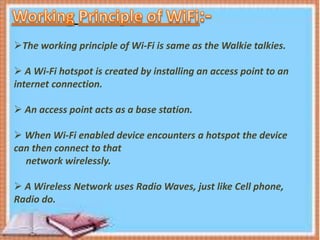
The working principle of Wi-Fi is same as the Walkie talkies.
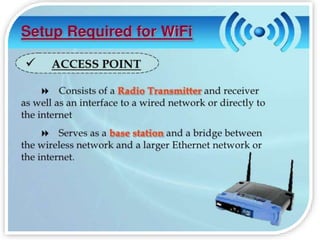
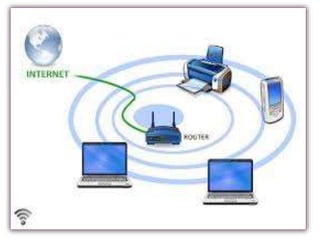
 A Wi-Fi hotspot is created by installing an access point to an
internet connection.
 An access point acts as a base station.
 When Wi-Fi enabled device encounters a hotspot the device
can then connect to that
network wirelessly.
 A Wireless Network uses Radio Waves, just like Cell phone,
Radio do.
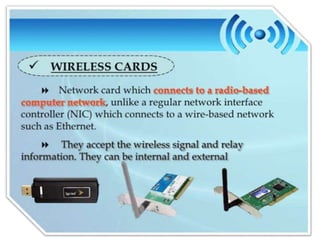
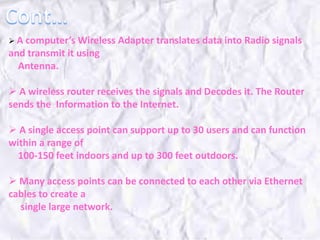
 A computer’s Wireless Adapter translates data into Radio signals
and transmit it using
Antenna.
 A wireless router receives the signals and Decodes it. The Router
sends the Information to the Internet.
 A single access point can support up to 30 users and can function
within a range of
100-150 feet indoors and up to 300 feet outdoors.
 Many access points can be connected to each other via Ethernet
cables to create a
single large network.
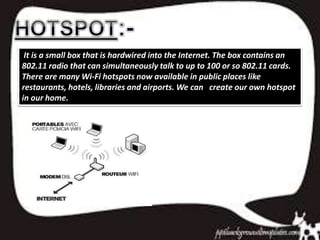
It is a small box that is hardwired into the Internet. The box contains an
802.11 radio that can simultaneously talk to up to 100 or so 802.11 cards.
There are many Wi-Fi hotspots now available in public places like
restaurants, hotels, libraries and airports. We can create our own hotspot
in our home.
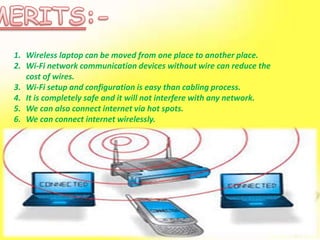
1. Wireless laptop can be moved from one place to another place.
2. Wi-Fi network communication devices without wire can reduce the
cost of wires.
3. Wi-Fi setup and configuration is easy than cabling process.
4. It is completely safe and it will not interfere with any network.
5. We can also connect internet via hot spots.
6. We can connect internet wirelessly.
1. Wi-Fi generates radiations which can harm the human health.
2. We must disconnect the Wi-Fi connection whenever we are not
using the server.
3. There are some limits to transfer the data, we cant able to transfer
the data for long distance.
4. Wi-Fi implementation is very expensive when compared to the
wired connection.
 Mobile applications.
 Business applications.
 Home applications.
 Computerized application.
 Automotive segment.
 Browsing internet.
Video conference.
Wi fi
Wi fi

Wi fi

  • 1.
  • 2.
     Introduction  Historyof WiFi  What is IEEE 802.11  Setup required for WiFi  Working Principle of WiFi  WiFi Network Topologies  Advantages  Disadvantages  Applications  Conclusion
  • 3.
    Wi-Fi, an acronymfor "Wireless Fidelity", is a set of product compatibility standards for Wireless Local Area Networks (WLAN) based on the IEEE 802.11 specifications.  Wi-Fi was intended to be used for mobile devices and LANs, but is now often used for Internet access.  It enables a person with a wireless-enabled computer or personal digital assistant (PDA) to connect to the Internet when in proximity of an access point.  Wireless Fidelity is the wireless way to handle networking. It is also known as 802.11 networking and wireless networking.  Using this technology we can connect computers anywhere in a home or office without the need of any wires. The computers connect to the network using radio signals, and they can be up to 100 feet or so apart.  Wi-Fi allows to connect to the internet from virtually anywhere at speeds of up to 54Mbps.  Wi-Fi goes beyond wirelessly connecting computers, it also connects people.
  • 4.
  • 5.
     IEEE (Instituteof Electrical and Electronics Engineers) established the 802.11 group in 1990.  Initial speeds were 1 and 2 Mbps.  IEEE modified the standard in 1999 to include 802.11a and b.  802.11g was added in 2003.  802.11 equipment first available, then a, followed by g.
  • 7.
     It wasappeared in late 1999.  It operates at 2.4 GHZ radio spectrum.  4-6 Mbps (actual speed) can go up to 11 Mbps within the range of 30m.  100-150 feet range.  Most popular, Least Expensive.  Interference from mobile phones and Bluetooth devices which can reduce the transmission speed.
  • 8.
     It wasintroduced in 2001 .  Operates at 5 GHz radio spectrum (less popular).  15-20 Mbps (Actual speed) can go up to 54 Mbps as the range reduces.  50-75 feet range.  More expensive.  Not compatible with 802.11b.
  • 9.
    IEEE 802.11g o Itwas introduce in 203. o Operates at 2.4 GHz radio spectrum. o 54 Mbps (Actual speed). o 100-150 feet range o Combines the features of both Standards i.e. IEEE 802.11b & IEEE 802.11a. o Compatible with 802.11b.
  • 13.
    The working principleof Wi-Fi is same as the Walkie talkies.  A Wi-Fi hotspot is created by installing an access point to an internet connection.  An access point acts as a base station.  When Wi-Fi enabled device encounters a hotspot the device can then connect to that network wirelessly.  A Wireless Network uses Radio Waves, just like Cell phone, Radio do.
  • 15.
     A computer’sWireless Adapter translates data into Radio signals and transmit it using Antenna.  A wireless router receives the signals and Decodes it. The Router sends the Information to the Internet.  A single access point can support up to 30 users and can function within a range of 100-150 feet indoors and up to 300 feet outdoors.  Many access points can be connected to each other via Ethernet cables to create a single large network.
  • 20.
    It is asmall box that is hardwired into the Internet. The box contains an 802.11 radio that can simultaneously talk to up to 100 or so 802.11 cards. There are many Wi-Fi hotspots now available in public places like restaurants, hotels, libraries and airports. We can create our own hotspot in our home.
  • 21.
    1. Wireless laptopcan be moved from one place to another place. 2. Wi-Fi network communication devices without wire can reduce the cost of wires. 3. Wi-Fi setup and configuration is easy than cabling process. 4. It is completely safe and it will not interfere with any network. 5. We can also connect internet via hot spots. 6. We can connect internet wirelessly.
  • 23.
    1. Wi-Fi generatesradiations which can harm the human health. 2. We must disconnect the Wi-Fi connection whenever we are not using the server. 3. There are some limits to transfer the data, we cant able to transfer the data for long distance. 4. Wi-Fi implementation is very expensive when compared to the wired connection.
  • 24.
     Mobile applications. Business applications.  Home applications.  Computerized application.  Automotive segment.  Browsing internet. Video conference.