A. Roshni
11761A0463
Contents
 Introduction
 Wi-Fi Technology
 Wi-Fi Network Elements
 Wi-Fi Network Topologies
 Hotspots
 How a Wi-Fi Network Works
 Advantages
 Limitations
 Conclusion
Introduction
 Wireless Technology is an alternative to Wired
Technology which is commonly used for connecting
devices in wireless mode.
 Wi-Fi (Wireless Fidelity) is a generic term that refers to
IEEE 802.11 standard for Wireless Local Area Networks
(WLANs).
 Wi-Fi Network connect computers to each other, to the
internet and to the wired network.
The Wi-Fi Technology
Wi-Fi Networks use Radio Technologies to transmit and
receive data at high speed:
 IEEE 802.11b
 IEEE 802.11a
 IEEE 802.11g
IEEE 802.11b
 Appear in late 1999
 Operates at 2.4GHz radio spectrum
 11 Mbps (theoretical speed) - within 30 m Range
 4-6 Mbps (actual speed)
 100 -150 feet range
 Most popular, Least Expensive
 Interference from mobile phones and Bluetooth devices
which can reduce the transmission speed.
IEEE 802.11a
 Introduced in 2001
 Operates at 5 GHz (less popular)
 54 Mbps (theoretical speed)
 15-20 Mbps (Actual speed)
 50-75 feet range
 More expensive
 Not compatible with 802.11b
IEEE 802.11g
 Introduced in 2003
 Combine the feature of both standards (a, b)
 100-150 feet range
 54 Mbps Speed
 2.4 GHz radio frequencies
 Compatible with „b‟
Elements of a WI-FI Network
 Access Point (AP) - The AP is a wireless LAN transceiver
or “base station” that can connect one or many wireless
devices simultaneously to the Internet.
 Wi-Fi cards - They accept the wireless signal and relay
information. They can be internal and external.
 Safeguards - Firewalls and anti-virus software protect
networks from uninvited users and keep information
secure.
Wi-Fi Network Topologies
 Peer-to-peer topology (Ad-hoc Mode)
 AP-based topology (Infrastructure Mode)
Peer-to-peer topology
 AP is not required.
 Client devices within a cell
can communicate with each
other directly.
 It is useful for setting up a
wireless network quickly
and easily.
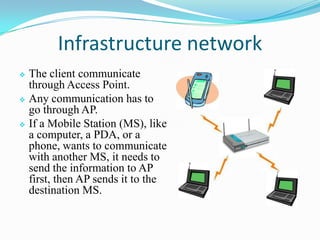
Infrastructure network
 The client communicate
through Access Point.
 Any communication has to
go through AP.
 If a Mobile Station (MS), like
a computer, a PDA, or a
phone, wants to communicate
with another MS, it needs to
send the information to AP
first, then AP sends it to the
destination MS.
Hotspots
 A Hotspot is a geographical area that has a readily
accessible wireless network
 Hotspots are equipped with Broad band Internet
connection and one or more Access points that allow users
to access the internet wirelessly
 Hotspots can be setup in any public location that can
support an Internet connection. All the locations discussed
previously are examples of Hotspots.
How a Wi-Fi Network Works
 A Wi-Fi hotspot is created by installing an access point to
an internet connection.
 An access point acts as a base station.
 When Wi-Fi enabled device encounters a hotspot the
device can then connect to that network wirelessly.
 A single access point can support up to 30 users and can
function within a range of 100 – 150 feet indoors and up
to 300 feet outdoors.
 Many access points can be connected to each other via
Ethernet cables to create a single large network.
Advantages
 Mobility
 Ease of Installation
 Flexibility
 Cost
 Reliability
 Security
 Use unlicensed part of the radio spectrum
 Roaming
 Speed
Limitations
 Interference
 Degradation in performance
 High power consumption
 Limited range
Conclusion
 Wi-Fi is a simple and cost effective way to connect to
internet without the need of wires.
 It is growing in popularity because of decreasing costs and
the freedom it gives to users.
Wi fi technology ppt mine

Wi fi technology ppt mine

  • 1.
  • 2.
    Contents  Introduction  Wi-FiTechnology  Wi-Fi Network Elements  Wi-Fi Network Topologies  Hotspots  How a Wi-Fi Network Works  Advantages  Limitations  Conclusion
  • 3.
    Introduction  Wireless Technologyis an alternative to Wired Technology which is commonly used for connecting devices in wireless mode.  Wi-Fi (Wireless Fidelity) is a generic term that refers to IEEE 802.11 standard for Wireless Local Area Networks (WLANs).  Wi-Fi Network connect computers to each other, to the internet and to the wired network.
  • 4.
    The Wi-Fi Technology Wi-FiNetworks use Radio Technologies to transmit and receive data at high speed:  IEEE 802.11b  IEEE 802.11a  IEEE 802.11g
  • 5.
    IEEE 802.11b  Appearin late 1999  Operates at 2.4GHz radio spectrum  11 Mbps (theoretical speed) - within 30 m Range  4-6 Mbps (actual speed)  100 -150 feet range  Most popular, Least Expensive  Interference from mobile phones and Bluetooth devices which can reduce the transmission speed.
  • 6.
    IEEE 802.11a  Introducedin 2001  Operates at 5 GHz (less popular)  54 Mbps (theoretical speed)  15-20 Mbps (Actual speed)  50-75 feet range  More expensive  Not compatible with 802.11b
  • 7.
    IEEE 802.11g  Introducedin 2003  Combine the feature of both standards (a, b)  100-150 feet range  54 Mbps Speed  2.4 GHz radio frequencies  Compatible with „b‟
  • 8.
    Elements of aWI-FI Network  Access Point (AP) - The AP is a wireless LAN transceiver or “base station” that can connect one or many wireless devices simultaneously to the Internet.  Wi-Fi cards - They accept the wireless signal and relay information. They can be internal and external.  Safeguards - Firewalls and anti-virus software protect networks from uninvited users and keep information secure.
  • 9.
    Wi-Fi Network Topologies Peer-to-peer topology (Ad-hoc Mode)  AP-based topology (Infrastructure Mode)
  • 10.
    Peer-to-peer topology  APis not required.  Client devices within a cell can communicate with each other directly.  It is useful for setting up a wireless network quickly and easily.
  • 11.
    Infrastructure network  Theclient communicate through Access Point.  Any communication has to go through AP.  If a Mobile Station (MS), like a computer, a PDA, or a phone, wants to communicate with another MS, it needs to send the information to AP first, then AP sends it to the destination MS.
  • 12.
    Hotspots  A Hotspotis a geographical area that has a readily accessible wireless network  Hotspots are equipped with Broad band Internet connection and one or more Access points that allow users to access the internet wirelessly  Hotspots can be setup in any public location that can support an Internet connection. All the locations discussed previously are examples of Hotspots.
  • 13.
    How a Wi-FiNetwork Works  A Wi-Fi hotspot is created by installing an access point to an internet connection.  An access point acts as a base station.  When Wi-Fi enabled device encounters a hotspot the device can then connect to that network wirelessly.  A single access point can support up to 30 users and can function within a range of 100 – 150 feet indoors and up to 300 feet outdoors.  Many access points can be connected to each other via Ethernet cables to create a single large network.
  • 14.
    Advantages  Mobility  Easeof Installation  Flexibility  Cost  Reliability  Security  Use unlicensed part of the radio spectrum  Roaming  Speed
  • 15.
    Limitations  Interference  Degradationin performance  High power consumption  Limited range
  • 16.
    Conclusion  Wi-Fi isa simple and cost effective way to connect to internet without the need of wires.  It is growing in popularity because of decreasing costs and the freedom it gives to users.