
SUBJECT : DATABASE SYSTEM
TOPIC : DATABASE LANGUAGES
PREPARED BY
Ms.J.Monica -III-B.Sc - Information Technology
Ms.V.K.Vidhyaa lakshmi -III-B.Sc-Information Technology
UNDER THE GUIDANCE OF
Mrs.P.Anusha M.Sc(IT).,M.Phil.,D.P.T.T.,(Ph.D).,
Assistant professor,
Department of Information Technology,
Bon secours college for women,
Thanjavur.
DATABASE
LANGUAGE
DEFINITION :
 A DBMS has appropriate languages and interface to
express database queries and updates.
 Database languages can be used to read, store and
update the date in the database.
CLASSIFICATION OF DBMS
LANGUAGE
1. CREATE 1. SELECT 1. COMMIT 1. GRANT
2. ALTER 2. INSERT 2. ROLLBACK 2. REVOKE
3. DROP 3. UPDATE 3. TRANSACTION
4. TRUNCATE 4. DELETE 4. SAVEPOINT
5. RENAME 5. MERGE
6. CALL
DATABASE LANGUAGES
DATA
DEFINITION
LANGUAGES
DATA
MANIPULATION
LANGUAGES
DATA CONTROL
LANGUAGES
TRANSACTION
LANGUAGES
DATABASE DEFINITION LANGUAGE
(DDL)
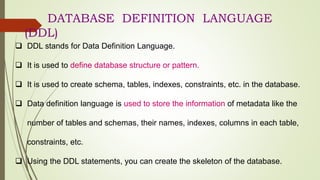
 DDL stands for Data Definition Language.
 It is used to define database structure or pattern.
 It is used to create schema, tables, indexes, constraints, etc. in the database.
 Data definition language is used to store the information of metadata like the
number of tables and schemas, their names, indexes, columns in each table,
constraints, etc.
 Using the DDL statements, you can create the skeleton of the database.
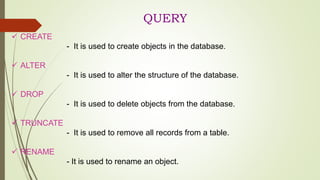
QUERY
 CREATE
- It is used to create objects in the database.
 ALTER
- It is used to alter the structure of the database.
 DROP
- It is used to delete objects from the database.
 TRUNCATE
- It is used to remove all records from a table.
 RENAME
- It is used to rename an object.
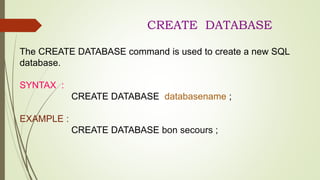
CREATE DATABASE
The CREATE DATABASE command is used to create a new SQL
database.
SYNTAX :
CREATE DATABASE databasename ;
EXAMPLE :
CREATE DATABASE bon secours ;
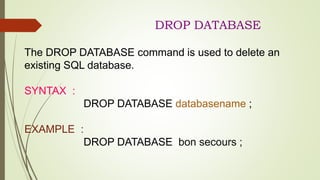
DROP DATABASE
The DROP DATABASE command is used to delete an
existing SQL database.
SYNTAX :
DROP DATABASE databasename ;
EXAMPLE :
DROP DATABASE bon secours ;
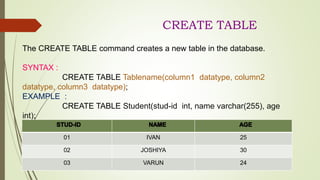
CREATE TABLE
The CREATE TABLE command creates a new table in the database.
SYNTAX :
CREATE TABLE Tablename(column1 datatype, column2
datatype, column3 datatype);
EXAMPLE :
CREATE TABLE Student(stud-id int, name varchar(255), age
int);
01 IVAN 25
02 JOSHIYA 30
03 VARUN 24
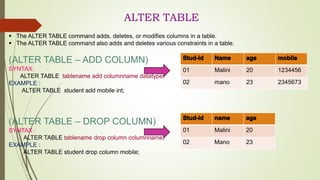
ALTER TABLE
 The ALTER TABLE command adds, deletes, or modifies columns in a table.
 The ALTER TABLE command also adds and deletes various constraints in a table.
(ALTER TABLE – ADD COLUMN)
SYNTAX:
ALTER TABLE tablename add columnname datatype;
EXAMPLE :
ALTER TABLE student add mobile int;
(ALTER TABLE – DROP COLUMN)
SYNTAX :
ALTER TABLE tablename drop column columnname;
EXAMPLE :
ALTER TABLE student drop column mobile;
01 Malini 20 1234456
02 mano 23 2345673
01 Malini 20
02 Mano 23
ALTER COLUMN
 The ALTER COLUMN command is used to change the data
type of a column in a table.
 The following SQL changes the data type of the column named
“BirthDate” in the “Employees” table to type year:
EXAMPLE :
ALTER TABLE Employees ALTER COLUMN BirthDate
year;
DROP TABLE
The DROP TABLE command deletes a table in the database.
SYNTAX :
DROP TABLE Tablename;
EXAMPLE :
DROP TABLE student ;
CREATED TABLE :
RESULT :
EMPTY SET
EMPTY SET
01 MOUNA 22
02 MARIYAM 23
TRUNCATE TABLE
The TRUNCATE TABLE command deletes the data inside a table, but not the table itself.
SYNTAX :
TRUNCATE TABLE Tablename;
EXAMPLE :
TRUNCATE TABLE student;
CREATED TABLE :
RESULT :
EMPTY SET
EMPTY SET
01 mano 34
02 velu 45
DATA MANUPULATION
LANGUAGE (DML)
 DML stands for Data Manipulation Language.
 It is used for accessing and manipulating data in a database.
 It handles user requests.
 A data-manipulation language (DML) is a language that
enables users to access or manipulate data as organized by
the appropriate data model.
The types of access are:
• Retrieval of information stored in the
database
• Insertion of new information into the
database
• Deletion of information from the
database
• Modification of information stored in the
database
CLASSIFICATION OF DML
DATA MANIPULATION LANGUAGE
PROCEDURAL DECLARATIVE
PROCEDURAL DML :
Procedural DMLs require a user to specify
what data are needed and how to get those data.
DECLARATIVE DML :
Declarative DMLs (also referred to as nonprocedural
DMLs) require a user to specify what data are needed
without specifying how to get those data.
QUERY
 SELECT :
- It is used to retrieve data from a database.
 INSERT :
- It is used to insert data into a table.
 UPDATE :
-It is used to update existing data within a table.
 DELETE :
- It is used to delete all records from a table.
 MERGE :
- It performs UPSERT operation, i.e., insert or update
operations.
 CALL :
- It is used to call a structured query language or a Java
subprogram.
SELECT
The SELECT command is used to select data from a database. The
data returned is stored in a result table, called the result set.
• To display the column:
SYNTAX : SELECT column name1, column name2 from table
name;
EXAMPLE : SELECT customername, city from employee;
• To Display the Table:
SYNTAX : SELECT * from table name;
EXAMPLE : SELECT * from employee;
EXAMPLES
DISPLAY COLUMN
CUSTOMER
NAME
CITY
MOUNI TANJORE
MEGNA TRICHY
DISPLAY TABLE
CUSTOMER
NAME
CITY STATE
MOUNI TANJORE TAMILNADU
MEGNA TRICHY TAMILNADU
INSERT
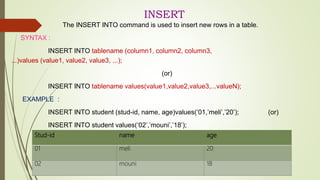
The INSERT INTO command is used to insert new rows in a table.
SYNTAX :
INSERT INTO tablename (column1, column2, column3,
...)values (value1, value2, value3, ...);
(or)
INSERT INTO tablename values(value1,value2,value3,...valueN);
EXAMPLE :
INSERT INTO student (stud-id, name, age)values(‘01,’meli’,’20’); (or)
INSERT INTO student values(‘02’,’mouni’,’18’);
Stud-id name age
01 meli 20
02 mouni 18
UPDATE
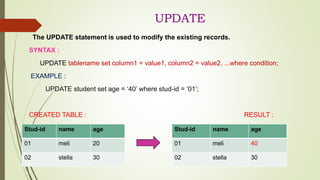
The UPDATE statement is used to modify the existing records.
SYNTAX :
UPDATE tablename set column1 = value1, column2 = value2, ...where condition;
EXAMPLE :
UPDATE student set age = ‘40’ where stud-id = ‘01’;
CREATED TABLE : RESULT :
Stud-id name age
01 meli 20
02 stella 30
Stud-id name age
01 meli 40
02 stella 30
DELETE
The DELETE statement is used to delete existing records in a table.
SYNTAX :
DELETE FROM tablename where condition;
EXAMPLE :
DELETE FROM student where stud-id = ‘ 01 ‘ ;
CREATED TABLE :
RESULT :
Stud-id name age
01 meli 20
02 hema 30
Stud-id name age
02 hema 30
Delete All Records
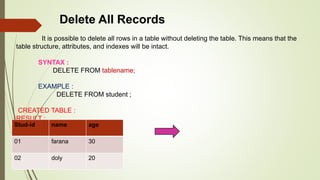
It is possible to delete all rows in a table without deleting the table. This means that the
table structure, attributes, and indexes will be intact.
SYNTAX :
DELETE FROM tablename;
EXAMPLE :
DELETE FROM student ;
CREATED TABLE :
RESULT :
EMPTY SET
Stud-id name age
01 farana 30
02 doly 20
DATA CONTROL
LANGUAGES
 DCL stands for Data Control Language.
 It is used to retrieve the stored or saved data.
 The DCL execution is transactional.
 It also has rollback parameters.
 DCL consists of statements that controls security concurrent
access to table.
 The DCL has two commands and they are GRANT and
REVOKE.
TRANSACTIONAL CONTROL
LANGUAGES
 TCL is used to run the changes made by the DML
statement.
 TCL can be grouped into a logical transaction.
 TCL commands are manage transactions in
database.
 The TCL commands are COMMIT, ROLLBACK,
SAVEPOINT.

database language ppt.pptx

  • 1.
    SUBJECT : DATABASESYSTEM TOPIC : DATABASE LANGUAGES
  • 2.
    PREPARED BY Ms.J.Monica -III-B.Sc- Information Technology Ms.V.K.Vidhyaa lakshmi -III-B.Sc-Information Technology UNDER THE GUIDANCE OF Mrs.P.Anusha M.Sc(IT).,M.Phil.,D.P.T.T.,(Ph.D)., Assistant professor, Department of Information Technology, Bon secours college for women, Thanjavur.
  • 3.
    DATABASE LANGUAGE DEFINITION :  ADBMS has appropriate languages and interface to express database queries and updates.  Database languages can be used to read, store and update the date in the database.
  • 4.
    CLASSIFICATION OF DBMS LANGUAGE 1.CREATE 1. SELECT 1. COMMIT 1. GRANT 2. ALTER 2. INSERT 2. ROLLBACK 2. REVOKE 3. DROP 3. UPDATE 3. TRANSACTION 4. TRUNCATE 4. DELETE 4. SAVEPOINT 5. RENAME 5. MERGE 6. CALL DATABASE LANGUAGES DATA DEFINITION LANGUAGES DATA MANIPULATION LANGUAGES DATA CONTROL LANGUAGES TRANSACTION LANGUAGES
  • 5.
    DATABASE DEFINITION LANGUAGE (DDL) DDL stands for Data Definition Language.  It is used to define database structure or pattern.  It is used to create schema, tables, indexes, constraints, etc. in the database.  Data definition language is used to store the information of metadata like the number of tables and schemas, their names, indexes, columns in each table, constraints, etc.  Using the DDL statements, you can create the skeleton of the database.
  • 6.
    QUERY  CREATE - Itis used to create objects in the database.  ALTER - It is used to alter the structure of the database.  DROP - It is used to delete objects from the database.  TRUNCATE - It is used to remove all records from a table.  RENAME - It is used to rename an object.
  • 7.
    CREATE DATABASE The CREATEDATABASE command is used to create a new SQL database. SYNTAX : CREATE DATABASE databasename ; EXAMPLE : CREATE DATABASE bon secours ;
  • 8.
    DROP DATABASE The DROPDATABASE command is used to delete an existing SQL database. SYNTAX : DROP DATABASE databasename ; EXAMPLE : DROP DATABASE bon secours ;
  • 9.
    CREATE TABLE The CREATETABLE command creates a new table in the database. SYNTAX : CREATE TABLE Tablename(column1 datatype, column2 datatype, column3 datatype); EXAMPLE : CREATE TABLE Student(stud-id int, name varchar(255), age int); 01 IVAN 25 02 JOSHIYA 30 03 VARUN 24
  • 10.
    ALTER TABLE  TheALTER TABLE command adds, deletes, or modifies columns in a table.  The ALTER TABLE command also adds and deletes various constraints in a table. (ALTER TABLE – ADD COLUMN) SYNTAX: ALTER TABLE tablename add columnname datatype; EXAMPLE : ALTER TABLE student add mobile int; (ALTER TABLE – DROP COLUMN) SYNTAX : ALTER TABLE tablename drop column columnname; EXAMPLE : ALTER TABLE student drop column mobile; 01 Malini 20 1234456 02 mano 23 2345673 01 Malini 20 02 Mano 23
  • 11.
    ALTER COLUMN  TheALTER COLUMN command is used to change the data type of a column in a table.  The following SQL changes the data type of the column named “BirthDate” in the “Employees” table to type year: EXAMPLE : ALTER TABLE Employees ALTER COLUMN BirthDate year;
  • 12.
    DROP TABLE The DROPTABLE command deletes a table in the database. SYNTAX : DROP TABLE Tablename; EXAMPLE : DROP TABLE student ; CREATED TABLE : RESULT : EMPTY SET EMPTY SET 01 MOUNA 22 02 MARIYAM 23
  • 13.
    TRUNCATE TABLE The TRUNCATETABLE command deletes the data inside a table, but not the table itself. SYNTAX : TRUNCATE TABLE Tablename; EXAMPLE : TRUNCATE TABLE student; CREATED TABLE : RESULT : EMPTY SET EMPTY SET 01 mano 34 02 velu 45
  • 14.
    DATA MANUPULATION LANGUAGE (DML) DML stands for Data Manipulation Language.  It is used for accessing and manipulating data in a database.  It handles user requests.  A data-manipulation language (DML) is a language that enables users to access or manipulate data as organized by the appropriate data model.
  • 15.
    The types ofaccess are: • Retrieval of information stored in the database • Insertion of new information into the database • Deletion of information from the database • Modification of information stored in the database
  • 16.
    CLASSIFICATION OF DML DATAMANIPULATION LANGUAGE PROCEDURAL DECLARATIVE
  • 17.
    PROCEDURAL DML : ProceduralDMLs require a user to specify what data are needed and how to get those data. DECLARATIVE DML : Declarative DMLs (also referred to as nonprocedural DMLs) require a user to specify what data are needed without specifying how to get those data.
  • 18.
    QUERY  SELECT : -It is used to retrieve data from a database.  INSERT : - It is used to insert data into a table.  UPDATE : -It is used to update existing data within a table.  DELETE : - It is used to delete all records from a table.  MERGE : - It performs UPSERT operation, i.e., insert or update operations.  CALL : - It is used to call a structured query language or a Java subprogram.
  • 19.
    SELECT The SELECT commandis used to select data from a database. The data returned is stored in a result table, called the result set. • To display the column: SYNTAX : SELECT column name1, column name2 from table name; EXAMPLE : SELECT customername, city from employee; • To Display the Table: SYNTAX : SELECT * from table name; EXAMPLE : SELECT * from employee;
  • 20.
    EXAMPLES DISPLAY COLUMN CUSTOMER NAME CITY MOUNI TANJORE MEGNATRICHY DISPLAY TABLE CUSTOMER NAME CITY STATE MOUNI TANJORE TAMILNADU MEGNA TRICHY TAMILNADU
  • 21.
    INSERT The INSERT INTOcommand is used to insert new rows in a table. SYNTAX : INSERT INTO tablename (column1, column2, column3, ...)values (value1, value2, value3, ...); (or) INSERT INTO tablename values(value1,value2,value3,...valueN); EXAMPLE : INSERT INTO student (stud-id, name, age)values(‘01,’meli’,’20’); (or) INSERT INTO student values(‘02’,’mouni’,’18’); Stud-id name age 01 meli 20 02 mouni 18
  • 22.
    UPDATE The UPDATE statementis used to modify the existing records. SYNTAX : UPDATE tablename set column1 = value1, column2 = value2, ...where condition; EXAMPLE : UPDATE student set age = ‘40’ where stud-id = ‘01’; CREATED TABLE : RESULT : Stud-id name age 01 meli 20 02 stella 30 Stud-id name age 01 meli 40 02 stella 30
  • 23.
    DELETE The DELETE statementis used to delete existing records in a table. SYNTAX : DELETE FROM tablename where condition; EXAMPLE : DELETE FROM student where stud-id = ‘ 01 ‘ ; CREATED TABLE : RESULT : Stud-id name age 01 meli 20 02 hema 30 Stud-id name age 02 hema 30
  • 24.
    Delete All Records Itis possible to delete all rows in a table without deleting the table. This means that the table structure, attributes, and indexes will be intact. SYNTAX : DELETE FROM tablename; EXAMPLE : DELETE FROM student ; CREATED TABLE : RESULT : EMPTY SET Stud-id name age 01 farana 30 02 doly 20
  • 25.
    DATA CONTROL LANGUAGES  DCLstands for Data Control Language.  It is used to retrieve the stored or saved data.  The DCL execution is transactional.  It also has rollback parameters.  DCL consists of statements that controls security concurrent access to table.  The DCL has two commands and they are GRANT and REVOKE.
  • 26.
    TRANSACTIONAL CONTROL LANGUAGES  TCLis used to run the changes made by the DML statement.  TCL can be grouped into a logical transaction.  TCL commands are manage transactions in database.  The TCL commands are COMMIT, ROLLBACK, SAVEPOINT.