SQL Programming OverviewDot Net Team - TDG – Injazatahmed.elbaz@injazat.com
Agenda History of SQLSQL FundamentalsData DefinitionData ModificationsSingle Table SELECT StatementsJoinsSet OperatorsAggregate FunctionsSubqueriesViewsStoredProcedures & FunctionsTriggersThe Mechanics of Query Processing
History of SQLDuring the 1970s(IBM), StructuredEnglish Query Language(SEQUEL)Select Query Language (SQL), which included commands allowing data to be read only for reporting and record look-up.Structured Query LanguageAmerican National Standards Institute and officially called the ANSI SQL standard, established in 1986
History of SQL (cont’d)In 1987, SQL became an international standard and was registered with the International Organization for Standardization (ISO) using its previously copyrighted title, ANSI SQL
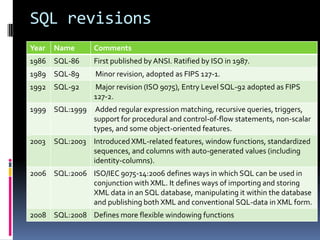
SQL revisions
History of SQL ServerSQL Server was originally a Sybase product created for IBM's OS/2 platform.The SQL Server team eventually rewrote the product from scratch. In late 1998 , SQL Server 7.0 was released.In 2000, SQL Server 2000 was released with many useful new features. SQL Server 2005, The storage and retrieval engine has been completely rewritten, the .NET Framework has been incorporated.
Transact SQL(T-SQL)T-SQL is Microsoft's implementation of a SQL.T-SQL is the language used to talk to SQL Server.SQL Server 2000 implements ANSI-92. SQL Server 2005 implements ANSI-99.T-SQL does not fully conform to any of the more recent ANSI versions, but it does implement many of the selected features.
SQL Fundamentals SQL is the only way to build, manipulate and access a relational database.
What is a Relational Database?In simple terms, a relational database is a set of tablesa relational database is a set of relationsEach table keeps information about aspects of one thing, such as a customer, an order, a product, or a team. It is possible to set up constraints on the data in individual tables and also between tables. For example, when designing the database, we might specify that an order entered in the Order table must exist for a customer who exists in the Customer table.A data model provides us with information about how the data items in the database are interrelated
The first step to write good query is the database design
TableColumns and Rows Each row must be able to stand on its own, without a dependency to other rows in the table.The row must represent a single, complete instance of the entity the table was created to represent. Each column in the row contains specific attributes that help define the instance
RelationshipsA relationship is a logical link between two entitiesRelationships can be defined as follows:One-to-zero or manyOne-to-one or manyOne-to-exactly-oneMany-to-manyThe many-to-many relationship requires three tables because a many-to-many constraint would be unenforceable
Relationships (cont’d)Entity Relationship Diagram (ERD). The ERD allows the database designer to conceptualize the database design during planning.Primary keys (unique column or combination of columns) Foreign keys (a column that references primary key of another table)To efficiently manage the data in your table you need to be able to uniquely identify each individual row in the table.The concept of maintaining foreign keys is known as "referential integrity".
Primary key A non-data key that has a more efficient or smaller data type associated with it A non-descriptive key doesn't represent anything else with the exception of being a value that uniquely identifies each row or individual instance of the entity in a table.Simplify the joining of tables and provide the basis for a "Relation."Primary keys can never be NULL and they must be uniquePrimary keys can also be combinations of columns
NormalizationEach table describes one thing only
NormalizationNormalization is the process of efficiently organizing data in a database. There are two goals of the normalization process: eliminating redundant data (for example, storing the same data in more than one table) ensuring data dependencies make sense (only storing related data in a table).Both of these are worthy goals as they:
reduce the amount of space a database consumes
ensure that data is logically stored.First Normal Form — 1NFEliminate duplicative columns from the same table.Create separate tables for each group of related data and identify each row with a unique column (the primary key).
Second Normal Form — 2NFRemove subsets of data that apply to multiple rows of a table and place them in separate tables. Create relationships between these new tables and their predecessors through the use of  foreign keys. 2NF attempts to reduce the amount of redundant data in a table by extracting it, placing it in new table(s) and creating relationships between those tables.
Third Normal Form — 3NFThe uniqueness of a row depends on the key, the whole key, and nothing but the key.Already meet the requirements of both 1NF and 2NFRemove columns that are not fully dependent upon the primary key.Fourth and Fifth Normal Form
Normalization Examplewe will take the classic example of an Invoice and level it to the Third Normal Form.We will also construct an Entity Relationship Diagram (ERD) of the database as we go.Just memorize the 3 normal forms them for now:No repeating elements or groups of elements No partial dependencies on a concatenated key No dependencies on non-key attributes
Normalization Example (cont’d)
1NF: No Repeating Elements or Groups of ElementsNF1 addresses two issues: A row of data cannot contain repeating groups of similar data (atomicity).Each row of data    must have a unique identifier    (or Primary Key).
2NF: No Partial Dependencies on a Concatenated KeyNF2 analysis of the orders table:
2NF (cont’d)each order can be associated with any number of order-items, but at least one; each order-item is associated with one order, and only one.
2NF (cont’d)Remember, NF2 only applies to tables with a concatenated primary key.Now orders table has a single-column primary key, it has passed 2NF.order_items still has a concatenated PK.
2NF (cont’d)Each order can have many items; each item can belong to many orders.
3NF: No Dependencies on Non-Key Attributesthe repeating Customer information.if a customer places more than one order then we have to input all of that customer's contact information again.each order is made by one, and only one customer.each customer can make any number of orders, including zero.
3NF (cont’d)
To Normalize or to De-normalize?Depending on how a database is to be used.data input or  reporting.fully normalized databases require complex queries to support reporting and business analysis requirements.If you are designing a new database system to support a typical business process, you will usually want to follow these rules completely and normalize all of your data structures.when you have a large volume of data to extract and analyze through reports and business intelligence tools, you will strategically break the rules of normal form, creating redundant values in fewer, larger tables.OLAP vs. OLTP
Connections and TransactionsSQL architecture important piecesneed to be understood
ConnectionsA connection is created anytime a process attaches to SQL Server. The connection is established with defined security and connection properties.For example, a connection can specify which database to connect to on the server and how to manage memory resident objects.Connection pooling.
Transactions Transaction is a collection of dependent data modifications that is controlled so that it completes entirely or not at all. For example, bank transfer from an account to another account.database objects designed to maintain data integrity in a transactional environmentLocksConstraintsKeysIndexes
Query operations are divided into three different categoriesData Definition Language (DDL) — DDL statements are used to create and manage the objects in a database. They can be used to create, modify, and drop databases, tables, indexes, views, stored procedures, and other objects.Examples include CREATE, ALTER, and DROP.Data Control Language (DCL) — DCL statements control the security permissions for users and database objects. Some objects have different permission sets. You can grant or deny these permissions to a specific user or users who belong to a database role or Windows user group.Examples include GRANT, REVOKE, and DENY.Data Manipulation Language (DML) — DML statements are used to work with data. This includes statements to retrieve data, insert rows into a table, modify values, and delete rows.Examples include SELECT, INSERT, UPDATE, and DELETE.
Data Definition Data TypesEach database column has to have a valid data type Data types are only partially standardizedNumbers:TinyInt, Int, BigInt,Numeric, Decimal, Float, Real, money  CharactersChar(length), Nchar, Varchar,NvarcharCharacter Large Object (CLOB)Varchar(Max),Nvarchar(Max), Text, NtextSeparated data pagesLarge Object (LOB)Varbinary(max), Varbinary, Binary, ImageStream operations
 Data Types (cont’d)Large Value Types (LVT)
Varchar(max), Nvarchar(max), or Varbinary(max)
Used with parameters
Date and Time
Smalldatetime, datetime, date, time, timestamp
XML Data Type
store complete XML documents or well-formed XML fragments
Object-Relational Database Management System (ORDBMS)Table, uniqueidentifier , cursor, sql_variant Data TypesUser-Defined Type
Create Tables Defines the structure of the tableCREATETABLE  Divisions(DivisionID  INT  NOT NULL, DivisionNameVarchar(40)  NOT NULL);
 Alter Tables Modifies the structure of the tableALTERTABLE DivisionsADDDivisionCityVarchar(40) NOT NULL;or ALTERCOLUMNDivisionNameVarchar(80) NOT NULL;or DROPCOLUMNDivisionCityVarchar(40) NOT NULL;
Data Definition (cont’d) DROP TablesDROPTABLE  Divisions;ConstraintsUsed to enforce valid data in columns NOT NULL (the column will not allow null values) CHECK (value is checked against constants or other columns)PRIMARY KEY (enforces uniqueness of primary key)UNIQUE (enforces uniqueness of alternate keys)FOREIGN KEY (specifies a relationship between tables)
Data Definition (cont’d)Indexes (like a virtual table with pointers to physical table) In general, rows are unsorted Indexes are sorted on the indexed value Indexes are created on a single column or combination of columnsNOTE: Null means unknown or missing value, not blank or zero
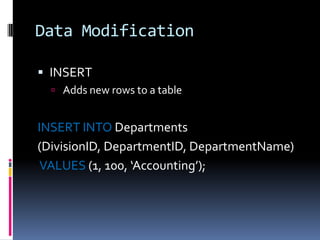
Data ModificationINSERT Adds new rows to a tableINSERTINTO Departments(DivisionID, DepartmentID, DepartmentName)VALUES (1, 100, ‘Accounting’);
Data Modification (cont’d)UPDATEModifies the column values in existing rowsUPDATE EmployeeSETCurrentSalary = CurrentSalary + 100WHERE Employee = 4;
Data Modification (cont’d)DELETERemoves rows from a tableDELETEFROM EmployeesWHERE Employee = 7;
TRANSACTIONS A set of INSERT/UPDATE/DELETE operations that belong together as a logical unit of work COMMIT (ends the transaction with success and makes updates permanent) ROLLBACK (ends the transaction with failure and undoes the updates)
TRANSACTIONS (cont’d)BEGINTRAN  T1; UPDATE  table1 ...;UPDATE  table2 ...; INSERTINTO  table3 …;COMMITTRAN  T1;
SELECTSELECT select_list (describes the columns of the result set.)[ INTO new_table_name ] (specifies that the result set is used to create a new table)FROM table_list (Contains a list of the tables from which the result set data is retrieved)[ WHERE search_conditions ] (filter that defines the conditions each row in the source tables must meet)[ GROUP BY group_by_list ] (partitions the result set into groups based on the values)[ HAVING search_conditions ] (an additional filter that is applied to the result set)[ ORDER BY order_list [ ASC | DESC ] ] (defines the order in which the rows in the result set are sorted)
Single Table SELECTSELECTEmployeeID, FirstName, LastName,CurrentSalary*12 ASYearlySalaryFROM EmployeesWHEREEmployeeID = 3;DISTINCT can be used to suppress duplicates
WHEREThe WHERE clause specifies a filter conditionConditional Operators= <> > < >= <=IN , NOT IN (test for several values)BETWEEN, NOT BETWEEN (intervals)IS NULL, IS NOT NULLLIKE, NOT LIKE ( % or _ )EXISTS, NOT EXISTS (sub queries) Conditions can be combined with NOT AND OR
ORDER BYThe ORDER BY statement defines the sort order of the rowsSELECTLastName,FirstName,CurrentSalaryFROM EmployeesORDERBYCurrentSalaryDESC			,LastNameASC			,FirstNameASC;
NULLNULL is not the same as blankNULL is not the same as zeroNULL is not the same as the text ‘NULL’NULL is not equal to any valueNULL is not different to any valueNULL is not equal to NULLIn SQL Server, NULL sorts as the lowest value
Joins (INNER)Joins are used to combine information from multiple tablesBasic Syntax of an INNER Join (excludes data that does NOT satisfy the join)
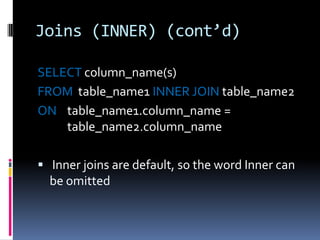
Joins (INNER) (cont’d)SELECTcolumn_name(s)FROM  table_name1 INNERJOIN table_name2ON    table_name1.column_name =                                        	table_name2.column_name Inner joins are default, so the word Inner can be omitted
Joins (OUTER)Basic Syntax of an OUTER Join (include rows from one table that have no matching row)
Joins (OUTER) (cont’d)table1 LEFT OUTER JOIN table2all rows from table 1 will be includedtable1 RIGHT OUTER JOIN table2all rows from table 2 will be includedtable1 FULL OUTER JOIN table2all rows from each table will be includedSELECTcolumn_name(s) FROM table_name1LEFTOUTERJOIN table_name2ON  table_name1.column_name =         	    table_name2.column_name
Outer Join ExampleSELECTregion.region_nbr, region.region_name, branch.branch_nbr, branch.branch_nameFROM regionLEFTOUTERJOIN branchONbranch.region_nbr = region.region_nbrORDERBYregion.region_nbr
Outer Join Example (cont’d)Here is the result. Note that the "Virtual Region" is included in the results even though it has no rows in the branch table. This is the difference between the INNER JOIN and OUTER JOIN.
Joins (CROSS) Cartesian ProductEach row in one table is paired to every row in the other tableSELECT  * FROM  employeeCROSSJOIN department
Set OperatorsUNION, INTERSECT and EXCEPT
 UNIONSELECT  zip  FROMhotel.customerWHERE  zip  > '90000‘UNION [ALL]SELECT  zip  FROMhotel.hotelWHERE  zip  > '90000‘ Creates one table with rows from both SELECTs Suppresses duplicate rows
INTERSECTSELECT  zip  FROMhotel.customerWHERE  zip  <  '30000'INTERSECTSELECT  zip  FROMhotel.hotelWHERE  zip  <  '30000‘ Returns the rows that occur in both queries
EXCEPTSELECT  zip  FROMhotel.hotelWHERE  zip  <  '30000'EXCEPTSELECT  zip  FROMhotel.customerWHERE  zip  <  '30000‘ Returns the rows from one query except those that occur in the other basically a minus
Row FunctionsRow functions take input parameters and return a value Math Functions String FunctionsDate and Time FunctionsData Type ConversionsCASE StatementsNULL Functions
Row Functions - Math ABS, DEGREES, RAND, ACOSEXP, ROUND, ASIN, LOG, SINATN2, LOG10, SQRT, CEILING FLOOR, SIGN, ATAN,PISQUARE, COS, POWERTAN, COT, RADIANSSELECTROUND(123.9994,3)Here is the result set. 123.9990
Row Functions - String ASCII, NCHAR, SOUNDEX, CHAR, PATINDEX SPACE, CHARINDEX, DIFFERENCE, REPLACE STUFF, LEFT, REPLICATE, SUBSTRING QUOTENAME, STR,LEN, REVERSE UNICODE, LOWER, RIGHT UPPER, LTRIM, RTRIMSELECTLEFT('abcdefg',2)Here is the result set. ab
Row Functions – Date & TimeDATEADD, DATEDIFF DATENAME, DATEPART DAY, MONTH, YEAR GETDATE, GETUTCDATESELECTGETDATE()Here is the result set:  July 7 2009 4:20 PM
Row Functions – Data TypeSELECTCAST( 'abc'  ASvarchar(5) )SELECTSUBSTRING(Name, 1, 30)  ASProductName,ListPriceFROMProduction.ProductWHERECONVERT(int, ListPrice) LIKE '3%';
Row Functions - CaseThe CASE expression enables many forms of conditional processing to be placed into a SQL statement.SELECT  title, price, Budget = CASE priceWHEN price > 20.00 THEN 'Expensive‘WHEN price BETWEEN 10.00 AND 19.99 THEN 'Moderate'WHEN price < 10.00 THEN 'Inexpensive'ELSE 'Unknown'END,FROM titles
Row Functions - NullA null value in an expression causes the result of the expression to be null Testing for NULL in a WHERE clauseISNULL(check_expression, replacement_value)NULLIF(@Value1, @Value2)SELECT Name, WeightFROMProduction.ProductWHERE Weight ISNULL;
Aggregate Functions SUM, AVG, MAX, MIN, COUNTSELECTAVG (UnitPrice * Quantity) AsAveragePriceFROMWidgetOrdersWHERE  Continent  =  “North America”SELECTCOUNT(*)  AS  'Number of Large Orders'FROMWidgetOrdersWHERE  Quantity > 100SELECTMAX(Quantity * UnitPrice)  As  'Largest Order'FROMWidgetOrders
Aggregate Functions – GROUP BY The GROUP BY statement is used in conjunction with the aggregate functions to group the result-set by one or more columns.SELECT  Customer, SUM(OrderPrice)FROM OrdersGROUPBY Customer
Aggregate Functions – HAVINGThe HAVING clause was added to SQL because the WHERE keyword could not be used with aggregate functions.SELECT Customer, SUM(OrderPrice)FROM OrdersGROUPBY CustomerHAVINGSUM(OrderPrice)<2000
Subqueries A SELECT statement embedded into another statement is called a subquerySELECTSUM(Sales) FROMStore_InformationWHEREStore_nameIN(SELECTstore_nameFROM GeographyWHEREregion_name = 'West') IN or NOT IN will handle extra lists returned by the sub query Operators (>, <, =, etc.) can be used when single values are returned
Correlated Subqueries If a subquery may reference columns from the main query table, this is called a correlatedSELECTDISTINCTc.LastName, c.FirstNameFROMPerson.Contact cJOINHumanResources.Employee eONe.ContactID = c.ContactIDWHERE 5000.00 IN(SELECT  Bonus  FROMSales.SalesPerson spWHEREe.EmployeeID = sp.SalesPersonID) ;
Views - InlineA view is a virtual table based on the result-set of an SQL statement An inline view is a table within theSELECT heightFROM(SELECT height FROM test WHERE id = @idORDERBY id DESC, acc_dateDESC, height DESC)WHERE ROWNUM = 1;
Views - StoredCREATEVIEW[Current Product List] ASSELECTProductID,ProductNameFROM ProductsWHERE Discontinued=No A view does not store data If you do insert, update, delete on a view the data values in the underlying tables will be updated This is not possible on all views Computed columns cannot be updated Not permitted on aggregate views or views with set operators Join views may or may not be updateable
StoredProcedures & FunctionsPrecompiled execution. Reduced client/server traffic. Efficient reuse of code and programming abstraction.Centralize maintenance.Enhanced security controls. You can grant users permission to execute a stored procedure independently of underlying table permissions.
StoredProceduresCREATEPROCEDUREsp_GetInventory@location varchar(10)ASSELECT Product, QuantityFROM InventoryWHERE Warehouse = @locationEXECUTEsp_GetInventory 'FL'
User Defined FunctionsCREATEFUNCTIONwhichContinent (@Country nvarchar(15))RETURNSvarchar(30) ASBEGIN	declare @Return varchar(30)select @return = case @Country 	when 'Argentina' then 'South America‘when 'Belgium' then 'Europe' 	when 'Brazil' then 'South America‘	else 'Unknown' 	Endreturn @returnend

T-SQL Overview

  • 1.
    SQL Programming OverviewDotNet Team - TDG – Injazatahmed.elbaz@injazat.com
  • 2.
    Agenda History ofSQLSQL FundamentalsData DefinitionData ModificationsSingle Table SELECT StatementsJoinsSet OperatorsAggregate FunctionsSubqueriesViewsStoredProcedures & FunctionsTriggersThe Mechanics of Query Processing
  • 3.
    History of SQLDuringthe 1970s(IBM), StructuredEnglish Query Language(SEQUEL)Select Query Language (SQL), which included commands allowing data to be read only for reporting and record look-up.Structured Query LanguageAmerican National Standards Institute and officially called the ANSI SQL standard, established in 1986
  • 4.
    History of SQL(cont’d)In 1987, SQL became an international standard and was registered with the International Organization for Standardization (ISO) using its previously copyrighted title, ANSI SQL
  • 5.
  • 6.
    History of SQLServerSQL Server was originally a Sybase product created for IBM's OS/2 platform.The SQL Server team eventually rewrote the product from scratch. In late 1998 , SQL Server 7.0 was released.In 2000, SQL Server 2000 was released with many useful new features. SQL Server 2005, The storage and retrieval engine has been completely rewritten, the .NET Framework has been incorporated.
  • 7.
    Transact SQL(T-SQL)T-SQL isMicrosoft's implementation of a SQL.T-SQL is the language used to talk to SQL Server.SQL Server 2000 implements ANSI-92. SQL Server 2005 implements ANSI-99.T-SQL does not fully conform to any of the more recent ANSI versions, but it does implement many of the selected features.
  • 8.
    SQL Fundamentals SQLis the only way to build, manipulate and access a relational database.
  • 9.
    What is aRelational Database?In simple terms, a relational database is a set of tablesa relational database is a set of relationsEach table keeps information about aspects of one thing, such as a customer, an order, a product, or a team. It is possible to set up constraints on the data in individual tables and also between tables. For example, when designing the database, we might specify that an order entered in the Order table must exist for a customer who exists in the Customer table.A data model provides us with information about how the data items in the database are interrelated
  • 10.
    The first stepto write good query is the database design
  • 11.
    TableColumns and RowsEach row must be able to stand on its own, without a dependency to other rows in the table.The row must represent a single, complete instance of the entity the table was created to represent. Each column in the row contains specific attributes that help define the instance
  • 12.
    RelationshipsA relationship isa logical link between two entitiesRelationships can be defined as follows:One-to-zero or manyOne-to-one or manyOne-to-exactly-oneMany-to-manyThe many-to-many relationship requires three tables because a many-to-many constraint would be unenforceable
  • 13.
    Relationships (cont’d)Entity RelationshipDiagram (ERD). The ERD allows the database designer to conceptualize the database design during planning.Primary keys (unique column or combination of columns) Foreign keys (a column that references primary key of another table)To efficiently manage the data in your table you need to be able to uniquely identify each individual row in the table.The concept of maintaining foreign keys is known as "referential integrity".
  • 14.
    Primary key Anon-data key that has a more efficient or smaller data type associated with it A non-descriptive key doesn't represent anything else with the exception of being a value that uniquely identifies each row or individual instance of the entity in a table.Simplify the joining of tables and provide the basis for a "Relation."Primary keys can never be NULL and they must be uniquePrimary keys can also be combinations of columns
  • 15.
  • 16.
    NormalizationNormalization is theprocess of efficiently organizing data in a database. There are two goals of the normalization process: eliminating redundant data (for example, storing the same data in more than one table) ensuring data dependencies make sense (only storing related data in a table).Both of these are worthy goals as they:
  • 17.
    reduce the amountof space a database consumes
  • 18.
    ensure that datais logically stored.First Normal Form — 1NFEliminate duplicative columns from the same table.Create separate tables for each group of related data and identify each row with a unique column (the primary key).
  • 19.
    Second Normal Form— 2NFRemove subsets of data that apply to multiple rows of a table and place them in separate tables. Create relationships between these new tables and their predecessors through the use of foreign keys. 2NF attempts to reduce the amount of redundant data in a table by extracting it, placing it in new table(s) and creating relationships between those tables.
  • 20.
    Third Normal Form— 3NFThe uniqueness of a row depends on the key, the whole key, and nothing but the key.Already meet the requirements of both 1NF and 2NFRemove columns that are not fully dependent upon the primary key.Fourth and Fifth Normal Form
  • 21.
    Normalization Examplewe willtake the classic example of an Invoice and level it to the Third Normal Form.We will also construct an Entity Relationship Diagram (ERD) of the database as we go.Just memorize the 3 normal forms them for now:No repeating elements or groups of elements No partial dependencies on a concatenated key No dependencies on non-key attributes
  • 22.
  • 23.
    1NF: No RepeatingElements or Groups of ElementsNF1 addresses two issues: A row of data cannot contain repeating groups of similar data (atomicity).Each row of data must have a unique identifier (or Primary Key).
  • 24.
    2NF: No PartialDependencies on a Concatenated KeyNF2 analysis of the orders table:
  • 25.
    2NF (cont’d)each ordercan be associated with any number of order-items, but at least one; each order-item is associated with one order, and only one.
  • 26.
    2NF (cont’d)Remember, NF2only applies to tables with a concatenated primary key.Now orders table has a single-column primary key, it has passed 2NF.order_items still has a concatenated PK.
  • 27.
    2NF (cont’d)Each ordercan have many items; each item can belong to many orders.
  • 28.
    3NF: No Dependencieson Non-Key Attributesthe repeating Customer information.if a customer places more than one order then we have to input all of that customer's contact information again.each order is made by one, and only one customer.each customer can make any number of orders, including zero.
  • 29.
  • 30.
    To Normalize orto De-normalize?Depending on how a database is to be used.data input or reporting.fully normalized databases require complex queries to support reporting and business analysis requirements.If you are designing a new database system to support a typical business process, you will usually want to follow these rules completely and normalize all of your data structures.when you have a large volume of data to extract and analyze through reports and business intelligence tools, you will strategically break the rules of normal form, creating redundant values in fewer, larger tables.OLAP vs. OLTP
  • 31.
    Connections and TransactionsSQLarchitecture important piecesneed to be understood
  • 32.
    ConnectionsA connection iscreated anytime a process attaches to SQL Server. The connection is established with defined security and connection properties.For example, a connection can specify which database to connect to on the server and how to manage memory resident objects.Connection pooling.
  • 33.
    Transactions Transaction isa collection of dependent data modifications that is controlled so that it completes entirely or not at all. For example, bank transfer from an account to another account.database objects designed to maintain data integrity in a transactional environmentLocksConstraintsKeysIndexes
  • 34.
    Query operations aredivided into three different categoriesData Definition Language (DDL) — DDL statements are used to create and manage the objects in a database. They can be used to create, modify, and drop databases, tables, indexes, views, stored procedures, and other objects.Examples include CREATE, ALTER, and DROP.Data Control Language (DCL) — DCL statements control the security permissions for users and database objects. Some objects have different permission sets. You can grant or deny these permissions to a specific user or users who belong to a database role or Windows user group.Examples include GRANT, REVOKE, and DENY.Data Manipulation Language (DML) — DML statements are used to work with data. This includes statements to retrieve data, insert rows into a table, modify values, and delete rows.Examples include SELECT, INSERT, UPDATE, and DELETE.
  • 35.
    Data Definition DataTypesEach database column has to have a valid data type Data types are only partially standardizedNumbers:TinyInt, Int, BigInt,Numeric, Decimal, Float, Real, money CharactersChar(length), Nchar, Varchar,NvarcharCharacter Large Object (CLOB)Varchar(Max),Nvarchar(Max), Text, NtextSeparated data pagesLarge Object (LOB)Varbinary(max), Varbinary, Binary, ImageStream operations
  • 36.
    Data Types(cont’d)Large Value Types (LVT)
  • 37.
  • 38.
  • 39.
  • 40.
  • 41.
  • 42.
    store complete XMLdocuments or well-formed XML fragments
  • 43.
    Object-Relational Database ManagementSystem (ORDBMS)Table, uniqueidentifier , cursor, sql_variant Data TypesUser-Defined Type
  • 44.
    Create Tables Definesthe structure of the tableCREATETABLE Divisions(DivisionID INT NOT NULL, DivisionNameVarchar(40) NOT NULL);
  • 45.
    Alter TablesModifies the structure of the tableALTERTABLE DivisionsADDDivisionCityVarchar(40) NOT NULL;or ALTERCOLUMNDivisionNameVarchar(80) NOT NULL;or DROPCOLUMNDivisionCityVarchar(40) NOT NULL;
  • 46.
    Data Definition (cont’d)DROP TablesDROPTABLE Divisions;ConstraintsUsed to enforce valid data in columns NOT NULL (the column will not allow null values) CHECK (value is checked against constants or other columns)PRIMARY KEY (enforces uniqueness of primary key)UNIQUE (enforces uniqueness of alternate keys)FOREIGN KEY (specifies a relationship between tables)
  • 47.
    Data Definition (cont’d)Indexes(like a virtual table with pointers to physical table) In general, rows are unsorted Indexes are sorted on the indexed value Indexes are created on a single column or combination of columnsNOTE: Null means unknown or missing value, not blank or zero
  • 48.
    Data ModificationINSERT Addsnew rows to a tableINSERTINTO Departments(DivisionID, DepartmentID, DepartmentName)VALUES (1, 100, ‘Accounting’);
  • 49.
    Data Modification (cont’d)UPDATEModifiesthe column values in existing rowsUPDATE EmployeeSETCurrentSalary = CurrentSalary + 100WHERE Employee = 4;
  • 50.
    Data Modification (cont’d)DELETERemovesrows from a tableDELETEFROM EmployeesWHERE Employee = 7;
  • 51.
    TRANSACTIONS A setof INSERT/UPDATE/DELETE operations that belong together as a logical unit of work COMMIT (ends the transaction with success and makes updates permanent) ROLLBACK (ends the transaction with failure and undoes the updates)
  • 52.
    TRANSACTIONS (cont’d)BEGINTRAN T1; UPDATE table1 ...;UPDATE table2 ...; INSERTINTO table3 …;COMMITTRAN T1;
  • 53.
    SELECTSELECT select_list (describesthe columns of the result set.)[ INTO new_table_name ] (specifies that the result set is used to create a new table)FROM table_list (Contains a list of the tables from which the result set data is retrieved)[ WHERE search_conditions ] (filter that defines the conditions each row in the source tables must meet)[ GROUP BY group_by_list ] (partitions the result set into groups based on the values)[ HAVING search_conditions ] (an additional filter that is applied to the result set)[ ORDER BY order_list [ ASC | DESC ] ] (defines the order in which the rows in the result set are sorted)
  • 54.
    Single Table SELECTSELECTEmployeeID,FirstName, LastName,CurrentSalary*12 ASYearlySalaryFROM EmployeesWHEREEmployeeID = 3;DISTINCT can be used to suppress duplicates
  • 55.
    WHEREThe WHERE clausespecifies a filter conditionConditional Operators= <> > < >= <=IN , NOT IN (test for several values)BETWEEN, NOT BETWEEN (intervals)IS NULL, IS NOT NULLLIKE, NOT LIKE ( % or _ )EXISTS, NOT EXISTS (sub queries) Conditions can be combined with NOT AND OR
  • 56.
    ORDER BYThe ORDERBY statement defines the sort order of the rowsSELECTLastName,FirstName,CurrentSalaryFROM EmployeesORDERBYCurrentSalaryDESC ,LastNameASC ,FirstNameASC;
  • 57.
    NULLNULL is notthe same as blankNULL is not the same as zeroNULL is not the same as the text ‘NULL’NULL is not equal to any valueNULL is not different to any valueNULL is not equal to NULLIn SQL Server, NULL sorts as the lowest value
  • 58.
    Joins (INNER)Joins areused to combine information from multiple tablesBasic Syntax of an INNER Join (excludes data that does NOT satisfy the join)
  • 59.
    Joins (INNER) (cont’d)SELECTcolumn_name(s)FROM table_name1 INNERJOIN table_name2ON table_name1.column_name = table_name2.column_name Inner joins are default, so the word Inner can be omitted
  • 60.
    Joins (OUTER)Basic Syntaxof an OUTER Join (include rows from one table that have no matching row)
  • 61.
    Joins (OUTER) (cont’d)table1LEFT OUTER JOIN table2all rows from table 1 will be includedtable1 RIGHT OUTER JOIN table2all rows from table 2 will be includedtable1 FULL OUTER JOIN table2all rows from each table will be includedSELECTcolumn_name(s) FROM table_name1LEFTOUTERJOIN table_name2ON table_name1.column_name = table_name2.column_name
  • 62.
    Outer Join ExampleSELECTregion.region_nbr,region.region_name, branch.branch_nbr, branch.branch_nameFROM regionLEFTOUTERJOIN branchONbranch.region_nbr = region.region_nbrORDERBYregion.region_nbr
  • 63.
    Outer Join Example(cont’d)Here is the result. Note that the "Virtual Region" is included in the results even though it has no rows in the branch table. This is the difference between the INNER JOIN and OUTER JOIN.
  • 64.
    Joins (CROSS) CartesianProductEach row in one table is paired to every row in the other tableSELECT * FROM employeeCROSSJOIN department
  • 65.
  • 66.
    UNIONSELECT zip FROMhotel.customerWHERE zip > '90000‘UNION [ALL]SELECT zip FROMhotel.hotelWHERE zip > '90000‘ Creates one table with rows from both SELECTs Suppresses duplicate rows
  • 67.
    INTERSECTSELECT zip FROMhotel.customerWHERE zip < '30000'INTERSECTSELECT zip FROMhotel.hotelWHERE zip < '30000‘ Returns the rows that occur in both queries
  • 68.
    EXCEPTSELECT zip FROMhotel.hotelWHERE zip < '30000'EXCEPTSELECT zip FROMhotel.customerWHERE zip < '30000‘ Returns the rows from one query except those that occur in the other basically a minus
  • 69.
    Row FunctionsRow functionstake input parameters and return a value Math Functions String FunctionsDate and Time FunctionsData Type ConversionsCASE StatementsNULL Functions
  • 70.
    Row Functions -Math ABS, DEGREES, RAND, ACOSEXP, ROUND, ASIN, LOG, SINATN2, LOG10, SQRT, CEILING FLOOR, SIGN, ATAN,PISQUARE, COS, POWERTAN, COT, RADIANSSELECTROUND(123.9994,3)Here is the result set. 123.9990
  • 71.
    Row Functions -String ASCII, NCHAR, SOUNDEX, CHAR, PATINDEX SPACE, CHARINDEX, DIFFERENCE, REPLACE STUFF, LEFT, REPLICATE, SUBSTRING QUOTENAME, STR,LEN, REVERSE UNICODE, LOWER, RIGHT UPPER, LTRIM, RTRIMSELECTLEFT('abcdefg',2)Here is the result set. ab
  • 72.
    Row Functions –Date & TimeDATEADD, DATEDIFF DATENAME, DATEPART DAY, MONTH, YEAR GETDATE, GETUTCDATESELECTGETDATE()Here is the result set: July 7 2009 4:20 PM
  • 73.
    Row Functions –Data TypeSELECTCAST( 'abc' ASvarchar(5) )SELECTSUBSTRING(Name, 1, 30) ASProductName,ListPriceFROMProduction.ProductWHERECONVERT(int, ListPrice) LIKE '3%';
  • 74.
    Row Functions -CaseThe CASE expression enables many forms of conditional processing to be placed into a SQL statement.SELECT title, price, Budget = CASE priceWHEN price > 20.00 THEN 'Expensive‘WHEN price BETWEEN 10.00 AND 19.99 THEN 'Moderate'WHEN price < 10.00 THEN 'Inexpensive'ELSE 'Unknown'END,FROM titles
  • 75.
    Row Functions -NullA null value in an expression causes the result of the expression to be null Testing for NULL in a WHERE clauseISNULL(check_expression, replacement_value)NULLIF(@Value1, @Value2)SELECT Name, WeightFROMProduction.ProductWHERE Weight ISNULL;
  • 76.
    Aggregate Functions SUM,AVG, MAX, MIN, COUNTSELECTAVG (UnitPrice * Quantity) AsAveragePriceFROMWidgetOrdersWHERE Continent = “North America”SELECTCOUNT(*) AS 'Number of Large Orders'FROMWidgetOrdersWHERE Quantity > 100SELECTMAX(Quantity * UnitPrice) As 'Largest Order'FROMWidgetOrders
  • 77.
    Aggregate Functions –GROUP BY The GROUP BY statement is used in conjunction with the aggregate functions to group the result-set by one or more columns.SELECT Customer, SUM(OrderPrice)FROM OrdersGROUPBY Customer
  • 78.
    Aggregate Functions –HAVINGThe HAVING clause was added to SQL because the WHERE keyword could not be used with aggregate functions.SELECT Customer, SUM(OrderPrice)FROM OrdersGROUPBY CustomerHAVINGSUM(OrderPrice)<2000
  • 79.
    Subqueries A SELECTstatement embedded into another statement is called a subquerySELECTSUM(Sales) FROMStore_InformationWHEREStore_nameIN(SELECTstore_nameFROM GeographyWHEREregion_name = 'West') IN or NOT IN will handle extra lists returned by the sub query Operators (>, <, =, etc.) can be used when single values are returned
  • 80.
    Correlated Subqueries Ifa subquery may reference columns from the main query table, this is called a correlatedSELECTDISTINCTc.LastName, c.FirstNameFROMPerson.Contact cJOINHumanResources.Employee eONe.ContactID = c.ContactIDWHERE 5000.00 IN(SELECT Bonus FROMSales.SalesPerson spWHEREe.EmployeeID = sp.SalesPersonID) ;
  • 81.
    Views - InlineAview is a virtual table based on the result-set of an SQL statement An inline view is a table within theSELECT heightFROM(SELECT height FROM test WHERE id = @idORDERBY id DESC, acc_dateDESC, height DESC)WHERE ROWNUM = 1;
  • 82.
    Views - StoredCREATEVIEW[CurrentProduct List] ASSELECTProductID,ProductNameFROM ProductsWHERE Discontinued=No A view does not store data If you do insert, update, delete on a view the data values in the underlying tables will be updated This is not possible on all views Computed columns cannot be updated Not permitted on aggregate views or views with set operators Join views may or may not be updateable
  • 83.
    StoredProcedures & FunctionsPrecompiledexecution. Reduced client/server traffic. Efficient reuse of code and programming abstraction.Centralize maintenance.Enhanced security controls. You can grant users permission to execute a stored procedure independently of underlying table permissions.
  • 84.
    StoredProceduresCREATEPROCEDUREsp_GetInventory@location varchar(10)ASSELECT Product,QuantityFROM InventoryWHERE Warehouse = @locationEXECUTEsp_GetInventory 'FL'
  • 85.
    User Defined FunctionsCREATEFUNCTIONwhichContinent(@Country nvarchar(15))RETURNSvarchar(30) ASBEGIN declare @Return varchar(30)select @return = case @Country when 'Argentina' then 'South America‘when 'Belgium' then 'Europe' when 'Brazil' then 'South America‘ else 'Unknown' Endreturn @returnend