Data Flow Diagram (DFD)
By Fizza Khan
Student of BS(Bioinformatics)
Data Flow Diagram:
• A data flow diagram (DFD) is a
graphical representation of the "flow" of
data through an information system,
modelling its process aspects.
History:
• In the 1970s, Larry Constantine, the original
developer of structured design, proposed
data flow diagrams as a practical technique
based on Martin and Estrin's "Data Flow
Graph" model of computation.
• It became more popular in business circles, as
it was applied to business analysis, than in
academic circles.
DFD is not a “Flow Chart”
• Flow chart shows “Flow of Control”.
• Data flow diagram shows “Flow of Data”.
• The flow chart describes boxes that describe
“Computation, Decisions, Interactions, &
Loops.
• Data flow diagram should not include control
elements.
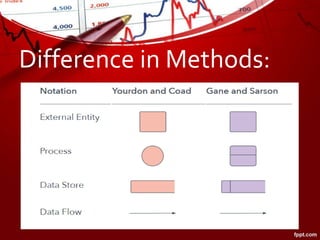
Methods of Symbols used in
DFDs
1. Yourdon & Coad
2. Yourdon & DeMarco
Difference in Methods:
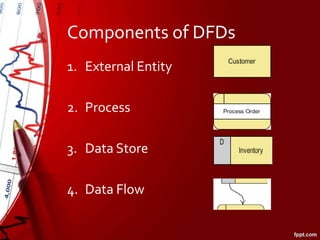
Components of DFDs
1. External Entity
2. Process
3. Data Store
4. Data Flow
Example Of a Banking Process
Custo
mer
Enquires
deposits &
Withdrawals
Account Details
Counter2
Account
Information
Account
Information
Rules of Data Flow
Data Can Flow From
• External entity to process
• Process to external entity
• Process to data store
• Data store to process
• Process to process
Data Cannot Flow From
• External entity to external
entity
• External entity to data store
• Data store to External
entity
• Data store to data store
Types Of Data Flow
Diagrams
1. Logical Data Flow Diagram
2. Physical Data Flow Diagram
Logical Data Flow Diagram
• It focusses on the business & how the business
operates.
• It describe the business events that take place & the
data required & produced by each event.
• It does not delve into the technical aspects of a
process or a system.
• Non-technical employees can understand these
diagrams easily.
Physical Data Flow
Diagrams
• It shows that the how system will be implemented.
• These diagrams specify the software, hardware, files
& people involved in an information flow.
• A detailed physical data flow diagram can facilitate
the development of the code needed to implement a
data system.
DFDs Levels & Layers:
1. Level 0 – Context Diagram
2. Level 1 – Overview Diagram
3. Level 2 – Detailed Diagram
Level 0 – Context Diagram
• It is the most basic & simplest Data Flow Diagram.
• It show a single process node and its connections to
external entities.
• This level basically represents the input & output of
the entire system.
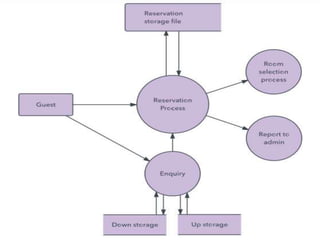
Example of a Hotel Reservation
System
Level 1 – Overview Diagram
• Presents more detailed view of the system
than Level 0.
• Highlight the main functions carried out by
the system.
• It is basically the breakdown of level 0 into
sub-processes.
Example
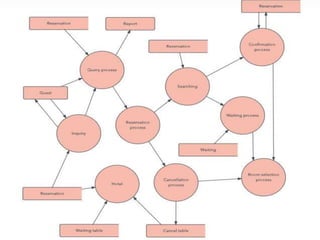
Level 2 – Detailed Diagram
• Simply break processes down into more
detailed sub-processes.
• DFDs could go beyond level 3, but they rarely
do.
• Level 3 data flow diagrams are detailed
enough that it doesn’t usually make sense to
break them down further.
Applications
1. DFDs in Software Engineering
2. DFDs in Business Analysis
3. DFDs in Business Process Re-
Engineering
4. DFDs in Agile Development
5. DFDs in System Structure
Advantages
• Aids in describing the boundaries of the system.
• Beneficial for communicating existing system
knowledge to the users.
• Can provide a detailed representation of system
components.
• Used as the part of system documentation file.
• Easier to understand by technical and nontechnical
audiences
• Supports the logic behind the data flow within the
Disadvantages
• Make the programmers little confusing
concerning the system.
• The biggest drawback of the DFD is that it
simply takes a long time to create, so long
that the analyst may not receive support from
management to complete it.
Data flow diagram

Data flow diagram

  • 1.
    Data Flow Diagram(DFD) By Fizza Khan Student of BS(Bioinformatics)
  • 2.
    Data Flow Diagram: •A data flow diagram (DFD) is a graphical representation of the "flow" of data through an information system, modelling its process aspects.
  • 3.
    History: • In the1970s, Larry Constantine, the original developer of structured design, proposed data flow diagrams as a practical technique based on Martin and Estrin's "Data Flow Graph" model of computation. • It became more popular in business circles, as it was applied to business analysis, than in academic circles.
  • 4.
    DFD is nota “Flow Chart” • Flow chart shows “Flow of Control”. • Data flow diagram shows “Flow of Data”. • The flow chart describes boxes that describe “Computation, Decisions, Interactions, & Loops. • Data flow diagram should not include control elements.
  • 5.
    Methods of Symbolsused in DFDs 1. Yourdon & Coad 2. Yourdon & DeMarco
  • 6.
  • 7.
    Components of DFDs 1.External Entity 2. Process 3. Data Store 4. Data Flow
  • 8.
    Example Of aBanking Process Custo mer Enquires deposits & Withdrawals Account Details Counter2 Account Information Account Information
  • 9.
    Rules of DataFlow Data Can Flow From • External entity to process • Process to external entity • Process to data store • Data store to process • Process to process Data Cannot Flow From • External entity to external entity • External entity to data store • Data store to External entity • Data store to data store
  • 10.
    Types Of DataFlow Diagrams 1. Logical Data Flow Diagram 2. Physical Data Flow Diagram
  • 11.
    Logical Data FlowDiagram • It focusses on the business & how the business operates. • It describe the business events that take place & the data required & produced by each event. • It does not delve into the technical aspects of a process or a system. • Non-technical employees can understand these diagrams easily.
  • 12.
    Physical Data Flow Diagrams •It shows that the how system will be implemented. • These diagrams specify the software, hardware, files & people involved in an information flow. • A detailed physical data flow diagram can facilitate the development of the code needed to implement a data system.
  • 13.
    DFDs Levels &Layers: 1. Level 0 – Context Diagram 2. Level 1 – Overview Diagram 3. Level 2 – Detailed Diagram
  • 14.
    Level 0 –Context Diagram • It is the most basic & simplest Data Flow Diagram. • It show a single process node and its connections to external entities. • This level basically represents the input & output of the entire system.
  • 15.
    Example of aHotel Reservation System
  • 16.
    Level 1 –Overview Diagram • Presents more detailed view of the system than Level 0. • Highlight the main functions carried out by the system. • It is basically the breakdown of level 0 into sub-processes.
  • 17.
  • 18.
    Level 2 –Detailed Diagram • Simply break processes down into more detailed sub-processes. • DFDs could go beyond level 3, but they rarely do. • Level 3 data flow diagrams are detailed enough that it doesn’t usually make sense to break them down further.
  • 20.
    Applications 1. DFDs inSoftware Engineering 2. DFDs in Business Analysis 3. DFDs in Business Process Re- Engineering 4. DFDs in Agile Development 5. DFDs in System Structure
  • 21.
    Advantages • Aids indescribing the boundaries of the system. • Beneficial for communicating existing system knowledge to the users. • Can provide a detailed representation of system components. • Used as the part of system documentation file. • Easier to understand by technical and nontechnical audiences • Supports the logic behind the data flow within the
  • 22.
    Disadvantages • Make theprogrammers little confusing concerning the system. • The biggest drawback of the DFD is that it simply takes a long time to create, so long that the analyst may not receive support from management to complete it.