Data Flow Diagrams
Mechanics
Outline
DFD symbols
External entities (sources and sinks)
Data Stores
Data Flows
Processes
Types of diagrams
Step by step approach
Rules
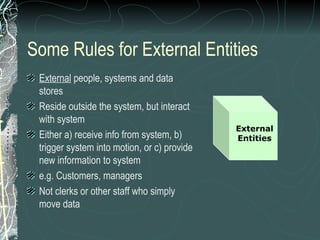
Some Rules for External Entities
External people, systems and data
stores
Reside outside the system, but interact
with system
Either a) receive info from system, b)
trigger system into motion, or c) provide
new information to system
e.g. Customers, managers
Not clerks or other staff who simply
move data
External
Entities
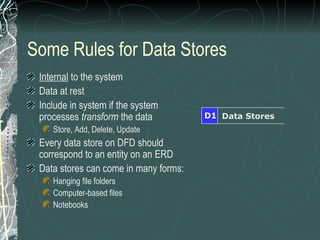
Some Rules for Data Stores
Internal to the system
Data at rest
Include in system if the system
processes transform the data
Store, Add, Delete, Update
Every data store on DFD should
correspond to an entity on an ERD
Data stores can come in many forms:
Hanging file folders
Computer-based files
Notebooks
Data StoresD1
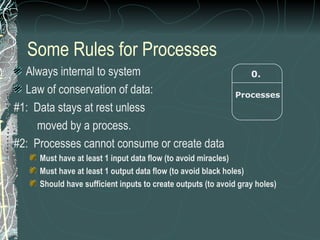
Some Rules for Data Flows
Data in motion, moving from one
place to another in the system
From external entity (source) to
system
From system to external entity (sink)
From internal symbol to internal
symbol, but always either start or
end at a process
Data Flow
Some Rules for Processes
Always internal to system
Law of conservation of data:
#1: Data stays at rest unless
moved by a process.
#2: Processes cannot consume or create data
Must have at least 1 input data flow (to avoid miracles)
Must have at least 1 output data flow (to avoid black holes)
Should have sufficient inputs to create outputs (to avoid gray holes)
0.
Processes
Processes
Logical process models omit any processes that do nothing
more than move or route data, thus leaving the data unchanged.
Valid processes include those that:
Perform computations (e.g., calculate grade point average)
Make decisions (determine availability of ordered products)
Sort, filter or otherwise summarize data (identify overdue invoices)
Organize data into useful information (e.g., generate a report or
answer a question)
Trigger other processes (e.g., turn on the furnace or instruct a
robot)
Use stored data (create, read, update or delete a record)
Types of Diagrams
Context Diagram
A data flow diagram (DFD) of the scope of an organizational
system that shows the system boundaries, external entities
that interact with the system and the major information flows
between the entities and the system
Level-O Diagram
A data flow diagram (DFD) that represents a system’s major
processes, data flows and data stores at a high level of detail
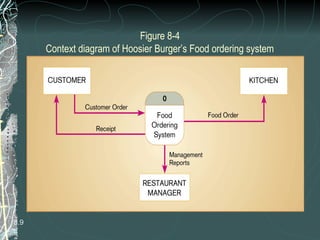
Figure 8-4
Context diagram of Hoosier Burger’s Food ordering system
8.9
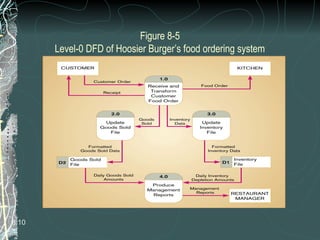
Figure 8-5
Level-0 DFD of Hoosier Burger’s food ordering system
8.10
Creating Data Flow Diagrams
Creating DFDs is a highly iterative process of gradual refinement.
General steps:
1. Create a preliminary Context Diagram
2. Identify Use Cases, i.e. the ways in which users most commonly
use the system
3. Create DFD fragments for each use case
4. Create a Level 0 diagram from fragments
5. Decompose to Level 1,2,…
6. Go to step 1 and revise as necessary
7. Validate DFDs with users.
Data Flow Diagramming Rules
General
Specific rules to
Symbols
Context Diagram
Level 0 and lower decompositions
Balancing across levels
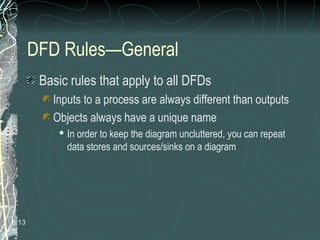
DFD Rules—General
Basic rules that apply to all DFDs
Inputs to a process are always different than outputs
Objects always have a unique name
 In order to keep the diagram uncluttered, you can repeat
data stores and sources/sinks on a diagram
8.13
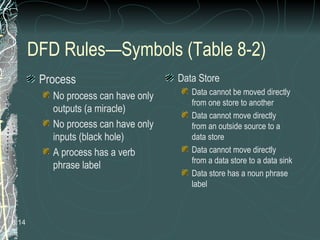
DFD Rules—Symbols (Table 8-2)
Process
No process can have only
outputs (a miracle)
No process can have only
inputs (black hole)
A process has a verb
phrase label
Data Store
Data cannot be moved directly
from one store to another
Data cannot move directly
from an outside source to a
data store
Data cannot move directly
from a data store to a data sink
Data store has a noun phrase
label
8.14
DFD Rules—Symbols (Table 8-2)
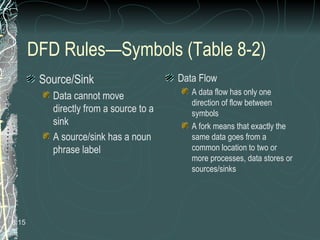
Source/Sink
Data cannot move
directly from a source to a
sink
A source/sink has a noun
phrase label
Data Flow
A data flow has only one
direction of flow between
symbols
A fork means that exactly the
same data goes from a
common location to two or
more processes, data stores or
sources/sinks
8.15
DFD Rules—Symbols (Table 8-2)
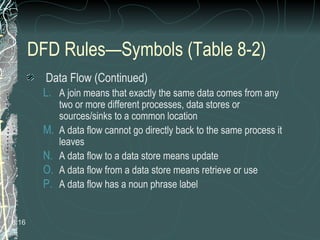
Data Flow (Continued)
L. A join means that exactly the same data comes from any
two or more different processes, data stores or
sources/sinks to a common location
M. A data flow cannot go directly back to the same process it
leaves
N. A data flow to a data store means update
O. A data flow from a data store means retrieve or use
P. A data flow has a noun phrase label
8.16
DFD Rules—Context Diagram
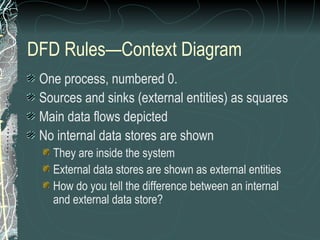
One process, numbered 0.
Sources and sinks (external entities) as squares
Main data flows depicted
No internal data stores are shown
They are inside the system
External data stores are shown as external entities
How do you tell the difference between an internal
and external data store?
Decomposition of DFDs
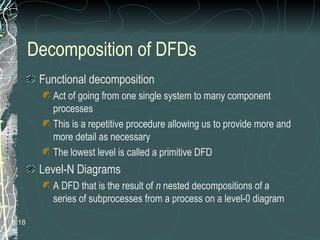
Functional decomposition
Act of going from one single system to many component
processes
This is a repetitive procedure allowing us to provide more and
more detail as necessary
The lowest level is called a primitive DFD
Level-N Diagrams
A DFD that is the result of n nested decompositions of a
series of subprocesses from a process on a level-0 diagram
8.18
DFD Rules—Balancing DFDs
When decomposing a DFD, you must conserve inputs
to and outputs from a process at the next level of
decomposition. This is called balancing.
Example: Hoosier Burgers
In Figure 8-4, notice that there is one input to the system, the
customer order
Three outputs:
 Customer receipt
 Food order
 Management reports
8.19
DFD Rules—Balancing DFDs
Example (Continued)
Notice Figure 8-5. We have the same inputs and
outputs
No new inputs or outputs have been introduced
We can say that the context diagram and level-0
DFD are balanced
8.20
DFD Rules—Balancing DFDs
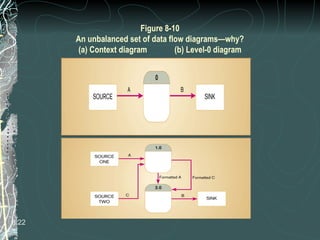
An unbalanced example, Figure 8-10
In context diagram, we have one input to the system,
A and one output, B
Level-0 diagram has one additional data flow, C
These DFDs are not balanced
8.21
Figure 8-10
An unbalanced set of data flow diagrams—why?
(a) Context diagram (b) Level-0 diagram
8.22
Balancing DFDs
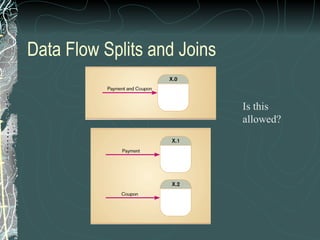
We can split a data flow into separate data flows
on a lower level diagram (see Figure 8-11)
Balancing leads to four additional advanced
rules (See Table 8-3)
8.23
Data Flow Splits and Joins
Is this
allowed?

Dfd mechanics

  • 1.
  • 2.
    Outline DFD symbols External entities(sources and sinks) Data Stores Data Flows Processes Types of diagrams Step by step approach Rules
  • 3.
    Some Rules forExternal Entities External people, systems and data stores Reside outside the system, but interact with system Either a) receive info from system, b) trigger system into motion, or c) provide new information to system e.g. Customers, managers Not clerks or other staff who simply move data External Entities
  • 4.
    Some Rules forData Stores Internal to the system Data at rest Include in system if the system processes transform the data Store, Add, Delete, Update Every data store on DFD should correspond to an entity on an ERD Data stores can come in many forms: Hanging file folders Computer-based files Notebooks Data StoresD1
  • 5.
    Some Rules forData Flows Data in motion, moving from one place to another in the system From external entity (source) to system From system to external entity (sink) From internal symbol to internal symbol, but always either start or end at a process Data Flow
  • 6.
    Some Rules forProcesses Always internal to system Law of conservation of data: #1: Data stays at rest unless moved by a process. #2: Processes cannot consume or create data Must have at least 1 input data flow (to avoid miracles) Must have at least 1 output data flow (to avoid black holes) Should have sufficient inputs to create outputs (to avoid gray holes) 0. Processes
  • 7.
    Processes Logical process modelsomit any processes that do nothing more than move or route data, thus leaving the data unchanged. Valid processes include those that: Perform computations (e.g., calculate grade point average) Make decisions (determine availability of ordered products) Sort, filter or otherwise summarize data (identify overdue invoices) Organize data into useful information (e.g., generate a report or answer a question) Trigger other processes (e.g., turn on the furnace or instruct a robot) Use stored data (create, read, update or delete a record)
  • 8.
    Types of Diagrams ContextDiagram A data flow diagram (DFD) of the scope of an organizational system that shows the system boundaries, external entities that interact with the system and the major information flows between the entities and the system Level-O Diagram A data flow diagram (DFD) that represents a system’s major processes, data flows and data stores at a high level of detail
  • 9.
    Figure 8-4 Context diagramof Hoosier Burger’s Food ordering system 8.9
  • 10.
    Figure 8-5 Level-0 DFDof Hoosier Burger’s food ordering system 8.10
  • 11.
    Creating Data FlowDiagrams Creating DFDs is a highly iterative process of gradual refinement. General steps: 1. Create a preliminary Context Diagram 2. Identify Use Cases, i.e. the ways in which users most commonly use the system 3. Create DFD fragments for each use case 4. Create a Level 0 diagram from fragments 5. Decompose to Level 1,2,… 6. Go to step 1 and revise as necessary 7. Validate DFDs with users.
  • 12.
    Data Flow DiagrammingRules General Specific rules to Symbols Context Diagram Level 0 and lower decompositions Balancing across levels
  • 13.
    DFD Rules—General Basic rulesthat apply to all DFDs Inputs to a process are always different than outputs Objects always have a unique name  In order to keep the diagram uncluttered, you can repeat data stores and sources/sinks on a diagram 8.13
  • 14.
    DFD Rules—Symbols (Table8-2) Process No process can have only outputs (a miracle) No process can have only inputs (black hole) A process has a verb phrase label Data Store Data cannot be moved directly from one store to another Data cannot move directly from an outside source to a data store Data cannot move directly from a data store to a data sink Data store has a noun phrase label 8.14
  • 15.
    DFD Rules—Symbols (Table8-2) Source/Sink Data cannot move directly from a source to a sink A source/sink has a noun phrase label Data Flow A data flow has only one direction of flow between symbols A fork means that exactly the same data goes from a common location to two or more processes, data stores or sources/sinks 8.15
  • 16.
    DFD Rules—Symbols (Table8-2) Data Flow (Continued) L. A join means that exactly the same data comes from any two or more different processes, data stores or sources/sinks to a common location M. A data flow cannot go directly back to the same process it leaves N. A data flow to a data store means update O. A data flow from a data store means retrieve or use P. A data flow has a noun phrase label 8.16
  • 17.
    DFD Rules—Context Diagram Oneprocess, numbered 0. Sources and sinks (external entities) as squares Main data flows depicted No internal data stores are shown They are inside the system External data stores are shown as external entities How do you tell the difference between an internal and external data store?
  • 18.
    Decomposition of DFDs Functionaldecomposition Act of going from one single system to many component processes This is a repetitive procedure allowing us to provide more and more detail as necessary The lowest level is called a primitive DFD Level-N Diagrams A DFD that is the result of n nested decompositions of a series of subprocesses from a process on a level-0 diagram 8.18
  • 19.
    DFD Rules—Balancing DFDs Whendecomposing a DFD, you must conserve inputs to and outputs from a process at the next level of decomposition. This is called balancing. Example: Hoosier Burgers In Figure 8-4, notice that there is one input to the system, the customer order Three outputs:  Customer receipt  Food order  Management reports 8.19
  • 20.
    DFD Rules—Balancing DFDs Example(Continued) Notice Figure 8-5. We have the same inputs and outputs No new inputs or outputs have been introduced We can say that the context diagram and level-0 DFD are balanced 8.20
  • 21.
    DFD Rules—Balancing DFDs Anunbalanced example, Figure 8-10 In context diagram, we have one input to the system, A and one output, B Level-0 diagram has one additional data flow, C These DFDs are not balanced 8.21
  • 22.
    Figure 8-10 An unbalancedset of data flow diagrams—why? (a) Context diagram (b) Level-0 diagram 8.22
  • 23.
    Balancing DFDs We cansplit a data flow into separate data flows on a lower level diagram (see Figure 8-11) Balancing leads to four additional advanced rules (See Table 8-3) 8.23
  • 24.
    Data Flow Splitsand Joins Is this allowed?

Editor's Notes

  • #7 Always internal: we do not model what external entities or systems do with the data (they are a “black box” as far as we are concerned). #1: Processes may PULL or PUSH data. #2: Processes cannot consume or create data BY THEMSELVES. The system may provide processes information to add or delete data (within data stores), but processes cannot simply eat or invent data. Note the system would have to be TRIGGERED somehow to add or delete data.