Introduction to TurnitinCentre for Teaching and LearningUniversity of Limerick, Ireland[W]  www.ul.ie/ctlUpdated Sept 2011 by Angelica Risquez1
OverviewTypes of assignments and originality checkCase scenarios and teaching adviceUsing Turnitin with SulisUsing Turnitin on its ownOriginality reportGrademarkPeermark2
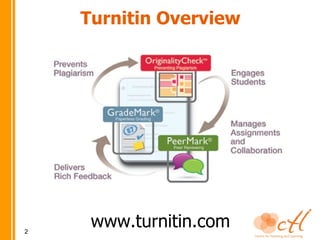
Turnitin Overviewwww.turnitin.com3
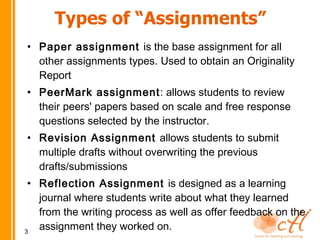
Types of “Assignments”Paper assignment is the base assignment for all other assignments types. Used to obtain an Originality ReportPeerMark assignment: allows students to review their peers' papers based on scale and free response questions selected by the instructor.Revision Assignment allows students to submit multiple drafts without overwriting the previous drafts/submissionsReflection Assignment is designed as a learning journal where students write about what they learned from the writing process as well as offer feedback on the assignment they worked on. 4
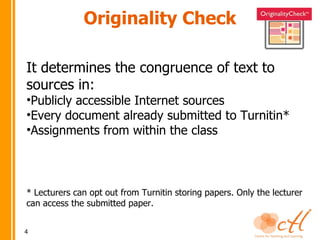
Originality CheckIt determines the congruence of text to sources in:Publicly accessible Internet sources
Every document already submitted to Turnitin*
Assignments from within the class* Lecturers can opt out from Turnitin storing papers. Only the lecturer can access the submitted paper.5
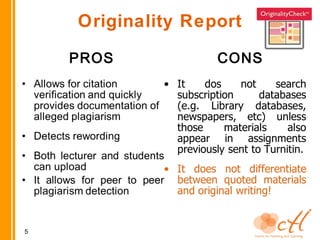
Originality CheckPROSCONSAllows for citation verification and quickly provides documentation of alleged plagiarismDetects rewording Both lecturer and students can uploadIt allows for peer to peer plagiarism detectionIt dos not search subscription databases (e.g. Library databases, newspapers, etc) unless those materials also appear in assignments previously sent to Turnitin.It does not differentiate between quoted materials and original writing!6
Possible ScenarioA lecturer (or student who has access to it) receives an originality report showing a match for the following passage:Today, according to authors of The Death of “e” and the Birth of the Real New Economy doing business electronically is the only way to stay alive and  competitive. It is a necessity to get involved in the digital economy. Therefore, “e” is disappearing from our vocabulary because conducting business electronically is a normal, every-day activity.Upon clicking on the comparison link, you find that the text is found in an on-line article, entitled The Death of “e” and the Birth of the Real New Economy. Is this plagiarism or a false positive? Why?7
Teaching adviceUse it proactively
Notify and explain to your students
Clear plagiarism policy: definition, avoidance, guidelines and disciplinary process.
Help students develop writing skills. Writing Centre http://www.ul.ie/ctl/regional-writing-centreTrain and support students (e.g. trial submission)
Involve students (e.g. submit themselves)
Be creative! (e.g. using originality report in tutorials, peer review and online grading features, allowing multiple drafts of an assignment…)8
Teaching Advice (2)UL resourceshttp://www2.ul.ie/pdf/201553623.pdf(Appendix 5: Plagiarism at College by Prof Sarah Moore)http://www.ul.ie/~library/GLIS/html/index.htm(Library online tutorials on Harvard referencing style, Refworks, researching with the internet, etc).Other resourceshttp://www.turnitin.com/static/support.htmlhttp://www.plagiarismadvice.org/The Turnitin blog9
Using Turnitin with SulisFrom September 2011, Sulis and Turnitin are integrated, meaningNo need to create lecturer or students accounts
When students submit into the Assignment tool in Sulis, a Turnitin report can be generated
Instructors may also choose to allow students to view the reports10How to set up my Sulis Assignment to get a Turnitin report
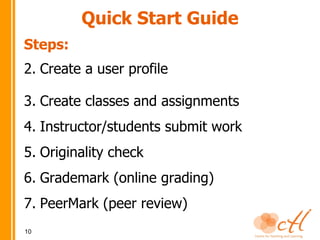
Using Turnitin on its ownIf you want to submit your own documents into Turnitin, or use the Grademark and/or Peermark features, you need to use Turnitin on its ownSteps: Create a user profileCreate classes and assignmentsInstructor/students submit work11
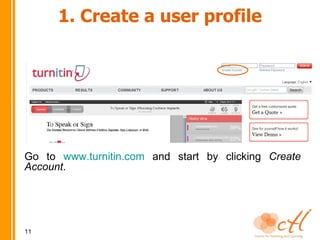
1. Create a user profileGo to www.turnitin.com and start by clicking Create Account. 12
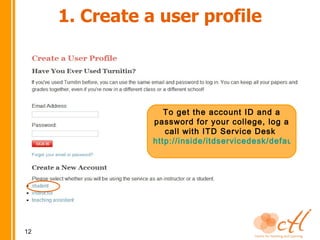
1. Create a user profileTo get the account ID and a password for your college, log a call with ITD Service Desk http://inside/itdservicedesk/default.htm13
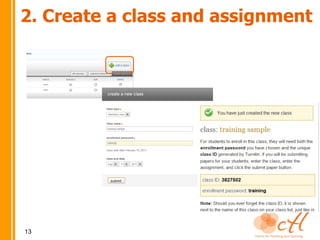
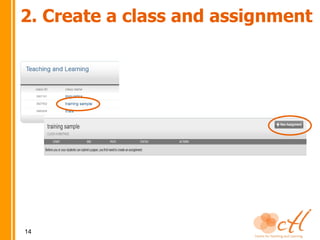
2. Create a class and assignment14
2. Create a class and assignment15
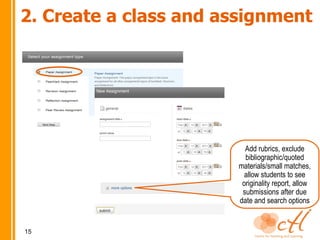
2. Create a class and assignmentAdd rubrics, exclude bibliographic/quoted materials/small matches, allow students to see originality report, allow submissions after due date and search options16
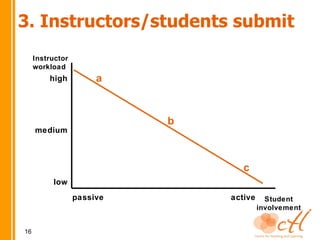
3. Instructors/students submitInstructor workloadahighbmediumclowpassiveactiveStudent involvement17
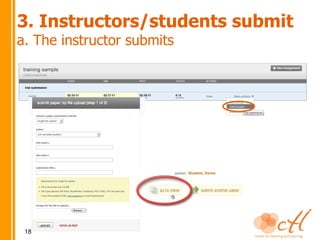
3. Instructors/students submita. The instructor submitsAdvantages Minimal student induction
 With large classes, you can submit all papers at once (.zip file from Sulis or other LMS, use IE!)Disadvantages Students lack of involvement
 They may not pay as much attention to the originality of their work18
193. Instructors/students submita. The instructor submits
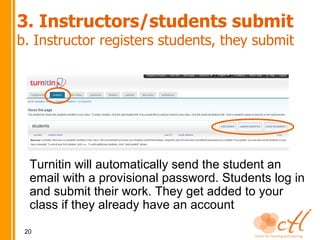
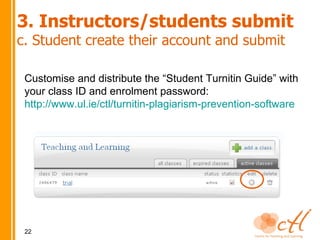
3. Instructors/students submitb. Instructor registers students, they submitAdvantages No errors with student accounts
 Minimal induction
 Student awareness and involvement, e.g students could see their originality report, do peer reviews (PeerMark), view online grading (GradeMarks), etc. Disadvantages They need to know how to log in and submit (handout and/or training needed)
 You need a class list with name, surname and email, e.g.patricia, wong, 09563214@studentmail.ul.ie20

Turnitin presentation

  • 1.
    Introduction to TurnitinCentrefor Teaching and LearningUniversity of Limerick, Ireland[W]  www.ul.ie/ctlUpdated Sept 2011 by Angelica Risquez1
  • 2.
    OverviewTypes of assignmentsand originality checkCase scenarios and teaching adviceUsing Turnitin with SulisUsing Turnitin on its ownOriginality reportGrademarkPeermark2
  • 3.
  • 4.
    Types of “Assignments”Paperassignment is the base assignment for all other assignments types. Used to obtain an Originality ReportPeerMark assignment: allows students to review their peers' papers based on scale and free response questions selected by the instructor.Revision Assignment allows students to submit multiple drafts without overwriting the previous drafts/submissionsReflection Assignment is designed as a learning journal where students write about what they learned from the writing process as well as offer feedback on the assignment they worked on. 4
  • 5.
    Originality CheckIt determinesthe congruence of text to sources in:Publicly accessible Internet sources
  • 6.
    Every document alreadysubmitted to Turnitin*
  • 7.
    Assignments from withinthe class* Lecturers can opt out from Turnitin storing papers. Only the lecturer can access the submitted paper.5
  • 8.
    Originality CheckPROSCONSAllows forcitation verification and quickly provides documentation of alleged plagiarismDetects rewording Both lecturer and students can uploadIt allows for peer to peer plagiarism detectionIt dos not search subscription databases (e.g. Library databases, newspapers, etc) unless those materials also appear in assignments previously sent to Turnitin.It does not differentiate between quoted materials and original writing!6
  • 9.
    Possible ScenarioA lecturer(or student who has access to it) receives an originality report showing a match for the following passage:Today, according to authors of The Death of “e” and the Birth of the Real New Economy doing business electronically is the only way to stay alive and competitive. It is a necessity to get involved in the digital economy. Therefore, “e” is disappearing from our vocabulary because conducting business electronically is a normal, every-day activity.Upon clicking on the comparison link, you find that the text is found in an on-line article, entitled The Death of “e” and the Birth of the Real New Economy. Is this plagiarism or a false positive? Why?7
  • 10.
  • 11.
    Notify and explainto your students
  • 12.
    Clear plagiarism policy:definition, avoidance, guidelines and disciplinary process.
  • 13.
    Help students developwriting skills. Writing Centre http://www.ul.ie/ctl/regional-writing-centreTrain and support students (e.g. trial submission)
  • 14.
    Involve students (e.g.submit themselves)
  • 15.
    Be creative! (e.g.using originality report in tutorials, peer review and online grading features, allowing multiple drafts of an assignment…)8
  • 16.
    Teaching Advice (2)ULresourceshttp://www2.ul.ie/pdf/201553623.pdf(Appendix 5: Plagiarism at College by Prof Sarah Moore)http://www.ul.ie/~library/GLIS/html/index.htm(Library online tutorials on Harvard referencing style, Refworks, researching with the internet, etc).Other resourceshttp://www.turnitin.com/static/support.htmlhttp://www.plagiarismadvice.org/The Turnitin blog9
  • 17.
    Using Turnitin withSulisFrom September 2011, Sulis and Turnitin are integrated, meaningNo need to create lecturer or students accounts
  • 18.
    When students submitinto the Assignment tool in Sulis, a Turnitin report can be generated
  • 19.
    Instructors may alsochoose to allow students to view the reports10How to set up my Sulis Assignment to get a Turnitin report
  • 20.
    Using Turnitin onits ownIf you want to submit your own documents into Turnitin, or use the Grademark and/or Peermark features, you need to use Turnitin on its ownSteps: Create a user profileCreate classes and assignmentsInstructor/students submit work11
  • 21.
    1. Create auser profileGo to www.turnitin.com and start by clicking Create Account. 12
  • 22.
    1. Create auser profileTo get the account ID and a password for your college, log a call with ITD Service Desk http://inside/itdservicedesk/default.htm13
  • 23.
    2. Create aclass and assignment14
  • 24.
    2. Create aclass and assignment15
  • 25.
    2. Create aclass and assignmentAdd rubrics, exclude bibliographic/quoted materials/small matches, allow students to see originality report, allow submissions after due date and search options16
  • 26.
    3. Instructors/students submitInstructorworkloadahighbmediumclowpassiveactiveStudent involvement17
  • 27.
    3. Instructors/students submita.The instructor submitsAdvantages Minimal student induction
  • 28.
    With largeclasses, you can submit all papers at once (.zip file from Sulis or other LMS, use IE!)Disadvantages Students lack of involvement
  • 29.
    They maynot pay as much attention to the originality of their work18
  • 30.
  • 31.
    3. Instructors/students submitb.Instructor registers students, they submitAdvantages No errors with student accounts
  • 32.
  • 33.
    Student awarenessand involvement, e.g students could see their originality report, do peer reviews (PeerMark), view online grading (GradeMarks), etc. Disadvantages They need to know how to log in and submit (handout and/or training needed)
  • 34.
    You needa class list with name, surname and email, e.g.patricia, wong, 09563214@studentmail.ul.ie20