Ways to Prevent Plagiarism
By
Siti Mariam binti Ismail
Corporate Training Institute
What is Plagiarism
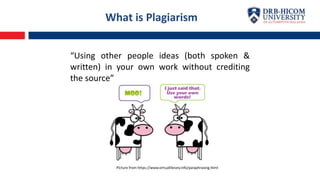
“Using other people ideas (both spoken &
written) in your own work without crediting
the source”
Picture from https://www.virtuallibrary.info/paraphrasing.html
People Ideas including spoken (words, opinion and
thoughts) and written (product, information,
findings, project paper, thesis & dissertation,
research proposal, etc.
Crediting the source
In the event that you wish to incorporate others
work into your assignments, project paper or
proposals, its is important to make a citation and
acknowledgement towards the source.
What is Plagiarism
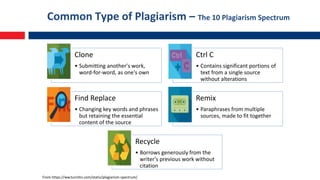
Common Type of Plagiarism – The 10 Plagiarism Spectrum
Clone
• Submitting another's work,
word-for-word, as one's own
Ctrl C
• Contains significant portions of
text from a single source
without alterations
Find Replace
• Changing key words and phrases
but retaining the essential
content of the source
Remix
• Paraphrases from multiple
sources, made to fit together
Recycle
• Borrows generously from the
writer's previous work without
citation
From https://ww.turnitin.com/static/plagiarism-spectrum/
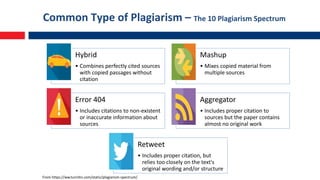
Common Type of Plagiarism – The 10 Plagiarism Spectrum
Hybrid
• Combines perfectly cited sources
with copied passages without
citation
Mashup
• Mixes copied material from
multiple sources
Error 404
• Includes citations to non-existent
or inaccurate information about
sources
Aggregator
• Includes proper citation to
sources but the paper contains
almost no original work
Retweet
• Includes proper citation, but
relies too closely on the text's
original wording and/or structure
From https://ww.turnitin.com/static/plagiarism-spectrum/
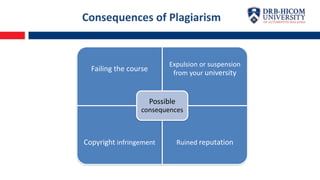
Consequences of Plagiarism
Failing the course
Expulsion or suspension
from your university
Copyright infringement Ruined reputation
Possible
consequences
3 Ways to Prevent Plagiarism
1) START YOUR PAPER EARLY
 Always start your
writing/paper/research early so that
you will have ample time to make a
information searching, readings,
understanding of your topic and
select related references with your
topic
 Use of Google Scholar, Mendeley, or
any Open Source and Paid search
platform
3 Ways to Prevent Plagiarism
2) PROPERLY CITE YOUR REFERENCES
 Always properly cite, quote and give
credits to the original source.
 Two ways to properly cites are:
 Ask guidance from your
lecturer/supervisor
 Use citation management
software (Zotero, Mendeley,
Endnote
3 Ways to Prevent Plagiarism
3) USE OF PLAGIARISM CHECKER
 Use of plagiarism checker. Example
of free plagiarism checker –
Grammarly, Copyscape, Copyleaks,
etc. For academic purposes, use
Turnitin
3 Ways to Prevent Plagiarism
4) USE OF PARAPHRASING TOOL
 You may combine quotes and
paraphrasing it within the same
sentence to lower the similarity
percentage. Just remember to cite
properly.
 Example of paraphrase tool :
quillbot.com, paraphrase-online.com,
paraphrasing-tool.com
Turnitin – Plagiarism Checker
 Database of over 70 billion websites
 600 millions of student papers submitted to
Turnitin since 1996
 Over a dozen different languages
 Compatible with most browsers and devices
including iOS
Getting Started – 4 easy steps
Step 1 : Create User Profile/Registration
Step 2 : Submit Paper
Step 3 : Viewing Originality Reports
Step 4 : Enroll In Additional Classes
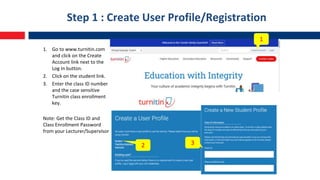
Step 1 : Create User Profile/Registration
1. Go to www.turnitin.com
and click on the Create
Account link next to the
Log In button.
2. Click on the student link.
3. Enter the class ID number
and the case sensitive
Turnitin class enrollment
key.
Note: Get the Class ID and
Class Enrollment Password
from your Lecturer/Supervisor
1
2 3
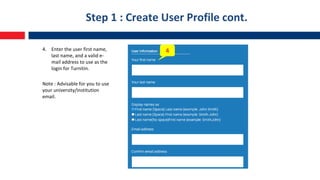
Step 1 : Create User Profile cont.
4. Enter the user first name,
last name, and a valid e-
mail address to use as the
login for Turnitin.
Note : Advisable for you to use
your university/institution
email.
4
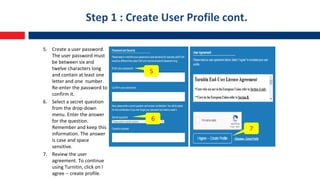
Step 1 : Create User Profile cont.
5. Create a user password.
The user password must
be between six and
twelve characters long
and contain at least one
letter and one number.
Re-enter the password to
confirm it.
6. Select a secret question
from the drop-down
menu. Enter the answer
for the question.
Remember and keep this
information. The answer
is case and space
sensitive.
7. Review the user
agreement. To continue
using Turnitin, click on I
agree -- create profile.
5
6
7
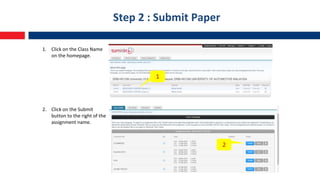
Step 2 : Submit Paper
1. Click on the Class Name
on the homepage.
2. Click on the Submit
button to the right of the
assignment name.
1
2
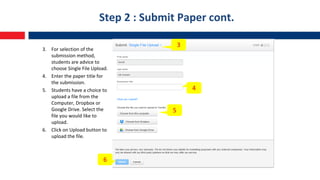
Step 2 : Submit Paper cont.
3. For selection of the
submission method,
students are advice to
choose Single File Upload.
4. Enter the paper title for
the submission.
5. Students have a choice to
upload a file from the
Computer, Dropbox or
Google Drive. Select the
file you would like to
upload.
6. Click on Upload button to
upload the file.
3
4
5
6
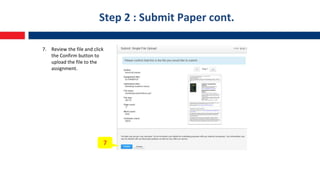
Step 2 : Submit Paper cont.
7. Review the file and click
the Confirm button to
upload the file to the
assignment.
7
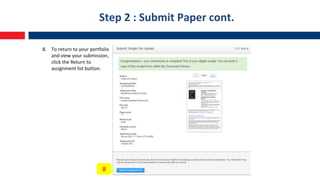
Step 2 : Submit Paper cont.
8. To return to your portfolio
and view your submission,
click the Return to
assignment list button.
8
Step 3 : Viewing Originality Reports
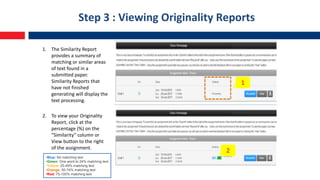
1. The Similarity Report
provides a summary of
matching or similar areas
of text found in a
submitted paper.
Similarity Reports that
have not finished
generating will display the
text processing.
2. To view your Originality
Report, click at the
percentage (%) on the
“Similarity” column or
View button to the right
of the assignment.
•Blue: No matching text
•Green: One word to 24% matching text
•Yellow: 25-49% matching text
•Orange: 50-74% matching text
•Red: 75-100% matching text
1
2
Step 3 : Viewing Originality Reports
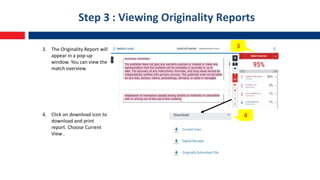
3. The Originality Report will
appear in a pop-up
window. You can view the
match overview.
4. Click on download icon to
download and print
report. Choose Current
View .
3
4
Step 3 : Viewing Originality Reports
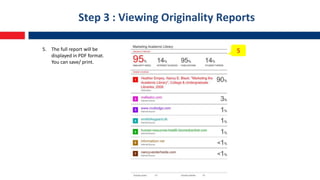
5. The full report will be
displayed in PDF format.
You can save/ print.
5
Step 4 : Enroll In Additional Classes
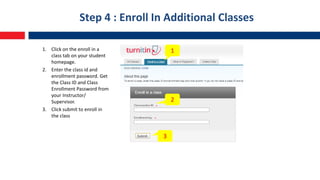
1. Click on the enroll in a
class tab on your student
homepage.
2. Enter the class id and
enrollment password. Get
the Class ID and Class
Enrollment Password from
your Instructor/
Supervisor.
3. Click submit to enroll in
the class
1
2
3
References
• Turnitin. (2012). WHITE PAPER The Plagiarism Spectrum. Turnitin.Com.
https://www.turnitin.com/static/plagiarism-spectrum
• Turnitin. (n.d.). Student quick start guide. Turnitin.Com. Retrieved January 6, 2021, from
https://help.turnitin.com/feedback-studio/turnitin-website/student/quickstart.htm
• RESEARCH & INFORMATION SERVICES DIVISION, UPM. (2018). Guide for students : how to use
turnitin. Https://Sgs.Upm.Edu.My/Content/Guidelines_to_plagiarism_detection-31588.
• Turnitin.com. (2017). About Plagiarism.org. https://www.plagiarism.org/

Ways to prevent plagiarism_turnitin.pdf

  • 1.
    Ways to PreventPlagiarism By Siti Mariam binti Ismail Corporate Training Institute
  • 2.
    What is Plagiarism “Usingother people ideas (both spoken & written) in your own work without crediting the source” Picture from https://www.virtuallibrary.info/paraphrasing.html
  • 3.
    People Ideas includingspoken (words, opinion and thoughts) and written (product, information, findings, project paper, thesis & dissertation, research proposal, etc. Crediting the source In the event that you wish to incorporate others work into your assignments, project paper or proposals, its is important to make a citation and acknowledgement towards the source. What is Plagiarism
  • 4.
    Common Type ofPlagiarism – The 10 Plagiarism Spectrum Clone • Submitting another's work, word-for-word, as one's own Ctrl C • Contains significant portions of text from a single source without alterations Find Replace • Changing key words and phrases but retaining the essential content of the source Remix • Paraphrases from multiple sources, made to fit together Recycle • Borrows generously from the writer's previous work without citation From https://ww.turnitin.com/static/plagiarism-spectrum/
  • 5.
    Common Type ofPlagiarism – The 10 Plagiarism Spectrum Hybrid • Combines perfectly cited sources with copied passages without citation Mashup • Mixes copied material from multiple sources Error 404 • Includes citations to non-existent or inaccurate information about sources Aggregator • Includes proper citation to sources but the paper contains almost no original work Retweet • Includes proper citation, but relies too closely on the text's original wording and/or structure From https://ww.turnitin.com/static/plagiarism-spectrum/
  • 6.
    Consequences of Plagiarism Failingthe course Expulsion or suspension from your university Copyright infringement Ruined reputation Possible consequences
  • 7.
    3 Ways toPrevent Plagiarism 1) START YOUR PAPER EARLY  Always start your writing/paper/research early so that you will have ample time to make a information searching, readings, understanding of your topic and select related references with your topic  Use of Google Scholar, Mendeley, or any Open Source and Paid search platform
  • 8.
    3 Ways toPrevent Plagiarism 2) PROPERLY CITE YOUR REFERENCES  Always properly cite, quote and give credits to the original source.  Two ways to properly cites are:  Ask guidance from your lecturer/supervisor  Use citation management software (Zotero, Mendeley, Endnote
  • 9.
    3 Ways toPrevent Plagiarism 3) USE OF PLAGIARISM CHECKER  Use of plagiarism checker. Example of free plagiarism checker – Grammarly, Copyscape, Copyleaks, etc. For academic purposes, use Turnitin
  • 10.
    3 Ways toPrevent Plagiarism 4) USE OF PARAPHRASING TOOL  You may combine quotes and paraphrasing it within the same sentence to lower the similarity percentage. Just remember to cite properly.  Example of paraphrase tool : quillbot.com, paraphrase-online.com, paraphrasing-tool.com
  • 11.
    Turnitin – PlagiarismChecker  Database of over 70 billion websites  600 millions of student papers submitted to Turnitin since 1996  Over a dozen different languages  Compatible with most browsers and devices including iOS
  • 12.
    Getting Started –4 easy steps Step 1 : Create User Profile/Registration Step 2 : Submit Paper Step 3 : Viewing Originality Reports Step 4 : Enroll In Additional Classes
  • 13.
    Step 1 :Create User Profile/Registration 1. Go to www.turnitin.com and click on the Create Account link next to the Log In button. 2. Click on the student link. 3. Enter the class ID number and the case sensitive Turnitin class enrollment key. Note: Get the Class ID and Class Enrollment Password from your Lecturer/Supervisor 1 2 3
  • 14.
    Step 1 :Create User Profile cont. 4. Enter the user first name, last name, and a valid e- mail address to use as the login for Turnitin. Note : Advisable for you to use your university/institution email. 4
  • 15.
    Step 1 :Create User Profile cont. 5. Create a user password. The user password must be between six and twelve characters long and contain at least one letter and one number. Re-enter the password to confirm it. 6. Select a secret question from the drop-down menu. Enter the answer for the question. Remember and keep this information. The answer is case and space sensitive. 7. Review the user agreement. To continue using Turnitin, click on I agree -- create profile. 5 6 7
  • 16.
    Step 2 :Submit Paper 1. Click on the Class Name on the homepage. 2. Click on the Submit button to the right of the assignment name. 1 2
  • 17.
    Step 2 :Submit Paper cont. 3. For selection of the submission method, students are advice to choose Single File Upload. 4. Enter the paper title for the submission. 5. Students have a choice to upload a file from the Computer, Dropbox or Google Drive. Select the file you would like to upload. 6. Click on Upload button to upload the file. 3 4 5 6
  • 18.
    Step 2 :Submit Paper cont. 7. Review the file and click the Confirm button to upload the file to the assignment. 7
  • 19.
    Step 2 :Submit Paper cont. 8. To return to your portfolio and view your submission, click the Return to assignment list button. 8
  • 20.
    Step 3 :Viewing Originality Reports 1. The Similarity Report provides a summary of matching or similar areas of text found in a submitted paper. Similarity Reports that have not finished generating will display the text processing. 2. To view your Originality Report, click at the percentage (%) on the “Similarity” column or View button to the right of the assignment. •Blue: No matching text •Green: One word to 24% matching text •Yellow: 25-49% matching text •Orange: 50-74% matching text •Red: 75-100% matching text 1 2
  • 21.
    Step 3 :Viewing Originality Reports 3. The Originality Report will appear in a pop-up window. You can view the match overview. 4. Click on download icon to download and print report. Choose Current View . 3 4
  • 22.
    Step 3 :Viewing Originality Reports 5. The full report will be displayed in PDF format. You can save/ print. 5
  • 23.
    Step 4 :Enroll In Additional Classes 1. Click on the enroll in a class tab on your student homepage. 2. Enter the class id and enrollment password. Get the Class ID and Class Enrollment Password from your Instructor/ Supervisor. 3. Click submit to enroll in the class 1 2 3
  • 24.
    References • Turnitin. (2012).WHITE PAPER The Plagiarism Spectrum. Turnitin.Com. https://www.turnitin.com/static/plagiarism-spectrum • Turnitin. (n.d.). Student quick start guide. Turnitin.Com. Retrieved January 6, 2021, from https://help.turnitin.com/feedback-studio/turnitin-website/student/quickstart.htm • RESEARCH & INFORMATION SERVICES DIVISION, UPM. (2018). Guide for students : how to use turnitin. Https://Sgs.Upm.Edu.My/Content/Guidelines_to_plagiarism_detection-31588. • Turnitin.com. (2017). About Plagiarism.org. https://www.plagiarism.org/