ICT WORKSHOP 2018
• Presented by : Dharma J. Gohel
• Guide : Dr. Dilip Barad
• Topic : Urkund
 We will be discussing…
What is Urkund
and its academic
purpose
How to create an
account
How to upload
documents?
What is Plagiarism ?
• Plagiarism detection is the process of
locating instances of plagiarism
within a work or document.
• The widewspread use of computers
and the advent of the internet has
made it easier to plagiarize the work
of others.
What is Urkund ?
•“An automatic text-
recognition system made
for detecting, preventing
and handling plagiarism.”
How it is beneficial for the students?
It helps students in fair writing.
At times students don’t know
that cut copy paste is bad and it
can be caught by software.
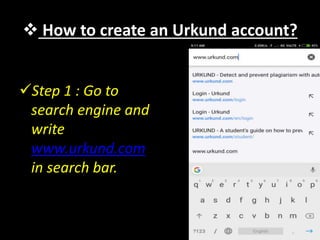
 How to create an Urkund account?
Step 1 : Go to
search engine and
write
www.urkund.com
in search bar.
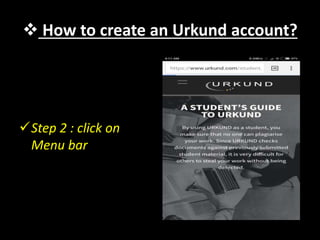
 How to create an Urkund account?
Step 2 : click on
Menu bar
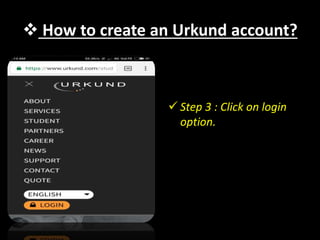
 How to create an Urkund account?
 Step 3 : Click on login
option.
 How to create an Urkund account?
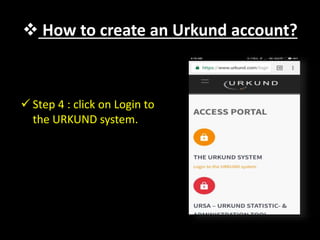
 Step 4 : click on Login to
the URKUND system.
 How to create an Urkund account?
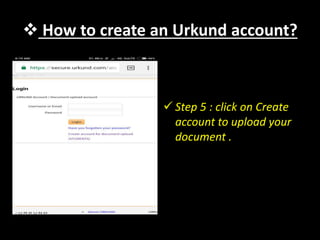
 Step 5 : click on Create
account to upload your
document .
 How to create an Urkund account?
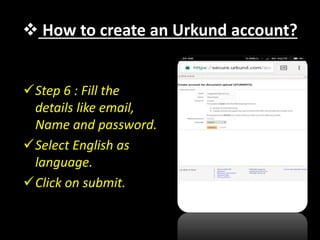
Step 6 : Fill the
details like email,
Name and password.
Select English as
language.
Click on submit.
 How to create an Urkund account?
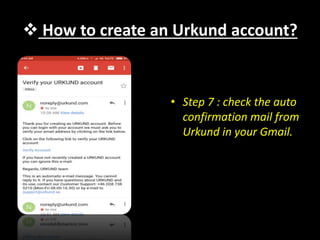
• Step 7 : check the auto
confirmation mail from
Urkund in your Gmail.
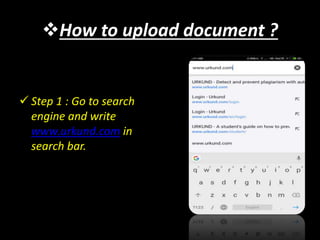
How to upload document ?
 Step 1 : Go to search
engine and write
www.urkund.com in
search bar.
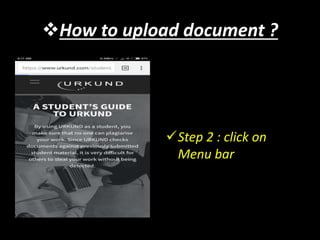
How to upload document ?
Step 2 : click on
Menu bar
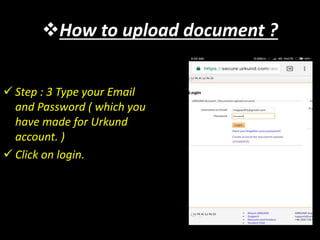
How to upload document ?
 Step : 3 Type your Email
and Password ( which you
have made for Urkund
account. )
 Click on login.
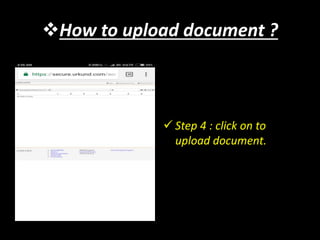
How to upload document ?
 Step 4 : click on to
upload document.
How to upload document ?
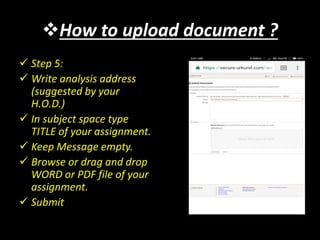
 Step 5:
 Write analysis address
(suggested by your
H.O.D.)
 In subject space type
TITLE of your assignment.
 Keep Message empty.
 Browse or drag and drop
WORD or PDF file of your
assignment.
 Submit
How to upload document ?
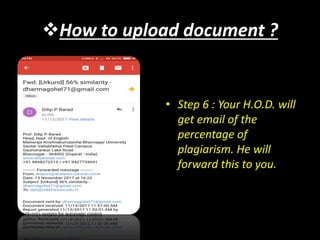
• Step 6 : Your H.O.D. will
get email of the
percentage of
plagiarism. He will
forward this to you.
THANK YOU

Ict workshop 2018 urkund

  • 1.
    ICT WORKSHOP 2018 •Presented by : Dharma J. Gohel • Guide : Dr. Dilip Barad • Topic : Urkund
  • 2.
     We willbe discussing… What is Urkund and its academic purpose How to create an account How to upload documents?
  • 3.
    What is Plagiarism? • Plagiarism detection is the process of locating instances of plagiarism within a work or document. • The widewspread use of computers and the advent of the internet has made it easier to plagiarize the work of others.
  • 4.
    What is Urkund? •“An automatic text- recognition system made for detecting, preventing and handling plagiarism.”
  • 5.
    How it isbeneficial for the students? It helps students in fair writing. At times students don’t know that cut copy paste is bad and it can be caught by software.
  • 6.
     How tocreate an Urkund account? Step 1 : Go to search engine and write www.urkund.com in search bar.
  • 7.
     How tocreate an Urkund account? Step 2 : click on Menu bar
  • 8.
     How tocreate an Urkund account?  Step 3 : Click on login option.
  • 9.
     How tocreate an Urkund account?  Step 4 : click on Login to the URKUND system.
  • 10.
     How tocreate an Urkund account?  Step 5 : click on Create account to upload your document .
  • 11.
     How tocreate an Urkund account? Step 6 : Fill the details like email, Name and password. Select English as language. Click on submit.
  • 12.
     How tocreate an Urkund account? • Step 7 : check the auto confirmation mail from Urkund in your Gmail.
  • 13.
    How to uploaddocument ?  Step 1 : Go to search engine and write www.urkund.com in search bar.
  • 14.
    How to uploaddocument ? Step 2 : click on Menu bar
  • 15.
    How to uploaddocument ?  Step : 3 Type your Email and Password ( which you have made for Urkund account. )  Click on login.
  • 16.
    How to uploaddocument ?  Step 4 : click on to upload document.
  • 17.
    How to uploaddocument ?  Step 5:  Write analysis address (suggested by your H.O.D.)  In subject space type TITLE of your assignment.  Keep Message empty.  Browse or drag and drop WORD or PDF file of your assignment.  Submit
  • 18.
    How to uploaddocument ? • Step 6 : Your H.O.D. will get email of the percentage of plagiarism. He will forward this to you.
  • 19.