Today’s Technology and You
Safe computing in a digital world
May 17, 2013
Eric A. Vanderburg, MBA, CISSP
Director, Cyber Security and Information Systems
© 2013 Property of JurInnov Ltd. All Rights Reserved© 2013 Property of JurInnov Ltd. All Rights Reserved
Who Are We?
JurInnov works with organizations that want to
more effectively manage matters involving
“Electronically Stored Information” (ESI).
– Computer Forensics
– Cyber Security
– Electronic Discovery
– Document and Case Management
© 2013 Property of JurInnov Ltd. All Rights Reserved4
What are Cybercriminals After?
Access to:
– Personal information
– Patent applications
– Financial information
– M&A documents
– Intellectual property
– Client correspondence
Business disruption of:
– Calendar system
– Billing system
– Website
© 2013 Property of JurInnov Ltd. All Rights Reserved
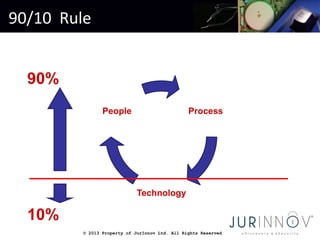
90/10 Rule
Process
Technology
People
10%
90%
© 2013 Property of JurInnov Ltd. All Rights Reserved© 2013 Property of JurInnov Ltd. All Rights Reserved
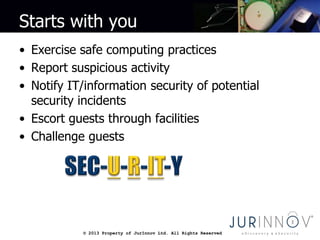
Starts with you
• Exercise safe computing practices
• Report suspicious activity
• Notify IT/information security of potential
security incidents
• Escort guests through facilities
• Challenge guests
© 2013 Property of JurInnov Ltd. All Rights Reserved© 2013 Property of JurInnov Ltd. All Rights Reserved
Passwords
• Passwords are the keys to many things: your bank
account, your computer, your email, a server on a
network.
• Your password gives others the power to:
– Access your account (financial, email, etc)
– Modify or destroy your files
– Send malicious e-mail such as spam or threats in your
name
– Commit fraud while masquerading as you
– Use your computer to distribute illegally files such as
movies, songs or worse (child pornography)
© 2013 Property of JurInnov Ltd. All Rights Reserved© 2013 Property of JurInnov Ltd. All Rights Reserved
Passwords and Accounts
• Creating a secure password
• Passphrase: Here24octopihad5legslike*fish
• Secondary logon
• Limit administrative accounts
• Lock the computer
• Autolock
• Change default passwords
• Change passwords that you suspect may have been
compromised
• Choose recovery hints and challenges wisely
© 2013 Property of JurInnov Ltd. All Rights Reserved© 2013 Property of JurInnov Ltd. All Rights Reserved
Passwords
• Do not store them in obvious places
• Do not let anyone observe you entering it
• Do not share your password
• Do not reveal a password
– on questionnaires or security forms
– to anyone over the phone, e-mail, or IM
• Do not use same password for different servers/services
• Do not use written examples of passwords
© 2013 Property of JurInnov Ltd. All Rights Reserved© 2013 Property of JurInnov Ltd. All Rights Reserved
Spotting password theft
• Email
– Large number of rejected messages
– Missing emails
– Messages in sent mail that you didn’t send
• Social media
– Posts you did not make
– Many unknown contacts
© 2013 Property of JurInnov Ltd. All Rights Reserved© 2013 Property of JurInnov Ltd. All Rights Reserved
When is data really gone?
• Deleting a file does not actually remove it from
your computer
• Files persist until they are overwritten
• Full or partial files may be recoverable
• Sensitive data should be wiped
• Drives should be wiped before being reused
© 2013 Property of JurInnov Ltd. All Rights Reserved© 2013 Property of JurInnov Ltd. All Rights Reserved
Browser security
• Cookies
• Block pop-ups
• HTTP vs. HTTPS
• Certificates
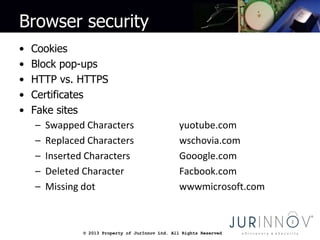
• Fake sites
– Swapped Characters yuotube.com
– Replaced Characters wschovia.com
– Inserted Characters Gooogle.com
– Deleted Character Facbook.com
– Missing dot wwwmicrosoft.com
© 2013 Property of JurInnov Ltd. All Rights Reserved© 2013 Property of JurInnov Ltd. All Rights Reserved
Working remotely
• Free Wi-Fi
• Encrypt and password protect mobile
devices
• VPN
• Enable computer firewall
• Disable shares or use a homegroup (if not
on a domain)
© 2013 Property of JurInnov Ltd. All Rights Reserved© 2013 Property of JurInnov Ltd. All Rights Reserved
Public computers
• Limit what you do
• Erase your tracks (clear history)
– IE (Tools, Internet Options, General tab, Delete Browsing
History)
– Firefox (Tools, Options, Privacy tab, clear private data)
– Use private browsing window
• Do not save files locally
• Don’t save passwords
• Watch for over the shoulder
• Delete temporary files
• Exit programs and close browser when you leave
© 2013 Property of JurInnov Ltd. All Rights Reserved© 2013 Property of JurInnov Ltd. All Rights Reserved
Social media
• Privacy settings
– Default
– Per-post
• Who should be your friend?
• Geolocation
• Watch out for social scams
– Mugged on vacation
– Free stuff
– Spammed content and links
© 2013 Property of JurInnov Ltd. All Rights Reserved© 2013 Property of JurInnov Ltd. All Rights Reserved
Social engineering
• Social engineering preys on qualities of human
nature:
 the desire to be helpful
 the tendency to trust people
 the fear of getting into trouble
© 2013 Property of JurInnov Ltd. All Rights Reserved© 2013 Property of JurInnov Ltd. All Rights Reserved
Malware
• Viruses
• Trojans
• Keyloggers
• Bots
• Spyware
• Adware
© 2013 Property of JurInnov Ltd. All Rights Reserved© 2013 Property of JurInnov Ltd. All Rights Reserved
Why malware?
• Revenge
• Sense of power
• To prove a point
• Bragging rights
• Profit
• To attack other systems
• Because they can
© 2013 Property of JurInnov Ltd. All Rights Reserved© 2013 Property of JurInnov Ltd. All Rights Reserved
Spyware
• Corrupts/alters the current
software
• Tracks browsing habits, sites
• Interferes with system settings
• (registry, startup)
• Steals passwords, information etc.
© 2013 Property of JurInnov Ltd. All Rights Reserved© 2013 Property of JurInnov Ltd. All Rights Reserved
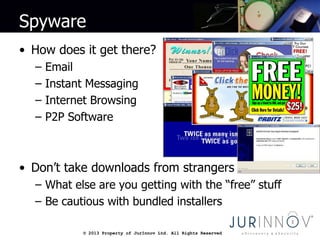
Spyware
• How does it get there?
– Email
– Instant Messaging
– Internet Browsing
– P2P Software
• Don’t take downloads from strangers
– What else are you getting with the “free” stuff
– Be cautious with bundled installers
© 2013 Property of JurInnov Ltd. All Rights Reserved© 2013 Property of JurInnov Ltd. All Rights Reserved
Spyware
• Identifying it
– Sluggish computer
– Annoying pop-ups
– Changes to browser home pages
– Unwanted toolbars
– Unknown programs appear
© 2013 Property of JurInnov Ltd. All Rights Reserved© 2013 Property of JurInnov Ltd. All Rights Reserved
Preventing malware
• Safe browsing habits
• Up-to-date antivirus
• Antimalware software
• Computer firewall
• Windows updates
© 2013 Property of JurInnov Ltd. All Rights Reserved© 2013 Property of JurInnov Ltd. All Rights Reserved
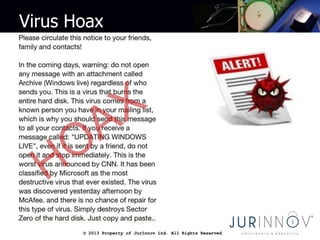
Virus Hoax
© 2013 Property of JurInnov Ltd. All Rights Reserved© 2013 Property of JurInnov Ltd. All Rights Reserved
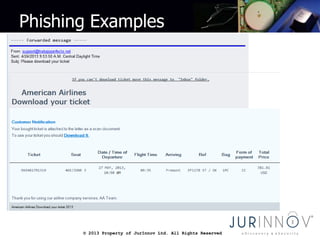
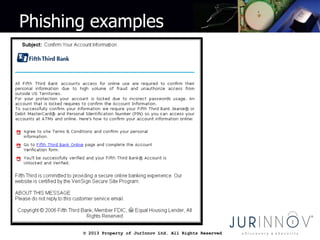
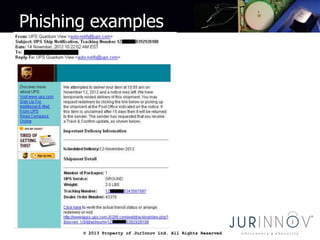
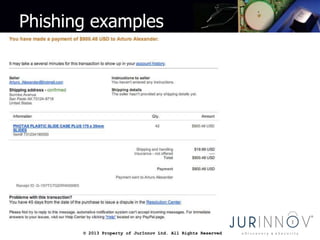
Phishing
• False Sense Of Urgency - Threatens to "close/suspend
your account”, charge a fee or talks about suspicious
logon attempts, etc.
• Suspicious-Looking Links - Links containing all or part of
a real company's name asking you to submit personal
information.
• Not personalized – does not address you by name or
include a masked version of the account number.
• Misspelled or Poorly Written – Helps fraudulent emails
avoid spam filters
© 2013 Property of JurInnov Ltd. All Rights Reserved© 2013 Property of JurInnov Ltd. All Rights Reserved
Phishing Examples
© 2013 Property of JurInnov Ltd. All Rights Reserved© 2013 Property of JurInnov Ltd. All Rights Reserved
Phishing examples
© 2013 Property of JurInnov Ltd. All Rights Reserved© 2013 Property of JurInnov Ltd. All Rights Reserved
Phishing examples
© 2013 Property of JurInnov Ltd. All Rights Reserved© 2013 Property of JurInnov Ltd. All Rights Reserved
Phishing examples
© 2013 Property of JurInnov Ltd. All Rights Reserved© 2013 Property of JurInnov Ltd. All Rights Reserved
Phishing
• Treat all email with suspicion
• Never use a link in an email to get to any web
page
• Never send personal or financial information to
any one via email
• Never give personal or financial information
solicited via email
© 2013 Property of JurInnov Ltd. All Rights Reserved© 2013 Property of JurInnov Ltd. All Rights Reserved
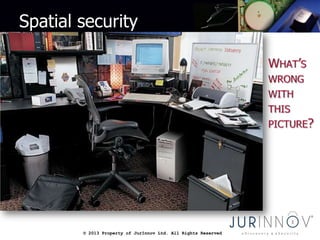
Spatial security
© 2013 Property of JurInnov Ltd. All Rights Reserved© 2013 Property of JurInnov Ltd. All Rights Reserved
Spatial security
• Computers or whiteboard placement
• Facing away from windows or public areas
• Monitor privacy screen
• One way window film
Questions
© 2013 Property of JurInnov Ltd. All Rights Reserved
Blogs & Podcasts
• 50,000 Medicaid providers’
data breached
• Data breach threats of 2013
• Ignorance of the breach is
no excuse
• Over processing of ESI and
the Microsoft letter
• Predictive coding gets a
glossary
• LegalTech 2013
© 2013 Property of JurInnov Ltd. All Rights Reserved© 2013 Property of JurInnov Ltd. All Rights Reserved
For assistance or additional information
• Phone: 216-664-1100
• Web: www.jurinnov.com
• Email: eric.vanderburg@jurinnov.com
JurInnov Ltd.
The Idea Center
1375 Euclid Avenue, Suite 400
Cleveland, Ohio 44115

Today's technology and you: Safe computing in a digital world - Eric Vanderburg - JurInnov

  • 1.
    Today’s Technology andYou Safe computing in a digital world May 17, 2013 Eric A. Vanderburg, MBA, CISSP Director, Cyber Security and Information Systems
  • 2.
    © 2013 Propertyof JurInnov Ltd. All Rights Reserved© 2013 Property of JurInnov Ltd. All Rights Reserved Who Are We? JurInnov works with organizations that want to more effectively manage matters involving “Electronically Stored Information” (ESI). – Computer Forensics – Cyber Security – Electronic Discovery – Document and Case Management
  • 3.
    © 2013 Propertyof JurInnov Ltd. All Rights Reserved4 What are Cybercriminals After? Access to: – Personal information – Patent applications – Financial information – M&A documents – Intellectual property – Client correspondence Business disruption of: – Calendar system – Billing system – Website
  • 4.
    © 2013 Propertyof JurInnov Ltd. All Rights Reserved 90/10 Rule Process Technology People 10% 90%
  • 5.
    © 2013 Propertyof JurInnov Ltd. All Rights Reserved© 2013 Property of JurInnov Ltd. All Rights Reserved Starts with you • Exercise safe computing practices • Report suspicious activity • Notify IT/information security of potential security incidents • Escort guests through facilities • Challenge guests
  • 6.
    © 2013 Propertyof JurInnov Ltd. All Rights Reserved© 2013 Property of JurInnov Ltd. All Rights Reserved Passwords • Passwords are the keys to many things: your bank account, your computer, your email, a server on a network. • Your password gives others the power to: – Access your account (financial, email, etc) – Modify or destroy your files – Send malicious e-mail such as spam or threats in your name – Commit fraud while masquerading as you – Use your computer to distribute illegally files such as movies, songs or worse (child pornography)
  • 7.
    © 2013 Propertyof JurInnov Ltd. All Rights Reserved© 2013 Property of JurInnov Ltd. All Rights Reserved Passwords and Accounts • Creating a secure password • Passphrase: Here24octopihad5legslike*fish • Secondary logon • Limit administrative accounts • Lock the computer • Autolock • Change default passwords • Change passwords that you suspect may have been compromised • Choose recovery hints and challenges wisely
  • 8.
    © 2013 Propertyof JurInnov Ltd. All Rights Reserved© 2013 Property of JurInnov Ltd. All Rights Reserved Passwords • Do not store them in obvious places • Do not let anyone observe you entering it • Do not share your password • Do not reveal a password – on questionnaires or security forms – to anyone over the phone, e-mail, or IM • Do not use same password for different servers/services • Do not use written examples of passwords
  • 9.
    © 2013 Propertyof JurInnov Ltd. All Rights Reserved© 2013 Property of JurInnov Ltd. All Rights Reserved Spotting password theft • Email – Large number of rejected messages – Missing emails – Messages in sent mail that you didn’t send • Social media – Posts you did not make – Many unknown contacts
  • 10.
    © 2013 Propertyof JurInnov Ltd. All Rights Reserved© 2013 Property of JurInnov Ltd. All Rights Reserved When is data really gone? • Deleting a file does not actually remove it from your computer • Files persist until they are overwritten • Full or partial files may be recoverable • Sensitive data should be wiped • Drives should be wiped before being reused
  • 11.
    © 2013 Propertyof JurInnov Ltd. All Rights Reserved© 2013 Property of JurInnov Ltd. All Rights Reserved Browser security • Cookies • Block pop-ups • HTTP vs. HTTPS • Certificates • Fake sites – Swapped Characters yuotube.com – Replaced Characters wschovia.com – Inserted Characters Gooogle.com – Deleted Character Facbook.com – Missing dot wwwmicrosoft.com
  • 12.
    © 2013 Propertyof JurInnov Ltd. All Rights Reserved© 2013 Property of JurInnov Ltd. All Rights Reserved Working remotely • Free Wi-Fi • Encrypt and password protect mobile devices • VPN • Enable computer firewall • Disable shares or use a homegroup (if not on a domain)
  • 13.
    © 2013 Propertyof JurInnov Ltd. All Rights Reserved© 2013 Property of JurInnov Ltd. All Rights Reserved Public computers • Limit what you do • Erase your tracks (clear history) – IE (Tools, Internet Options, General tab, Delete Browsing History) – Firefox (Tools, Options, Privacy tab, clear private data) – Use private browsing window • Do not save files locally • Don’t save passwords • Watch for over the shoulder • Delete temporary files • Exit programs and close browser when you leave
  • 14.
    © 2013 Propertyof JurInnov Ltd. All Rights Reserved© 2013 Property of JurInnov Ltd. All Rights Reserved Social media • Privacy settings – Default – Per-post • Who should be your friend? • Geolocation • Watch out for social scams – Mugged on vacation – Free stuff – Spammed content and links
  • 15.
    © 2013 Propertyof JurInnov Ltd. All Rights Reserved© 2013 Property of JurInnov Ltd. All Rights Reserved Social engineering • Social engineering preys on qualities of human nature:  the desire to be helpful  the tendency to trust people  the fear of getting into trouble
  • 16.
    © 2013 Propertyof JurInnov Ltd. All Rights Reserved© 2013 Property of JurInnov Ltd. All Rights Reserved Malware • Viruses • Trojans • Keyloggers • Bots • Spyware • Adware
  • 17.
    © 2013 Propertyof JurInnov Ltd. All Rights Reserved© 2013 Property of JurInnov Ltd. All Rights Reserved Why malware? • Revenge • Sense of power • To prove a point • Bragging rights • Profit • To attack other systems • Because they can
  • 18.
    © 2013 Propertyof JurInnov Ltd. All Rights Reserved© 2013 Property of JurInnov Ltd. All Rights Reserved Spyware • Corrupts/alters the current software • Tracks browsing habits, sites • Interferes with system settings • (registry, startup) • Steals passwords, information etc.
  • 19.
    © 2013 Propertyof JurInnov Ltd. All Rights Reserved© 2013 Property of JurInnov Ltd. All Rights Reserved Spyware • How does it get there? – Email – Instant Messaging – Internet Browsing – P2P Software • Don’t take downloads from strangers – What else are you getting with the “free” stuff – Be cautious with bundled installers
  • 20.
    © 2013 Propertyof JurInnov Ltd. All Rights Reserved© 2013 Property of JurInnov Ltd. All Rights Reserved Spyware • Identifying it – Sluggish computer – Annoying pop-ups – Changes to browser home pages – Unwanted toolbars – Unknown programs appear
  • 21.
    © 2013 Propertyof JurInnov Ltd. All Rights Reserved© 2013 Property of JurInnov Ltd. All Rights Reserved Preventing malware • Safe browsing habits • Up-to-date antivirus • Antimalware software • Computer firewall • Windows updates
  • 22.
    © 2013 Propertyof JurInnov Ltd. All Rights Reserved© 2013 Property of JurInnov Ltd. All Rights Reserved Virus Hoax
  • 23.
    © 2013 Propertyof JurInnov Ltd. All Rights Reserved© 2013 Property of JurInnov Ltd. All Rights Reserved Phishing • False Sense Of Urgency - Threatens to "close/suspend your account”, charge a fee or talks about suspicious logon attempts, etc. • Suspicious-Looking Links - Links containing all or part of a real company's name asking you to submit personal information. • Not personalized – does not address you by name or include a masked version of the account number. • Misspelled or Poorly Written – Helps fraudulent emails avoid spam filters
  • 24.
    © 2013 Propertyof JurInnov Ltd. All Rights Reserved© 2013 Property of JurInnov Ltd. All Rights Reserved Phishing Examples
  • 25.
    © 2013 Propertyof JurInnov Ltd. All Rights Reserved© 2013 Property of JurInnov Ltd. All Rights Reserved Phishing examples
  • 26.
    © 2013 Propertyof JurInnov Ltd. All Rights Reserved© 2013 Property of JurInnov Ltd. All Rights Reserved Phishing examples
  • 27.
    © 2013 Propertyof JurInnov Ltd. All Rights Reserved© 2013 Property of JurInnov Ltd. All Rights Reserved Phishing examples
  • 28.
    © 2013 Propertyof JurInnov Ltd. All Rights Reserved© 2013 Property of JurInnov Ltd. All Rights Reserved Phishing • Treat all email with suspicion • Never use a link in an email to get to any web page • Never send personal or financial information to any one via email • Never give personal or financial information solicited via email
  • 29.
    © 2013 Propertyof JurInnov Ltd. All Rights Reserved© 2013 Property of JurInnov Ltd. All Rights Reserved Spatial security
  • 30.
    © 2013 Propertyof JurInnov Ltd. All Rights Reserved© 2013 Property of JurInnov Ltd. All Rights Reserved Spatial security • Computers or whiteboard placement • Facing away from windows or public areas • Monitor privacy screen • One way window film
  • 31.
  • 32.
    © 2013 Propertyof JurInnov Ltd. All Rights Reserved Blogs & Podcasts • 50,000 Medicaid providers’ data breached • Data breach threats of 2013 • Ignorance of the breach is no excuse • Over processing of ESI and the Microsoft letter • Predictive coding gets a glossary • LegalTech 2013
  • 33.
    © 2013 Propertyof JurInnov Ltd. All Rights Reserved© 2013 Property of JurInnov Ltd. All Rights Reserved For assistance or additional information • Phone: 216-664-1100 • Web: www.jurinnov.com • Email: eric.vanderburg@jurinnov.com JurInnov Ltd. The Idea Center 1375 Euclid Avenue, Suite 400 Cleveland, Ohio 44115

Editor's Notes