Security Awareness 
Untangled Church Technology Conference 
© 2014 JurInnov, Ltd. All Rights Reserved 
November 8, 2014 
Dr. Eric Vanderburg 
Director, Cybersecurity and Information Systems 
eav@jurinnov.com 
@evanderburg 
(216) 664-1100
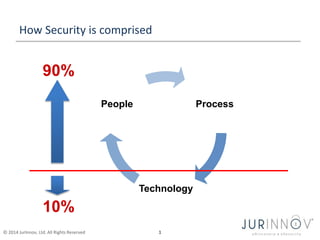
How Security is comprised 
90% 
© 2014 JurInnov, Ltd. All Rights Reserved 1 
Process 
Technology 
People 
10%
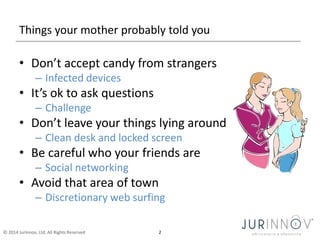
Things your mother probably told you 
• Don’t accept candy from strangers 
– Infected devices 
• It’s ok to ask questions 
– Challenge 
• Don’t leave your things lying around 
– Clean desk and locked screen 
• Be careful who your friends are 
– Social networking 
• Avoid that area of town 
– Discretionary web surfing 
© 2014 JurInnov, Ltd. All Rights Reserved 2
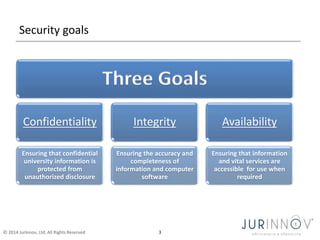
Security goals 
Three Goals 
Confidentiality 
Ensuring that confidential 
university information is 
protected from 
unauthorized disclosure 
Integrity 
Ensuring the accuracy and 
completeness of 
information and computer 
software 
© 2014 JurInnov, Ltd. All Rights Reserved 3 
Availability 
Ensuring that information 
and vital services are 
accessible for use when 
required
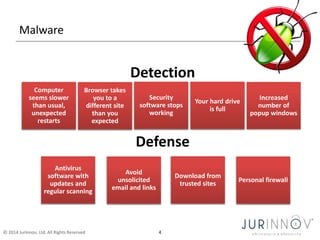
Malware 
Detection 
Security 
software stops 
working 
Defense 
Computer 
seems slower 
than usual, 
unexpected 
restarts 
Browser takes 
you to a 
different site 
than you 
expected 
© 2014 JurInnov, Ltd. All Rights Reserved 4 
Your hard drive 
is full 
Antivirus 
software with 
updates and 
regular scanning 
Avoid 
unsolicited 
email and links 
Download from 
trusted sites 
Increased 
number of 
popup windows 
Personal firewall
Computer Use 
• Secure browsing 
• Updates 
• Popups and warnings 
• Certificate errors 
• Suspicious links 
• Deleted files are not truly deleted 
© 2014 JurInnov, Ltd. All Rights Reserved 5
Remove the opportunity 
• Location of office equipment 
– Printers & fax machines 
• Lock it down 
– Office doors 
– File cabinets, sensitive documents, personal items 
– Computers 
• Windows OS: Ctrl-Alt-Delete [enter] or Windows L 
• Macs: Shift (⇧) + Command (⌘) + Q 
• Password-protected screensaver or Time-out 
• Don’t leave the computer unattended when logged into an account with 
sensitive data (i.e., payroll, email, personal info) 
– Phones 
© 2014 JurInnov, Ltd. All Rights Reserved 6
It’s ok to discriminate against data 
• You can’t treat it all the same 
– Personal information 
– Financial information 
– Member information 
– Public information 
• Where is all the data? 
– Head, paper, computer, server, backup, email 
• What if we got rid of it? 
© 2014 JurInnov, Ltd. All Rights Reserved 7
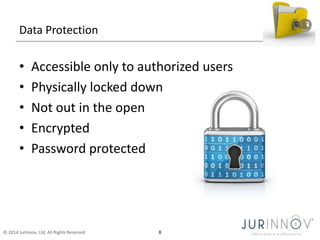
Data Protection 
• Accessible only to authorized users 
• Physically locked down 
• Not out in the open 
• Encrypted 
• Password protected 
© 2014 JurInnov, Ltd. All Rights Reserved 8
Encryption 
• At rest 
© 2014 JurInnov, Ltd. All Rights Reserved 9 
– Full disk encryption 
– File encryption 
• In motion 
– VPN 
– SSL
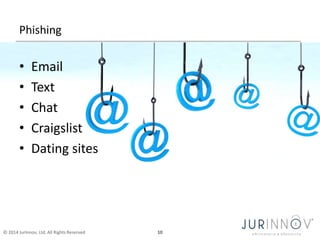
Phishing 
• Email 
• Text 
• Chat 
• Craigslist 
• Dating sites 
© 2014 JurInnov, Ltd. All Rights Reserved 10
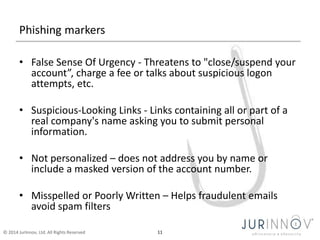
Phishing markers 
• False Sense Of Urgency - Threatens to "close/suspend your 
account”, charge a fee or talks about suspicious logon 
attempts, etc. 
• Suspicious-Looking Links - Links containing all or part of a 
real company's name asking you to submit personal 
information. 
• Not personalized – does not address you by name or 
include a masked version of the account number. 
• Misspelled or Poorly Written – Helps fraudulent emails 
avoid spam filters 
© 2014 JurInnov, Ltd. All Rights Reserved 11
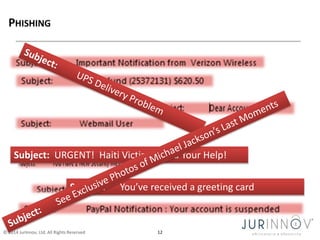
Subject: URGENT! Haiti Victims Need Your Help! 
Subject: You’ve received a greeting card 
© 2014 JurInnov, Ltd. All Rights Reserved 12
Protect yourself against phishing 
• Treat all email with suspicion 
• Never use a link in an email to 
get to any web page 
• Never send personal or financial 
information to any one via email 
• Never give personal or financial 
information solicited via email 
© 2014 JurInnov, Ltd. All Rights Reserved 13
Passwords 
• Passwords are THE KEYS TO: 
– Your bank account 
– Your computer 
– Your email 
– A server on a network 
– Many other things 
© 2014 JurInnov, Ltd. All Rights Reserved 14
Passwords 
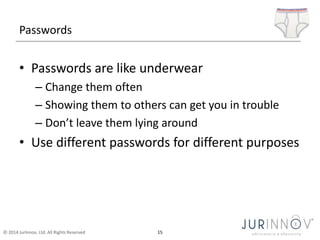
• Passwords are like underwear 
– Change them often 
– Showing them to others can get you in trouble 
– Don’t leave them lying around 
• Use different passwords for different purposes 
© 2014 JurInnov, Ltd. All Rights Reserved 15
Passwords 
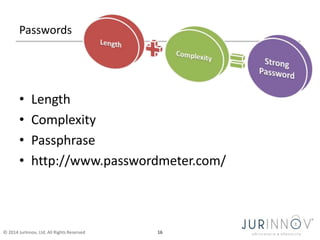
• Length 
• Complexity 
• Passphrase 
• http://www.passwordmeter.com/ 
© 2014 JurInnov, Ltd. All Rights Reserved 16
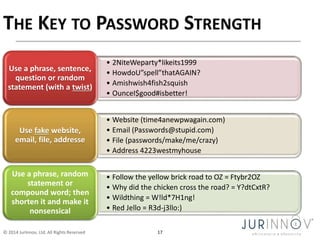
• 2NiteWeparty*likeits1999 
• HowdoU”spell”thatAGAIN? 
• Amishwish4fish2squish 
• OunceI$good#isbetter! 
Use a phrase, sentence, 
question or random 
statement (with a twist) 
• Website (time4anewpwagain.com) 
• Email (Passwords@stupid.com) 
• File (passwords/make/me/crazy) 
• Address 4223westmyhouse 
Use fake website, 
email, file, addresse 
• Follow the yellow brick road to OZ = Ftybr2OZ 
• Why did the chicken cross the road? = Y?dtCxtR? 
• Wildthing = W!ld*7H1ng! 
• Red Jello = R3d-j3llo:) 
Use a phrase, random 
statement or 
compound word; then 
shorten it and make it 
nonsensical 
© 2014 JurInnov, Ltd. All Rights Reserved 17
Email password theft - indicators 
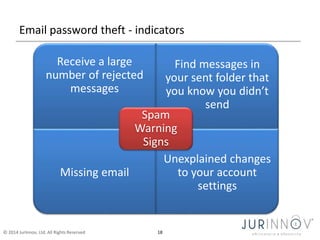
Receive a large 
number of rejected 
messages 
© 2014 JurInnov, Ltd. All Rights Reserved 18 
Find messages in 
your sent folder that 
you know you didn’t 
send 
Missing email 
Unexplained changes 
to your account 
settings 
Spam 
Warning 
Signs
Identity Theft 
• Thieves will… 
• Go on spending sprees using your 
credit card 
• With your name and Social Security 
number they can: 
– open new credit card accounts 
– gain employment 
• Give your name to the police during an arrest 
• Establish wireless service in your name 
© 2014 JurInnov, Ltd. All Rights Reserved 19
Identity theft – How it happens 
• They may steal your mail, wallet, 
or purse 
• Malware 
• Phishing 
• Social engineering 
– bribing or conning an employee 
who has access to these records 
• Stealing personnel records or breaking 
into your records electronically 
© 2014 JurInnov, Ltd. All Rights Reserved 20
Social engineering 
Social engineering preys on qualities of 
human nature:  The desire to 
© 2014 JurInnov, Ltd. All Rights Reserved 21 
be helpful 
 The tendency 
to trust people 
 The fear of 
getting into 
trouble
Identity Theft - Indicators 
• Bills that do not arrive as expected 
• Charges on your credit card that are not yours 
• Unexpected credit cards or account 
statements 
• Denials of credit for no apparent reason 
• Calls or letters from 
– Debt collectors 
– Businesses about merchandise or services you did 
not make 
© 2014 JurInnov, Ltd. All Rights Reserved 22
Identity Theft - Defenses 
• Limit the number of credit cards you carry 
• Keep a list of all credit cards numbers and the 
numbers to call to report them 
• Shred Information 
• Be diligent about checking statements 
• Order and analyze your credit report 
• Watch for Shoulder Surfing 
© 2014 JurInnov, Ltd. All Rights Reserved 23
Identity Theft - Response 
• Place a "Fraud Alert" on your credit reports 
• Close suspect accounts 
• Use the FTC’s ID Theft Affidavit 
• Keep Documentation about conversations 
• File a police report with local Law Enforcement 
• Report the theft to FTC 
– Online at Ftc.gov/idtheft 
– By phone 1-877-ID-THEFT (438-4338) 
© 2014 JurInnov, Ltd. All Rights Reserved 24
Social Networking (Cont’d) 
• Networking sites: 
– Used to meet people online, stay in touch with 
friends, connect on professional levels 
– Use privacy setting on your account to ensure 
maximum security 
– Be careful about who you accept as a “friend” 
– Be careful about the information you provide on 
these sites 
© 2014 JurInnov, Ltd. All Rights Reserved 25
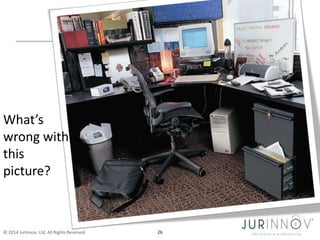
What’s 
wrong with 
this 
picture? 
© 2014 JurInnov, Ltd. All Rights Reserved 26
Q&A 
Don’t be shy… 
© 2014 JurInnov, Ltd. All Rights Reserved 27

Untangled Conference - November 8, 2014 - Security Awareness

  • 1.
    Security Awareness UntangledChurch Technology Conference © 2014 JurInnov, Ltd. All Rights Reserved November 8, 2014 Dr. Eric Vanderburg Director, Cybersecurity and Information Systems eav@jurinnov.com @evanderburg (216) 664-1100
  • 2.
    How Security iscomprised 90% © 2014 JurInnov, Ltd. All Rights Reserved 1 Process Technology People 10%
  • 3.
    Things your motherprobably told you • Don’t accept candy from strangers – Infected devices • It’s ok to ask questions – Challenge • Don’t leave your things lying around – Clean desk and locked screen • Be careful who your friends are – Social networking • Avoid that area of town – Discretionary web surfing © 2014 JurInnov, Ltd. All Rights Reserved 2
  • 4.
    Security goals ThreeGoals Confidentiality Ensuring that confidential university information is protected from unauthorized disclosure Integrity Ensuring the accuracy and completeness of information and computer software © 2014 JurInnov, Ltd. All Rights Reserved 3 Availability Ensuring that information and vital services are accessible for use when required
  • 5.
    Malware Detection Security software stops working Defense Computer seems slower than usual, unexpected restarts Browser takes you to a different site than you expected © 2014 JurInnov, Ltd. All Rights Reserved 4 Your hard drive is full Antivirus software with updates and regular scanning Avoid unsolicited email and links Download from trusted sites Increased number of popup windows Personal firewall
  • 6.
    Computer Use •Secure browsing • Updates • Popups and warnings • Certificate errors • Suspicious links • Deleted files are not truly deleted © 2014 JurInnov, Ltd. All Rights Reserved 5
  • 7.
    Remove the opportunity • Location of office equipment – Printers & fax machines • Lock it down – Office doors – File cabinets, sensitive documents, personal items – Computers • Windows OS: Ctrl-Alt-Delete [enter] or Windows L • Macs: Shift (⇧) + Command (⌘) + Q • Password-protected screensaver or Time-out • Don’t leave the computer unattended when logged into an account with sensitive data (i.e., payroll, email, personal info) – Phones © 2014 JurInnov, Ltd. All Rights Reserved 6
  • 8.
    It’s ok todiscriminate against data • You can’t treat it all the same – Personal information – Financial information – Member information – Public information • Where is all the data? – Head, paper, computer, server, backup, email • What if we got rid of it? © 2014 JurInnov, Ltd. All Rights Reserved 7
  • 9.
    Data Protection •Accessible only to authorized users • Physically locked down • Not out in the open • Encrypted • Password protected © 2014 JurInnov, Ltd. All Rights Reserved 8
  • 10.
    Encryption • Atrest © 2014 JurInnov, Ltd. All Rights Reserved 9 – Full disk encryption – File encryption • In motion – VPN – SSL
  • 11.
    Phishing • Email • Text • Chat • Craigslist • Dating sites © 2014 JurInnov, Ltd. All Rights Reserved 10
  • 12.
    Phishing markers •False Sense Of Urgency - Threatens to "close/suspend your account”, charge a fee or talks about suspicious logon attempts, etc. • Suspicious-Looking Links - Links containing all or part of a real company's name asking you to submit personal information. • Not personalized – does not address you by name or include a masked version of the account number. • Misspelled or Poorly Written – Helps fraudulent emails avoid spam filters © 2014 JurInnov, Ltd. All Rights Reserved 11
  • 13.
    Subject: URGENT! HaitiVictims Need Your Help! Subject: You’ve received a greeting card © 2014 JurInnov, Ltd. All Rights Reserved 12
  • 14.
    Protect yourself againstphishing • Treat all email with suspicion • Never use a link in an email to get to any web page • Never send personal or financial information to any one via email • Never give personal or financial information solicited via email © 2014 JurInnov, Ltd. All Rights Reserved 13
  • 15.
    Passwords • Passwordsare THE KEYS TO: – Your bank account – Your computer – Your email – A server on a network – Many other things © 2014 JurInnov, Ltd. All Rights Reserved 14
  • 16.
    Passwords • Passwordsare like underwear – Change them often – Showing them to others can get you in trouble – Don’t leave them lying around • Use different passwords for different purposes © 2014 JurInnov, Ltd. All Rights Reserved 15
  • 17.
    Passwords • Length • Complexity • Passphrase • http://www.passwordmeter.com/ © 2014 JurInnov, Ltd. All Rights Reserved 16
  • 18.
    • 2NiteWeparty*likeits1999 •HowdoU”spell”thatAGAIN? • Amishwish4fish2squish • OunceI$good#isbetter! Use a phrase, sentence, question or random statement (with a twist) • Website (time4anewpwagain.com) • Email (Passwords@stupid.com) • File (passwords/make/me/crazy) • Address 4223westmyhouse Use fake website, email, file, addresse • Follow the yellow brick road to OZ = Ftybr2OZ • Why did the chicken cross the road? = Y?dtCxtR? • Wildthing = W!ld*7H1ng! • Red Jello = R3d-j3llo:) Use a phrase, random statement or compound word; then shorten it and make it nonsensical © 2014 JurInnov, Ltd. All Rights Reserved 17
  • 19.
    Email password theft- indicators Receive a large number of rejected messages © 2014 JurInnov, Ltd. All Rights Reserved 18 Find messages in your sent folder that you know you didn’t send Missing email Unexplained changes to your account settings Spam Warning Signs
  • 20.
    Identity Theft •Thieves will… • Go on spending sprees using your credit card • With your name and Social Security number they can: – open new credit card accounts – gain employment • Give your name to the police during an arrest • Establish wireless service in your name © 2014 JurInnov, Ltd. All Rights Reserved 19
  • 21.
    Identity theft –How it happens • They may steal your mail, wallet, or purse • Malware • Phishing • Social engineering – bribing or conning an employee who has access to these records • Stealing personnel records or breaking into your records electronically © 2014 JurInnov, Ltd. All Rights Reserved 20
  • 22.
    Social engineering Socialengineering preys on qualities of human nature:  The desire to © 2014 JurInnov, Ltd. All Rights Reserved 21 be helpful  The tendency to trust people  The fear of getting into trouble
  • 23.
    Identity Theft -Indicators • Bills that do not arrive as expected • Charges on your credit card that are not yours • Unexpected credit cards or account statements • Denials of credit for no apparent reason • Calls or letters from – Debt collectors – Businesses about merchandise or services you did not make © 2014 JurInnov, Ltd. All Rights Reserved 22
  • 24.
    Identity Theft -Defenses • Limit the number of credit cards you carry • Keep a list of all credit cards numbers and the numbers to call to report them • Shred Information • Be diligent about checking statements • Order and analyze your credit report • Watch for Shoulder Surfing © 2014 JurInnov, Ltd. All Rights Reserved 23
  • 25.
    Identity Theft -Response • Place a "Fraud Alert" on your credit reports • Close suspect accounts • Use the FTC’s ID Theft Affidavit • Keep Documentation about conversations • File a police report with local Law Enforcement • Report the theft to FTC – Online at Ftc.gov/idtheft – By phone 1-877-ID-THEFT (438-4338) © 2014 JurInnov, Ltd. All Rights Reserved 24
  • 26.
    Social Networking (Cont’d) • Networking sites: – Used to meet people online, stay in touch with friends, connect on professional levels – Use privacy setting on your account to ensure maximum security – Be careful about who you accept as a “friend” – Be careful about the information you provide on these sites © 2014 JurInnov, Ltd. All Rights Reserved 25
  • 27.
    What’s wrong with this picture? © 2014 JurInnov, Ltd. All Rights Reserved 26
  • 28.
    Q&A Don’t beshy… © 2014 JurInnov, Ltd. All Rights Reserved 27

Editor's Notes

  • #14 A more malicious type of spam is phishing. Phishing is a social engineering technique cyber criminals use to acquire sensitive information by masquerading as a trustworthy person or business in a seemingly official electronic notification or message. Other common malicious emails masquerade as invitations to see photos of family or friends, greeting cards, pleas for disaster relief assistance, or other intriguing headlines.  These emails play on your emotions to try to get you to react without thinking. So always beware of messages where someone is threatening to close an account or take away privileges unless you provide personal information. Remember that social engineers are trying to use your trusting nature and fear of trouble against you.
  • #19 The key to password strength is length and complexity As you just learned, a poorly chosen password may result in the compromise of individual systems, data or the entire University of Arizona network. Therefore, it’s important that your NetID password is as long and complex as is feasible. Passwords should be easy for you to remember, but difficult for other people to guess. Some people find creating a password that is associated with a phrase (also known as a passphrase) is easier to remember. By virtue of its length, a passphrase is stronger than a password. It could be a line from your favorite song, the punch line of a joke, three or more words in a row, or anything else. However, be careful about using dictionary words, movie titles, famous quotes, etc., as these have been added to password cracker dictionaries. So, if you opt to use a well-known phrase, sentence, question, or quote, you should always add a twist. For example, if you use a well know question -- such as “why did the chicken cross the road?” -- add a word in the middle. Another suggestion for creating a complex yet easy to remember password is to use a fake (and we emphasize fake) website address, email address, and the like. Unfortunately, not all services support long passwords. For those accounts that do allow longer passwords, what matters is the complexity you add to make it secure. The more nonsensical, the better!  For these instances you can use a phrase, random statement or compound word, shorten it and make it nonsensical by inserting numbers and special characters. Take the example here using the compound word “wildthing,” where we have added complexity by using uppercase, lowercase, and inserting numbers and special characters. It’s important to note that you should never use published example password/passphrases, such as the ones used in this presentation.
  • #27 Networking sites have become very popular online, but can also be places that identity thieves use to capture personal information they can use against you. Make sure that you adjust your privacy settings to protect yourself, and be careful about who you accept as a friend. Once you have accepted someone as your friend they will be able to access any information about you (including photographs) that you have marked as viewable by your friends. You can remove friends at any time, should you change your mind about someone.