RECOMMENDING SECURITY
MEASURES FOR
INFORMATION SECURITY
Information Security is the practice of
defending information from unauthorised
access, use, disclosure, disruption,
modification, recording or destruction.
Why Information Security?
• Information is critical to any business and
paramount to the survival of any organisation in
today‟s globalised digital economy.
• Governments, military, corporations, financial
institutions, etc. amass huge confidential
information about their employees, customers,
research & financial status. Most of this
information is stored on computers and
transmitted across networks to other computers.
• Conventional warfare has been replaced by
digital or cyber war. Rivals continue attempts to
gain access to the adversaries information.
Some Examples
• Bradley Manning, US soldier: involved in the biggest
breach of classified data (7 Lakh Classified files,
battlefield videos & diplomatic cables) in US History
for providing files to Wikileaks.
• A hacker stole a database from South Carolina‟s
Deptt. Of Revenue, exposing 3.6 million Social
Security numbers and 3.8 Lakh payment card
records. More than 6.5 Lakh businesses were also
compromised.
• As per recent article of Indiatimes: As India‟s 108 bn
$ IT Service industry is becoming the world‟s
favoured outsourcing centre, India is emerging as a
top destination for cyber data theft.
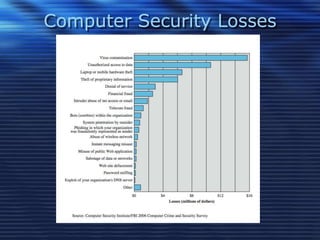
Computer Security Losses
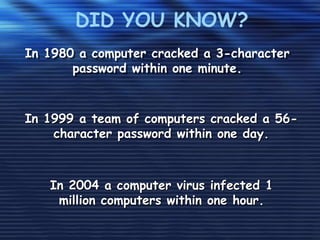
In 1980 a computer cracked a 3-character
password within one minute.
DID YOU KNOW?
In 2004 a computer virus infected 1
million computers within one hour.
In 1999 a team of computers cracked a 56-
character password within one day.
REASONS FOR ATTACKS
• Fraud: These attacks are after credit card
numbers, bank accounts,
passwords…anything of use of themselves or
sell for profit
• Activism: Activists disagree with a particular
political or social stance one takes, and want
only to create chaos and embarrass the
opponent organisation.
• Industrial Espionage: Specific proprietary
information is targeted either in rivalry or to
make profit.
FORMS OF THREAT
• Computer Viruses
• Trojan Horse
• Address Book Theft
• Domain Name System Poisoning
• Zombies (Enslaving of Computers), IP Spoofing
(Replicating IP adress)
• Password grabbers
• Network Worms
• Hijacked Home Pages
• Denial of Service attacks
• Phishing
• Identity theft
Top Three Security Threats
• Malware (Malicious Software)
• Internet- Facing Applications
• Social Engineering
Social Engineering
Social Engineering is the art of deceptively
influencing a person face to face, over the phone, via e
mail, etc. to get the desired information. For an
organisation with more than 30 employees one expert
puts the success rate of social engineering at 100%.
For eg.-
•Convincing an employees to share a company
password over the phone or chat
•Tricking someone into opening a malicious e mail
attachment
•Sending a “free” hardware that‟s been pre- infected
TYPICAL SYMPTOMS
– File deletion
– File corruption
– Visual effects
– Pop-Ups
– Erratic (and unwanted) behavior
– Computer crashes
THREAT CONSEQUENCES
• Unauthorized Disclosure
– exposure, interception, inference, intrusion
• Deception
– masquerade, falsification, repudiation
• Disruption
– incapacitation, corruption, obstruction
• Usurpation
– misappropriation, misuse
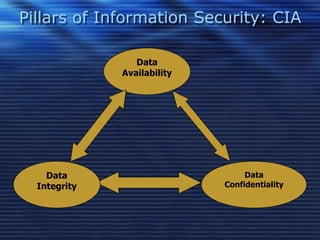
Data
Availability
Data
Integrity
Data
Confidentiality
Pillars of Information Security: CIA
CONFIDENTIALITY
Preventing disclosure of information to
unauthorised individuals or systems. For
eg. A Credit Card transaction. The system
attempts to enforce confidentiality by
encrypting the card number during
transmission from buyer to seller.
INTEGRITY
Maintaining and assuring the accuracy
and consistency of data over its entire life-
cycle. This means the data cannot be
modified in an unauthorised or undetected
manner.
AVAILABILITY
The information must be available
when it is needed, to ensure its utility. This
means that the computing systems used
to store and process the information, the
security controls used to protect it , and
the communication channels used to
access it must be functioning correctly.
MEASURES FOR INFORMATION
SECURITY
Use a strong password
• A strong password is the best way to protect yourself
against identity theft and unauthorized access to your
confidential information.
Protect confidential information
• Varied people have access to information that must not
be shared, including the password. Familiarize yourself
with the applicable laws and policies which govern these
records and act accordingly.
Make sure operating system and virus protection are up-
to-date
• This will avoid vulnerability to hackers and others looking
to steal information.
Use secure and supported applications
• Any software you install has the potential to be exploited
by hackers, so be very careful to only install applications
from a trusted source. The use of pirated software is
illegal.
Be wary of suspicious e-mails
• Don't become a phishing victim. Never click on a link in
an email; if you're tempted, cut and paste the url into
your browser. That way, there's a good chance your
browser will block the page if it's bad. And don't open
email attachments until you've verified their legitimacy
with the sender.
Store confidential information only on HSU servers
• CDs, DVDs, and USB drives are all convenient ways to
store data; the trouble is, they're just as convenient for
thieves as for you. Wherever possible, store confidential
information in your network folder or other protected
central space. If you must store confidential information
locally, you must encrypt it and then delete it as soon as
you no longer need it.
Back up your data … and make sure you can restore it
• If your computer becomes infected, the hardware fails,
you may be unable to retrieve important information. So
make sure your data is backed up regularly - and test
that backup from time to time to make sure that the
restore works correctly.
Protect information in all its forms
• Protecting your digital data is important. But paper
and the human voice remain important elements
of the security mix. Keep confidential printed
information in locked file cabinets and shredded
when no longer required. If you're talking about
confidential information on the phone, take
appropriate steps to ensure you're not overheard.
Learn to be security-aware
• Being aware and alert to the environment can
prevent any disaster.
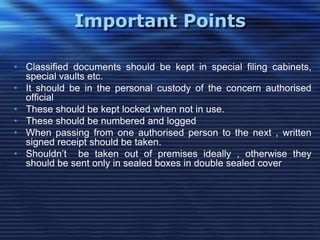
Important Points
• Classified documents should be kept in special filing cabinets,
special vaults etc.
• It should be in the personal custody of the concern authorised
official
• These should be kept locked when not in use.
• These should be numbered and logged
• When passing from one authorised person to the next , written
signed receipt should be taken.
• Shouldn‟t be taken out of premises ideally , otherwise they
should be sent only in sealed boxes in double sealed cover
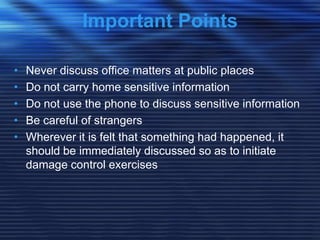
• Never discuss office matters at public places
• Do not carry home sensitive information
• Do not use the phone to discuss sensitive information
• Be careful of strangers
• Wherever it is felt that something had happened, it
should be immediately discussed so as to initiate
damage control exercises
Important Points
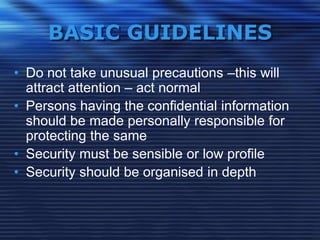
BASIC GUIDELINES
• Do not take unusual precautions –this will
attract attention – act normal
• Persons having the confidential information
should be made personally responsible for
protecting the same
• Security must be sensible or low profile
• Security should be organised in depth
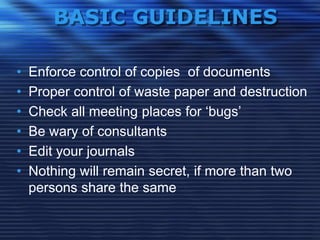
BASIC GUIDELINES
• Enforce control of copies of documents
• Proper control of waste paper and destruction
• Check all meeting places for „bugs‟
• Be wary of consultants
• Edit your journals
• Nothing will remain secret, if more than two
persons share the same
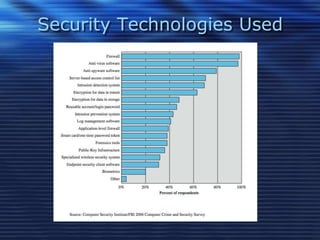
Security Technologies Used

Recommending information security measures

  • 1.
  • 2.
    INFORMATION SECURITY Information Securityis the practice of defending information from unauthorised access, use, disclosure, disruption, modification, recording or destruction.
  • 3.
    Why Information Security? •Information is critical to any business and paramount to the survival of any organisation in today‟s globalised digital economy. • Governments, military, corporations, financial institutions, etc. amass huge confidential information about their employees, customers, research & financial status. Most of this information is stored on computers and transmitted across networks to other computers. • Conventional warfare has been replaced by digital or cyber war. Rivals continue attempts to gain access to the adversaries information.
  • 4.
    Some Examples • BradleyManning, US soldier: involved in the biggest breach of classified data (7 Lakh Classified files, battlefield videos & diplomatic cables) in US History for providing files to Wikileaks. • A hacker stole a database from South Carolina‟s Deptt. Of Revenue, exposing 3.6 million Social Security numbers and 3.8 Lakh payment card records. More than 6.5 Lakh businesses were also compromised. • As per recent article of Indiatimes: As India‟s 108 bn $ IT Service industry is becoming the world‟s favoured outsourcing centre, India is emerging as a top destination for cyber data theft.
  • 5.
  • 6.
    In 1980 acomputer cracked a 3-character password within one minute. DID YOU KNOW? In 2004 a computer virus infected 1 million computers within one hour. In 1999 a team of computers cracked a 56- character password within one day.
  • 7.
    REASONS FOR ATTACKS •Fraud: These attacks are after credit card numbers, bank accounts, passwords…anything of use of themselves or sell for profit • Activism: Activists disagree with a particular political or social stance one takes, and want only to create chaos and embarrass the opponent organisation. • Industrial Espionage: Specific proprietary information is targeted either in rivalry or to make profit.
  • 8.
    FORMS OF THREAT •Computer Viruses • Trojan Horse • Address Book Theft • Domain Name System Poisoning • Zombies (Enslaving of Computers), IP Spoofing (Replicating IP adress) • Password grabbers • Network Worms • Hijacked Home Pages • Denial of Service attacks • Phishing • Identity theft
  • 9.
    Top Three SecurityThreats • Malware (Malicious Software) • Internet- Facing Applications • Social Engineering
  • 10.
    Social Engineering Social Engineeringis the art of deceptively influencing a person face to face, over the phone, via e mail, etc. to get the desired information. For an organisation with more than 30 employees one expert puts the success rate of social engineering at 100%. For eg.- •Convincing an employees to share a company password over the phone or chat •Tricking someone into opening a malicious e mail attachment •Sending a “free” hardware that‟s been pre- infected
  • 11.
    TYPICAL SYMPTOMS – Filedeletion – File corruption – Visual effects – Pop-Ups – Erratic (and unwanted) behavior – Computer crashes
  • 12.
    THREAT CONSEQUENCES • UnauthorizedDisclosure – exposure, interception, inference, intrusion • Deception – masquerade, falsification, repudiation • Disruption – incapacitation, corruption, obstruction • Usurpation – misappropriation, misuse
  • 13.
  • 14.
    CONFIDENTIALITY Preventing disclosure ofinformation to unauthorised individuals or systems. For eg. A Credit Card transaction. The system attempts to enforce confidentiality by encrypting the card number during transmission from buyer to seller.
  • 15.
    INTEGRITY Maintaining and assuringthe accuracy and consistency of data over its entire life- cycle. This means the data cannot be modified in an unauthorised or undetected manner.
  • 16.
    AVAILABILITY The information mustbe available when it is needed, to ensure its utility. This means that the computing systems used to store and process the information, the security controls used to protect it , and the communication channels used to access it must be functioning correctly.
  • 17.
    MEASURES FOR INFORMATION SECURITY Usea strong password • A strong password is the best way to protect yourself against identity theft and unauthorized access to your confidential information. Protect confidential information • Varied people have access to information that must not be shared, including the password. Familiarize yourself with the applicable laws and policies which govern these records and act accordingly.
  • 18.
    Make sure operatingsystem and virus protection are up- to-date • This will avoid vulnerability to hackers and others looking to steal information. Use secure and supported applications • Any software you install has the potential to be exploited by hackers, so be very careful to only install applications from a trusted source. The use of pirated software is illegal. Be wary of suspicious e-mails • Don't become a phishing victim. Never click on a link in an email; if you're tempted, cut and paste the url into your browser. That way, there's a good chance your browser will block the page if it's bad. And don't open email attachments until you've verified their legitimacy with the sender.
  • 19.
    Store confidential informationonly on HSU servers • CDs, DVDs, and USB drives are all convenient ways to store data; the trouble is, they're just as convenient for thieves as for you. Wherever possible, store confidential information in your network folder or other protected central space. If you must store confidential information locally, you must encrypt it and then delete it as soon as you no longer need it. Back up your data … and make sure you can restore it • If your computer becomes infected, the hardware fails, you may be unable to retrieve important information. So make sure your data is backed up regularly - and test that backup from time to time to make sure that the restore works correctly.
  • 20.
    Protect information inall its forms • Protecting your digital data is important. But paper and the human voice remain important elements of the security mix. Keep confidential printed information in locked file cabinets and shredded when no longer required. If you're talking about confidential information on the phone, take appropriate steps to ensure you're not overheard. Learn to be security-aware • Being aware and alert to the environment can prevent any disaster.
  • 21.
    Important Points • Classifieddocuments should be kept in special filing cabinets, special vaults etc. • It should be in the personal custody of the concern authorised official • These should be kept locked when not in use. • These should be numbered and logged • When passing from one authorised person to the next , written signed receipt should be taken. • Shouldn‟t be taken out of premises ideally , otherwise they should be sent only in sealed boxes in double sealed cover
  • 22.
    • Never discussoffice matters at public places • Do not carry home sensitive information • Do not use the phone to discuss sensitive information • Be careful of strangers • Wherever it is felt that something had happened, it should be immediately discussed so as to initiate damage control exercises Important Points
  • 23.
    BASIC GUIDELINES • Donot take unusual precautions –this will attract attention – act normal • Persons having the confidential information should be made personally responsible for protecting the same • Security must be sensible or low profile • Security should be organised in depth
  • 24.
    BASIC GUIDELINES • Enforcecontrol of copies of documents • Proper control of waste paper and destruction • Check all meeting places for „bugs‟ • Be wary of consultants • Edit your journals • Nothing will remain secret, if more than two persons share the same
  • 25.