CSC 307 1.0
Graphics Programming
Budditha Hettige
Department of Statistics and Computer Science
Graphics Programming
Texture Mapping
2Budditha Hettige
3
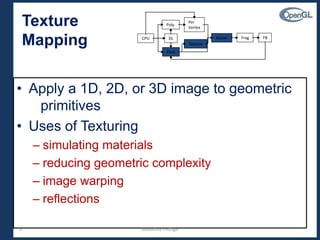
• Apply a 1D, 2D, or 3D image to geometric
primitives
• Uses of Texturing
– simulating materials
– reducing geometric complexity
– image warping
– reflections
Texture
Mapping CPUCPU DLDL
Poly.Poly.
Per
Vertex
Per
Vertex
RasterRaster FragFrag FBFB
PixelPixel
TextureTexture
Budditha Hettige
4
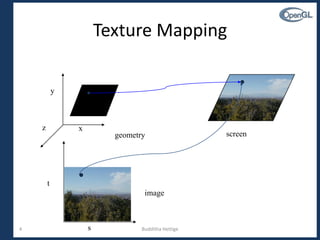
Texture Mapping
s
t
x
y
z
image
geometry screen
Budditha Hettige
5
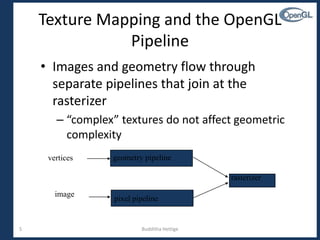
Texture Mapping and the OpenGL
Pipeline
geometry pipelinevertices
pixel pipeline
image
rasterizer
• Images and geometry flow through
separate pipelines that join at the
rasterizer
– “complex” textures do not affect geometric
complexity
Budditha Hettige
6
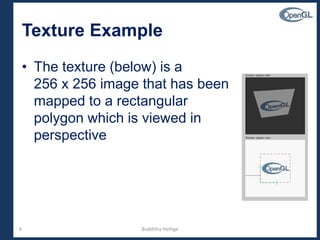
Texture Example
• The texture (below) is a
256 x 256 image that has been
mapped to a rectangular
polygon which is viewed in
perspective
Budditha Hettige
7
Applying Textures I
• Three steps
 specify texture
• read or generate image
• assign to texture
• enable texturing
 assign texture coordinates to vertices
 specify texture parameters
• wrapping, filtering
Budditha Hettige
8
Applying Textures II
– specify textures in texture objects
– set texture filter
– set texture function
– set texture wrap mode
– set optional perspective correction hint
– bind texture object
– enable texturing
– supply texture coordinates for vertex
• coordinates can also be generated
Budditha Hettige
9
Texture Objects
• Like display lists for texture images
– one image per texture object
– may be shared by several graphics contexts
• Generate texture names
glGenTextures( n, *texIds );
Budditha Hettige
10
Texture Objects (cont.)
• Create texture objects with texture data and
state
glBindTexture( target, id );
• Bind textures before using
glBindTexture( target, id );
Budditha Hettige
11
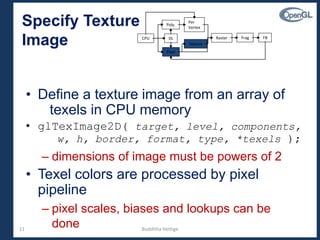
• Define a texture image from an array of
texels in CPU memory
• glTexImage2D( target, level, components,
w, h, border, format, type, *texels );
– dimensions of image must be powers of 2
• Texel colors are processed by pixel
pipeline
– pixel scales, biases and lookups can be
done
Specify Texture
Image CPUCPU DLDL
Poly.Poly.
Per
Vertex
Per
Vertex
RasterRaster FragFrag FBFB
PixelPixel
TextureTexture
Budditha Hettige
12
Converting A Texture Image
• If dimensions of image are not power of 2
• gluScaleImage( format, w_in, h_in,
type_in, *data_in, w_out, h_out,
type_out, *data_out );
– *_in is for source image
– *_out is for destination image
• Image interpolated and filtered during scaling
Budditha Hettige
13
Specifying a Texture:
Other Methods
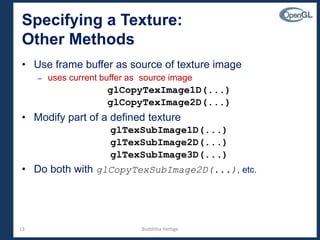
• Use frame buffer as source of texture image
– uses current buffer as source image
glCopyTexImage1D(...)
glCopyTexImage2D(...)
• Modify part of a defined texture
glTexSubImage1D(...)
glTexSubImage2D(...)
glTexSubImage3D(...)
• Do both with glCopyTexSubImage2D(...), etc.
Budditha Hettige
14
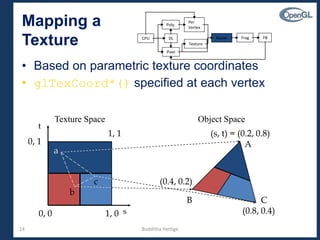
• Based on parametric texture coordinates
• glTexCoord*() specified at each vertex
s
t
1, 1
0, 1
0, 0 1, 0
(s, t) = (0.2, 0.8)
(0.4, 0.2)
(0.8, 0.4)
A
B C
a
b
c
Texture Space Object Space
Mapping a
Texture CPUCPU DLDL
Poly.Poly.
Per
Vertex
Per
Vertex
RasterRaster FragFrag FBFB
PixelPixel
TextureTexture
Budditha Hettige
15
Generating Texture Coordinates
• Automatically generate texture coords
glTexGen{ifd}[v]()
• specify a plane
– generate texture coordinates based upon distance from
plane
• generation modes
– GL_OBJECT_LINEAR
– GL_EYE_LINEAR
– GL_SPHERE_MAP
0 DCzByAx
Budditha Hettige
16
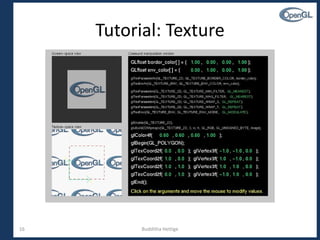
Tutorial: Texture
Budditha Hettige
17
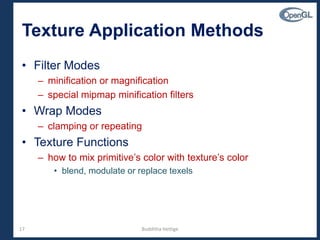
• Filter Modes
– minification or magnification
– special mipmap minification filters
• Wrap Modes
– clamping or repeating
• Texture Functions
– how to mix primitive’s color with texture’s color
• blend, modulate or replace texels
Texture Application Methods
Budditha Hettige
18
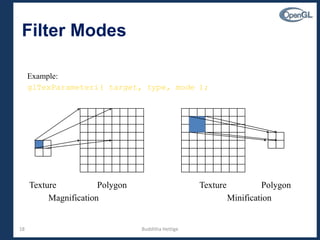
Filter Modes
Texture Polygon
Magnification Minification
PolygonTexture
Example:
glTexParameteri( target, type, mode );
Budditha Hettige
19
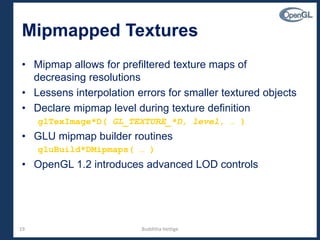
Mipmapped Textures
• Mipmap allows for prefiltered texture maps of
decreasing resolutions
• Lessens interpolation errors for smaller textured objects
• Declare mipmap level during texture definition
glTexImage*D( GL_TEXTURE_*D, level, … )
• GLU mipmap builder routines
gluBuild*DMipmaps( … )
• OpenGL 1.2 introduces advanced LOD controls
Budditha Hettige
20
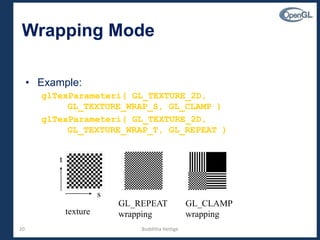
Wrapping Mode
• Example:
glTexParameteri( GL_TEXTURE_2D,
GL_TEXTURE_WRAP_S, GL_CLAMP )
glTexParameteri( GL_TEXTURE_2D,
GL_TEXTURE_WRAP_T, GL_REPEAT )
texture
s
t
GL_CLAMP
wrapping
GL_REPEAT
wrapping
Budditha Hettige
21
Texture Functions
• Controls how texture is applied
• glTexEnv{fi}[v]( GL_TEXTURE_ENV, prop,
param )
• GL_TEXTURE_ENV_MODE modes
– GL_MODULATE
– GL_BLEND
– GL_REPLACE
• Set blend color with
GL_TEXTURE_ENV_COLOR
Budditha Hettige
22
Perspective Correction Hint
• Texture coordinate and color interpolation
– either linearly in screen space
– or using depth/perspective values (slower)
• Noticeable for polygons “on edge”
• glHint( GL_PERSPECTIVE_CORRECTION_HINT, hint )
where hint is one of
• GL_DONT_CARE
• GL_NICEST
• GL_FASTEST
Budditha Hettige
23
Is There Room for a Texture?
• Query largest dimension of texture image
– typically largest square texture
– doesn’t consider internal format size
• glGetIntegerv( GL_MAX_TEXTURE_SIZE, &size )
• Texture proxy
– will memory accommodate requested texture size?
– no image specified; placeholder
– if texture won’t fit, texture state variables set to 0
• doesn’t know about other textures
• only considers whether this one texture will fit all of memory
Budditha Hettige
24
Texture Residency
• Working set of textures
– high-performance, usually hardware accelerated
– textures must be in texture objects
– a texture in the working set is resident
– for residency of current texture, check GL_TEXTURE_RESIDENT
state
• If too many textures, not all are resident
– can set priority to have some kicked out first
– establish 0.0 to 1.0 priorities for texture objects
Budditha Hettige
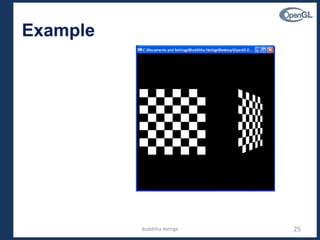
Example
25Budditha Hettige

Texture Mapping

  • 1.
    CSC 307 1.0 GraphicsProgramming Budditha Hettige Department of Statistics and Computer Science
  • 2.
  • 3.
    3 • Apply a1D, 2D, or 3D image to geometric primitives • Uses of Texturing – simulating materials – reducing geometric complexity – image warping – reflections Texture Mapping CPUCPU DLDL Poly.Poly. Per Vertex Per Vertex RasterRaster FragFrag FBFB PixelPixel TextureTexture Budditha Hettige
  • 4.
  • 5.
    5 Texture Mapping andthe OpenGL Pipeline geometry pipelinevertices pixel pipeline image rasterizer • Images and geometry flow through separate pipelines that join at the rasterizer – “complex” textures do not affect geometric complexity Budditha Hettige
  • 6.
    6 Texture Example • Thetexture (below) is a 256 x 256 image that has been mapped to a rectangular polygon which is viewed in perspective Budditha Hettige
  • 7.
    7 Applying Textures I •Three steps  specify texture • read or generate image • assign to texture • enable texturing  assign texture coordinates to vertices  specify texture parameters • wrapping, filtering Budditha Hettige
  • 8.
    8 Applying Textures II –specify textures in texture objects – set texture filter – set texture function – set texture wrap mode – set optional perspective correction hint – bind texture object – enable texturing – supply texture coordinates for vertex • coordinates can also be generated Budditha Hettige
  • 9.
    9 Texture Objects • Likedisplay lists for texture images – one image per texture object – may be shared by several graphics contexts • Generate texture names glGenTextures( n, *texIds ); Budditha Hettige
  • 10.
    10 Texture Objects (cont.) •Create texture objects with texture data and state glBindTexture( target, id ); • Bind textures before using glBindTexture( target, id ); Budditha Hettige
  • 11.
    11 • Define atexture image from an array of texels in CPU memory • glTexImage2D( target, level, components, w, h, border, format, type, *texels ); – dimensions of image must be powers of 2 • Texel colors are processed by pixel pipeline – pixel scales, biases and lookups can be done Specify Texture Image CPUCPU DLDL Poly.Poly. Per Vertex Per Vertex RasterRaster FragFrag FBFB PixelPixel TextureTexture Budditha Hettige
  • 12.
    12 Converting A TextureImage • If dimensions of image are not power of 2 • gluScaleImage( format, w_in, h_in, type_in, *data_in, w_out, h_out, type_out, *data_out ); – *_in is for source image – *_out is for destination image • Image interpolated and filtered during scaling Budditha Hettige
  • 13.
    13 Specifying a Texture: OtherMethods • Use frame buffer as source of texture image – uses current buffer as source image glCopyTexImage1D(...) glCopyTexImage2D(...) • Modify part of a defined texture glTexSubImage1D(...) glTexSubImage2D(...) glTexSubImage3D(...) • Do both with glCopyTexSubImage2D(...), etc. Budditha Hettige
  • 14.
    14 • Based onparametric texture coordinates • glTexCoord*() specified at each vertex s t 1, 1 0, 1 0, 0 1, 0 (s, t) = (0.2, 0.8) (0.4, 0.2) (0.8, 0.4) A B C a b c Texture Space Object Space Mapping a Texture CPUCPU DLDL Poly.Poly. Per Vertex Per Vertex RasterRaster FragFrag FBFB PixelPixel TextureTexture Budditha Hettige
  • 15.
    15 Generating Texture Coordinates •Automatically generate texture coords glTexGen{ifd}[v]() • specify a plane – generate texture coordinates based upon distance from plane • generation modes – GL_OBJECT_LINEAR – GL_EYE_LINEAR – GL_SPHERE_MAP 0 DCzByAx Budditha Hettige
  • 16.
  • 17.
    17 • Filter Modes –minification or magnification – special mipmap minification filters • Wrap Modes – clamping or repeating • Texture Functions – how to mix primitive’s color with texture’s color • blend, modulate or replace texels Texture Application Methods Budditha Hettige
  • 18.
    18 Filter Modes Texture Polygon MagnificationMinification PolygonTexture Example: glTexParameteri( target, type, mode ); Budditha Hettige
  • 19.
    19 Mipmapped Textures • Mipmapallows for prefiltered texture maps of decreasing resolutions • Lessens interpolation errors for smaller textured objects • Declare mipmap level during texture definition glTexImage*D( GL_TEXTURE_*D, level, … ) • GLU mipmap builder routines gluBuild*DMipmaps( … ) • OpenGL 1.2 introduces advanced LOD controls Budditha Hettige
  • 20.
    20 Wrapping Mode • Example: glTexParameteri(GL_TEXTURE_2D, GL_TEXTURE_WRAP_S, GL_CLAMP ) glTexParameteri( GL_TEXTURE_2D, GL_TEXTURE_WRAP_T, GL_REPEAT ) texture s t GL_CLAMP wrapping GL_REPEAT wrapping Budditha Hettige
  • 21.
    21 Texture Functions • Controlshow texture is applied • glTexEnv{fi}[v]( GL_TEXTURE_ENV, prop, param ) • GL_TEXTURE_ENV_MODE modes – GL_MODULATE – GL_BLEND – GL_REPLACE • Set blend color with GL_TEXTURE_ENV_COLOR Budditha Hettige
  • 22.
    22 Perspective Correction Hint •Texture coordinate and color interpolation – either linearly in screen space – or using depth/perspective values (slower) • Noticeable for polygons “on edge” • glHint( GL_PERSPECTIVE_CORRECTION_HINT, hint ) where hint is one of • GL_DONT_CARE • GL_NICEST • GL_FASTEST Budditha Hettige
  • 23.
    23 Is There Roomfor a Texture? • Query largest dimension of texture image – typically largest square texture – doesn’t consider internal format size • glGetIntegerv( GL_MAX_TEXTURE_SIZE, &size ) • Texture proxy – will memory accommodate requested texture size? – no image specified; placeholder – if texture won’t fit, texture state variables set to 0 • doesn’t know about other textures • only considers whether this one texture will fit all of memory Budditha Hettige
  • 24.
    24 Texture Residency • Workingset of textures – high-performance, usually hardware accelerated – textures must be in texture objects – a texture in the working set is resident – for residency of current texture, check GL_TEXTURE_RESIDENT state • If too many textures, not all are resident – can set priority to have some kicked out first – establish 0.0 to 1.0 priorities for texture objects Budditha Hettige
  • 25.