CSC 307 1.0
Graphics Programming
Budditha Hettige
Department of Statistics and Computer Science
Graphics Programming
OpenGL 3D Drawing
2Budditha Hettige
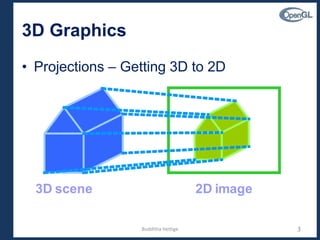
3D Graphics
• Projections – Getting 3D to 2D
3
3D scene 2D image
Budditha Hettige
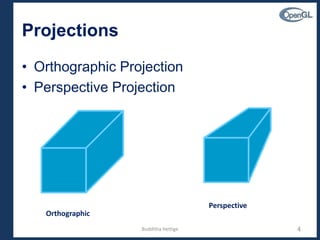
Projections
• Orthographic Projection
• Perspective Projection
4
Orthographic
Perspective
Budditha Hettige
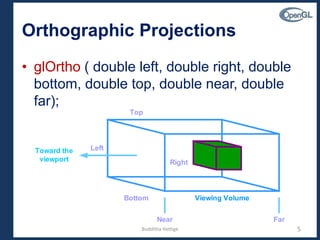
Orthographic Projections
• glOrtho ( double left, double right, double
bottom, double top, double near, double
far);
5
Toward the
viewport
Top
Bottom
Left
Right
Near Far
Viewing Volume
Budditha Hettige
Perspective Projection
• gluPerspective ( double angle, double
aspect, double near, double far);
6
zoom in zoom out
map map
Observer
w
h
aspect = w/h
Budditha Hettige
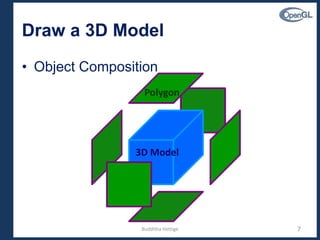
Draw a 3D Model
• Object Composition
7
3D Model
Polygon
Budditha Hettige
Object Composition
• Use Transformation
– glPushMatrix ( );
– glPopMatrix ( );
– Save the current transformation state and
then restore it after some objects have been
placed
Budditha Hettige 8
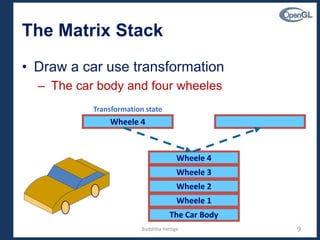
The Matrix Stack
• Draw a car use transformation
– The car body and four wheeles
The Car Body
Wheele 1
Wheele 2
Wheele 3
Wheele 4
Wheele 4
Transformation state
Budditha Hettige 9
Hidden Surface Removal
• Enable Depth Testing
– glEnable (GL_DEPTH_TEST);
10
Hidden Surface
Budditha Hettige
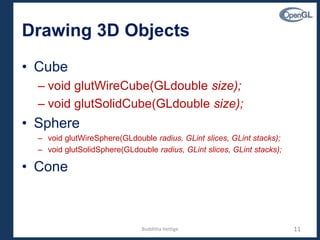
Drawing 3D Objects
• Cube
– void glutWireCube(GLdouble size);
– void glutSolidCube(GLdouble size);
• Sphere
– void glutWireSphere(GLdouble radius, GLint slices, GLint stacks);
– void glutSolidSphere(GLdouble radius, GLint slices, GLint stacks);
• Cone
11Budditha Hettige
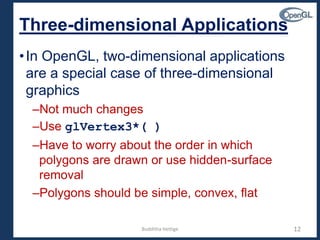
12
Three-dimensional Applications
•In OpenGL, two-dimensional applications
are a special case of three-dimensional
graphics
–Not much changes
–Use glVertex3*( )
–Have to worry about the order in which
polygons are drawn or use hidden-surface
removal
–Polygons should be simple, convex, flat
Budditha Hettige
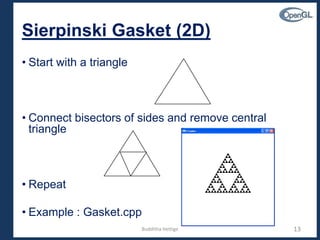
13
Sierpinski Gasket (2D)
• Start with a triangle
• Connect bisectors of sides and remove central
triangle
• Repeat
• Example : Gasket.cpp
Budditha Hettige
14
Moving to 3D
•We can easily make the program three-
dimensional by using
typedef Glfloat point3[3]
glVertex3f
glOrtho
•But that would not be very interesting
•Instead, we can start with a tetrahedron
Budditha Hettige
15
3D Gasket
• We can subdivide each of the four faces
• We can easily make the program three-dimensional by using
typedef Glfloat point3[3]
glVertex3f
glOrtho
Budditha Hettige
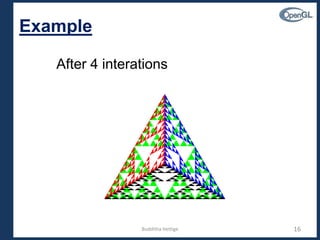
16
Example
After 4 interations
Budditha Hettige
17
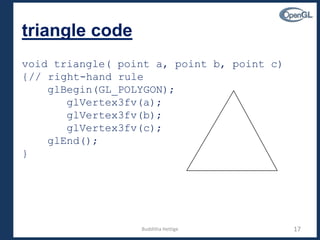
triangle code
void triangle( point a, point b, point c)
{// right-hand rule
glBegin(GL_POLYGON);
glVertex3fv(a);
glVertex3fv(b);
glVertex3fv(c);
glEnd();
}
Budditha Hettige
18
subdivision code
void divide_triangle(point a, point b, point c,
int m)
{
point v1, v2, v3;
int j;
if(m>0)
{
for(j=0; j<3; j++) v1[j]=(a[j]+b[j])/2;
for(j=0; j<3; j++) v2[j]=(a[j]+c[j])/2;
for(j=0; j<3; j++) v3[j]=(b[j]+c[j])/2;
divide_triangle(a, v1, v2, m-1);
divide_triangle(c, v2, v3, m-1);
divide_triangle(b, v3, v1, m-1);
}
else(triangle(a,b,c));
}
Budditha Hettige
19
tetrahedron code
void tetrahedron( int m)
{
glColor3f(1.0,0.0,0.0);
divide_triangle(v[0], v[1], v[2], m);
glColor3f(0.0,1.0,0.0);
divide_triangle(v[3], v[2], v[1], m);
glColor3f(0.0,0.0,1.0);
divide_triangle(v[0], v[3], v[1], m);
glColor3f(0.0,0.0,0.0);
divide_triangle(v[0], v[2], v[3], m);
}
Budditha Hettige
20
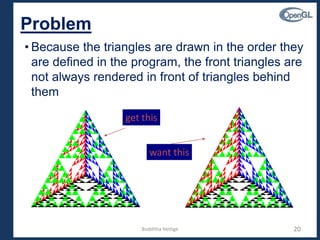
Problem
• Because the triangles are drawn in the order they
are defined in the program, the front triangles are
not always rendered in front of triangles behind
them
get this
want this
Budditha Hettige
21
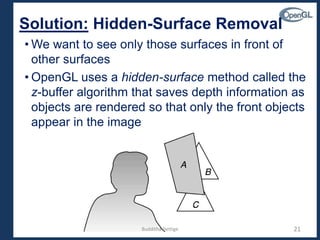
Solution: Hidden-Surface Removal
• We want to see only those surfaces in front of
other surfaces
• OpenGL uses a hidden-surface method called the
z-buffer algorithm that saves depth information as
objects are rendered so that only the front objects
appear in the image
Budditha Hettige
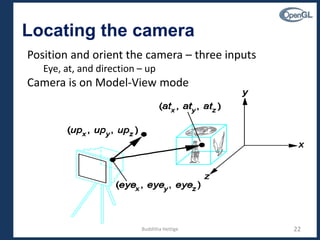
Locating the camera
22
Position and orient the camera – three inputs
Eye, at, and direction – up
Camera is on Model-View mode
Budditha Hettige
Default Camera Settings
• With default, camera is located at the origin and
oriented at the negative z-axes
• If place a cube at the origin, only one side of the
cube is visible
• Look at objects from
different angles
– Move the objects
– Move the camera
• Example – a cube
• Glu function
void gluLookAt(eyex, eyey, eyez, atx, aty, atz, upx, upy, upz)
gluLookAt(1.0, 1.0, 1.0, 0.0, 0.0, 0.0, 0.0, 1.0, 0.0);
23Budditha Hettige
24
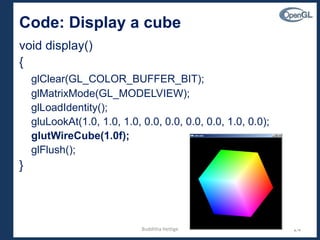
Code: Display a cube
void display()
{
glClear(GL_COLOR_BUFFER_BIT);
glMatrixMode(GL_MODELVIEW);
glLoadIdentity();
gluLookAt(1.0, 1.0, 1.0, 0.0, 0.0, 0.0, 0.0, 1.0, 0.0);
glutWireCube(1.0f);
glFlush();
}
Budditha Hettige

OpenGL 3D Drawing

  • 1.
    CSC 307 1.0 GraphicsProgramming Budditha Hettige Department of Statistics and Computer Science
  • 2.
    Graphics Programming OpenGL 3DDrawing 2Budditha Hettige
  • 3.
    3D Graphics • Projections– Getting 3D to 2D 3 3D scene 2D image Budditha Hettige
  • 4.
    Projections • Orthographic Projection •Perspective Projection 4 Orthographic Perspective Budditha Hettige
  • 5.
    Orthographic Projections • glOrtho( double left, double right, double bottom, double top, double near, double far); 5 Toward the viewport Top Bottom Left Right Near Far Viewing Volume Budditha Hettige
  • 6.
    Perspective Projection • gluPerspective( double angle, double aspect, double near, double far); 6 zoom in zoom out map map Observer w h aspect = w/h Budditha Hettige
  • 7.
    Draw a 3DModel • Object Composition 7 3D Model Polygon Budditha Hettige
  • 8.
    Object Composition • UseTransformation – glPushMatrix ( ); – glPopMatrix ( ); – Save the current transformation state and then restore it after some objects have been placed Budditha Hettige 8
  • 9.
    The Matrix Stack •Draw a car use transformation – The car body and four wheeles The Car Body Wheele 1 Wheele 2 Wheele 3 Wheele 4 Wheele 4 Transformation state Budditha Hettige 9
  • 10.
    Hidden Surface Removal •Enable Depth Testing – glEnable (GL_DEPTH_TEST); 10 Hidden Surface Budditha Hettige
  • 11.
    Drawing 3D Objects •Cube – void glutWireCube(GLdouble size); – void glutSolidCube(GLdouble size); • Sphere – void glutWireSphere(GLdouble radius, GLint slices, GLint stacks); – void glutSolidSphere(GLdouble radius, GLint slices, GLint stacks); • Cone 11Budditha Hettige
  • 12.
    12 Three-dimensional Applications •In OpenGL,two-dimensional applications are a special case of three-dimensional graphics –Not much changes –Use glVertex3*( ) –Have to worry about the order in which polygons are drawn or use hidden-surface removal –Polygons should be simple, convex, flat Budditha Hettige
  • 13.
    13 Sierpinski Gasket (2D) •Start with a triangle • Connect bisectors of sides and remove central triangle • Repeat • Example : Gasket.cpp Budditha Hettige
  • 14.
    14 Moving to 3D •Wecan easily make the program three- dimensional by using typedef Glfloat point3[3] glVertex3f glOrtho •But that would not be very interesting •Instead, we can start with a tetrahedron Budditha Hettige
  • 15.
    15 3D Gasket • Wecan subdivide each of the four faces • We can easily make the program three-dimensional by using typedef Glfloat point3[3] glVertex3f glOrtho Budditha Hettige
  • 16.
  • 17.
    17 triangle code void triangle(point a, point b, point c) {// right-hand rule glBegin(GL_POLYGON); glVertex3fv(a); glVertex3fv(b); glVertex3fv(c); glEnd(); } Budditha Hettige
  • 18.
    18 subdivision code void divide_triangle(pointa, point b, point c, int m) { point v1, v2, v3; int j; if(m>0) { for(j=0; j<3; j++) v1[j]=(a[j]+b[j])/2; for(j=0; j<3; j++) v2[j]=(a[j]+c[j])/2; for(j=0; j<3; j++) v3[j]=(b[j]+c[j])/2; divide_triangle(a, v1, v2, m-1); divide_triangle(c, v2, v3, m-1); divide_triangle(b, v3, v1, m-1); } else(triangle(a,b,c)); } Budditha Hettige
  • 19.
    19 tetrahedron code void tetrahedron(int m) { glColor3f(1.0,0.0,0.0); divide_triangle(v[0], v[1], v[2], m); glColor3f(0.0,1.0,0.0); divide_triangle(v[3], v[2], v[1], m); glColor3f(0.0,0.0,1.0); divide_triangle(v[0], v[3], v[1], m); glColor3f(0.0,0.0,0.0); divide_triangle(v[0], v[2], v[3], m); } Budditha Hettige
  • 20.
    20 Problem • Because thetriangles are drawn in the order they are defined in the program, the front triangles are not always rendered in front of triangles behind them get this want this Budditha Hettige
  • 21.
    21 Solution: Hidden-Surface Removal •We want to see only those surfaces in front of other surfaces • OpenGL uses a hidden-surface method called the z-buffer algorithm that saves depth information as objects are rendered so that only the front objects appear in the image Budditha Hettige
  • 22.
    Locating the camera 22 Positionand orient the camera – three inputs Eye, at, and direction – up Camera is on Model-View mode Budditha Hettige
  • 23.
    Default Camera Settings •With default, camera is located at the origin and oriented at the negative z-axes • If place a cube at the origin, only one side of the cube is visible • Look at objects from different angles – Move the objects – Move the camera • Example – a cube • Glu function void gluLookAt(eyex, eyey, eyez, atx, aty, atz, upx, upy, upz) gluLookAt(1.0, 1.0, 1.0, 0.0, 0.0, 0.0, 0.0, 1.0, 0.0); 23Budditha Hettige
  • 24.
    24 Code: Display acube void display() { glClear(GL_COLOR_BUFFER_BIT); glMatrixMode(GL_MODELVIEW); glLoadIdentity(); gluLookAt(1.0, 1.0, 1.0, 0.0, 0.0, 0.0, 0.0, 1.0, 0.0); glutWireCube(1.0f); glFlush(); } Budditha Hettige